Almost every guide to landing page optimization ends the same way: test everything.
Here’s what that means for a typical small business. Say your page gets 1,000 visitors a month and converts 5% of them. You want to know whether a new headline lifts that to 6%. Using the standard rule of thumb from Evan Miller’s guide to A/B testing, you need about 7,600 visitors on each version to detect that difference reliably. With two versions, that’s 15,200 visitors, or 15 months of traffic, to test one headline.
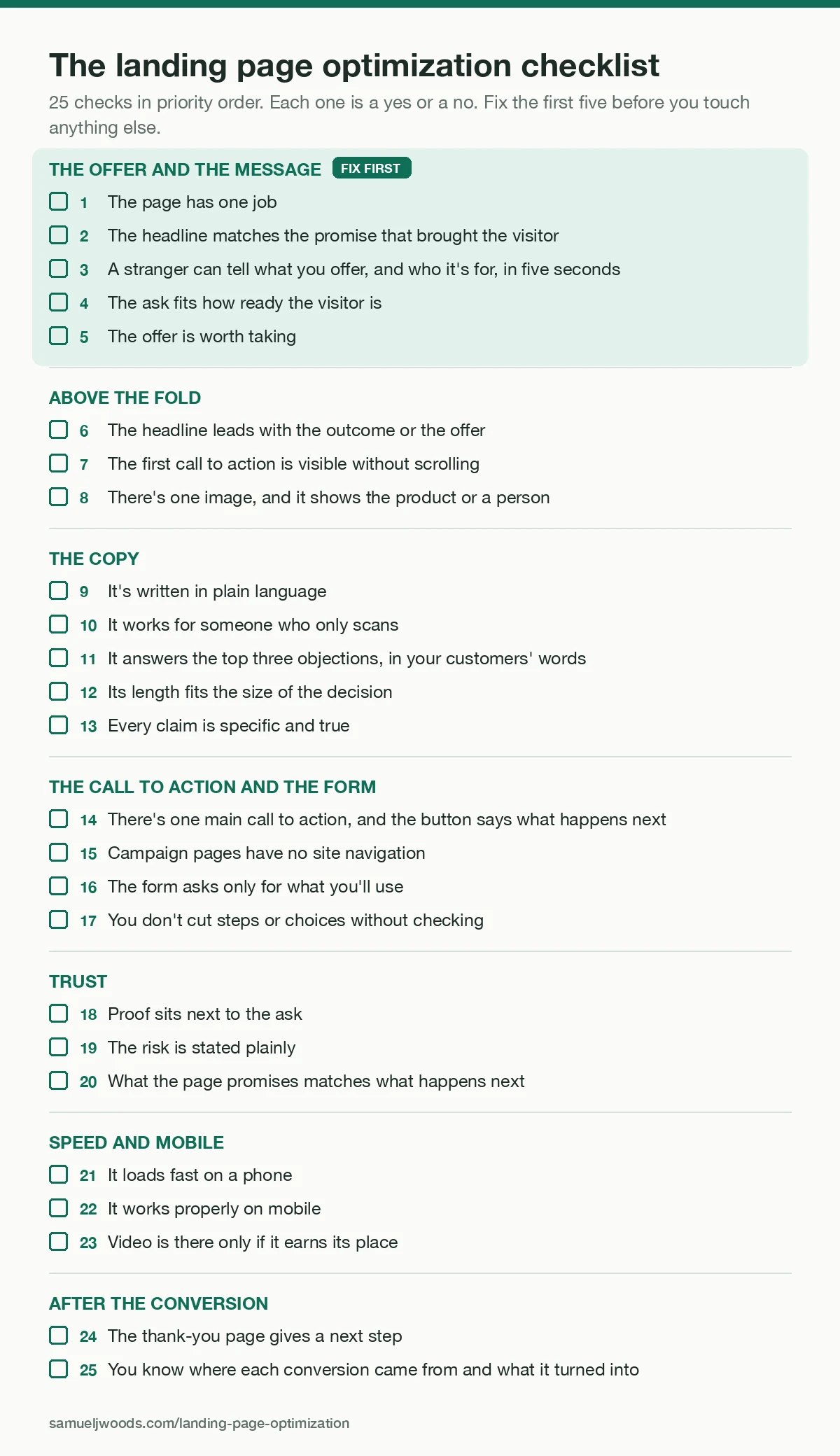
So for most people who build their own pages, “test everything” is advice they can’t use. This guide is for them. It has a 25-point checklist in priority order, a way to improve a page without split tests, a table for diagnosing what’s wrong from what you’re seeing, and how to run a proper test once you have the traffic.
1. What landing page optimization is, and what “good” looks like
Landing page optimization (optimisation, if you’re in the UK) is the work of raising the share of visitors who take the one action a page exists for: signing up, booking a call, starting a trial or buying. It covers the offer, the words, the layout, the form, the speed of the page, and how well the page matches whatever sent the visitor there.
The most useful benchmark comes from Unbounce’s 2024 Conversion Benchmark Report, the latest edition. Across 41,000+ landing pages, 464 million visitors and 57 million conversions between July 2023 and July 2024, the median conversion rate was 6.6%. It varied a lot by industry: 3.8% for SaaS, 4.2% for ecommerce, 6.1% for professional services and 12.3% for entertainment, a figure pulled up by sweepstakes pages. It also varied by where visitors came from, with email traffic converting at an average of 19.3%.
Two things to keep in mind. Unbounce counts a click on the page’s main button or a form submission as a conversion, not a sale, and the data only covers pages built on Unbounce. So use the 6.6% to sanity-check your page, never as a target. The number that matters is your own page’s rate, measured the same way every month.
2. Before you change anything, set a baseline
Every change you make is a guess until you can compare it with what came before. Set this up in a day, then let it run for two to four weeks before you touch the page.
Pick one conversion event: the form submitted, the call booked, the order placed. Then record visitors and conversions, split by where they came from (email, ads, search, social). Your page builder or Google Analytics will give you this.
Install a free session recording tool. Microsoft Clarity costs nothing and shows you where people scroll, click and give up.
Start a change log: a simple list with the date, what you changed and why. You’ll need it in section 4, when you’re judging changes without a split test.
3. The landing page optimization checklist
Twenty-five checks in seven groups, in the order I’d work through them. Each one is a yes or no. The first five come first because no amount of polish fixes a page that’s selling the wrong thing to the wrong person.
Fix first: the offer and the message
1. The page has one job
You can say in one sentence what a visitor should do here. If the answer is “learn about us, then maybe book a call, or join the newsletter”, the page is doing three jobs and will do none of them well.
2. The headline matches the promise that brought the visitor
Whatever they clicked, whether an ad, an email or a search result, the page’s headline should repeat that promise in close to the same words. In a test Unbounce published in 2018, Campaign Monitor changed the verb in its headline to match the searcher’s keyword and saw a 31.4% lift in conversions. Unbounce sells the feature that did it, and the test only had 1,274 visitors, so treat it as a direction, not a forecast.
3. A stranger can tell what you offer, and who it’s for, in five seconds
Show the top of the page to someone who fits your buyer for five seconds, then ask them. If they can’t answer both, nothing below the fold gets a chance.
4. The ask fits how ready the visitor is
Cold traffic from social or search is rarely ready to book a sales call. Give them something smaller first: a guide, a short course, a free tool. Warm traffic from your email list or a referral can go straight to the call, the trial or the purchase. A lot of landing pages that “don’t convert” are asking cold visitors for a decision they’d only make warm.
5. The offer is worth taking
Before you rewrite a word, ask whether the thing you’re offering is good enough, at that price, for that person. Copy can make a good offer clear. It can’t make a weak one strong.
Above the fold
6. The headline leads with the outcome or the offer
In 2009, 37signals tested five headlines on the sign-up page for Highrise. The winner put the 30-day free trial in the headline and beat “Start a Highrise account” by 30%. The test ran on about 4,000 page views across five versions, so it’s a small test, but it’s a clean example of leading with what the visitor gets.
7. The first call to action is visible without scrolling
In Nielsen Norman Group’s 2018 eye-tracking study, people looking at web pages on desktop screens spent 57% of their viewing time above the fold. That doesn’t mean the form has to sit there. In a test Unbounce wrote up in 2015, First Midwest Bank moved its form below the fold and got 52% more conversions, though without a published sample size. Put a clear first step high on the page, and repeat it once the page has made its case.
8. There’s one image, and it shows the product or a person
When 37signals tested Highrise pages in 2011, a short page built around a large photo of a smiling customer beat their long-form page by 47% on paid sign-ups. That was a whole-page redesign, so the photo was one of several changes. In the Obama campaign’s 2007 sign-up page test, every video lost to every image. Stock photos of handshakes help nobody.
The copy
9. It’s written in plain language
In Unbounce’s 2024 data, pages written at a 5th to 7th grade reading level converted at a median of 11.1%, about twice the rate of pages written at college or professional level (5.3% and 5.5%). That’s a correlation across very different businesses, and financial services was an exception, but it matches what readers do. Paste your copy into a free readability checker such as Hemingway Editor and simplify anything it flags.
10. It works for someone who only scans
Nielsen Norman Group estimated in 2008 that people read at most 28% of the words on an average web page, and that 20% is more likely. Your headings, the first line of each section, the button and the captions should tell the whole story on their own.
11. It answers the top three objections, in your customers’ words
Ask recent buyers what nearly stopped them, and read your sales calls or support emails. The objections they raise belong on the page, answered, near the button.
12. Its length fits the size of the decision
For a free download, a short page usually does the job. For an expensive or unfamiliar purchase, people need more. In a case study published in 2010, the agency Conversion Rate Experts reported that its rebuilt Moz sales page, six times longer than the old one and with a new video among other changes, produced 52% more sales in a test on over 5,000 visitors. 37signals’ 2011 Highrise tests went both ways: a long page beat the original by 37.5%, then a much shorter page built around a customer photo beat the long one by 47% on paid sign-ups. Both were whole-page redesigns, so length was only one of the changes. Match the length to how much the visitor needs to know before they say yes.
13. Every claim is specific and true
Vague claims (“world-class results”) get ignored, and inflated ones come back as refunds. One of my clients, an independent consultant, presold a $1,490 group program while it was about 40% built. Her sales page split it into two labelled lists: what was available on day one, and what would be built during the program, with target weeks and a line saying anything on that second list might change. She sold 38 seats against a target of 30, three people (7.9%) took refunds against her usual 11%, and nine testimonials mentioned the honesty without being asked. It isn’t a clean comparison: her previous cohort, at $890, sold 52 seats, so she sold fewer seats at a much higher price. But being upfront about what wasn’t built yet didn’t stop her beating her target.
The call to action and the form
14. There’s one main call to action, and the button says what happens next
Write it in the visitor’s words. In 2013, Michael Aagaard reported on an Unbounce test where “Get my free 30-day trial” beat “Get your 30-day trial” by 90% in click-through. Two words changed, the measure was clicks, not sign-ups, and no sample size was published, so read it as a reason to test button copy, not a reason to change “your” to “my” everywhere.
15. Campaign pages have no site navigation
In an undated test, when HubSpot removed the navigation from five of its landing pages, two middle-of-funnel pages saw lifts of 16% and 28%, while top-of-funnel pages moved between 0% and 4%. HubSpot didn’t publish sample sizes, but on that evidence it matters most when you’re asking for something bigger than a free download.
16. The form asks only for what you’ll use
Every field is a small reason to stop. Baymard Institute found in 2024 that the average ecommerce checkout had 11.3 form fields when most needed only 8. Watch for confusing fields too. In 2010, an Expedia executive said that deleting an optional “Company” field from its booking form was worth about $12M in profit a year. It had confused some customers into entering their bank’s name and then the bank’s address, so their card payments failed.
17. You don’t cut steps or choices without checking
Shorter isn’t always better. MarketingExperiments reported in 2014 that collapsing a three-step checkout into a single page cut conversion by 29%, and that removing a choice of subscription length cut it by nearly 40%. If a form needs many fields, splitting it into short steps that start with the easy questions is worth testing.
Trust
18. Proof sits next to the ask
Put real testimonials, with names and faces where you can, close to the button. In an undated VWO case study, the careers site WikiJob added three lines of testimonials to a sales page and saw 34% more purchases. VWO sells testing software and didn’t publish the sample size, so treat it as an example, not a guarantee.
19. The risk is stated plainly
If there’s a guarantee, a free cancellation or a trial, say so near the button, in one sentence, with the actual terms. There’s no published guarantee test with a named company and a sample size that I’d trust, so here’s the next best thing: in Baymard’s 2026 survey of 1,083 US online shoppers, 19% said they’d abandoned an order in the past three months because they didn’t trust the site with their card details, and 13% because the returns policy wasn’t good enough.
20. What the page promises matches what happens next
The price, the terms and the bonuses on the page should be exactly what the visitor sees at checkout, in the confirmation email and on the call. A surprise at the next step undoes everything the page did. The consultant in point 13 built this in: her enrolment emails could only draw on the day-one list, so nothing a buyer read after paying promised more than the page had.
Speed and mobile
21. It loads fast on a phone
Run the page through PageSpeed Insights and fix what it flags, starting with large images. The best evidence that speed matters comes from Bing’s search pages, where controlled tests found that every 100 milliseconds of delay cost 0.6% of revenue, according to Ron Kohavi and Stefan Thomke in Harvard Business Review in 2017. A Google-commissioned study by Deloitte, published in 2020, found that a 0.1-second improvement in mobile speed went with 8.4% more retail conversions. That one is a correlation, not a test.
22. It works properly on mobile
In Unbounce’s 2024 data, 83% of landing page visits came from mobile devices, although desktop visitors converted 8% better on average. Fill in your own form on your own phone. Check that the button is reachable with a thumb and that the keyboard doesn’t cover the field you’re typing in. (Google retired its Mobile-Friendly Test in December 2023, so use Lighthouse or PageSpeed Insights instead.)
23. Video is there only if it earns its place
Unbounce looked at roughly 35,000 of its customers’ pages in each of three periods in 2020 and 2021 and found that pages with video performed “roughly as well or slightly worse” than pages without. In 2016, removing an explainer video from the bottom of Highrise’s features page increased free sign-ups by 53.2%, with no change in paid sign-ups and no sample size published. If you keep a video, the page should still work for someone who never presses play.
After the conversion
24. The thank-you page gives a next step
Someone who just signed up is at their most interested. Tell them what happens now and give them one thing to do: watch the welcome video, book the call, read the first lesson.
25. You know where each conversion came from and what it turned into
Tag your links by source and look past the sign-up to what happened next. A page that doubles sign-ups from the wrong people has made your business worse.
If you want more tactics once these are done, I’ve collected 16 more ways to lift a landing page’s conversion rate, and 30 of the best landing pages online to learn from. For headlines and body copy, the 105 copywriting formulas cover the structures that work on landing pages.
4. How to optimize a landing page without enough traffic to A/B test
Remember the arithmetic from the start: 15 months of traffic to test one headline on a small page. Even with the traffic, most tests don’t produce a winner. Ron Kohavi and Stefan Thomke report that only 10% to 20% of experiments at Google and Bing produce positive results, and that across Microsoft about one third do.
So here’s what to do instead. None of it gives you statistical proof. All of it gives you better guesses than your own opinion of your own page.
Run a five-second test
Show the top of the page to five people who match your buyer for five seconds, then ask what you offer, who it’s for and what they’d do next. If three of five get it wrong, rewrite the headline before anything else.
Ask the people who converted
Send recent buyers or leads one question: “What nearly stopped you from signing up?” The answers tell you which objections to answer on the page.
Watch 20 session recordings
In Microsoft Clarity, look for where people stop scrolling, what they click that isn’t a link, and where they abandon the form.
Get a second opinion from a model
Paste the page into an AI model with your buyer described, and ask it to read the page as that buyer would:
You are [describe your buyer: their business, their problem, what they've already tried].
You've just clicked an ad that promised: [the ad or email promise].

Read the landing page below as that person. Tell me:
1. In one sentence, what you think is being offered and who it's for.
2. The first point where you'd hesitate or leave, and why.
3. The three questions you'd want answered before taking the next step, and whether the page answers them.
Quote the page when you point to a problem. Don't rewrite the page.

[paste the page copy]
It’s no substitute for real buyers, but it’s quick, and it’s good at spotting a headline that doesn’t match the ad or a question the page never answers. I share prompts like this one in Bionic Business, my weekly newsletter.
Change one thing at a time, and log it
Make a single change, note it in your change log, and compare the next four weeks with the four weeks before. Seasonality, ads and launches all move the numbers too, so treat a before-and-after comparison as a strong hint, not proof. If a change makes things clearly worse, roll it back.
When an A/B test is worth running
Once a page gets enough conversions to detect the change you care about, test properly.
Work out the sample size before you start, with a calculator such as Evan Miller’s, and wait until you reach it. Checking results as they come in and stopping when one version looks ahead is the classic mistake. In Miller’s example, an experiment checked after every one of 150 visitors declared a difference that wasn’t there 26.1% of the time, more than five times the 5% you’d expect.
Run tests in whole weeks. Kohavi and colleagues recommend at least a week or two, then multiples of a week, so that weekday and weekend visitors are both counted.
And size the change to the traffic. In the Obama campaign’s December 2007 test, reported by Dan Siroker, who went on to co-found the testing company Optimizely, 310,382 visitors saw one of 24 versions of the sign-up page. The winning version raised the sign-up rate from 8.26% to 11.6%. With a few thousand visitors a month, test big changes, such as a different offer or a different headline angle, because small ones won’t show up.
5. Diagnose your page by symptom
| What you’re seeing | Likely cause | Check first |
|---|---|---|
| Most visitors leave without scrolling | The page doesn’t match what they clicked, or it loads slowly | 2, 3, 21 |
| They scroll but don’t click | The offer is unclear, or objections go unanswered | 3, 5, 11, 18 |
| They click the button but don’t finish the form | Too many fields, a confusing field, or a surprise at the next step | 16, 17, 20 |
| Mobile converts far worse than desktop | Layout, form or speed problems on phones | 21, 22 |
| Plenty of sign-ups, few sales | The ask is wrong for how ready they are, or the page attracts the wrong people | 4, 5, 25 |
| One traffic source converts, another doesn’t | The page matches one source’s promise and not the other’s | 2, 25 |
For the same kind of diagnosis across a whole funnel, see conversion funnel analysis.
6. Tools you actually need
You don’t need a testing platform to start. A small, free set covers most of this checklist:
- Google Analytics or your page builder’s own stats, for visitors and conversions by source.
- Microsoft Clarity, free, for session recordings and heatmaps.
- PageSpeed Insights or Lighthouse, for speed and mobile.
- Hemingway Editor’s free web version, for readability.
- Evan Miller’s free calculators, for sample sizes.
- The A/B testing built into your page builder, once your traffic makes it worthwhile.
7. Questions people ask
What’s a good landing page conversion rate?
Unbounce’s 2024 median across all industries was 6.6%, with industry medians from 3.8% (SaaS) to 12.3% (entertainment). A good rate is one that’s higher than your own page’s rate last month, for the same kind of visitor.
Should a landing page have navigation?
For pages you send paid or campaign traffic to, usually not. HubSpot’s own test found the biggest gains from removing navigation on pages asking for a bigger commitment, and almost none on top-of-funnel pages.
How many fields should a form have?
As few as the next step needs. If you won’t use a field in the next week, remove it. If you need a lot of information, split the form into short steps.
How long should an A/B test run?
Until it reaches the sample size you worked out before starting, and for whole weeks. Never stop a test the moment one version pulls ahead.
What’s the difference between a landing page and a homepage?
A homepage serves everyone who arrives, so it has many jobs and many links. A landing page serves one group of visitors arriving with one promise in mind, so it has one job and, ideally, one way forward.
Is landing page optimization the same as conversion rate optimization?
Landing page optimization is one part of it. Conversion rate optimization covers the whole site and funnel. For that wider view, see my conversion rate optimization checklist and CRO playbook.
Pick the first five checks and run them against your best-performing page this week. That’s where the biggest gains are, and none of them needs a single extra visitor.
Sources
- Evan Miller, “How Not To Run an A/B Test”, 18 Apr 2010: rule of thumb n = 16σ²/δ² per variation (equivalent to a two-sided 5% test at 80% power, the defaults in Miller’s calculator, which gives 7,663 for this example); peeking false-positive rate 26.1%. evanmiller.org (Arithmetic in the intro: σ² = 0.05 × 0.95 = 0.0475, δ = 0.01, n = 16 × 0.0475 / 0.0001 = 7,600 per version.)
- Unbounce, 2024 Conversion Benchmark Report (data 23 Jul 2023 to 23 Jul 2024): 6.6% median; industry medians; email 19.3% average; reading level 11.1% vs 5.3%; 83% mobile visits, desktop converting 8% better. unbounce.com
- Unbounce, Campaign Monitor dynamic text test, 3 Apr 2018: +31.4%, 1,274 visitors. unbounce.com
- Jason Fried, 37signals, “Headline tests on the Highrise signup page”, 13 Jan 2009: +30%, about 4,000 page views. signalvnoise.com
- Nielsen Norman Group, “Scrolling and Attention”, 15 Apr 2018: 57% of viewing time above the fold. nngroup.com
- Unbounce, First Midwest Bank, 2 Dec 2015: form below the fold +52%. unbounce.com
- 37signals, Highrise A/B testing parts 1 to 3, Jul to Aug 2011: long page +37.5% net sign-ups over the original; person page beat long form by 47% on paid sign-ups. signalvnoise.com ; signalvnoise.com
- Dan Siroker, Optimizely, 29 Nov 2010: Obama 2007 test, 310,382 visitors, 8.26% to 11.6%, “all of the videos did worse than all of the images”. optimizely.com
- Jakob Nielsen, “How Little Do Users Read?”, 5 May 2008: at most 28%, 20% more likely. nngroup.com
- Conversion Rate Experts, Moz case study, 22 Mar 2010: page six times longer, +52% sales, 5,000+ visitors. conversion-rate-experts.com
- One of my clients, anonymised: $1,490 presale, 38 seats vs 30 target, refunds 7.9% vs 11%, nine testimonials; one cohort, prior cohort $890 and 52 seats, so not a clean comparison.
- Michael Aagaard, Unbounce, 16 Oct 2013: “Get my free 30-day trial” vs “Get your 30-day trial”, +90% click-through. unbounce.com
- HubSpot (Diana Urban), navigation removal test: MOFU +16% and +28%, TOFU 0 to 4%. blog.hubspot.com
- Baymard Institute, “Checkout Optimization: 11.3 form fields, 8 needed”, 26 Jun 2024. baymard.com
- Expedia “Company” field, Joe Megibow quoted by Silicon.com, 1 Nov 2010 (Wayback): about $12M profit a year. archived copy
- MarketingExperiments (MECLABS), 7 Jul 2014: one-page checkout −29%; 15 May 2014: removing a choice, nearly −40%. marketingexperiments.com ; marketingexperiments.com
- VWO, WikiJob case study: testimonials +34% purchases. wingify.com
- Baymard Institute, cart abandonment reasons (2026 survey of 1,083 US online shoppers): 19% card trust, 13% returns policy. baymard.com
- Ron Kohavi and Stefan Thomke, “The Surprising Power of Online Experiments”, HBR, Sep to Oct 2017: 100 ms = 0.6% of Bing revenue; 10 to 20% of experiments positive at Google and Bing; about one third at Microsoft. hbr.org
- Google, Deloitte Digital and Fifty-Five, “Milliseconds Make Millions” (data 2019, published 2020): 0.1 s faster mobile, +8.4% retail conversions (regression). thinkwithgoogle.com
- Google Search Central: Mobile-Friendly Test retired December 2023. developers.google.com
- Unbounce, video on landing pages, 26 Aug 2021: about 35,000 pages per period, “roughly as well or slightly worse”. unbounce.com
- Nathan Kontny, “Behind the scenes: A/B testing at Highrise”, 24 Oct 2016: removing the features-page video +53.2% free sign-ups. signalvnoise.com
- Kohavi, Henne and Sommerfield, “Practical Guide to Controlled Experiments on the Web”, KDD 2007: run at least a week or two, then in multiples of a week. doi.org