
Your inbox probably feels like a tax on your attention. Client requests, lead replies, internal noise, receipts, newsletter clutter, support escalations. It all lands in the same place, and every message competes for the same brainpower.
Most people attack that as a personal productivity problem. I think that's too small. If you're serious about building an ai agent for email inbox management, the true prize is bigger than inbox zero: faster decisions, better response quality, cleaner handoffs, and a system that turns everyday email into revenue signals.
I've been building AI systems inside businesses since long before the current hype cycle. The people who win with email agents go past automated sorting. They build a controlled layer between incoming communication and business action. That's where the advantage lies.
Your Inbox Is a Goldmine Not a Graveyard
Your inbox is one of the few places where customers, leads, vendors, partners, and your team all tell you what matters in their own words. Most companies waste that signal. They archive it, skim it, or leave it trapped inside one person's mailbox.
That's a mistake.
When someone replies to a campaign, asks for pricing, complains about onboarding friction, mentions a competitor, or hints at budget, they're handing you market intelligence for free. If you treat email like a pile of chores, you react too slowly. Someone else will spot the pattern first.
Stop treating email like admin
Email is intent data as much as it is communication.
A good agent can identify which emails need action, which contain sales signals, which reveal churn risk, and which should feed another system. That changes the role of the inbox from passive storage to active sensing.
Your competitors are still reading emails one by one. You should be extracting patterns across all of them.
This matters on the outbound side too. AI-generated emails hit a 9.44% click-through rate, compared with 8.46% for manual campaigns, a 12% improvement according to Arcade's email AI automation benchmarks. That tells me the model is useful beyond sorting inboxes: it helps you create more relevant communication once you've captured the right signal.
If you're still thinking only about folders and unread counts, start with the basics of optimizing your email handling. Then go one level deeper. Ask what your inbox knows that your CRM doesn't yet know.
What an email agent should actually do
The wrong goal is "clean my inbox."
The right goals look more like this:
- Surface revenue opportunities by detecting buying signals, pricing intent, renewal risk, and partner interest.
- Protect speed to response by routing urgent messages fast, so leads and customers don't wait on human sorting.
- Capture voice-of-customer data by pulling objections, feature requests, and sentiment from real conversations.
- Reduce decision friction by giving you summaries, draft replies, and recommended next actions.
Most inboxes are full of weak signals that become valuable when aggregated. One complaint is noise. Ten similar complaints in different threads are a product problem. One pricing question is routine. Repeated pricing objections from the same segment are a positioning insight.
That's why I frame this as an intelligence layer for the business rather than a productivity toy.
The Architecture of an Email Intelligence Agent
Open a founder's inbox on a Tuesday afternoon and you will usually find three things mixed together: active deals, customer risk, and market signals. If your system treats all three like generic email admin, you lose revenue and miss pattern changes your competitors will catch first.
The architecture needs to do more than sort messages. It needs to capture business context, route decisions to the right person, and push useful signal into the systems you already use for sales, support, and product. That is the difference between inbox automation and an intelligence asset.
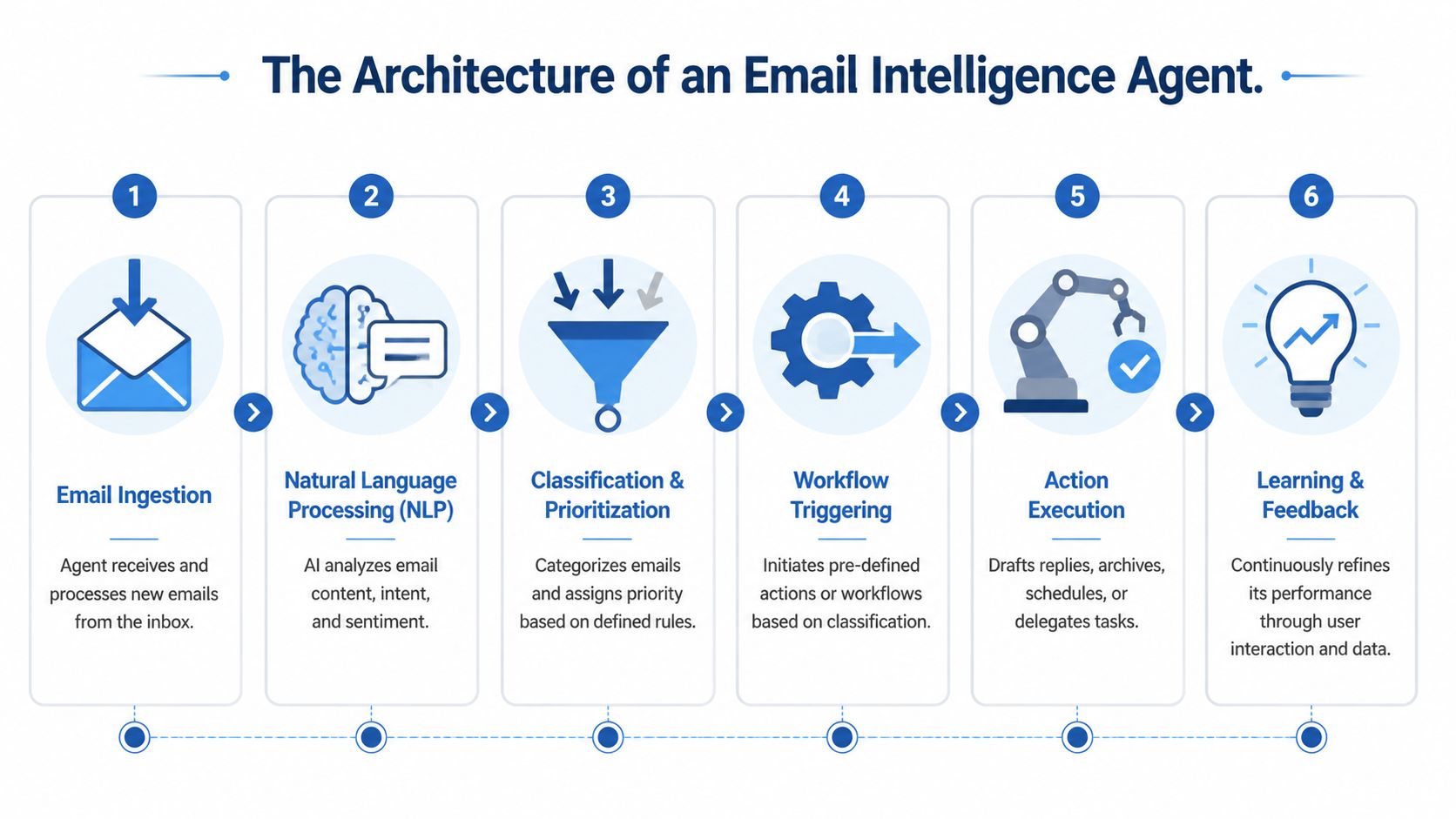
I build these systems around four layers: trigger, processor, memory, and action engine. If one layer is weak, the agent becomes slow, inconsistent, or unsafe.
The trigger
The trigger tells the system that something changed. In practice, that means a new email event from Gmail or Outlook, a thread update, or polling when direct events are not available.
Use event-driven triggers for any workflow tied to pipeline, renewals, key client emails, or support escalations. Polling is acceptable for low-priority inboxes. It is the wrong choice for revenue-critical mail where response speed changes outcomes.
A good trigger also captures metadata early. Mailbox, sender domain, thread ID, timestamps, recipients, attachments, and labels all matter before the model reads a single sentence.
The processor
The processor is the decision layer. It reads the message, thread history, metadata, and business context, then classifies intent, extracts key fields, scores urgency, and recommends the next action.
Keep the processor focused on repeatable decisions:
- What is the sender asking for?
- Is there revenue potential, churn risk, or competitor signal here?
- Does this require a human owner now?
- What structured data should be extracted?
- Which person or system should receive the result?
If you want a broader foundation for this pattern, review practical AI agent architecture patterns.
The mistake I see most often is treating processing as a clever prompt. It is a workflow design problem first. Your classification schema, escalation rules, confidence thresholds, and handoff logic matter more than one polished prompt.
The memory
Without memory, the agent produces polished nonsense.
Memory should include prior thread context, account status, CRM data, support history, product usage, pricing stage, internal policies, approved messaging, and previous decisions. That is how the agent recognizes that a short reply from a quiet account may signal renewal risk, or that a pricing question from a target segment belongs in both sales follow-up and market analysis.
My practical rule: never let the model guess what your systems already know. Pull account, thread, and policy context in before asking it to decide.
I recommend separating memory into two stores. Use structured systems such as CRM, help desk, and billing tools for facts. Use a searchable knowledge layer for unstructured material such as playbooks, policy docs, and prior examples.
The action engine
The action engine turns analysis into controlled execution. It creates tasks, updates the CRM, drafts replies, tags threads, sends alerts, opens support tickets, notifies account owners, and logs outcomes for later reporting.
Do not give the model unrestricted authority. Let the model recommend. Let deterministic rules decide what can be sent automatically, what needs approval, and what must be escalated. Refunds, legal replies, sensitive client messages, and account changes should sit behind explicit guardrails.
This is also where the revenue angle gets real. A mature email agent should not stop at triage. It should feed buying signals into your sales follow-up, objections into your marketing, complaint clusters into your support fixes, and competitor mentions into your strategy notes. If you want a parallel view of how these systems connect to pipeline creation, read Salesmotion on AI sales agents.
The simple stack
Here is the blueprint I use with clients:
| Layer | What it does | Typical options |
|---|---|---|
| Trigger | Detects new emails or thread updates | Gmail, Outlook, IMAP, webhook events |
| Processor | Classifies, summarizes, extracts intent | GPT-4o, Claude, Gemini |
| Memory | Supplies sender, thread, and policy context | CRM, help desk, vector store, knowledge base |
| Action engine | Executes approved next steps | Make, n8n, Zapier, Python services, Slack, CRM |
The architecture is simple on paper. The advantage comes from wiring it to the rest of the business so every important email becomes a decision, a data point, or a revenue opportunity.
Choosing Your LLM and Integration Stack
You open the inbox at 8:12 a.m. One thread is a renewal risk. Another mentions a competitor by name. A third looks like a support complaint, but it is really a stalled expansion deal. If your stack picks the wrong model or weak integrations, those signals die inside the inbox instead of reaching your sales, product, and support work fast enough to matter.
Choose the stack for the business decision you need to make, not for the model that had the best demo last week. Email agents win on reliability, permissions, and context. Raw model intelligence matters, but only after the system can pull the right customer history, apply policy, and route outputs into the tools you already use.
Pick the model based on task shape
For email, I care about four things: reasoning quality, instruction following, latency, and thread handling.
A lightweight triage flow can run well on several top models. Sensitive account conversations, pricing objections, high-stakes correspondence, and messy multi-party threads need a better model and stricter review. That is where quality shows up in real business outcomes, not benchmark screenshots.
| Model | Primary Strength | Best Suited For | Cost & Performance Consideration |
|---|---|---|---|
| GPT-4o | Strong general reasoning and tool use | Triage, summarization, routing, draft generation | Good default when you want one model to cover mixed inbox tasks |
| Claude 3 Opus | Strong long-form interpretation and writing quality | Sensitive replies, nuanced summaries, executive inboxes | Good fit when tone control and context fidelity matter more than speed |
| Gemini | Broad ecosystem fit for Google-heavy teams | Gmail-centric workflows and workspace-connected tasks | Good option if your workflows already depend on Google Workspace |
Do not chase leaderboard bragging rights. In inbox operations, the best model is the one that gives stable outputs under your policies, with your thread history, and inside your approval flow.
If you still treat prompts as the whole system, fix that first. The hard part is context assembly, not clever phrasing. I break that down in this guide to context engineering vs prompt engineering.
Pick the stack based on control and coordination
The integration layer decides whether your email agent becomes a toy or an operating system for the business.
Use no-code or low-code tools if speed matters and the workflows are still changing weekly. Use custom services if volume, permissions, logging, or cross-functional routing are complex enough that a visual builder turns into a maintenance problem. If you already live in Outlook, Microsoft-native tooling is often the fastest to adopt, because admin control matters as much as feature depth.
My default view is simple:
- Use Make or n8n for fast iteration, visual debugging, and multi-step workflows you can maintain yourself.
- Use Zapier for straightforward automations where speed to deployment matters more than fine-grained control.
- Use Python or a custom service when you need custom memory, stronger observability, queue management, or tighter permission boundaries.
- Use platform-native tooling when you want centralized admin control and lower operational overhead.
The integration decision is partly technical. It also decides who can maintain the system, who can audit it, and whether you, and anyone helping you, can trust what the agent is doing.
My selection criteria
I use four filters with clients.
-
First, business criticality.
If a wrong reply can create legal, financial, or customer risk, keep the workflow supervised and narrow the agent's authority. -
Second, inbox volume and complexity.
A founder inbox can tolerate simpler logic. Shared inboxes for sales, support, or client work need stronger classification, thread memory, and routing. -
Third, how much context has to travel.
If one email should create action across sales, support, and product, your memory layer and logging need to be first-class parts of the design. -
Fourth, your technical capacity.
If nobody on your team, you included, can maintain custom services, do not build a brittle stack just to sound advanced.
One more rule. The stack should make hidden commercial signals visible. Your email agent should do more than draft replies. It should identify expansion interest, renewal friction, churn risk, product gaps, and competitor mentions, then push each signal to the right place with enough context to act.
That is why support workflows deserve more thought than simple deflection. If you are focused on scaling support with automated replies, connect that work to CRM data, account ownership, and escalation logic so support emails also improve retention and pipeline visibility.
My recommendation in practice
For most small businesses and SaaS founders, I start with one strong LLM, one orchestration layer, one source of customer truth, and one human review checkpoint.
A common pattern works well: Gmail or Outlook trigger, thread and CRM lookup, classification and extraction, draft generation, Slack or CRM handoff, human approval, logged outcome. That setup gives you speed, auditability, and room to expand without creating a governance mess.
Do not start with full autonomy. Email is full of edge cases, internal politics, and revenue consequences. Draft-first systems build trust. Auto-send systems need to earn it.
Designing and Building Core Email Workflows
This is where operations either get sharper or turn chaotic. The difference is whether each workflow has a narrow purpose, a clear handoff, and a defined approval boundary.
I start with three workflows almost every time. Triage and prioritization. Intelligent summarization. Reply drafting.

Triage and prioritization
This workflow acts like a chief of staff. It decides what the email is, who should care, and how fast it needs action.
A reliable workflow for support and shared inboxes usually follows a pattern of inbox monitoring, intent classification with confidence thresholds, data extraction, external tool integration, and action execution. That structured approach can reduce errors by 40% to 60% in shared inboxes according to AgentMail's workflow guidance.
Use a prompt like this:
You are an email operations assistant.
Review the email, sender, subject, and prior thread context.
Classify the message into one primary category: sales, support, billing, partnership, vendor, internal, newsletter, spam, other.
Assign urgency as high, medium, or low.
Explain the reason in one sentence.
Extract any named entities, deadlines, customer identifiers, or purchase intent signals.
If confidence is low, mark for human review.
Output structured JSON only.
What matters here is constrained output. I want categories, urgency, extracted fields, and a confidence-aware fallback. I don't want a poetic essay from the model.
Intelligent summarization
Long threads kill speed. People join late, skim badly, and miss the one sentence that matters.
A good summarizer should compress a thread into decision-ready context. Not generic recap. Usable context.
My prompt pattern:
Summarize this email thread for a busy operator.
Include: current issue, what has already been promised, unresolved questions, tone of the sender, and the recommended next action.
If the thread contains risk, dissatisfaction, budget discussion, competitor mentions, or feature requests, flag them explicitly.
Keep the summary concise and structured.
I care less about elegant language and more about whether the summary helps someone act in under a minute.
If you handle customer support at volume, this complements broader systems for scaling support with automated replies. The summary is often the difference between a fast, correct response and a rushed, context-poor one.
Here's a practical implementation walkthrough worth watching before you build heavier automation:
Reply drafting
This is the workflow everyone wants first, and the one I trust least without controls.
Drafting works well when the model has your tone examples, the current thread, relevant account context, and clear instructions on what it may not say. It works badly when you ask it to "reply professionally" and hope for the best.
Use a prompt template like this:
Draft a reply to this email in our brand voice.
Goal: resolve the sender's request clearly and briefly.
Use the thread context, account data, and approved knowledge base content.
Do not invent policies, timelines, pricing, or commitments.
If required information is missing, ask a concise clarifying question instead of guessing.
Return a draft only. Do not assume send approval.
That line about not inventing commitments matters. A lot.
Chain the workflows together
The best systems don't leave these workflows isolated. They feed each other.
A common chain looks like this:
- New email arrives and gets classified.
- Context gets pulled from CRM, help desk, or internal notes.
- Thread gets summarized if it's long or ambiguous.
- A draft gets created if the category allows it.
- A human approves or edits before send.
- The action gets logged for future memory and QA.
If your email agent can send messages that you can't explain later, your architecture is broken.
When not to automate drafting? Investor updates, legal disputes, emotionally charged personnel issues, and anything where one wrong sentence can create strategic damage. Draft-assist is fine there. Auto-action is not.
Beyond Triage to Market Intelligence
If your system stops at sorting, you're leaving the strategic upside on the table.
An edge comes when email stops being a private productivity layer and becomes a signal network across your business. Sales sees buying intent. Product sees repeated feature requests. Support sees friction and churn language. Marketing sees objections and competitor mentions. The agent should move those insights across the business without waiting for someone to manually forward a thread.

The gap most tools still miss
The critical gap in most current AI email tools is cross-functional coordination. Most agents focus on individual productivity and fail to bridge silos between sales, support, and marketing, as noted in Gmelius's review of AI assistants for email.
That gap matters because email still carries the highest-value unstructured business context in many businesses. If support gets a message that mentions budget expansion, sales should know. If sales gets repeated objections about one missing feature, product should know. If marketing gets reply sentiment that signals positioning confusion, whoever owns your messaging should know.
What I build instead
I design email agents to extract and route signals as well as messages.
Examples of high-value extraction:
- Route competitor mentions to marketing and sales.
- Summarize feature requests and send them to product with thread context.
- Push budget or timing signals to sales with account history.
- Flag churn language or frustration to whoever handles customer success, before it escalates.
- Send vendor or partner dependencies to operations or procurement.
The key is context-rich routing. Don't dump raw emails into Slack and call it intelligence. Send a short summary, why it matters, who owns it, and what action is recommended.
The operating model
I like a three-lane routing model:
| Signal type | Destination | Agent output |
|---|---|---|
| Revenue | Sales or account team | Intent summary, sender context, recommended follow-up |
| Product | Product or engineering | Feature theme, pain point summary, linked thread |
| Risk | Support, success, or leadership | Sentiment flag, issue summary, escalation note |
This is how you build a business that learns faster than competitors: you turn email into structured awareness across the business, instead of reading more of it.
Monitoring Your Agent and Measuring ROI
If you can’t prove value, your email agent becomes a novelty with a budget line.
A major gap in most discussions about email agents is the lack of ROI measurement frameworks. Founders and small business owners need a way to quantify labor savings, cost per processed email, and breakeven logic, as highlighted in Sintra’s overview of AI email assistants.

The scorecard I actually use
Don’t track vanity metrics. Track operating metrics that tell you whether the system is making your business faster and safer.
Start with these:
- Classification accuracy tells you whether emails were categorized correctly.
- Escalation quality tells you whether the right messages reached a human.
- Draft acceptance rate shows whether drafts were approved, lightly edited, or rewritten.
- Cost per processed email is what each handled message costs end to end.
- Time reclaimed is the inbox handling work you no longer have to do.
- Business impact by workflow shows whether response quality, routing speed, or downstream conversion handling improved.
A simple ROI model
You don’t need a complicated finance spreadsheet. You need disciplined inputs.
Use this framework:
-
Measure the current state.
How much human time is spent reading, sorting, summarizing, and drafting? -
Measure the agent-assisted state.
Compare before and after across the same workflow, same team, same inbox type. -
Include operating overhead.
Add model usage, orchestration tooling, maintenance time, and QA review effort. -
Compare value to cost.
If the agent saves expensive time and improves response handling, it’s working. If it creates rework, it’s not.
A profitable agent reduces delay on the work that matters most. Doing work cheaply is the smaller win.
For your marketing and revenue work, this should connect back to your broader performance system. If you need a framework for that, my guide on how to measure marketing effectiveness gives you the bigger picture.
My blunt recommendation
Start narrow. One inbox. One workflow. One owner. One review policy.
Then expand only after the numbers make sense and the failure modes are understood. That’s how you turn an ai agent for email inbox management into a real operating asset instead of another AI experiment people stop trusting in a month.
