
I’d learn marketing automation by designing the decision logic before touching a platform. Map one repeated action, the behavior that should change the next message, and the business event that proves success. Then build one welcome flow in a free or low-cost tool, suppress the wrong contacts, track one conversion event and inspect the results yourself.
Most advice on how to learn marketing automation starts in the wrong place. It sends you toward a platform tutorial, a drag-and-drop builder, and a collection of templates. You can follow those instructions for a month and still have no idea why a contact entered a workflow, why a good lead received the wrong message, or whether the system influenced revenue.
I'm Samuel Woods. I build systems for online businesses where the owner still has to inspect the data, write the messages, and fix the broken steps. My view is simple: AI creates opportunities. Agents and workflows make them yours. The useful skill is deciding which work deserves automation, what must stay human, and how to prove the result.
Marketing automation has become a normal operating capability. One 2026 industry summary reports that 95% of enterprise marketing teams and 78% of mid-market B2B organizations use at least one marketing automation platform, while 45% of marketing teams use at least one agentic AI system for automation tasks, up from 15% in 2024. The same summary places the global software market at around $9.8 billion in 2026. (Digital Applied's 2026 marketing automation data)
That doesn't mean you need an expensive system. It means you need to learn the judgment behind the system before you add complexity.
Table of Contents
- Why Learning Marketing Automation Is Mostly a Strategy Problem
- The Core Concepts You Must Understand First
- The Skills to Build and the Order to Build Them
- Picking a Tool Stack a Solo Operator Can Actually Run
- Three Playbooks That Teach the Most per Hour Spent
- Measuring What Matters Without Chasing Vanity Numbers
- Your 30-60-90 Day Learning Plan and What to Ship on Monday
Why Learning Marketing Automation Is Mostly a Strategy Problem
Most “learn marketing automation” content overemphasizes platforms and underemphasizes judgment. Anyone can drag a welcome email into HubSpot. The difficult decision is whether that email belongs in an automated journey, what behavior should change the next message, and which revenue event will tell you the workflow earned its place.
A junior marketer can spend days building 14 email drips that nobody opens. Another marketer can build one behavior-triggered nudge sequence that produces a 22% lift in demo bookings, if that result is measured correctly and the workflow is appropriate for the audience. Those numbers aren't a universal benchmark, and they aren't permission to promise a lift. They illustrate the gap between producing automation and choosing automation.
The first marketer creates strategy debt. Every extra flow adds conditions, exclusions, copy to maintain, and another way to send a poor message at the wrong moment. The customer experiences the confusion, while the operator inherits hours of debugging.
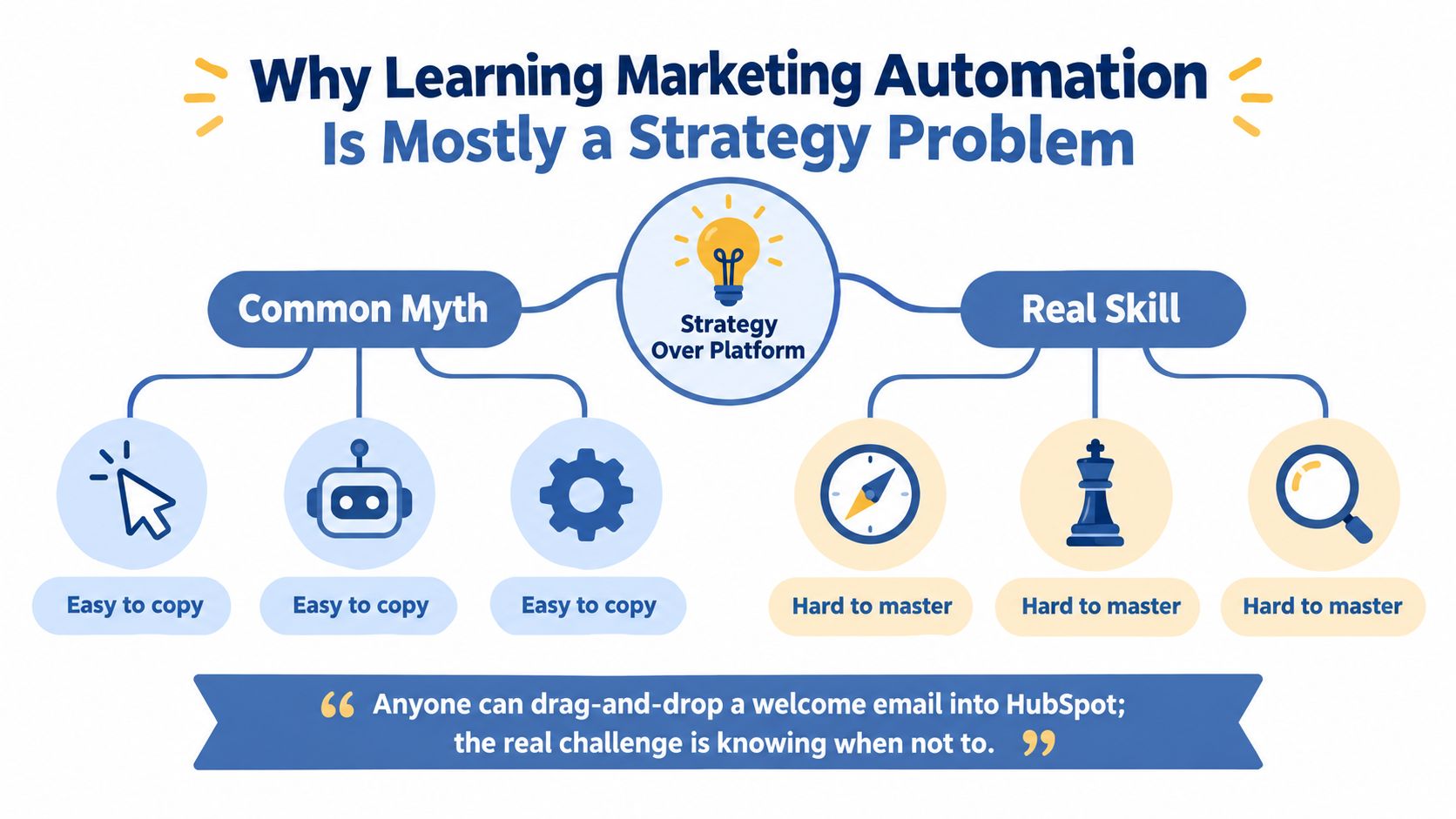
Start with the work, not the software
Before opening a platform, write down three things:
- Repeated action: What do you do after a signup, download, purchase, or reply?
- Decision point: What customer behavior should change the next action?
- Business event: Does success mean a booked call, activated account, purchase, renewal, or something else?
The field has moved through a clear progression. Email-first programs came first, then CRM-connected workflows, then AI-assisted execution, with agentic systems becoming part of the current discussion. A 2025 to 2026 industry summary reports that the market was $6.65 billion in 2024 and is projected to reach $15.58 billion by 2030, at a 15.3% compound annual growth rate. It also reports that 58% of marketers automate email campaigns, 51% are piloting or scaling AI-powered automation, and 68% expect automation budgets to grow. (MoEngage's marketing automation statistics)
Those figures explain why tool operation alone is a weak career plan. You need to understand audience data, lifecycle design, testing, attribution, workflow logic, and review processes. Concepts first, skills second, tools a distant third.
The Core Concepts You Must Understand First
You don't need to memorize every feature in a marketing platform. You need a working model of how a person moves through your business.
Four building blocks carry most beginner workflows: segmentation, lead scoring, triggers, and lifecycle stages. Each answers a different question, and the system becomes useful only when the answers connect.
| Concept | Purpose | Beginner Mistake | Quick Example |
|---|---|---|---|
| Segmentation | Groups contacts for relevant treatment | Using broad demographics as the whole model | Contacts who visited a pricing page receive a product-specific message |
| Lead scoring | Estimates fit and buying intent | Treating the score as an unquestioned truth | A high-fit contact with recent product activity moves into review |
| Triggers | Starts or changes a workflow | Sending every message on a fixed schedule | A download starts a short educational sequence |
| Lifecycle stages | Defines the customer relationship | Leaving stages empty or inconsistent | Subscriber becomes lead, then MQL, SQL, opportunity, customer, and evangelist |
Segmentation gives the workflow context
Start with rule-based segmentation, such as source, product interest, location, or customer status. Add behavior-based segmentation when actions matter more than profile fields, such as repeated content downloads or a pricing-page visit. Predictive segmentation can come later, after your records contain enough consistent behavior to support a useful decision.
The mistake I see most often is creating segments that describe people but don't change what you do. A segment earns its existence when it changes content, timing, routing, suppression, or measurement.
Scoring should be simple enough to audit
Separate explicit fit from implicit activity. Fit might include role, company type, use case, or budget signal. Activity might include a reply, a product visit, or a return to a key page.
A small business should begin with a model you can explain in a spreadsheet. If you can't tell why a person received a score, you won't know whether to change the score or change the workflow.
Triggers and lifecycle stages create the schema
A trigger can be an event that happens to one person, such as a form submission, or a scheduled condition applied to a group, such as inactivity. Time-based waits are useful when the message needs space, but they shouldn't replace event logic when the buyer has already shown a clear intent.
Your lifecycle might run through subscriber, lead, MQL, SQL, opportunity, customer, and evangelist. When a contact changes stage, the score can update, the segment can refresh, and the next workflow can queue. Treat lifecycle and score as decoration and every downstream automation loses meaning.
The Skills to Build and the Order to Build Them
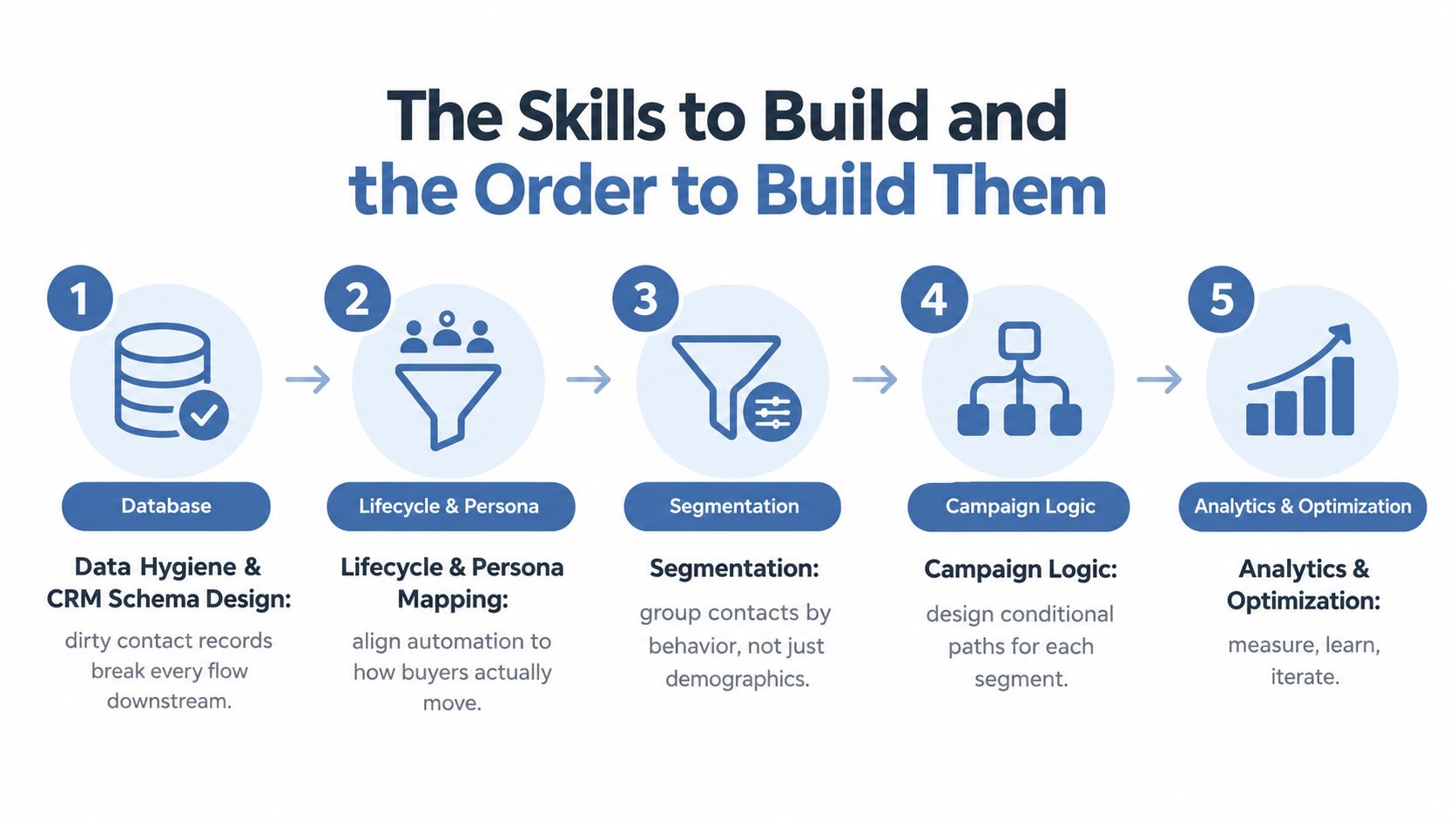
The order matters because each skill becomes input for the next. I'd plan the work in evening-sized blocks rather than trying to master a platform in one weekend.
Data hygiene and CRM schema design. Spend your first sessions deciding which fields exist, what each value means, and how duplicates, missing consent, and old records are handled. Dirty records break every flow downstream.
Lifecycle and persona mapping. Map the path from first known contact to customer and repeat buyer. Then describe the people who take that path, including their problem, buying signal, and reason to stop engaging.
Copywriting for triggered messages. Automated messages still need a clear promise, useful context, and a single next action. If the copy is weak, automation only distributes weak copy faster.
Workflow logic. Learn entry rules, branches, wait steps, exit conditions, suppression rules, and frequency caps. Draw the logic on paper before you build it.
Analytics and experimentation. Connect each workflow to a conversion event, then compare performance over time. You're learning whether the system changes behavior, not whether the platform reports activity.
A realistic study rhythm
Give data and schema work a few focused sessions. Lifecycle mapping and copywriting can develop alongside a live welcome flow. Workflow logic deserves repeated practice because the edge cases appear only when contacts behave differently.
Analytics comes after the first workflow has enough activity to inspect. Building a dashboard before the logic works gives you a polished view of noise.
Practical rule: If you can't draw the entry condition, next decision, exit condition, and conversion event on one page, the workflow is too complicated to build yet.
One conventional recommendation is wrong for solo operators: “learn the whole platform first.” You don't need a certification course before shipping. You need a narrow, safe workflow, a test contact, a suppression rule, and a way to inspect what happened.
Picking a Tool Stack a Solo Operator Can Actually Run
Most beginners waste their first month comparing platforms. I'd evaluate a tool by whether you can send a tested workflow in less than a day, start on a free or low-cost plan, connect it through an API or webhook when needed, and understand the documentation without specialist training.
The cheapest tool is the right tool only if it can run the three playbooks described below without awkward workarounds. A polished visual builder that can't express your exit conditions will cost more in maintenance than a plain system you can inspect.
| Tier | Example Tools | Monthly Cost | What It Unlocks |
|---|---|---|---|
| All-in-one starter | Mailchimp, Brevo, or MailerLite with a basic CRM | Free or low-cost entry plan | Signup flows, basic segmentation, simple reporting |
| Growth stack | ActiveCampaign or HubSpot's free tier with a spreadsheet or Airtable source of truth | Free or paid, depending on selected features | CRM-linked journeys, conditional logic, lead scoring |
| Power-user stack | Customer.io, n8n or Zapier as glue, and a warehouse when needed | Varies by usage and connected systems | Event-based journeys, custom data movement, deeper control |
Choose based on operating constraints
Bundled tools usually reduce setup time and provide one reporting surface. They can limit branching depth, data control, or attribution detail. Flexible stacks can express better logic, but every connector introduces another place for authentication, field mapping, or delivery to fail.
Visual builders are easier to learn. They aren't automatically easier to maintain. A workflow with clear names, documented fields, and visible exit conditions beats a maze of clever branches.
If you're comparing the practical building blocks, I've also collected AI workflow automation tools for small operators. Use a list like that to narrow the search, then test one real workflow before committing.
| Decision | Favor the simpler stack when | Favor the flexible stack when |
|---|---|---|
| Deliverability | Email is the main channel and volume is modest | You need detailed sending controls and multiple event sources |
| Branching | Your journey has a few clear paths | Behavior needs to alter content and routing in several ways |
| Reporting | A single conversion event is enough | You need custom attribution across systems |
| Maintenance | You operate everything yourself | You can inspect integrations and repair failures |
Don't buy a warehouse because it sounds advanced. Don't choose a platform because a tutorial made it look effortless. Pick the cheapest system that lets you define the data, build the logic, suppress the wrong contacts, and measure the outcome.
Three Playbooks That Teach the Most per Hour Spent
Email is the sensible starting point because it forces you to learn triggers, content, timing, suppression, and measurement in one place. One 2026 industry roundup reports that 63% of marketers use automation for email marketing, compared with 50% for social media management, 40% for paid ads, 35% for content management, 29% for landing pages, and 28% for SMS marketing. (Email Vendor Selection's marketing automation statistics)
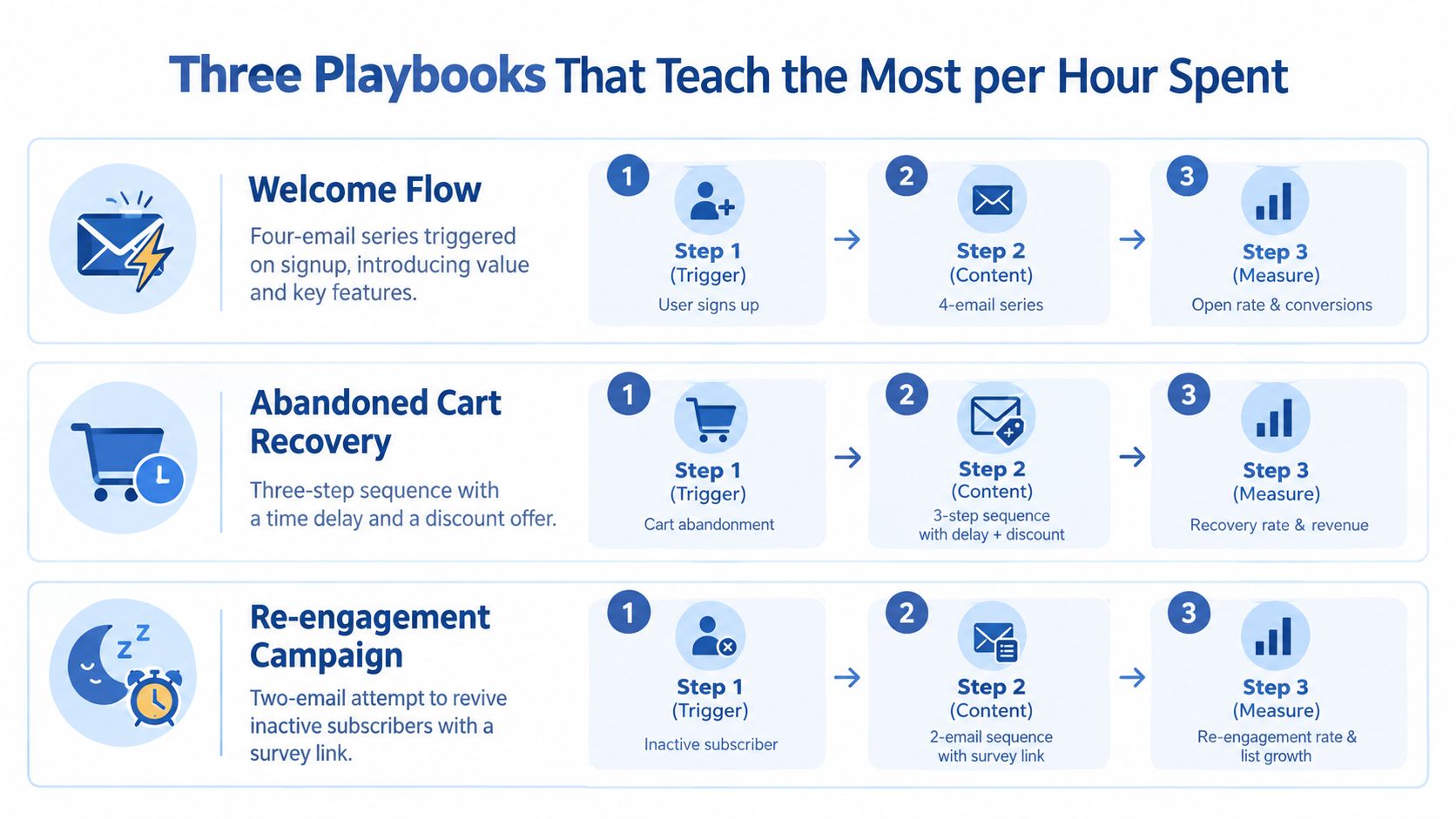
1. Build a welcome flow
Trigger: A person signs up, with the source stored as a field.
Step one: Send the first email immediately after a deliverability test. Confirm that the promise made on the signup form appears in the message.
Step two: Wait, then send a useful value reminder. Branch the copy by signup source so a reader who joined through a pricing guide doesn't receive the same introduction as someone who downloaded a checklist.
Step three: Send a social proof message that fits the reader's problem. Avoid unsupported results or invented customer stories.
Step four: Send a soft conversion ask. Track one event, such as a reply, booked demo, account activation, or purchase. Suppress customers and unsubscribed contacts at every step.
A four-email structure is enough to teach the mechanics. It also keeps the review burden manageable.
2. Re-engage or sunset inactive contacts
Create a behavioral segment for contacts who haven't engaged for 60 to 90 days. Start with a short message that acknowledges the silence and offers a preference center. If the person changes preferences, update the segment and stop the sequence.
If there's no response, send a final break-up email. Suppress or sunset the record according to your consent policy. The conversion event is a confirmed preference update or a re-engagement action, not an open.
Behavior-triggered flows are now common. One 2026 roundup reports that 82% of respondents use behavioral triggers at least somewhat, 37% use them extensively, and 43% say more than half of total email revenue comes from automated flows. (DesignRush's email marketing statistics)
3. Turn behavior into the segment
Choose one meaningful event: a pricing-page visit, repeat content download, or cart abandonment. The event itself becomes the segmentation signal.
For a pricing visit, suppress people who are already in an active sales conversation, wait briefly, send an answer to the likely objection, and exit after the tracked conversion. For a cart abandonment flow, check purchase status before every message and stop immediately when the order completes.
I've also documented additional marketing automation workflow examples that you can adapt without copying a complex funnel.
AI can help draft these messages, but it shouldn't decide the promise, the audience, or the exit rule. One 2026 source reports that 87% of businesses using AI apply it to email marketing workflows, while 49% of email marketers use AI to generate campaign content. (Knak's AI email statistics) Review every draft for claims, tone, consent, and relevance before it enters a live workflow.
Measuring What Matters Without Chasing Vanity Numbers
An automation dashboard can make a weak system look busy. Opens rise, emails send, and the chart moves right while the list becomes less responsive and the business sees no additional pipeline.
Use three measurement layers. They answer different questions, so don't collapse them into one score.
| Layer | Metrics to Track | Why It Matters | Common Trap |
|---|---|---|---|
| Workflow health | Delivery rate, bounce rate, spam complaint rate, suppression list growth | Shows whether the system reaches the intended audience safely | Optimizing sends while ignoring failed delivery |
| Engagement and intent | Click-to-open on conversion emails, MQLs, SQLs, replies, tracked actions | Shows whether contacts respond to the message and offer | Treating opens as purchase intent |
| Business outcomes | Pipeline or revenue influenced, retention, repeat purchase, expansion, hours saved, cost per activated lead | Connects automation to money and operating capacity | Claiming success from activity alone |
Start with workflow health
Inspect enrollment volume, exit reasons, error rate, send delays, and suppression counts while debugging the automation itself. Then check delivery, bounces, spam complaints, and suppression growth.
A real-time dashboard helps you catch a mid-journey drop-off or sudden unsubscribe spike before the issue spreads. The number you need first is the number that tells you whether the workflow is functioning.
Treat benchmarks as guardrails
Industry comparisons can mislead. For example, B2B services often see 23% to 28% average open rates, while retail and eCommerce often see 18% to 22%, according to IrisScale's marketing automation best-practices guidance. (IrisScale's workflow automation metrics)
Those ranges aren't targets. They're context for choosing a sensible internal baseline. Open-rate comparisons became even less reliable after Apple's Mail Privacy Protection, and click-based attribution misses dark social and offline closes. Track direction, replies, conversion events, influenced pipeline, and revenue alongside the email metrics.
The measurement skill is knowing what each number can and can't prove. A click can show interest. It can't prove a sale. A workflow can save hours. It can still damage trust if the wrong people receive it.
For a deeper measurement framework, I keep my guide to measuring marketing effectiveness focused on the link between activity and business results.
Your 30-60-90 Day Learning Plan and What to Ship on Monday
You don't need months of tutorials before the work becomes useful. Run the learning plan beside your normal workload and make every phase produce something live, inspectable, and reversible.
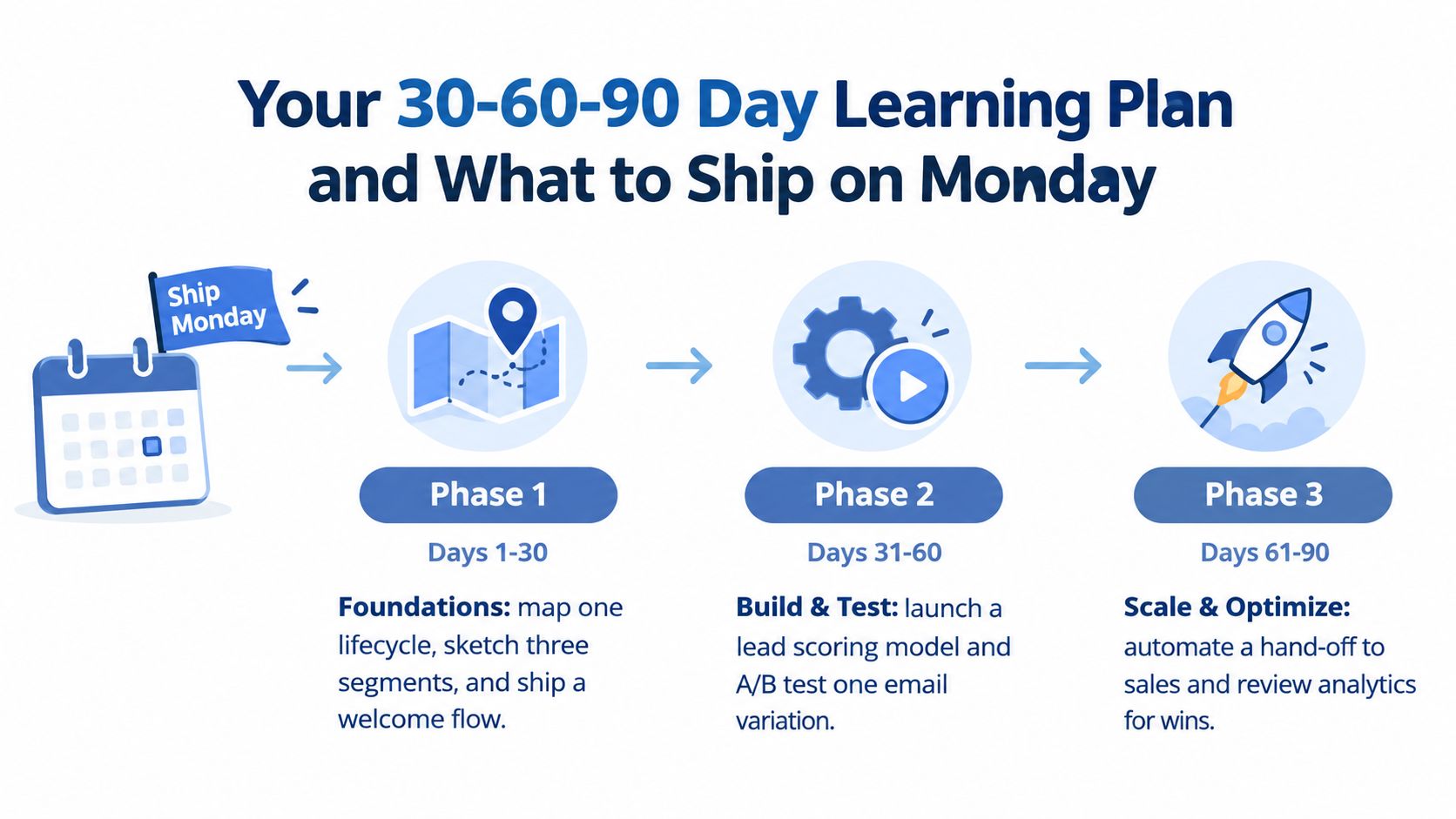
Days 1 to 30 build the foundation
Map one lifecycle using subscriber, lead, MQL, SQL, opportunity, customer, and evangelist as your starting vocabulary. Sketch three segments, define the fields each segment needs, and ship a basic welcome flow in a free-tier tool.
Spend 30 minutes reading about lead scoring and triggers, then apply the ideas to your own records. Keep the first score model simple enough to audit in a spreadsheet.
Days 31 to 60 add behavior
Launch the re-engagement campaign. Add one event-based trigger, such as a pricing-page visit or repeat download, and document every branch, wait, suppression rule, and exit condition.
Create the first dashboard with deliverability, open rate, and pipeline influenced. Don't add more metrics until you can explain what action each metric will cause.
Days 61 to 90 introduce controlled assistance
Use AI to draft content variations, then review claims, voice, audience fit, and compliance yourself. Recalibrate the score when observed behavior shows that your initial assumptions were wrong.
Document the working playbook so another person could inspect it, even if you're currently the only operator. The document should include the trigger, data requirements, message sequence, exclusions, conversion event, and failure checks.
Monday deliverable: Put a live welcome flow in place with four emails, a suppression list, and one tracked conversion event.
Test it with your own address and a second contact record. Check the entry rule, the source field, the wait step, the exit condition, the conversion tracking, and the suppression behavior before sending it to your list.
That first workflow gives you something better than another platform badge. It gives you a working system that can save manual follow-up time, reveal where your data is weak, and show whether your message produces a business action. I write about these build-and-inspect cycles each week in Bionic Business, where I document the opportunities AI creates for online businesses and the parts that fail in practice.
This week, choose one repetitive customer action, map its trigger and exit rule, build the four-email welcome flow, and record the conversion event in a simple dashboard. Then inspect the first contacts yourself before adding another automation.
Frequently Asked Questions
What should you learn first in marketing automation?
Start with concepts before tools. Segmentation, lead scoring, triggers and lifecycle stages carry most beginner workflows, and each answers a different question. Then build skills in order: data hygiene and CRM schema design, lifecycle and persona mapping, copywriting for triggered messages, workflow logic, and finally analytics and experimentation. Each skill feeds the next, so skipping ahead usually means more debugging later.
Do you need a certification to learn marketing automation?
No. Learning the whole platform first is poor advice for solo operators. You need a narrow, safe workflow, a test contact, a suppression rule and a way to inspect what happened. If you cannot draw the entry condition, next decision, exit condition and conversion event on one page, the workflow is too complicated to build yet.
Which marketing automation tool should a beginner start with?
Pick the cheapest system that lets you define the data, build the logic, suppress the wrong contacts and measure the outcome. Starter options include Mailchimp, Brevo or MailerLite with a basic CRM. ActiveCampaign or HubSpot’s free tier add CRM-linked journeys and lead scoring. Customer.io with n8n or Zapier suits event-based journeys when you can maintain the integrations yourself.
What is the best first marketing automation workflow to build?
A welcome flow. It teaches triggers, content, timing, suppression and measurement in one place. Store the signup source as a field, send the first email immediately, branch the value reminder by source, add social proof that fits the reader’s problem, then make a soft conversion ask. Track one event such as a reply, booked demo or purchase, and suppress customers at every step.
How long does it take to learn marketing automation?
A 30-60-90 day plan run beside your normal workload is enough to become useful. In the first 30 days, map one lifecycle, sketch three segments and ship a welcome flow. From day 31 to 60, launch a re-engagement campaign and add one event-based trigger. From day 61 to 90, use AI to draft variations, recalibrate scoring and document the playbook.
How do you measure whether a marketing automation workflow is working?
Use three layers. Workflow health covers delivery, bounces, spam complaints and suppression growth. Engagement and intent covers click-to-open on conversion emails, replies and tracked actions. Business outcomes cover pipeline or revenue influenced, retention, repeat purchases and hours saved. Treat industry open-rate benchmarks as context for your own baseline, since Apple’s Mail Privacy Protection makes open comparisons unreliable.
