
AI for social media content works when it prepares the material and you keep the judgment. I run it in five stages: signal capture from real customer language, ideation, drafting from a voice file, separate adaptation for each platform, and scheduling behind an approval step. Then I edit every post in four passes and track engagement rate per post.
The popular advice for AI for social media content is simple: write a prompt, generate a post, publish it, and move on. That workflow fails as soon as your content has to sound like a real person, fit four different platforms, stay factually accurate, and earn attention from people who've already seen a stream of synthetic copy.
I publish social content weekly as a solopreneur. AI gives me speed, but speed only helps after I supply the right context and keep a human review step in place. The useful opportunity is operational: agents and workflows can remove a large part of the repetitive work handled by a part-time social hire, while I retain control over judgment, voice, and trust.
Table of Contents
- Why Most AI Social Media Workflows Fail Before They Begin
- The Five-Stage AI Content Workflow I Actually Use
- Platform-Specific Prompt Constraints That Actually Move Engagement
- The Editing Workflow That Protects Brand Voice
- Scheduling, Measurement, and the Single KPI That Matters
- When Not to Use AI for Social Media Content
Why Most AI Social Media Workflows Fail Before They Begin
The weak point in AI social content is rarely the language model. It is the empty prompt and the missing operating context.
A request such as “write five posts about my product” says nothing about the people reading, the claim being made, the platform's conventions, or the experience behind the message. The result can be grammatical while still sounding interchangeable. I then spend more time rewriting every sentence than reviewing a draft with a clear point of view.
The scale is easy to misjudge. A 2024 survey of 1,680 marketers found that companies using generative AI already produced 39% of their social media content with it, with the projected share rising to 48% by 2026 (Marketing Charts' report on generative AI and social content). More output does not automatically create more useful content. In practice, 78% of marketers still heavily edit AI output, so generation is only one part of the production job.
The three breaks I look for first
Generic voice appears when the model receives no examples of how you speak. It fills the gap with familiar marketing language, tidy transitions, broad claims, and safe conclusions. Readers may not label every sentence as AI-generated, but they can still sense that nobody specific is behind it. A useful prompt needs source material, audience detail, approved claims, and examples of your real phrasing.
Platform mismatch starts when one master post gets copied across Facebook, Instagram, X, and LinkedIn. A paragraph that works as a Facebook explanation can feel bloated on X. A polished LinkedIn lesson may sound stiff on Instagram. Each platform requires different constraints around length, opening lines, formatting, context, and calls to action. Those constraints belong in the prompt before drafting begins, not in a final cleanup pass.
Unedited output creates the quiet performance problem. AI can produce a plausible post that misses the audience's concern, uses a claim you cannot support, or ends with a CTA that does not belong. It can also introduce licensing questions when you create visual assets or adapt templates, so I check the terms before turning a one-off experiment into a repeatable system.
Practical rule: AI should prepare the material. You should decide whether it deserves to represent you.
That rule shapes my approach to AI workflows for solopreneurs. Agents can collect inputs, propose angles, draft variations, adapt a message for each platform, and route work for approval. That replaces a large share of repetitive work handled by a part-time social hire, while judgment, voice, factual review, and final approval stay with the operator.
The workflow breaks when context disappears between steps. I once chained idea generation directly into drafting. The posts were clean but bland because I had automated production before capturing the customer language and platform requirements that made the content worth publishing. Generation saved minutes. Editing consumed them again.
The Five-Stage AI Content Workflow I Actually Use
I use five stages: signal capture, ideation, drafting, platform adaptation, and scheduling. The workflow replaces repeated searching, blank-page writing, manual resizing of one idea for several platforms, and calendar administration. It doesn't replace judgment.
The opportunity is a weekly production line that I can run alone. I use ChatGPT, Claude, or Gemini for different reasoning and drafting tasks, and I can connect them through Make or n8n. Open models are useful when I need local control over data, though they often require more setup and testing than a hosted model.
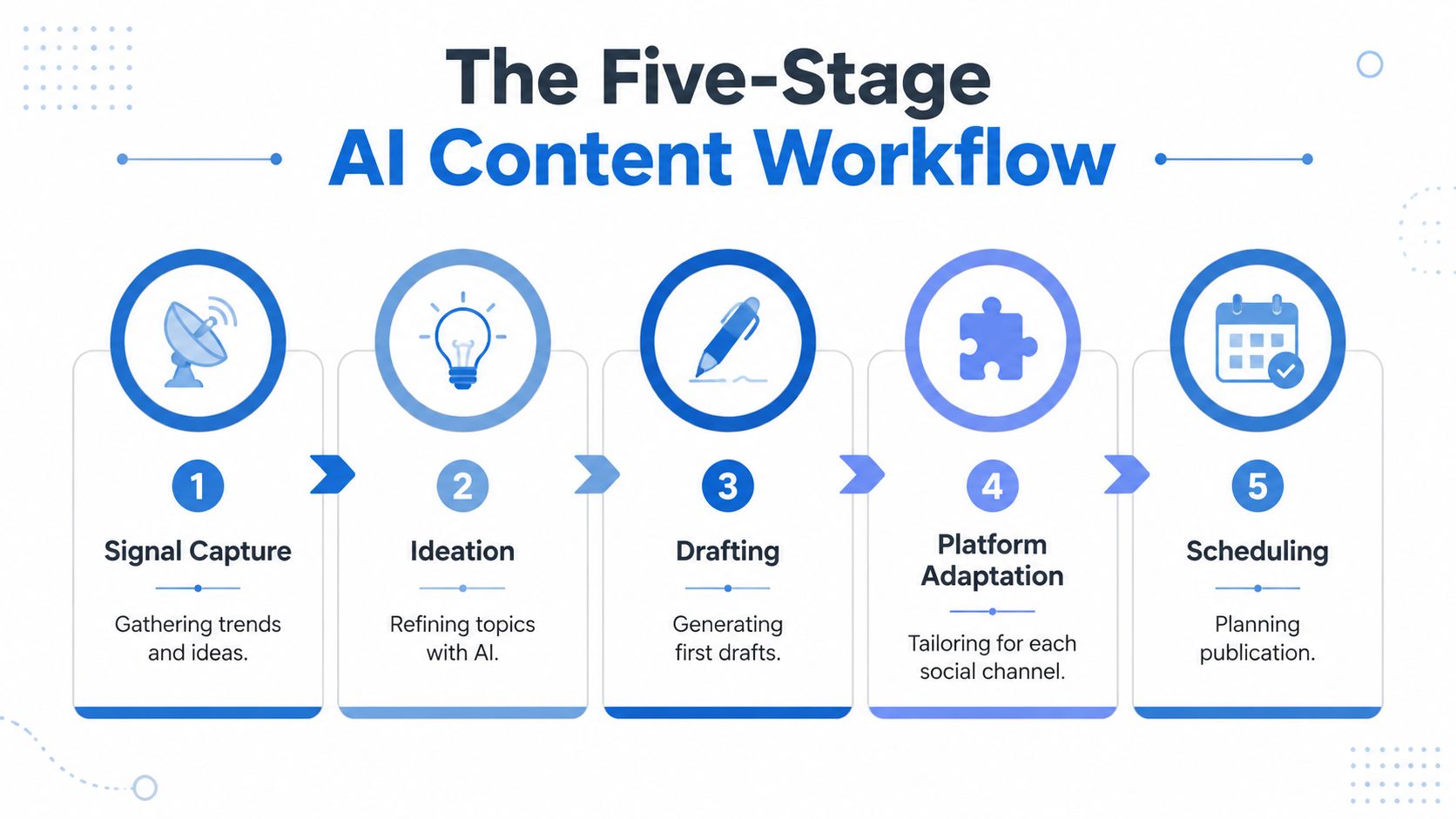
1. Signal capture
I collect customer questions, comments, support messages, sales objections, search notes, and posts I saved during the week. I put them into a plain document or database with the original wording intact.
My capture prompt is:
“Extract the recurring problems, specific language, emotional stakes, and unanswered questions from these notes. Do not invent themes. Return a table with evidence, audience, possible angle, and confidence.”
The agent needs source material, not a vague request for trends. I replace manual scrolling and scattered notes with a single weekly input. I judge this stage by whether each proposed idea points back to a real observation.
2. Ideation
I send the captured signals to ChatGPT or Claude:
“Generate ten post angles from this evidence. Each angle must contain one specific tension, one useful claim, and one reason the reader should care this week. Avoid motivational language, unsupported numbers, and generic advice. Mark any angle that requires more evidence.”
I choose the ideas myself. The model produces options, but I know which problem fits my offer, experience, and current priorities. This stage removes the blank-page delay rather than handing over editorial control.
3. Drafting
For the selected angle, I provide a short voice file with phrases I use, phrases I avoid, examples of published posts, and the facts the draft may contain.
“Write a first draft for [platform]. Use the attached voice examples as a style reference, not as facts. Make one clear claim. Use only the supplied evidence. Leave [PLACEHOLDER] where a personal example is required. End with one natural next step, not a sales pitch.”
I often draft in Claude or ChatGPT, then use a second model to find unsupported claims. The important data is the source packet and the voice examples. Without them, drafting becomes generic copy production.
4. Platform adaptation
I never ask one agent to “repurpose everywhere.” I give each platform its own constraints, which I detail below. The adaptation prompt includes the original idea, the approved draft, the target audience, prohibited claims, and the desired action.
“Adapt this approved idea for [platform]. Preserve the claim and personal point of view. Change the opening, rhythm, length, and CTA to fit the platform. Do not add facts. Return the post and a one-sentence explanation of what changed.”
This replaces manual rewriting, but I still inspect every version. The metric I watch here is engagement rate per post, compared by platform and format.
5. Scheduling
I move approved posts into a scheduler manually or through Make or n8n. The automation can create a draft, attach the platform version, assign a date, and notify me for approval. It must not publish unreviewed material.
This workflow's first failure was skipping signal capture. I connected a drafting agent to a calendar and produced polished posts that had no connection to what people were asking. The fix was simple: no source note, no draft.
Platform-Specific Prompt Constraints That Actually Move Engagement
The same idea needs a different shape on each platform. The cross-platform GPT-4 experiment is useful because it prevents a lazy conclusion. AI did well on Facebook in that test, but its advantage weakened on X and Instagram, where tone, compression, and platform fit matter more (the cross-platform study).
I use the model as a starting point, then adjust the constraints. Facebook gets room for an emotional arc and a clearer explanation. Instagram needs a strong first line, visual context, and interaction that feels native. X needs a narrow claim and disciplined compression. LinkedIn needs a concrete professional observation without drifting into polished corporate language.
My prompt changes by platform
For Facebook, I ask:
“Build a short emotional arc around the reader's problem. Include the situation, the turning point, and the practical lesson. Keep the language conversational and make the CTA invite a response.”
For Instagram:
“Write a visual-first caption. Open with a specific tension. Use short paragraphs and one concrete example. Suggest a question that can produce a genuine comment. Avoid broad inspiration.”
For X:
“Make one claim in a compact post. Remove setup, filler, and repeated context. Use a precise verb and one memorable detail. Do not add hashtags unless they clarify the subject.”
For LinkedIn:
“Write for an owner-operator who has personally faced this problem. Start with an observation from work, explain the decision, and state the lesson. Avoid executive language, inflated results, and generic career advice.”
The model choice can change too. An independent Instagram content marketing study found that AI-generated posts could match human content on likes, while different models performed well for different mechanics. ChatGPT did best for interactive story elements such as polls, and Gemini performed well for total reach, including reach among non-followers (the Instagram study).
| Platform | Prompt constraint | Tone guardrail | Best-fit model |
|---|---|---|---|
| Build an emotional arc and invite a response | Personal and explanatory | GPT-4 in the cited experiment | |
| Lead with visual context and interaction | Specific, concise, human | ChatGPT for polls, Gemini for reach mechanics | |
| X | Make one claim and cut setup | Tight and direct | Any model with strict compression |
| Use a work observation and practical lesson | Personal, never corporate | A model with strong voice examples |
The table isn't a promise that one model will always win. It gives me a starting decision. I test the post against the platform's actual response rather than treating model preference as permanent.
A prompt should describe the reader's situation and the platform's behaviour before it describes the desired tone.
The number that matters is engagement rate per post on each channel, not the number of versions an agent creates. If the adaptation stage produces four fluent posts and none earns a meaningful response, the system has increased output without improving the business.
The Editing Workflow That Protects Brand Voice
Most AI social media content advice stops at generation. My work begins after the first draft.
A 2026 survey found that 89.7% of marketers use AI daily or several times a week, while 78.4% apply moderate or extensive editing before publishing (Sociality's AI in social media marketing report). That gap is the operational reality. Frequent AI use doesn't mean frequent one-click publishing.
I edit in four passes. Each pass has a different job, so I don't waste time polishing a sentence that later fails a factual check.
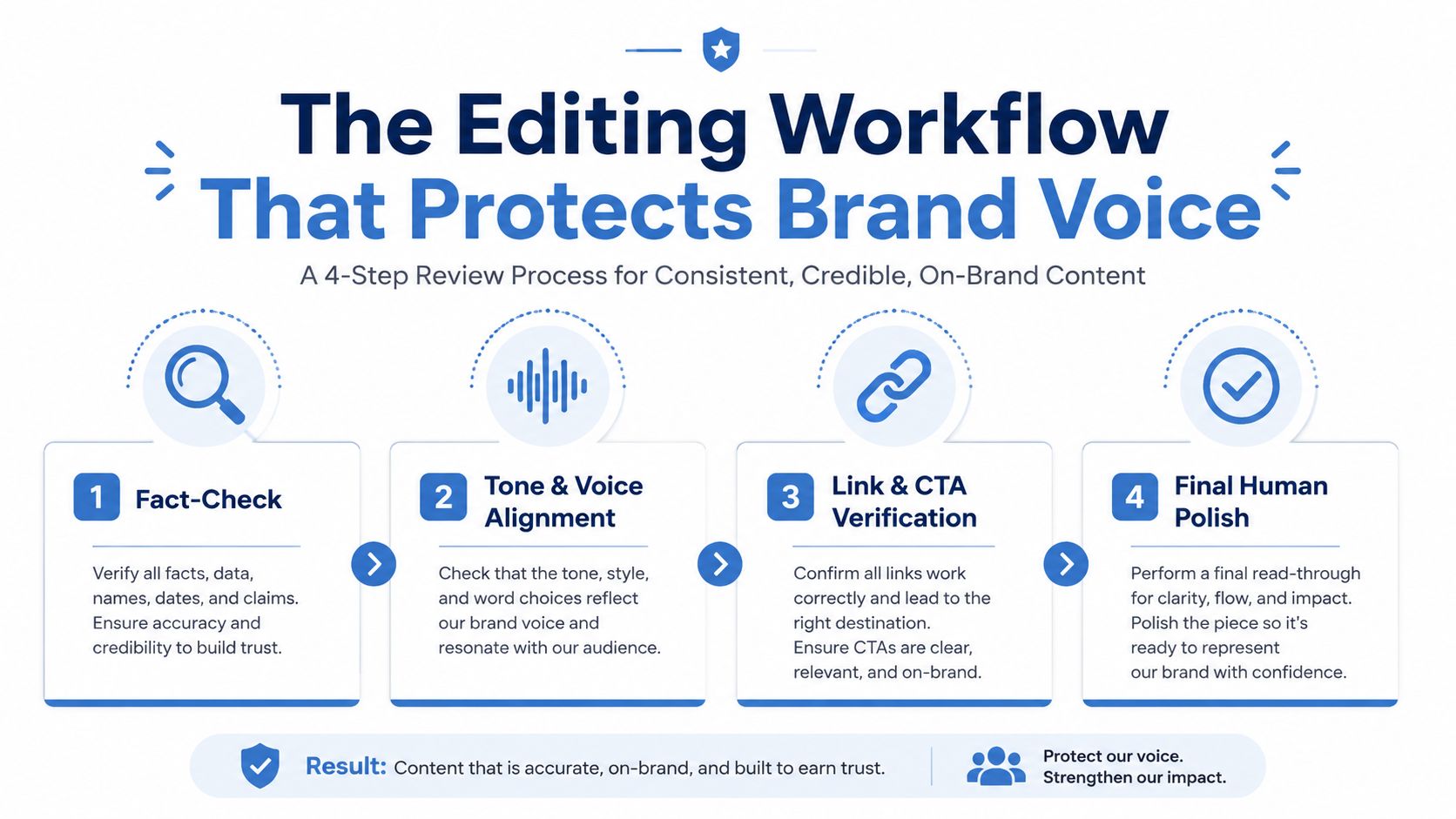
Fact check
I compare every factual statement against the source notes. I remove invented numbers, unsupported certainty, borrowed examples, and claims that sound plausible but have no evidence.
My review prompt is:
“List every factual claim in this draft. For each claim, quote the supporting source passage or mark it UNSUPPORTED. Do not repair unsupported claims by guessing.”
The model can find candidates. I make the final decision.
Voice alignment
I remove phrases I wouldn't say aloud. I look for generic openings, repeated sentence patterns, exaggerated confidence, and transitions that make the post sound like a template.
I keep a small voice document containing examples of my own posts, banned phrases, preferred sentence length, and the beliefs I want the content to express. That context gives the editor something real to compare against.
Link and CTA verification
I open every link, confirm that it supports the sentence around it, and check that the CTA matches the post's purpose. A useful educational post may need a question. A product-related post may need a next step. AI frequently adds a CTA because the prompt asks for one, even when the post doesn't need it.
Final human polish
I read the post aloud. If I wouldn't send it to one person directly, I don't publish it.
I stop editing when the claim is accurate, the voice sounds like mine, the platform version feels native, and the CTA earns its place. More edits after that often produce a smoother sentence without producing a better post. I track whether engagement rate per post improves after the review process, because the purpose of editing is audience response, not grammatical perfection.
I documented the full editing agent alongside other AI content agents. The agent can flag problems and propose alternatives. It can't supply the lived experience that makes a post credible.
Scheduling, Measurement, and the Single KPI That Matters
A content workflow earns its place when it makes decisions easier. I schedule approved posts in a calendar, store the original idea beside each platform version, and record the result after publication. Make or n8n can connect the content database, scheduler, and analytics export, but I keep the approval step outside the automation.
The scheduling stack doesn't need to be complicated. I use a calendar or scheduling platform, a source document, an automation layer, and the native analytics from each social network.
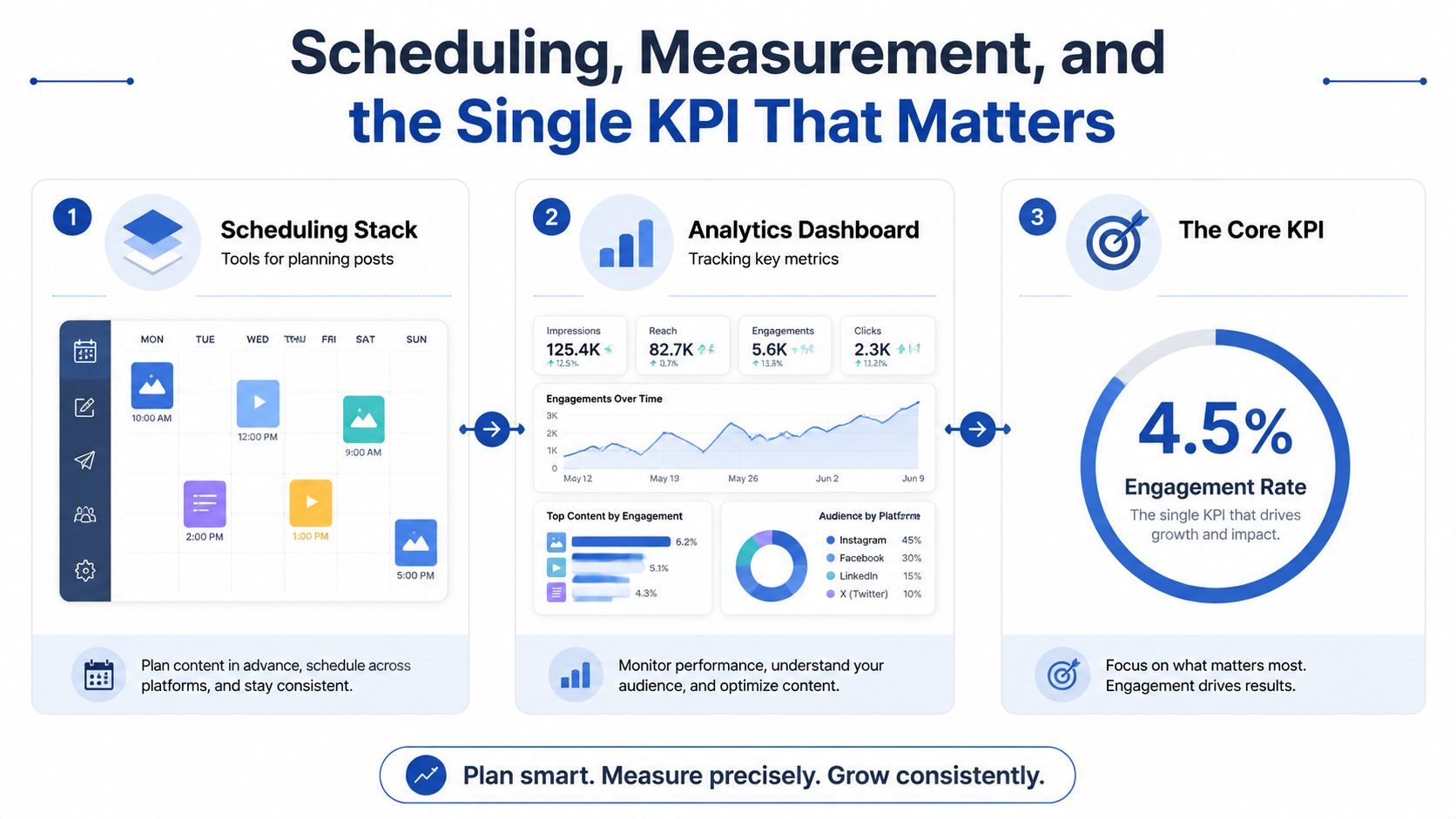
The dashboard I actually use
I record the platform, format, topic, whether AI assisted the draft, how much editing was required, and the resulting engagement rate. I also record link clicks when the post has a measurable destination, but I don't let impressions alone decide whether the workflow worked.
The single weekly KPI is engagement rate per post. It tells me whether faster production is still producing a response from the people I want to reach. If output rises while engagement rate falls, I reduce automation, improve the source material, or change the platform prompt.
The system needs consistent labels. Without a distinction between AI-assisted and fully human posts, I can't compare the workflow's effect. Without the original topic and platform, I can't tell whether a weak result came from the idea, the adaptation, or the timing.
Where automation breaks
Platform APIs change. Fields disappear, native formats behave differently from scheduled versions, and an automation can fail without making the reason obvious. I check the calendar and recent analytics manually each week instead of assuming a successful scenario run means a successful publication.
A measurement agent can summarise the data:
“Group posts by platform, topic, format, and AI involvement. Identify the strongest and weakest engagement rate per post. Explain only patterns supported by the supplied records. Recommend one change for next week.”
That recommendation is useful when the input is clean. It becomes fiction when posts are mislabeled or when the workflow imports incomplete analytics.
I published a practical version of this operating loop in my AI social media automation workflow. The important part isn't the automation count. It's the weekly decision to keep, edit, or stop a workflow based on the number that reflects audience response.
When Not to Use AI for Social Media Content
AI can hurt when the value of the post comes from proof that a real person cared enough to write it. I pull back for emotional storytelling, crisis response, community replies, and posts built around a personal failure or sensitive customer experience. Those situations need judgment, timing, and accountability before they need speed.
Trust also has a measurable cost. A 2025 experimental study found that generative AI could increase engagement and content volume while reducing perceived quality and authenticity, with negative spill-over into conversations (the 2025 study on generative AI and social communication). More publishing can create more opportunities for attention, but it can also make every post feel less personal.
Disclosure changes the response
A 2026 experiment found that labeling posts as AI-generated or AI-enhanced reduced both affective and behavioral engagement compared with human-created posts. The negative effect was especially strong for emotional content, and late disclosure helped AI-enhanced content but not fully AI-generated content (the study on AI content labeling).
Platform rules add another constraint. A 2024 policy review found that Meta, YouTube, and TikTok all referenced AI-generated or generative AI content in their policies by 2024 (the review of platform AI policies). Disclosure isn't a detail to solve after publishing. It belongs in the decision about whether AI should create the post at all.
My Monday question is simple:
“Would the audience value the fact that I personally experienced and wrote this?”
If the answer is yes, I write it myself and use AI only for transcription, structure, or error checking. If the answer is no, I use the five-stage workflow, keep the source context attached, and review the final version before it represents me.
On Monday, collect five real customer questions, run the signal-capture prompt, choose one idea, and publish only one platform-specific draft after the four editing passes. Record the engagement rate per post, then use that result to decide what your next AI workflow should automate. For the weekly systems and experiments I continue documenting, Bionic Business follows the same build, measure, and repair approach.
Frequently Asked Questions
Can AI write social media posts that sound like me?
Only if you give it something real to work from. Keep a short voice file with examples of your published posts, phrases you use, phrases you avoid, your preferred sentence length and the beliefs you want the content to express, plus the facts a draft may contain. Without that source packet, drafting turns into generic copy, and you spend more time rewriting than reviewing.
Can I post the same AI-generated content on every platform?
Copying one master post across Facebook, Instagram, X and LinkedIn causes platform mismatch. Give each platform its own prompt constraints: an emotional arc on Facebook, a strong first line and visual context on Instagram, one compressed claim on X, and a concrete work observation on LinkedIn. Keep the core claim and point of view the same across every version.
Which AI model is best for social media content?
No model wins everywhere. In a cross-platform GPT-4 experiment, AI did well on Facebook but its advantage weakened on X and Instagram. An Instagram study found ChatGPT did best for interactive story elements such as polls, while Gemini performed well for total reach. Treat the model choice as a starting decision and test it against each platform’s actual response.
How should I edit AI-generated social media posts?
Edit in four passes, each with one job. Check every factual claim against your source notes and remove anything unsupported. Align the voice by cutting phrases you wouldn’t say aloud. Open every link and confirm the CTA fits the post’s purpose. Then read it aloud, and if you wouldn’t send it to one person directly, don’t publish it.
What metric should I track for AI social media content?
Track engagement rate per post, compared by platform and format. Record whether AI assisted each draft and how much editing it needed, so you can compare AI-assisted posts with fully human ones. If output rises while engagement rate falls, reduce automation, improve the source material or change the platform prompt. Impressions alone shouldn’t decide whether the workflow worked.
When should I avoid using AI for social media posts?
Avoid it when the value of the post comes from proof that a real person cared enough to write it, such as emotional storytelling, crisis response, community replies, or a post about a personal failure or sensitive customer experience. Research cited in the article found that labeling posts as AI-generated reduced engagement, especially for emotional content. Write those yourself.
