
To build AI tools that ship, start with one repeated workflow instead of a model. I define its trigger, inputs, decision rules, allowed actions, output and success metric first. Then I build the smallest version in Zapier, Make or one API route, test it against real examples, and add a spend limit and human approval before customers touch it.
The popular advice is to start with the model. Pick GPT-4o, write a clever prompt, connect an API, and call the result an AI tool.
That advice produces impressive demos and fragile businesses. I've shipped tools that worked beautifully in a controlled test, then failed when users supplied incomplete context, pasted hostile instructions, or asked for something the original prompt never anticipated. The model was rarely the main problem. The missing tests, unclear workflow, weak permissions, and absent feedback loop were.
If you're a solopreneur or run a team of fewer than ten, you don't need a research lab to learn how to build AI tools. You need one workflow worth improving, a small test set, a visible success metric, and enough restraint to keep the system narrow until it earns expansion.
Table of Contents
- The 70% That Never Ship
- Your Build Path and Stack
- Context and Prompts That Hold Up
- Reasoning Patterns for Real Work
- Evals Before You Touch Production
- Cost, Privacy, and What Breaks
- Your Monday Build Plan
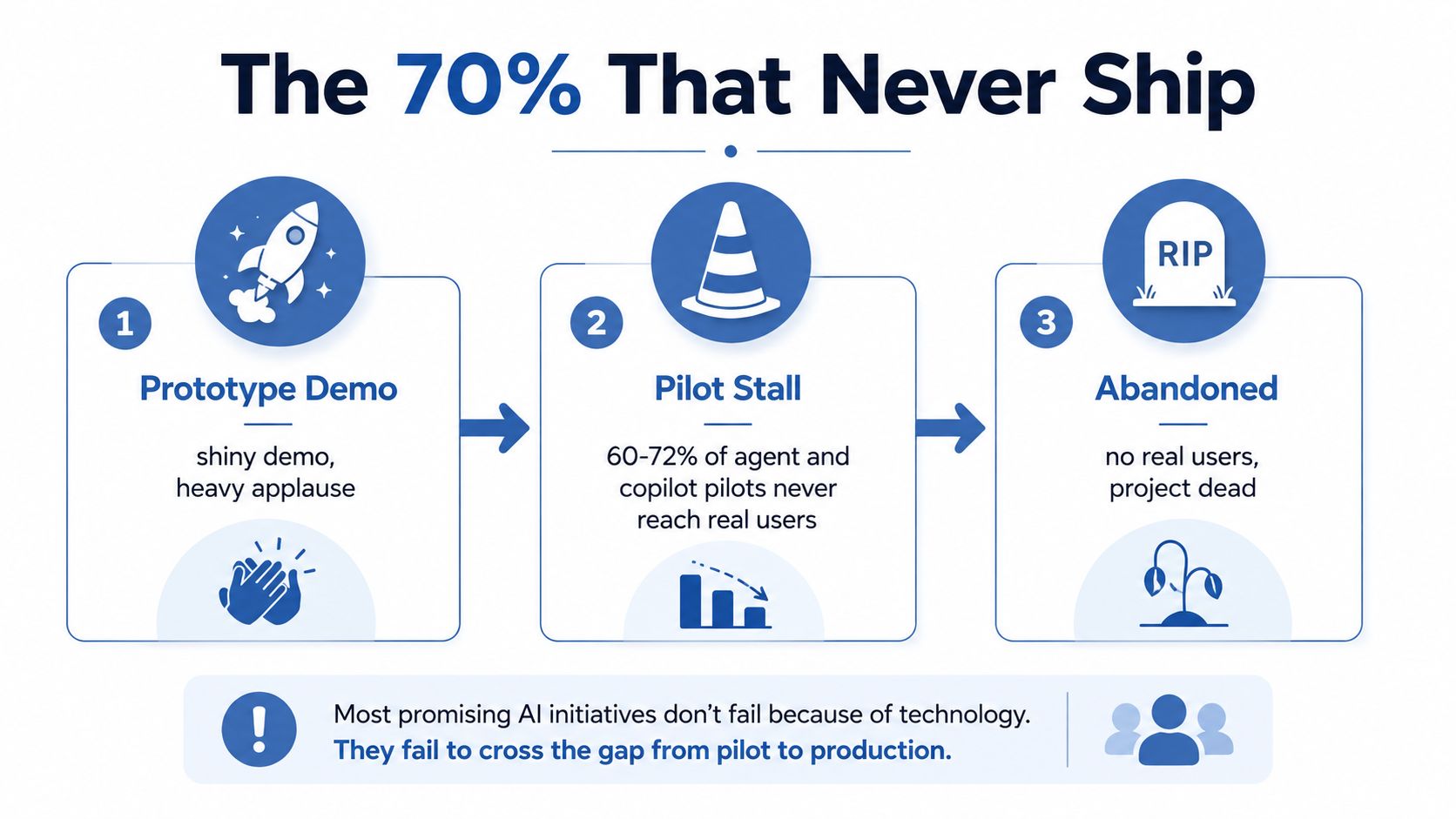
The 70% That Never Ship
The prototype is the easy part. Independent coverage of agent deployments reports that roughly 70% of AI agent pilots stall before production, while successful rollouts often take 5 to 9 months end to end rather than a few weeks (the production failure analysis).
That gap explains why so many AI projects feel magical on Friday and useless by Monday. A founder tests five clean examples, sees a polished answer, and assumes the product works. Real users omit fields, use unfamiliar wording, paste messy documents, request unsupported actions, and expect the system to recover without explanation.
The failure modes are predictable:
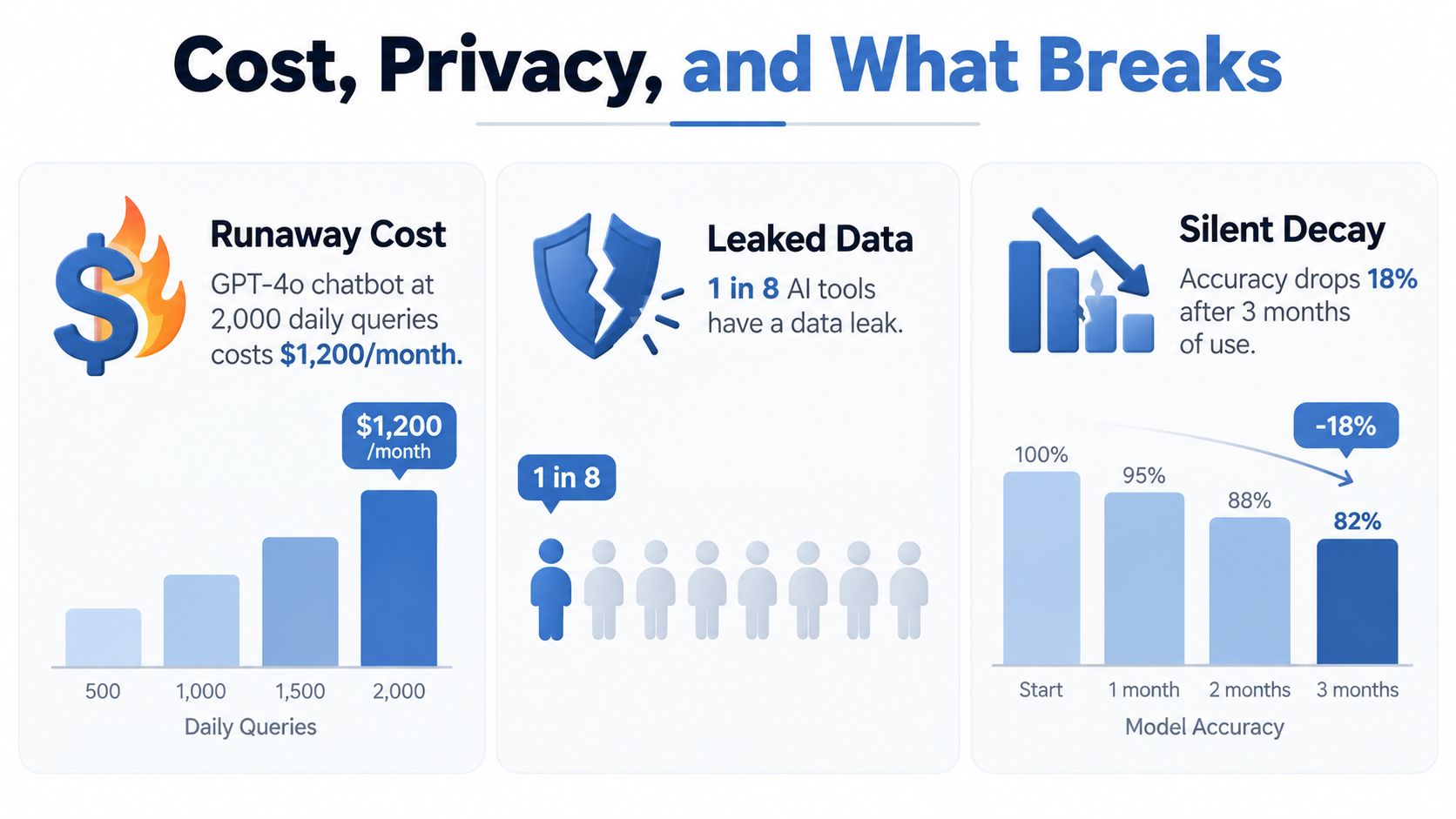
- Token costs drift: Longer histories, repeated tool calls, and retry loops increase spend.
- Hallucinations pass review: A plausible claim can survive a quick human skim.
- Prompts become brittle: A small instruction change can break formatting or tool selection.
- Security assumptions fail: Hostile instructions inside retrieved content can steer an agent toward the wrong action. Research on tool-augmented LLMs identifies direct and indirect prompt injection as concrete failure modes (tool-use failure research).
- Quality decays after launch: New source material, model updates, and user behavior change the inputs your original test never covered.
Practical rule: A working notebook is evidence that one path works. It isn't evidence that your workflow is safe, affordable, or repeatable.
Developer adoption makes this tension sharper. Stack Overflow's 2024 Developer Survey found that 76% of respondents were using or planning to use AI tools in development, up from 70% in 2023. The survey covered more than 65,000 developers across 185 countries, yet only 43% trusted AI tool accuracy, while 81% named productivity as the top benefit (Stack Overflow survey coverage). Adoption is high. Verification still belongs in the product.
Before choosing a stack, I force every idea through six questions.
The six parts of a buildable workflow
- Trigger: What event starts the run? A new keyword in a spreadsheet, a support ticket, an uploaded transcript, or a button click?
- Input: What does the model read? Define the fields, source documents, dates, and limits.
- Decision logic: Which business rules must run before the model acts? A low-confidence answer may need review. A request involving a refund may need approval.
- Action: What can the system do? Draft a document, update a row, call an API, or send a message?
- Output: Where does the result land? Email, Slack, Notion, a CRM record, or a private dashboard?
- Feedback loop: Which outcome tells you whether the result helped? Track the action taken after the output, not merely whether the response sounded good.
Take a content brief generator. The trigger is a new keyword in Airtable. The input includes the keyword, the top three search results, your product notes, and examples of previous articles. The decision logic rejects keywords outside your audience or product area. The action creates a draft brief, the output appears in Notion, and the feedback loop records whether the eventual page attracts clicks or produces a qualified lead.
That workflow opens an opportunity because retrieval, structured outputs, automation platforms, and hosted models are accessible to a small operator now. Two years ago, you could still build a version, but stitching together document search, model calls, validation, and monitoring demanded more custom work.
Write this on one page before Monday:
- Trigger:
- Input sources:
- Decision rules:
- Allowed actions:
- Output destination:
- Success metric:
- Human approval point:
- Worst plausible failure:
If you can't answer those fields, you don't have a tool idea yet. You have a model experiment.
Your Build Path and Stack
There are four sensible paths. I've used each, and the cheapest option usually wins until the workflow proves it needs more control.
| Path | Setup Time | Cost per 1k Runs | Customization | Privacy | Lock-in |
|---|---|---|---|---|---|
| Zapier or Make with OpenAI | Fastest | Variable by task and provider | Low to medium | Depends on connected services | Medium |
| Direct API wrapper | Short | Variable by model and context | Medium to high | Provider-dependent | Medium to high |
| Fine-tuned model | Longer | Variable, plus training and hosting | High for a defined task | Depends on hosting | High |
| Local open-weight model | Longer | Variable, tied to hardware and usage | Medium to high | Stronger local control | Lower provider lock-in |
Start with Zapier or Make when the workflow is mostly classification, extraction, drafting, or routing. Use a direct API route, perhaps a small Vercel function with structured outputs, when you need better error handling, retries, authentication, or a custom interface.
Fine-tuning is often premature. It can help when you have a stable task, consistent examples, and a repeatable output standard. It won't repair missing source data, vague business rules, or a bad evaluation set.
Local models make more sense when customer data, internal financial information, unpublished material, latency, or provider dependence creates a real constraint. The trade-off is operational work. You'll own model serving, hardware limits, updates, and failure recovery.
For most small marketing tools, my starting architecture is a hosted model for generation, a vector database with hybrid search for retrieval, an orchestration layer that handles retries and structured outputs, and a thin React or Slack surface.
Choose the cheapest path that protects the data your workflow touches. Before selecting a model, I'd also work through which LLM is the best for the actual task, context size, latency, and failure tolerance.
Context and Prompts That Hold Up
Most prompt failures are context failures. A beautifully worded instruction can't compensate for missing product facts, weak examples, stale retrieval, or an output schema the application never validates.
More context can help, but stuffing a window with irrelevant material creates another failure. I separate context into three layers so each piece has a job.
The three-layer prompt
System: Set the permanent role, tone, safety rules, source hierarchy, and refusal behavior. This layer shouldn't change with each user request.
Developer: Define the task, JSON schema, field requirements, tool permissions, and validation rules. I specify what the application expects.
User: Pass the actual request, retrieved documents, and user-provided constraints. Treat this content as untrusted input, especially when it comes from a web page, email, or uploaded file.
For a campaign brief generator, the system layer might read:
You create campaign briefs for a direct-to-consumer skincare brand. Use only verified product facts supplied in the context. Never invent ingredients, clinical outcomes, guarantees, prices, or customer results. If a required fact is missing, return
needs_review.
The developer layer supplies the schema:
Return JSON with these fields:
{
  "audience": "string",
  "pain_point": "string",
  "offer": "string",
  "message_angles": ["string"],
  "proof_points": ["string"],
  "needs_review": ["string"]
}
Do not add fields. Every proof point must map to a supplied source.
The user layer contains the campaign request, retrieved chunks from past winning ads, current product notes, and exclusions. I'd use hybrid search so exact product terms and semantically similar examples both have a chance to appear.
Four prompt patterns cover most practical marketing work:
- Instruction plus few-shot examples: Good for consistent formatting and tone.
- Explicit intermediate reasoning fields: Useful for a multi-step brief where the model must identify audience, objection, evidence, and angle before drafting.
- Tool-use instructions: Necessary when the workflow must fetch live data rather than rely on model memory.
- Structured-output prompts: Useful for ad matrices, content briefs, classifications, and any result that enters another system.
The implementation details matter as much as the wording. Version prompts in Git, store the exact prompt hash with every model call, record the model version and retrieved documents, and treat edits like deployments. My deeper distinction between context engineering and prompt engineering covers why retrieval quality often matters more than another clever instruction.
Reasoning Patterns for Real Work
I see four reasoning patterns in marketing tools. Only three earn regular use for small workflows.
ReAct, or reason and act, fits research tasks. A positioning agent can call a search API, collect competitor pages, inspect selected sources, and produce a comparison. Raw function-calling is often enough at first. LangGraph becomes useful when you need explicit state, retries, and checkpoints.
Plan and execute suits a content calendar builder. The planner creates a sequence of topics, the executor drafts each item, and a final validator checks format and constraints. LangGraph or CrewAI can represent the stages, though I'd avoid adding either until one prompt has already shown demand.
Reflection or self-critique earns its place for long-form copy. The first pass drafts an ad or landing page, the second checks unsupported claims, weak specificity, and tone. This costs extra model calls, so I only use it where the second pass catches errors that would otherwise cost money or trust.
Tree of thought is usually excessive for marketing. Branching alternatives can help with pricing experiments involving multiple scenarios, but they add complexity and spend to ordinary copy generation. A single structured prompt with a human review is usually easier to inspect.
| Pattern | Best Marketing Use Case | Cost vs Single Prompt | Recommended Stack |
|---|---|---|---|
| ReAct | Research with live search and source checks | Higher, because it makes tool calls | Raw function-calling, then LangGraph |
| Plan and execute | Calendar creation and staged production | Higher, due to planning and execution passes | LangGraph or CrewAI |
| Reflection | Long-form copy review | Higher, due to a second pass | Raw function-calling |
| Tree of thought | Branching pricing scenarios | Highest and harder to control | Custom workflow with explicit limits |
I won't invent a token multiplier for these patterns. The actual cost depends on context length, model choice, retries, and how many branches or tools run. Measure your own traces instead.
Tool selection deserves its own test suite. ToolBench evaluates tool use against 16,464 APIs and 3,451 tools, with 87,413 single-tool instructions, 110,066 multi-tool instructions, and 126,486 annotated instruction-solution pairs (ToolBench reference). Its metrics include pass rate, hallucination rate, API correctness, and plan or action exact match. That's a better fit for an agent than judging prose quality alone.
My blunt sequence is simple. Ship the single-prompt tool, test it with real examples, then add one reasoning pattern only when a measured failure requires it. I wrote a fuller explanation of reasoning models because founders often pay for complex reasoning before they've proven the underlying workflow.
Evals Before You Touch Production
A demo asks, “Can the model produce a good answer?” An evaluation asks, “Does this version behave acceptably across the cases that matter?”
Start with a golden set. Pull real customer tickets, successful ad copy, sales transcripts, or completed briefs from your own records. Label each example with the person who will own the tool, and keep the set small enough to inspect manually.
I'd begin with 50 to 100 examples when the workflow has enough historical material, as a practical starting point rather than a universal rule. The number must be linked to the task's variety. A narrow classifier may need fewer cases than a brief generator handling several audiences and offers.
Four failures your tests should catch
- Hallucination: The tool invents a product feature, ingredient, guarantee, or result.
- Stale data: It cites an old price, expired promotion, or retired feature.
- Prompt injection: User text or retrieved content attempts to override system rules.
- Off-brand tone: The output uses claims or language your brand wouldn't publish.
ToolFailBench uses 1,000 single-turn tasks across finance, medicine, law, cybersecurity, and real estate, and separates failures into Tool-Skip, Result-Ignore, Output-Fabrication, and Unnecessary-Tool-Use (ToolFailBench review). You don't need to copy that benchmark. You do need failure labels that tell you what broke.
Run every prompt version against the same golden set. Score accuracy, brand fit, refusal behavior, and format compliance. Block a change when its composite score drops below your baseline.
For a campaign brief tool, my starter rubric is:
- Factual accuracy, 40%: Every product statement matches supplied evidence.
- On-brand voice, 30%: The language matches approved examples.
- Actionability, 20%: The brief gives a usable audience, angle, offer, and next step.
- Format compliance, 10%: The JSON or document structure passes validation.
Those weights are a starting editorial choice, not a universal benchmark. Change them when the cost of a failure changes. A regulated claim may deserve more weight than stylistic polish.
The loop needs operational discipline. Run evals locally and in CI on every pull request, review a fixed sample of traces before release, watch production traces and user signals, and turn every incident or surprising pass into a new golden scenario. That workflow is described in detail by Confident AI's agent evaluation guide.
Cost, Privacy, and What Breaks
The default advice says to use the largest model because it's safer. That's wrong for many small businesses.
A smaller local model can be the better choice when the workflow reads customer PII, internal financials, or unpublished content. You trade provider convenience for hardware, maintenance, latency, and model quality. Privacy isn't a slogan. It's an architectural constraint you should decide before sending data anywhere.
Cost drift usually comes from the workflow around the model:
- Retry loops: A failed parser calls the model again without a hard limit.
- Repeated context: A long system prompt and full conversation history are sent every turn.
- Tool-call thrash: The agent repeatedly searches, fetches, and reformulates because success conditions are vague.
- Unnecessary indexing: Embeddings rebuild on a schedule even when the source material hasn't changed.
- Unbounded outputs: The model writes far more than the user needs.
I set maximum retries, maximum tool calls, maximum output length, and a spend alert before exposing a tool to users. I cache stable retrieval results, summarize old conversation history, and route simple classification to a smaller model.
The model itself isn't the whole threat model. Prompt injection can arrive through a web page, document, email, or customer message. Training-data leakage and jailbreak attempts need separate tests. The system should treat retrieved text as data, never as a higher-priority instruction.
Use three practical controls:
- Input sanitization: Strip unsafe markup, isolate untrusted content, and mark source boundaries clearly.
- Output classification: Check for unsupported claims, sensitive data, forbidden actions, and schema violations before delivery.
- Human approval: Require review before refunds, account changes, public publishing, financial actions, or other irreversible effects.
Measure spend per successful workflow, not spend per model call.
NIST's AI Risk Management Framework 1.0, released on January 26, 2023, gave organizations voluntary guidance for identifying, measuring, and managing AI risk. NIST later added a Generative AI Profile on July 26, 2024 (NIST framework development). You don't need to turn your Monday prototype into a compliance project. You should borrow the basic habit of identifying risks before production.
Your Monday Build Plan
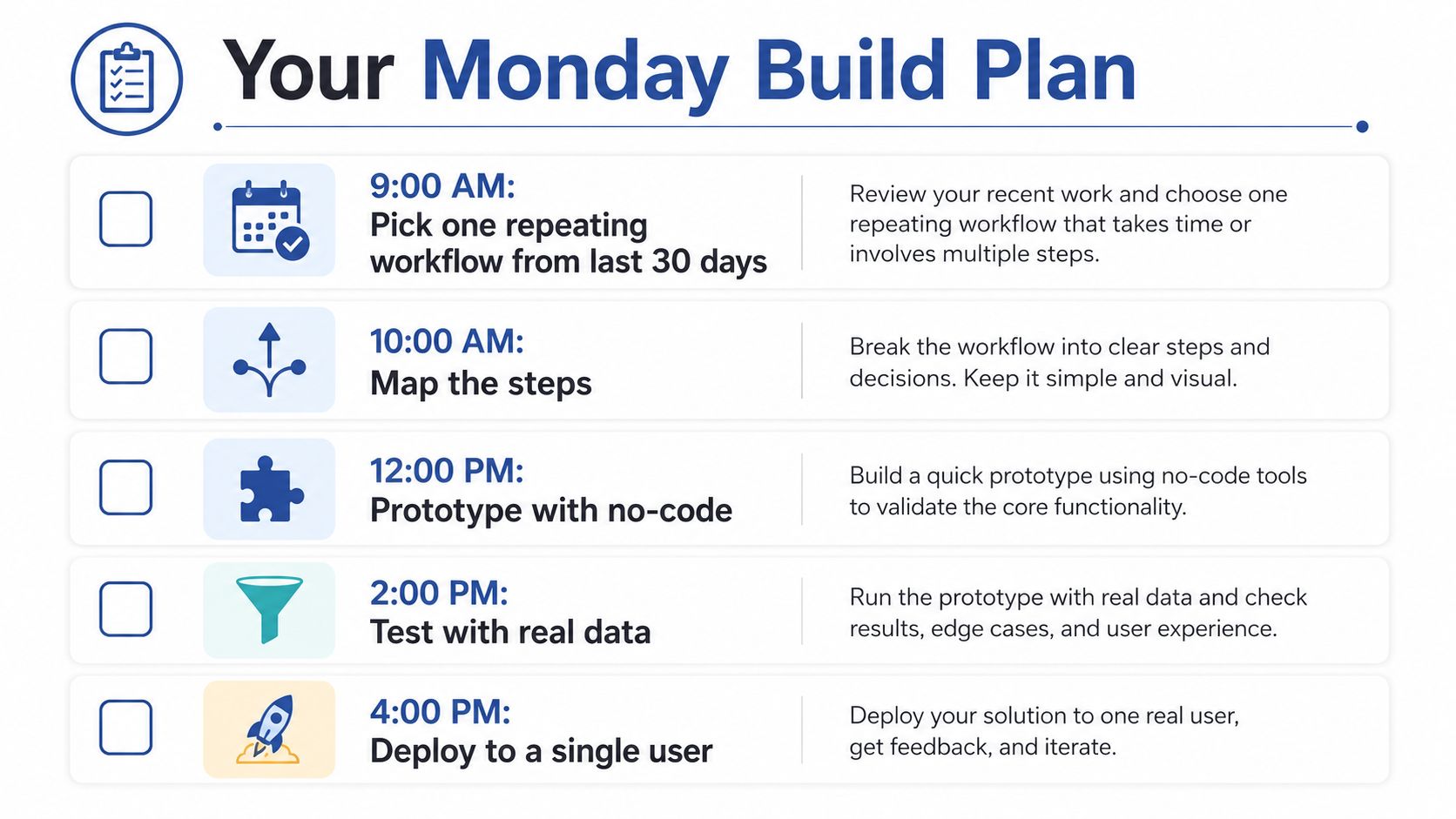
You need one day, one workflow, and a willingness to kill the idea if the evidence is poor. Don't begin by building a chatbot. Begin with a repeated task that produces a document and already has examples you can inspect.
The schedule
9:00 AM: Pick one workflow from the last month that repeats at least weekly and creates a brief, email, report, proposal, or other document. Choose something with a visible owner and a measurable result.
10:00 AM: Write three real inputs and the ideal output for each. Include the facts the tool may use, the facts it must never invent, and the point where you'd want human review.
11:00 AM: Build the smallest prototype with Zapier, Make, or one Vercel route. Use a lightweight hosted model such as GPT-4o-mini or Claude Haiku if the task doesn't require deeper reasoning.
1:00 PM: Run the examples, score each output, and rewrite the prompt twice. Don't judge only whether the prose sounds good. Check facts, format, tone, and whether you'd use the result.
2:00 PM: Add a small evaluation script for the top two failures you found. If the tool invented product claims, test for unsupported claims. If it broke JSON, validate the schema and retry with a strict limit.
3:00 PM: Choose one KPI. Use minutes saved per week for a repetitive internal task, qualified leads for a routing tool, or drafts shipped for a content workflow. Put the number in one dashboard cell.
4:00 PM: Decide whether to go, kill, or invest. “Invest” means the next change is tied to a measured failure or user need. It doesn't mean adding more agents because the demo feels exciting.
I've seen three useful outcomes from this approach. One SaaS company shipped an outreach drafter in a day and reported that SDR preparation time fell by 70%, though that result belongs to the company's own report rather than a verified public source. An agency built a brief-to-ad generator that became part of every account workflow. A scrappy ecommerce team killed its chatbot after evaluation showed that it lost more sales than it recovered.
The third outcome is a win. Killing a tool before it reaches customers is cheaper than defending a bad answer after launch.
On Monday, build the smallest workflow that can prove one business outcome. Track one number, save every failure, and refuse to expand the system until it earns the next feature. I continue this kind of build-and-break work in Bionic Business, where the weekly examples focus on turning AI opportunities into systems an owner can run.
Download the worksheet, choose one repeating document task, and build its first version this Monday. Before you connect it to customers or publish its output, create the golden set, add a spend limit, and require approval for any action you can't easily undo.
Frequently Asked Questions
What do I need to define before building an AI tool?
Write one page covering the trigger that starts a run, the inputs the model reads, the decision rules that apply before it acts, the actions it may take, where the output lands, the success metric, the human approval point and the worst plausible failure. If you can’t fill in those fields, you have a model experiment rather than a tool idea.
Should I build an AI tool with Zapier, a direct API, fine-tuning or a local model?
Start with Zapier or Make when the work is mostly classification, extraction, drafting or routing. Move to a direct API route when you need better error handling, retries, authentication or a custom interface. Fine-tuning is often premature and won’t repair missing data or vague rules. A local model makes sense when customer PII, internal financials or unpublished material create a real privacy constraint.
How do I test an AI tool before launch?
Build a golden set of real examples from your own records, such as tickets, briefs or ad copy, starting around 50 to 100 when you have enough history. Run every prompt version against the same set, score accuracy, brand fit, refusals and format, and block any change that drops below your baseline. Label each failure so you know what broke.
What are the most common ways AI tools fail after launch?
Hallucinated product claims, stale prices or retired features, prompt injection hidden in web pages, emails or uploaded files, and off-brand tone. Costs drift through retry loops, repeated context, tool-call thrash, unnecessary re-indexing and unbounded outputs. Quality also decays as new source material, model updates and user behavior produce inputs your original tests never covered.
How do I keep AI tool costs under control?
Set a maximum for retries, tool calls and output length, plus a spend alert, before any user touches the tool. Cache stable retrieval results, summarize old conversation history and route simple classification to a smaller model. Then measure spend per successful workflow instead of spend per model call, because most cost drift comes from the workflow around the model.
Do I need LangGraph, CrewAI or a reasoning agent to build an AI tool?
Not at first. Ship a single-prompt tool, test it with real examples, and add one reasoning pattern only when a measured failure requires it. ReAct suits research with live search, plan and execute suits staged work like a content calendar, and reflection suits long-form copy review. Tree of thought is usually excessive for marketing work.
