
The worst advice in AI right now is to pick one model and standardize on it. That sounds tidy on paper, but it breaks the second you start shipping real work, because writing, analysis, coding, research, and automation all reward different strengths. I've watched businesses lose weeks trying to force one model to do everything, then adopt a second and third model anyway.
If you want the best AI model for business, stop asking which brand wins the internet argument. Ask which model reduces editing time, fits your stack, and meets your data rules without becoming a side project.
| Model | Best For | Key Strength | Limitation | Pricing Tier |
|---|---|---|---|---|
| Claude Fable 5 | High-stakes reasoning and broad business intelligence | Top overall intelligence in Artificial Analysis' 2026 comparison | Not always the fastest option for agent loops | Premium |
| Claude Opus 4.8 (max) | Complex analysis and decision support | Top overall intelligence in Artificial Analysis' 2026 comparison | Not built for every low-latency workflow | Premium |
| GPT-5.5 (xhigh) | General business use where flexibility matters | Strong all-round performance | Trails the top intelligence leaders in the same comparison | Premium |
| Gemini 2.5 Flash-Lite | Fast turnarounds | 0.32s latency in the comparison dashboard | Speed can matter more than depth in some workflows Artificial Analysis | Usage-based |
| Mercury 2 | Agent loops and rapid tool calls | 1205 tokens/sec speed in the comparison dashboard Artificial Analysis | Not the first choice for deep reasoning | Usage-based |
| Llama 4 Scout | Very long documents and knowledge bases | 10M-token context window Artificial Analysis | Long context doesn't automatically mean best output quality | Open-source or hosted |
| GPT-5.4 | Generalist business workloads | 74.9% SWE-bench coding performance GuruSup | Not the strongest choice for every content workflow | Premium |
| Claude Opus 4.6 | Writing and coding-heavy teams | 74%+ coding performance and strong natural prose GuruSup | Best-in-class writing can still require review in production | Premium |
| Gemini 3.1 Pro | Reasoning and multimodal work | 94.3% GPQA reasoning GuruSup | Not always the most natural prose engine | Premium |
Table of Contents
- Why There Is No Single Best AI Model for Every Business
- The Five Criteria That Matter When Choosing a Model
- Side-by-Side Comparison of Leading AI Models for Business
- Recommended Models by Business Scenario and Use Case
- Implementation Checklist for Deploying AI Models in Your Business
- How Model Selection Compounds Into Competitive Advantage
- Your Decision Framework for Choosing the Right AI Model
Why There Is No Single Best AI Model for Every Business
The market keeps selling a fantasy version of AI selection: one winner, one purchase, one rollout. Production does not work that way. The model that writes polished marketing copy can be a poor fit for legal review, and the one that looks strongest in a demo can feel slow inside a live operations loop.
Benchmarks do not equal business fit
A model can look excellent on a leaderboard and still create the wrong economics in production. A model with strong reasoning may still force your team to spend too much time editing, reviewing, or routing outputs through approval steps. Another model may be faster and cheaper to run, but if it misses context or misses tone, the hidden cleanup cost wipes out the savings.
That is why business fit matters more than headline scorecards. If a model reduces response time but creates extra legal review, brand correction, or analyst rework, it is not the better choice for that workflow.
Artificial Analysis' model comparison shows that different models lead on different dimensions, which is the point Artificial Analysis. Some models are built for speed, some for long-context work, and some for heavier reasoning. A model that fits a high-volume support queue may not fit a contract review process, and a model that handles long internal docs well may be too slow for an agent loop.
I have seen teams lose time because they tested in a clean demo and deployed into a messy workflow. Real work includes partial context, inconsistent inputs, approval chains, brand rules, and people editing the output before customers ever see it.
My rule: if a model saves time in a benchmark but creates more editing work, it is the worse business choice.
Why most teams end up multi-model
Independent guidance points to the same conclusion. There is no single best AI model for business, because the right choice depends on the task class: strategy, reasoning, marketing copy, analysis, or automation LinkedIn guidance. The practical response is to use different models for different jobs instead of forcing one model into every workflow.
That pattern reduces vendor lock-in at the operational level. It also lowers the risk of designing your process around one model's strengths and then discovering that your sales, support, or operations work has to route around its weaknesses. In production, the best setup is usually the one that fits the workflow with the least friction.
Once you build around business outcomes, the question changes quickly. Which model helps you sell faster, which one keeps operations clean, and which one fits your stack without adding review burden, governance headaches, or rework?
For a useful breakdown of why prompt structure and context handling matter so much in production, see this practical guide to context engineering versus prompt engineering.
The Five Criteria That Matter When Choosing a Model
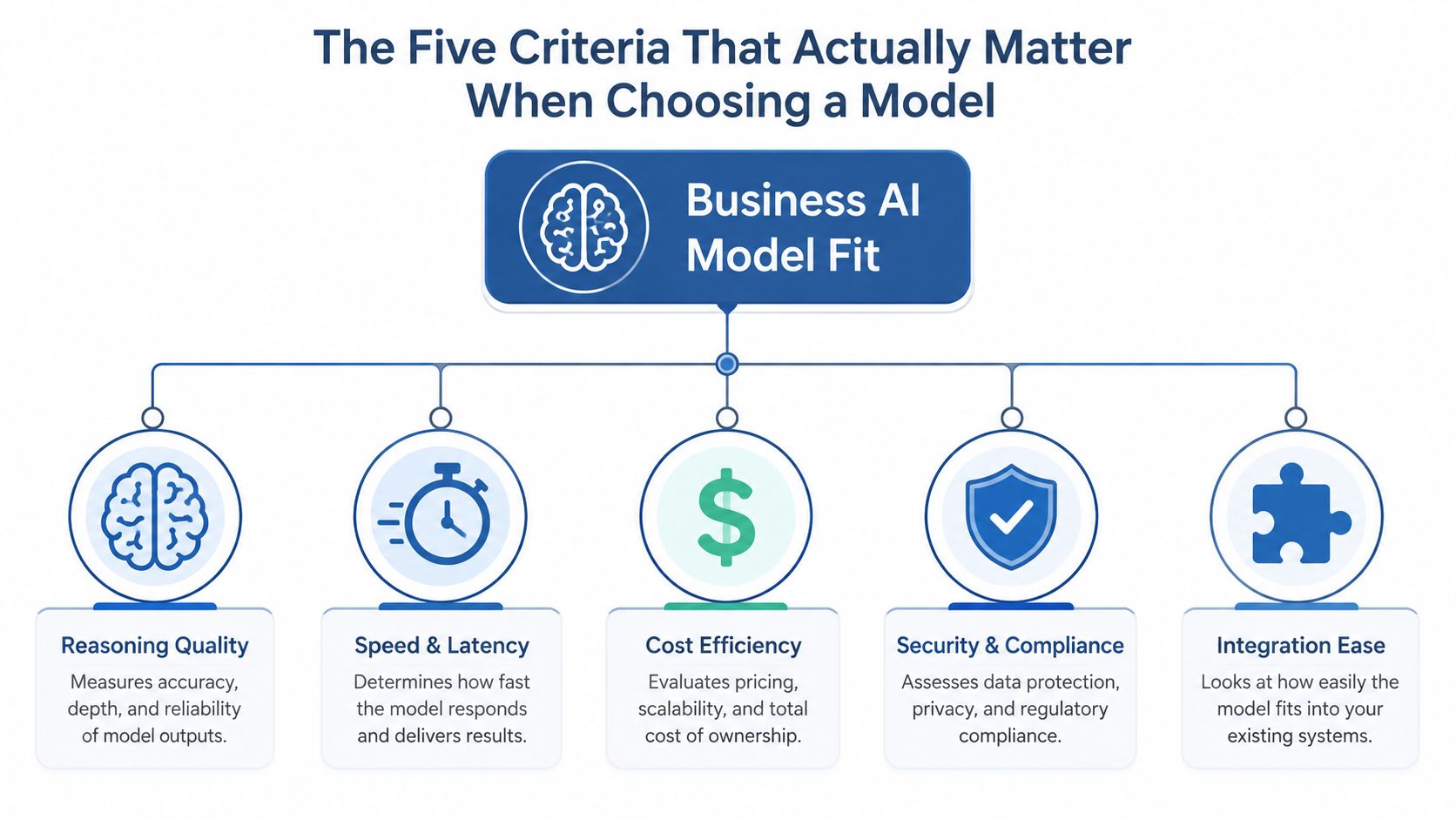
Picking a model by hype is the fastest way to create hidden labor costs. The five criteria that matter in production are reasoning quality, speed and latency, cost per task, data privacy and governance, and integration with your existing stack. Each one changes the economics of adoption.
Reasoning quality and editing time
Reasoning quality matters most when bad output is expensive. Strategic planning, financial summaries, and internal analysis need fewer hallucinations, fewer logic gaps, and less rewriting than a one-line social post. That is why comparison data showing GPT-5.4 at 74.9% SWE-bench, Claude Opus 4.6 at 74%+ coding, and Gemini 3.1 Pro at 94.3% GPQA matters more than a generic “top model” ranking GuruSup.
High reasoning does not always mean better business value by itself. If your team spends ten extra minutes cleaning output, the smarter model can become the more expensive one.
Speed, cost, governance, and stack fit
Speed matters when the model sits inside an agent loop or live workflow. Independent model comparisons show the spread can be dramatic, from 1205 tokens/sec for Mercury 2 to 0.32s latency for Gemini 2.5 Flash-Lite Artificial Analysis. That kind of gap changes how fast a lead qualification bot, support workflow, or internal assistant feels to users.
Governance matters when the model touches sensitive data, customer records, or regulated workflows. A model that looks cheap on paper can become a non-starter if it fails your own privacy and security checks, or your clients'.
Integration is where rollouts often stall. One comparison argues that Microsoft 365 Copilot is the path of least resistance for the roughly 90% of large enterprises that already run Microsoft 365, with a stated enterprise price of $30 per user per month, while Gemini for Workspace fits Google Workspace organizations The AI Rankings. Fighting your existing productivity suite is a common reason rollouts stall.
The best model is the one your team can ship, govern, and keep using.
A useful operating habit is to score each model against these five criteria for the exact workflow you care about. If you do that, the winner often changes by department.
For a practical grounding in how selection and workflow design connect, I would also point you to this context engineering guide, because prompt quality and context design shape output quality more than most buyers expect.
Side-by-Side Comparison of Leading AI Models for Business
A more useful comparison ignores which model sounds smartest in a benchmark and asks which one causes the least friction inside a live business workflow, because the hidden costs show up in editing time, approval cycles, and how well the model fits your stack.
What the strongest business models are actually good at
Independent comparison work shows different models win in different lanes. Claude Opus 4.6 is strongest for natural prose, Gemini is strongest for multimodal and 1M-context use cases, Grok 4 is competitive on coding at 75%, and GPT-5.4 remains a strong generalist with 74.9% SWE-bench coding performance. Another business ranking puts Claude Fable 5 at 97, but other snapshots move around enough to show that benchmark position shifts by test set and release timing. That is why one-table shopping rarely survives contact with production.
Teams at mid-size SaaS companies often end up running two to three models in parallel because one model is better for drafting, another is better for reasoning, and a third is better for automation or document handling. When a setup fails, the usual cause is the hidden cost of making one model do every job badly.
Here is the production lens I use. If the work is prose-heavy, Claude usually earns the first test slot because fewer edits means less labor downstream. If the task is coding or agentic automation, GPT and faster models often deserve a parallel evaluation. If the work involves research with images, charts, or long documents, Gemini or a long-context model usually makes more sense.
| Model | Best For | Operational Fit | Main Trade-Off | Typical Approval Friction |
|---|---|---|---|---|
| Claude Fable 5 | Enterprise reasoning | Strong fit for teams that care about careful outputs and reviewable prose | Can be more model than you need for simple internal tasks | Higher, because teams expect a governance review before broad use |
| Claude Opus 4.8 (max) | Deep business analysis | Useful when senior staff need nuanced analysis and polished drafts | Not always the fastest choice in day-to-day workflows | Higher, especially where legal or brand review is involved |
| GPT-5.5 (xhigh) | Broad business workflows | Good default for mixed use cases that cross functions | May require tighter prompt discipline to keep outputs consistent | Moderate, since it is often easier to pilot than to standardize |
| Gemini 2.5 Flash-Lite | Fast interactions | Works well for lightweight internal assistants and quick responses | Less suited to heavier reasoning tasks | Lower, if the workflow stays inside a controlled workspace |
| Mercury 2 | Agent execution speed | Useful when task throughput matters more than long-form analysis | Speed-first design can trade off depth | Lower to moderate, depending on how much autonomy the agent needs |
| Llama 4 Scout | Document analysis | Fits long-review work that depends on large context windows | Long context still needs careful prompting and quality checks | Variable, since hosting and data handling choices affect review time |
| Claude Opus 4.6 | Writing and code review | Strong for teams that need clean prose and careful review comments | Not the universal answer for multimodal work | Higher, because writing teams and engineering teams review it differently |
| GPT-5.4 | Generalist operations | Good fit for broad internal operations and mixed business tasks | May need stricter editorial control for brand writing | Moderate, with fewer objections when the use case is clear |
| Gemini 3.1 Pro | Research and reasoning | Strong for research workflows that combine text, files, and visual inputs | Can be less natural for marketing copy | Moderate to higher, depending on data access rules |
The table points to a simple operating truth. No model wins everywhere, and that is useful information. The better business stacks separate drafting, reasoning, and automation instead of forcing one interface to cover all three.
The approval timeline often matters more than the benchmark score. A model that technically performs well can still sit idle for weeks if you or your clients cannot sign off on data handling, logging, or vendor access. For a practical framework on selecting reasoning-heavy systems in business, see this guide to strategic use of reasoning AI models.
If your business already runs on Microsoft or Google, stack fit may matter more than model fit. In those environments, integration friction can outweigh small differences in output quality, and the model that ships fastest often creates more value than the one that scores slightly higher on paper.
Recommended Models by Business Scenario and Use Case
The cleanest way to choose is by job, not by logo. Different tasks create different kinds of value, and the wrong default model can burn hours in editing, reviews, and approvals even when the output looks strong on paper.
Marketing, strategy, coding, research, and documents
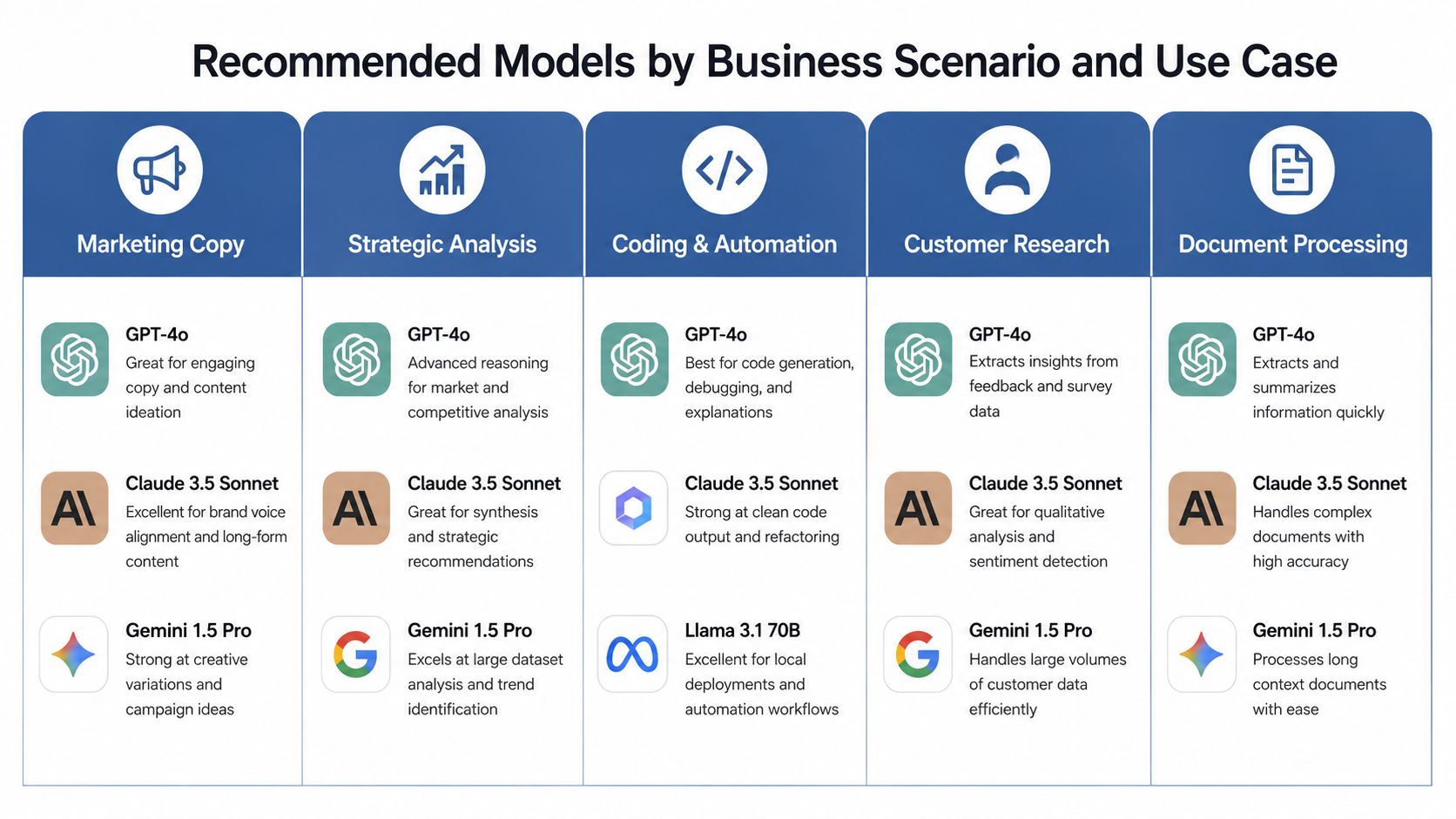
For marketing copy, Claude is usually the safer first test because the draft often needs less cleanup. If you produce long-form content, brand messaging, or thought leadership, that reduction in editing time can matter more than raw speed.
For strategic analysis, Claude and Gemini make a stronger pair. Claude handles narrative logic well, while Gemini is stronger when the work includes charts, screenshots, or mixed-source research. For coding and automation, GPT-5.4's 74.9% SWE-bench performance and Claude Opus 4.6's 74%+ coding mark make both worth testing before you lock a workflow into place.
For customer research and long document review, Gemini or a long-context model becomes more useful, especially when the task involves contracts, meeting notes, or large research dumps. Llama 4 Scout's 10M-token context window makes that kind of workload feasible in a way smaller-context systems cannot match.
Use the model that minimizes human correction, even if another one sounds more impressive in a demo.
When stack fit beats model preference
If you already work inside Microsoft 365, Microsoft 365 Copilot is often the easier path because it fits the workflow you already use. If you live in Google Workspace, Gemini for Workspace is usually the more natural move for the same reason.
Open-source models make sense when privacy, control, or custom deployment matters more than convenience. They are not the right answer for every team, but they can be the right answer when you need local control, specialized tuning, or a lower-risk path for sensitive workflows.
For a deeper operational view of how reasoning-heavy models fit into actual business work, I'd use this strategic model guide as a companion reference. I also sometimes recommend tools like WearView AI when teams need a practical workflow around visual or commerce-related decisions, because model choice matters less when the surrounding system is poorly designed.
If you use one model for drafting and a second for verification, you usually get better business output than relying on a single assistant end to end. That split is especially useful for high-value copy, pricing analysis, and internal decision support.
Implementation Checklist for Deploying AI Models in Your Business
A strong model choice still fails if the rollout is sloppy. The work starts when the model meets people, permissions, and process.
Test before you commit
Run the same tasks across two to three models and compare the outputs side by side. Score them on quality, speed, cost, and the amount of human editing required before delivery. That last metric matters more than most people admit, because it captures the hidden labor that benchmark dashboards never show.
Put governance in the workflow
Define who can use the model, what data it can see, and what a human must approve before output reaches a customer. If the model touches regulated, financial, or brand-sensitive work, governance can't be an afterthought.
Choose a deployment pattern that fits your stack. If you already have Microsoft or Google depth, it often makes more sense to adopt there first than to bolt on a shiny external system and ask everyone to change habits.
A practical rollout checklist looks like this:
- Test with real business tasks instead of toy prompts.
- Set governance rules for data access, approvals, and retention.
- Put AI into the tools you already open every day.
- Show everyone who uses it when to trust the model and when to override it.
The most useful guide I've seen for context-heavy adoption is what model context protocol means in practice, because integration quality often decides whether a model survives in production.
Good deployment makes AI feel boring. That's the goal.
For teams already comparing model stacks against business process fit, a broader business-transformation lens helps too. The goal is to redesign a workflow so the model removes friction instead of creating review queues, because “adding AI” on its own changes nothing.
How Model Selection Compounds Into Competitive Advantage
The businesses winning with AI use models to redesign customer journeys, internal operations, and market response around faster decision cycles, and faster content is only a small part of that PwC. That changes the shape of the business itself.
Speed in one workflow becomes speed everywhere
If your team chooses a model that drafts faster, researches faster, and hands off cleaner output, you shorten the loop between question and decision. That matters in sales, marketing, and operations, because the business that learns first often responds first.
The same logic applies to long-context systems. If you can process more material in one pass, you spend less time reconstructing context and more time making decisions. That's a real competitive edge.
A lot of business AI content still treats models like fancy copy tools. That's outdated. The stronger use case is infrastructure, where models support workflow documentation, analytics automation, and lead or research systems that compound over time.
The moat is operational, not cosmetic
As the competitive stack matures, model choice becomes a question of how you run the business day to day, and the purchase is the small part. The team that standardizes around the right mix of reasoning, speed, and integration will usually out-execute a competitor that keeps chasing benchmark headlines.
If your AI system helps one team make better decisions, that's useful. If it helps every team move faster with fewer mistakes, it becomes a moat.
That's why the selection process needs to respect revenue impact. Better model fit means fewer rewrites, faster approvals, cleaner handoffs, and a lower chance that your AI initiative gets abandoned by the people expected to use it.
Your Decision Framework for Choosing the Right AI Model
Start with the work, not the model label. A model that looks strong in a benchmark can still create more editing, more review, and more handoff friction than your team can afford. In practice, the right choice is the one that fits the job, the stack, and the level of control your business needs.
Revenue-facing work should favor output quality and lower editing time. Operational workflows should favor speed, integration, and governance. Sensitive use cases should eliminate any option that cannot meet your privacy and control requirements, even if the demo feels impressive.
A practical scoring method
Score each candidate from 1 to 5 on four questions, then weight the answers based on the workflow you are trying to improve.
- Does this model fit your business goal by improving the workflow that drives revenue or reduces cost?
- Does it fit your technical stack, working inside Microsoft, Google, or your existing systems without friction?
- Can you and anyone helping you use it without a long training curve?
- Does it fit your risk tolerance, meaning can you live with the model's error rate, governance burden, and review overhead?
If your business runs on Microsoft, start with Microsoft 365 Copilot. If you work in Google Workspace, start with Gemini for Workspace. If you need privacy-sensitive or custom deployment work, evaluate open-source options before you standardize on a closed model. The real test is whether a model fits the way you already work, since any of them can answer a prompt.
Use a 90-day adoption phase to separate novelty from operational value. Assign one model to drafting, one to reasoning or verification, and only add a third if a specific workflow needs it. That keeps you moving without hard-coding a bad default into daily work.
Choose the mix that matches your workflows, not your curiosity. Score your top three business tasks against the four criteria above, test the two strongest candidates on the same real work, and compare editing time, approval friction, and output quality. That is the fastest way to see which best ai model for business holds up in production.
