
You’re probably already feeling the pressure from two directions. Your team wants AI yesterday, and your data is scattered across Google Drive, Slack, PDFs, CRMs, support tools, and random spreadsheets with names like final_v7_reallyfinal.xlsx.
That’s where most companies lose the war before the first shot. They buy a model, spin up a demo, and call it strategy. Then the agent gives half-right answers, misses context, and burns trust with the people who were supposed to use it.
I’m Samuel Woods. I’ve worked with ML since 2016 and Generative AI since 2019. If you want to know how to train an ai agent on my company data, I’ll give you the actual plan. Not the glossy vendor version. The one that protects cash, shortens time to value, and builds an advantage your competitors can’t copy quickly.
First Define the Mission Not the Model
Monday morning. You want an AI agent in production this quarter. Your first question is which model to buy. Someone on your team wants a chatbot on the website. Whoever handles sales wants call summaries. If you let the conversation start with model selection, you have already ceded ground.
The first decision is strategic. The real choice is where to deploy force.

Pick one battlefield first
A focused agent beats a broad demo every time. Start where response speed, consistency, and decision quality affect revenue, margin, or risk. That usually means a workflow with high volume, clear rules, and expensive human time trapped in repetition.
Good first missions include:
- In support triage, classify tickets, draft replies, and surface the right policy before an agent touches the case.
- For sales preparation, summarize account history, highlight deal risks, and brief reps before meetings.
- In marketing operations, turn campaign performance, customer feedback, and brand rules into recommendations you can act on.
- For internal knowledge retrieval, find the right answer across SOPs, product documentation, and meeting records without sending anyone on a scavenger hunt.
If you need a plain-language primer before you commit budget, start with automating business tasks with AI. Then make the key decision. Which workflow gives you a measurable win fast enough to build internal momentum?
One rule matters more than the rest. Your first agent must sit on a business process you can measure.
If that process is already written down as an SOP, start with how to turn an SOP into an AI agent.
Tie the agent to a decision, not a feature
“Summarize documents” is not a mission. “Help account executives prepare for renewal calls using CRM notes, support history, pricing rules, and product usage signals” is a mission. The first creates a demo. The second creates operating advantage.
This is also where many AI programs fail because owners confuse activity with impact. A clean interface, a capable model, and a decent proof of concept mean nothing if the agent is not attached to a decision someone makes every day. I see the same mistake in broken analytics programs. Teams collect signals, buy tools, and still miss the commercial objective, which is why so many marketing intelligence tools fail to drive action.
Define the mission with enough precision that you can test it in a live setting. Use a sentence you can approve and score:
- For sales, help reps prepare for calls in minutes instead of hunting through systems.
- For support, help agents resolve complex cases faster with approved, source-backed guidance.
- For operations, help your team execute policy-heavy workflows without missing required steps.
That clarity does three things fast. It narrows the data you need. It sets the right human review model. It stops your team from wasting months debating vendors before they know what they are building.
What I’d tell you to avoid
Do not start with a customer-facing agent unless your internal knowledge is already accurate, current, and governed. A bad internal copilot wastes time. A bad customer agent burns trust in public.
Do not promise autonomy when the actual need is decision support. Owners get sold the fantasy of an AI employee. What wins early is a disciplined assistant with tight scope, clear tools, and human review where mistakes are expensive.
Do not put your first agent on pricing, legal interpretation, or regulated decisions unless you already have strong controls and a team that knows how to evaluate outputs.
Use this filter before you fund anything:
| Question | If the answer is yes |
|---|---|
| Does this workflow happen often enough to matter? | Strong first candidate |
| Can you measure speed, cost, revenue, or risk improvement? | Fund it |
| Would a wrong answer create serious liability? | Keep a human reviewer |
| Is the needed knowledge buried across company systems? | Good fit for company data |
| Does the task require brand, policy, or product nuance? | Train and ground it on internal material |
Win one battle first. Then expand. That is how you build an AI agent that strengthens the business instead of becoming another expensive experiment.
Your Data Is Ammunition Prepare It for Battle
Monday morning, your agent gives a sales rep the wrong pricing rule, sends support to an outdated policy, and surfaces a deprecated implementation guide to a customer success manager. The model is not the problem. Your data supply chain is.
That is why data prep is a decision you own yourself instead of a cleanup task you hand off. If the knowledge feeding the agent is stale, duplicated, or unlabeled, you are arming a fast system with bad intelligence. Speed makes the damage worse.
Start with a war map, not a content dump
Build a ranked inventory of the knowledge that affects revenue, cost, and risk. Force the business to choose what matters first.
A simple priority system works well. P0 is the material you cannot afford to get wrong. Current product catalogs, active policies, pricing logic, and a representative set of historical support cases. P1 is high-value supporting context. Internal knowledge bases, brand rules, FAQs, and standard operating procedures. P2 is useful but secondary. SME interviews, edge-case notes, and legacy reference material.
That ranking does two things. It stops the usual document graveyard from contaminating retrieval. It also exposes whether your company has a single source of truth for the workflows you want the agent to handle.
Use a working inventory like this:
- Customer truth lives in support tickets, call transcripts, chat logs, and win-loss notes.
- Commercial logic lives in pricing rules, proposal templates, sales playbooks, and objection handling.
- Operational doctrine lives in SOPs, internal wikis, compliance policies, and QA checklists.
- Product reality lives in product docs, release notes, implementation guides, and bug logs.
If a source does not shape an important decision, it can wait.
Clean the supply line before you feed the model
PDFs, email threads, spreadsheets, transcripts, and slide decks are common starting points. Left alone, they create conflicting answers, broken context, and false confidence. The fix is boring, and it wins.
Extract the text. Remove duplicates. Archive expired versions. Standardize names, dates, product terms, and policy labels. Add ownership so someone is accountable when the source changes.
I’d also pressure-test how your team handles file sprawl and metadata discipline. The same failure pattern shows up in weak analytics environments and weak agent deployments. I covered that in this breakdown of failing marketing intelligence systems. If the underlying records are fragmented, the agent will return fragmented answers.
If you want a practical benchmark for information discipline, study systems built to Organize and analyze digital assets. The principle is the same. Retrieval improves when assets are clearly named, tagged, versioned, and governed.
Bad data reduces accuracy. Worse, it trains the business to distrust the system.
Build structure that matches how the business actually works
A folder full of documents is not a knowledge system. Your agent needs context it can retrieve with precision.
That means metadata, normalized fields, and relationships across products, customer segments, regions, policies, and workflows. A support article should connect to the relevant product tier, release version, implementation constraint, and escalation path. A pricing rule should tie back to region, contract type, discount authority, and effective date.
Without that structure, retrieval becomes guesswork. With it, the agent can answer the question behind the question.
Use this sequence:
- Identify the sources tied to high-value decisions
- Extract and clean the content
- Normalize terms, labels, and versions
- Tag relationships across teams, products, customers, and processes
- Build retrieval on top of that structure
Skip those steps and what you have is a polished interface wrapped around organizational confusion.
The Two Paths to a Custom AI Agent
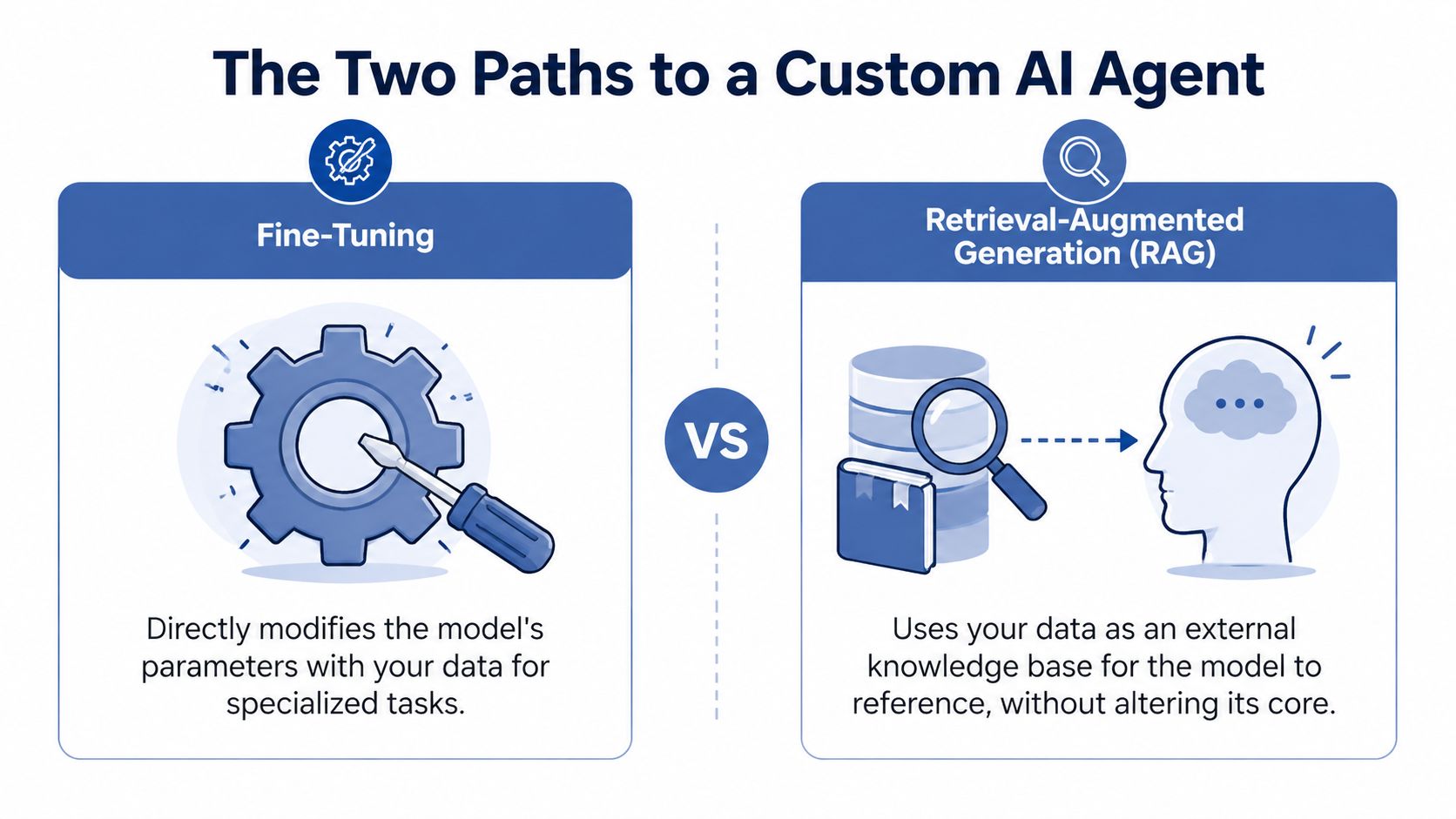
You have two main ways to make an AI agent useful with company data. Fine-tuning and Retrieval-Augmented Generation, or RAG.
Most businesses should start with RAG. Fine-tuning isn’t bad, but most companies don’t need to retrain the soldier when what they really need is to give the soldier a map, radio, and current battlefield intelligence.
Fine-tuning when behavior matters
Fine-tuning changes the model’s behavior more substantially. You use it when you want the model to internalize a specialized style, reasoning pattern, or output format.
That can make sense if you need:
- Consistent brand voice, especially across high-volume content or response generation
- Specialized classification behavior for niche document types or decision logic
- Stable formatting when outputs must follow strict structures repeatedly
The trade-off is obvious. Fine-tuning is heavier, slower to adapt, and harder to update when your source knowledge changes. If pricing, policies, product specs, or internal rules change often, you don’t want that knowledge trapped inside a static training cycle.
RAG when knowledge freshness matters
RAG keeps the core model general and connects it to your company’s knowledge base at runtime. That’s why I usually recommend it first for internal agents.
If your team asks questions like these, RAG is usually the right weapon:
| Question type | Better fit |
|---|---|
| What does our refund policy say for this scenario? | RAG |
| Summarize this account using CRM and ticket history | RAG |
| Write in our exact style across repeated outputs | Fine-tuning can help |
| Use the latest product documentation | RAG |
RAG is the better opening move because it’s faster to deploy, easier to govern, and easier to update. It also aligns with how most company knowledge functions. Living documents. Changing rules. New customer data every day.
My advice for owners
Don’t let this turn into a technical purity debate. This is a capital allocation decision.
Use RAG first when your edge comes from access to proprietary information. Use fine-tuning later when you’ve proven the workflow and want tighter behavior, tone, or specialized response patterns. In some cases, you’ll use both. RAG for current facts, fine-tuning for consistent behavior.
Train the agent less like a scholar and more like an operator. It needs current intelligence before it needs elegance.
The companies that move fastest don’t chase the most exotic architecture. They choose the shortest path to a reliable internal win, then layer sophistication only when the economics justify it.
Building the Agent's Brain With Vector Stores and Tools
Your competitor walks into a renewal call with a full account brief, open support issues, pricing guardrails, and the next best offer already drafted. You open five tabs and start digging. That gap is the war.
The agent’s brain is the retrieval and decision layer. Its hands are the tools that let it act inside your systems. Revenue comes from the combination. A model that answers questions but cannot fetch, update, route, or draft inside the workflow stays stuck in demo territory.

What the brain actually does
A vector store lets your agent search by meaning as well as keywords. It maps documents, tickets, transcripts, CRM notes, and policy files into representations the model can retrieve quickly, even when the user asks a messy question. That matters because employees rarely query systems with perfect wording. They ask like operators under pressure.
The stack is a secondary decision. Pinecone, Weaviate, pgvector on Postgres, Chroma, LangChain, and LlamaIndex can all work. The winning move is disciplined retrieval design. Chunk documents with intent. Attach metadata that reflects how the business filters information, such as region, product line, customer tier, document owner, and effective date. Enforce permissions at retrieval time, not after the answer is generated.
Then give the agent a standing operating brief. Spell out its role, approved systems, escalation rules, and refusal conditions. Clear tool descriptions matter for the same reason a military unit needs labeled equipment. Ambiguity causes friendly fire. I explain that discipline in more detail in this guide to context engineering for production AI systems.
What the hands should look like
Start with a tight tool belt tied to one business objective. Broad access is how companies create expensive chaos. Narrow, named tools are how they create repeatable output.
A strong internal agent often begins with tools like these:
- GetCustomerHistory from Salesforce or HubSpot
- CheckInventory from Shopify, NetSuite, or your ERP
- FetchPolicy from your internal knowledge base
- CreateTask in Asana, ClickUp, or Jira
- DraftReply using approved templates and brand rules
Each tool needs a clear purpose, strict inputs, and controlled outputs. If a tool can write back to a system, define exactly what fields it can touch, what approval it needs, and what audit trail it leaves behind. You should care about this because tool sprawl turns an agent from a force multiplier into an operational risk.
If you need help building this layer, skip the fantasy of a giant research team. You need engineers who understand orchestration, APIs, Python, and production systems. Companies that hire python developers for backend integration and workflow automation usually get to deployment faster than companies waiting for a single platform to solve everything.
A practical architecture pattern
Use a sales intelligence agent as the model case.
A rep asks for an account brief before a meeting. The agent retrieves CRM notes, prior emails, support history, pricing constraints, implementation milestones, and recent product usage signals. The model then produces a concise brief with risks, expansion angles, and talking points. After that, the tool layer creates the prep doc, logs follow-up tasks, and drafts the recap in the right system.
That architecture wins because it is tied to a measurable outcome. More prepared reps. Faster follow-up. Better renewal defense. Higher rep throughput.
Here’s a simple walkthrough to visualize the pattern:
I offer consulting and frameworks for grounding agents in company data with RAG and connecting them to business tools. That is one implementation option. The strategic point is larger. Build the brain around a high-value decision, then arm it with a small number of precise tools. That is how an agent starts taking territory instead of just talking.
Protecting Your Kingdom With Security and Compliance
You approve an AI agent for sales, ops, or support. Two weeks later, you realize the agent can surface pricing exceptions, customer PII, and internal HR notes to the wrong people. That is how a growth initiative turns into a serious incident.
The fix is to treat security as part of the operating plan from day one, without slowing down. If the agent touches company data, it sits inside your control environment. Run it with the same discipline you expect from finance systems, customer data platforms, and identity infrastructure.

Start with internal terrain
Companies are 24% more likely to develop internal AI agents trained on proprietary data over customer-facing ones, according to Merge’s AI agent statistics roundup. That is the right opening move for most firms.
Internal deployments give you tighter control over users, data exposure, and failure handling. They also let you prove business value before you expose the system to customers, regulators, or the press.
Use internal agents first for contained, high-value work:
- Knowledge retrieval across SOPs, product docs, and policy answers
- Workflow support such as ticket routing, QA review, and reporting prep
- Decision support such as account briefs, exception review, and research synthesis
Customer-facing agents come later. They need harder controls, legal review, and stricter testing because every bad output can hit revenue, trust, and brand reputation at once.
Build defenses in layers
Security failures rarely come from one dramatic mistake. They come from a chain of lazy decisions. Broad permissions. Unfiltered retrieval. No audit trail. No approval step for risky actions.
Set up your controls like a defense system, with each layer covering the next:
| Layer | What to enforce |
|---|---|
| Access | Role-based permissions and least privilege |
| Data handling | Redaction, anonymization, and scoped retrieval |
| Infrastructure | Private or controlled hosting where needed |
| Oversight | Logging, audit trails, and human review for sensitive actions |
If your agent can pull contracts, payroll data, customer records, or board materials without hard boundaries, what you have built is an insider threat with a chat interface.
Use the minimum data and minimum permissions required for the mission. That rule alone prevents a large share of avoidable failures.
Compliance shapes architecture
GDPR in Europe and CCPA in California should influence how you design retrieval, retention, access control, and human review. Treat those requirements as system design constraints, not cleanup work for legal after launch.
My recommendation is simple. Segment data by sensitivity. Restrict retrieval by role and region. Require human approval for regulated data, pricing discretion, legal commitments, and irreversible actions. Log every retrieval and every tool action tied to those workflows.
If you need a practical operating model for secure enterprise AI agents, start there. The winning companies build agents that answer questions and can also survive contact with auditors, customers, and competitors.
Think of security as how you keep the weapon pointed at the market instead of at your own kingdom.
From Launch to Lasting Results Through Evaluation and Scaling
Most companies celebrate too early.
They launch the agent, show a few screenshots to the team, and then move on. That’s like winning the first skirmish and declaring the whole campaign over. The hard part starts after deployment.
Measure the agent like an operator
Your first evaluation framework should be tied to the mission you picked earlier. Not generic model benchmarks. Not vibes.
Track questions like these:
- Did the support agent help humans resolve issues faster?
- Did the sales agent improve meeting prep quality and follow-up speed?
- Did the marketing agent produce usable analysis without constant rewrites?
- Did users trust the outputs enough to change behavior?
If you can’t measure business impact, what you have is software theater.
Review failures with intent
Every bad answer is intelligence.
Look at where the agent failed. Was retrieval weak? Was the context incomplete? Did a tool description confuse the action selection? Did the agent have the wrong documents, the wrong permissions, or the wrong escalation rules?
Many teams need discipline more than genius here. Review transcripts. Label failure types. Patch the system. Update prompts, retrieval logic, context files, and tool access. Then test again.
Launch is the starting gun. The moat gets built in the feedback loop.
I’d also encourage you to think beyond one-off implementations and toward an internal capability. That’s the difference between deploying a single assistant and building a repeatable operating system for AI agents inside the business.
Scale by pattern, not by chaos
Once one agent works, it’s tempting to fund five more immediately. Slow down.
Use the first win to create reusable patterns:
- A standard intake process for selecting use cases
- A shared data preparation method for ingestion and governance
- A tool registry with naming rules, permissions, and descriptions
- An evaluation cadence with business owners and technical owners both accountable
That’s how you scale without creating agent sprawl.
The strongest companies deploy agents with a repeatable playbook for choosing missions, preparing data, controlling access, evaluating outcomes, and improving over time. Once that muscle exists, every new agent gets cheaper, faster, and harder for competitors to match.
Your competitors can buy the same models. They can’t easily copy your internal knowledge, your context design, your workflow integration, or your operating discipline.
That’s the ultimate prize.
If you’re serious about how to train an ai agent on my company data, start narrower than you want, clean more data than feels exciting, choose RAG before complexity, lock down access, and treat post-launch QA like a standing war room. That’s how you turn AI from a buzzword into a weapon your business can use.