
You're probably getting two wildly different answers right now. One developer says an AI agent will cost $10,000 to $30,000. A platform says $200 a month. Both can be true, and both can mislead you if you're making a business decision instead of shopping for a demo.
I'm Samuel Woods. I've been working with ML since 2016 and Generative AI since 2019. I've watched founders burn time and budget on “cheap” agents that never made it into operations, and I've watched others use a well-scoped agent to move faster than bigger competitors.
The wrong question is “how much does an AI agent cost?” The right question is what you'll spend to get a reliable business outcome, keep it running, and make sure it doesn't create operational drag. If you're in a vertical with higher compliance pressure, this gets even sharper. For example, if you're evaluating specialized tools in legal workflows, this roundup of top legal AI agents is useful because it shows how different products package capability, workflow depth, and risk.
Table of Contents
- The Real Price of an AI Agent
- The 9 Levers That Control AI Agent Costs
- Sample Budgets: What to Expect in 2026
- The Hidden Costs of Building Your Own Agent
- Decoding Vendor Pricing Models
- A Simple Framework for Estimating Your ROI
- Your Next Move as a Founder or Marketer
The Real Price of an AI Agent
Monday morning, your team is buried in repetitive work, leads are waiting too long for a response, and someone pitches a “free” open-source agent as the fix. Three months later, you have a part-time engineer babysitting prompts, a manager reviewing bad outputs, and no clear gain on the P&L. That is how founders overspend on AI.
The sticker price is the least useful number in the room.
The cost range is wide because the product label is sloppy. Industry estimates from Deloitte's State of Generative AI in the Enterprise and vendor market pricing put a proof of concept in the low five figures, while enterprise deployments with multiple systems, controls, and workflow depth can climb into six figures fast. For many small and midsize companies, the first-year budget lands in the middle because they are paying for setup, integration, testing, monitoring, and change management on top of model access.
Two companies can both say “AI agent” and mean completely different investments. One wants an internal assistant that drafts answers from company docs. Another wants a customer-facing operator that works across CRM, billing, support, and approvals. Those are different systems, different risks, and different budget lines.
What you're actually buying
Founders who budget correctly tie the spend to an operating outcome:
- You save labor, with fewer hours spent on repetitive tasks your team should have stopped doing manually.
- You execute faster, with shorter response times, quicker routing, and less pipeline leakage.
- You make better decisions, with answers and actions grounded in the right systems and context.
- You get more consistency, with fewer dropped handoffs, fewer missed follow-ups, and less variation between employees.
A practical rule: if the agent does not remove a real bottleneck, cut the project.
Use payroll as your comparison point. Use backlog. Use missed revenue from slow follow-up. That is the frame that leads to good decisions.
A legal workflow is a good example. The software itself may look affordable, but the economics change based on review time, risk tolerance, and how often humans need to step in. If you want a category-specific benchmark, review these top legal AI agents and note how quickly “automation” turns into an operations question.
Ownership cost decides whether the investment works
Initial fees only tell you what it costs to start. Total cost of ownership tells you what it takes to keep the system useful.
That includes prompt and workflow maintenance, model usage, integration fixes, access control, QA, logging, fallback handling, vendor management, and the internal labor needed to clean up bad outputs. Open-source tools often look cheaper on day one because the invoice is small. The labor bill shows up later, inside engineering time, ops time, and managerial review.
This is why “build vs. buy” is usually a risk question before it is a technology question. If your team lacks clean internal documentation, start there. Preparing the knowledge base often drives more cost than founders expect, and this guide on training an AI agent on company data covers the operational work involved.
My advice is simple. Budget for the full system, including the humans required to keep it accurate and safe. A cheap agent that creates rework is expensive. A well-scoped agent that removes labor every week is an asset.
The 9 Levers That Control AI Agent Costs
Most vendor quotes feel vague because they hide the cost drivers inside one line item. I'd rather you see the machinery.
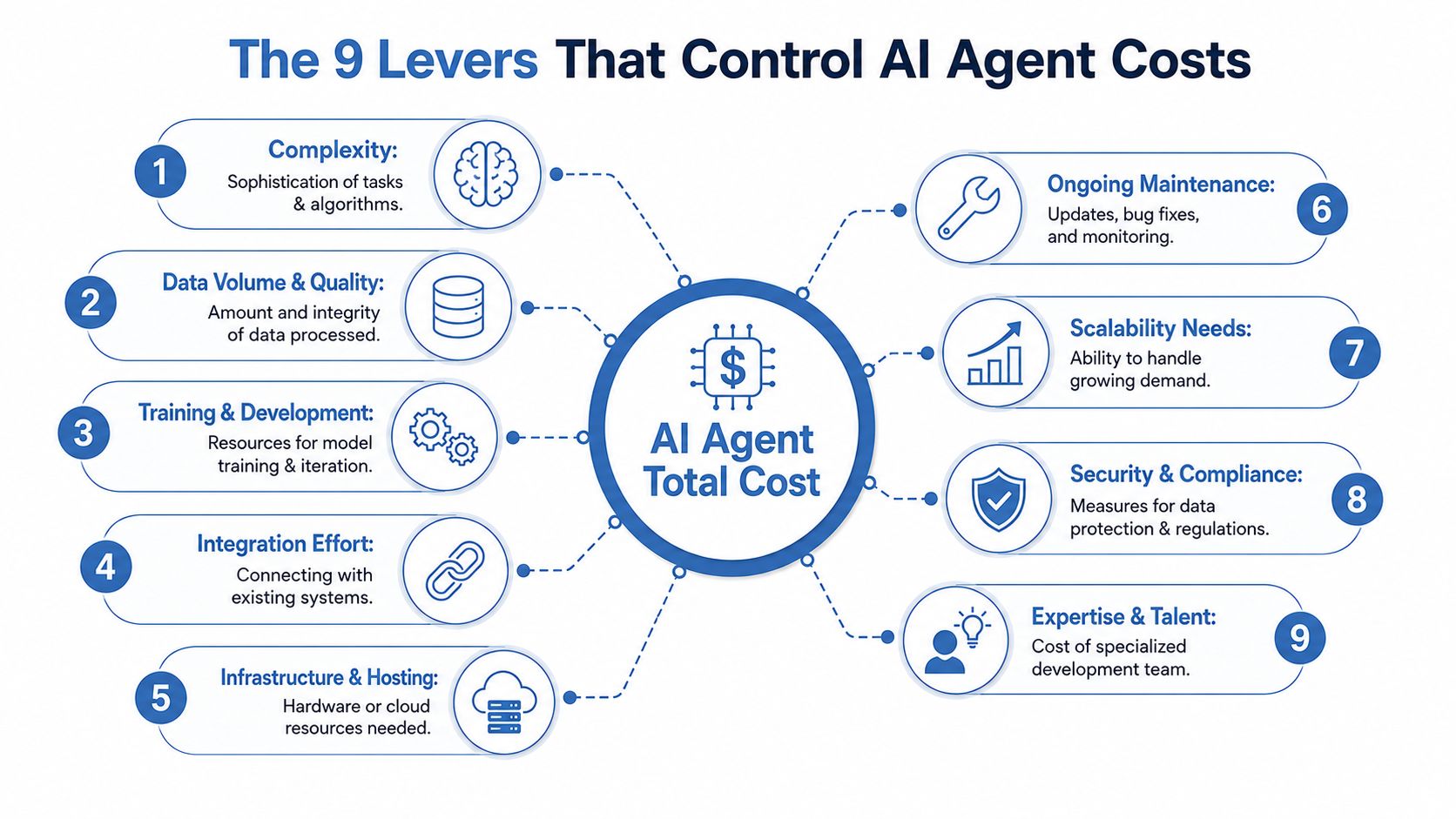
What founders usually miss
Think of an AI agent like building a revenue team member with software parts. You need a brain, memory, access to tools, guardrails, and someone who keeps it from going off the rails.
If a vendor says your agent is expensive, one of these levers is driving it. Usually several.
The nine cost levers
- Complexity
A simple agent answers questions or routes requests. A more advanced agent reasons across steps, decides what tool to use, and executes actions. The more autonomy you demand, the more engineering and testing you pay for.
- Data volume and quality
If your source data is messy, your budget goes up. Fast. An agent trained on bad knowledge bases, inconsistent docs, or stale SOPs becomes a confident liability. If you're thinking about using internal documents, this guide on training an AI agent on company data is the right place to start because data prep often drives more effort than founders expect.
- Training and development
Some agents mostly need prompt and workflow engineering. Others need custom evaluation, retrieval logic, and repeated iteration. The quote rises because you're paying for cycles of testing, fixing, and re-testing before users trust it.
- Integration effort
Turning a “nice demo” into a “real system” requires substantial effort. Connecting Salesforce, HubSpot, Slack, Zendesk, email, billing, inventory, or your internal database takes real work. Every integration adds points of failure and maintenance burden.
The agent is rarely the expensive part. The expensive part is making it useful inside your business.
- Infrastructure and hosting
You can run on managed platforms or assemble your own stack. Hosting looks simple on paper, but production environments need reliability, logging, and enough performance to avoid slow responses during live usage.
- Ongoing maintenance
Prompts drift. APIs change. Internal processes change. Team members rename fields, vendors update endpoints, and suddenly your agent starts making bad calls or failing unnoticed. That means continuous maintenance, not one-and-done delivery.
- Scalability needs
An internal assistant used by five people is one thing. A support or sales agent interacting with real prospects and customers all day is another. More volume means more usage cost, more edge cases, and more pressure on uptime.
- Security and compliance
If you handle customer records, legal docs, finance workflows, or anything regulated, your costs increase because your margin for error drops. Review, permissions, logging, and approval layers all add overhead. That's good overhead. Cheap shortcuts here are expensive later.
- Expertise and talent
Junior builders can make prototypes. Production agents require people who understand prompt engineering, context design, workflow logic, and business systems. You're paying for judgment as much as code.
My blunt recommendation
If you can't identify which three levers drive most of your quote, don't approve the budget yet.
Ask the vendor what percent of the price comes from integration, maintenance setup, and workflow complexity. If they can't explain that clearly, they probably can't control your costs clearly either.
Sample Budgets: What to Expect in 2026
A founder approves a $25,000 AI agent project because the quote looks manageable. Six months later, the actual first-year bill is closer to $70,000 once model usage, fixes, prompt updates, monitoring, and internal support time hit the P&L.
That is the number you should budget against.
Stop asking, "What does it cost to launch?" The right question is, "What does it cost to run, maintain, and trust for 12 months?" If you miss that, you will underfund the project and blame the agent for a budgeting mistake.
Three budget bands that matter
I use three planning bands.
The first is the MVP. One workflow. Tight scope. Clear success metric. The goal is to prove business value fast. The flashy demo can wait.
The second is the mid-tier production agent. This is the range where companies start getting real return because the agent is connected to revenue, service, or operating workflows that matter every week.
The third is the enterprise-grade system. Multiple agents, multiple systems, stricter controls, heavier oversight, and a larger failure radius. Budgets rise because the business risk rises.
2026 AI Agent Budget Tiers
| Tier | Initial Development Cost | Recurring Monthly Cost | Typical Use Case |
|---|---|---|---|
| MVP | $15,000 to $30,000 | $200 to $2,000 | Proof of concept, single-purpose internal agent, narrow assistant workflow |
| Mid-tier production agent | $30,000 to $100,000 | $2,000 to $5,000 | CRM-connected agent, knowledge base support agent, core team workflow automation |
| Enterprise multi-agent system | $100,000 to $500,000+ | $5,000 to $13,000+ | Multi-workflow deployment, complex orchestration, heavier governance and business-critical operations |
These ranges line up with how major vendors and consultancies price AI work. OpenAI lists usage-based API pricing that can swing monthly run costs based on model choice and volume, especially once an agent handles real customer traffic instead of internal testing. Microsoft positions Azure AI agents inside a broader stack of hosting, orchestration, and security services, which is why enterprise budgets expand fast after the prototype stage. IBM makes the same point from another angle in its coverage of AI agents and enterprise automation. Production cost is never just the model bill. See this guide to building and deploying AI agents if you need a clearer picture of how deployment choices affect operating cost.
A few sourcing points are worth keeping straight. OpenAI publishes current model and API pricing on its API pricing page. Microsoft outlines the infrastructure and service layers that sit underneath enterprise agent deployments in its Azure AI Foundry documentation. IBM explains the operational demands of production agents in its AI agents overview.
What I'd actually budget
If you are a small business founder, budget the middle of the range, not the floor.
The floor buys experimentation. The middle buys something your team can rely on.
My advice is simple. Build your model around first-year total cost of ownership. Include the initial build, monthly platform or API spend, human review time, maintenance, and internal owner time. That is the number that matters because "cheap" agents often stay cheap only when nobody important uses them.
If your agent touches leads, customers, or delivery, set the budget as if it will succeed. Success increases usage. Usage increases cost. That is a good problem, but only if you planned for it.
The Hidden Costs of Building Your Own Agent
Open-source frameworks seduce smart founders. I get the appeal. You see LangChain, CrewAI, and a stack of tutorials, and it feels like you can avoid vendor lock-in, save money, and keep control.
Then the maintenance bill shows up in your team's time.
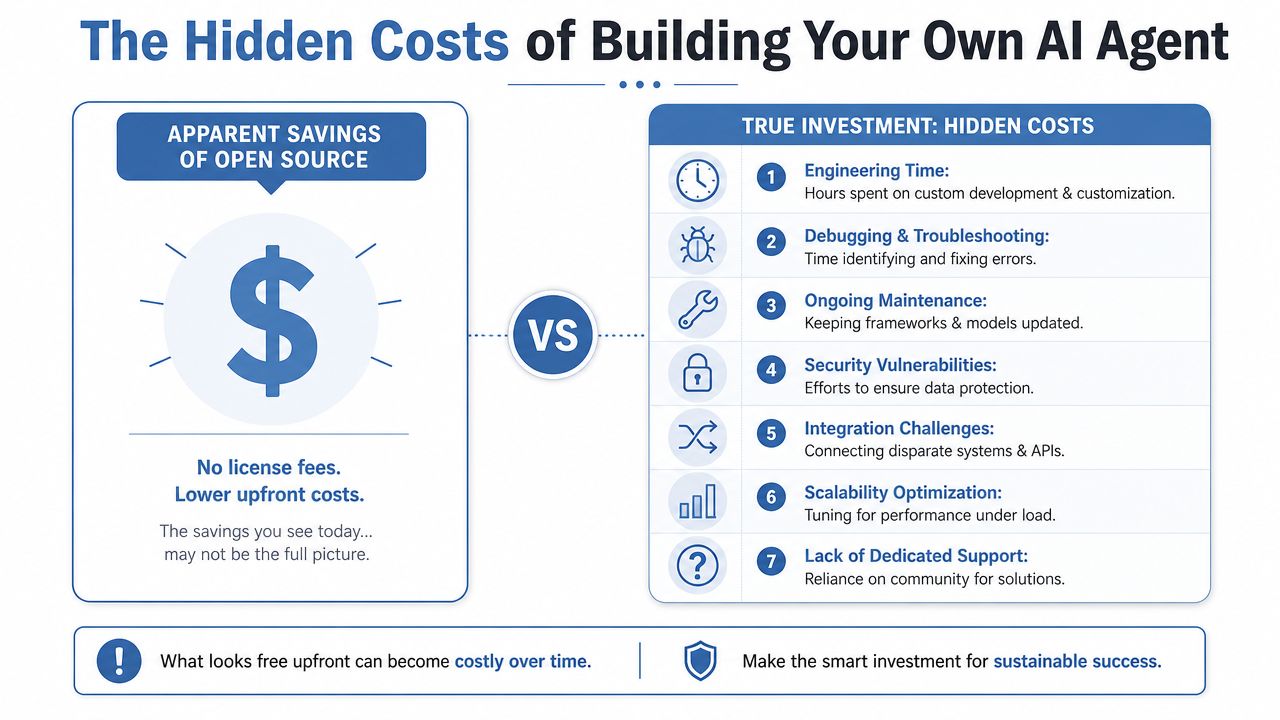
Why open source looks cheaper than it is
Managed platforms can look inexpensive at $19 to $150 per month, but self-hosted frameworks carry $375 to $3,000 per month in hidden maintenance and engineering time, according to this analysis of AI agent hidden costs. That number matters because founders often compare subscription fees to infrastructure fees and forget to count labor.
Labor is the cost center.
If your technical lead spends time fixing prompt regressions, integration breaks, framework updates, and monitoring issues, that time costs real money. It's pulled away from shipping product, serving clients, or building the growth systems that differentiate your company.
Where the hidden bill comes from
Here's what usually gets ignored in self-hosted builds:
- Engineering upkeep covers framework changes, version conflicts, and tool-call issues.
- Monitoring means someone has to notice failures before users do.
- Security takes work, because permissions, data exposure, and auditability don't solve themselves.
- Integrations drift as third-party systems change and your workflows break.
- Someone needs operational ownership. When the agent fails on a weekend, someone owns that problem.
If you want the broader strategic view, I covered that trade-off in this guide to building and deploying AI agents.
Cheap software with expensive attention is not cheap.
When build does make sense
I have nothing against building. I object to fantasy budgets.
Build your own agent if one of these is true:
- You need control because the workflow is unusual and managed platforms can't support it cleanly.
- You have internal talent, and a capable team can own the stack without derailing core priorities.
- You need deeper system access because your agent must operate across proprietary tools or internal logic that off-the-shelf products won't handle well.
Don't build if you're mainly chasing savings. That logic breaks for most SMBs. The hidden labor cost eats the delta, and the operational risk makes the business less agile, not more.
Decoding Vendor Pricing Models
Once you decide not to fully build from scratch, you hit a different problem. Vendor pricing pages are messy on purpose.

The three models you'll run into
First, there's the flat subscription. This is the simplest model. You pay a monthly fee and get a defined level of access. It's easier to budget, and for many SMBs it's the least painful way to start.
Second, there's usage-based pricing. You pay based on API calls, model usage, or workload volume. That can be fair when volume is low or irregular, but it gets dangerous if adoption spikes and nobody's watching the bill.
Third, there's cost per action. This is the one I want you to scrutinize hard. In 2026, platforms like Salesforce Agentforce shifted to $2 to $5 per agent action, while SME-focused ranges often stay in the $500 to $5,000 per month band. The same analysis notes that a human service interaction costs $6.00, while an AI session costs $0.50 to $2.00, but high volume can make budgets unpredictable if you don't model action counts first, according to this breakdown of AI agent pricing models.
If you want to see how pricing pages package features and plans in the wild, this review of GPT Uncensored pricing plans is a useful comparison point.
How I'd choose
If your workflow volume is predictable, I prefer flat pricing. Finance likes it. Operators like it. Surprises stay lower.
If your workload is seasonal or experimental, usage-based can work. But you need caps, alerts, and someone who owns cost monitoring.
If a vendor pushes per-action pricing, ask very direct questions:
- What counts as one action
- What happens when a workflow branches
- How retries are billed
- Whether failed actions still incur cost
- What reporting you get before the invoice lands
For a broader stack view, I often point teams to practical comparisons of AI tools for business growth so they can see how pricing aligns with business use cases rather than just model access.
A quick walkthrough helps if your team needs the mechanics explained visually.
My view is simple. Choose the pricing model that matches how your business creates value, not the one that makes the demo easiest to buy.
A Simple Framework for Estimating Your ROI
Cost matters. ROI decides whether the project deserves oxygen.
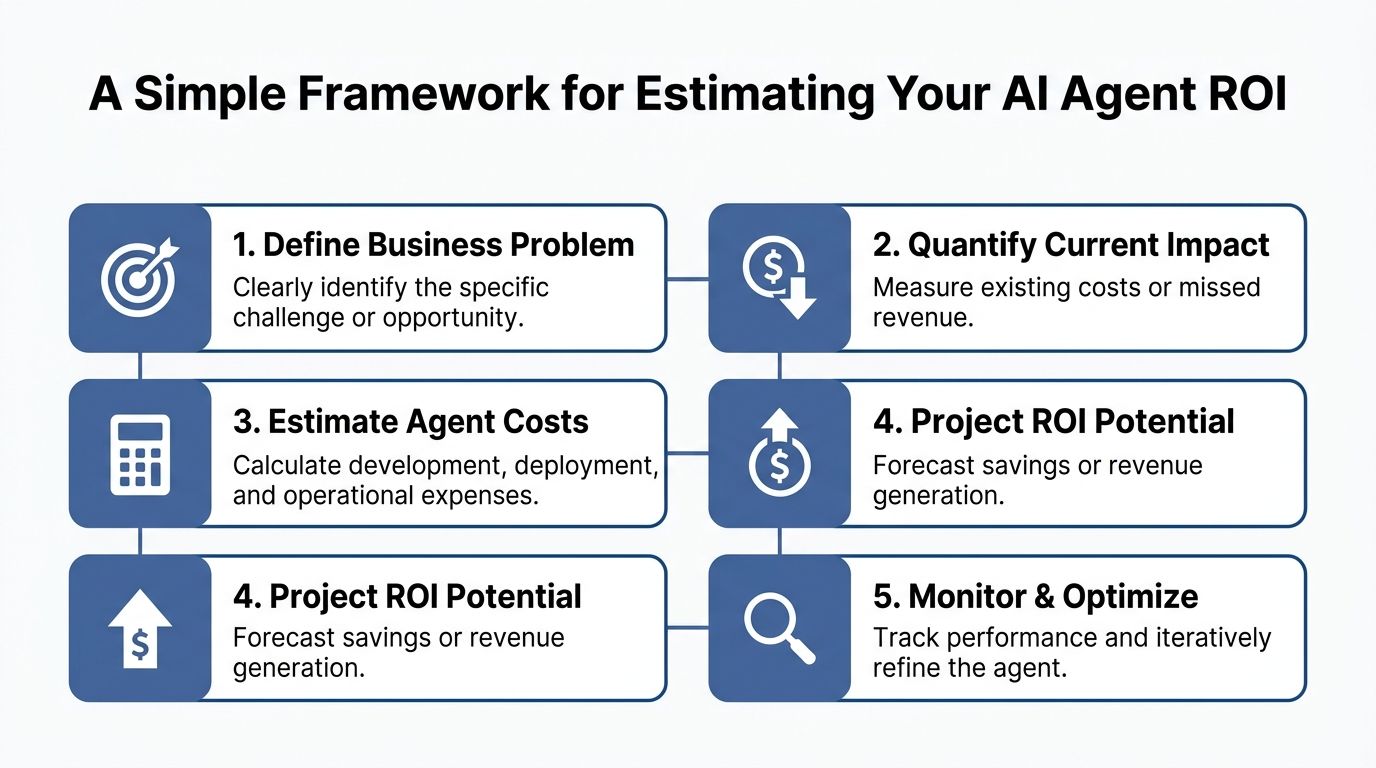
The five-part ROI check
I use a simple framework with founders. No spreadsheet theater. Just operational math.
- Define the business problem
Pick one workflow. Support triage. Lead qualification. Invoice processing. Sales follow-up. If the use case is fuzzy, ROI will be fuzzy too.
- Quantify the current drag
What does the current process cost you in labor, delay, missed response time, or backlog? Use your own internal numbers here. You don't need abstract benchmarks. You need your current pain.
- Estimate full agent cost
Include build, setup, monitoring, and recurring run costs. If you ignore maintenance, your ROI case is fiction.
- Project savings or revenue impact
Model the most direct gains first. Faster responses. Lower manual processing time. More capacity without adding headcount. Better service consistency.
- Measure after deployment
Don't stop at launch. Track whether the agent is reducing cost or increasing throughput in the workflow you funded.
A one-minute test: if you can't explain the ROI in one minute, the project isn't scoped tightly enough.
Where the business case gets strong fast
There are a few use cases where the business case is especially clean.
Customer support is one. In 2026, customer support AI agents handle 40 to 60% of tier-1 tickets, and the average human customer service interaction costs $6.00 compared to $0.50 for an AI agent interaction, based on this business AI agent cost and ROI analysis. That gives you a direct cost comparison tied to a repeatable workflow.
Invoice processing is another. The same source reports $8,000 to $15,000 per month in savings with a 3 to 6 month payback period for invoice processing agents. Founders love flashy use cases. Finance loves short payback periods. You need both, but finance usually wins.
My recommendation on ROI modeling
Start with use cases that have one of these characteristics:
- High repetition, where the same task happens over and over.
- Clear unit economics, where you know what each interaction or process costs today.
- Low ambiguity, where the workflow has rules, approvals, or structured outcomes.
- Competitive urgency, where faster execution would visibly help you win deals or serve clients better.
Skip broad “AI transformation” projects. They sound strategic and behave like budget leaks.
Your Next Move as a Founder or Marketer
A founder greenlights a “cheap” AI agent, then gets the second invoice. Internal engineering time. QA. Prompt tuning. Failure handling. Vendor overages. Suddenly the low sticker price is the smallest line item in the project.
Budget for the full operating cost. That is the only number that matters if you care about margin, reliability, and speed to value.
If you are still asking how much an AI agent costs, ask better questions. What labor does it remove? What revenue does it protect or create? What will it cost to maintain once real users hit it with edge cases? How much management time will your team burn if you choose a “free” open-source stack and own every failure yourself?
My advice is simple.
Pick one workflow where labor cost, response time, or missed follow-up already hurts the business. Choose something dull, repeatable, and measurable. That is where TCO is easiest to control and ROI is easiest to prove.
Then answer these two questions before you approve any spend:
- What exact business outcome am I buying?
- Who owns performance, maintenance, and exception handling after launch?
Those answers expose the underlying economics. If the outcome is vague, the budget will drift. If ownership is fuzzy, hidden labor costs will pile up inside your team and erase the savings you expected.
This is also where founders get build-versus-buy wrong. Open-source looks cheap because the software license is cheap. The labor is not. Every hour your team spends wiring tools together, monitoring failures, updating models, and handling security reviews is part of the bill. Count it.
The teams that get value from AI agents treat them like operating assets with an owner, a budget, and a target payback period. Do that, and the agent becomes an asset. Skip it, and you bought your team another system to babysit.
