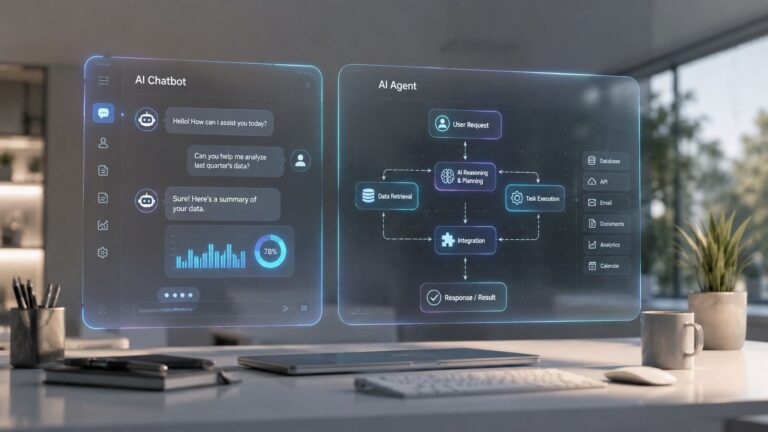
You're probably in this spot right now. Your team has a chatbot live on the site, in support, maybe inside Slack or Intercom, and everyone keeps calling it “AI.” Customers still get stuck. Sales still waits on follow-up. Ops still cleans up exceptions by hand.
That's the problem. The real decision is whether you want a system that responds or a system that drives outcomes. I'm Samuel Woods, a Fractional Chief AI Officer. I've been working with ML since 2016 and Generative AI since 2019, and I can tell you this plainly: most companies buy conversational convenience when they need operational advantage.
For founders and owners, the core issue in AI agents vs chatbots is whether the tool creates revenue, protects margin, and increases your speed against competitors without introducing unmanaged risk. A weak chatbot gives you the appearance of automation. A well-governed agent gives you execution capacity.
Table of Contents
- Your Chatbot Is a Liability, Not an Asset
- The Real Difference Between Responding and Resolving
- A Head-to-Head Capability Comparison
- Mapping the Right AI to Your Business Goal
- The Governance Gap Nobody Talks About
- Measuring ROI and Scaling Your AI Workforce
Your Chatbot Is a Liability, Not an Asset
I'll be direct. If your chatbot can answer easy questions but breaks the moment a customer needs a real outcome, it's a friction layer sitting between your buyer and your team.
That's why I push founders to stop treating this like a UX upgrade. In AI agents vs chatbots, the decision is strategic. One tool is built to deflect work. The other is built to finish work.
A lot of companies still deploy a bot that can explain policy, surface help docs, or route tickets, then act surprised when customers abandon the interaction. The customer didn't show up to admire your automation stack. They showed up to get a refund, rebook an order, solve a billing issue, or move forward in a sales process.
A practical rule: if the customer still needs a human after the bot answers, you probably automated the wrong layer.
I've spent years helping teams apply prompt engineering, context engineering, automations, and agents inside actual businesses. The split is obvious once you see it. A chatbot is usually a narrow interface. An agent is closer to a digital operator with reasoning, memory, and tool use.
That's why a lot of SMB support stacks feel cheap in all the wrong places. They optimize for message handling instead of issue resolution. If you're evaluating support use cases, my take on the best AI agent for customer support for small business gets into what that looks like in practice.
What founders usually get wrong
Most founders ask, “Can this answer customer questions?” Wrong question.
Ask these instead:
- Can it complete the workflow? Think refund, reschedule, qualify, route, update, notify.
- Can it operate across systems like your CRM, help desk, warehouse, billing, and marketing tools?
- Can my team control it through approvals, escalation, auditability, and policy boundaries?
If those answers are weak, your chatbot is absorbing traffic and handing back partial value.
The Real Difference Between Responding and Resolving
Most comparisons in AI agents vs chatbots are shallow because they fixate on features. You and I care about business output. The cleanest distinction is this: chatbots respond, agents resolve.
A chatbot waits for a prompt and follows a defined path. An agent takes a goal, plans steps, uses tools, and keeps moving until the task is done or handed off intelligently. That shift changes support, sales, operations, and marketing.
According to Slack, chatbots handle predictable, linear interactions by following predefined logic and requiring human prompts to initiate actions, while AI agents proactively identify needs, act independently, and manage complex workflows and variable scenarios using real-time data in decision-making (Slack on AI agents vs chatbots).
A chatbot gives answers
That's useful in narrow environments.
A chatbot works when the path is structured and the stakes are low. “What's your refund policy?” “Where's my order?” “What are your support hours?” Fine. Fast answers matter there, and you don't need orchestration overhead.
But that same architecture falls apart when the request is messy. A customer says, “My invoice is wrong, I changed my plan last week, and now my account access is broken.” That's a multi-system operations problem, well beyond content retrieval.
An agent finishes the job
An agent can interpret the goal behind the message, collect context, pull from relevant systems, and take action. That's a different class of capability.
Adobe outlines four core capabilities that separate agents from chatbots: role-playing, memory systems, tool assignment, and execution loops. Chatbots are stateless and reset every session, while agents can track progress over days or weeks and continue until the task is complete (Adobe on agents, assistants, and chatbots).
Responding reduces queue volume. Resolving reduces operational load.
That's why this matters commercially. A response might satisfy an inquiry. A resolution protects retention, shortens time-to-value, and clears work from your human team.
The business lens that matters
If you run support, a chatbot can reduce repetitive noise. If you run growth, a chatbot can qualify basic intent. If you run an ecommerce operation, a chatbot can explain shipping timelines.
If you want a system that can execute, the standard changes:
- It has to pursue an outcome instead of only replying (goal orientation).
- It has to remember where the workflow stands (context retention).
- It has to operate across tools instead of only talking about them (action capability).
That's the line most vendors blur. Don't let them. In the AI agents vs chatbots debate, completion is the main buying criterion, ahead of surface-level conversation quality.
A Head-to-Head Capability Comparison
The capability gap here is wide enough to change how you staff your company. If you choose correctly, you automate chunks of execution along with the replies.
Here's the visual version first.
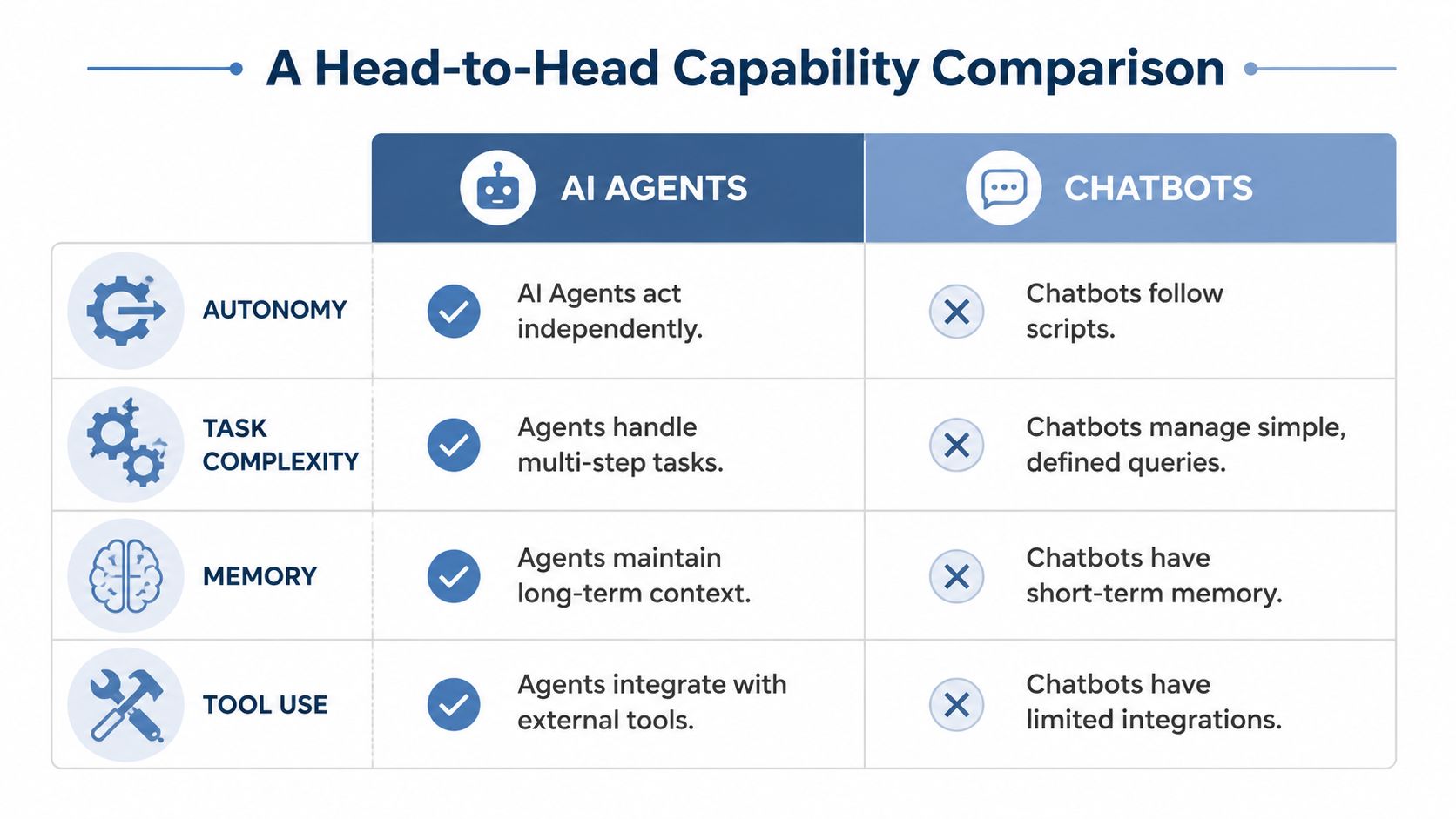
Capability table first
| Capability | Chatbot (Responds) | AI Agent (Resolves) |
|---|---|---|
| Autonomy | Waits for user prompts and follows preset flows | Acts independently toward a defined goal |
| Task complexity | Best for simple, linear interactions | Handles multi-step workflows and variable conditions |
| Memory | Typically session-bound and limited | Maintains context across longer-running work |
| Tool use | Limited integrations, usually retrieval-focused | Works across APIs, CRMs, databases, and operational systems |
That table is the practical version of the technical shift.
DevRev reports that AI agents resolve 40–80%+ of support interactions end-to-end, while traditional chatbots and RAG-based tools resolve only 10–20% of such interactions, a fourfold to eightfold improvement in autonomous resolution rates (DevRev on AI agents vs chatbots). That's a different operating model.
Where agents pay off
Here's how this maps to business goals.
If your goal is to answer policy questions at scale, use a chatbot. You don't need a reasoning loop to tell someone your office hours. Keep it simple, cheap, and tightly scoped.
If your goal is to reduce support headcount pressure, an agent becomes viable because it can diagnose, decide, and act. If your goal is to automate sales outreach, the gap gets even bigger. Salesforce gives a clear example: a chatbot can define a sales territory from preset rules, while an AI agent can prioritize regional prospects for the day and draft outreach emails autonomously (Salesforce on AI agents vs chatbots).
The same logic applies in marketing ops. A chatbot can answer campaign FAQs for internal teams. An agent can pull data from your CRM, spot inactive leads, draft follow-up sequences, and trigger workflow updates. That's where prompt quality also matters. If your team is still weak on task design, a resource on effective AI prompts can help improve how you structure instructions before you layer in deeper orchestration.
Here's the advice I give most owners:
- Choose chatbots for bounded language tasks such as FAQs, status checks, and scripted triage.
- Choose agents for system-level execution such as lead qualification, returns processing, billing remediation, and onboarding coordination.
- Don't force agents into trivial work, because a simple FAQ bot doesn't need a planning engine.
For teams building out an internal AI roadmap, I've written more about what makes a real intelligent AI agent different from a dressed-up chat interface.
If your workflow touches multiple systems and the outcome matters, buying a chatbot is usually under-buying.
Mapping the Right AI to Your Business Goal
Stop asking which technology sounds more advanced. Ask what job needs to get done and how much autonomy your organization can safely handle.
This is the simplest decision map I use with founders.
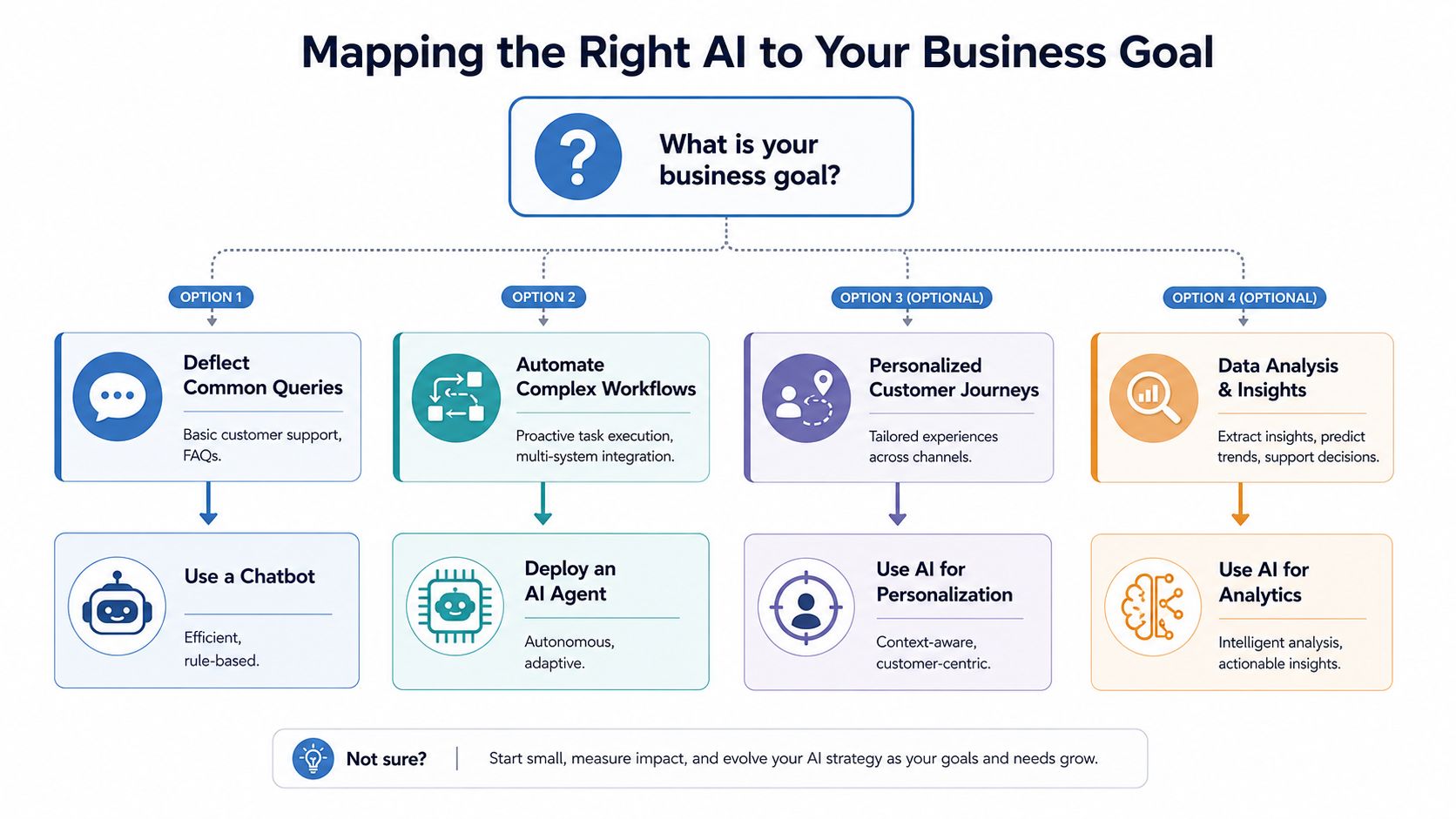
Use a chatbot when the work is narrow
A chatbot is the right call when the task is predictable and the business value comes from speed, availability, and consistency.
Good examples:
- Support FAQ handling, such as shipping windows, password reset guidance, return policy details.
- Basic lead capture, such as name, email, company size, demo request routing.
- Internal help desk intake, such as standard HR or IT questions with known answer paths.
That's not glamorous, but it works. A lot of companies should keep a chatbot in these lanes and stop pretending it's an autonomous system.
Use an agent when the goal matters more than the conversation
An agent makes sense when the outcome requires judgment, tool use, or several linked actions.
Use an agent for work like:
Complex support resolution.
Think “Process the refund, update the CRM, notify finance, and create the warehouse return” instead of “What's your refund policy?”Lead qualification and follow-up.
Think “Review firmographic data, score urgency, draft outreach, and queue the right rep” instead of “What plan are you interested in?”Operations coordination.
Inventory updates, cross-functional approvals, and triggered notifications across systems.
Ivern's 2026 benchmark tested 10 real-world multi-step tasks. AI agents completed 9 out of 10 autonomously, while chatbots succeeded on only 1 out of 10. In one example, a 5-step research task took 10 minutes of active prompting with a chatbot but was completed in under 90 seconds by an agent (Ivern benchmark on agents vs chatbots).
That gap matters because your competitors are compressing the time between signal and action, well beyond automating replies.
Your decision should track workflow complexity, not vendor marketing.
A practical ecommerce example makes this obvious. A chatbot can tell a buyer how returns work. An agent can initiate the return, update inventory, alert fulfillment, and sync the customer record. If you're thinking about agent-led commerce flows and system connectivity, this breakdown of an Ecommerce API is useful for understanding the infrastructure side.
The catch is organizational readiness. The biggest blocker to agent adoption is usually whether your company can manage autonomous behavior without creating support chaos, compliance exposure, or bad customer outcomes.
The Governance Gap Nobody Talks About
Most AI agents vs chatbots content ignores the hardest part. Capability gets all the attention. Governance decides whether the deployment survives.
Here's the reality in one image.

Why agent risk is an operational problem
A chatbot mostly needs content review, testing, and escalation paths. It says things. An agent does things.
Elementum highlights the overlooked issue well: the governance and runtime control gap matters because AI agents require real-time behavioral monitoring, detailed audit trails, and compliance controls for regulations like SOX or HIPAA, since they can autonomously execute transactions. That's a risk most “vs.” comparisons ignore (Elementum on the governance gap).
That changes the decision for founders.
If your agent can update CRM records, trigger campaigns, process refunds, modify tickets, or push operational actions into downstream tools, then bad behavior becomes a financial and compliance issue instead of a UX annoyance. The operational question moves past “Is the answer good?” to “Was the action appropriate, traceable, reversible, and policy-compliant?”
What governance actually requires
Many startups are underbuilt. They buy autonomy before they build controls.
You need at least these layers:
- Behavioral monitoring tracks what the agent is doing in production, beyond what it was supposed to do in staging.
- Audit trails record the decision context, tool calls, and outputs so your team can inspect failures.
- Confidence thresholds and escalation rules make certain actions pause and hand off when ambiguity rises.
- Compliance mapping ties GDPR, HIPAA, SOX, or internal data policies to concrete permissions and workflows.
Rasa's contact center guidance is useful here because it grounds measurement in operations. It recommends tracking metrics such as deflection rate, containment rate, automation rate, solution or resolution rate, and CSAT, with CSAT as the primary optimization metric. For LLM-based tools, it also calls for tracking cost, latency, prompt injection vulnerability, and policy adherence rate (Rasa on measuring AI agent performance).
If you're designing around an agent-led org model, I've also written about what an agent-first org chart looks like when responsibilities, approvals, and oversight are assigned properly.
The more autonomous the system, the less you can rely on “we tested it before launch” as your control model.
That's the blind spot. A chatbot can be annoying. An ungoverned agent can create expensive messes at machine speed.
Measuring ROI and Scaling Your AI Workforce
An AI pilot that looks cheap in a dashboard can become expensive fast once it starts making decisions inside your operation. Don't fund novelty. Fund lower cost, faster execution, higher retention, and more output per employee without creating new compliance exposure.
That is why weak AI programs fail. They track usage, not business impact. Worse, they ignore the operating burden that comes with autonomy.
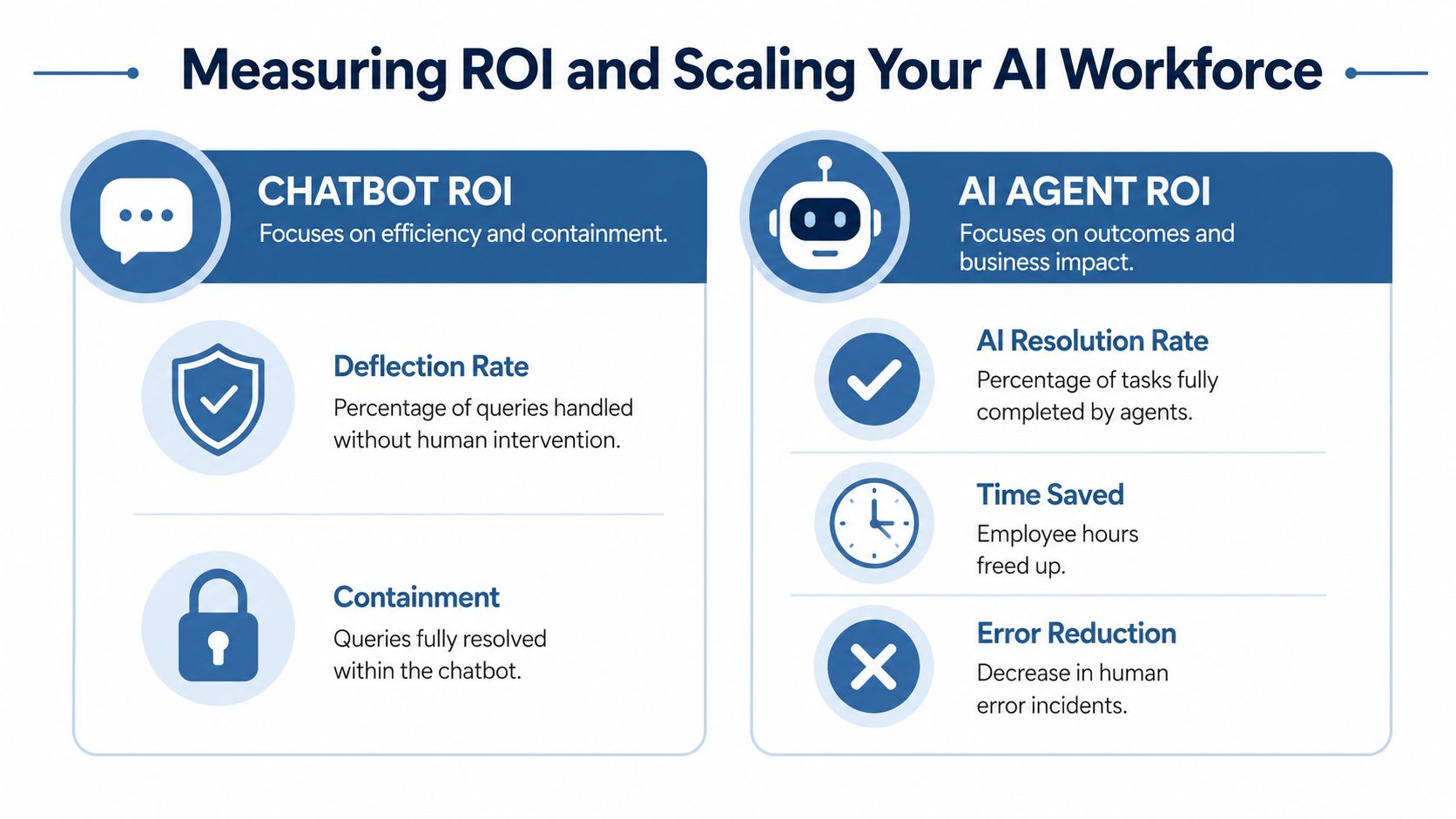
Measure the right thing
Chatbot ROI is usually an efficiency question. Did it reduce repetitive conversations, contain requests, and ease queue volume?
Agent ROI is different. You are paying for completed work, and faster replies are only part of it. That means the scorecard has to center on resolution quality, labor removed, cycle time reduced, error rates, rework created, and the cost of oversight.
Quickchat has noted that agent economics often look better than chatbot economics when you measure cost per resolved outcome instead of cost per interaction. That is the standard that matters. A cheaper interaction is irrelevant if your team still has to finish the job.
A practical ROI lens
If I were advising a small business owner, I would separate the decision this way.
| System | Primary ROI question | Best-fit metrics |
|---|---|---|
| Chatbot | Did it reduce repetitive workload? | Deflection, containment, fallback patterns |
| AI agent | Did it complete valuable work correctly and safely? | Resolution rate, cost per resolution, rework rate, CSAT by AI interaction, policy adherence, exception rate |
This distinction stops a common budgeting mistake.
A chatbot can post strong efficiency numbers while pushing unresolved work downstream to sales, support, or operations. An agent can cost more to run per task and still win because it closes the loop, removes labor, and cuts delay across the business. But if that same agent creates approval conflicts, bad CRM updates, or audit problems, the ROI model collapses. Founders miss that part all the time.
How I'd advise an owner to scale this
Do not scale agents by enthusiasm. Scale them by control maturity.
Keep chatbots on narrow, high-volume, low-risk tasks.
FAQs, routing, simple lookups, and basic policy explanations. This is stable work with limited downside.Deploy agents where completed resolution creates margin.
Use them in support flows with repeatable action paths, lead qualification that writes into CRM, and operations tasks spread across multiple systems. Pick workflows where success produces measurable financial gain.Price in supervision from day one.
An agent costs more than it looks if you spend hours reviewing outputs, fixing records, or handling customer fallout. Include human review time, exception handling, and incident response in your ROI model.Expand permissions in stages.
Start with read access. Then allow narrow write actions with approval gates. Broaden autonomy only after the system proves it can operate within policy at production volume.Scale by function instead of by slogan.
Support is often first. RevOps is next. Then selected ecommerce or internal operations use cases. An “AI workforce” claim means nothing. A system tied to margin improvement, response time, and service quality does.
One build decision matters here. Off-the-shelf platforms work when speed and standardization matter most. Custom stacks make sense when workflows are specific, controls are strict, or the reasoning layer is part of your advantage. Many teams combine model providers, orchestration tools, and systems such as CRM, Slack, or Zapier. If you want a structured path for deploying agents in lead generation and qualification, instead of adding another chat interface, I offer that as Build AI Agents for Business.
I would enforce a few rules.
- Do not judge on one metric alone. Low operating cost means little if escalation, rework, or churn rises.
- Do not scale autonomy faster than governance capacity. If your team cannot review decisions, trace failures, and assign accountability, your agent footprint is already too large.
- Do not buy a chatbot for a workflow that requires execution. If the task depends on taking action across systems, a reply engine will disappoint you.
- Do not treat agent headcount as free. Every autonomous workflow adds policy design, monitoring, access management, and failure handling.
Quickchat expects AI agents to become the default choice for more new conversational AI projects over the next few years. That shift will happen. But it will reward businesses that operate agents as managed production systems over founders chasing a demo.
The bottom line is straightforward. Use a chatbot when the job is answering. Use an agent when the job is completing work. If your company cannot monitor, govern, and audit autonomous behavior at scale, keep the scope tight until it can.
Capability matters. Operational readiness decides whether that capability turns into profit or expensive disorder.
