
Your marketing team probably has plenty of ideas and too little operating capacity.
You ship a campaign, then lose half a day repackaging it for social. You tweak ad copy manually because performance slipped. You pull reports late at night because nobody trusts the dashboard. Then next week starts, and the whole cycle repeats. That's how small teams stay busy and still get outpaced.
I'm Samuel Woods, and I've been working with ML since 2016 and generative AI since 2019. I've watched a lot of founders get distracted by flashy demos while their actual marketing machine stays fragile, slow, and dependent on heroic effort. That's the wrong game.
Autonomous marketing workflows for small teams mean building a system that handles routine execution, responds to triggers, and keeps moving without constant supervision, while your marketers stay in charge. The shift became practical in the mid-2020s, when AI systems moved beyond single-task automation into cross-platform execution that could analyze data, formulate strategies, execute campaigns, and optimize from feedback loops, as described in this 2026 review of AI marketing agents for small businesses.
That matters because small teams finally got access to capabilities that used to require multiple specialists. Planning. Writing. Publishing. Optimization. All coordinated. Not perfectly. But well enough to create a real operating advantage.
Time savings alone are a small prize. The bigger one is redeploying your best people onto revenue work. Better offers. Better positioning. Faster testing. Tighter sales alignment. The team that automates execution while protecting quality gets more market reps than the team still moving tasks by hand.
Stop Drowning in Marketing Busywork
Monday starts with good intentions. By Thursday, your marketing lead is chasing approvals in Slack, reformatting one campaign into four channel versions, pulling numbers from three dashboards, and pasting updates into a doc no one will read next week.
That is an operating problem, and more talent won't fix it.
Small teams get trapped in manual coordination work that looks productive because everyone stays busy. The output says otherwise. Campaigns ship late. Reporting lags. Follow-up breaks. Good ideas die in review queues. Meanwhile, a competitor with a tighter system runs more tests, learns faster, and compounds those gains every week.
The fix is a controlled autonomous workflow. Extra hustle won't substitute for one.
If you are new to AI agents for marketing and operations, start with the boring work first. Distribution. Reporting. Lead routing. Approval collection. Those tasks create drag, and they also create risk when they depend on someone remembering the next step. A reliable autonomous system removes that fragility by handling repeatable execution the same way every time, with clear rules, approval points, and fallbacks when something looks off.
Faster systems beat busier teams
Busy teams confuse motion with progress.
Your team can spend all week producing assets and still lose to a smaller competitor that publishes on schedule, follows up faster, and reviews performance without manual assembly. That gap has nothing to do with creativity. It comes from execution speed and consistency.
I want founders to focus on one question: where does handoff friction slow revenue? Usually the answer is obvious. A webinar goes live, but no one republishes the clips. A high-intent lead fills out a form, but sales gets the context too late. A paid campaign underperforms, but the team notices after the budget is already burned.
Those are workflow failures. They are fixable.
A useful operating standard is simple. If a task happens repeatedly, follows known rules, and still eats attention every week, automate it with supervision built in. Teams trying to optimize B2B marketing automation usually get the best results when they stop automating isolated tasks and start automating complete sequences with ownership, approvals, and exceptions clearly defined.
Capacity is only valuable if you can trust the system
Saved time is meaningless if the system creates cleanup work, brand risk, or silent mistakes.
That is why I do not advise founders to chase fully hands-off marketing from day one. Build for reliable throughput first. Your autonomous workflow should draft, route, publish, notify, and log what happened. It should also stop when confidence is low, when required inputs are missing, or when a human approval is required. Control beats novelty.
Here is what that changes in practice:
- Content distribution gets consistent. One approved source asset can feed email, social, and supporting campaign tasks without someone manually rebuilding the same message in each channel.
- Reporting gets credible. Performance updates are collected and summarized on a schedule, with source data attached, instead of living in screenshots and memory.
- Lead response gets faster. Qualified intent triggers routing and context delivery immediately, rather than waiting in an inbox or spreadsheet.
- Approvals stop clogging execution. The system knows what can run automatically and what must pause for review.
That is the advantage small teams should want. More output, yes. More control, too.
What deserves your effort is a workflow you can trust under real operating pressure. Autonomy comes second.
Designing Your Autonomous Marketing Architecture
A common mistake is treating autonomous marketing like a stack of connected apps, a few prompts, and a hope that nothing breaks after you hit publish.
That approach fails under real operating pressure. Small teams need an architecture that decides well, pulls from the right signals, and acts within clear limits. If you skip that design work, you get messy outputs, approval bottlenecks, and silent errors that only show up after revenue slips.
I use a simple model: Brain, Senses, and Hands.

Brain
The Brain handles judgment. It decides what should happen next, what should wait, and what should stop.
For a founder building a first autonomous system, this layer should contain decision rules, approved messaging context, escalation logic, and approval thresholds. Do not treat the model like a copy machine. Treat it like an operator working from a written playbook with limited authority.
That distinction matters. A useful system does more than draft content. It checks the situation, picks the next action, and follows policy. If confidence is low, the Brain should pause the workflow and ask for review.
Senses
The Senses collect the signals that make decisions possible. CRM field changes, form submissions, campaign performance shifts, new content approvals, customer status updates, and sales notes all belong here.
Keep this layer narrow. More signals do not create better automation. They create noise unless each signal maps to a real action.
The right question is simple: what events should change what the system does?
| Layer | What it handles | Typical examples |
|---|---|---|
| Brain | Decision logic and reasoning | Model prompts, brand rules, approval logic |
| Senses | Event detection and context input | CRM updates, analytics events, form fills |
| Hands | Execution across tools | Email sends, social drafts, task creation |
Hands
The Hands execute approved work inside your tools. They create drafts, publish assets, update records, notify the team, assign follow-ups, and log what happened.
Founders often get reckless. They give execution systems broad publishing access before they have review rules, audit trails, or rollback steps. That is backwards. Start with narrow permissions. Let the system draft, route, and prepare. Expand authority only after it proves it can operate without causing cleanup work.
HubSpot, Make, Zapier, Slack, your CMS, ad platforms, and email tools usually sit in this layer. Their job is execution. Judgment stays in the Brain.
Build for control first
A rule-based automation might turn a blog post into one social draft.
A controllable autonomous workflow does more. It checks the post category, matches it to the right audience, adapts the angle by channel, routes anything sensitive for approval, publishes only after approval clears, then records the outcome for review. That is the standard you want.
If you're trying to optimize B2B marketing automation, separate decision-making from execution from day one. That structure keeps the system understandable, governable, and easier to debug when something goes wrong.
For a more detailed explanation of how these systems operate in practice, see my guide on AI agents for business workflows.
Build the Brain first. Connect the Senses second. Give the Hands limited authority until the system earns more trust.
Defining Agent Roles and Trigger Events
A founder publishes a new article on Tuesday. By lunch, LinkedIn copy is drafted, the email summary is waiting for approval, paid-social variations are tagged for review, and every action is logged. No one is chasing assets across Slack. No one is guessing who owns the next step. That is the standard.
Agent design decides whether your workflow saves time or creates cleanup work. Give every agent one job, one trigger, and one output. If a role needs a paragraph to explain, it is too broad.
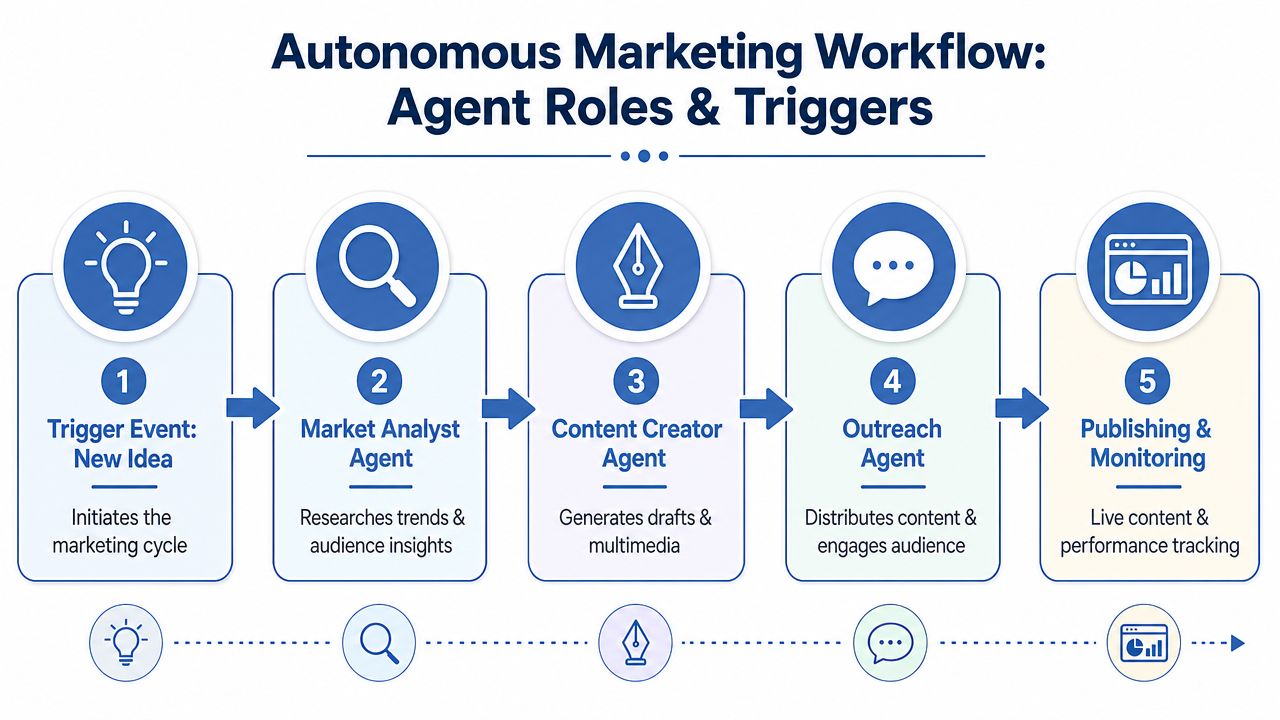
Three agent roles worth building first
The first role is the Market Scout.
This agent monitors change. It tracks competitor messaging shifts, recurring objections from sales calls, repeated themes in customer conversations, and performance anomalies that deserve human review.
Its job is signal detection. It doesn't create content. Keep it read-only at first. It should surface patterns, attach source evidence, and route findings to a human owner.
The second role is the Content Propagator.
Build this one early. An approved source asset enters the system, and the agent turns it into channel-specific drafts, assigns the right format to each destination, and sends anything sensitive into approval.
This role drives output without giving the system publishing freedom it has not earned. If you need help choosing the stack behind it, use this guide to AI workflow automation tools for small teams.
The third role is the Lead Qualifier.
This agent watches inbound behavior and triages attention. Demo request from a target account. Existing customer revisits pricing. A prospect hits multiple bottom-of-funnel pages in one session.
It should classify urgency, enrich the record, and assign the next action. It should not invent outreach or change CRM stages without rules you approved in advance.
Trigger events should be narrow and auditable
Founders get into trouble when triggers are vague. "New marketing activity" is useless. "Approved blog post published in CMS" is usable. Good triggers are specific, machine-readable, and tied to a business event you can verify later.
Use trigger-event pairs like these:
- Approved article published -> create distribution drafts.
- Competitor homepage copy changes -> log changes and alert marketing lead.
- Demo form submitted by target account -> score, enrich, and notify sales.
- Pricing page revisited by open opportunity -> create follow-up task.
- Campaign performance drops below threshold -> flag for human review.
That structure keeps the system controllable. You can see what started the workflow, what the agent touched, and where a human must approve the next step.
A trigger sequence that actually works
Use the Content Propagator for your first real build because it is practical and easy to govern.
An approved blog post goes live in your CMS. That event triggers the workflow. The agent pulls the article, brand voice rules, audience notes, approved CTA, and channel requirements. Then it drafts a LinkedIn post, an email summary, short social variations, and supporting paid copy.
Next, the workflow checks risk. Routine educational content can move into scheduling if it stays inside approved templates. Claims, pricing references, customer-specific language, or regulated topics must stop for review before anything is published.
Here is the flow in plain English:
- Trigger fires when an approved content asset is published.
- Agent gathers context from approved internal sources.
- Drafts are generated for each target channel.
- Approval logic checks risk and routes exceptions to a human.
- Publishing and monitoring begin only after approval clears.
This video gives useful context on how agent roles and workflow behavior fit together in practice:
Why these roles matter first
These roles map to recurring work. That matters because repetitive workflows are easier to standardize, easier to measure, and much easier to govern than one-off campaign experiments.
Start there.
A weekly content distribution cycle, inbound lead triage, and competitive monitoring give small teams fast operational gains without handing the system risky decision rights. You get speed where it counts and oversight where it matters. That is how you build trust in the workflow. Then you expand authority, one proven step at a time.
If a workflow repeats every week, touches multiple tools, and follows a clear approval path, an agent should handle most of it.
Do not start with your fanciest campaign. Start with the workflow your team repeats every week and is tired of doing by hand.
Crafting Prompts and Choosing Your Tools
Prompts are where most autonomous systems falter.
Usually the model is fine. The instructions are sloppy, the context is thin, and nobody defined what a good output looks like. If your prompt reads like a wish, you'll get wish-quality output.
A usable prompt for a content propagation agent
Here is the kind of prompt structure I use for a first-pass Content Propagator:
Operating brief
You are the content propagation agent for a B2B company. Your job is to transform one approved source article into channel-specific marketing assets while preserving brand voice and factual accuracy.Inputs
Source article text
Brand voice guidelines
Target audience description
Current offer or CTA
Restricted claims and banned phrasesTasks
- Write one LinkedIn post for founders and operators.
- Write three short social variations with different hooks.
- Draft one email summary for subscribers.
- Suggest one paid-social angle based only on claims found in the source article.
Rules
Do not invent facts, results, or customer quotes.
Keep the CTA aligned to the current offer.
Flag any section where the source lacks enough evidence for a strong claim.
If the topic touches pricing, compliance, or customer data, mark output as review required.Output format
Separate each channel clearly. End with a short risk note and approval recommendation.
It's plain, and it's usable. It gives the agent a role, context, tasks, limits, and an escalation condition. That's what makes it dependable.
Build versus buy
Founders usually face two paths.
One path is the integrated platform. HubSpot is the obvious example because it combines CRM, marketing operations, and growing AI capabilities in one place. This is the lower-friction option if your team needs faster setup, one source of truth, and fewer moving parts.
The other path is a flexible agent layer on top of best-of-breed tools. That usually means your CRM, your CMS, your analytics stack, and an automation layer like Make or Zapier connected to a reasoning model. This route gives you more control and usually more power, but it also increases design responsibility.
Here's the trade-off:
| Stack approach | Strength | Weakness | Best fit |
|---|---|---|---|
| Integrated platform | Faster deployment and simpler governance | Less flexible across tools | Small teams that want one operating environment |
| Flexible agent layer | More customization and cross-tool orchestration | More setup complexity | Teams with clear processes and technical support |
Start simpler than you want. The point is to get one workflow producing reliable output, even if it looks plain.
Phase your rollout or you'll automate chaos
This matters more than tool selection. A 2026 workflow automation guide from Aprimo recommends establishing baseline metrics first, then automating the highest-volume repetitive tasks, and notes that this phased approach can reduce campaign cycle time by 40 to 60%, cut errors by 50% or more, with measurable ROI often appearing within three to six months.
That sequence is right. Standardize. Measure. Automate. Then expand.
If you're evaluating orchestration options, my guide on AI workflow automation tools can help you compare what's better handled inside a platform versus through a separate automation layer.
One more point. Don't buy a tool because it says "agentic." Buy it if it supports context control, approvals, logging, and predictable execution. Everything else is marketing.
Setting Guardrails and Measuring Real Impact
Your agent ships a customer-facing update at 2:07 a.m. with the wrong offer, the wrong audience, and no approval record. That is how founders lose trust in automation. The cause is a system with no controls, and blaming "AI" misses it.

Full autonomy is usually a bad first move
Small teams need a control plane before they grant an agent more freedom. Put approvals, escalation paths, audit logs, and a kill switch in place first. If you skip that work, you end up with an autonomous marketing system you can't trust, and software with permission to create expensive mistakes.
Bloomreach gets part of this right in its agentic orchestration overview. For small teams, the key gap is operational discipline; model capability is rarely the constraint. Reliable autonomy comes from controlled execution, clear ownership, and documented exception handling.
Use approval rules based on risk
Treat actions differently based on what can go wrong.
A repost of an already approved asset can often run automatically. A pricing change, a regulated claim, a campaign touching a sensitive segment, or any outbound message with revenue implications should stop for review. If the system finds missing data, conflicting instructions, or behavior outside normal patterns, it should escalate immediately.
Sort every action into three classes:
- Auto-approved for low-risk, repeatable tasks such as publishing approved variants or sending internal summaries
- Review-required for customer-facing actions with brand, legal, or strategic consequences
- Escalate-now for ambiguity, exceptions, and abnormal behavior
Give agents speed on repetition. Keep human control on judgment.
Measure operating health before you measure AI success
If you only track clicks and impressions, you will miss the complete picture. Start with workflow health. Measure cycle time, queue depth, SLA compliance, rework rate, and error rate by workflow type. Those metrics show whether the system is producing clean throughput or hiding broken process under a layer of automation.
Then connect those operating metrics to commercial outcomes. Hours recovered matters if that time goes into better testing, stronger follow-up, faster launches, or more sales support. Lower error rates matter if they reduce rework and protect conversion paths. Stable or improving cost per lead matters because it proves the system is helping the business rather than keeping the team busy.
Use a scorecard like this:
| Metric | Why it matters | What good looks like |
|---|---|---|
| Cycle time | Shows whether work moves faster | Shorter turnaround without added review risk |
| Rework rate | Exposes weak prompts or unclear rules | Fewer manual fixes over time |
| Error rate | Protects brand and compliance | Fewer preventable mistakes and exceptions |
| Hours recovered | Shows capacity created | Time redirected into revenue work |
| Cost per lead | Connects automation to economics | Stable or improving acquisition efficiency |
If you need a cleaner KPI framework, use this guide on measuring marketing effectiveness across channel and business outcomes.
The goal is reliable output, controlled risk, and measurable business impact. Maximum autonomy can wait.
Your Quick Start Autonomous Workflow Checklist
Monday morning. A new blog post is live, your founder wants LinkedIn copy by noon, the newsletter needs a teaser, and nobody remembers who owns distribution. That is the right moment to build your first autonomous workflow.
Do not start with a swarm of agents. Start with one workflow that repeats, touches revenue, and can fail safely.
Start with content distribution
For a small team, content distribution is usually the best first system to automate. You already have the source asset. The waste shows up after publish, when someone has to slice it into channel copy, assign tasks, check formatting, and push it through review.
That work is repetitive, cross-functional, and easy to govern. It also gives you a clean approval point before anything goes public, which is exactly what a trustworthy autonomous system needs.
Use this checklist
Pick one source asset type.
Choose blog posts, webinars, or newsletter editions. Use one format until the workflow is stable.Define one trigger.
Start with a simple event like "approved content is published." If the trigger is messy, the workflow will be messy.Assign one agent role.
Use a single Content Propagator. Do not add a researcher, editor, and scheduler on day one. Extra agents create extra failure points.Set one success metric.
Track cycle time from approved source content to channel-ready assets. That gives you the fastest read on whether the system is producing useful output.Add one guardrail.
Require human approval before external publishing. Keep that gate in place until output quality is boringly consistent.Review outputs for one week.
Look for recurring errors, weak prompt instructions, missing brand rules, and approval bottlenecks. Fix those before you expand scope.
Start small enough that mistakes are cheap, easy to catch, and easy to fix.
As noted earlier, small teams can recover meaningful time by automating a handful of repeatable workflows. You do not need a full autonomous marketing stack to prove the model. You need one workflow that runs on schedule, one approval path that protects the brand, and one metric that shows the team is getting faster.
That is the standard. Reliable output. Clear control. Less supervision without more risk.
The teams that pull ahead will be the ones running dependable systems every day, with approvals, audit trails, and fail-safes built in from the start. Flashy demos in Slack won't get them there.
