
Many teams still treat meeting follow-up like clerical work. Somebody records the call, somebody else writes notes, somebody forgets to update the CRM, and by Friday your pipeline has already drifted away from reality.
That’s a revenue leak dressed up as an operations problem.
I’m Samuel Woods. I’ve been working with ML since 2016 and generative AI since 2019, and I’ll say this plainly. If you’re still evaluating an ai agent for meeting notes and follow up like it’s just another SaaS subscription, you’re aiming too low. The strategic move is to turn every meeting into structured intelligence, then route that intelligence straight into execution before your competitors finish writing recap emails.
Your Competitors Are Drowning in Meetings You Can Weaponize
The default assumption is wrong. Most founders think the answer is buying another meeting bot and letting it dump transcripts into a folder nobody opens again.
That’s lazy thinking.
A 2025 Gartner report noted that 68% of SMBs prefer custom AI agents to avoid vendor lock-in via Read AI’s market overview. That matters because the win is owning the workflow that turns conversations into tasks, CRM updates, follow-ups, and institutional memory you can use. The transcript is only the raw material.
Why generic note takers usually stall
Off-the-shelf tools can be useful. I use them when speed matters more than control.
But most of them stop at “capture” and call it innovation. You get summaries, maybe action items, maybe a searchable archive. Meanwhile, you still have to decide what matters, confirm who owns what, draft the follow-up, push updates into HubSpot or Salesforce, and chase execution manually.
That’s where value dies.
Your competitors are paying the same hidden tax you are. Slow follow-up, missed commitments, stale CRM records, and knowledge trapped in private calls.
If you want an ai agent for meeting notes and follow up to become a competitive weapon, build it around your commercial process. Sales calls should move deals. Customer success calls should protect renewals. Internal planning meetings should create decisions that survive contact with Monday morning.
The strategic shift
I’d rather you own the system than rent the outcome.
That means designing a workflow where meeting intelligence feeds your real revenue engine: pipeline management, account expansion, onboarding, campaign execution, and client retention. If you also want tighter outbound follow-up, tools like Ellie: AI email automation are useful context for thinking about how personalized response drafting can plug into your broader post-meeting system.
The point is simple. Your meetings already contain the raw material for market share. Most companies just leave it unprocessed.
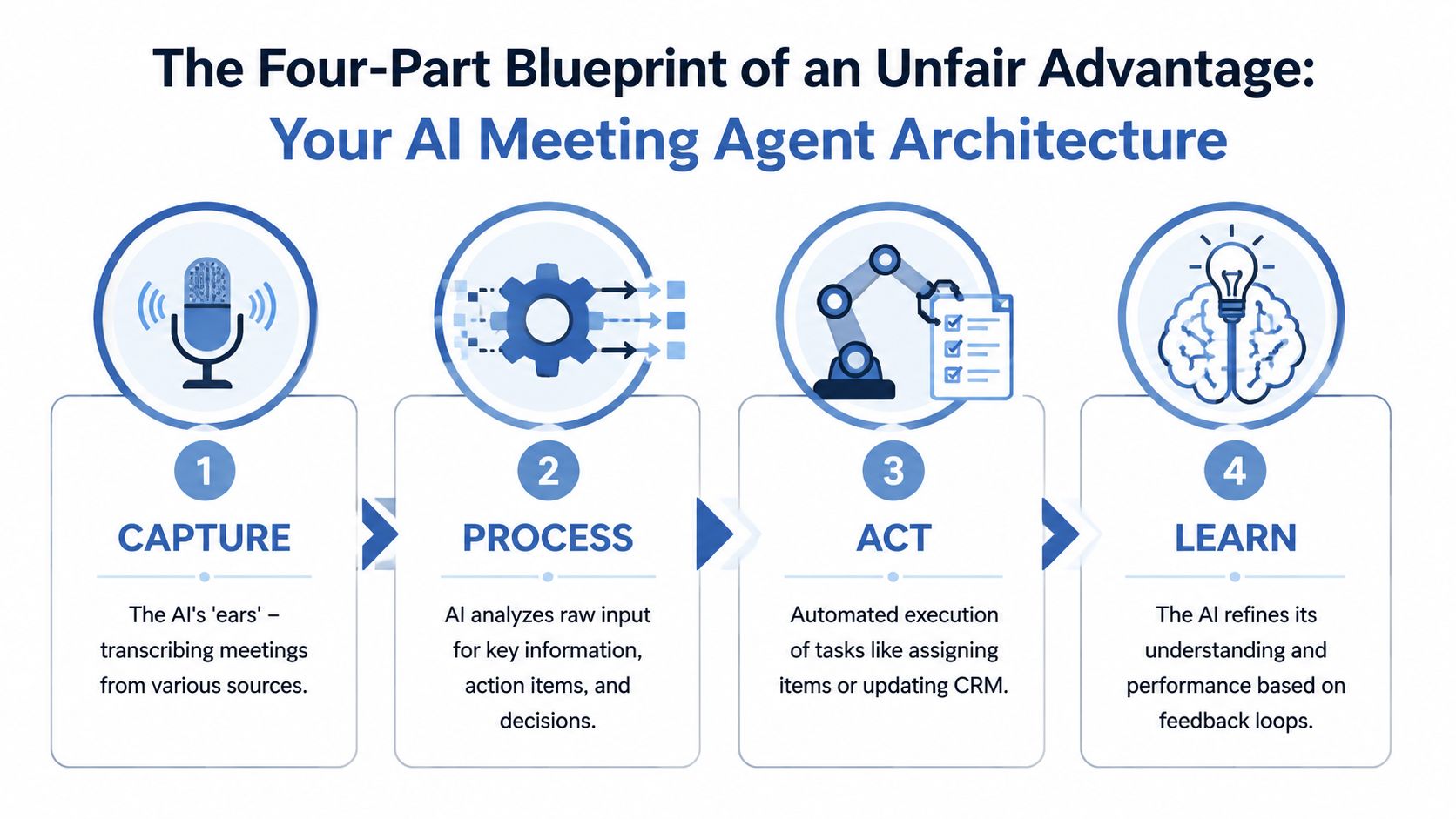
The Four-Part Blueprint for Meeting Follow-Up
You don’t need a complicated architecture diagram to build this properly. You need four parts that work in sequence and produce business action, not digital clutter.
Capture
Your system starts with raw meeting data. Zoom, Google Meet, and Teams are the obvious inputs.
This stage matters because the rest of the workflow inherits its quality from the transcript. AI meeting transcription now reaches up to 95% accuracy, and a typical CMO handling 15 to 20 hours of weekly meetings can reclaim 7 to 10 hours per month through automated summarization and action item extraction, according to Glean’s analysis of AI meeting summarization.
That’s the floor, not the ceiling.
If all you do is capture words, you save admin time. Useful, but not strategic. Capture only becomes valuable when the transcript feeds the next layer.
Process
The AI agent for meeting notes and follow up stops being a recorder and starts acting like an analyst.
The model should classify what happened in the meeting, which goes further than summarizing it. Pull out decisions, tasks, blockers, objections, risks, next steps, and unresolved questions. If you run sales, tag buying signals and competitor mentions. If you run customer success, flag churn risk and implementation friction. If you run product, extract feature commitments and dependencies.
I prefer structured outputs here. JSON beats prose every time because automations can use it.
A clean processing layer should answer questions like:
- What was decided, and whether it was final or provisional
- Who owns the next action, and what concrete deliverable they owe
- What deadline was mentioned, and whether the date is explicit or inferred
- What commercial signal appeared, such as urgency, hesitation, pricing concern, or expansion potential
Act
A common failure is stopping after summary generation and believing you’ve automated something.
Action means the system writes back to your operating environment. It creates tasks in Asana, Jira, or ClickUp. It updates records in HubSpot or Salesforce. It drafts follow-up emails. It posts the meeting brief to Slack. It sends unresolved issues to the right owner.
My practical rule: if your meeting agent doesn’t change the state of another system, it’s a note taker.
Learn
The fourth part is the moat.
You should be able to mark outputs as right, wrong, incomplete, or risky. That feedback should refine prompts, extraction rules, routing logic, and account-specific context. Over time, the system learns your language, your sales stages, your delivery workflows, and your definition of a real action item.
That’s how you get compounding advantage. Competitors can buy the same models. They can’t buy your operating memory.
Assembling Your Tech Stack and Integrations
You have two real choices. Buy speed or build control.
Both can work. Only one becomes a defensible asset.

Buy when speed matters more than control
If you need results fast, start with tools like Otter, Fireflies, Read AI, or Granola. They can join meetings, transcribe calls, summarize discussions, and push some outputs downstream.
That’s fine for a pilot. It’s often the right call if you have no technical capacity in-house and you need immediate proof that automated follow-up will stick.
But don’t confuse convenience with strategy. These tools optimize for their own product roadmap rather than your workflow. When your process becomes unusual, cross-functional, or privacy-sensitive, you hit the ceiling.
Build when the workflow itself is the asset
A custom stack usually looks like this:
| Layer | Recommended role |
|---|---|
| Calendar and meeting trigger | Google Calendar or Outlook detects the event and decides whether the agent should run |
| Capture | Native meeting recording or a transcription layer |
| Reasoning model | An LLM processes transcript chunks and extracts structured outputs |
| Automation layer | Zapier, Make, or custom orchestration routes tasks and updates |
| Systems of record | HubSpot, Salesforce, Notion, Slack, Asana, Jira, ClickUp |
At this point, most founders get impatient, and rightly so. Building takes more setup.
It also gives you control over data, prompts, routing, approval logic, and business-specific enrichment. You decide what counts as a risk, what triggers a sales task, what updates the CRM, and what gets held for human review.
The integrations that actually matter
Your ai agent for meeting notes and follow up is useless in isolation. It needs to touch the systems you already live inside.
I’d prioritize integrations in this order:
- Calendar first, so the agent knows which meetings matter.
- Video platform next, so capture happens automatically.
- CRM after that, because commercial context makes the transcript more useful.
- Task system next, so action items become accountable work.
- Messaging and email last, so summaries and drafts reach humans in the right moment.
The business payoff comes from follow-through, not from the note itself. Companies using AI agents with structured, automated post-meeting processes have seen up to 25% higher customer renewal rates compared with manual methods, according to Klu’s review of Harvard Business Review data.
That should reset how you think about this. Better notes are nice. Better retention is the point.
My recommendation
For most startups and SMBs, I recommend a hybrid path.
Use a fast capture layer if you need to get moving this quarter. Then build your own extraction, enrichment, and execution logic on top. That gives you speed now and a moat later. If you’re sorting through orchestration options, I’d start with a practical review of AI workflow automation tools so you choose the glue layer before you wire everything together.
Don’t build everything from scratch. Build the parts that encode how your business wins.
Prompt and Chain Design for Flawless Execution
Most failures in meeting automation come from sloppy prompt design, rarely from too much ambition.
A 2026 Forrester study found that 42% of teams abandon AI notetakers within six months because of inaccuracies such as multi-speaker detection errors, costing businesses over $5,000 in lost productivity from debugging and correction, as summarized by Fellow’s discussion of AI notetaker adoption problems. That’s what happens when people trust a one-shot summary prompt and call it done.
One prompt is amateur hour
You need a chain, not a blob.
I split the workflow into separate reasoning passes. One pass summarizes the meeting. Another extracts action items only. Another identifies decisions and open questions. Another checks whether the extracted tasks are supported by transcript evidence.
Each step has a narrow job. That reduces hallucinations and gives you better auditability.
Here’s the sequence I prefer:
Run a meeting summary pass.
Produce a concise overview of context, objectives, and key discussion points.Run a decision extraction pass.
Pull only explicit decisions. Exclude suggestions, speculation, and brainstorming.Run an action item extraction pass.
Return only tasks with an owner, deliverable, and due date or due-date status.Run a risk and objection pass.
Identify blockers, concerns, unresolved dependencies, and buying friction.Finish with a validation pass.
Check every extracted item against transcript evidence and flag weak confidence cases for review.
What your prompts should force the model to do
A good extraction prompt is strict. It tells the model what not to invent.
I want instructions like these embedded in the chain:
- Every action item must point back to transcript language.
- If no directly responsible individual is named, mark the owner as unresolved instead of guessing.
- If no deadline is explicit, state that the due date is missing.
- Do not confuse a proposed next step with an approved commitment.
If the model has to guess, your system should surface uncertainty, not fabricate confidence.
A practical template
Use structure like this for action items:
Return valid JSON only. Extract action items explicitly supported by the transcript. For each item, include task_description, owner, due_date, due_date_status, supporting_quote, and confidence_note. If owner or due date is not explicit, mark it as unresolved. Do not infer commitments from suggestions, questions, or brainstorming.
That instruction alone will save you from a lot of cleanup.
If you want to go deeper on chain design, I’d review 2026 AI prompt strategies alongside a grounded understanding of context engineering vs prompt engineering. Prompts matter, but the surrounding context, retrieval logic, and system boundaries matter just as much.
When not to automate fully
I don’t recommend full autonomy for every meeting type.
Board meetings, legal reviews, performance discussions, and high-stakes negotiation calls usually need a human approval layer before anything gets pushed into a CRM or sent externally. The cost of a wrong follow-up there is too high.
For recurring sales calls, onboarding calls, and internal project meetings, you can automate far more aggressively. The pattern is predictable, and the business value of speed is immediate.
Building Your Automated Follow-Up Workflows
This is the part that moves revenue. A transcript doesn’t close deals. Execution does.
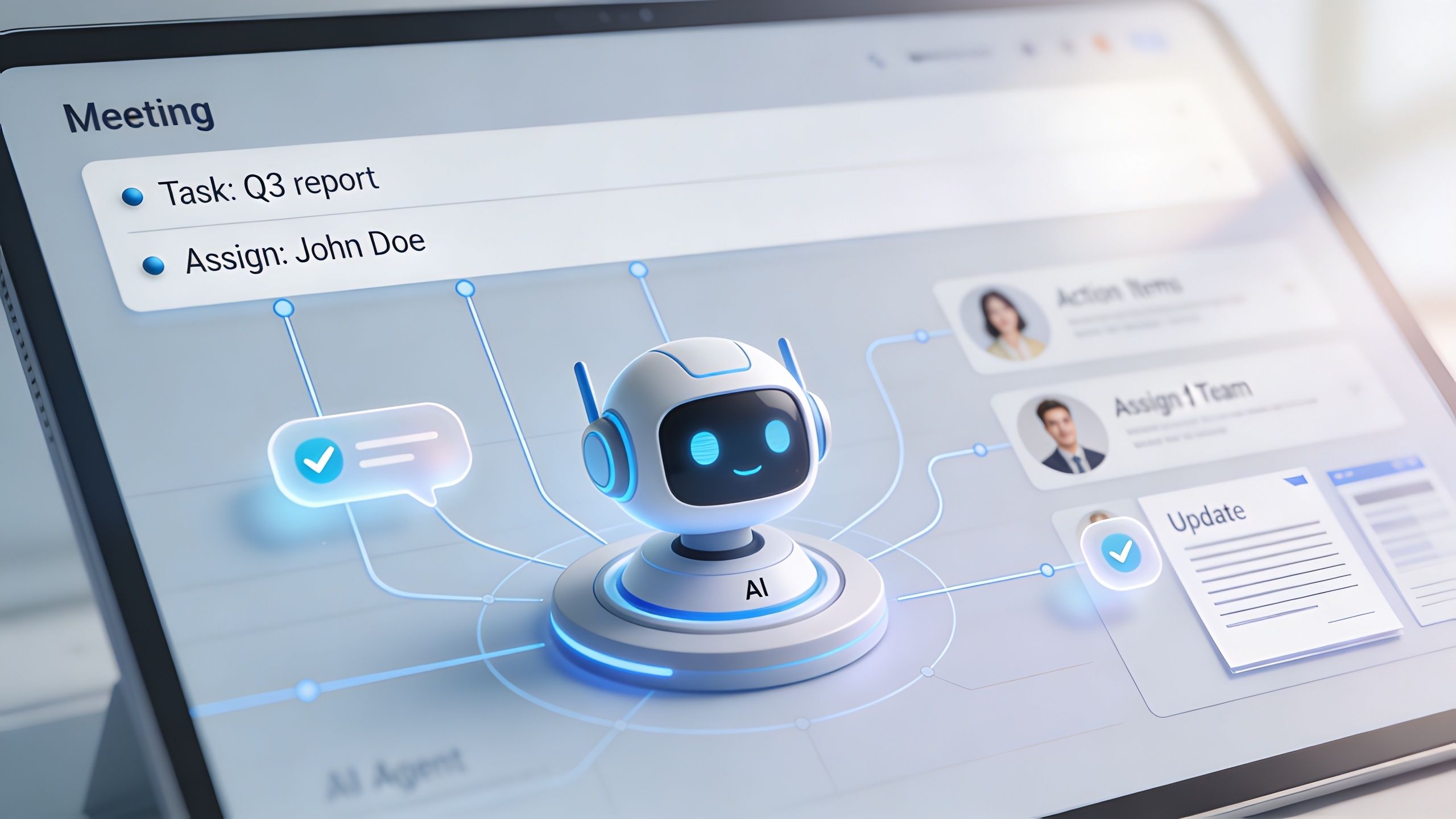
Right after a sales or client call ends, your agent should begin doing the work you usually postpone until later. That means parsing the meeting output, assigning tasks, updating the system of record, and drafting external communication while the conversation is still fresh.
A day-in-the-life workflow
Let’s say you finish a discovery call.
The agent receives the transcript and structured extraction. It identifies a pricing concern, a request for a custom integration, and a commitment from you to provide a technical answer. It also sees that the buyer asked for a proposal revision and that the next meeting should happen after procurement review.
Now the workflow starts firing.
It updates the CRM.
The opportunity record gets updated with call notes, buyer objections, next-step status, and relevant tags.It creates the task.
A task is created for the technical answer, with the follow-up request attached.It drafts the email.
The agent drafts a recap for the prospect, confirming decisions and next steps.It posts the update.
A short summary goes into Slack so anyone helping you can see movement without asking for an update.
That’s a closed loop. No sticky notes. No forgotten promises. No one saying, “I meant to send that yesterday.”
Build approval where risk is high
I don’t want every draft sent automatically.
Internal updates and task creation can usually run without approval once the workflow is stable. External emails should often route through a human checkpoint, especially early in deployment. You should be able to approve, edit, or reject the draft in one click.
That still saves serious time because the heavy lifting is done.
For stronger client-facing follow-up logic, I’d study Recepta.ai email automation strategies and adapt the ideas to your own sales cycle. If email is a major channel for you, this guide on email marketing automation strategies is also a useful companion when you’re designing handoffs between meetings and outbound messaging.
A short demo can help you visualize the orchestration layer in practice:
My rule for workflow design
Don’t automate summaries. Automate commitments.
That means every meeting workflow should answer four operational questions before it completes:
| Question | Required outcome |
|---|---|
| What happened | A concise internal summary is stored |
| Who owes what | Tasks are assigned or flagged for assignment |
| What changed commercially | CRM fields or account notes are updated |
| What must be communicated | A draft follow-up is prepared for review or send |
The best meeting agents don’t document work. They move work forward before your team context-switches to the next call.
Testing Your Agent and Measuring True ROI
If you deploy this without measurement, you’re collecting expensive demos instead of building capability.
The wrong metric is “how many meetings got summarized.” I don’t care. That tells me nothing about execution quality or revenue impact.

Measure operating performance first
Start with machine performance, because if the system isn’t reliable, business metrics will be noisy.
Top-tier AI meeting assistants can reduce follow-up time by automating task assignment and CRM updates. When evaluating them, prioritize selection accuracy above 95%, success rate above 98%, and latency below 2 seconds per API call, based on Taskade’s guidance on AI meeting note tools.
Those thresholds are useful because they force discipline. If your agent misses obvious tasks, fails too often, or takes too long, you won’t trust it.
Then measure commercial impact
Once the workflow is operationally stable, track business movement.
I care about a short list:
Check task creation accuracy.
Did the system capture the action items that mattered?Check time to execution.
How quickly after the meeting did work get assigned, recorded, and communicated?Check CRM freshness.
Are opportunity and account records updated while the conversation is still commercially relevant?Watch deal and retention movement.
Are fewer opportunities stalling because follow-up slipped? Are customer issues getting documented and resolved more consistently?
These are the metrics that tie automation to revenue.
Run a controlled pilot
Don’t roll this out across every meeting you have on day one. Pick one meeting type that repeats often and has clear downstream actions.
A good pilot usually has three traits:
- High meeting volume, so you get enough examples quickly.
- Visible business stakes, such as pipeline movement or customer retention.
- Tolerable risk, so mistakes won’t trigger legal or brand damage.
Sales calls, account check-ins, and onboarding calls are usually better pilot candidates than legal or leadership meetings.
My audit rule: review transcript, extraction, and resulting action in the same sample set. If you only inspect summaries, you’ll miss the real failure point.
Build a human review loop on purpose
The fastest way to ruin adoption is to act like the first version should be trusted blindly.
Instead, create a lightweight QA routine. Review a sample of meetings every week. Compare transcript evidence against extracted actions. Check whether CRM updates were correct. Track which prompts failed, which owners were misidentified, and which email drafts needed major edits.
That routine is how you turn a fragile system into a dependable one.
Don’t ignore privacy and compliance
A meeting workflow touches sensitive data fast. Customer discussions, pricing, hiring conversations, product roadmaps, and support escalations can all flow through the same pipeline.
So decide early:
| Risk area | What you need to define |
|---|---|
| Data retention | How long transcripts and summaries are stored |
| Access control | Which roles can view raw transcripts versus structured summaries |
| External sharing | Which outputs can be sent automatically and which require approval |
| Vendor exposure | Which parts of the workflow use third-party tools and what data each tool receives |
If you skip that governance layer, you’ll eventually get blocked by a legal or security problem. Usually after you’ve already started depending on the system.
My final recommendation
Build the smallest version that can prove business value. Then harden it.
For most small businesses, that means one workflow, one meeting type, and one clear commercial outcome. Get the transcript right. Get the extraction reliable. Get the follow-up into the right systems. Then expand.
That’s how an ai agent for meeting notes and follow up stops being a novelty and starts becoming infrastructure your competitors can’t match.
If you want help designing a custom meeting intelligence system that drives pipeline, retention, and execution speed, you can work with me on it.
