
Most agency owners I talk to are dealing with the same quiet mess. Too many client requests. Too much manual reporting. Too many talented people doing work a machine should have handled before breakfast.
That pressure shows up as margin erosion, slower delivery, and teams that stay busy without increasing output. You don't fix that with another dashboard. You fix it by hiring digital employees that can think through a workflow, use tools, and complete work inside your stack.
I'm Samuel Woods. I've worked with machine learning since 2016 and generative AI since 2019. My view is simple. If you're still treating AI like a writing assistant instead of an operational layer, you're leaving money on the table and giving competitors time to catch you.
Your Agency Is Leaking Profit and You Don't See It
You feel it when client reporting spills into evenings. You feel it when your account managers chase updates across Slack, Asana, Google Analytics, HubSpot, and a dozen spreadsheets. You feel it when sales wants faster proposals, clients want faster insights, and your team can't move any quicker without burning out.
That isn't random agency chaos. That's operational leakage.

The real problem isn't headcount
Most agencies try to solve this by hiring another coordinator, another media buyer, another junior strategist. That helps for a minute. Then complexity grows again, and the same bottlenecks come back in a more expensive form.
An ai agent for an agency changes the equation because it handles repeatable cognitive work. Not just automation in the old sense. Not “if this, then that” rules glued together with hope. I'm talking about systems that can pull data, reason over it, route tasks, draft outputs, and trigger the next action.
The urgency is real. The global agentic AI market is projected to grow from $5.25 billion in 2024 to $199.05 billion by 2034, a 43.84% CAGR, which tells you this is moving from experimentation to infrastructure for autonomous workflows, as reported in Landbase's agentic AI statistics.
Agencies that wait for this to feel “mature” will end up buying the playbook from competitors who built it earlier.
Where the leak shows up first
It usually starts in three places:
- Reporting drag. Your team spends too much time collecting numbers instead of interpreting them.
- Content bottlenecks. Good ideas sit in documents because production takes too long.
- Sales prep waste. Lead research, CRM cleanup, and proposal prep eat hours that should go into closing.
If you want a simple way to spot hidden waste before building agents, I'd look at practical breakdowns of cutting manual tasks through HeyBRB consultancy. Not because you need another theory deck. Because admin creep is where many agencies first realize they've built a business around expensive human glue work.
My opinion after building these systems
You should stop asking, “Should my agency use AI?” That question is outdated.
Ask this instead:
- Which workflow is draining margin every week?
- Which client-facing process needs faster turnaround?
- Which internal task can a digital employee own end to end?
That shift matters. Once you frame AI as labor, not novelty, better decisions follow. You stop chasing demo tricks and start designing capacity.
Define Your First Digital Employees
Don't start with use cases. Start with job descriptions.
That one change saves agencies months of wasted experimentation. When you say “we need an AI agent,” people build a toy. When you say “we need a Client Reporting Analyst who checks performance every Sunday, summarizes movement, flags risk, and drafts next-step recommendations,” people build something useful.
Hire for the bottleneck first
The first digital employees in an agency should be boring on purpose. High-frequency work. Clear inputs. Clear outputs. Strong business value.
Enterprise adoption is already past the curiosity phase. Marketing teams are leading with 51% usage for campaign optimization, and over 80% of Fortune 500 companies are running active AI agents on low-code platforms as of 2026, according to SQ Magazine's AI agents statistics roundup.
That should tell you something important. The winners aren't using agents for random novelty tasks. They're applying them to workflow execution.
If you want more examples of how I think about these role-based systems, I've written about that in my guide to AI marketing agents.
Three hires I'd make first
1. Client Reporting Analyst
This agent pulls campaign data from your analytics stack, compares it against the prior period, drafts a plain-English summary, and highlights anomalies for a human review pass.
Good fit if you run paid media, SEO, lifecycle, or multi-channel retainers.
What it changes:
- Account managers spend more time advising instead of assembling screenshots
- Clients get faster answers on what changed
- You create consistency across every account review
2. Lead Enrichment Specialist
This agent takes inbound leads or prospect lists, standardizes company information, enriches records from approved sources, categorizes accounts, and pushes structured notes into your CRM.
This is one of the easiest wins because sales teams hate messy CRM data and agencies lose opportunities when follow-up quality drops.
What it changes:
- Sales gets cleaner handoffs
- Outreach becomes more relevant
- Proposal prep speeds up
3. Content Repurposing Coordinator
This agent takes one source asset, a webinar, sales call transcript, founder memo, or podcast, and turns it into channel-ready outputs with brand rules attached.
Not generic “make me content.” Structured repurposing. LinkedIn posts, email angles, ad hooks, article outlines, landing page tests.
Practical rule: If the role needs original strategic judgment on every task, don't automate it first. If the role follows a pattern and still consumes expensive team hours, automate it early.
Write the job req before you touch the tech
For each digital employee, define five things:
- Mission. What business outcome does this role support?
- Inputs. Which systems, files, and prompts does it need?
- Outputs. What exactly should it produce?
- Guardrails. What must it never do without review?
- Owner. Which human is accountable for quality?
Agencies get into trouble when they skip this and go tool-first. Then they end up with disconnected automations that impress on a screen share and fail under real client load.
You don't need ten agents. You need one that earns trust.
Design Your Agency's AI Nervous System
A single all-purpose agent is usually a mistake. It becomes unreliable, hard to test, and difficult to control. Agencies need structure, not magic.
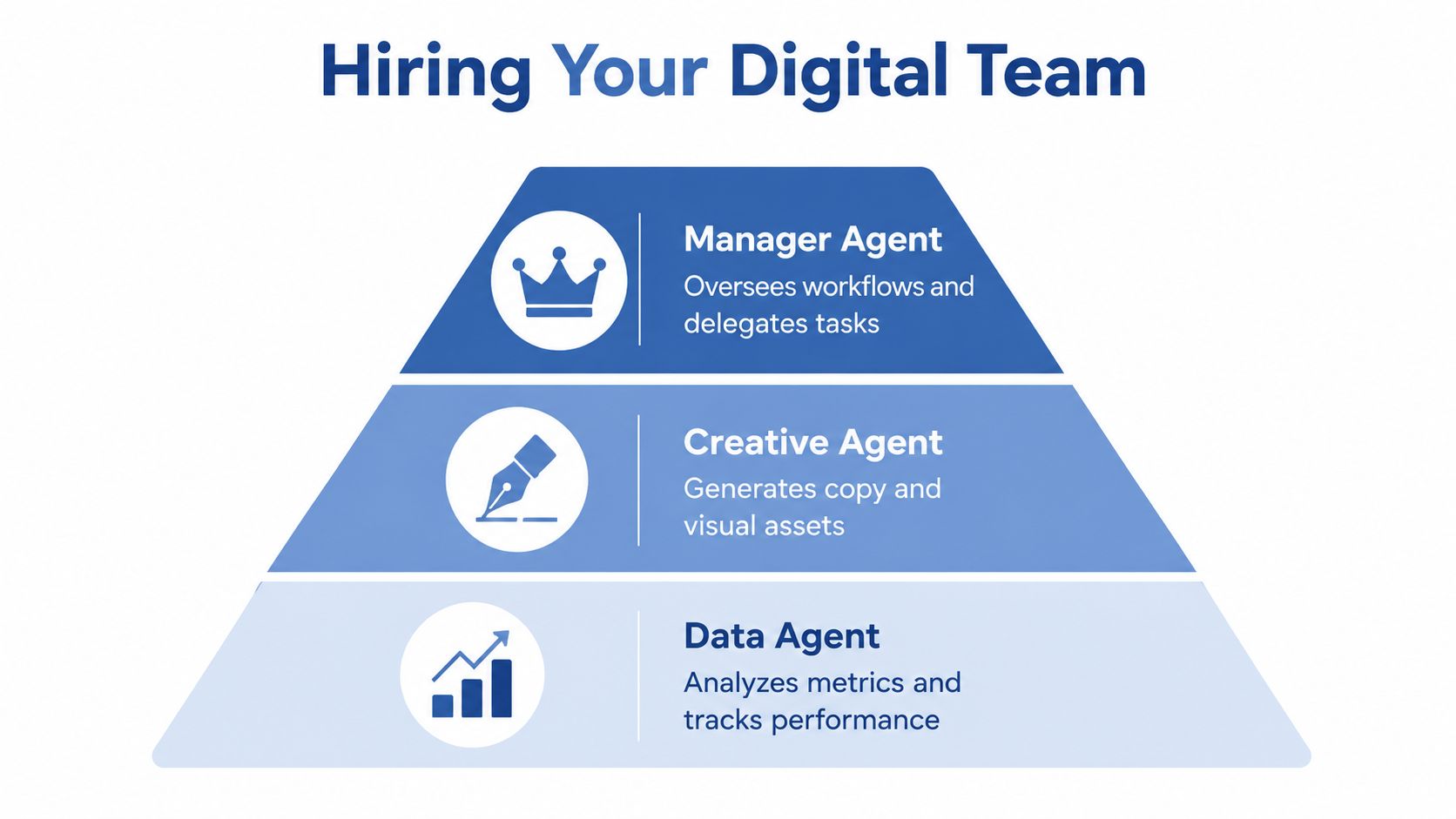
The model I recommend is manager + sub-agent. One manager agent owns the workflow. Specialist agents handle distinct jobs inside it. That mirrors how a solid agency team already works.
Why orchestration beats generic agents
Most guides still talk about “the agent” like it's one smart blob. That's not how you build systems that survive contact with real clients.
The bigger issue is failure rate. 70% of off-the-shelf agent solutions fail without custom orchestration, which is why agencies need client-specific frameworks instead of generic plug-and-play setups, as noted in Glean's overview of AI agent types.
A practical agency setup might look like this:
- A Campaign Manager Agent receives a goal such as “launch a retargeting sprint for Client A”
- It sends research work to a Market Analyst Agent
- It sends messaging work to a Copy Agent
- It sends metrics checks to a Data Agent
- It returns a packaged output to a human reviewer or directly into your project system
That's how you turn AI into an operating layer instead of an assistant tab.
The architecture I trust
I keep agency systems simple at the beginning.
The manager agent should do four things well:
- Interpret the request
- Choose which sub-agent or tool to call
- Track state across the workflow
- Escalate to a human when confidence is low or risk is high
Each sub-agent should have one specialty. Not five. One.
A research sub-agent should not also rewrite ad copy, summarize client calls, and reprioritize sprint work. Specialization improves outputs and makes debugging possible.
Your first version should look less like artificial general intelligence and more like a disciplined operations manager.
Tool choice matters more than people admit
A lot of bad builds fail because the architecture and the tool choice are mismatched. If your team can barely maintain Zapier, don't start with a custom code framework. If you want durable internal IP, don't overcommit to a no-code layer that limits control.
I'd also recommend understanding the difference between prompt quality and system design. That's where context engineering becomes critical. Agents fail when they don't have the right context, tool permissions, memory boundaries, and handoff logic.
Here's the practical comparison I use with agencies.
AI Agent Orchestration Tool Comparison 2026
| Tool | Best For | Coding Skill Required | Flexibility |
|---|---|---|---|
| Make.com | Fast agency prototypes, simple routing, connecting SaaS apps | Low | Moderate |
| Zapier Interfaces and Zapier Agents | Quick internal tools, lightweight outbound and CRM workflows | Low | Moderate |
| CrewAI | Multi-agent systems with more control over roles and delegation | Medium | High |
| LangGraph | Complex stateful workflows, production systems, custom logic | High | Very high |
| N8N | Self-hosted minded teams that want workflow control without deep app lock-in | Low to medium | High |
My recommendation by agency stage
If you're a smaller agency or consultancy, start with Make.com, Zapier, or N8N. Prove the workflow. Get adoption. Find the weak spots.
If you're an established agency with technical support, move toward CrewAI when you need role-based orchestration and LangGraph when you need precision, state, and serious control.
Use this rule:
- No-code first when the problem is validating demand
- Low-code next when the workflow is valuable but evolving
- Code-heavy only after the workflow is proven and worth hardening
The point isn't sophistication. The point is durable advantage.
Prompts, Memory, and Connecting to Your Stack
An agent without context is a coin flip. An agent without memory is a temp. An agent without system access is a chatbot pretending to be an employee.
That's why I spend less time obsessing over one clever prompt and more time designing the instruction layer, memory rules, and tool connections.

A manager agent prompt that actually works
Here's a stripped-down template I use as a starting point.
Role
You are the Manager Agent for a marketing agency. Your job is to complete client workflow requests by delegating tasks to approved tools and sub-agents.Primary goal
Deliver accurate, brand-safe, actionable outputs that reduce human workload and support campaign performance.Operating rules
Use available systems only. Ask for human review when a request affects budget, client strategy, or external publishing.Available tools
CRM access, analytics connector, project management connector, approved knowledge base, content sub-agent, data sub-agent, research sub-agent.Brand constraints
Follow client tone, banned phrases, compliance notes, and channel-specific formatting rules.Workflow behavior
Break complex work into smaller tasks, assign each task to the best tool or sub-agent, check outputs for consistency, then return the final package with any flagged risks.Escalation rules
If data is missing, confidence is low, or conflicting instructions appear, pause and request human input.
That's the baseline. Then you customize by client, workflow, and risk level.
What memory should actually store
Most agencies overstore junk and understoresignal.
Your agent's memory should keep:
- Client brand rules
- Preferred offer framing
- Channel guidelines
- Recent campaign context
- Approved offers, exclusions, and escalation paths
It should not keep every random draft, every failed experiment, or messy internal chat fragments forever. Poor memory design contaminates future outputs.
Your stack is the real moat
If your agent can't access HubSpot, GA4, Slack, Asana, Notion, Airtable, or whatever your team runs on, it won't become operational. It'll stay a demo.
Connect the stack in layers.
Senses
These connections let the agent observe:
- Analytics tools for campaign movement
- CRM data for lead and deal context
- Project systems for work status
- Knowledge bases for SOPs and client notes
Hands
These let the agent act:
- Create or update tasks
- Draft emails
- Push CRM notes
- Prepare reports
- Trigger handoffs in Slack
A lot of agencies use automation middleware to bridge those tools. If outbound workflow is part of your roadmap, this breakdown of Zapier for scaling outbound efforts is useful because it shows how workflow glue can support sales execution without forcing a full rebuild.
A video walkthrough helps if you want to see this logic from a systems angle.
The integration sequence I recommend
Don't connect everything at once.
Read only first
Let the agent inspect data before it changes anything.Single action next
Give it one bounded write action, like creating a task draft or posting a summary to Slack.Approval gates after that
For anything client-facing or revenue-impacting, require review.Expand only after logs look clean
If you can't audit behavior, don't increase autonomy.
This is also where service options matter. My own work through Samuel Woods focuses on designing these kinds of bionic marketing systems, but the principle matters more than the provider. Build the connective tissue first. Fancy outputs come later.
Measure What Matters Agent ROI and Safety
Most agencies measure the wrong thing. They obsess over output quality in isolation and ignore economics.
Accuracy matters. But if an agent gives you polished work at the wrong cost, with weak reliability, and no clear impact on pipeline or retention, you don't have an asset. You have an expensive experiment.
Start with business metrics, not model vanity
The strongest agency deployments tie technical performance to commercial movement.
Track the operational layer:
- Task completion rate
- Human intervention rate
- Tool selection quality
- Latency
- Token or run cost
- Error recovery behavior
Then tie it to business outcomes:
- Hours returned to the team
- Speed of client delivery
- Lead response quality
- Proposal turnaround
- Campaign iteration speed
- Client retention support
If your team struggles to frame ROI in commercial terms, a simple benchmark tool can help. For SEO and growth workflows, I sometimes point teams to project organic growth with this calculator because it forces a business conversation instead of an AI-flavored one.
The benchmark I care about
A common failure is focusing only on accuracy. Well-implemented agents can deliver a 210% ROI in 3 years with payback under 6 months when teams balance accuracy with cost-efficiency and error recovery, according to MindStudio's guide to AI agent success metrics.
That should reshape how you evaluate your build.
If the agent is accurate but too expensive, it fails. If it's cheap but creates hidden cleanup work, it fails. If it saves time but doesn't improve throughput or decision speed, it probably fails.
I also recommend using a broader performance framework for your marketing operation. My guide on how to measure marketing effectiveness is useful here because agent ROI only makes sense inside a proper measurement system.
Safety is not optional
An ai agent for an agency touches client data, campaign decisions, and internal systems. That means safety has to be designed in, not added later.
My baseline safeguards are simple:
- Permission boundaries. Start with the minimum access required.
- Human approval for high-stakes actions. Budget changes, publishing, client comms, and deletions need a checkpoint.
- Logging. Record prompts, tool calls, outputs, and exceptions.
- Fallback behavior. If the agent isn't confident, it pauses and escalates.
- Version control. Track prompt and workflow changes so you know what caused a problem.
The scorecard I use
| Area | What good looks like |
|---|---|
| Reliability | The agent completes routine work consistently with limited intervention |
| Economics | Run cost stays justified relative to time saved or revenue supported |
| Speed | Work moves faster without adding review bottlenecks |
| Safety | The agent stays within permissions and escalates edge cases |
| Business impact | The workflow improves a KPI leadership actually cares about |
At this juncture, many agencies come to a realization: They don't need “more AI.” They need one agent that can prove value on a scorecard a CFO will respect.
Your First 90 Days as an AI-Powered Agency
You don't need a giant transformation project. You need momentum and one visible win.
Days 1 through 14
Pick one painful workflow. Only one.
Good candidates are recurring reporting, lead enrichment, or content repurposing. Write the job description, define the inputs and outputs, and choose a low-risk environment where a human can review every result.
Days 15 through 45
Build the first version in a no-code or low-code tool. Keep the scope tight.
Give the agent read access first. Let it pull data, summarize, and recommend. Don't let it publish, spend, or message clients on its own yet.
The first goal isn't autonomy. The first goal is trust.
Days 46 through 90
Add the manager + sub-agent structure to one core process. Maybe your manager agent routes reporting to a data sub-agent and content adaptation to a creative sub-agent. Maybe it handles inbound lead qualification and CRM prep before a salesperson steps in.
By day 90, you should have one workflow that runs often, saves real team time, and creates a visible operational advantage. That's enough.
After that, scale the pattern. Not the hype.
If you want your agency to compete in 2026, stop experimenting around the edges. Build one digital employee, prove ROI, then turn that into a system. That's how you move from an agency that uses AI to an agency that compounds with it.