
Most advice on AI model comparison for business use starts in the wrong place. It asks which model is “best,” then pretends the answer stays the same after you factor in latency, token limits, data control, and the cost of running the thing at scale. That's how business owners end up paying for a prestige model that's brilliant in demos and terrible in production.
I've been working with ML since 2016 and generative AI since 2019, and I'm going to be blunt: model selection is a buying decision, and a chatbot taste test won't make it for you. If you're spending real money on AI, you're paying for workflow capacity. The right model is the one that lets you move faster, ship more, and keep control of the business logic.
| Model family | Best for | Key limitation |
|---|---|---|
| GPT | Broad business use, coding support, general-purpose integration | Can get expensive fast if you use premium models for everything |
| Claude | Nuanced writing, long-context reasoning, brand-sensitive output | Not always the cheapest choice for high-volume tasks |
| Gemini | Massive-context workflows, multimodal inputs, document-heavy analysis | Best fit depends heavily on the exact workflow |
| Open models | Data control, customization, self-hosted deployments | Higher operational burden and infrastructure planning |
Table of Contents
- The Model Selection Trap
- The 2026 Evaluation Framework
- Comparing the Major Model Families
- The Economics of AI Deployment
- The Case for Open-Source Models
- Building Your Internal Benchmark
- Strategic Recommendations by Use Case
The Model Selection Trap
The biggest mistake I see is simple. Buyers start by asking which model is smartest, then they buy the one that looks best on a leaderboard and wonder why the deployment feels clumsy six weeks later.
The real problem sits in how you buy and orchestrate models. A model can score well in a demo and still fail in production if it cannot handle your data shape, your workflow steps, and your integration burden. Recent comparison guides list Gemini 2.5 Pro and Claude Opus 4.7 with 1M-token context windows, while GPT-5.5 and Copilot AI are listed at 128K tokens, and that changes what each model can handle in a single pass. If you work with market research, campaign histories, support archives, or quarterly reports, context window size decides whether you get one clean workflow or a pile of chunking, summarization, and retrieval glue.
A practical rule: do not buy intelligence in the abstract. Buy the ability to process your actual business inputs without stitching the workflow together by hand.
Artificial Analysis now ranks more than 100 AI models across intelligence, price, performance, speed, and context window. That is a useful signal that the market has moved past single-score thinking, but it does not solve the buying problem for you. You need to pick for different jobs, and prestige isn't one of them. A support automation model, a strategy model, and a content model do not deserve the same budget.
The hidden cost is workflow fit. If you need a model to sit inside a broader system, you may also need orchestration, routing, and memory management, along with the right retrieval layer. For some deployments, the difference between a good model and a usable system comes down to whether the tool fits cleanly with your stack, including the Model Context Protocol. That is where budget gets burned: in the extra engineering hours needed to make the model usable, on top of the model fee.
The other trap is overbuying reasoning. You do not need your cheapest workflow, like routine categorization or basic drafting, to run on your most expensive model. You need a stack that matches model strength to business value, otherwise you are paying premium rates to solve commodity problems.
The 2026 Evaluation Framework
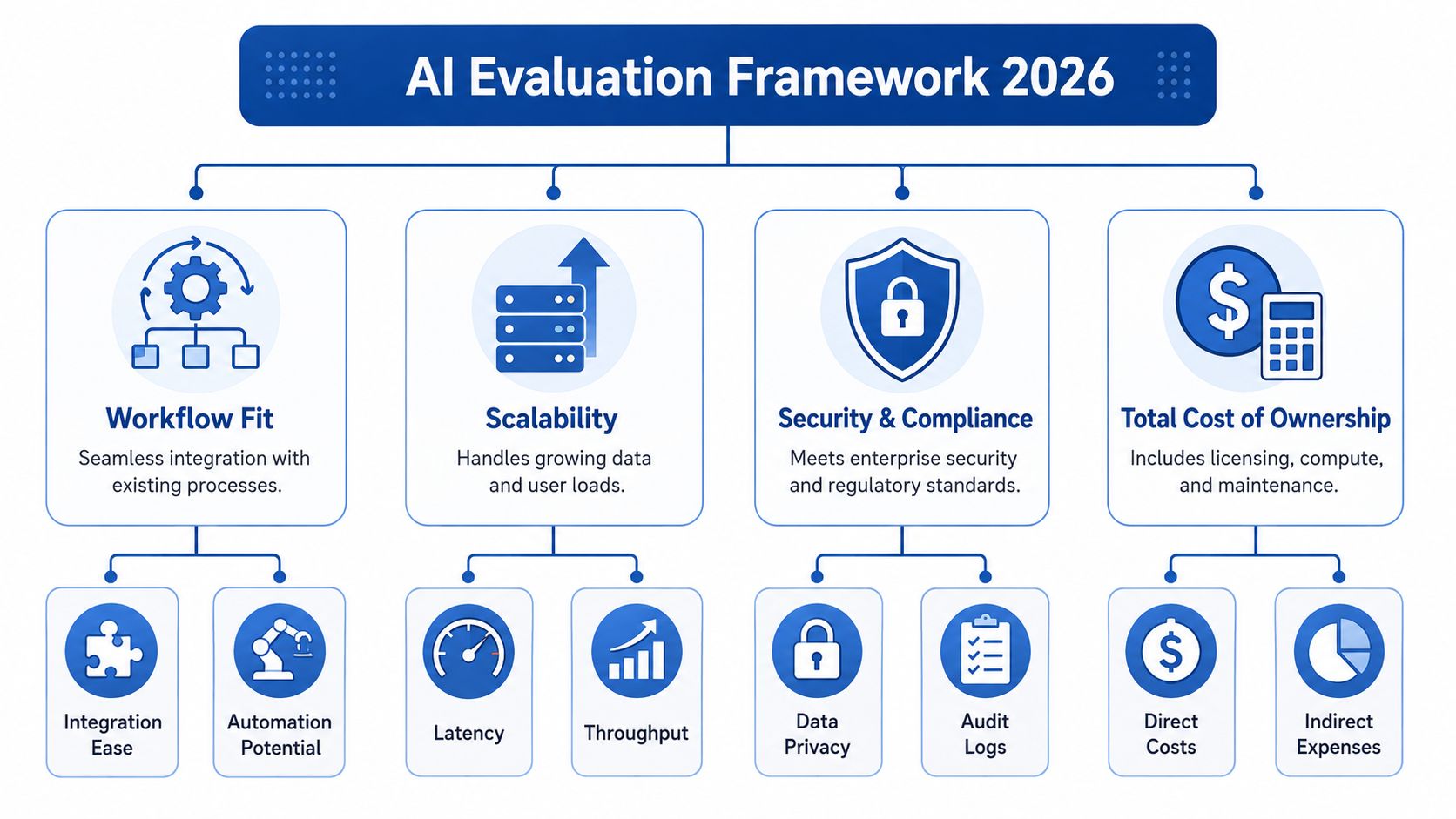
Treat the 2026 evaluation as a buying filter instead of a feature checklist. Start with workflow fit, then test scalability, then check security and compliance, then do the math on total cost of ownership. That order forces the buying decision back onto business reality instead of vendor polish.
The first gate is workflow fit. A model can be strong and still fail your use case if it cannot handle the inputs you work with. If your business depends on sales calls, screen recordings, product documentation, or ad creative, you need a model that can process those materials without turning you into a prompt janitor. That also means checking whether your stack needs orchestration, routing, memory, or a cleaner tool interface such as the Model Context Protocol, because model quality alone does not fix a brittle workflow.
The second gate is scalability. Latency, throughput, and consistency under load decide whether a model is operational or just impressive in a demo. Business benchmark summaries and vendor comparisons show that some setups are fast enough for interactive use, while others only make sense in slower back-office workflows, so the key question is whether the model holds up under your traffic pattern and response-time expectations. Users feel latency immediately, and your margins feel it later through infrastructure and usage costs.
A model that is sharp but slow still loses in production. Customers do not care about benchmark charts if the process stalls.
The third gate is security and compliance. At that point, the model choice becomes a question of data control as well as productivity. You need to know where data moves, who can see it, what gets retained, and which parts of the workflow touch sensitive material. If those answers are fuzzy, the model is not ready for client data.
The fourth gate is total cost of ownership. License fees, inference, hosting, customization, integration work, and maintenance all hit the same P&L. That is where buyers get fooled by low headline pricing, because the model fee is only one line in the bill. If you cannot explain the full cost stack clearly, what you have is a pilot with a budget problem.
If you're building connected workflows, the protocol layer matters too. If you are deciding how tools, data, and agents should talk to each other, my breakdown of Model Context Protocol is the right companion read.
Comparing the Major Model Families
GPT, Claude, and Gemini each solve a different business problem. If you try to flatten them into one category, you'll make the wrong purchase and then blame the implementation.
Where each family fits
Claude tends to win when you need polished, human-like text and long-context reasoning. Gemini tends to win when the workflow is document-heavy, multimodal, or built around very large inputs. GPT still has the most familiar general-purpose footprint for many businesses, especially where coding support, broad integration, and conversational workflows matter.
The clearest way to think about this is by business function. If you're comparing AI platforms for a specific operational workflow, I'd also look at a practical ecosystem review like compare AI agent platforms for FBA, because the model alone won't tell you whether the surrounding stack is usable.
| Model family | Best for | Key limitation |
|---|---|---|
| GPT | Coding support, general-purpose business tasks, broad integration | Can become expensive if used as the default for every workload |
| Claude | Long-form writing, nuanced synthesis, brand-safe output | Not always the best choice for high-volume, low-value tasks |
| Gemini | Multimodal input, huge-context analysis, research-heavy workflows | Needs careful workflow design to realize its advantage |
The business read on each ecosystem
Claude deserves attention when the output has to sound like a smart person wrote it instead of a template. Gemini deserves attention when you handle huge document sets, mixed media, or knowledge bases that don't fit comfortably into smaller windows. GPT remains the safest default for mixed-use work that needs broad capability across coding, analysis, and everyday work.
One source gives a useful coding and reasoning split. It lists GPT-5.4 at 74.9% SWE-bench and 92.8% GPQA, which makes it comparatively stronger on code than Gemini in that report but slightly behind Gemini on reasoning, while Claude Opus 4.6 appears at 1M context with 91.3% GPQA and Gemini 3.1 Pro at 1M context with 94.3% GPQA (GurusUp comparison). That's a good reminder that the “best” model shifts depending on whether you care more about coding, synthesis, or deep reasoning.
For me, the rule is direct. Use Claude when quality of prose and long-context thinking protect revenue. Use Gemini when the workflow is huge and messy. Use GPT when you need a generalist that plugs into a lot of systems without a long change-management cycle.
The Economics of AI Deployment
Cost is where AI projects fail in practice. Owners approve a model because the demo looks sharp, then usage spreads across every workflow and the invoice starts competing with payroll. That is a buying problem, and a better model won't fix it.
Pricing spreads are wide enough to change the business case. One comparison report lists GPT-4.1 at $2 input / $8 output per 1M tokens, GPT-4o at $5 / $15, o1 at $15 / $60, o3-mini at $0.30 / $1.20, o4-mini at $0.15 / $0.60, and GPT-4.5 Preview at $75 / $150 per 1M tokens (Flowhive comparison). That is a wide spread between the cheapest and most expensive options in the table. If you put a flagship model on a simple workflow, you are paying premium rates for work that does not need premium reasoning.
Match model class to task class
Premium reasoning models belong on high-stakes work. Use them for pricing strategy, strategic synthesis, deal analysis, and decision support where a wrong answer costs real money. Cheap mini-models belong on high-volume tasks like classification, routing, summarization, and repetitive draft generation.
The same comparison also makes the workflow trade-off obvious. It lists Claude 4 Opus and GPT-4o at 88.8% MMLU, with GPT-4o faster at 20.8s for a 500-word task versus 23.1s for Claude 4 Opus, while Gemini 2.5 Pro is much faster at 6.3s and supports a 2M-token context window (Flowhive comparison). Speed, context size, and quality do not move together. That is why smart operators split workloads by function instead of standardizing on one expensive model for everything.
A simple rule: if the task does not justify premium reasoning, do not pay for premium reasoning.
The biggest hidden cost is over-provisioning. A founder who uses a flagship model for routine support replies is doing the equivalent of hiring a senior strategist to sort inbox spam. A better stack uses the cheapest model that can reliably hit the quality bar, then escalates only when the workflow needs deeper thinking. That keeps margin intact and avoids building a process that is expensive on day one and worse six months later when volume grows.
Budget planning needs to include the full operating picture beyond token pricing. Model spend sits next to orchestration, evaluation, human review, and the cost of rework when the output misses the mark. If you want a hard look at the hidden line items before you lock in the wrong assumptions, my breakdown of how much an AI agent costs is the right place to pressure-test the numbers.
The Case for Open-Source Models
Proprietary models get the headlines, but open models deserve a serious seat at the table. They won't suit every business, but for the right one they're the only choice that makes operational sense.
MIT Sloan points out that open models have real advantages, but they're still not widely used, which says a lot about how badly mainstream buyer guidance handles the tradeoff between convenience and control (MIT Sloan). That gap matters if your business cares about data governance, customization, or predictable operating costs. If you're running sensitive workflows, or if you want to keep the model close to your infrastructure, the case for open models is about control more than ideology.

When open models win
Open models make sense when your margin depends on heavy usage, when you need tighter control over data for legal reasons, or when your product needs customization that a closed API won't support cleanly. They also make sense when you're building a durable internal capability and don't want to redesign your workflow every time a vendor changes pricing or usage rules.
That control comes with overhead. You'll need infrastructure, monitoring, deployment discipline, and someone who understands the operational side well enough to keep performance stable. If you don't have that skill in-house, the open-model route can become a maintenance project instead of an advantage.
The upside is strategic. A well-run open-model stack gives you more room to tailor the model around your business data and your brand voice, and that can matter more than chasing leaderboard bragging rights. If your competitor is locked into a black-box API while you control the inference path, the difference shows up in product flexibility and long-term economics.
Later, if you want to go deeper on the marketing angle specifically, I've covered why open-source LLMs may be the future of AI marketing in more detail.
Here's the trade-off in one line. Closed models buy convenience. Open models buy control. If you're serious about durable advantage, control is usually the better asset.
Building Your Internal Benchmark
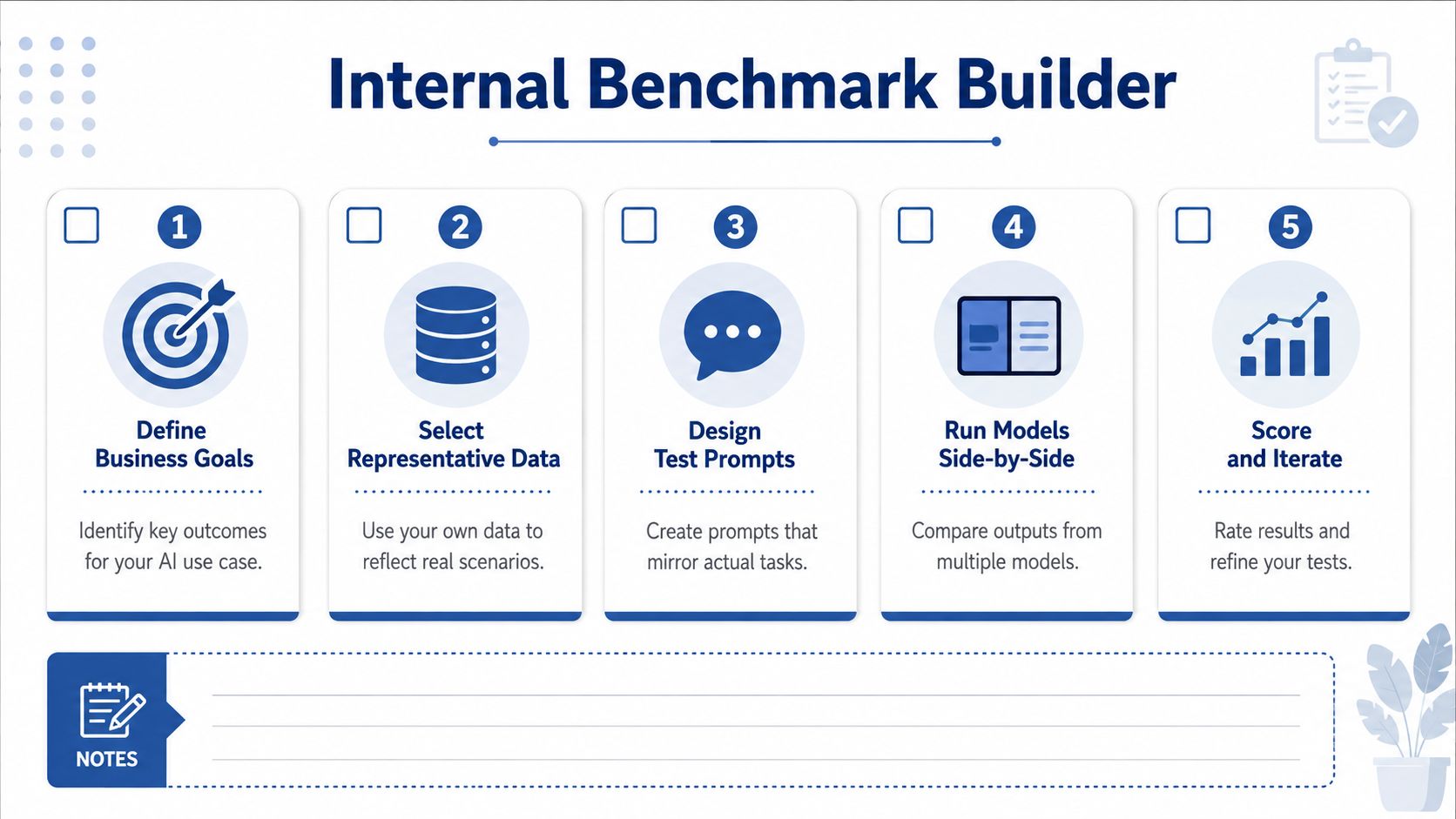
Public leaderboards tell you what a model can do in the abstract. A buying decision needs something harsher: a test against your data, your approval rules, and your actual workflow. If you skip that step, you end up buying impressive demos and then spending your own hours patching the gaps.
Start with the tasks that touch revenue or carry real operating risk. For a SaaS business, that often means customer support, sales material, product research, and internal knowledge retrieval. For marketing, it usually means campaign ideation, landing page drafts, ad variation testing, and synthesis from analytics plus competitor data.
Build for your actual workload
Use prompts that mirror the actual job. If you feed in landing pages, product specs, support threads, or deal notes, then those inputs belong in the benchmark. Toy prompts waste time and create false confidence. Polished sample inputs do the same.
Run each model against the same set of tasks and score three things: output quality, latency, and consistency. Benchmarks in the market show why this matters, because one tested setup reported a 98.69% success rate, 8.88 seconds latency, and $10 cost in the same summary, which makes the point plainly: throughput, speed, and cost belong in the same decision (Vendasta benchmark summary). A model that writes prettier copy but introduces more cleanup work still drains margin.
Score what you feel in the daily work, not what the vendor wants you to admire.
Keep the scorecard disciplined. Rate factual accuracy, brand voice, refusal behavior, and edit distance from the final approved version. Then compare those results against latency and cost per task. The winner is the model that cuts friction while holding quality steady, because that is what reduces labor cost and speeds up delivery.
If you're testing agentic workflows, add multi-turn memory and context retention to the benchmark. A model that stays coherent across several steps is worth more than one that performs well in a single prompt and drifts once the work becomes operational. Production failures usually show up in the seams, not in the headline feature.
Strategic Recommendations by Use Case
If you run the business, don't pick one model for everything. That's lazy buying. Build a stack.
For marketing and growth work, I'd bias toward Claude or Gemini for long-form planning, research synthesis, and brand-sensitive output, then use a cheaper model tier for volume tasks like variants, tagging, and summarization. For SaaS founders, GPT is often the safest first integration if you need broad coding help and general-purpose automation, but don't ignore open models when data control or unit economics start to matter. For operations work, prioritize latency, throughput, and reliability over model prestige, because internal automation dies when response time or consistency slips.
The winning pattern in 2026 is orchestration. A premium reasoning model handles the decision-heavy work, a fast mini-model handles the repetitive load, and an open model can sit behind sensitive internal workflows when control matters more than vendor convenience. That's how you build a system that protects margin and creates speed at the same time.
The businesses that win will match model strength to business function, measure it against real workloads, and buy with discipline instead of hunting for one magical model. If you want that kind of AI stack, keep the conversation inside the business case, not the hype cycle.
If you're making a serious AI buying decision and want a second set of eyes on the stack, review the model mix against your highest-value workflows first, then pressure-test the cost and integration burden before you buy. When you're ready to turn the comparison into an execution plan, I can help you map the right models to the right business jobs without wasting budget on the wrong tier.
