
The worst advice in AI right now is to ask for the best LLM and stop there. That question sounds tidy, but it falls apart the moment you try to run real work through a model, because the model that writes sharp copy can still choke on long inputs, cost too much to use at scale, or drift on factual detail when you need brand-safe output.
I've shipped AI workflows since 2019, and I still see the same mistake. People buy the model with the loudest benchmark headline, then wonder why campaign work, interview synthesis, or bulk variant generation feels brittle in production. A better question is simpler and a lot more useful for a solo operator: which model wins this task, in this slot, under these constraints?
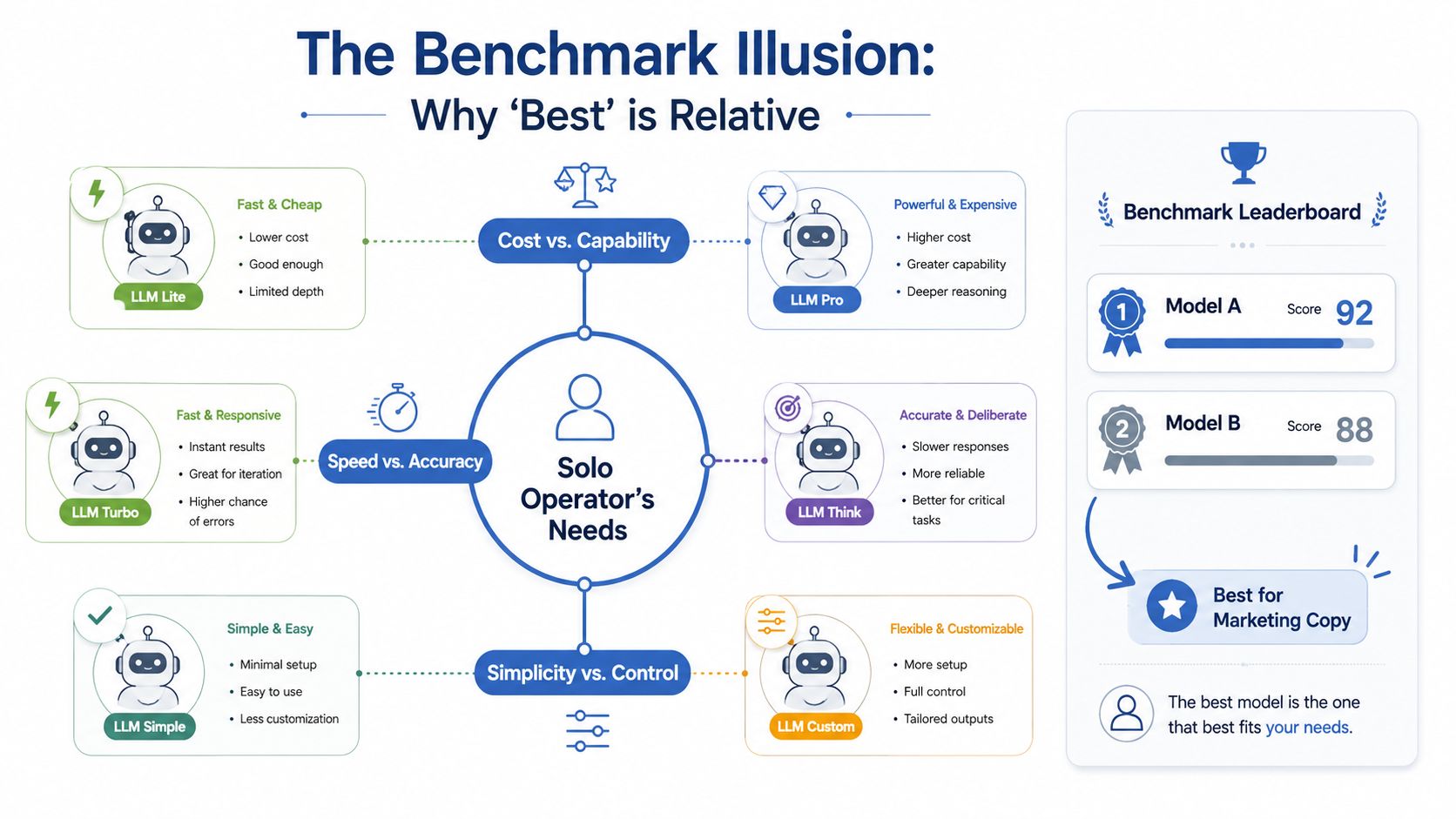
This is the same trap I see in tool-ranking content that tries to rank itself first. GetIntel's study of self-ranking tool lists is a useful reminder that lists can reward page structure over real usefulness, and model pages do the same thing all the time.
Table of Contents
- The Wrong Question Most Buyers Ask
- Six Criteria That Actually Pick Your Model
- Frontier Models Compared on the Numbers That Matter
- What Broke When I Matched the Wrong Model to the Job
- Best Model Picks by Marketing Workload
- Integration, Deployment, and Real Cost of Ownership
- Your Monday Checklist for Picking an LLM
The Wrong Question Most Buyers Ask
The cleanest way to think about model choice starts with Stanford's HELM framework, which was introduced in 2022 to compare models across 16 core scenarios with 7 metrics, including accuracy, calibration, stability, fairness, bias, toxicity, and efficiency (HELM overview). That matters because the idea of a single winner breaks down fast once cost, latency, and safety enter the picture.
I use that lesson in every workflow I build. The model that looks strongest on a headline chart can still be the wrong call if it drops brand language inside a long PDF, burns too many tokens on a cheap task, or exceeds the tolerance you've got for factual drift.
Why leaderboard thinking fails in marketing
Broad benchmark tables tend to flatten real work into one score. Yet recent tables show frontier models clustered tightly on MMLU, a benchmark covering 57 academic subjects, with examples around 91.5%, 92%, and 94% in one 2026 snapshot (benchmark snapshot). That spread looks meaningful until you compare it with day-to-day work like extracting UTM-tagged campaign names from a long document or rewriting offers in your brand voice.
The practical problem is that your workflow isn't one benchmark. It's a stack of small jobs, and each job has different failure modes.
Practical rule: if the model's weak point can break revenue, trust, or delivery speed, leaderboard rank stops being the deciding factor.
A lot of “best model” posts also miss the governance side. Hallucination-focused evaluation suites such as HalluLens and FaithBench exist because a strong score on general benchmarks doesn't tell you how often a model produces unsupported claims in the kind of customer-facing work you publish (hallucination benchmark note).
The better question
The question I ask is which model wins the slot inside the workflow. One model may be right for long-context reading, another for cheap variant generation, another for sensitive data, and another for quick ideation. That's also where a task-by-task stack beats a single winner.
LLMrefs' benchmark ranking guide is worth reading if you want a quick feel for why benchmark tables diverge by task instead of producing one universal champion.
Six Criteria That Actually Pick Your Model
I don't start with branding. I start with six checks that tell me whether a model will hold up in a real workflow, and I can run most of them in under half an hour. If you're a solo operator, that's the right time horizon. A repeatable test is all you need.
| Criterion | Quick Test under 30 min | Business Outcome It Predicts |
|---|---|---|
| Accuracy on your own prompts | Run 50 real prompts through two or three models and score outputs against your own standard | Fewer rewrites, better retention of brand voice, higher support deflection |
| Cost per task | Count input and output tokens on a sample job, then multiply by published pricing | Margin, CPA, and whether the workflow survives at scale |
| Latency under load | Send a small batch at the same time and note the slowest responses | Session quality, turnaround time, and weekly output |
| Privacy and data handling | Read the provider terms for retention, training use, and opt-out settings | Risk control and whether you can use customer data safely |
| Tool calling and structured output | Ask for a schema-bound response, then validate how often it breaks format | Less cleanup, fewer downstream failures, more reliable automation |
| Rate limits and recovery | Hit the model with a burst and watch whether it degrades, throttles, or recovers cleanly | Output consistency on busy days and campaign launch reliability |
1. Accuracy on your prompts
Benchmarks are useful, but they're abstract. Your own prompt set tells you whether the model can handle your tone, your offer structure, and your weird edge cases. I keep a 50-prompt set from real customer work, then I score outputs for factual fidelity, structure, and usefulness.
2. Cost per task over cost per million tokens
Sticker price misleads people. A model with a cheap per-token rate can still be expensive if it needs long prompts, retries, or heavy cleanup. The better measure is blended cost per completed task, because that's what hits margin.
3. Latency under the way you'll actually use it
A fast single prompt isn't enough. Batch behavior matters if you're generating dozens of variants, and the slowest response in a set can shape the whole workflow. That's especially important when the output feeds a launch window or a publishing queue.
4. Privacy terms and opt-out settings
If you work with customer notes, interview transcripts, or internal docs, read the terms before you paste anything in. Some workflows can tolerate public-model usage. Others can't, and you want to know that before the first upload.
5. Tool calling and structured output
A model that can follow a schema cleanly saves hours. If you've ever cleaned up broken JSON by hand, you know how much time that eats. Clean structured output is the difference between a draft and a workflow.
6. Rate limits and recovery
People often get blindsided. A model can look great in testing, then stall when your Monday traffic spikes. If you want a deeper walkthrough of choosing around these checks, I've written a separate guide on how to choose an AI model for your business.
If you want a provider-neutral planning resource, AI strategy consulting can be useful as a reference point for how teams structure model selection around constraints instead of hype.
Frontier Models Compared on the Numbers That Matter
The models below come up often when marketers ask which llm is the best for production work. I am not trying to crown one winner. The table is there to show where the trade-offs sit, especially for hallucination risk, context-window pricing, and the rate-limit traps that headline reviews skip.
| Model | Context Window | Input $/1K | Output $/1K | p95 Latency | Rate Limit (Tier 1) | Knowledge Cutoff |
|---|---|---|---|---|---|---|
| GPT-4o | Varies by plan | Varies | Varies | Varies by workload | Tiered | Varies |
| GPT-4o-mini | Varies by plan | Varies | Varies | Varies by workload | Tiered | Varies |
| Claude Sonnet | 1M on published pricing materials for Sonnet 4.6 (pricing note) | $3 | $15 (Anthropic pricing PDF) | Varies by route | Tiered | Varies |
| Gemini 2.5 Pro | Varies by project | Varies | Varies | Varies by project | Project quotas can throttle usage | Varies |
| Llama 3.1 405B | Self-hosted or provider-based | Varies | Varies | Varies by deployment | Self-managed | Varies |
| Mistral | Varies by model | Varies | Varies | Varies by deployment | Tiered | Varies |
The pricing lines above are only specific where the sources are specific. Anthropic lists $3 per million input tokens and $15 per million output tokens for Claude Sonnet 4.6 in its pricing materials. It also lists Opus-class pricing at $5 input and $25 output per million tokens, which matters once you start watching margin on long-form marketing work.
Rate limits can matter just as much as model quality. Independent commentary on ChatGPT Codex limits says plan ceilings vary sharply across tiers, including Plus, Pro 5x, and Pro 20x allowances expressed as ranges per 5 hours, so a model that looks fine in testing can stall in a real batch run (Codex limits note).
That problem shows up fast when a Monday workflow depends on one provider for volume. The benchmark score still looks nice. The queue stops moving.
Benchmarks that matter, and ones that don't
A real-task evaluation in 2026 found Claude Sonnet 4.6 and Claude Opus 4.6 both hit 100% task success on 38 of 38 tasks, while Gemini 2.5 Pro and GPT-5.2-codex both scored 98.3% in the same evaluation (real-task evaluation). That kind of result is useful because the raw scores are close enough that workflow fit becomes the key separator. If you want a plain-English breakdown of how these model families differ, my guide on reasoning models explained is a useful companion.
I care less about bragging rights than whether the model survives the job you are paying for. On long-document workflows, Claude Opus 4.6 matters because it was Anthropic's first Opus-class model with a 1M-token context window (Claude Opus 4.6 note). That can be the difference between one clean pass and a chain of broken chunks.
For a broader view of model comparison methods, the LLMrefs benchmarks ranking guide is useful if you want to sanity-check leaderboard-style claims before you spend.
Short version: pick by workload slot, not by leaderboard rank.
What Broke When I Matched the Wrong Model to the Job
I made this mistake on a Q4 campaign where the inputs were ugly. The brief, brand voice doc, offer notes, and objections sheet all had to fit together, and I ran the first version through a model that looked great on public scores but wasn't the right fit for the job.
The result was predictable in hindsight. The context handling clipped the brand voice material, the CTAs got generic, and the variant set underperformed control by 22%. The campaign budget was $40K, so that miss hurt in the only way that matters: it ate into expected return and made the next round of testing harder to trust.
What I changed
I split the work into pieces. I used Claude Sonnet for long-context copy distillation, GPT-4o-mini for high-volume variant generation, and Gemini for image-ad brainstorming. That gave each part of the workflow a model that matched the actual constraint instead of one model carrying the whole thing.
A better model wasn't the fix. Matching each model to the bottleneck was.
Practical rule: long context and cheap volume do different jobs, so don't force one model to do both unless you've tested that exact stack.
The same six criteria from earlier would have caught the failure before spend went live. The prompt set would've shown the generic CTA problem, the cost check would've exposed unnecessary token burn, and the workflow test would've told me the model couldn't hold the brand doc together long enough to matter.
Best Model Picks by Marketing Workload
If you want a usable answer to which llm is the best, map the model to the job. Most people skip that step, and it's why they end up disappointed by a tool that was never meant to carry every task in the stack.
| Marketing Workload | Primary Pick | Runner-Up | Deciding Criterion |
|---|---|---|---|
| Long-form SEO content | Claude Sonnet | GPT-4o | Long context and cleaner synthesis of source notes |
| Short ad copy at scale | GPT-4o-mini | Claude Sonnet | Cheap high-volume generation |
| Email personalization | Llama 3.1 405B self-hosted | Claude Sonnet | Keep PII inside your own environment |
| Landing page testing ideation | Gemini 1.5 Pro | GPT-4o | Multimodal prompt reading and screenshot analysis |
| Social listening summarization | GPT-4o-mini | Claude Sonnet | Fast summarization at lower cost |
| Customer interview synthesis | Claude Sonnet | GPT-4o | Long-context reading and stable quote handling |
Why these picks work
Claude Sonnet is the model I reach for when the workflow starts with a wall of text and ends with a clean summary. That's why it fits customer interviews and long-form content work so well. GPT-4o-mini wins when the issue is throughput, because you're asking for a lot of small outputs and don't want the bill to balloon.
Gemini earns its place when the input includes more than text. Screenshot review, layout notes, and page-level ideation are a better fit than text-only prompting. For PII-heavy work, a self-hosted open-weights model like Llama 3.1 405B can be the safer route because the data stays inside your own environment.
One option from my own work is worth mentioning once. I offer a workflow service that can include a private LLM or GPT fine-tuned on your company data, which can make sense when you want a controlled setup rather than a public API path.
A fallback matters when provider access is uneven. If you're blocked by region, quota, or plan limits, the runner-up column gives you a second lane instead of forcing a scramble.
Integration, Deployment, and Real Cost of Ownership
Raw API pricing is only part of the bill. The question is how much friction you're adding to the workflow, because deployment choice changes latency variance, retention posture, and how much engineering time you spend making the thing safe.
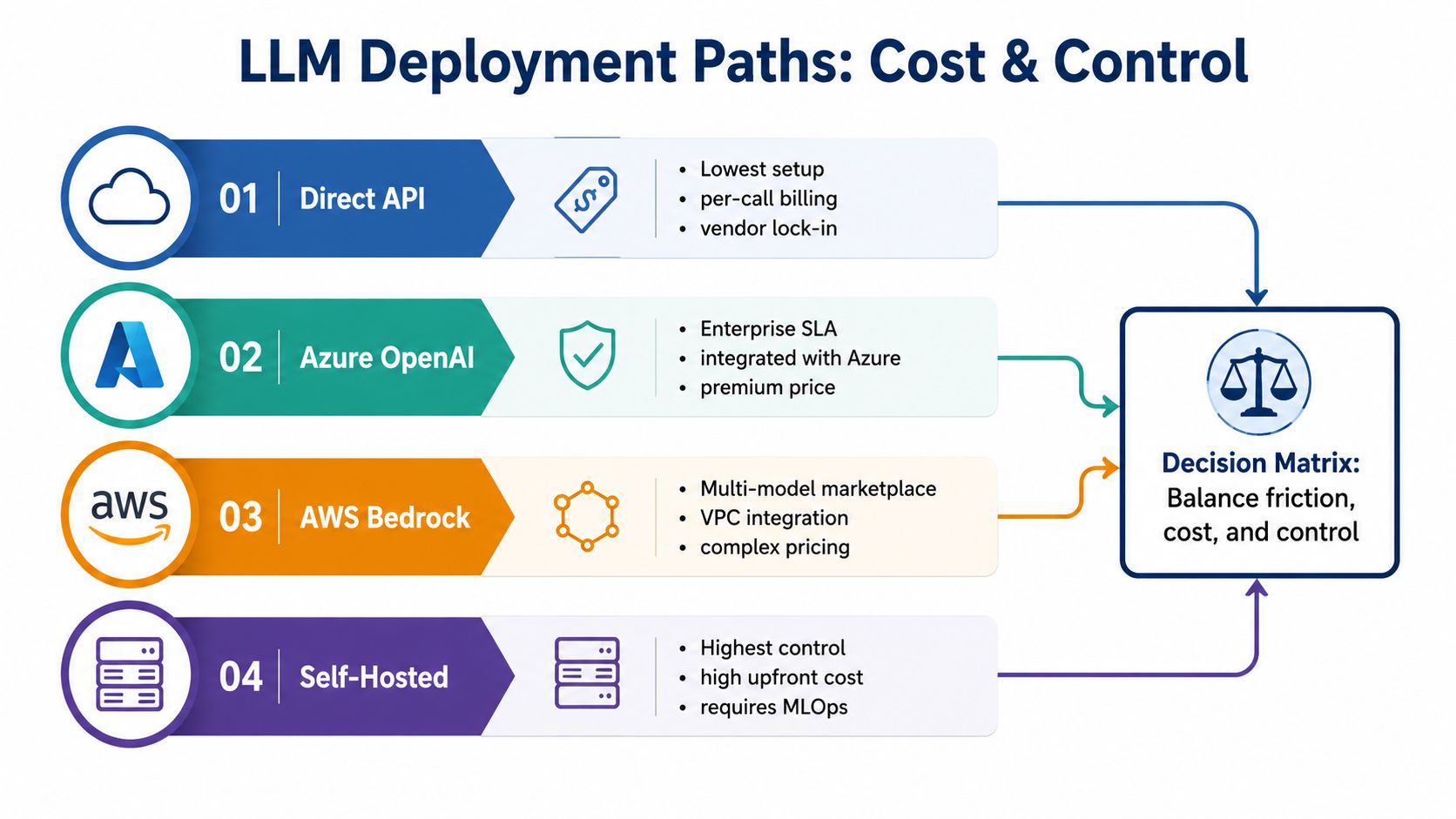
Direct API calls are the easiest path. Azure OpenAI adds extra access and compliance controls, AWS Bedrock gives you a multi-model layer with VPC-friendly integration, and self-hosted open weights on RunPod or Lambda give you the most control at the cost of more setup and more ongoing care.
The hidden costs I watch
Prompt caching can change the math fast. Claude and Gemini both support caching that can reduce repeated-input cost materially, and that matters if you reuse briefs, brand docs, or knowledge packs over and over. The headline rate isn't the whole rate.
The other hidden cost is guardrails. When you self-host, you take on the cleanup yourself, from format checks to safety filters to routing logic. That's fine if control matters more than speed. It's a bad deal if you're a solo operator trying to move fast this week.
For deployment architecture, I'd read the model context protocol overview before wiring tools into a workflow. It helps frame how models and external tools fit together without forcing every task through one prompt.
A simple ownership formula
I use a blunt version of total cost of ownership:
TCO = token cost + retry cost + cache-adjusted input cost + deployment overhead + engineering hours
It's blunt, and it works. It forces you to count the hours spent setting up routing, logs, validators, and fallback logic, which is where a cheap model can turn expensive fast.
Rule I use: if a cheaper model adds cleanup work every day, the cheaper model isn't cheaper.
Your Monday Checklist for Picking an LLM
Start with the task, not the brand name. Then run a small, repeatable test and make the choice before the week gets busy.
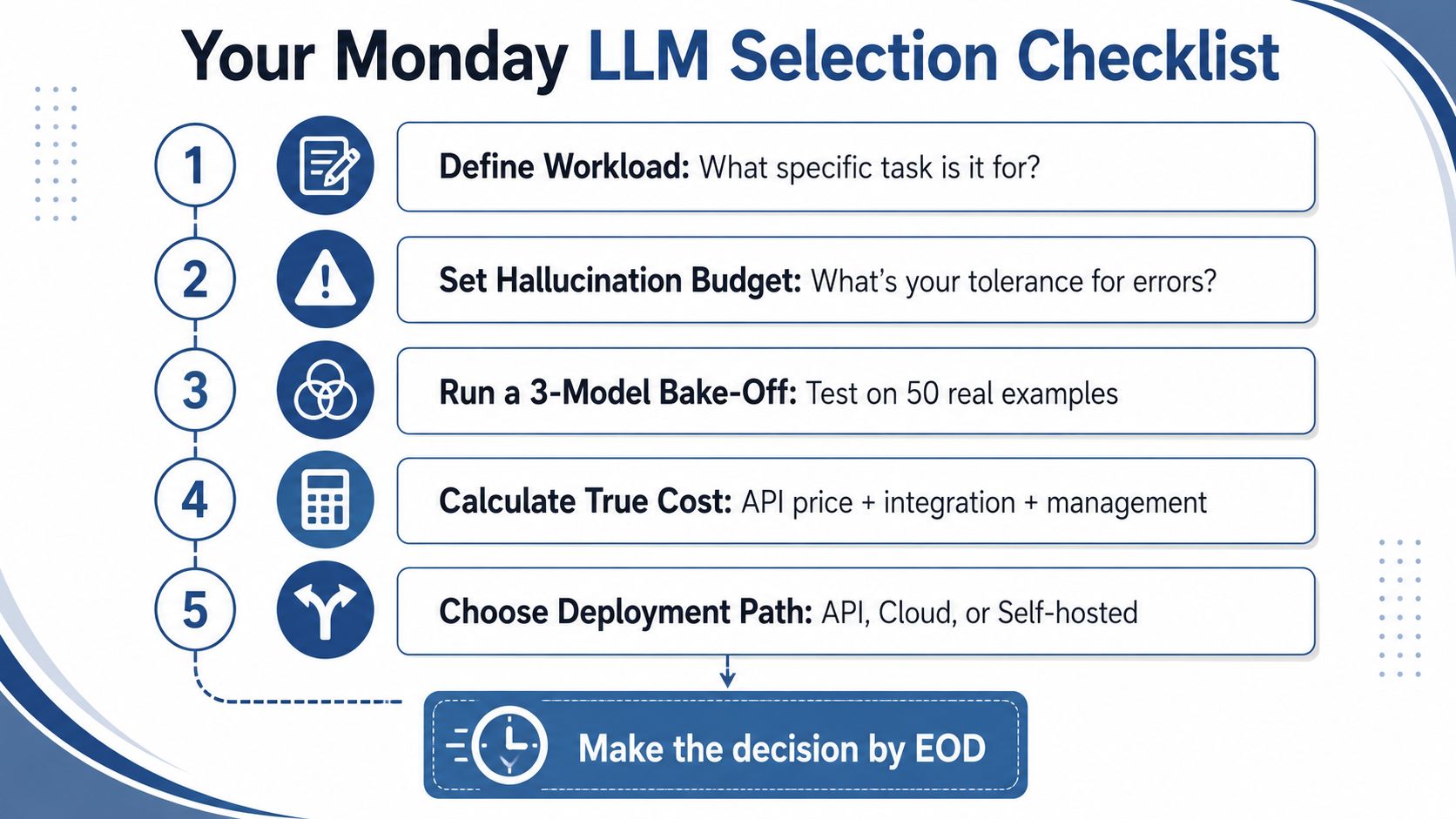
Define the workload. Write one sentence about the actual job, then score whether the model needs long context, speed, or privacy. Use a spreadsheet. Pass if the task is narrow enough that one model slot is obvious.
Set your hallucination budget. Decide what level of factual drift you can tolerate before the output becomes unusable. I'd test this with an LLM-as-judge pass or a manual review. Pass only if the model stays inside your tolerance on your own prompts.
Run a three-model bake-off on 50 real prompts. Promptfoo works well for this kind of comparison, because it keeps the test repeatable. Pass if one model clearly wins on the task you care about, not the one with the loudest benchmark.
Calculate blended cost per task. Helicone or a spreadsheet can show you what the job really costs once retries and prompt overhead are included. Pass if the number still works against your margin.
Pick a fallback before traffic spikes. Don't wait until a quota wall or latency spike ruins a launch day. Pass if you already know which second model takes over when the primary one throttles.
The contrarian move usually pays off. Default to the smallest model that clears your quality bar, then move up only when the revenue lift justifies the extra tokens. That keeps you honest, keeps margin intact, and stops you from paying for capacity you don't need.
The trap is chasing leaderboard scores over persona-specific evaluation. The shortcut is building one shared evaluation harness now, because that makes the next model swap a routine change instead of a painful project.
If you want to stop guessing, take one real workflow, test three models against your own prompts, and choose the smallest one that holds quality. Then lock in the fallback, publish the output, and use the same harness again next month so your stack keeps getting better without becoming a science project.
