
AI adoption hit 88% in 2025, but only 48% of AI projects make it from pilot to production. That's the core answer to how to choose an AI model for your business, you don't start with the most popular model, you start with the one that can survive your actual workflow. McKinsey and Gartner data summarized in 2026 reporting makes the gap impossible to ignore.
I'm Samuel Woods, and I've been working with ML since 2016 and Generative AI since 2019. The pattern is always the same. Teams buy a model because it demoed well, then they discover the hidden costs in latency, retries, human review, governance, and integration.
The business problem usually isn't “which model is smartest.” It's “which model, or mix of models, can produce reliable output at the lowest workable cost while protecting margin, speed, and control.” That's why orchestration matters. A single-model mindset burns money. A routing mindset compounds advantage.
Table of Contents
- Why Most AI Projects Fail Before They Ship
- Define Your Use Case Before You Look at a Single Model
- Compare the Major AI Model Families and When to Use Each
- Score Trade-offs With a Practical Decision Rubric
- Run a Proof of Concept and Plan Your Pilot Launch
- Vendor Models versus Open Source and the Orchestration Advantage
Why Most AI Projects Fail Before They Ship
AI is already mainstream in business functions, but production success still lags badly. McKinsey data summarized in 2026 reporting shows AI use in at least one business function rose from 78% in 2024 to 88% in 2025. Yet Gartner estimates only 48% of AI projects make it from pilot to production, and RAND estimates more than 80% fail outright. These figures show the problem is execution, not adoption.
The failure pattern is familiar, and that is why it keeps repeating. Teams pick models based on polished demos, benchmark screenshots, or whatever the market is praising that week. Then they ask the wrong question, which is whether the model is “good.” The question is which model, or mix of models, can deliver reliable output at the lowest workable cost while fitting your use case, your data, your security posture, and your operating economics.

Practical rule: if you cannot define success in the language of revenue, cost, speed, or risk reduction, you are not ready to compare models.
I have watched expensive pilots die because the team never agreed on what “better” meant. One stakeholder wanted faster response times, another wanted cleaner brand voice, a third cared only about security review, and nobody had a scoring method to resolve the trade-off. That is how you end up with a pilot that looks impressive in a meeting and useless in production.
If you want to avoid that trap, use a selection process that forces clarity before enthusiasm. The internal operating model matters too, especially when your AI stack touches automation, handoffs, and multiple systems. This practical overview of AI automations for business fits that reality.
Define Your Use Case Before You Look at a Single Model
Start with the job, not the model. Microsoft's selection flow says to define the exact use case, turn it into measurable success metrics, assess your data and current systems, and only then set budget and timeline boundaries before comparing models. That sequence matters because it stops you from optimizing for the wrong thing. Microsoft's evaluation guide is basically a guardrail against theater.
Write the brief before you run the demo
A useful brief fits in one paragraph. It should say what the model will do, who uses it, what data it sees, what system it plugs into, and what counts as success. If the brief can't survive a hallway read by an engineer, an operator, and a finance lead, it's still too fuzzy.
The metrics need teeth. “Better output quality” is useless. You need something concrete, like response time, task completion rate, groundedness against a test set, or a hard cost ceiling per request. If the team can't tell you how it will measure success, you don't have a project, you have a wish.
Define the failure condition early too. If the model can't meet the threshold on your representative test set, kill the idea fast and move on.
That sounds harsh, but it saves weeks. A model family that's great for general conversation may still be the wrong fit for a workflow that needs structured outputs, strict compliance, or long document handling. Once the use case is locked, the field narrows quickly, and that's a good thing.
Treat constraints like deal breakers
Your data shape matters. Your systems matter. Your compliance obligations matter. If the workflow depends on private customer data, a consumer-facing setup may be the wrong move no matter how polished the demo looks.
Budget and timeline are also constraints, not afterthoughts. A model that looks elegant but requires a quarter of integration work can be a bad business decision if your competitor can ship a simpler workflow this month. The brief should make that trade-off explicit before any vendor conversation starts.
Compare the Major AI Model Families and When to Use Each
The worst mistake is assuming one model family can do everything well enough. It can't. Different families have different cost curves, latency profiles, and control levels, and your job is to match them to the work instead of paying premium prices for every request.
Foundation models, fine-tuned models, RAG, multimodal systems, and agents
Foundation LLMs are the generalists. They're strong for drafting, summarization, analysis, and open-ended reasoning, which makes them a sensible first stop for content-heavy workflows. They're also the easiest to overuse. If your task is narrow and repetitive, a giant model can become an expensive habit.
Fine-tuned models make sense when your company has proprietary data and a repeatable pattern that needs domain-specific accuracy. Legal review, medical triage, product classification, and structured extraction often fit here. The win is consistency. The loss is maintenance, because you're committing to data curation and ongoing tuning discipline.
RAG is the right move when the model needs your knowledge base, not the internet's guesswork. It keeps answers grounded in your documents, policies, or product content, which is exactly what you want when factual drift would hurt trust. Multimodal models matter when the input isn't just text. If your workflow includes product images, scans, screenshots, or audio, the model has to handle those formats without brittle glue code.
If the task needs your internal truth, reach for retrieval before you reach for a bigger model.
AI agents are the newest layer, and they're useful when the workflow has multiple steps, tool calls, and conditional logic. They can route, plan, fetch, and act across systems. That's powerful, but it also means more places for failure, so they're best used where autonomy creates clear business value, not where a simple classifier would do the job.
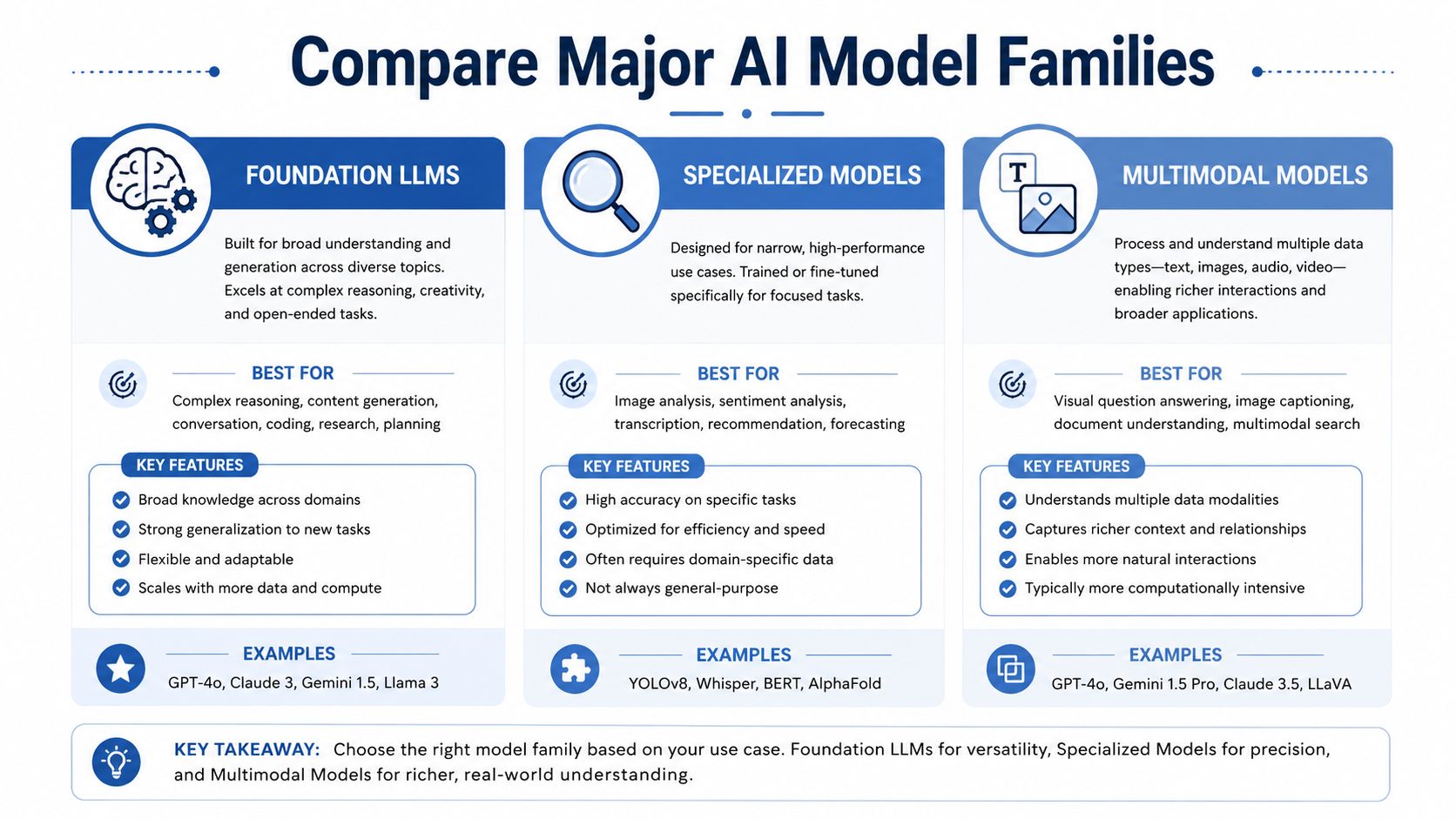
The strategic point is simple. Don't ask which model family is best in the abstract. Ask which family gives you the lowest reliable operating cost for the exact work you need to ship. That's where margin gets protected and where competitors often leave money on the table.
Score Trade-offs With a Practical Decision Rubric
Cost is where reality shows up fast. One 2026 comparison found that for a workload of 1 million input tokens plus 250,000 output tokens, token-only cost ranged from about $0.62 to $22.50 depending on the model, a spread of more than 35x before tooling, retries, monitoring, or human review are added. That comparison is a reminder that model choice can wreck unit economics if you treat it like a branding decision.
Use a scorecard, not a vibe
I like to score models on five business questions. Does it hit the quality threshold? Can it answer fast enough for the workflow? Can we afford it at volume? Does it fit our privacy and compliance needs? Can the team explain and support its output?
Here's a simple way to think about the trade-offs.
| Model | Cost per 1M Tokens | Latency | Accuracy on Benchmark | Privacy Fit | Explainability |
|---|---|---|---|---|---|
| Vendor premium model | Higher | Fast to moderate | Strong | Moderate to strong | Moderate |
| Smaller vendor model | Lower | Fast | Good on narrow tasks | Moderate to strong | Moderate |
| Open-weight model | Variable | Depends on hosting | Depends on tuning | Strong if self-hosted | Stronger when controlled |
| RAG plus smaller model | Lower to moderate | Fast | Strong on grounded tasks | Strong with proper controls | Stronger because sources are visible |
The rubric doesn't need to be fancy. It needs to be honest. If a model wins on accuracy but loses badly on cost, latency, or deployment fit, it's not the winner. It's the most expensive option that failed one of your actual constraints.
The comparison gets sharper when you think in terms of systems. This stack-oriented view of AI agents and tools is useful because the model rarely operates alone. It sits inside a pipeline, and that pipeline is where many teams lose margin.
Weight what actually drives revenue
A customer-facing sales assistant cares about response speed and consistency. An internal research tool cares more about depth and recall. A compliance workflow cares more about controllability and traceability than raw fluency.
That's why the same model can be great for one revenue stream and terrible for another. The scorecard makes that visible before you spend on integration. It also helps you defend the decision internally, because the math shows why the chosen model fits the business instead of just sounding impressive in a demo.
Run a Proof of Concept and Plan Your Pilot Launch
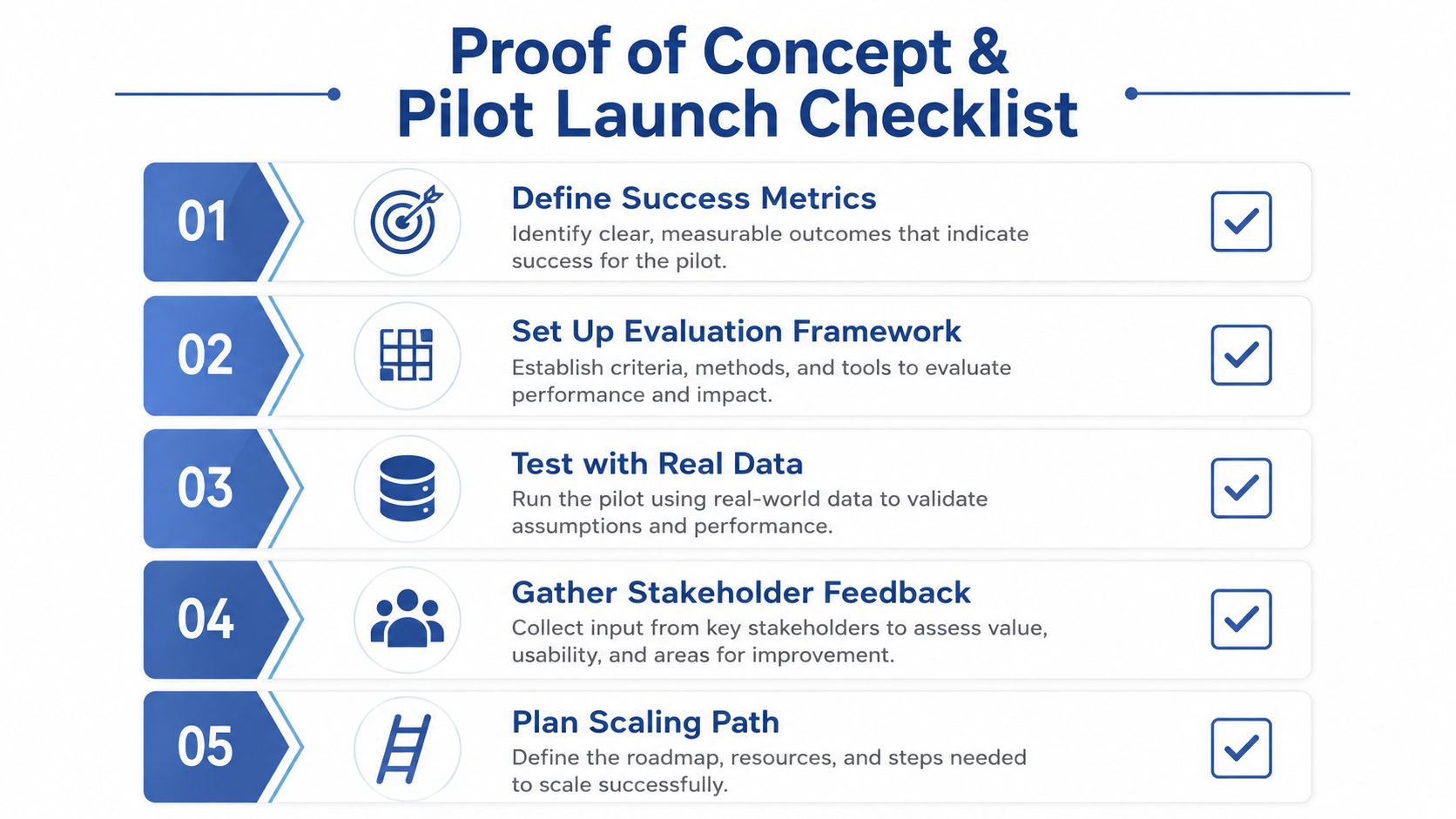
A model that looks strong in a demo can still fail once real users, messy inputs, and integration work enter the picture. That is why the selection process should move from shortlist to proof of concept quickly. A startup-oriented evaluation approach recommends narrowing the field to 3 to 7 candidate models, then running a proof of concept for 2 to 4 weeks, followed by a limited pilot of 4 to 8 weeks. That guidance keeps the decision tied to actual workflow performance instead of marketing claims.
Make the test look like production
Use a representative dataset, not your cleanest example. Include the ugly inputs, the borderline cases, and the requests users write. If the task is customer support, test with messy tickets. If it's content, test with briefs that are incomplete or contradictory, because that is what shows up in real operations.
Weight the decision across technical performance (40 points), business value (25), implementation feasibility (20), and risk assessment (15). This weighting model helps prevent benchmark worship from dominating the decision. A model can look strong in isolation and still be a bad business fit if it creates integration drag, slows approvals, or adds governance risk. That guidance matters because the true cost of a model choice usually appears in the workflow, not the demo.
You also need failure logs, not just pass or fail notes. Record where the model drifts, where it hallucinates, where it slows down, and where humans have to intervene. Those notes show whether the workflow can scale and where an orchestration layer will need fallback rules, routing thresholds, or manual review.
Operational rule: if the PoC does not surface integration pain, you probably did not test close enough to production.
The pilot should validate the operational layer. That means model versioning, fallback routes, output quality gates, and monitoring for data drift. It also means deciding who gets paged when the system degrades, because AI systems fail in the workflow, not in theory. If your stack depends on structured handoffs between tools, review the model context protocol so the pilot reflects how models connect to other systems.
Don't confuse shipping with finishing
A pilot is a controlled stress test. If the model cannot hold quality when volume rises or inputs get messy, the rollout plan needs another pass. That is where many teams waste money, because they celebrate the demo instead of instrumenting the deployment.
If you want a practical base layer for this stage, Samuel Woods also offers a fractional chief AI officer service focused on designing and integrating AI and ML workflows into business systems. It is one option among many for teams that need operating guidance, not just model advice.
Vendor Models versus Open Source and the Orchestration Advantage
Vendor models are the fastest way to get moving. They're well documented, improve continuously, and reduce infrastructure burden. Open-source models give you more control, lower marginal cost at scale, and a cleaner path to self-hosting when privacy or control matters.
Choose the stack, not the ideology
The mature decision isn't “vendor or open source.” It's “which tasks belong where.” Simple queries should route to cheaper models. Hard reasoning should escalate to stronger models. Sensitive workloads should stay on open-weight or self-hosted options when control matters more than convenience.
That orchestration approach is where the margin story gets interesting. A company that routes all requests through a premium model is paying top dollar for easy work. A company that routes intelligently keeps the expensive model for the few requests that need it. That's how you defend unit economics while still improving quality.
The practical question is how to define the routing thresholds. Start with the least expensive model that passes a representative test set, then move up only when the measurement justifies it. That keeps the premium model as an escalation path, not the default tax on every workflow.
The goal is not to find one model that wins every category. The goal is to build a workflow that wins economically.
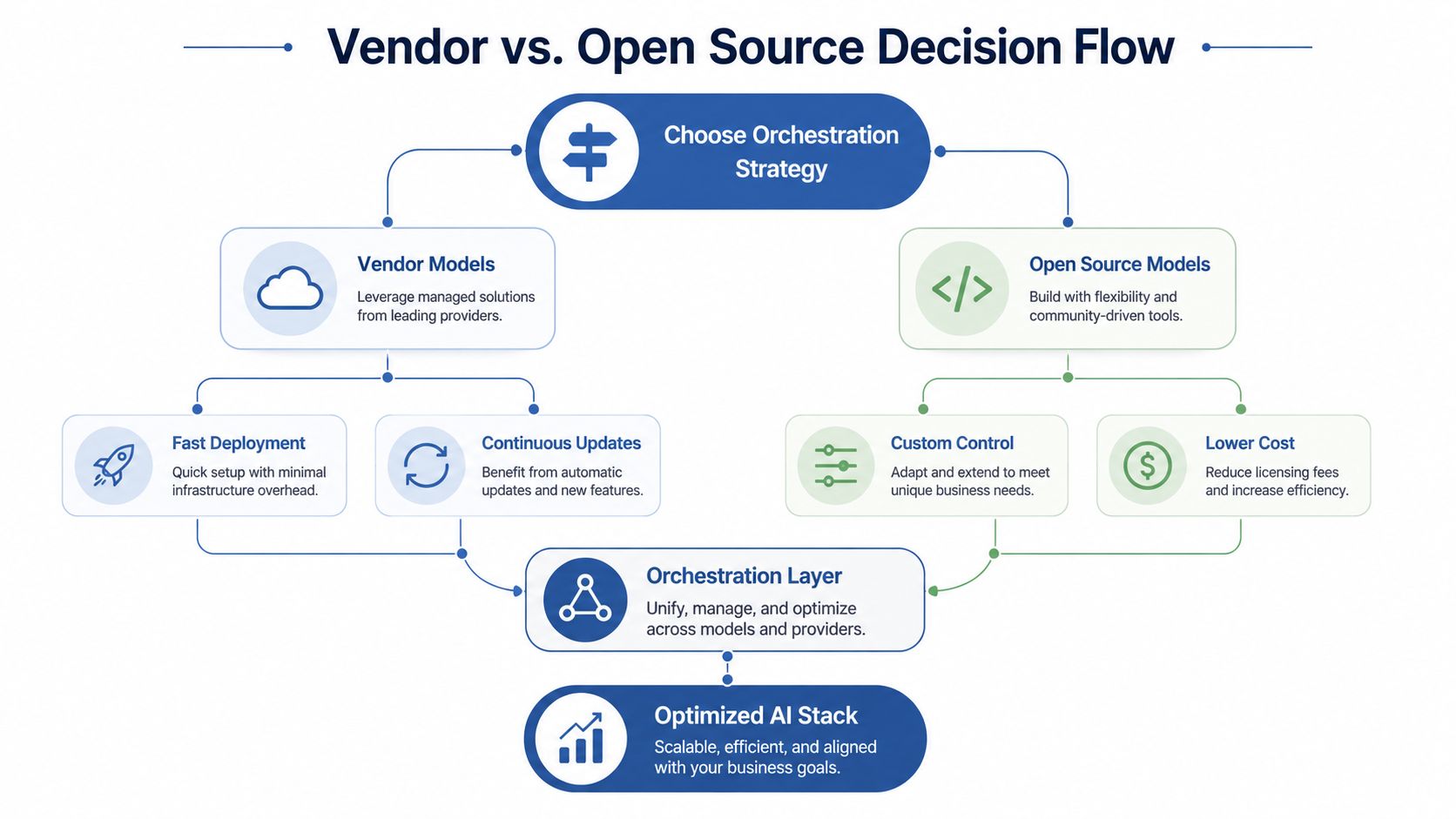
The orchestration layer is also where products like Model Context Protocol become relevant, because model access, tool use, and context handling start to matter as much as raw generation quality. That's the shift most founders miss. Once you have multiple models in the stack, the competitive edge comes from routing, fallback logic, and measurement, not from bragging about a single model name.
The companies that win here don't just pick an AI model. They design an AI operating system for the business. That lets them move faster than competitors, spend less per workflow, and escalate intelligently only when the task justifies it.
Build your first model shortlist around one real workflow this week. Write the brief, score three to seven candidates, and run a representative proof of concept before you spend a dollar on scale.