
Most advice on ai automations for business is weak.
It tells you to open ChatGPT, write faster social posts, maybe connect a few apps, and call that innovation. That approach doesn't build advantage. It creates faster sameness.
I've been building ML systems since 2016 and working with generative AI since 2019. The companies winning with AI aren't the ones playing with prompts. They're the ones building proprietary automation systems that turn customer data, workflow data, and brand intelligence into better decisions every day.
If you want revenue growth, stronger margins, and a harder-to-copy business, stop thinking in terms of tools. Start thinking in terms of systems.
Your Competitors Are Dabbling in AI You Will Dominate
Most of your competitors are still in the experimentation phase. They use AI for ad copy, meeting notes, and customer support drafts. Helpful, yes. Strategic, no.
That gap is your opening.
In 2025, AI adoption reached 78% of enterprises, and the stronger signal is return on investment. Organizations are seeing $3.70 ROI per dollar invested, early adopters report productivity gains of up to 55%, and 66% of companies saw revenue increases from AI. The key difference is that top performers redesign workflows instead of automating isolated tasks, according to Fullview's AI statistics roundup.

AI toys versus AI weapons
A toy saves a little time.
A weapon changes how your business competes.
If your team uses AI to draft a few emails faster, that's fine. If your business uses AI to score leads, route opportunities, generate personalized follow-up, monitor conversion signals, and feed performance data back into the system, you've built something very different. You've built an engine.
That engine does three things your competitors will struggle to match:
- It compounds learning. Every campaign, sales call, and support interaction creates new signal.
- It increases output without linear hiring. You scale action, not just headcount.
- It protects speed under pressure. When markets shift, you adapt faster because your workflows already run on live data.
Where the real advantage comes from
I don't care whether you use Claude, Gemini, GPT, Zapier, n8n, Make, or custom Python. I care whether the pieces are connected into a system that improves decisions and execution.
Practical rule: If an automation doesn't improve revenue, margin, speed, or market intelligence, it's a demo. Not a strategy.
The winners in the next decade will build what I call bionic teams. Human judgment at the top. AI handling routing, synthesis, drafting, pattern detection, and repetitive execution underneath.
That's how you scale without becoming generic. That's how you grow without turning your brand into machine sludge. And that's how you stop "using AI" and start building a business that rivals can't easily copy.
Adopt the Automation Flywheel Mindset
Most companies treat automation like a one-off project. They find a task, automate it, and move on.
That's too small.
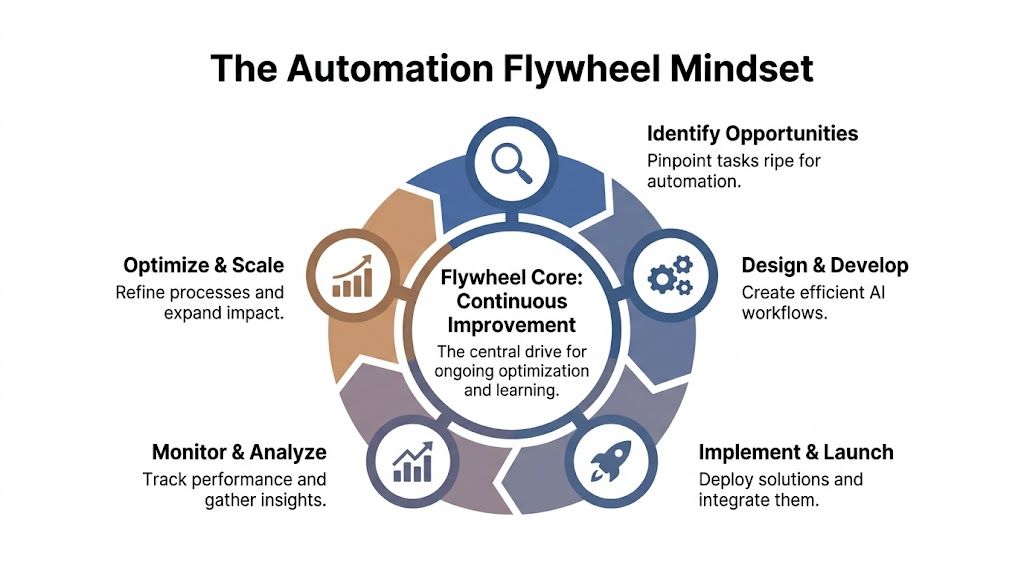
The right model is a flywheel. One automation creates data, that data creates insight, and that insight reveals the next automation opportunity. When you run this well, your business gets faster and smarter at the same time.
The three moves that matter
I use a simple operating model with clients. Identify. Build. Amplify.
Identify means spotting workflow friction and hidden opportunity. Not just obvious bottlenecks. I mean the places where your team loses time, context, or consistency. Lead handoffs. Repetitive proposal drafting. Support triage. Campaign reporting. Content repurposing. Competitive monitoring.
Build means turning that opportunity into a live workflow with clear inputs, logic, outputs, and ownership. Many organizations overcomplicate the process. You don't need an agent swarm on day one. You need one useful system that works reliably.
Amplify is where the moat starts forming. The automation doesn't just complete tasks. It generates structured data about what worked, what failed, where leads stall, what messages convert, which content themes create traction, and which customer problems keep repeating.
Why this beats task-by-task automation
Task-based automation saves effort once.
Flywheel automation improves the business repeatedly.
Say you automate inbound lead qualification. Good start. But if that workflow also logs behavioral signals, records why leads were prioritized, tracks downstream conversion, and feeds those patterns back into scoring, you've created a system that gets sharper over time.
That's the difference between "we automated a task" and "we improved the commercial brain of the company."
Build automations that create intelligence, not just activity.
What this looks like inside a real business
A healthy flywheel usually works like this:
- Signal capture: You collect events from CRM activity, site behavior, campaign engagement, support requests, and sales interactions.
- Decision layer: Models or rules classify, score, summarize, route, or generate next-best actions.
- Execution layer: Your tools send emails, assign tasks, update records, draft assets, or trigger human review.
- Feedback loop: Results flow back into the system so you can adjust prompts, thresholds, routing, and priorities.
- Expansion: The next workflow becomes easier because the data foundation already exists.
The mindset shift I want you to make
Stop asking, "What can AI do for this task?"
Start asking, "What operating system can I build for this part of the business?"
That question changes your decisions. You stop chasing isolated hacks. You start building an integrated layer across marketing, sales, operations, and support.
Once that happens, AI automations for business stop being a cost-saving side project. They become the mechanism that lets you move faster than competitors without sacrificing quality, insight, or control.
How to Pinpoint Your First Automation Wins
Don't start with the fanciest use case. Start with the clearest economic win.
I look for two things first. Frequency and rigidity. If a task happens constantly and follows a predictable pattern, it belongs near the top of your list.
That sounds obvious, but most founders ignore it. They jump into ambitious agent projects while their teams still waste hours on lead triage, inbox sorting, support categorization, and repetitive reporting.
Use a simple decision matrix
Here's the fastest way I know to choose your first projects.
| Task type | Frequency | Process rigidity | Priority |
|---|---|---|---|
| Lead qualification | High | High | Start here |
| Support ticket triage | High | High | Start here |
| Content repurposing | High | Medium | Strong candidate |
| Custom strategy memos | Low | Low | Wait |
| Executive decision support | Medium | Low | Pilot later |
The sweet spot is high-frequency, high-rigidity work.
That includes actions your team repeats every day with little variation. Classifying inbound requests. Routing leads. Updating CRM fields. Drafting first-pass responses. Turning one webinar into email, social, ad, and blog variants.
The opportunity is large. The global automation market is projected to reach $600 billion by 2030, businesses using workflow automation save 30% more time on routine tasks, error rates can fall by up to 75%, and chatbots can handle 80% of standard customer queries, according to business automation statistics compiled by ElectroIQ.
Three places I’d look first
For most startups and SMBs, I’d audit these areas before anything else:
Sales intake and routing
New leads often sit too long, get assigned badly, or receive generic follow-up. That's lost revenue disguised as process sloppiness.Customer support triage
Your team shouldn't spend prime human time classifying obvious requests. AI should sort, summarize, and route, while humans handle judgment-heavy cases.Marketing production plumbing
Not strategy. Plumbing. Repurposing assets, tagging themes, extracting customer language, drafting variants, and moving approved content into channels.
If you want concrete workflow patterns, review these marketing automation workflow examples and map them against your current bottlenecks.
How to calculate the cost of doing nothing
You don't need a finance team to build a business case. You need blunt arithmetic.
Ask:
- How often does this task happen
- Who touches it
- How long does it take
- What breaks when it slips
- What revenue waits on it
A slow lead-routing process doesn't just waste labor. It slows first response. That lowers conversion quality. A messy support queue doesn't just frustrate staff. It delays resolution and hides product signals. Weak content repurposing doesn't just waste effort. It starves your pipeline of volume.
If a workflow touches revenue and repeats weekly, you already have enough reason to inspect it.
What not to automate first
I wouldn't start with work that depends on unstable judgment, political nuance, or sparse data.
Examples include major pricing decisions, sensitive HR actions, or high-stakes negotiation. AI can support those workflows, but it shouldn't run them until you've built trust, quality controls, and strong human review.
Your first win should be boring in the best possible way. Repetitive. Measurable. Painful enough that everyone notices when it's fixed.
That's how momentum starts.
Designing and Building Your First AI Workflows
I want you to think like a systems architect, not a prompt tinkerer.
The first workflow I usually build with a growth-focused company is sales automation, because it forces discipline. Inputs are messy, response speed matters, and the commercial impact is easy to see when you get it right.

A strong sales workflow often follows this sequence: behavioral tracking, machine learning lead scoring, automated routing, and personalized outreach generated with LLMs. Teams using that playbook report up to 50% higher close rates from prioritized leads, and scoped implementations show a 240% average 3-year ROI, based on this sales automation methodology summary.
Start by mapping the ugly manual process
Before you build anything, map the current workflow in painful detail.
Who receives the lead first?
Where does the data land?
What fields are missing?
What signals matter?
When does a rep step in?
What gets written manually?
Where do delays happen?
Organizations often skip this because it's tedious. That's a mistake. If you don't map the current system, you'll automate assumptions instead of reality.
I like a one-page workflow spec with four boxes:
| Workflow element | What to define |
|---|---|
| Inputs | Forms, CRM fields, email events, site visits, demo requests |
| Decision logic | Scoring rules, thresholds, routing conditions, guardrails |
| Outputs | Rep assignment, follow-up draft, CRM update, Slack alert |
| Human review | Exceptions, approvals, brand-sensitive messaging |
A practical build example
Let's say you run a B2B SaaS company. Leads come in from paid search, webinars, referrals, and organic demo requests. Your reps complain that junk leads waste time, good leads wait too long, and follow-up quality varies by rep.
Here's how I'd build the first version.
Step one builds the data spine
Connect behavioral signals first. Email opens. Website visits. Demo requests. CRM history. Firmographic data.
Static data alone can mislead you. A company can look perfect on paper and still have no buying intent. Another may look small but show strong live engagement.
Step two scores for action, not vanity
Use ML or a rules-plus-model hybrid to rank leads by buying probability and urgency.
I don't need a huge, exotic model here. For many teams, a lightweight scoring layer is enough. Save the heavier reasoning models for summarization, drafting, and context-rich decisions.
Step three routes with purpose
High-score enterprise leads go to your strongest closer. Product-led leads with high usage signals go to an expansion specialist. Low-fit leads move into nurture.
At this point, revenue starts leaking or compounding. Routing is strategy disguised as operations.
Your CRM shouldn't be a storage bin. It should be a decision engine.
Step four personalizes outreach without going generic
Now bring in an LLM like Claude or Gemini to draft first-touch outreach using lead context, source context, firmographic traits, and approved messaging patterns.
Teams often wreck their brand by letting the model freewheel. Don't do that. Give it your proof points, objections, positioning, offers, tone rules, and examples of what good looks like.
If you're building systems that need streaming responses, event-driven updates, or more interactive agent behavior, this tutorial on building real-time AI agents is a useful technical reference.
When to use simple logic versus reasoning models
Use simple classification or rules when the decision is narrow and repeatable. Spam or not. Route left or right. Priority high or low.
Use reasoning models when context matters. Summarizing call notes. Drafting a customized email. Extracting objections from discovery transcripts. Turning messy signals into a sales brief.
Don't force a large model into every step. That's how costs rise and reliability drops.
Here’s a quick walkthrough that complements this build process:
The build standard I expect
A workflow is ready when it has:
- Clear business ownership: One leader owns outcomes, not just setup.
- Observable performance: You can inspect inputs, outputs, and failure cases.
- Fallback paths: Humans can intervene when confidence is low or stakes are high.
- Prompt and policy controls: Messaging follows your brand and compliance requirements.
- Iteration discipline: You review results and tune the system, not just launch it.
If you want one option for planning or implementing these systems, Samuel Woods offers advisory work focused on AI agents, agentic workflows, and bionic marketing operations. That's relevant when you need strategic design rather than another app subscription.
Your first workflow doesn't need to be perfect. It needs to be useful, instrumented, and hardwired to a business result.
Choosing Your AI Automation Tech Stack
Founders ask about tools too early.
The stack matters, but it matters after you've defined the workflow, the owner, the data, and the success metric. Otherwise you end up choosing software based on demos instead of economics.
I break the stack into three tiers. No-code, low-code, and custom. All three are valid. The wrong move is choosing a category that doesn't fit your operating reality.
Automation Stack Decision Framework
| Category | Best For | Speed to Deploy | Scalability | Cost |
|---|---|---|---|---|
| No-code platforms | Simple cross-app workflows, fast pilots, non-technical teams | Fast | Moderate | Low to moderate |
| Low-code platforms | More complex logic, branching, data handling, technical operators | Moderate | High | Moderate |
| Custom API and agent frameworks | Proprietary systems, deeper control, unique workflows, productized automation | Slower | Very high | Higher upfront |
When no-code is the right answer
If you're validating a workflow, start simple.
Zapier is often enough for intake forms, CRM updates, Slack alerts, and straightforward handoffs. If a process is linear and your team needs speed, no-code wins. I wouldn't apologize for that. Fast validation beats elegant overengineering.
Where low-code starts to pull ahead
Platforms like Make and n8n make sense when your workflow needs branching logic, custom data transforms, retries, scheduling, or multiple system dependencies.
This is the category I recommend most often for SMBs that have moved past experiments. You keep deployment speed, but you gain enough control to build serious operational workflows.
If you're comparing categories and vendors, this roundup of workflow automation software platforms is a useful starting point.
When custom is worth the effort
Custom stacks earn their keep when the workflow itself is strategic.
If your advantage depends on proprietary prompts, private datasets, agent orchestration, custom scoring logic, or tight integration with internal systems, build more of it yourself. That can mean direct API work, orchestration layers, vector retrieval, internal dashboards, and model routing logic.
That's how you create a moat. Not because custom is fashionable. Because the system becomes specific to how you sell, market, support, and deliver.
For a practical breakdown of categories, tools, and implementation trade-offs, I’d also review these AI workflow automation tools.
Selection rule: Choose the weakest tool that can reliably deliver the business outcome today. Upgrade only when the current layer becomes a constraint.
The trade-off most teams miss
A faster tool isn't always the cheaper tool.
If a no-code workflow becomes brittle, opaque, and expensive to maintain, your cheap pilot turns into drag. On the other hand, a custom build can become dead weight if your team can't maintain it.
The best stack is the one your business can operate confidently. Not the one with the loudest AI branding.
How to Measure ROI and Scale Your AI Systems
Most SMBs measure AI badly.
They track time saved, celebrate a few clever outputs, and then wonder why nobody approves a larger budget. That's because time saved is only persuasive when it connects to a business result.
The better approach is to build what I call an AI CFO view. One dashboard. A small set of metrics. Clear linkage between automation activity and commercial outcomes.

The core problem is straightforward. Many SMBs can't prove whether AI affected revenue because they don't connect automation outputs to business metrics. The fix is to move beyond vanity measures and tie things like sentiment analysis to conversion rate, or lead score accuracy to customer acquisition cost, as discussed in Flowlu's piece on small business AI automation.
What to track instead of vanity metrics
Track metrics by workflow type.
For sales, I care about lead-to-opportunity velocity, follow-up speed, qualified meeting rate, and close quality from prioritized leads.
For marketing, I care about asset production rate, content reuse efficiency, campaign launch speed, and downstream pipeline contribution.
For operations, I care about cost per transaction, error reduction, exception rate, and cycle time.
A simple ROI dashboard structure
You don't need a giant BI implementation to start. A useful dashboard can fit on one screen.
| Dashboard layer | Example focus |
|---|---|
| Activity | Volume processed, drafts created, tickets triaged |
| Quality | Accuracy, approval rate, exception rate |
| Speed | Time to response, cycle time, routing delay |
| Business outcome | Conversion, CAC movement, revenue influenced, cost per transaction |
That's enough to answer the only questions leadership really asks. Is it working. Is it reliable. Is it worth scaling.
If you need a stronger measurement framework for the marketing side, this guide on how to measure marketing effectiveness is a good companion.
When a pilot is ready to scale
I scale a workflow only when three conditions are true:
The output quality is stable
Not perfect. Stable. You understand the failure patterns and have mitigation in place.The economics are visible
You can explain the business value in terms leadership respects.The operating model exists
Someone owns monitoring, prompt changes, exception handling, and iteration cadence.
Good pilots die when nobody owns them after launch.
How to expand without breaking trust
Scale by adjacency.
If you've automated lead qualification successfully, move next into routing, outreach drafting, and CRM summarization. If support triage works, extend into knowledge retrieval and response drafting. If content repurposing works, extend into campaign assembly and performance tagging.
Don't jump from one isolated win to enterprise-wide chaos. Grow the system where data, logic, and team habits already exist.
That's how AI automations for business become an operating layer instead of a string of disconnected experiments.
Common Pitfalls That Kill AI Automation ROI
I've seen smart teams waste real money on AI because they automated the wrong thing, measured the wrong thing, or let the system damage the brand it was supposed to help.
Three mistakes show up constantly.
Automating a broken process
If the process is messy, your automation will just produce mess faster.
Bad handoffs, duplicate fields, unclear ownership, weak offers, and inconsistent approvals don't disappear when you add AI. They get amplified. Clean the workflow first. Then automate it.
Letting AI flatten your brand
This one is brutal because the damage is subtle.
A major risk with AI marketing is losing brand voice. 80 to 90% of marketers use AI, but very few have frameworks to audit outputs against brand guidelines. The result is generic messaging that fails CRO benchmarks, as noted in Graphos Product's discussion of AI marketing planning.
Your customers can feel the flattening even when they can't name it. The copy sounds competent but forgettable. The positioning drifts. The differentiation weakens.
Use brand rules, approved examples, messaging libraries, and human review for high-impact assets. Don't ask the model to invent your voice. Train the workflow to protect it.
The fastest way to commoditize your marketing is to let the model sound like everyone else.
Chasing shiny tools instead of business problems
A new agent framework appears every week. Most of them won't matter to your business.
You don't need novelty. You need advantage. If a tool doesn't help you capture better data, make better decisions, or execute faster with control, ignore it.
The right question isn't, "Should we use AI agents?" The right question is, "Where does judgment repeat often enough that software can support or automate it safely?"
That's the discipline.
The companies that win won't be the loudest on LinkedIn. They'll be the ones with tighter systems, faster feedback loops, stronger brand protection, and better commercial execution.
If you want help designing ai automations for business that actually improve revenue, speed, and competitive position, start with one workflow. Pick the process that repeats, affects money, and frustrates your team the most. Then build the system around it properly.