
Most advice on an ai agent for project management is backwards.
You’re told to start with prompts, models, and shiny demos. That’s why so many owners end up with a clever toy that summarizes meetings and saves nobody any real money. I’ve been building AI systems since 2016 and working with generative AI since 2019, and I can tell you the pattern is always the same. Tech-first projects impress everyone for two weeks, then die from neglect or apathy.
A real PM agent is an operational asset. It watches work move across systems, catches issues earlier than you would, pushes updates, and handles repetitive coordination that burns your expensive time.
That shift is already underway. The AI project management market is projected to grow from $3.08 billion in 2024 to $7.4 billion by 2029, a 16.3% CAGR, 1 in 5 project professionals already use generative AI in over 50% of recent projects, and Gartner projects that by 2030 AI will handle 80% of routine project management tasks according to Kanerika’s analysis of AI agents for project management.
If you ignore that, your competitors won’t.
Forget the Hype: Here’s What an AI PM Agent Actually Does
Many owners still confuse assistants with agents. That mistake costs them.
An assistant waits for a prompt. An agent operates inside a workflow. It checks Jira, Slack, Asana, HubSpot, GitHub, or your internal systems, reasons about what changed, and takes the next approved action. That’s a completely different category of system.
What it should own
A useful ai agent for project management usually handles work you hate but can’t ignore:
- It pulls status updates across tools and drafts client-ready summaries without you chasing people manually.
- It spots stalled tasks, dependency issues, and missing approvals before the weekly meeting.
- It flags who’s overloaded, who’s idle, and where timelines are drifting.
- It creates follow-up tasks, updates records, notifies owners, and routes issues to the right person.
That’s plain operational efficiency, with no magic involved.
A practical rule: if the agent only chats, your business stays the same. If it reads, decides, and acts inside your stack, you’re building something that matters.
A lot of owners should start one layer earlier, with workflow support that improves day-to-day execution before going fully agentic. If you want a practical example of where operational AI already offers advantages, read how to boost your productivity with AI. The lesson is simple. Start with real work, not novelty.
What separates a real agent from a dressed-up chatbot
Here’s the litmus test I use.
| System type | What it does | Business value |
|---|---|---|
| Chatbot | Answers questions when prompted | Convenience |
| Assistant | Summarizes and drafts content | Time savings |
| PM agent | Monitors systems, triggers actions, escalates risk | Operational advantage |
That last category is where competitive pressure starts. Your rival with a functioning PM agent doesn’t need to hire help to keep work moving. They need fewer meetings, fewer status pings, and fewer delays caused by basic coordination failure.
If you want to see where this model applies beyond PM, I’ve broken out additional AI agent use cases that follow the same principle. Automate judgment-light coordination first. Then move up the value chain.
Frame the Problem Before You Write a Single Prompt
If you can’t tie the agent to a painful workflow with clear financial drag, don’t build it.
That’s the part often skipped because it feels less exciting than model selection. Bad move. Companies using AI-enabled workflows improved operating profit from 2.4% in 2022 to 7.7% in 2024, and a case study from Insign showed 50% time savings on project timeline creation, while 72% of companies reported operational efficiency gains according to Dust’s review of AI for project management.

That kind of upside doesn’t come from asking ChatGPT for cleaner meeting notes. It comes from removing expensive friction from a core operating process.
Start with one bottleneck, not ten ideas
Pick the single project workflow that repeatedly wastes your time or delays revenue.
Common examples:
- Status chasing across Slack, Jira, email, and meetings.
- Timeline building that requires manual synthesis of dependencies and team availability.
- Resource reallocation when a blocker stalls delivery and nobody notices early enough.
- Progress reporting that eats hours every week and still arrives late.
This part matters more than your model choice. If the workflow isn’t expensive, the win won’t matter.
Put a dollar figure on the pain
Quantify one workflow before touching prompts. Keep it blunt.
- Count the hours per week you or your team spend on the manual task.
- Put a loaded hourly cost on it, using the actual cost of the people doing it, including your own time.
- Multiply the weekly cost across the year and treat that annual drag as your baseline loss.
That’s your business case. Your first PM agent should attack that number directly.
Don’t ask, “Can AI do this?” Ask, “Is this workflow expensive enough that fixing it changes margin, delivery speed, or capacity?”
If you’re sloppy about process definition, fix that before automating anything. A useful primer on defining project scope for teams helps because unclear scope is where many automation projects fail. The agent can’t rescue a workflow nobody has described clearly.
What to avoid
I’ve seen the same traps repeatedly:
- Starting with a broad mandate. “Build an AI PM copilot” is too vague to finish, so it becomes a budget leak.
- Automating messy exceptions first, when you should start with repetitive, structured coordination work.
- Ignoring ownership. One person should own the workflow, the KPI, and the rollout.
- Confusing activity with ROI. A polished demo doesn’t move the business forward.
A founder doesn’t need an AI strategy deck here. You need one high-friction workflow, one owner, and one metric that matters to the business.
Designing Your Agent's Responsibilities and Brain
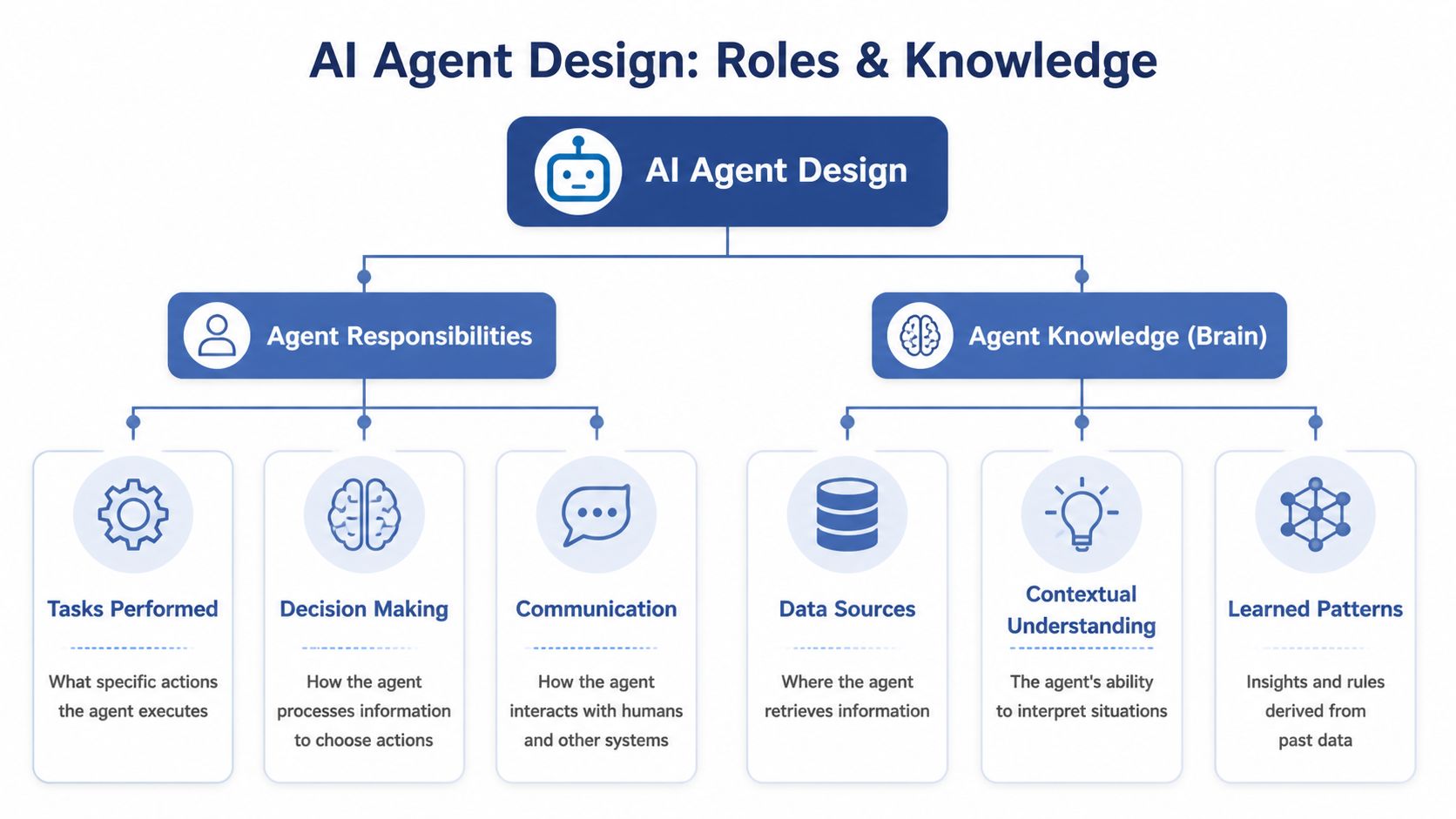
Once the business case is clear, design the agent like a new hire. Give it a job. Give it tools. Give it memory. Then limit what it’s allowed to do.
This discipline is how you avoid becoming part of the 95% pilot failure rate cited by MIT, and why a clear methodology matters when Gartner projects that 40% of AI projects will be canceled by 2027 if they take a tech-first approach, as summarized in Softermii’s breakdown of why AI agent projects fail.
The three-part job description
Every ai agent for project management I deploy starts with three design blocks.
Core directive
This is the mission. One sentence. Specific.
Examples:
- Draft a daily project summary by 9 AM using approved data sources.
- Detect delivery risks across active projects and route them to the correct owner.
- Prepare a weekly status report with blockers, timeline changes, and next actions.
If your directive sounds vague, the agent will behave vaguely.
Toolbelt
These are the actions the agent can take.
Think in functions, not aspirations:
- Read tasks from Jira
- Pull conversations from Slack
- Retrieve campaign milestones from Asana
- Post summaries to a Slack channel
- Open a follow-up task when a blocker appears
Tool access is where many builders get reckless. Give the agent only the minimum needed to do the job.
Memory
Memory is context that persists across runs. Previous reports. Team terminology. Open risks. Last known project state. Approved escalation paths.
Without memory, the agent starts from scratch every time and produces shallow output. With the right memory, it starts behaving like someone who knows how your business operates.
A template worth using
Here’s the structure I recommend:
| Design element | What to define |
|---|---|
| Purpose | The exact recurring outcome the agent owns |
| Inputs | Systems, records, and messages it can read |
| Actions | What it’s allowed to do automatically |
| Escalation rules | When it must hand off to a human |
| Context | Terminology, past outputs, project history |
| Success metric | The business KPI tied to the original bottleneck |
Context engineering becomes more significant than prompt engineering. If you want a deeper operating model for that, my guide on agentic context engineering lays out how to structure context so the system performs reliably over time.
The best agent prompt is usually boring. Clear role, clear constraints, clear tools, clear handoff rules.
What not to automate yet
Don’t let the first version make sensitive decisions alone. Not budget moves. Not client-facing commitments. Not staffing changes without review.
Your first release should own structured work with repeatable rules. Save ambiguous judgment calls for people until the system earns trust.
The Tech Stack: LLMs, Tools, and Orchestration
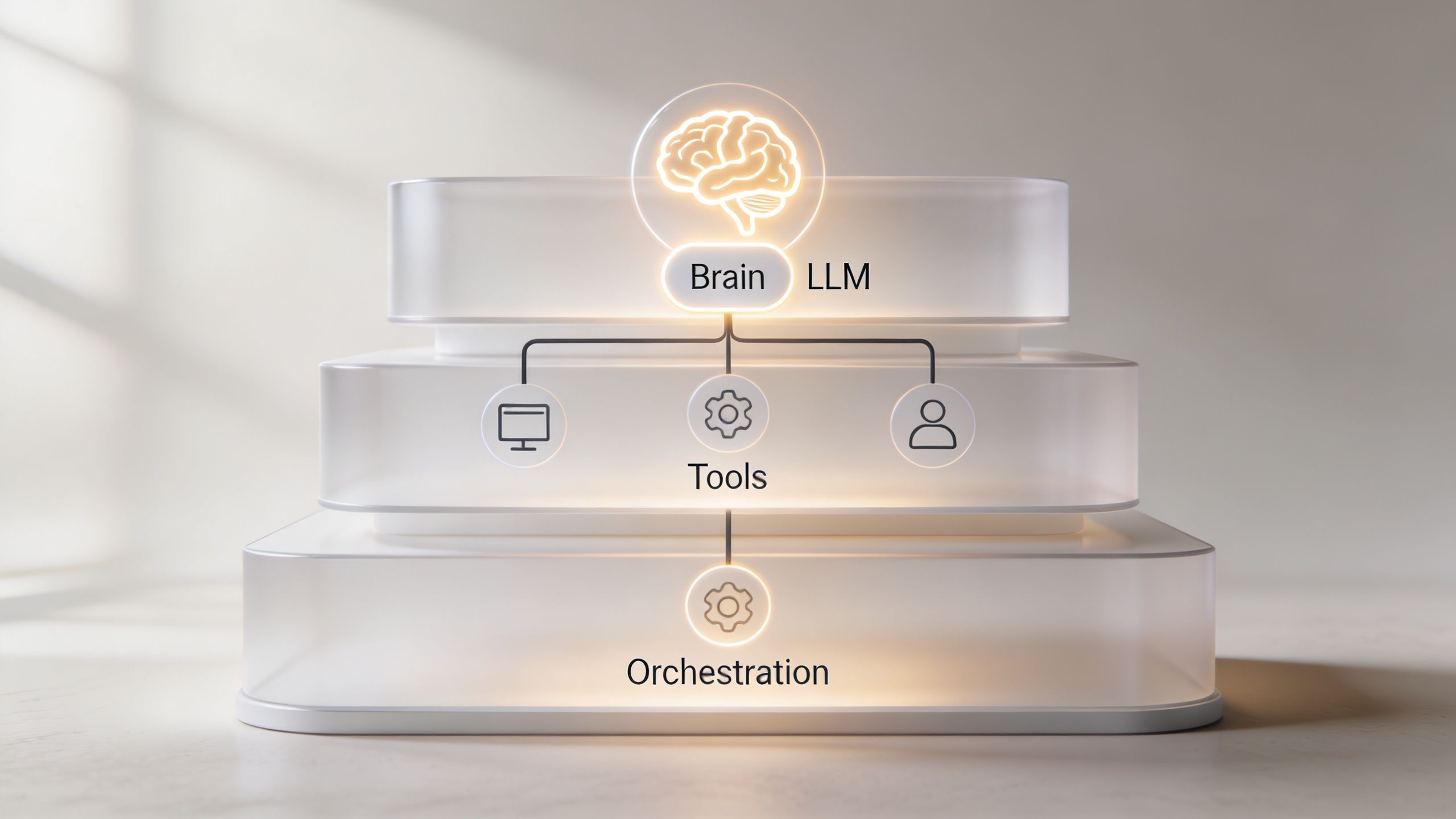
The architecture is simpler than vendors make it sound. You need a brain, hands, and a nervous system.
That’s it.
The three layers
Brain
This is the language model. It reasons over project state, writes summaries, interprets messages, and decides what action to take next based on your rules.
For most small businesses, model choice matters less than context quality and tool design. A mediocre setup with a top model still underperforms a disciplined system.
Hands
These are the APIs and connected systems. Jira. Asana. Monday.com. Slack. HubSpot. Internal databases. Documentation stores.
This layer determines whether your agent can do work or only talk about work.
Nervous system
This is the orchestration layer that manages triggers, tool calls, retries, memory, and handoffs. It can be custom code or a platform such as Zapier, LangChain, or LlamaIndex.
If you’re validating a use case, I usually prefer simpler orchestration first. Less engineering. Faster learning. Fewer excuses.
Custom build versus no-code
Founders often ask me which path is “best.” Wrong question. The better question is which path reduces risk while proving value fastest.
| Approach | Best for | Trade-off |
|---|---|---|
| No-code orchestration | Fast validation and straightforward workflows | Less flexibility for edge cases |
| Custom orchestration | Complex logic, proprietary workflows, tighter controls | More build time and integration overhead |
| Hybrid model | Most SMBs with serious intent | Requires discipline on where custom work begins |
If you’re trying to connect multiple systems with operational logic, I’d start by studying examples of IT automation and monday.com integration. Don’t copy the stack directly. Study it to see how orchestration quality usually decides whether the agent becomes useful or fragile.
Where projects break
Integration is the graveyard.
According to Atlassian’s overview of AI agents in project management, 40% to 60% of AI PM pilots fail in SMBs because of poor API compatibility and data silos, and only 20% of organizations successfully deploy generative AI in over 50% of projects due to those challenges. That should reframe your build plan immediately.
This is why I map the project management stack before choosing tools:
- Your PM data rarely lives in one place.
- Access design is part of the architecture, and it’s easy to forget.
- Different tools describe the same project differently.
- Vendor lock-in is a risk, because convenience now can become rigidity later.
If you want a broader look at how I think about these systems, I’ve written more on AI agents and where they fit operationally. The key point is simple. Don’t architect for a conference demo. Architect for your messiest real workflow.
Deployment Monitoring and Setting KPIs
Your first deployment should not run wild in production.
Put the agent in human-in-the-loop mode. Let it draft the update, suggest the reallocation, or prepare the risk log. Then require approval before it writes back to systems or notifies stakeholders.

That review layer is how you catch tool errors, bad reasoning, and context gaps before they create operational damage.
What to measure first
Successful implementations track task completion rate with an 85% to 95% target for structured tasks, accuracy in the 90% to 99% range depending on domain, and tool usage effectiveness. Initial prediction accuracy often starts at 70% to 80% and improves to 85% to 95% after several months of learning from organization-specific data, based on MindStudio’s AI agent success metrics.
Those are useful benchmarks, but model elegance pays for nothing. What counts is whether the workflow got cheaper, faster, and more reliable.
Tie KPIs to business outcomes
I recommend a small KPI stack:
- The primary KPI is the reduction in manual hours spent on the target workflow.
- The secondary KPI is faster turnaround on the workflow output, such as reports or issue routing.
- The quality KPI is the approval rate during human review.
- The operational KPI is how often tool failures, bad calls, or missing context show up.
That gives you one revenue-adjacent metric, one speed metric, one trust metric, and one engineering metric.
If your KPI dashboard starts with “prompt quality” instead of labor cost, throughput, or cycle time, you’re measuring the wrong thing.
Guardrails that actually matter
A PM agent needs constraints before autonomy.
Use rules like these:
- Read broadly, write narrowly. Give it more permission to observe than to change.
- Escalate exceptions. Any ambiguous case should route to a human owner.
- Log every action. If you can’t audit it, you can’t scale it.
- Limit the blast radius. Start with one client, one project type, or one workflow.
Here’s a practical walkthrough that complements those principles:
When to stop
Some workflows should stay human-led.
Don’t force an agent into high-conflict conversations, sensitive prioritization calls, or client negotiations where tone and context matter more than process speed. AI is strongest where the task is repetitive, cross-system, and expensive. It’s weaker where social judgment decides the outcome.
Your First 90-Day Agent Roadmap
You don’t need a grand transformation plan. You need one quarter of disciplined execution.
I’d run the first 90 days like this.
Days 1 to 14
Audit the workflow. Find the ugliest, most repetitive PM bottleneck in the business. Quantify the annual cost of that friction and assign one owner.
If you can’t name the workflow in one sentence, you’re still too vague.
Days 15 to 30
Design the agent on paper before building anything.
Write:
- Its directive
- Its allowed tools
- Its memory sources
- Its escalation rules
- Its success KPI
This step feels slow when you’re impatient. Good. Impatience is what creates failed pilots.
Days 31 to 60
Build the minimum viable version in a sandbox.
Use no-code if the workflow is straightforward. Use lightweight custom orchestration if the workflow has special logic or data handling needs. Keep scope narrow and force the system to prove it can perform one recurring job well.
Build the smallest agent that saves real money. Ignore every feature request that doesn’t support that outcome.
Days 61 to 90
Deploy with human approval, daily monitoring, and weekly review.
Track the KPI tied to the original business case. Review failures manually. Tighten prompts, tools, and memory only where you see recurring errors. Then decide whether the agent deserves more autonomy.
This is how an ai agent for project management becomes a durable business asset instead of another abandoned experiment. Your competitors can copy a prompt. They can’t easily copy a well-integrated workflow, tuned on your processes, trusted by your team, and tied directly to margin and delivery speed.
If you want help designing that roadmap, pressure-testing the business case, or building the first production-grade agent, you can work with me on it.