
Most advice on autonomous operations is useless for founders.
One camp treats it like science fiction. The other turns it into a bloated transformation program that only a giant enterprise can afford. Both approaches miss the true opportunity. You need a system that helps your business sense, decide, and act faster than the companies trying to take your market, and you can build one without a committee, a giant ERP rollout, or a year of architecture diagrams.
I'm Samuel Woods. I've worked with ML since 2016 and generative AI since 2019, and my view is simple. An autonomous business operations framework should drive revenue, compress response time, and remove bottlenecks that keep your team stuck in manual loops. If it can't do that, it's a demo.
Forget 'Future of Work': This Is About Your Market Now
The biggest mistake I see is founders assuming autonomous operations are an enterprise game.
They aren't.
That gap in the market is obvious. A practical framework for SMBs and startups is still underserved, and a 2025 Berkeley study noted that AI adoption often fails because it's exploratory rather than structured, without giving founders a useful playbook for using accessible tools like ChatGPT or Claude in real operating workflows, as summarized by First Line Software's review of enterprise AI readiness gaps.

That matters because another abstract AI maturity model won't help you. You need a way to wire together an LLM, your core SaaS tools, and a few focused workflows so the business reacts faster than your competitors. Pricing updates. Lead routing. Competitor monitoring. Campaign iteration. Customer follow-up. Those are real operating advantages.
What most companies get wrong
They start with the model.
Wrong move. Start with the decision cycle you want to speed up. Ask where your team loses time, where opportunities die in a Slack thread, and where manual triage slows revenue.
I push clients to look for three signs:
- Repetition, meaning the same task happens often enough to justify automation.
- Clear signals, so the agent can detect what matters from data you already have.
- Economic impact, where a faster or cleaner workflow means revenue rises or cost drops.
Your first autonomous workflow should feel boring operationally and valuable financially.
What this opens up for smaller teams
A lean company can move faster than a large one because it has fewer systems, fewer approvals, and less legacy mess. That's the opening.
If you're running a startup, ecommerce brand, SaaS company, or agency, you can build a lightweight operating layer on top of APIs and modern LLMs right now, to give your team an edge your competitors haven't organized yet.
The Three-Pillar Architecture of an Autonomous Framework
Most autonomous systems fail because people build disconnected automations instead of an operating model.
I use a simple architecture for an autonomous business operations framework. Three pillars. Intelligence, Decision, and Action. If one is weak, the whole thing turns brittle.
The market is moving hard in this direction. The autonomous enterprise market was valued at USD 49.25 billion in 2024 and is projected to reach USD 118.18 billion by 2030, growing at a 16.2% CAGR, according to Grand View Research's autonomous enterprise market analysis. That's a structural shift in how businesses run.
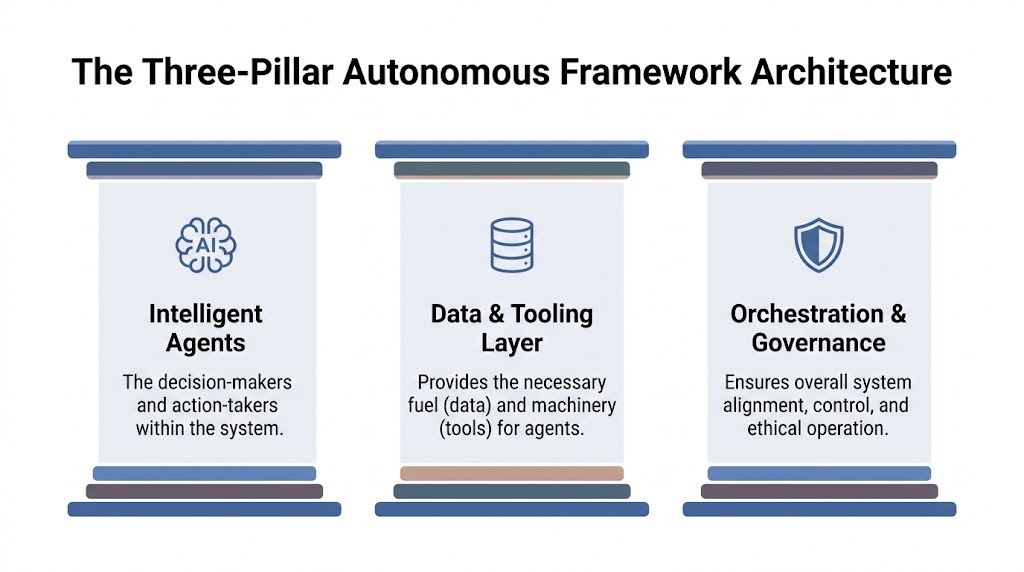
Intelligence layer
This is your sensing system.
It pulls in signals from your CRM, ad platforms, website analytics, support inbox, product usage, competitor pages, and internal docs. The goal is the right signals in a form the system can use, rather than more data.
For a founder-led business, that usually means:
- Customer signals such as form submissions, demo requests, churn reasons, support themes
- Market signals such as competitor pricing, positioning changes, review sentiment, ad creative shifts
- Operational signals such as pipeline stage delays, campaign performance, content production bottlenecks
If this layer is messy, your agents will act with false confidence. That's dangerous.
Decision layer
Here, AI earns its keep.
The decision layer interprets context, ranks opportunities, flags risks, and chooses next actions within clear boundaries. That may involve one agent or several. If you want a practical reference for how specialized agents coordinate roles, this overview of multi-agent architecture is useful because it shows how systems split observation, reasoning, and execution instead of forcing one model to do everything.
I don't want one giant "smart" agent trying to run the company. I want smaller agents with narrow mandates. One watches competitors. One scores inbound leads. One drafts responses. One routes exceptions to a human.
A good decision layer acts like a disciplined operator.
Action layer
In this scenario, teams either gain an advantage or create chaos.
The action layer pushes decisions into the world through APIs, automation platforms, alerts, CRM updates, email systems, project management tools, and approval queues. If your agent finds a high-intent lead but can't create a task, enrich the record, notify sales, and trigger the right follow-up, you have analysis without autonomy.
Here's the simplest way to think about it:
| Pillar | What it does | Common failure |
|---|---|---|
| Intelligence | Captures signals from tools and data sources | Dirty, fragmented inputs |
| Decision | Interprets signals and selects next best actions | Overly broad prompts and weak boundaries |
| Action | Executes through tools, workflows, and human handoffs | No permissions model or no rollback path |
The real design principle
Keep each pillar modular.
You should be able to swap Claude for another model, replace Zapier with n8n, or move from Google Sheets to a warehouse without rebuilding the business from scratch. Founders who design for modularity move faster later. Founders who wire everything into one fragile chain spend months fixing edge cases.
Designing Your First AI Agents That Actually Work
Most AI agents fail because they're vague.
"Research the market and improve our growth" is not an agent brief. That's a founder fantasy. Agents need a goal, tools, context, constraints, and a clear definition of success.
The shift toward agents is real. The agent-based AI market is forecasted to rise from USD 5.40 billion in 2024 to USD 50.31 billion by 2030, at a 45.8% CAGR, according to Typedef's roundup of agent-based AI automation statistics. The reason is obvious. Businesses want systems that can reason through work instead of following static rules.

The Observer
An Observer watches. It doesn't change systems directly.
This is usually the first agent I deploy because it's low risk and immediately useful. It can monitor competitor pricing pages, review sites, inbound lead quality, support sentiment, or campaign anomalies and then alert the right human or downstream system.
Use this pattern when you're still learning the shape of the workflow. The observer gives you visibility before you hand over control.
A practical observer brief includes:
- The scope, meaning what sources it watches
- The trigger, meaning what event matters enough to flag
- The output, such as a Slack alert, CRM note, dashboard update, or email summary
- The escalation rule for when a human has to review before any action happens
The Actor
An Actor does one job well.
Think lead enrichment after form submission. Or classifying support tickets and updating your help desk. Or taking approved content briefs and pushing drafts into your CMS workflow. The actor has a narrower role than the observer, but more direct business impact.
At this stage, teams get reckless. They give an actor too many tools, too much permission, and too little context. Then they act surprised when it does something dumb.
I recommend one actor per business outcome. One for CRM hygiene. One for post-demo follow-up. One for internal content ops. Tight scope wins.
For a deeper practical breakdown, this guide on how to build an AI agent is worth reading because it forces you to define goal, memory, tools, and boundaries before you obsess over the model.
The Orchestrator
The Orchestrator manages sequences.
It doesn't need to "think" more than other agents. It needs to coordinate cleanly. When a new customer signs, the orchestrator can trigger onboarding tasks, create records in the right tools, brief the account team, route implementation requests, and escalate edge cases.
That pattern matters once your workflows cross teams.
Here are the three questions I use before I approve any orchestrator design:
- What starts the workflow
- Which handoffs can be fully automated
- Which exceptions must stop and ask for human review
This walkthrough helps if you want to see more of how I think about practical agent deployment in marketing and operations: my guide to AI agents.
A useful visual always helps when you're mapping these roles:
Don't start with the most "autonomous" agent. Start with the one you can monitor, measure, and trust.
Building Your Data Pipeline and Tooling Stack
Your agents are only as good as the data they can access and the tools they're allowed to use.
At this stage, founders either build a clean advantage or create a tangled mess of half-working zaps, duplicate records, and unreliable prompts. The technical requirement is straightforward. You need unified data as a single source of truth and workflows mapped clearly enough that the system can execute without ambiguity. Samta notes that mature deployments achieve 40 to 60 percent efficiency gains, but 70 percent of initiatives fail because weak data infrastructure and integration debt create brittle automations, as outlined in Samta's guide to autonomous business processes.

Off-the-shelf versus custom
Most SMBs should not start custom.
If you're early, use tools like Zapier, Make, or n8n to connect your systems fast. The trade-off is less control, more dependency on third-party logic, and occasional friction with complex workflows. But speed matters early, and these tools let you validate whether the workflow deserves deeper investment.
Custom pipelines make sense when your volume rises, your logic gets more complex, or reliability starts affecting revenue. Then it becomes worth moving ingestion, transformation, and orchestration into your own stack.
Here's the practical comparison:
| Option | Best for | Strength | Weakness |
|---|---|---|---|
| Zapier or Make | Early-stage teams | Fast deployment | Harder to manage at complexity |
| n8n | Teams wanting more control | Flexible and API-friendly | Needs more technical ownership |
| Custom code | High-volume or complex workflows | Full control and extensibility | Higher build and maintenance cost |
Your minimum viable stack
A few layers that work together will do more for you than a huge platform map.
I usually want to see:
- Data ingestion through APIs, web scrapers, webhook listeners, form events
- Storage or state in Airtable, Google Sheets, Notion, PostgreSQL, a warehouse if needed
- A reasoning layer from OpenAI, Claude, Gemini, or an open-source model with the right constraints
- An execution layer across CRM APIs, email platform APIs, Slack, Jira, Asana, help desk systems
- Observability through logs, alerts, review queues, lightweight dashboards
If you're comparing implementation options, I laid out the main categories in this practical review of AI workflow automation tools.
Build one source of truth, not ten copies of truth
The phrase "single source of truth" gets abused, but the principle is dead right.
Your agent shouldn't pull customer stage from one tool, owner from another, and status from a stale spreadsheet someone forgot to update. Choose where each critical field lives. Define system ownership. Then force your workflows to respect it.
My practical rule: if two tools can both edit the same critical field, you've already introduced drift.
The tooling decision most founders avoid
You and I both know the temptation. Keep adding tools because each one solves a local problem.
Resist that urge. Every new tool increases context fragmentation, permissions complexity, and failure points. I would rather see a founder run a simple stack cleanly than a fancy stack badly.
One more option belongs on the table if you're designing the system itself and want strategic guidance rather than software alone. I offer advisory work as a Fractional Chief AI Officer focused on autonomous business systems, agentic workflows, and growth operations. That's one route alongside agencies, internal builders, and freelance automation specialists.
Governance and KPIs to Keep Your Framework on Track
Most people govern autonomous systems backwards.
They obsess over prompt versions, token usage, and uptime graphs while ignoring the question that matters. Is the system making you money, saving meaningful time, or reducing operating friction in a way that shows up in the business?
Stonehill's analysis is blunt. Mature autonomous deployments report 40 to 60 percent efficiency gains and 25 to 50 percent cost reductions, but success depends on tracking results-based metrics like margin improvement and cost per transaction. It also notes that up to 70 percent of digital transformations fail when companies focus on technical outputs instead of financial outcomes, as explained in Stonehill's framework for autonomous business operations.
The only KPIs I care about first
If your dashboard leads with model latency, you've already lost the plot.
Start with business outcomes:
- Margin improvement. Did automation increase contribution margin on a workflow or customer segment?
- Cost per transaction. Did the cost to process a lead, order, ticket, or campaign step go down?
- Cycle-time compression. Are key workflows moving faster from trigger to completion?
- Error rate. Is the system reducing mistakes or creating expensive cleanup work?
- Throughput. Can you handle more volume without proportional headcount growth?
These metrics force honesty. An agent that saves time but creates downstream correction work isn't helping. A workflow that looks elegant but doesn't change unit economics isn't strategic.
Set authority boundaries early
Autonomy without authority design is just unmanaged risk.
I use three levels:
| Level | Agent authority | Human role |
|---|---|---|
| Advisory | Detects and recommends | Human approves all actions |
| Guardrailed execution | Acts within rules and thresholds | Human reviews exceptions |
| Delegated execution | Runs end-to-end in narrow workflows | Human audits outcomes and handles edge cases |
Most companies should stay in advisory or guardrailed execution longer than they think. Especially in pricing, outbound messaging, refunds, legal content, or anything that affects trust.
What governance actually looks like
Keep it simple.
Every autonomous workflow should have a named owner, approved tools, defined permissions, escalation rules, and a rollback path. If nobody owns the outcome, the system will drift. If nobody can stop it quickly, you’ll hesitate to use it where it matters.
A lightweight governance checklist works better than a giant policy document:
- Define the business objective
- List the systems the agent can read
- List the systems it can write to
- Set thresholds for automatic action
- Document escalation paths
- Review outputs on a fixed cadence
If a workflow can’t be tied to margin, cost, speed, or quality, it doesn’t belong in your autonomous core.
Your Phased Rollout Roadmap from Pilot to Full Autonomy
Founders blow this by trying to automate the company all at once.
Don’t. Build an autonomous business operations framework the same way you’d build any serious operating capability. Start narrow, prove value, then extend the pattern.
Phase one with a pilot that can win quickly
Pick one workflow that is repetitive, high-volume, rules-based, and easy to measure. Good examples include inbound lead qualification, support ticket triage, content brief generation, call note summarization, or customer follow-up routing.
Bad pilot choices are just as important to name. Don’t start with brand strategy, final-copy approval, hiring decisions, or anything loaded with judgment and politics.
Use this checklist before you greenlight a pilot:
- A clear trigger, such as a form submit, inbound email, status change, or scheduled event, starts the workflow
- A clean outcome, where the result is visible and measurable
- Contained risk, because errors are reversible
- Available data, so the agent has enough context to do the job
- A known owner, one person accountable for results
If you want examples to pressure-test your shortlist, this collection of AI agent use cases will help you spot where narrow deployment makes sense first.
Phase two by replicating the pattern
Once a pilot works, don’t reinvent everything.
Reuse the same design logic. Same observability approach. Same approval thresholds. Same prompt structure where appropriate. The goal is an internal pattern library instead of a pile of one-off automations.
What changes in this phase is confidence. Your team starts seeing where else the framework can remove waiting time, patch handoff gaps, and improve response speed.
Roll out autonomy in areas where the process is already stable. Don’t use agents to hide broken operations.
Phase three with integration and optimization
Isolated wins become a source of operational advantage.
Your observer agents feed better intelligence into your actor agents. Your orchestrators connect sales, marketing, support, and fulfillment steps that used to sit in separate silos. Human review moves up the chain toward strategic judgment instead of repetitive admin.
I care about three milestones here:
- Shared context across workflows
- Consistent governance across agents
- A dashboard that shows business impact across the system
At this stage, the company starts behaving differently. It reacts faster. It spots changes earlier. It executes with less delay between signal and action.
That’s the key shift.
The Real Goal: Building a Bionic Business
This framework keeps the humans in the business.
What it removes is drag.
A good autonomous business operations framework gives your people a sharper operating environment. Your marketers spend less time gathering context and more time shaping campaigns. Your sales team spends less time cleaning records and more time closing. Your operators stop chasing updates and start directing systems.
That’s what I mean by a bionic business. Humans handle judgment, creativity, positioning, negotiation, and trust. AI handles monitoring, synthesis, routine decisions, and execution at machine speed.
Your competitors can still run on spreadsheets, inboxes, and meetings. They can manually stitch together reports every Monday and react to market shifts after the damage is done. You don’t want to be in that race.
You want a business that senses faster, decides faster, and acts faster.
Build that, and AI stops being a novelty. It becomes infrastructure for growth.