
You’re probably asking this because your team is already drowning in repetitive work.
Leads come in. Someone enriches them manually. Someone else pulls campaign data, summarizes trends, drafts follow-ups, updates the CRM, chases approvals, and tries to keep brand voice intact across all of it. That is expensive admin wearing a growth costume, and it doesn’t scale.
I’ve been working with machine learning since 2016 and generative AI since 2019. My view is simple. If you want to know how to build an ai agent for my business, don’t start with the tech. Start with the bottleneck that’s slowing revenue, response time, or decision quality.
Build the agent around that bottleneck. Then wire it into the systems your team already uses. Then force it to prove ROI. That’s how you turn AI from a novelty into an operational asset.
Your Competitors Are Already Building Theirs
Your competitor doesn’t need a perfect AI strategy to beat you. They just need one useful agent deployed inside a valuable workflow.
That agent might be scanning inbound leads, enriching accounts, summarizing customer research, or preparing account briefs before sales calls. The result is the same. Their team responds faster, works cleaner, and wastes less human time on low-value tasks.
The market has already moved. As of May 2025, 79% of companies are already adopting AI agents, 73% of executives agree deployment will provide a significant competitive advantage within 12 months, and companies using agents report 55% higher operational efficiency, according to PwC’s AI agent survey.
That should change how you think about this. AI agents have moved out of the side-experiment pile and into how businesses operate day to day.
You don't need to win the whole AI race this quarter. You need one agent that removes one costly bottleneck faster than your competitors do.
If you’re still getting your bearings, start with a clear primer on what is an AI agent. Then come back to the business question that matters more: where should your first one sit inside your business?
What this means for you
You don’t need an abstract “AI roadmap” slide deck.
You need an agent tied to a commercial outcome. Faster lead handling. Cleaner pipeline data. Better campaign decisions. Tighter onboarding. Less of your own time spent on junior work.
Here’s my opinion after building these systems for businesses. The businesses that move now save time and build faster learning loops than slower competitors. That compounds.
Start Internally to Win Externally
Most founders want to start with a customer-facing chatbot. I usually talk them out of it.
That move feels exciting because customers can see it. It also carries more risk, more brand exposure, and more ways to look foolish. Internal agents are usually the smarter first play.

The adoption pattern backs that up. Companies are 24% more likely to build internal agents than customer-facing ones, and 64% of all AI agent adoption is focused on business process automation, according to Merge’s AI agent statistics roundup.
That makes sense. Internal workflows are where you control the data, the context, and the approval chain. You can test faster. You can limit risk. You can see business value sooner.
The internal use cases I’d prioritize first
If you’re trying to build an AI agent for your business, start where the work is repetitive, rules-driven, and annoying enough that your team avoids it.
- Lead enrichment and qualification
Your agent pulls a new inbound lead from HubSpot or Salesforce, researches the company, summarizes likely fit, flags buying signals, and hands you a usable brief. You stop wasting time on low-quality accounts and start every conversation with context.
- Market and competitor monitoring
Your agent watches specific competitors, categories, review sites, public signals, and campaign shifts. Then it delivers a tight internal memo instead of dumping raw noise into Slack. Founders and marketing leads get signal, not screenshots.
- Campaign reporting and insight extraction
What you usually need is interpretation, and more dashboards won't give you that. An internal reporting agent can collect campaign data, compare periods, highlight anomalies, draft plain summaries, and suggest next actions for you to approve.
- Customer onboarding preparation
For service businesses, agencies, SaaS, and consultancies, a lot of onboarding work is repetitive. An agent can collect intake data, summarize goals, map next steps, and prepare you before kickoff.
A practical rule: if a workflow happens often, touches multiple tools, and requires judgment but not deep originality, it’s a strong candidate for an internal agent.
What not to automate first
Don’t start with high-risk customer interactions if your brand depends on nuance.
Don’t start with workflows that have broken process logic. AI won’t rescue a messy operating model. It will automate the mess and make it harder to debug.
Don’t start with a use case where nobody owns the outcome. Every agent needs an accountable human owner.
If you want a broader technical walk-through alongside the business lens I’m giving you here, this practical guide on how to build an AI is useful background. Just don’t confuse building something functional with building something commercially worth keeping.
A simple filter for your first agent
| Use case | Start here or skip it |
|---|---|
| Repetitive internal workflow with clear inputs | Start here |
| Customer-facing workflow with brand risk | Usually skip at first |
| Process depends on undocumented tribal knowledge | Fix the process first |
| Outcome ties directly to sales, ops, or retention | High priority |
My advice is blunt. Build your first agent where failure is cheap and insight is valuable.
Design Your Agent’s Core Logic
An AI agent is a system you can take apart and inspect.
When I strip away the hype for clients, I explain it in three parts. The thinker, the hands, and the instructions. If one of those is weak, the agent underperforms.
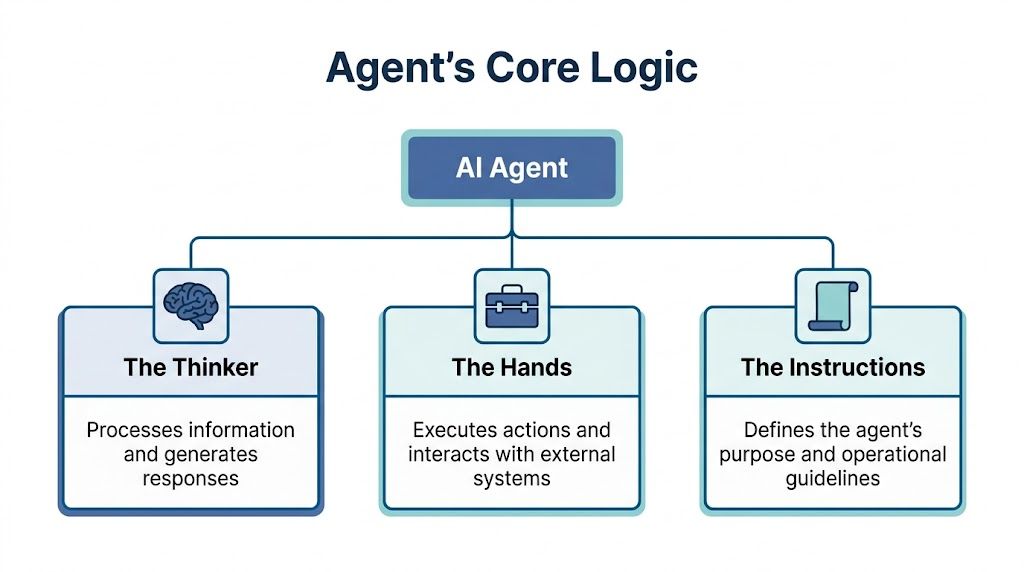
The thinker
Use the most capable model you can justify at the start.
I don’t recommend optimizing for cheapness on day one. Early on, you’re testing whether the workflow can produce real business value. Better reasoning usually gives you cleaner outputs, fewer weird failures, and a clearer understanding of what should stay automated and what shouldn’t.
The hands
Your agent needs tools. CRM access. Analytics access. Email drafts. Knowledge retrieval. Search. Calendar. Internal docs. Whatever the job requires.
If the model can’t access the system, it can’t do the work. Too many teams assume the model “knows” their business. It doesn’t. It needs structured access to your business.
The instructions
This is where most people underinvest.
Your prompt is the agent’s operating manual, so give it more care than a clever paragraph dashed off at midnight. It should define the mission, priorities, boundaries, decision criteria, fallback behavior, and output format.
If you’ve documented SOPs well, you already have raw material. If you haven’t, the agent project will expose that immediately.
The loop that actually matters
The useful pattern is the agent loop. The model reasons, calls a tool, gets a result, evaluates what to do next, and repeats until the task is complete. Enterprises that properly calibrate this loop see a 60-70% reduction in manual workflow time, according to OpenAI’s practical guide to building AI agents.
That’s the difference between a chatbot that talks and an agent that works.
A business agent should behave less like a mascot and more like an operator following a playbook.
How I decide what goes where
Here’s the decision logic I use with clients:
- Use a stronger model for reasoning-heavy work like account research, planning, synthesis, and exception handling.
- Use lighter models later for narrow subtasks like classification, formatting, or draft cleanup.
- Keep tools narrow and explicit so the agent doesn’t have too many ways to fail.
- Write instructions like policy, not like marketing copy.
For teams exploring packaged options before building from scratch, a customizable AI assistant can help you understand how task-specific assistants are structured. But if your workflow touches multiple tools and approvals, you’ll still need good orchestration and context design.
That’s where many people confuse prompt engineering with the underlying challenge. The deeper issue is context. What the model knows, what it can access, and how it should reason inside the task. I’ve written more about that in my breakdown of context engineering vs prompt engineering.
Teach It to Think and Talk Like You
Most AI agents fail long before they fail technically.
They fail because they sound generic. They flatten your positioning. They strip out judgment. They produce words that are acceptable but forgettable. That’s poison for any business that competes on trust, clarity, or brand distinctiveness.

This gap gets ignored in most technical guides. A LaSoft article on building AI agents for business points out the problem clearly. Brand inconsistency is a common failure point, and most guides focus on construction while ignoring how to maintain brand voice.
Your voice needs a constitution
I don’t leave this to vague instructions like “sound professional” or “be friendly.”
I build what I call a Voice and Tone Constitution. It sets rules for how your business thinks, and the writing follows from that.
That document usually includes:
- Brand posture so the agent understands whether your company sounds analytical, contrarian, premium, approachable, technical, or direct
- Audience awareness so it speaks differently to a founder, a buyer, a customer success lead, or an internal operator
- Approved phrasing patterns that reflect your positioning and sales language
- Red lines for words, claims, tone, and formatting that feel off-brand
- Examples and counterexamples so the agent can see what good and bad output looks like
That last part matters. Examples train taste.
Train judgment along with tone
Brand voice is as much about priorities as style.
A strong agent should know what your company values in communication. Does it lead with evidence? Does it challenge weak assumptions? Does it simplify jargon? Does it avoid overclaiming? Does it speak with urgency or restraint?
That judgment belongs in the system instructions and the examples library.
If your agent can write in your tone but not your judgment, it will still create expensive mediocrity.
Where businesses get this wrong
I see the same mistakes over and over:
They use one generic master prompt for every channel and audience.
Email, sales notes, ad copy, onboarding summaries, and internal strategy memos should not sound identical.They skip negative examples.
Showing the model what not to do is often as important as showing it what good looks like.They don’t test across touchpoints.
A prompt that works for LinkedIn posts may fail badly in customer support or outbound email.They let the model improvise positioning.
That’s how you end up with claims your company would never make.
A practical brand calibration workflow
| Step | What to do |
|---|---|
| Collect source material | Pull emails, proposals, landing pages, sales decks, memos, and call notes that reflect your real voice |
| Extract patterns | Identify recurring tone, structure, objections, phrases, and strategic beliefs |
| Build guardrails | Define what the agent must say, may say, and must avoid |
| Test with real tasks | Run drafts for internal memos, outbound emails, summaries, and support replies |
| Review drift | Compare outputs against your standards and tighten instructions |
If you want to get more precise at the system prompt layer, my guide to Claude system prompts will help you think about how to encode these constraints cleanly.
The point is straightforward. Every time your agent writes, it should sound like your business and hold your positioning.
Connect Your Agent to Your Business
An agent without integrations is just an expensive brainstorming partner.
Useful agents need access to the systems where work happens. Your CRM. Ad platforms. Analytics stack. Knowledge base. Ticketing system. Calendar. CMS. Internal docs. Maybe Slack. Maybe email. Usually some mix of all of them.

Pick orchestration based on your team, not your ego
Founders often overbuy complexity here.
If you or someone on your team can code, frameworks like LangChain or CrewAI can give you flexibility. If not, managed platforms and no-code automation layers can get you to a useful result faster. I care less about what’s fashionable and more about whether you can maintain it after launch.
Your orchestration layer has one job. Manage the sequence of reasoning, tool use, and output handling without turning your workflow into a brittle mess.
Start with read access
This is essential.
On the first release, your agent should usually observe, retrieve, summarize, classify, and recommend. It should not be allowed to freely edit records, send messages, approve spend, or trigger customer-facing actions without a checkpoint.
That means:
- Connect data sources first so the agent can gather context before it acts
- Keep permissions narrow rather than giving broad access because it’s convenient
- Log every tool call so you can trace what happened when something goes wrong
- Document inputs and outputs for each integration before scaling the workflow
I’ve cataloged a range of AI agent use cases if you want to map this thinking to specific business functions.
The integration stack I’d look at first
Different businesses need different tools, but the sequence is usually similar.
| Priority | Typical system |
|---|---|
| First | CRM like HubSpot or Salesforce |
| Second | Analytics tools like GA4, ad platforms, or reporting layers |
| Third | Internal knowledge sources like Notion, Google Drive, or a docs repository |
| Fourth | Communication tools like Slack, email, or support platforms |
This video is a useful visual primer on how these systems tend to get stitched together in practice.
What good integration looks like
The agent should be able to answer a simple chain of business questions without human hunting.
A new lead enters the CRM. The agent pulls company data, checks past interactions, reviews campaign source, compares firmographic fit, drafts a summary, and sends the account owner a clear next-step recommendation.
That’s useful because it compresses context gathering. Your team starts with a prepared point of view instead of a blank tab.
If you want outside help assembling this layer, I offer consulting and workshops around AI market-intelligence systems, workflow automation, and agent design for marketing and growth teams. That’s one option. You can also own this layer yourself or hand it to a technical partner, as long as whoever owns it understands process design and model behavior.
The key decision is simple. Choose the path you can support consistently.
Deploy Safely and Measure Your ROI
Most AI agent failures are self-inflicted.
Teams get excited, wire up a few tools, skip validation, and give the agent too much autonomy too early. Then the outputs drift, the team stops trusting it, and the whole project gets labeled “interesting, but not ready.”
That’s bad strategy, not bad technology.
According to Flatline Agency’s practical deployment guide, companies that skip validation and human escalation triggers experience 40-50% failure rates, while a staged approach starting with human-in-the-loop and hard limits can achieve 85%+ accuracy by month three. That matches what I’ve seen in practice. Safe deployment beats fast deployment.
Launch with hard limits
Your first release should have constraints everywhere that matters.
Use input filtering so junk data doesn’t trigger junk output. Add relevance checks so the agent stays inside its scope. Validate outputs before they hit downstream systems. Require human review for high-risk actions.
Here’s the short version:
- Read before write by giving the agent visibility before control
- Approve before send for external communication, spend, or record changes
- Cap risky actions like bid changes, customer-facing messages, or workflow branching
- Escalate edge cases whenever the agent sees uncertainty, conflict, or incomplete data
I trust AI agents the same way I trust new employees. I start them with supervision, narrow permissions, and clear standards.
Measure business value like an investor
Most guides often falter at this point. They tell you how to build the system and ignore whether the system deserves to exist.
I treat AI agents as capital allocation decisions. If an agent can’t produce measurable value, it doesn’t matter how clever the architecture is.
The ROI framework I use is intentionally simple:
ROI = (Value Created – Operating Cost) / Investment Cost
You don’t need fake precision. You need disciplined tracking.
What goes into each part
| ROI component | What to include |
|---|---|
| Value created | Hours saved, faster turnaround, improved lead handling, better decision prep, revenue influenced |
| Operating cost | Model usage, platform fees, maintenance time, monitoring overhead |
| Investment cost | Build time, integration work, prompt and testing setup, stakeholder training |
For SMBs, this matters even more because budget is tighter and tolerance for dead-end projects is lower. One of the biggest gaps in most AI content is the lack of a practical ROI framework for founders deciding where to invest first. A Centric Consulting piece on building AI agents for real-world applications highlights that gap well, especially around cost-benefit analysis and payback thinking.
Track operating metrics that map to business outcomes
Don’t obsess over vanity metrics like “agent messages sent” or “tasks touched.”
Track things you’d care about as the owner:
- Cycle time reduction for reports, lead qualification, or onboarding prep
- Human review rate so you know how much oversight is still required
- Output acceptance rate to see whether the work is usable
- Revenue-linked impact where the agent supports sales, retention, or expansion
- Failure patterns so you know whether the issue is prompt logic, tool access, or bad input data
When to kill or redesign the agent
Not every workflow deserves an agent.
If the process is mostly deterministic, a standard automation may be cheaper and easier to maintain. If the task requires deep strategic originality every time, the human should keep control. If the agent keeps failing because the underlying process is broken, fix the process before touching the prompt again.
Kill the project when the economics don’t work. Redesign it when the use case is right but the scope is too broad.
The fastest way to get AI ROI is to automate one expensive bottleneck with enough control that you actually trust the output. Leave everything else manual for now.
The businesses winning with AI agents have disciplined rollout, tight guardrails, and a clear view of what business result the agent is supposed to improve. Flashy demos have little to do with it.
This week, pick one workflow, write down the bottleneck it removes and the number that will prove it worked, then build the smallest agent that can move that number. If you want help figuring out which workflow to automate first, how to structure the agent loop, or how to keep brand voice intact while proving ROI, I can help you design the right system before you waste time building the wrong one.