
Most advice on ai agents for online businesses is weak. It treats agents like cute assistants that save a few hours, answer a few tickets, and maybe write a few emails. That's not how serious operators use them.
I use a different lens. I treat agents like digital employees tied to revenue, margin, speed, and market share. If you're still thinking in terms of “what task can I automate,” you're underbuilding. The founders who win use agents to respond faster, personalize at scale, and execute operating moves competitors can't match without adding headcount.
I've been building with ML since 2016 and generative AI since 2019. The pattern is clear. The companies getting value aren't chasing the flashiest demos. They're building narrow, connected systems that do useful work inside the business, then measuring the output like adults.
Your Competitors Are Hiring Robots Are You
Most founders still lump agents into the same bucket as ChatGPT. That's a mistake.
A chatbot answers. An agent pursues a goal. It can pull data, decide the next step, use tools, trigger actions, and keep moving until it hits a constraint or completes the job. That's a very different asset inside a business.

If you're running an online business, that distinction matters. You're not buying software. You're building a system that can handle customer service, qualification, follow-up, product discovery, and internal ops without waiting for a human to wake up.
The market already sees it this way. 90% of leaders see AI agents as a key competitive advantage over mere tools, and the market is projected to grow from $9.4 billion in 2024 to $85.1 billion by 2032 according to SellersCommerce research on AI agent adoption in retail.
Tools answer questions. Agents move money
That difference shows up in execution.
A basic prompt workflow says, “write a response to this customer.” An agentic workflow says, “identify the customer, check order status, draft the reply, decide whether the issue qualifies for a refund path, log the interaction, and escalate only if confidence is low.” One is content generation. The other is operations.
That means your competitors can start doing things you can't match with a thin team:
- Respond instantly: They don't leave revenue sitting in inboxes overnight.
- Operate around the clock: They support buyers when your human team is offline.
- Scale without linear hiring: They handle growth without bloating payroll.
- Close feedback loops faster: They learn where customers get stuck and surface patterns.
You don't need an AI strategy deck. You need an AI workforce attached to the bottlenecks that are slowing growth.
What this means in practice
I don't tell founders to “add AI.” I tell them to identify where delay, inconsistency, or manual review is costing them deals, retention, or support capacity.
For some businesses, that's post-purchase support. For others, it's lead qualification, competitor monitoring, or catalog enrichment. The common thread is simple. Agents become valuable when they reduce waiting, increase throughput, or improve decision quality.
If you want to win with ai agents for online businesses, stop asking whether they can help. Ask which part of your business should be staffed by software first.
Map Agent Use Cases to Revenue Not Just Tasks
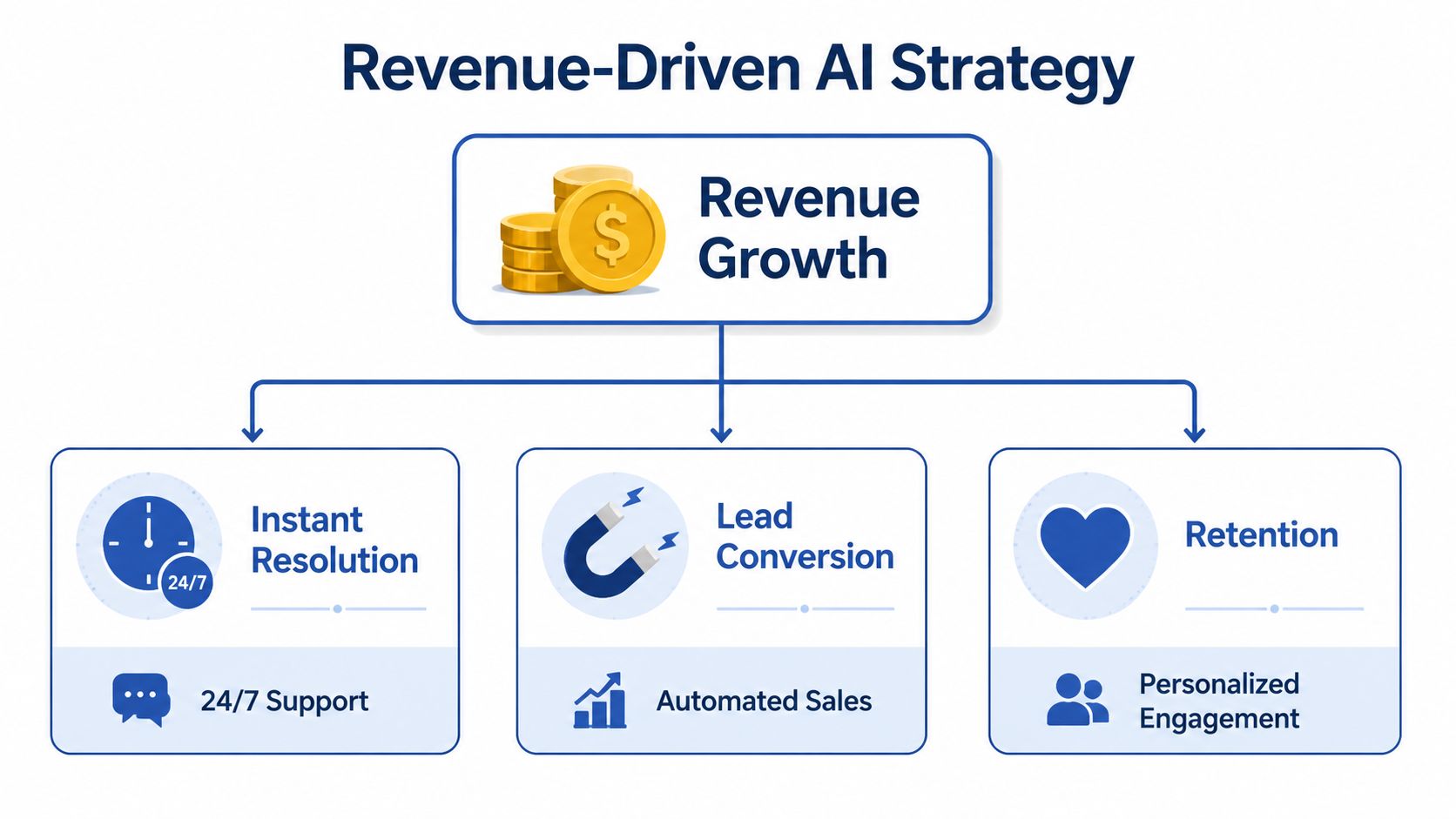
The wrong brief is “automate support.” The right brief is “increase resolution speed, protect margins, and improve retention.”
That's how I scope agent deployments. Not by tasks. By business outcomes.
Start where customers already ask for help
The cleanest early win for many online brands is order-status automation. It's repetitive, high-volume, and tied directly to customer experience.
One small online retailer integrated an AI chatbot with Shopify for order status requests and got a 67% reduction in support tickets, saved over $1,000 per month in labor costs, and improved CSAT from 4.2 to 4.7 out of 5, based on this Aalpha case study on AI agents for small businesses.
That result matters because it shows what a focused agent should do. It didn't try to run the whole company. It owned one painful workflow, connected to live data, and produced measurable gains.
Practical rule: Your first agent should solve a problem your team is already paying for in time, delays, or missed revenue.
Three use case buckets that actually matter
I look at revenue through three lenses.
Customer operations
This is the fastest path for many ecommerce brands. Order tracking, returns triage, FAQ handling, and account updates are repetitive and expensive when humans do every step manually.Sales and lead conversion
For SaaS and service businesses, agents can qualify inbound leads, route them correctly, enrich records, and trigger follow-up sequences. The value isn't the message itself. The value is faster response and cleaner pipeline handling.Retention and expansion Many teams underinvest in this area. Agents can identify renewal risk, surface usage gaps, recommend next-best offers, and support post-purchase journeys with more consistency than an overstretched team.
If you want more examples, I've mapped out additional AI agent use cases for growth and operations that fit different business models.
What to prioritize first
Don't start with the sexiest use case. Start with the one that has these traits:
| Signal | Why it matters |
|---|---|
| High repetition | Agents perform best when the pattern repeats |
| Clear data access | If the agent can't reach the source of truth, it will fail |
| Low downside on mistakes | Early deployments should have safe escalation paths |
| Visible business impact | You need buy-in from results, not demos |
Most online businesses should deploy one narrow agent before they build an “AI platform.” Nail one use case. Prove the economics. Then expand sideways into adjacent workflows.
That's how you turn agents into a growth system instead of another software expense.
Choose Your Agent Stack No-Code Platforms or Custom
Founders waste money here all the time. They either overengineer a simple workflow or trust a lightweight tool with a job that needs real control.
The right stack depends on the complexity of the work, the risk of failure, and how much defensibility you want to build.
No-code is fine for simple flows
If your workflow is linear, use no-code or low-code first. Make and Zapier are good examples. So are basic CRM automations and webhook-driven actions.
These tools are ideal when the process is stable. New lead arrives. Enrich the record. Send a Slack alert. Create a task. Trigger an email. Done.
For operators trying to improve execution speed across product and operations teams, this kind of orchestration overlaps with the broader discipline of streamlining product workflow with AI. Same principle. Remove handoffs. Reduce waiting. Standardize the obvious work.
Agent platforms work when the environment is messy
The next layer consists of agent platforms capable of reasoning across apps, interacting with websites, and managing more complex branching logic. Founders often get seduced by demos in this particular stage.
Here's the reality. In a 40+ hour benchmark study, no leading AI agent fully completed complex business workflows, and 70% of failures came from hallucinated actions or unhandled exceptions, based on AIMultiple's benchmark of AI agent performance.
That tells you something important. If the job involves unpredictable websites, dynamic interfaces, or brittle multi-step actions, you can't trust the agent blindly.
Custom is for leverage, not ego
Custom builds make sense when one of these is true:
- You need proprietary logic: Your qualification model, pricing logic, or internal workflow is a real advantage.
- You need deep system access: The agent has to interact with your CRM, support stack, internal docs, and product data in a tightly governed way.
- You need auditability: Regulated, high-value, or high-risk actions need traceability and explicit controls.
Frameworks like LangChain or LlamaIndex provide utility in these scenarios. These environments also enable building with a more opinionated operating system centered on prompts, retrieval, tools, and monitoring. If you're comparing setup paths, I've outlined several AI workflow automation tools for different business needs.
My decision rule
Use this:
- Pick no-code when the workflow is mostly deterministic.
- Pick an agent platform when you need flexible reasoning but can tolerate supervision.
- Pick custom when the workflow touches strategic data, margin, or customer experience in a way you want to own.
If an agent can break something expensive, add a human approval step.
That isn't a sign of failure. That's competent system design.
Design Prompts and Reasoning Chains That Think
Most bad agents are just bad instructions wrapped in nice UI.
Founders hand the model a vague objective, connect a few tools, and expect reliability. Then they act surprised when the agent improvises. The fix isn't “better AI.” The fix is better operational design.

Give the agent an SOP, not a wish
I design agents the same way I design human workflows. Clear objective. Approved tools. Decision rules. Escalation criteria. Required outputs.
If your prompt is a sentence, you don't have an agent. You have a gamble.
A good reasoning chain usually includes:
Role and job boundary
Tell the agent what it owns and what it must not do.Goal definition
State the business outcome, not just the task.Available tools and source priority
Identify whether it should check Shopify, HubSpot, your knowledge base, or internal docs first.Decision sequence
Force the order of operations so the model doesn't jump steps.Escalation rule
If confidence is low or data conflicts, hand it off.
For teams still blurring prompt writing with system design, my guide on context engineering vs prompt engineering breaks down why the surrounding information architecture matters as much as the prompt itself.
Use retrieval so it stops guessing
If your agent needs business-specific facts, give it retrieval. Don't trust raw model memory for policies, pricing, inventory, or product details.
This is also why product discoverability matters more now. If you're thinking about how AI systems interpret and surface your catalog or brand information, NanoPIM has a useful guide to AI-driven search and generative engine optimization. It connects directly to how agents find and use commercial information.
Here's a simple lead-qualification skeleton I like:
Check CRM first.
If the lead already exists, summarize prior activity.
If firmographic data is missing, enrich before scoring.
Score fit against ideal customer profile.
If the fit is strong and intent is clear, create next action.
If signals conflict, escalate with a short explanation.
That structure beats “analyze this lead and tell me what to do” every time.
A deeper walkthrough helps here:
Build for consistency, not cleverness
I don't want my agents to be creative in production. I want them to be repeatable.
That means tighter prompts, explicit constraints, grounded knowledge, and defined failure paths. The more money the workflow touches, the less improvisation you should allow.
Integrate with Your Stack and Measure What Matters
An isolated agent is a toy. A connected agent is an operator.
If your agent can't read from the systems your team already uses and write back to them cleanly, you're not gaining a competitive advantage. You're building another dashboard nobody trusts.
Integration decides whether the project lives or dies
The strongest deployments connect into the systems that already run the business. Shopify for order data. HubSpot for lifecycle stage. Slack for approvals. Zendesk or Intercom for customer threads. Internal docs for policy retrieval.
Most failures don't happen because the model is dumb. They happen because the data is fragmented, the handoffs are sloppy, and nobody defined ownership.
The market has a measurement problem too. According to Manus on AI agents for small business, 40% to 60% of SMB deployments fail, often because of poor integration and weak payback tracking. The same source argues teams need concrete KPI targets such as $5 to $15 per hour in effective labor cost reduction or a 15% to 30% lift in lead conversion.
My rule: If you can't name the system of record and the KPI before launch, don't deploy the agent yet.
Build a competitive dashboard
I tell founders to track agents like a sales channel or an ops team. Not like an experiment.
Use a dashboard with business metrics such as:
- Autonomous resolution rate: How often the agent solves the issue without human intervention.
- Agent-influenced revenue: Revenue tied to conversations, recommendations, or qualification handled by the agent.
- Escalation rate: How often the workflow still needs human review.
- Cost per completed outcome: The cost to resolve, qualify, route, or complete the target action.
- Time to first response: A major lever in both customer support and sales.
Not every business needs every metric. But every business needs a scoreboard tied to economics.
What good measurement changes
Once the agent is integrated and measured, you can make real decisions. Should you expand its scope? Tighten its permissions? Add retrieval? Insert human review only at one step instead of three?
Without that discipline, ai agents for online businesses turn into executive theater. With it, they become a system you can improve week by week.
Your Quickstart Checklist to Deploying Your First Agent
Don't start with a broad “AI transformation” project. Start with one painful, frequent workflow and force it to earn the right to expand.
That's how you get momentum without burning time or budget.
The checklist I use with founders
Pick one expensive bottleneck
Choose a workflow that already wastes team time or slows revenue. Support triage, inbound lead qualification, order-status handling, renewal follow-up. Keep it narrow.Define the win in business terms
Don't say “automate support.” Say “reduce ticket load, improve response speed, and protect CSAT.” Tie the build to a result someone cares about.Identify the source of truth
Decide where the agent should get facts. Shopify. HubSpot. Zendesk. Your docs. If the answer isn't clear, stop and fix the data path first.Choose the lightest viable stack
Use no-code for stable flows. Use a platform for supervised multi-step work. Use custom only when the process is strategic enough to justify ownership.Write the operating logic
Define role, allowed tools, workflow order, constraints, and escalation rules. Treat this like training a new employee who follows a checklist.Add human review at the risk points
Don't let the agent freestyle where mistakes hurt. Put approvals around refunds, pricing exceptions, outbound messaging, or account changes.Launch with a scoreboard
Track output, cost, quality, and business effect from day one. If you need a broader planning framework for enterprise-grade rollout, Applied has a solid piece on applied intelligence for enterprise AI execution.
What to avoid
A few things kill these projects fast:
- Overly broad scope: One agent trying to do ten jobs.
- Weak grounding: Letting the model answer from memory instead of business data.
- No fallback path: No escalation, no confidence threshold, no exception handling.
- No owner: If nobody owns performance, drift is guaranteed.
Start with a use case that pays for itself quickly. That's how you earn trust and budget for the next deployment.
The move that matters now
Your competitors don't need perfect agents to beat you. They just need agents that respond faster, qualify better, and reduce operational drag in places where your team is still doing manual work.
That's the opening.
Use AI agents for online businesses like a founder who wants an advantage, not like a hobbyist chasing novelty. Pick one workflow. Connect it to real data. Control the failure modes. Measure the economics. Then expand ruthlessly.
If you want help designing an agent strategy tied to revenue, retention, and operational leverage, Samuel Woods offers consulting and implementation guidance at Samuel Woods.