
Most advice on AI agents for service businesses is still stuck at the chatbot layer. Answer the phone. Book the appointment. Send a follow-up text. Useful, yes. Strategic, not even close.
I've worked with machine learning since 2016 and generative AI since 2019, and the pattern is clear. The businesses that win with agents treat them as an operational layer that touches sales, service delivery, and back-office execution. A widget is the wrong mental model.
That's where the advantage sits: in responding faster, routing cleaner, quoting more accurately, and keeping people focused on the work humans should still own. Sounding clever has little to do with it.
Stop Thinking Chatbot, Start Thinking System
If you're evaluating AI agents for service businesses as a nicer website assistant, you're aiming under the market.
This category has already moved past experimentation. In PwC's May 2025 survey of 300 senior executives, 79% said AI agents are already being adopted in their companies, and 66% of those adopters reported measurable value through increased productivity. That should change how you think about timing. The decision in front of you is whether your business builds an operational advantage before your competitors do.

What a system mindset looks like
A chatbot answers questions. A system moves work.
That difference matters in every service business with fragmented operations. A lead comes in after hours. Someone needs to qualify it, capture the right job details, route it to the right tech or salesperson, draft an estimate, update the CRM, and trigger the next follow-up. If your “agent” only handles the first touch, all you've built is a nicer front door.
Practical rule: If the agent can talk but can't update records, trigger workflows, and escalate edge cases cleanly, it's still a demo.
This is why I push owners to think in terms of business systems. Beyond handling communication, your agent is part intake coordinator, part process enforcer, part revenue protection mechanism.
A practical place to see this idea applied is the Estimatty sales estimator, which frames AI around quoting and growth workflows instead of generic messaging. That's the right direction. Tie the agent to revenue operations first and treat convenience as a side benefit.
The competitive frame you should use
Ask a harder question. What happens when a competitor answers every inbound request, keeps cleaner records, and follows up without relying on staff memory?
They save time, and they become easier to buy from.
That shows up in shorter response cycles, fewer dropped leads, and more consistent service delivery. The customer may never say, “I chose them because of their agent architecture.” They'll say the company was faster, clearer, and easier to deal with.
If you need a broader view of where these systems fit, my breakdown of AI agent use cases maps the shift from one-off automations to role-based agents inside the business. That's the mental upgrade that is typically needed first.
What to stop doing
Stop asking, “Can AI answer our calls?”
Start asking:
- Where does work stall? Look at lead intake, quoting, dispatch, invoice follow-up, status updates, and support triage.
- Where does data break? Check CRM fields, scheduling notes, job status changes, and handoffs between office and field.
- Where do humans waste judgment? Usually in repeating the same steps instead of handling exceptions, negotiation, and relationship moments.
That's where the true opportunity lies. The businesses that understand this earliest will automate and run tighter at the same time.
Define the Mission Before Building the Machine
Most agent projects fail before the first integration. The business never defines the mission clearly enough.
“Handle customer service” and “Support sales” are too vague to count. “Increase qualified after-hours bookings without creating scheduling errors” is a mission. So is “Reduce lead response lag and hand clean job data to the estimator.”
Pick one job, not twenty tasks
I tell clients to name the agent like they'd name a hire: a specific role tied to the value chain, never “AI assistant.”
Here are the most common high-impact roles:
A sales agent handles inbound lead capture, qualification, appointment setting, and follow-up across phone, web chat, SMS, and email.
An operations agent creates jobs, checks required fields, coordinates scheduling inputs, pushes updates between systems, and flags missing information.
A customer success agent sends status updates, answers routine service questions, gathers post-job feedback, and routes unhappy customers to a human quickly.
That role-first framing prevents a common mistake. People buy a platform, turn on ten features, and end up with scattered automation that no one owns.
Score use cases by business value
The best first deployment usually sits where three things overlap:
| Use case filter | What you want |
|---|---|
| Frequency | The workflow happens often enough to matter |
| Structure | The process has repeatable inputs and outputs |
| Business payoff | Better execution affects revenue, margin, or customer retention |
That usually rules out the most emotionally attractive projects. Founders often want a fully autonomous customer-facing agent first because it feels visible. I'd rather start where the process is bounded and the upside is clear.
Don't start with the flashiest workflow. Start with the one your business repeats all week and hates doing badly.
Tie the mission to outcomes that matter
The case for AI in service environments is already showing up in real operating outcomes. Salesforce reports that 92% of service teams with AI say it reduces their costs, while companies using AI in customer interactions saw customer satisfaction scores rise by 22.3%. That doesn't mean every use case will produce the same result. It does mean the bar has moved beyond novelty.
So define your mission in operational language:
- A revenue goal, such as capturing more inbound demand, especially outside working hours
- A margin goal, such as reducing manual admin around scheduling, quoting, and ticket handling
- An experience goal, such as improving consistency and speed without forcing customers through clunky automation
- A control goal, such as keeping cleaner records across the systems you already use
A simple mission template
Use this sentence and force clarity:
This agent exists to do one defined job for one team, using specific systems, while improving one business outcome and escalating specific exceptions to humans.
Example:
This agent exists to qualify inbound service requests for the sales team, using the CRM and scheduling system, while improving speed-to-contact and escalating unclear job scopes to a coordinator.
That's specific enough to build against. It also gives you a cleaner way to evaluate vendors, prompts, integrations, and success criteria later.
Agent Architecture and the Right Tools for the Job
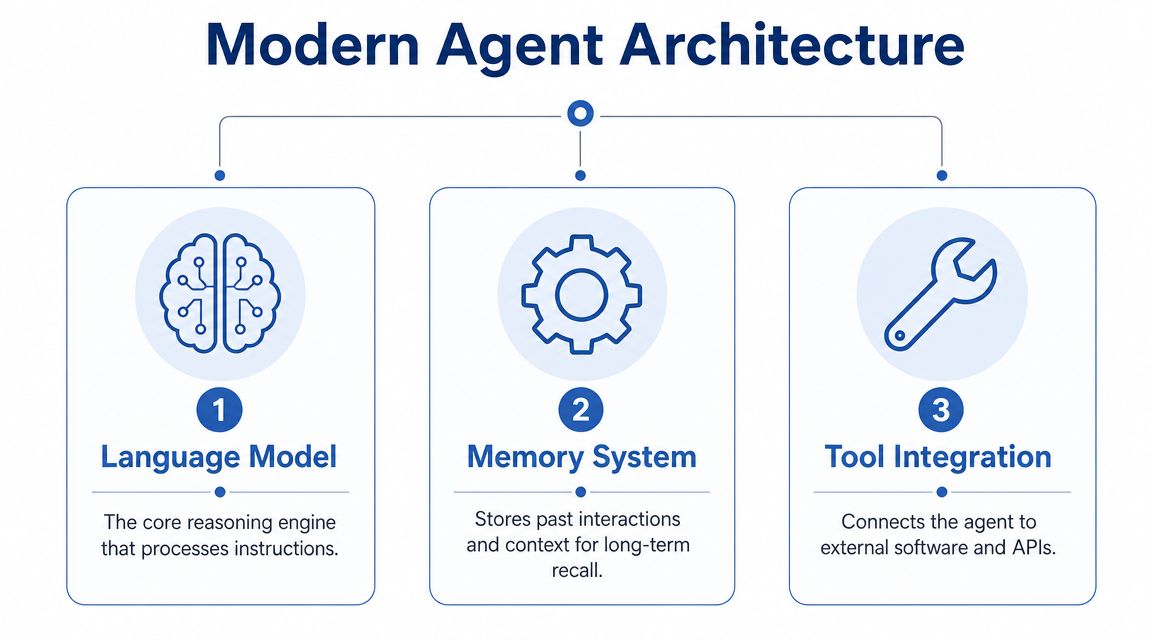
An AI agent is a stack of tools working together.
When founders say, “We tried an agent and it wasn't reliable,” what they often mean is they connected a model to a prompt and expected an operations system. That gap is where most disappointment lives.
The three parts that matter
Language model
This is the reasoning layer. It interprets requests, chooses actions, drafts outputs, and decides when it's uncertain.
For most service businesses, the model choice matters less than people think. Reliability usually improves more from better instructions, tighter tool access, and cleaner data than from switching model brands every few weeks. Use strong commercial models when quality and broad capability matter. Use open-source options when control, hosting requirements, or cost constraints outweigh convenience.
Memory system
If your agent can't remember prior interactions, account context, service rules, and internal procedures, it will feel random.
That memory shouldn't live in one place. Some context belongs in your CRM. Some belongs in document retrieval. Some belongs in structured state for active workflows, such as quote status, missing job details, or approval checkpoints.
Tool integration
This is the part most businesses underestimate. The agent needs controlled access to calendars, CRMs, scheduling software, invoicing systems, phone systems, and internal knowledge sources.
Without tools, the model can only talk. With tools, it can act.
Why full autonomy is a trap
There's a reason I rarely recommend starting with an end-to-end autonomous agent. In a practical benchmark, five general-purpose AI agents were tested on real-world business tasks, and none could complete the workflows correctly, highlighting the need for modular design and human checkpoints. That result matches what I see in implementation work. The longer the chain, the more failure points appear.
The fastest way to lose trust in AI is to hand it a messy, multi-step process and assume it will quietly figure everything out.
A smarter pattern is to break work into bounded units.
- First, collect and normalize input
- Second, classify the request
- Third, call the right system or workflow
- Fourth, ask for human review when confidence drops or edge cases appear
That design keeps the system just as capable and makes it deployable.
The architecture I'd start with
If you're building AI agents for service businesses today, start with an assistant model, not a fantasy employee.
| Layer | Good first move | What to avoid |
|---|---|---|
| Model | Use a capable LLM with strong tool use | Chasing every new release |
| Memory | Combine CRM data, docs, and workflow state | Dumping all context into one giant prompt |
| Tools | Give narrow permissions with audit trails | Broad write access from day one |
| Orchestration | Route tasks through explicit steps | Letting one prompt handle the full process |
| Oversight | Add approvals for risky actions | Blind autonomy on customer-facing tasks |
If you're comparing orchestration platforms, workflow builders, and agent tooling, this guide to AI workflow automation tools gives a practical view of where each category fits. Most businesses don't need the most complex stack. They need the clearest one.
Engineering Your Agent's Brain and Memory
Too many people over-focus on the model and underinvest in context. That's backwards.
Your agent will only be as useful as the information it can access and the instructions that govern how it behaves. In service businesses, the difference between a good agent and a dangerous one usually comes down to data plumbing, role design, and decision boundaries.
Start with sources of truth
Before you write prompts, map where the business truth lives.
For most service companies, that means some ugly combination of CRM records, inboxes, call transcripts, estimate templates, scheduling software, internal SOPs, pricing rules, technician notes, and invoicing systems. If those sources conflict, the agent will mirror the confusion at machine speed instead of fixing it.
I usually separate context into three buckets:
- Stable business knowledge such as service areas, standard policies, approved offers, FAQs, and escalation rules
- Customer-specific context such as past jobs, open estimates, billing history, and current service status
- Live workflow state such as “awaiting photos,” “needs manager approval,” or “appointment requested but not confirmed”
That separation matters because each bucket updates on a different rhythm. Treating all context the same is how agents become stale, noisy, or expensive.
Write the operating instructions like policy, not marketing
Prompt engineering in business systems is about reducing ambiguity. Sounding smart doesn't matter.
A strong master prompt usually includes:
A role definition, covering who the agent is inside the business and what job it owns.
A primary objective, meaning the business outcome it optimizes for, such as clean intake or faster quote preparation.
Allowed actions, spelling out which systems it can read, which it can update, and which actions require approval.
Rules and prohibitions about what it must never guess, promise, or finalize without verification.
Escalation logic with the exact conditions that trigger handoff to a human.
Here's the kind of structure I use in practice:
You are the inbound service qualification agent for a home services company. Your job is to collect accurate job details, check for required information, create or update the CRM record, and route qualified requests to scheduling. Do not invent pricing, appointment availability, or service coverage. If the request is ambiguous, outside policy, or missing critical data, escalate to a human coordinator.
That's not flashy. It works.
Build thinking paths behind the replies
For more complex workflows, the agent needs a repeatable reasoning path: a sequence, with no hidden magic.
A solid internal pattern looks like this:
| Stage | Agent behavior |
|---|---|
| Interpret | Identify customer intent and relevant workflow |
| Validate | Check required fields, policies, and system data |
| Act | Update records, draft output, or trigger the next step |
| Review | Confirm confidence and detect exception conditions |
| Escalate | Hand off with full context when needed |
Context engineering is a major differentiator. On top of feeding the model facts, you're shaping when it sees what, in what format, and under which rules. I go deeper on that in my guide to agentic context engineering.
What not to do
A few patterns break agents fast:
- One giant prompt is the first. People stuff policies, examples, SOPs, and live records into a single blob and wonder why outputs drift.
- Unstructured knowledge bases are the second. If naming is inconsistent and documentation is outdated, retrieval gets messy quickly.
- Missing refusal behavior is the third. If you don't tell the agent when to stop, it will try to be helpful in places it shouldn't.
Good agent design makes the workflow harder to break. Making the model more creative is beside the point.
That's the standard you want.
Deploying Agents Without Wrecking Your Reputation
A working prototype proves almost nothing.
The hard part starts when the agent touches real customers, real calendars, real invoices, and real job records. That's where service businesses either build trust or create operational debt.

Roll out in stages, not with a big reveal
The safest deployment pattern is phased.
I like a progression like this:
Shadow mode.
The agent observes inputs and proposes actions, but a human still executes them.Assisted mode.
The agent completes drafts, updates suggested fields, and prepares next steps for human review.Limited autonomy.
The agent handles narrow, low-risk tasks on its own with audit logs and exception routing.Expanded autonomy.
Only after performance is stable do you widen scope.
This approach feels slower to owners who want an instant payoff. It's usually faster in practice because you don't spend the next month cleaning records and apologizing to customers.
Integration matters more than conversation quality
The most underappreciated truth in AI agents for service businesses is this: the actual bottleneck is operational integration.
That's why I pay close attention to products built around deep workflow connection. Toma, for example, emphasizes deep integration with automotive-specific software, interaction reporting, and alerts when humans need to step in, which is exactly where the core challenge sits according to its company overview on Y Combinator. Smooth conversation is nice. Preserving data quality across CRM, scheduling, and invoicing is what ultimately determines whether the system survives production.
If the agent creates bad records, nobody will care how polite it sounded.
Here's the practical test. After the interaction, did the right customer record update correctly? Did the appointment land in the right place? Did notes stay structured enough for the next human to act without rework?
Design the handoff before you launch
Most failures happen at the boundary conditions.
The customer asks for something unusual. The job falls outside a normal service area. The schedule is almost full. The pricing depends on details the customer can't provide cleanly. Those are normal operating conditions in a real service business, and none of them is a bug.
Use a simple handoff framework:
- Trigger conditions such as missing data, policy conflict, low confidence, unusual request, emotional customer, billing dispute
- A handoff package with the customer summary, transcript, captured fields, and recommended next action
- A responsible owner, whether that's the sales rep, dispatcher, coordinator, estimator, or manager
- A recovery rule for what happens if the human doesn't respond in time
A short demo helps illustrate how these systems are being positioned in service operations:
Protect the business before you optimize it
Before you chase efficiency, lock down a few basics.
| Risk area | Guardrail |
|---|---|
| Pricing | Never let the agent invent quotes without approved logic |
| Scheduling | Confirm true availability from the live system before promising times |
| Customer records | Log every write action and make edits reversible |
| Escalation | Route uncertain cases to named humans, not generic inboxes |
| Compliance | Limit what the agent can say or store in sensitive workflows |
If you want one person to own this, make it whoever runs operations, even if that's you. Whoever handles marketing can help shape messaging, and whoever sells can help define qualification. But deployment lives or dies in the day-to-day operating workflows.
The Real Scoreboard: Measuring Agent ROI and Risk
Most dashboards for AI are vanity dashboards. Number of conversations. Number of responses. Number of tickets touched.
None of that tells you whether the system is making the business stronger.
Measure business movement, not activity
A useful agent scoreboard starts with outcomes you already care about.
Track things like:
- Watch lead conversion quality. Are after-hours and inbound opportunities turning into qualified appointments or estimates more consistently?
- Watch time to action. How quickly does a lead get contacted, a quote get prepared, or a customer get an update?
- Watch operational cleanliness. Are records more complete, handoffs smoother, and admin rework lower?
- Watch customer trust. Are complaints about bad information, wrong appointments, or confusing follow-up rising or falling?
That last one matters more than most owners admit. Reputation damage compounds when automation feels careless. If brand trust is already fragile, work on the customer-facing basics too. For firms where reviews directly affect pipeline, Stop Losing Clients to Bad Online Reviews is a useful reminder that response quality and reputation management are tightly connected.
Put the human handoff on the dashboard
The hardest financial decision is where automation should stop. Whether agents save labor is the easy part.
That's why this projection matters. By 2026, the key question for service businesses is where the human-agent handoff should sit for maximum profit, customer satisfaction, and liability protection, more than whether AI agents save labor. I agree with that completely.
So track handoff quality directly:
A healthy agent escalates at the right moment, with enough context that a person can close the issue fast.
Use review categories such as successful autonomous completion, good escalation, bad escalation, and silent failure. Silent failure is the one that hurts most because it often shows up later as churn, refunds, or angry calls.
The scoreboard I'd want on one page
| Metric group | What to watch |
|---|---|
| Revenue | Qualified lead flow, quote progression, booked work quality |
| Efficiency | Admin effort removed, repeat data entry reduced, response lag shortened |
| Trust | Complaint patterns, review themes, escalation appropriateness |
| Risk | Incorrect commitments, bad record updates, unresolved exceptions |
If the dashboard only proves the agent was busy, it's useless. It should tell you whether the system is helping you grow without creating a mess.
Your Next Move: From Blueprint to Production
You do not need a giant transformation project to start winning with AI agents for service businesses.
You need one workflow with clear economics, clear boundaries, and clear ownership. Usually that's inbound lead qualification, estimate preparation support, scheduling coordination, or service-status communication. Pick the one your business repeats constantly and where mistakes already cost you money.
Then build it the right way. Define the mission. Connect the core systems. Give the agent bounded authority. Add human checkpoints where trust, liability, or data quality matter. Measure outcomes that show up in revenue and margin.
At this point, the competitive gap opens.
One company adds a chatbot and calls it innovation. Another company builds an agent that captures demand after hours, keeps records clean, speeds handoffs, and supports the team without creating chaos. Those two businesses are not on the same curve.
Start with one high-value, low-risk workflow this quarter. Get it into production safely. Learn from it. Then expand.
That's how you turn AI from a novelty into operational efficiency.
If you want help designing agent systems that fit real business workflows, I work with owners and small teams on AI strategy, prompt systems, context engineering, and agent deployment. Here's how to work with me.
