
Your dashboards tell you what already happened. What you need is a system that tells you what to do next.
I'm Samuel Woods. I've worked with machine learning since 2016 and generative AI since 2019, and I can tell you this plainly. Most companies don't have an intelligence problem. They have an action problem. They collect data, stare at charts, debate in meetings, and move too late.
That's why AI business intelligence software matters. “Ask your data” makes a nice demo, but the real value is that the right system helps you trust an answer fast enough to act on it, and it automates the flood of small recurring questions that quietly slow down sales, marketing, finance, and ops every day.
Why Your Business Intelligence Is Incomplete
How many revenue-impacting questions come up in your business every day that never get answered in time?
If your business still depends on weekly dashboards and reports someone builds by hand, your BI setup is only covering part of the job. It records what happened. It does not reliably support fast decisions across sales, marketing, finance, and operations while conditions are still changing.
You feel that gap in very practical ways. A pricing issue sits unnoticed for days. Conversion quality slips inside one channel while top-line pipeline still looks healthy. A supply problem starts upstream, but you see it only after service levels drop. By the time the report catches up, the cost has already shown up in margin, churn, or missed targets.

Dashboards are necessary, but they stop short
Keep your dashboards. Keep your monthly reporting. Keep KPI tracking.
Just stop pretending those tools are enough.
A dashboard is a static reporting layer. It shows the metrics someone chose in advance. It rarely explains the cause of a change, surfaces the next question to ask, or gives you and your team a fast path to an answer you trust. That last point matters most. If you do not trust the output, you delay action. If you cannot get answers without pulling data by hand, routine decisions slow to a crawl.
Your business intelligence is incomplete when the business generates more recurring questions than you have time to answer.
That is the bottleneck. Sales asks why win rate fell in one segment. Marketing asks which campaign mix is creating low-quality pipeline. Finance asks whether margin pressure is isolated or systemic. Ops asks which accounts are at risk of service delays. Each question is small on its own. Added together, they create drag across the whole business.
What you should care about as the owner
The core issue is whether you and your team can move from signal to trusted action without delay. Prettier reporting doesn't solve that.
That means getting answers you can use, then removing the repetitive work behind the recurring questions that eat your week. AI BI earns its keep through faster intervention on revenue leaks, tighter control over margin, and quicker response to market shifts.
If you are already investing in marketing intelligence tools for faster decision-making, AI BI should sit on top of that foundation and reduce the distance between question, answer, and execution.
The talent market is shifting for the same reason. Companies are hiring for systems that support ongoing decisions rather than reporting output alone. You can see that change in understanding the BI job market.
The businesses that gain share will be the ones that trust the answers fast enough to act and automate the recurring questions that slow everyone else down. More dashboards won't do it.
From Looking Backwards to Seeing the Future
Most reporting setups are still being asked to serve a business that moves faster than the model they were built on.
Traditional BI answers historical questions. Useful, but limited. AI business intelligence software is built for a different job. It helps you explore, predict, prioritize, and respond without waiting for every question to become a manual data pull.
The practical difference
Here's the line to draw.
| Capability | Traditional BI | AI Business Intelligence |
|---|---|---|
| Core purpose | Report what happened | Surface what's changing and suggest what to investigate next |
| User access | Analysts and power users lead the process | Non-technical teams can query in plain language |
| Data workflow | Manual report building and dashboard maintenance | Automated analysis, summarization, and pattern detection |
| Output | Static charts, scheduled reports, KPI dashboards | Answers, forecasts, alerts, anomalies, and recommendations |
| Follow-up questions | Usually require another report or analyst step | Conversational exploration with rapid iteration |
| Decision support | Descriptive | Predictive and increasingly prescriptive |
| Operational use | Best for recurring executive reporting | Best for recurring business questions across functions |
That table is why so many firms are redesigning analytics roles right now. If you want a sense of how the talent side is shifting, understanding the BI job market is useful context. The change reaches past software into what companies now expect from analysts, data leads, and operational teams.
What changes inside the business
Under the old model, you ask why close rates slipped. Someone exports CRM data. Someone joins a few tables. A dashboard gets updated. By the time you review it, you have already lost another week of sales.
Under the new model, you ask the system directly, get a structured answer, drill into rep tenure, pipeline stage, or segment mix, and act the same day.
That's a different operating cadence.
Fast answers only matter if the people closest to revenue can use them without waiting for technical mediation.
There's also a strategic split happening. Simple questions are moving toward lightweight natural-language interfaces. Higher-stakes decisions are moving into controlled workflow systems where data inputs, logic, and outputs are governed more tightly.
That's why I don't tell owners to chase flashy chat interfaces in isolation. A chat box without reliable business logic is a liability. A governed system that lets teams ask sharp questions and get dependable answers is an advantage.
The businesses pulling ahead keep most of their dashboards. What they replace is delay.
The Five Core Capabilities That Create Advantage
Most vendor feature lists are noise. You need to know which capabilities provide a competitive advantage.
The right AI business intelligence software gives you five forms of advantage: five ways to move faster than companies still stuck in dashboard culture.
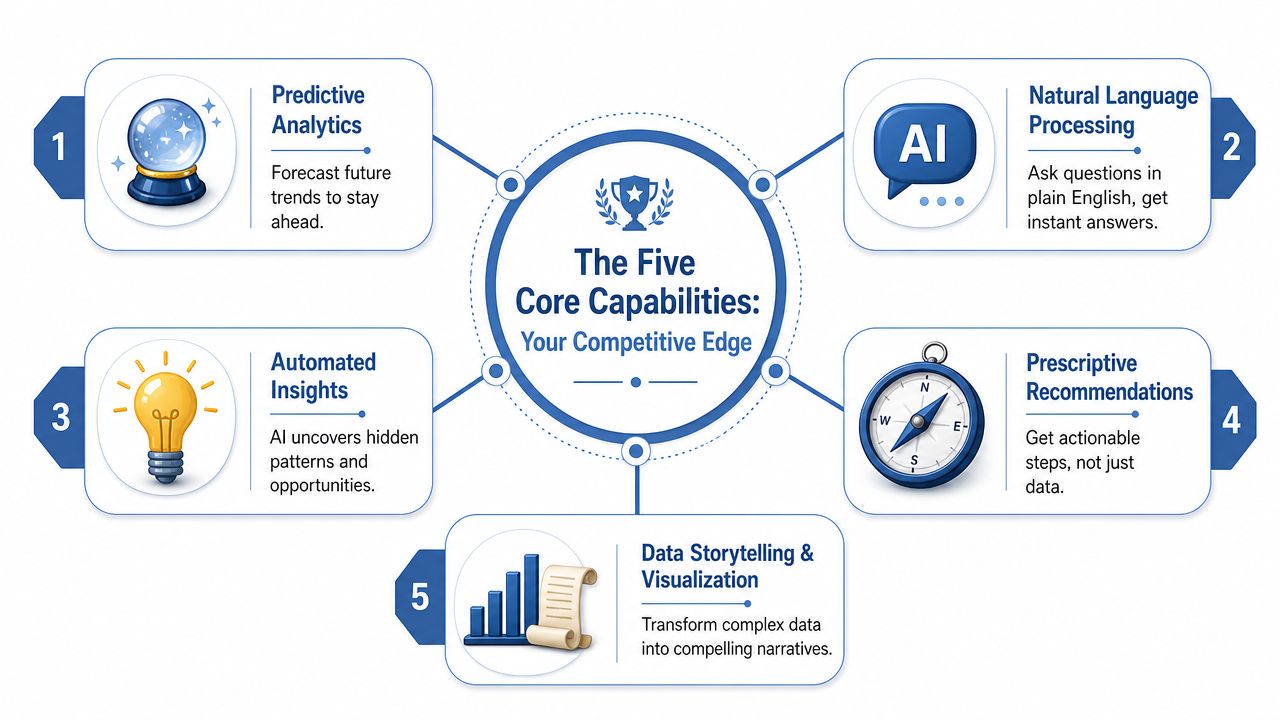
Start with the semantic layer
Before any of the flashy AI works, you need a governed semantic layer. Effective AI BI tools are built on one because it translates raw, messy data into consistent business metrics and lets non-technical users ask plain-English questions without dealing with table structures or rebuilding business logic every time, as explained in ThoughtSpot's overview of business intelligence tools.
If you skip that layer, your AI doesn't become intelligent. It becomes inconsistent.
If you want the broader design principle behind this, my guide to context engineering for reliable AI systems covers the same problem from the LLM side. Context quality determines answer quality.
Five capabilities that actually matter
- Natural language querying
This is how you remove analytics bottlenecks when nobody on the team is technical. You shouldn't need SQL to ask which segment has the highest pipeline slippage this month. You shouldn't need an analyst to compare CAC trends across channels and landing pages.
Used well, natural language querying expands data access without forcing you or anyone on your team to become a dashboard builder.
- Predictive analytics
Historical reporting tells you where you lost. Predictive analytics gives you a chance to stop losing.
AI BI offers strategic utility for churn risk, demand planning, sales forecasting, and campaign planning. But only if the underlying data is clean and the metrics are consistent. Otherwise, your forecast is just mathematical theater.
- Automated insights
A strong platform doesn't wait for someone to ask the perfect question. It proactively surfaces changes, correlations, and trend breaks.
That matters because many of your biggest risks aren't visible in top-level dashboards. They show up as scattered weak signals across segments, geographies, products, or channels.
Here's a useful walkthrough of how these systems get discussed in practice.
- Anomaly detection
This is your early warning system. It flags the weird stuff before it becomes a monthly postmortem.
Think sudden return-rate spikes, a conversion dip in one traffic source, or unusual discount behavior in one region. Detection alone is not the goal. The goal is detecting fast enough to intervene.
- Agent-driven workflows
At this stage, AI BI stops being passive software and starts becoming infrastructure. An agent can monitor a metric, summarize what changed, push an alert into Slack, open a task, or update a CRM workflow for follow-up.
A practical rule: if an insight still depends on someone remembering to check a dashboard, you haven't operationalized it.
What this creates against competitors
Your competitors may have access to similar data. What they usually lack is a system that turns that data into repeatable action across the business.
Tools vary. Some companies use Looker, Tableau, ThoughtSpot, Power BI, or Snowflake-native approaches. Others add orchestration layers, internal copilots, or custom agent workflows. In some cases, businesses also bring me in as an advisor to design the prompts, context structure, and agent workflow logic around the BI stack (here is how I work).
The capability stack matters more than the brand label. If the system can't define metrics consistently, answer clearly, detect change early, and trigger action, it won't create advantage.
Putting AI BI to Work in Your Business
Real ROI doesn't come from making the top-level dashboard more interactive. It comes from automating the long tail of recurring questions your teams ask every day.
That's where AI BI earns its keep. Current industry commentary keeps circling the same point: the biggest value shows up when sales, marketing, and operations teams get immediate answers to recurring questions without leaning on IT for every request, as discussed in Querio's analysis of AI BI for non-technical users.
Marketing
You are about to launch a campaign. The usual workflow is familiar. Pull last quarter's performance. Build a few segments. Debate which audience to prioritize. Wait for someone to validate the numbers.
A better workflow looks different. You ask which customer cohorts are showing stronger purchase intent signals, where lead quality has shifted, and which channels are producing lower-value pipeline despite healthy top-line volume.
The AI BI system doesn't just return a chart. It summarizes the pattern, highlights the segment changes, and gives you something usable before spend goes live.
That changes campaign timing and targeting. It also cuts waste because you are no longer guessing from lagging metrics.
Growth
Growth work is full of tiny leaks that become big revenue problems. Trial conversion softens. Demo no-show rates drift up. Activation falls for one acquisition source but not another.
Traditional BI catches this eventually. AI BI can flag the anomaly sooner, point to likely drivers, and let you drill into funnel stage, acquisition path, or product behavior without opening three separate systems.
A common example is trial-to-paid conversion. If one segment drops while another stays stable, the system can surface that change, tie it back to onboarding behavior or channel mix, and give you a same-day read on where to intervene.
Most revenue problems start as small unanswered questions.
Operations
Operations throws up high-frequency questions that rarely make it into polished dashboards.
Which suppliers are at risk next month. Which SKUs are showing unusual return behavior. Which support queues are lengthening by region. Which fulfillment nodes are trending toward delay.
Those questions are too operational to wait on. They're also too numerous for you to answer by hand forever.
Where AI BI should go first
I usually recommend starting with recurring questions that meet three tests:
- It is asked repeatedly: the same issue comes up every week or every month.
- It is business-critical: the answer affects revenue, cost control, service quality, or execution speed.
- It is currently delayed: someone has to export data, ask for a report, or reconcile conflicting numbers.
That's the sweet spot: repeated, non-technical decisions close to daily execution, rather than vanity reporting.
When not to use it
Don't force AI BI into every use case.
Use conventional dashboards for stable KPI tracking, investor or lender reporting, and regulated outputs that need fixed definitions and minimal variation. Use AI BI when the question is dynamic, exploratory, cross-functional, or operationally urgent.
That split is where a lot of owners get clarity. You don't need to replace your whole BI environment. You need to stop using static reporting for jobs that require speed, interpretation, and action.
How to Choose the Right AI BI Software
Every vendor demo looks impressive for twenty minutes.
They'll show a polished interface, a smooth natural-language prompt, and a few clean charts. None of that tells you whether you and your team will trust the answers six months later when the data is messy, business logic is contested, and someone needs to explain why the number changed.
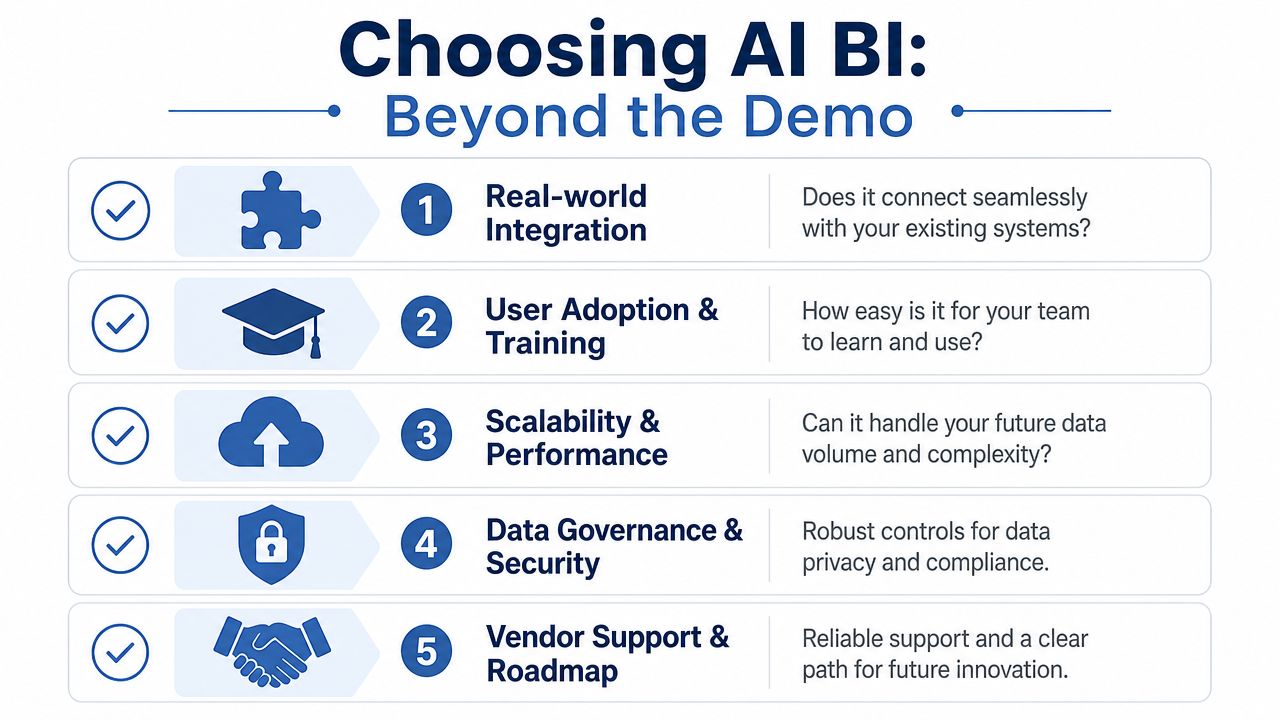
Ask harder questions than the vendor wants
Here's the checklist I'd use when you evaluate a tool yourself.
- Check integration reality. Ask what it takes to connect your CRM, product analytics, finance data, support systems, and warehouse. If the answer sounds easy only in a clean demo environment, keep digging.
- Check metric governance. Ask where metric definitions live, who controls them, and how conflicts are resolved. If your marketing numbers and your finance numbers can give different answers to the same revenue question, the tool will create friction.
- Check answer auditability. Ask whether you can inspect lineage, logic, assumptions, and source data behind a response. If you can't, trust will collapse as soon as one output looks wrong.
- Check workflow fit. Ask how insights get pushed into Slack, email, CRM tasks, planning workflows, or operational systems. Insight without workflow is just another tab.
- Check the adoption path. Ask what the first ninety days of rollout look like for non-technical users. If adoption depends on someone hand-holding every query, scale will stall.
The right buying lens
Most companies overvalue the interface and undervalue the operating model.
A better lens is simple. Can this system connect to your real data environment, enforce consistent business definitions, support controlled exploration, and fit how you already work?
Buy for trust and workflow fit. Ignore the demo theatrics.
That's also why AI BI should be evaluated alongside your broader automation stack. If you're already thinking about AI workflow automation tools for operational execution, your BI platform shouldn't sit in isolation. It should feed the workflows that create action.
A flashy answer engine can impress in a demo. A governed system that embeds into sales, marketing, finance, and ops can change how the business performs.
Choose the second one.
Your Roadmap for Implementation and Governance
Buying software is the easy part. Relying on it in live business decisions is where most businesses stumble.
Trust comes from use: you ask a question, get a clear answer, understand where it came from, and see that acting on it improves the outcome.
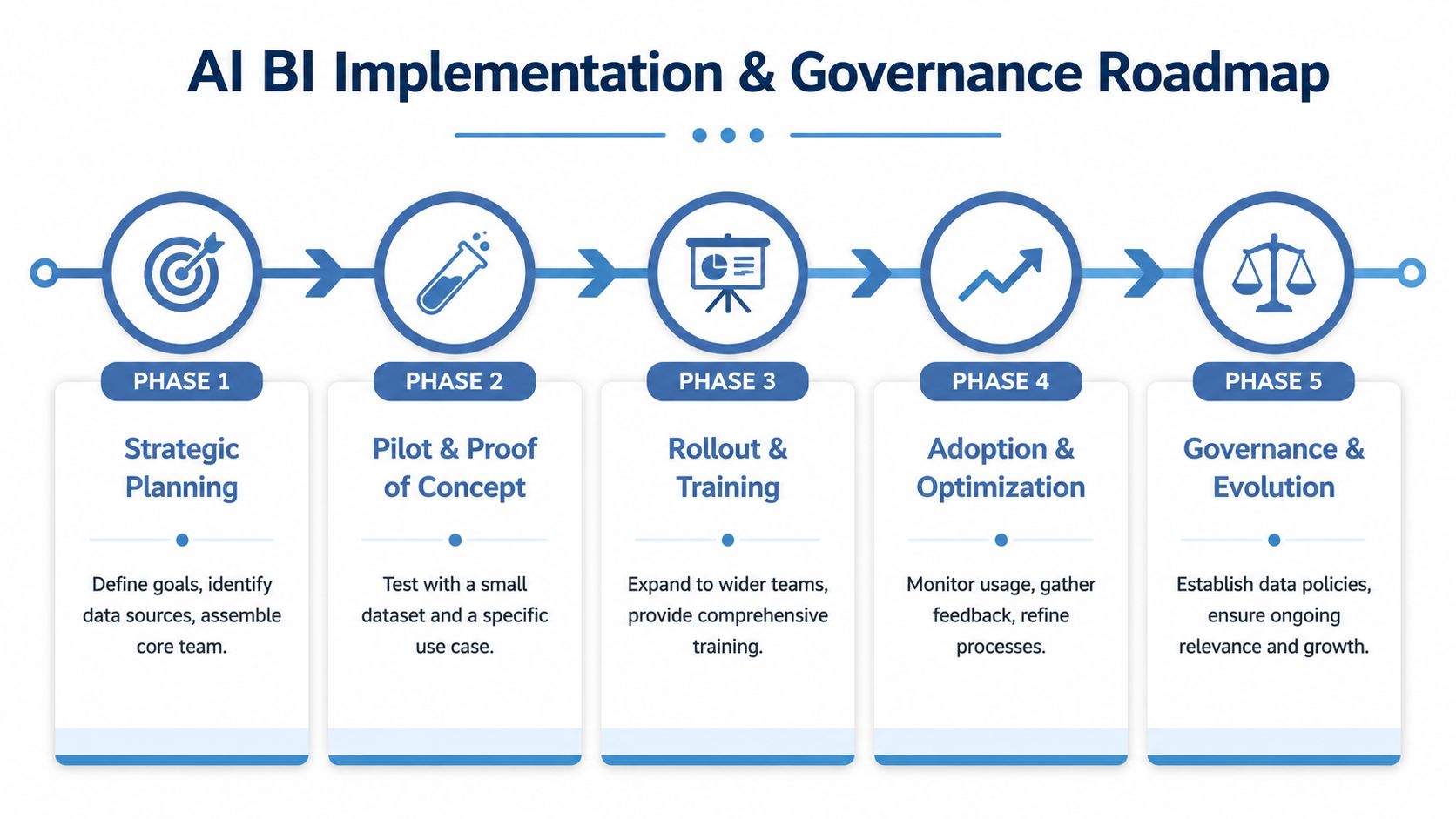
Phase one starts small
Don't start with a business-wide rollout. Start with one painful, recurring, high-value use case.
Good candidates include pipeline quality review, campaign performance diagnosis, churn risk investigation, inventory exceptions, or trial conversion analysis. Pick one area where the business already feels delay and where a faster answer changes action.
Then define the metrics tightly. Name the source systems. Set ownership. Agree on what “good” looks like before the first user prompt ever gets typed.
Scale only after trust exists
Once the pilot is producing dependable answers, expand into the area of the business that benefits most from recurring query automation.
Train whoever does the work, whether that is you, a contractor, or a small team. Build query examples around real work. Learn how to validate outputs. Learn what not to ask. Learn where the data is strong and where it still has gaps.
That discipline matters because trustworthy AI BI requires transparency. Well-designed platforms expose feature importance and confidence intervals for predictions, because people need enough visibility into the reasoning to act responsibly, as outlined in Snowflake's guide to AI for business intelligence.
Governance can't be bolted on later
Use a simple governance model from day one:
- Someone owns each critical KPI.
- People only see the data they should.
- You can trace an answer back to source logic.
- When output looks wrong, everyone knows who reviews it.
- High-stakes decisions get more validation than low-risk operational queries.
That last point matters. Not every answer should trigger automatic action. For sensitive decisions in pricing, finance, compliance, or major customer changes, keep a human in the loop.
If you can't explain why the system gave an answer, you won't use it when pressure is high.
Move from answers to actions
The end state is a business where insights trigger action inside the normal flow of work.
Alerts route to Slack. Risks create tasks. CRM records update. Teams investigate exceptions before they spread. The BI layer becomes part of the operating system instead of a reporting destination.
That's when implementation turns into advantage.
Measuring the ROI of AI Business Intelligence
What happens when your competitors answer operational questions in minutes while you wait days for analysis?
The return on AI business intelligence software shows up first in speed, but speed only matters when people trust the answer enough to act. If you still second-guess the numbers on sales, finance, operations, and customers, all you have is a faster reporting tool. The businesses that win use AI BI to remove friction from everyday decisions and eliminate the constant stream of repeat questions that drain your time.
That shift changes the economics of the business. You spend less time rebuilding the same reports. You stop chasing status updates across spreadsheets, dashboards, and inbox threads. Whoever does the work gets answers inside the systems they already use, then moves. That is how AI BI improves revenue execution, margin control, and response time across the business.
Adoption is no longer the interesting question. As noted earlier, many BI teams have already brought AI into their reporting and analysis stack. The issue now is execution quality. Can you trust what the system produces? Can you automate the high-volume, low-risk decisions that slow the business down every day? Those two factors decide whether AI BI becomes a cost-saving tool or a market-share tool.
If you're building beyond reporting and into lasting execution, I'd also look at actionable AI frameworks for MLOps. AI BI produces stronger returns when insights connect directly to workflows, operating systems, and controls that turn analysis into repeatable action.
The payoff is straightforward. Faster answers. Fewer manual escalations. More consistent decisions. Earlier response to change.
That is the edge you should care about. A business that spots shifts sooner, resolves routine questions automatically, and acts with confidence will out-execute one that keeps debating whose dashboard is right.
If you want help designing an AI BI stack that you and your team will trust and use, I work with business owners as a Fractional Chief AI Officer to map the data foundation, workflow design, and governance needed to make that happen.
