
Many teams assume a digital workforce begins with an AI demo. That's backwards. If your workflows are messy, your data is incomplete, and your exception handling is undefined, the agents you deploy will just automate confusion faster than your team can clean it up.
I've seen this mistake across marketing organizations since 2019, and the pattern is always the same. Owners buy the tool, celebrate the pilot, then discover the primary bottleneck is work design, not model quality. A digital workforce should be treated like a managed labor pool of software workers, with clear job definitions, supervised handoffs, and measurable output, not like a box of clever chatbots.
The market is moving fast, but the practical rules are still boring. Start with the process, not the platform. Start with clean inputs, not bigger prompts. And start with governance before you let software act on behalf of your brand.
Table of Contents
- Why Most Digital Workforce Initiatives Fail Before They Start
- Identifying Which Marketing Workflows to Automate First
- Architecting Your Digital Workforce for Scale
- Choosing the Right Tools and Platforms for Your Agents
- Measuring Performance and Governing Your Digital Workforce
- Real Digital Workforce Deployments and What They Produced
- Your 90-Day Digital Workforce Implementation Roadmap
Why Most Digital Workforce Initiatives Fail Before They Start
The most common failure is simple. Teams start with an agent platform, then try to force it onto a broken workflow. The result is expensive automation of a process nobody would have designed that way in the first place.
A better mental model is to treat digital workers like contractors. You wouldn't hire a contractor without a job description, access rules, a review process, and a clear definition of done. Your software workers need the same treatment, and the same discipline around data quality and handoffs.
If you can't describe the workflow step by step, an AI agent can't execute it reliably.
The three failure patterns I see most often
First, teams automate the visible task and ignore the upstream mess. They build a content agent or reporting agent while the source data is inconsistent, which means the agent produces polished nonsense. Second, they choose the most advanced model before documenting the workflow, so the system has no stable operating instructions.
Third, they forget that exceptions represent the core work. A workflow that runs smoothly for 80 percent of cases can still fail in production if the remaining 20 percent has nowhere to go. IBM's practical approach is the right one here: start with a single high-volume process, document it in detail, train the software worker, then use process mining and bottleneck analysis to validate ROI after deployment, while routing exceptions back to humans during operation. See the broader workflow discipline in my marketing automation best practices guide.
Clean data beats clever prompts
In marketing, the biggest hidden constraint is often the state of the data feeding the agent. If campaign names are inconsistent, lifecycle tags are unreliable, or customer records are fragmented, the software worker will inherit those flaws and scale them across every touchpoint.
That's why I push teams to think in terms of input quality, workflow clarity, and exception routing before they think about “prompt magic.” The most effective implementations I've seen behave like well-run operations desks. They reserve human judgment for the cases that need it.
Identifying Which Marketing Workflows to Automate First
The right first workflow is the one with enough volume to matter, enough structure to automate safely, and enough business impact that the time saved shows up in revenue-related work. It's rarely the flashiest one. If a workflow is tiny, highly creative, or full of one-off judgment calls, it's a poor first candidate.
Score every workflow on three dimensions
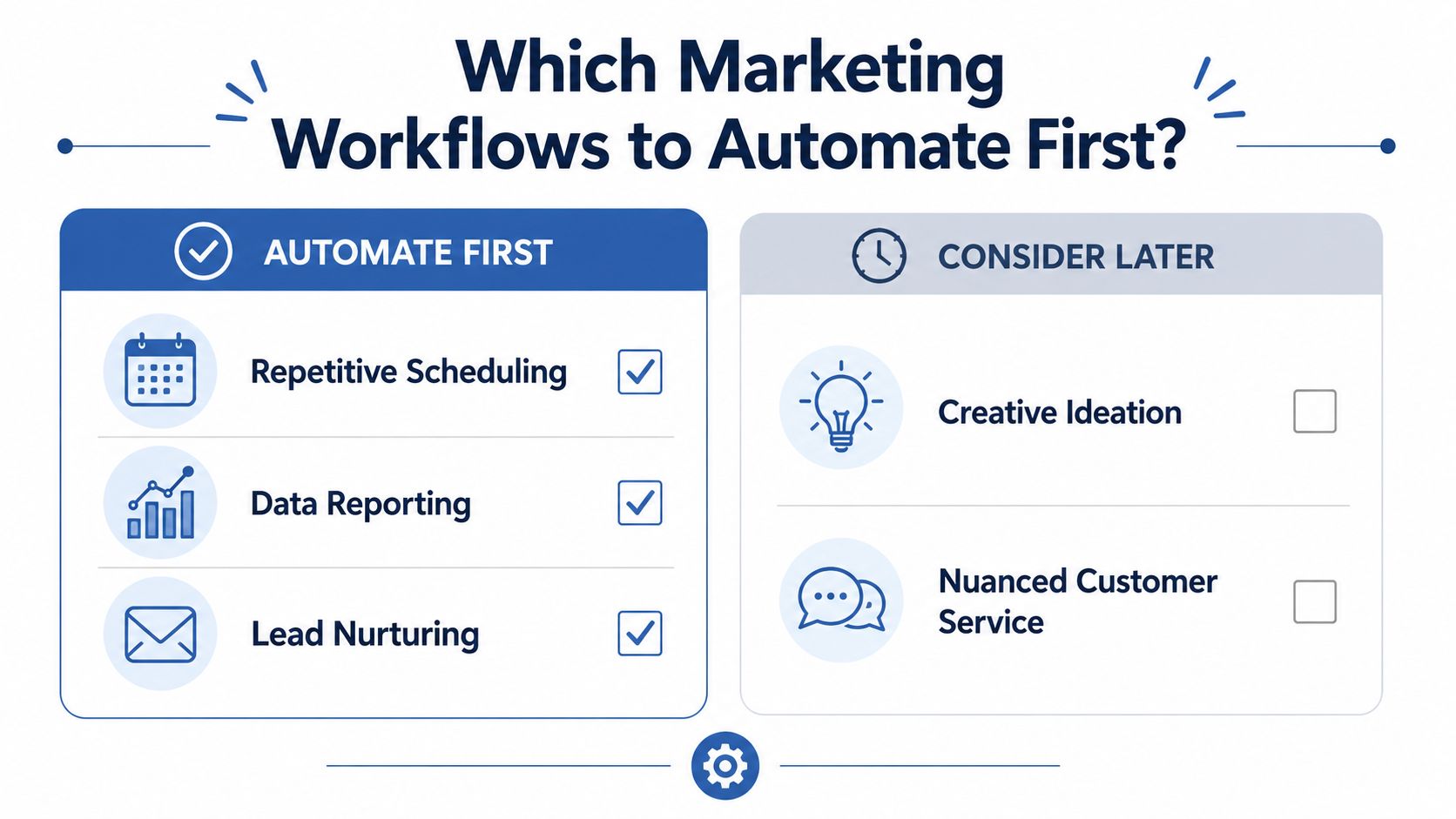
Start with a simple inventory. List the marketing processes your team repeats every week, then score each one on volume, complexity, and revenue impact. Repetitive scheduling, reporting, and lead nurturing usually rise to the top because they combine frequency with clear rules.
Then look for friction as well as repetition. If a workflow forces your team to copy data between systems, rewrite the same message variants, or manually triage obvious requests, it's probably a strong automation candidate. If the workflow exists mainly because no one has redesigned the process in years, automation can expose that waste fast.
The best first automation often reveals a bad process. That's useful, not a problem.
What to automate first and what to keep human
Use the first 30 days for stable, rules-heavy work. That usually means structured tasks where the output format is predictable and the failure mode is obvious. Use the first 90 days for workflows that have more moving parts but still follow a repeatable path.
Keep humans on creative ideation, nuanced customer service, and any workflow where the brand risk is high and the decision context changes constantly. For a useful external example of how people think about data collection in adjacent automation work, Scrapeway's guide on choosing a web scraping API is a decent reminder that extraction quality matters before orchestration ever does. If your team can't trust the raw inputs, they won't trust the outputs either.
For a practical workflow reference, my marketing automation workflow examples page shows the kinds of repeatable processes that usually justify early automation. The key is to pick work that is boring enough to standardize, but valuable enough to matter.
Architecting Your Digital Workforce for Scale
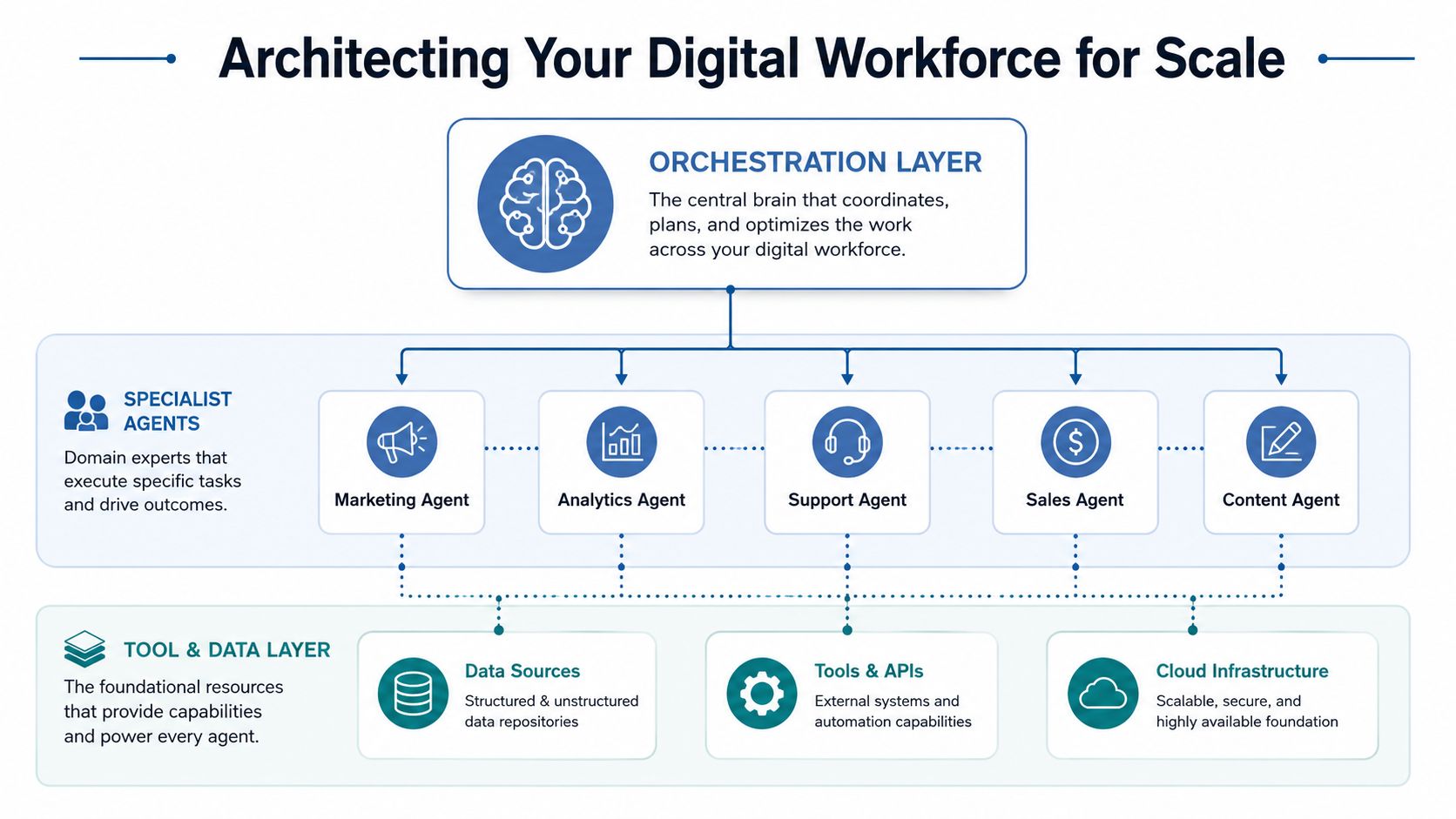
Once you know what to automate, the next question is who does what. In a scaled setup, you don't want one giant agent trying to handle everything. You want a small labor system with specialist roles, clear ownership, and an orchestration layer that knows when to route, retry, or escalate.
Build around roles, not prompts
I've had better results when the system is split into distinct functions. A data collection agent gathers inputs, a content agent drafts assets, an analytics agent interprets performance, and an orchestration agent decides what happens next. That division keeps failures smaller and makes debugging far easier.
The practical gain is control. When one specialist agent breaks, the rest of the system can keep moving. When one giant agent breaks, everything stops and nobody knows why. That's the difference between an experiment and an operating model.
Feed the agents real context
Agents are only as good as the context you provide. That means clean pipelines from your CRM, content library, campaign history, brand guidelines, and performance data. It also means your prompts should behave like reusable templates, not one-off clever instructions.
I use context engineering patterns that separate stable brand rules from dynamic task inputs. The stable layer holds voice, compliance, offers, and forbidden claims. The dynamic layer holds the campaign brief, audience segment, and current goal. That separation makes outputs more consistent and makes updates less risky.
In my experience, the more your system depends on tribal knowledge, the less it behaves like a digital workforce and the more it behaves like a brittle experiment.
Design exception routing from day one
Many teams get it wrong when they assume the goal is to remove humans from the loop, when the primary goal is to keep humans on the edge cases that need judgment. If an agent can't complete a task confidently, it should route the case to a reviewer without blocking the rest of the workflow.
For a deeper view of stack choices, I've documented my AI agent tech stack around the layers that matter in production. The right architecture gives you speed, but it also gives you a clean failure path, and that's what keeps a system usable when it hits real-world chaos.
Choosing the Right Tools and Platforms for Your Agents
Tool choice matters, but not as much as most vendors want you to believe. Managed platforms can get you moving quickly, while open frameworks can give you flexibility and lower lock-in. The right answer depends on your team size, internal expertise, and how much control you need over the workflow.
Compare platforms by operating model
| Category | Best For | Trade-offs | Cost Range |
|---|---|---|---|
| Managed agent platforms | Teams that want faster deployment and less infrastructure burden | Less flexibility, more vendor dependence, narrower customization | Varies by vendor |
| Orchestration frameworks | Teams with technical ownership and custom workflow needs | More setup, more maintenance, more engineering discipline required | Varies by stack |
| Open-source model stacks | Teams that need portability and tighter control over data handling | More operational complexity, more internal responsibility for reliability | Varies by model and hosting |
| API-based model use | Teams that want to test quickly and iterate | Ongoing dependency on external APIs and model behavior changes | Varies by usage |
Managed tools like Salesforce Agentforce and Microsoft Copilot Studio are attractive when you need speed and governance in one place. Salesforce frames digital workers as software-based systems that combine AI, machine learning, natural language processing, and robotic process automation to work around the clock, which makes the managed-platform pitch easy to understand. That model works best when your workflows already live near the platform and your team doesn't want to build heavy infrastructure.
Open frameworks like LangChain or CrewAI make more sense when you need custom orchestration, niche integrations, or a stack you can move between environments. I'm more cautious with them when the team has no internal owner, because a flexible framework without operational discipline turns into a maintenance tax. The same applies to local model choices like Llama or Mistral: they're useful when data control matters, but they raise the bar for monitoring and performance management.
For teams evaluating the broader agent stack, I pay as much attention to how they'll source data as to how they'll run models. That's why the right scraping and enrichment layer matters as much as the agent layer, especially when competitive intelligence or market monitoring is part of the use case. If you can't trust the intake, the agent platform won't save you.
The fastest path is usually a mixed stack. Use managed tools where governance and speed matter, then add open components where differentiation matters more than convenience. That combination gives you room to scale without boxing yourself into one vendor's worldview.
Measuring Performance and Governing Your Digital Workforce
If you don't measure a digital workforce, you don't have one. You have a set of automations with a nice interface. The right operating model tracks output, quality, human satisfaction, and the safety controls that keep software workers inside their lane.
Track the metrics that actually matter
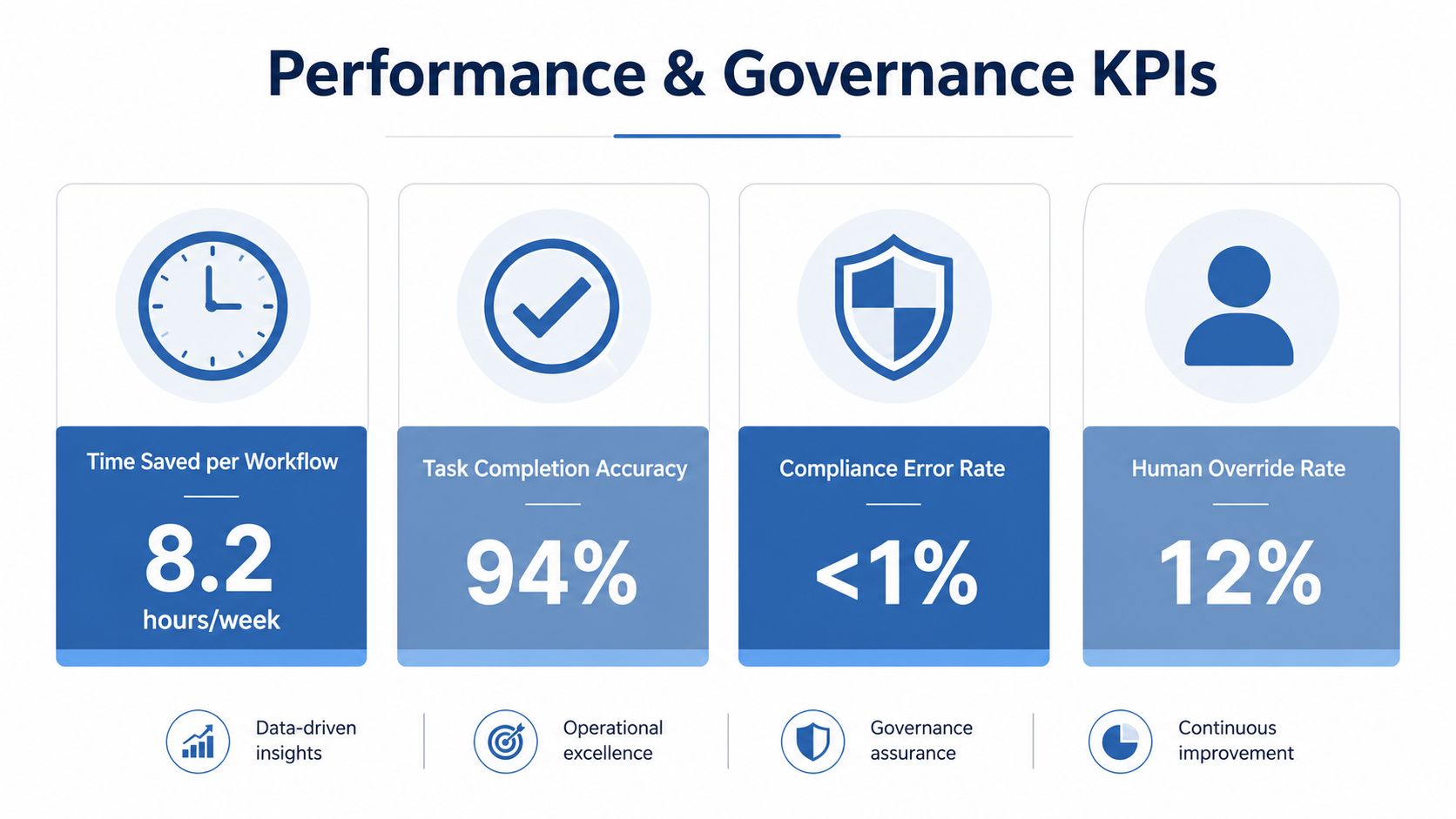
I keep the scoreboard simple. Measure time saved per workflow, task accuracy, error rates, and human override rate. Krungsri's planning guidance is useful here, since it emphasizes KPIs tied to reduced work hours and error decline, plus training plans and safe infrastructure for implementation. For wider operational framing, I also watch whether the human team wants to keep using the system, because satisfaction is a leading indicator of adoption.
Don't stop at efficiency. If the agent saves time but creates messy review work, the business still loses. If it improves throughput but weakens brand consistency, the hidden cost shows up later in conversion and trust.
Govern agents like accountable workers
Cisco's zero-trust framing is helpful because it treats AI agents as identities that need access control, behavioral monitoring, and policy enforcement. That matters because agents operate at machine speed and can take unintended actions faster than a human can intervene. In practice, your governance needs least-privilege access, time-bound permissions, logging, and an owner for every agent.
I also like the “agent system of record” idea because it mirrors how HR systems manage people. Onboarding, access, performance review, and offboarding should all exist for software workers too. That structure is what keeps the system auditable when something goes wrong.
My governance rule is simple: if an agent can touch customer data, publish brand content, or trigger revenue-impacting actions, it needs a named human owner and a clear escalation path.
Make trust part of the deployment
The human side matters more than many organizations admit. People resist systems they don't understand, especially when those systems touch their targets or their jobs. The fastest way to earn trust is to make the agent's decisions visible, reversible, and reviewable.
That's also why broad policy beats ad hoc permission sprawl. If every team invents its own rules, you'll spend more time reconciling exceptions than improving performance. A good digital workforce is controlled enough to be safe and flexible enough to move fast.
Real Digital Workforce Deployments and What They Produced
The most useful deployments are rarely the cleanest ones. They're the ones that hit real operational friction, then force you to redesign the workflow instead of just polishing the prompt. I've seen that in SaaS, ecommerce, and B2B services, and the lessons are surprisingly consistent.
Competitive intelligence that stopped living in spreadsheets
One SaaS team wanted faster competitor tracking. The old process involved manual monitoring, copied notes, and inconsistent alerts that reached marketers too late to matter. I replaced it with a data collection agent, an orchestration layer, and a human review step for only the highest-risk changes.
The first version failed because the input sources weren't stable enough. Once the team standardized the monitored fields and clarified escalation rules, the workflow became reliable enough to support weekly positioning decisions. The lesson was blunt: the agent made a messy intelligence process usable, but it didn't create strategic insight.
Content production that needed guardrails as well as speed
An ecommerce brand used agents to draft campaign copy, product-adjacent messaging, and variant ideas for paid and email. The system worked best when the brand rules were encoded separately from the campaign brief, so the model could vary the message without drifting on voice. Without that separation, reviews became slow and the output felt generic.
The biggest production issue was exception handling for edge cases like regulated claims, product launches, and seasonal offers that needed human approval. Writing speed mattered far less. Once I routed those exceptions cleanly, the team got faster without turning the brand into a content factory with no taste.
Lead qualification that improved routing quality
A B2B services firm used agents to qualify inbound leads and sequence nurture steps based on fit and intent. The win came from better handoffs more than from automation itself. Sales spent less time on unqualified conversations, while marketing had a clearer view of which lead patterns deserved priority.
The rough edge was data quality. When intake forms were incomplete, the agent had to guess, and guessing is poison in a revenue workflow. I fixed that by tightening the workflow at the front door, which improved the whole system more than adding another model ever would.
Your 90-Day Digital Workforce Implementation Roadmap
The first 90 days should prove one thing. Your team can operate software workers with enough discipline to create repeatable business value. If you can't show that, you have pilot theater and no digital workforce yet.
Weeks 1 to 4
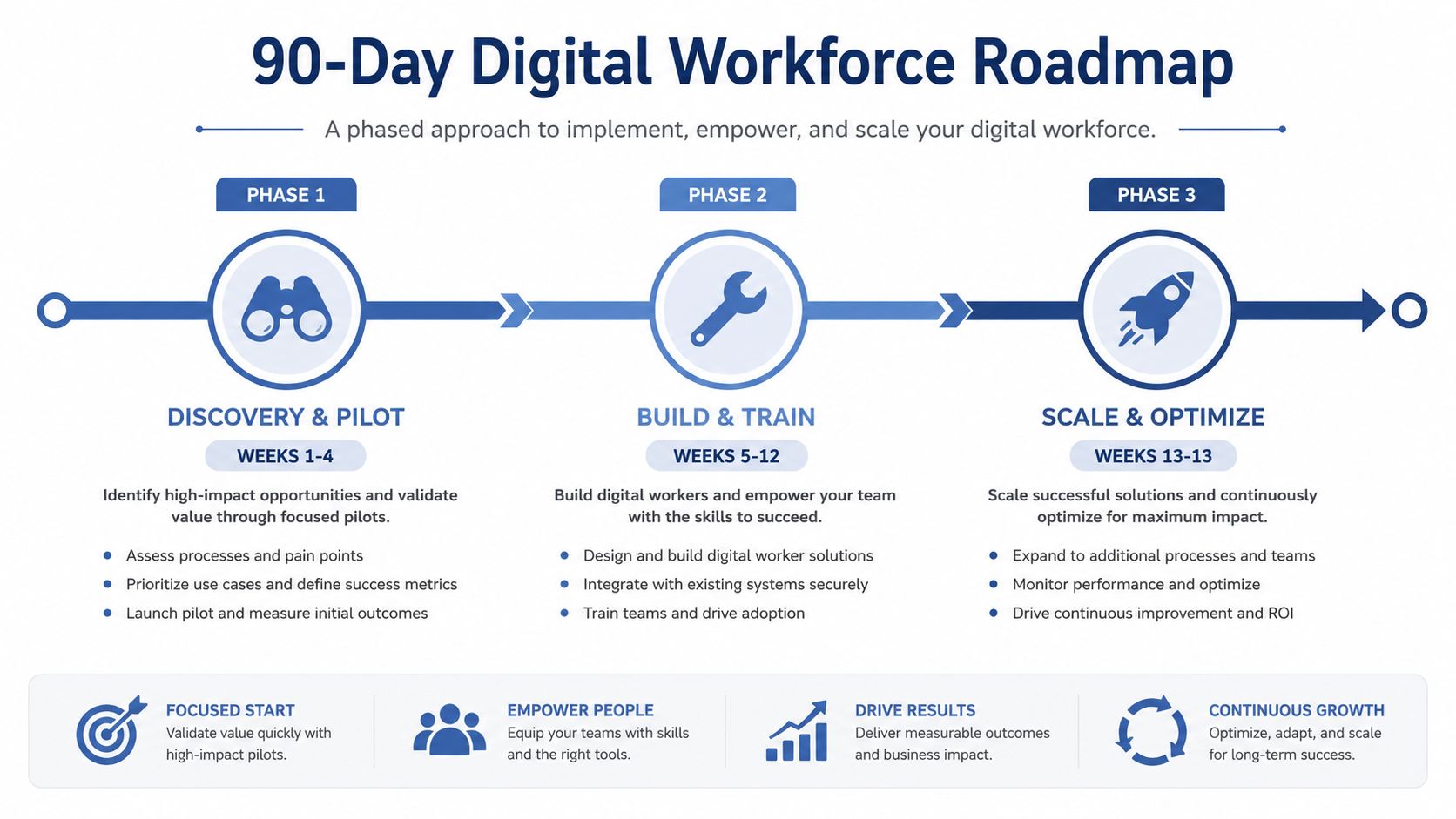
Audit one workflow, document every step, define the owner, and map the exception paths. Pick a process with enough repetition to matter, but not so much ambiguity that the pilot collapses under review. By the end of this phase, you should know exactly what the agent is allowed to do and what it must hand back to a human.
Weeks 5 to 12
Build the first production workflow, connect the data sources, and train the people who will manage it. Keep the first release narrow. The goal is reliable operation, not feature density.
Weeks 13 onward
Scale only after the workflow is stable, measured, and accepted by the team that uses it. Add adjacent use cases before you add complexity, and keep the governance layer intact as volume grows. That's how a digital workforce becomes a competitive advantage instead of a side project with a fancy demo.
The teams that win are the ones that treat digital labor like an operating system, not a novelty. They design the work, protect the data, and measure the output. If you're ready to build that way, start with one workflow, one owner, and one clear metric. If you want help with practical AI implementation that fits marketing operations, work with me.
