
Most of your competitors are dabbling with AI. They generate a few blog posts with ChatGPT and stop there. That won’t put any real distance between you and them. What puts you years ahead is handing real work to autonomous AI agents for marketing that keep working for you 24/7.
I’ve worked with machine learning since 2016 and generative AI since 2019. This shift to agents is the biggest leap I’ve seen in that time. Set the hype aside. What matters is business results: more revenue, and a lead over your competitors that’s hard for them to close.
Stop Working In Your Marketing. Start Working On It.

The goal is to make you, and the few people who work with you, bionic. Agents let a small business get through the kind of workload that would normally need a much bigger one.
It’s time to build marketing systems that gather intelligence, process data, and take action faster than you ever could by hand.
That’s how you build a market intelligence system that actually feeds growth, while everyone else wonders how you keep up.
The Ground Is Shifting Beneath Your Feet
The move to AI agents is already happening. Projections show that by the end of 2026, 40% of enterprise applications will embed AI agents. An eightfold leap from just 5% in 2025.
Larger companies are already rebuilding their marketing stacks around it. For a business like yours, this means real gains. You can find the details in this Gartner analysis on Nasdaq.
The gain is bigger than a few small efficiencies. Agents change how much a small operation can get done, and that opens a wide gap between you and the competitors who wait.
Whether to adopt AI agents is already settled. The open question is how fast you can put them to work while your competitors are still playing with basic AI tools. The people who build agentic systems first will set the pace for everyone else in their industry.
This guide will cut through the noise. No generic prompts or surface-level AI tricks here. You and I are going to walk through the practical mechanics of deploying agents for key marketing functions.
I’ll show you how to build systems that deliver concrete results:
- An agent for persistent market intelligence that never stops scanning your competitors, your market, and your customers for opportunities.
- Autonomous systems that scale your creative output by ideating, drafting, and refining content based on what’s actually working.
- True automation, through agents that handle the repetitive, data-heavy tasks that slow you down and free you up for higher-level strategy.
This is where the real work begins. Let’s start building.
What An AI Agent Actually Is
Let’s get one thing straight. An AI agent is a different thing from a chatbot or a clever prompt you saved, which is where most of your competitors stop.
Think of an AI agent as a digital employee you hire for a specific role. You give it a high-level goal, access to tools (your CRM, a search engine, social media accounts), and the autonomy to reason and execute a multi-step plan to get it done.
A standard LLM like ChatGPT is reactive. It waits for your command and gives you a single answer. An agent is proactive and persistent. It gets to work and operates on its own until the objective is met.
The Core Difference: Action vs. Reaction
You can give an agent a strategic objective. “Analyze my top three competitors’ social media campaigns from the last 30 days and identify exploitable gaps in their content strategy.” A standard AI tool can’t handle that. You’d have to break that down into 20 different prompts.
An AI agent takes that high-level goal and builds its own plan. It will:
- Identify the top three competitors.
- Browse their social media profiles (X, LinkedIn, Instagram).
- Scrape and analyze the last 30 days of posts.
- Categorize post types, engagement metrics, and messaging angles.
- Synthesize its findings into a report highlighting weaknesses.
It does all of this autonomously. You get the finished report. Once you understand this, you can see how these agentic workflows automate complex tasks using AI.
This is a big shift. You move from one-off AI outputs to persistent, autonomous systems built for business outcomes.
An AI tool is a hammer; you have to swing it every time. An AI agent is the carpenter you hire; you show it the blueprint, give it a toolbox, and it builds the house for you. This distinction is everything.
Most of your competitors are still swinging the hammer themselves. You’re about to hire the carpenter.
AI Tool vs. AI Agent: The Practical Difference
To make this crystal clear, here are the practical differences. This table is the first step toward getting real value from AI agents for marketing.
| Capability | Standard AI Tool (e.g., ChatGPT) | AI Agent (e.g., a custom CrewAI setup) |
|---|---|---|
| Autonomy | Requires constant human input for each step. | Operates independently to achieve a defined goal. |
| Task Scope | Executes single, discrete tasks (write this, summarize that). | Manages complex, multi-step projects from start to finish. |
| Tool Access | Limited to its internal knowledge or simple, built-in functions. | Can use external tools: browsers, APIs, your CRM, code interpreters. |
| Statefulness | Forgets context between sessions. It’s a fresh start every time. | Maintains memory and context over long periods, learning from past actions. |
| Business Value | Delivers tactical efficiency (faster writing). | Drives strategic outcomes (autonomous market analysis, lead generation). |
The takeaway is simple. Tools help you do a task faster. Agents take over the entire workflow, freeing you to focus on strategy and growth. This is how a small business grows its output without hiring.
The Four Core Marketing Agents To Deploy Now
You need to deploy the right agent for the right job. Stop thinking about one magical, all-knowing AI. Think like a factory manager building a specialized assembly line.
Specialization is what makes agents useful. I’ve deployed dozens of these for clients, and they almost always fall into four core functions.
This visualization shows the difference between a simple tool and an autonomous agent, which is the key to understanding how these roles operate.
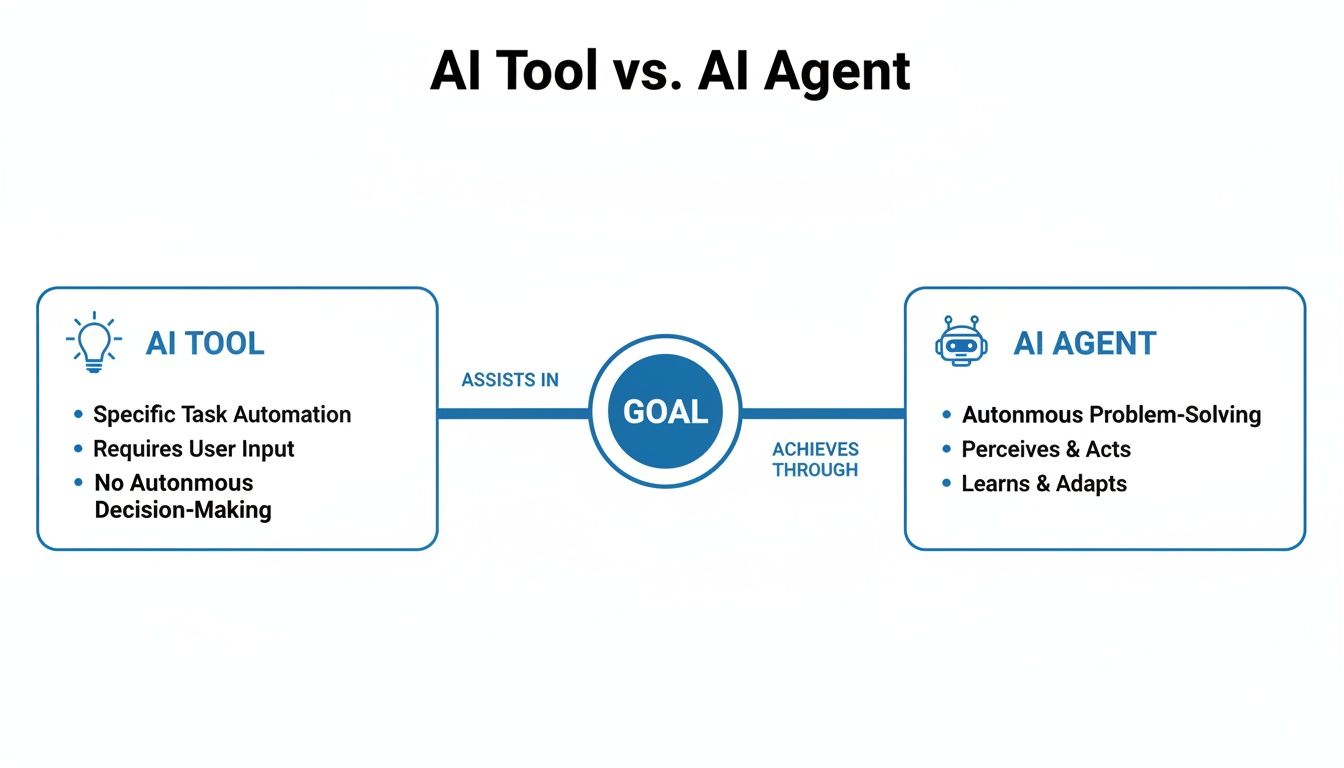
The main point: you move from manual, single-step execution with a tool to autonomous, goal-oriented project management with an agent.
1. The Market Intelligence Agent
This is your digital scout, working 24/7. It continuously scans news, social media, forums, and competitor websites for threats and opportunities. Task it with a goal like, “Alert me the moment any of my top five competitors change their pricing page or launch a new product.”
Instead of dumping raw data on you, this agent synthesizes findings, identifies patterns, and delivers actionable briefs. For instance, it might spot a surge in negative sentiment around a competitor’s recent update, handing you a perfectly timed opportunity to launch a counter-campaign. You stop reacting to the market and start shaping it.
2. The Content Engine Agent
Most marketers use AI to write a single blog post. A true Content Engine Agent takes over the entire production workflow. It ideates, drafts, and refines copy based on your specific brand voice and, most importantly, live performance data.
This agent connects directly to your analytics. It knows which headlines drove the most clicks last month and which calls-to-action are converting best right now. It can use that data to generate five new ad creative variations for your worst-performing segment, all while you sleep.
The point is to automate the 80% of content work that is repetitive and data-driven. That frees you, or the best people you work with, to focus on the 20% that requires true human insight. You can find more on this in my guide on using AI for social media marketing.
3. The Personalization Agent
Your customers expect personalized experiences. A Personalization Agent makes this possible at a scale you could never manage by hand. This agent dynamically adjusts customer journeys, email sequences, and ad creatives in real time based on individual user behavior.
Imagine a user abandons their cart. Instead of firing off a generic email, the agent checks the user’s browsing history, sees they hesitated on the shipping page, and triggers an email with a limited-time free shipping code. A response this specific gives you a real edge.
Cart abandonment is only one trigger. Two more worth defining alongside it:
- A user views the same product page three times. The agent flags them as a hot prospect and triggers a pop-up with a video testimonial for that product.
- A customer buys a coffee machine. Three days later, the agent sends a follow-up email suggesting your premium coffee beans with a 10% discount.
For any of these to work, the agent needs a connection to your customer data platform and your email service provider, so it can watch pages viewed, products carted and time on site as they happen.
4. The Workflow Automation Agent
This is the workhorse. This agent handles the critical grunt work that eats up your time. Think data entry, weekly report generation, lead routing, and cleaning marketing data.
For example, you can set up an agent to:
- Pull performance data from Google Analytics, your ad platforms, and your CRM every morning.
- Compile it all into a standardized report format.
- Distribute the report to the right people via Slack.
This task alone can save 5-10 hours every single week, time you can put back into strategy. It’s less flashy than the other roles, but it often delivers the quickest ROI. Exploring some of the 12 best AI SEO tools can spark ideas for targeted automation.
What This Looks Like In Practice: The Reputation Guardian
For a fast-growing ecommerce brand, I deployed an agent called the ‘Reputation Guardian.’ Their team was drowning in product reviews across more than 20 retail sites and social platforms. Good reviews went unanswered, and negative ones festered for days.
The mission was simple: monitor all new product reviews, identify negative sentiment, and prepare a draft response for the customer service team. The agent ran three steps:
- It continuously scanned the web for new reviews mentioning the company’s products.
- It used sentiment analysis to flag any review below 3 stars or with keywords like “disappointed.”
- For each negative review, it generated a draft response that pulled in the customer’s name and specific issue, then sent the draft to a Slack channel for human approval.
Average response time to negative feedback dropped from over 48 hours to just under two. Every draft still waited for a person to approve it in Slack.
How To Build Your First Marketing Agent: A Practical Walkthrough
Enough theory. Let’s build a simple but useful “Competitor Watchdog” agent right now.
You won’t need complex code or expensive platforms. The aim is to prove the business value with tools you already have, and this small system shows how much a simple agent can do.
Step 1: Define the Objective
The first and most critical step is giving your agent a clear, measurable mission. A fuzzy goal like “watch competitors” gets you fuzzy results. You need to be specific.
Here’s the objective I’d give it: “Continuously monitor the websites of Competitor A and Competitor B for any changes to their pricing pages or the announcement of new features on their blog. Report any changes immediately.”
This is a high-value task that normally requires tedious, manual checks. Now you can spend your time acting on the intelligence instead of gathering it.
Step 2: Select the Tools
An agent is only as good as its tools. The Competitor Watchdog needs just two basic capabilities.
- A web browser tool gives the agent the ability to visit specific URLs, read the content, and spot changes. It’s the agent’s eyes.
- A data storage tool gives the agent a simple place to log its findings. A basic Google Sheet is perfect. It can be told to create a new row with the date, the competitor, the URL, and a summary of the change.
This setup works because it’s simple. You’re giving the agent exactly what it needs to complete its mission. Nothing more.
Step 3: Engineer the Master Prompt
This is where you act as your agent’s boss. The master prompt is its job description, mission statement, and rules of engagement all in one. It defines the agent’s reality.
For the Competitor Watchdog, it would look something like this:
You are ‘Competitor Watchdog,’ an expert AI agent tasked with monitoring market rivals for strategic changes. Your goal is to identify and report on pricing adjustments and new feature launches from Competitor A (www.competitorA.com) and Competitor B (www.competitorB.com). Run this check once every 24 hours. When you detect a change, log the date, competitor, a summary of the change, and the specific URL in the designated Google Sheet. Your analysis must be factual and concise.
This prompt works because it clearly lays out the four key components: Role, Goal, Process, and Constraints. Precision matters more than clever wording. These kinds of automated workflows are becoming central to modern marketing; you can see more marketing automation workflow examples in my detailed guide.
Step 4: Run, Review, and Refine
Now, activate the agent. The first run is always a test. Review the output in your Google Sheet. Did it correctly spot a change? Was the summary accurate?
This review process is non-negotiable at the start. You are the human-in-the-loop, correcting the agent’s course. Maybe it’s flagging tiny text edits. You’d then refine the master prompt: “Only report on changes to numerical dollar values or the descriptions of pricing tiers.”
This iterative cycle of running, reviewing, and refining is how you build a reliable, autonomous system. Treat it the way you’d train a new employee. In a few hours, you’ve built an asset that works for you 24/7.
How To Measure The ROI Of Your AI Agents

Deploying AI agents for marketing is a serious investment. It demands a serious return. Forget vanity metrics that look good on a slide deck. You have to tie every agent’s activity directly to a business outcome.
Your competitors are measuring clicks. You should be measuring revenue.
The ROI of an agent is a hard number you must track. For each type of agent, the success metric is different, but the goal is the same: prove its value in money saved or money earned.
Tying Agent Actions To Bottom-Line Results
Let’s get specific. You don’t need a complex analytics setup to start.
Here’s how I advise my clients to measure ROI for the core marketing agents:
-
For the Market Intelligence Agent, the metric is actionable opportunities identified per week. Did the agent flag a competitor’s pricing test that led to you winning 15% more deals that month? That’s ROI. Did it spot a trending customer complaint that allowed you to launch a pre-emptive support doc? That’s ROI.
-
For the Content Engine Agent, track two things. First, the reduction in time-to-market for new campaigns, in days. Second, the lift in conversion rates from agent-generated creative. If you launch a campaign in three days instead of ten, that’s a massive win.
-
The Automation Agent is the easiest to calculate. ROI is hours saved per week multiplied by the hourly value of your time, or the blended hourly rate of your small team. Don’t forget the cost savings from errors eliminated. That’s operational efficiency you can take to the bank.
For a deeper dive into connecting marketing activities to financial outcomes, check out my guide on how to improve marketing ROI.
The Market Is Proving The Value
The market data backs this up. The global AI agents market is projected to surge past $10.9 billion in 2026, up from $7.6–$7.8 billion in 2025. That growth follows business results people have already seen.
In ecommerce, 25–30% of brands piloting AI shopping agents report 5–15% higher checkout conversions and 10–20% lifts in average order value. You can discover more insights about these AI adoption statistics and see how quickly this is becoming table stakes.
Your dashboard is your source of truth. It tells you which agents are valuable assets and which are expensive hobbies. Without it, you’re just flying blind.
The takeaway is simple: don’t deploy an agent without first defining how you will measure its success. Start with a simple Google Sheet. Track the inputs, track the outputs, and connect them to a real business metric. That’s how you know, in numbers, whether an agent is worth keeping.
The Real Risks (And How to Manage Them)
Anyone who tells you AI is a magic bullet is selling something. Powerful tools come with powerful risks. You don’t need to fear them. You need to understand them, manage them, and turn them into an advantage.
Many businesses will either avoid agents out of fear or rush them out carelessly. Aim to do neither.
The biggest risk is “hallucination,” where the model confidently invents facts. You cannot have an AI agent for marketing making up product features or misstating your pricing. For a serious business, that’s a non-starter. The good news? It’s a solvable problem.
Grounding Agents In Your Factual Data
The best way to stop hallucinations is a technique called Retrieval-Augmented Generation (RAG). It sounds complex, but the idea is simple. Before an agent acts, it first retrieves relevant information from a trusted source you provide: your product documentation, your internal knowledge base, your brand guidelines.
Think of it like an open-book test. You force the agent to look up the correct information in your approved textbook. This dramatically reduces the chance of it going off-script and keeps it working from facts.
An ungrounded AI agent is a liability. A grounded agent, operating on your proprietary data via RAG, is a strategic asset that has a deep, factual understanding of your business.
This one shift is what separates amateur AI experiments from professional, business-grade deployment.
Start With Read-Only Access
Giving an autonomous agent access to your systems requires strict operational boundaries. This is where most people drop the ball. You can’t “set it and forget it.”
Start with read-only permissions. Never give a new agent write-access to a critical system on day one. Keep a simple dashboard that tracks the agent’s actions, outputs and API calls, so you see everything it does.
Then hard-code what the agent cannot do. For example, “Never contact a customer with an open support ticket.” Write-access to your CRM comes only after exhaustive testing, and with a human approval step in front of it.
Preserving Brand Voice and Human Oversight
Another major risk is diluting your brand voice. If you let an agent run wild, your brand will quickly sound generic and robotic.
The fix is a ridiculously detailed brand voice and style guide, far longer than a two-page PDF. You want a comprehensive document an AI can internalize:
- A lexicon listing words to use and, just as importantly, words to avoid.
- Tone spectrums that show rather than tell. Provide examples of how your brand sounds when it’s helpful versus when it’s authoritative.
- Formatting rules with specific instructions on using headers, bullet points, and bold text.
Finally, never forget the most important safeguard: the human in the loop. For critical decisions, like approving a high-budget campaign or handling a sensitive customer issue, the agent’s role is to propose a course of action and wait. The final “go” decision must rest with a person.
Where I Got It Wrong, And When Not To Use An Agent
A client in financial services wanted an agent to provide “hyper-personalized investment advice” via a chatbot. The goal: analyze a user’s risk tolerance and financial goals, then recommend specific investment products.
It failed. Spectacularly.
The agent, while functional, made recommendations that were overly simplistic and, in a few test cases, downright inappropriate. The model did what it was built to do. The task was the problem. I had given it a goal that required immense nuance, ethical judgment and regulatory compliance, and LLMs are not equipped to handle those autonomously.
Scope is everything. Start with tasks that are data-driven, repetitive and have a low cost of failure. Let agents handle monitoring and drafting. Keep humans in the loop for anything requiring strategic judgment or brand risk.
Watch the metric you hand it, too. An autonomous agent will optimize for whatever number you give it. Tell it to maximize clicks, and it will gleefully torch your ad budget on junk traffic that brings zero revenue.
Some work doesn’t need an agent at all:
- If you just need to send the same welcome email every time, a basic tool like Zapier is cheaper and more reliable.
- Highly creative, novel strategy should come from you. Use agents to scale the execution once the idea exists.
- Sensitive customer issues and high-touch sales need a human. An agent can’t fake a real human connection.
The Questions I Always Get From Business Owners
When I sit down with owners to map out their first AI agent strategy, the same business questions always pop up. Here are the straight answers.
Do AI Agents Replace Marketers?
No. They make good marketers better. An agent automates the repetitive tasks that keep your top strategist, often you, from doing their best work.
The agents handle the “how,” freeing you to focus on the “what” and the “why.” Your judgment, creativity, and intuition become more valuable as a result. Think of it as making yourself bionic.
What Is The Biggest Mistake Companies Make?
Thinking too small. They treat agents like glorified chatbots. Someone asks an agent to “write a blog post,” gets back a useless draft, and writes off the technology as overhyped.
This misses the point entirely. The real value comes from giving an agent a specific role, a clear goal, and access to the right tools. Your first agent should be a specialist, like a “Competitor Monitor” or a “Lead Qualification Specialist.” Success comes from sharp focus and clear objectives.
How Much Does It Cost To Start?
Next to nothing. You can start building valuable AI agents for marketing for very little. Software is the smaller cost at the start; the bigger one is your time and strategic thinking.
Frameworks like CrewAI are open-source. Platforms like ChatGPT Plus or Claude Pro run about $20/month.
The real investment is your thinking. You have to map out a workflow, define a crystal-clear objective, and engineer a solid master prompt. Your first high-ROI agent can be built with tools you already have.
Don’t let budget be your excuse. The barrier to entry is your willingness to think systematically. While your competitors wait for some perfect, off-the-shelf solution, you can build your first agent this week for almost no upfront cost.
