You didn't start this business to spend your best hours copying data between apps, chasing people for basic answers, and cleaning up the same admin mess every week.
But that's what happens to most owner-operators. You become the rainmaker, operator, dispatcher, sales rep, bookkeeper, and support desk. Primary duties get squeezed by the work around the work.
I've been working with machine learning since 2016 and generative AI since 2019. My view is simple. AI agents are useful when they remove friction from revenue, operations, or customer response. If they don't do that, they're a toy.
For ai agents for owner operators, the win is not “using AI.” The win is building a small system that handles repetitive decisions and routine actions so you can focus on judgment, relationships, and growth.
Your Business Is Drowning in Busywork
You probably feel this already.
Your day starts with one important task. Then the inbox pulls you sideways. A customer wants an update. A lead needs a reply. An invoice needs fixing. A spreadsheet is out of date. By lunch, you've done a lot of activity and almost nothing that expands the business.
That's the owner-operator trap. You're not short on effort. You're short on advantage.
The market has moved past curiosity. In a 2025 McKinsey survey cited by Datagrid's AI agent statistics roundup, 88% of enterprises reported regular AI use, but less than 10% had scaled AI agents in any single function. That matters because it tells you two things at once. The tools are real, and execution is still rare.
Why this matters to you
If you run a small operation, that gap is your opening.
Big companies have budget, but they also have slow approvals, messy systems, and internal politics. You have something better. Speed. You can spot one annoying workflow, automate it, and start benefiting this month instead of next fiscal year.
My advice: don't think about AI agents as a futuristic employee. Think of them as a tightly scoped operating system for one painful workflow.
That could be lead qualification. Quote drafting. Customer follow-up. Dispatch updates. FAQ handling. Status reporting. None of that is glamorous. All of it matters.
If you want a broader view of where this fits for lean teams, Stumptown AI has a useful piece on AI agents for small businesses that frames the shift well. The key idea is the same one I push with clients. Small companies don't win by having more people. They win by getting more output from the people they already have.
What an agent should actually do
A good first agent should do one of three things:
- Speed up money: reply to leads faster, prep quotes, route hot opportunities
- Reduce admin drag: update records, summarize requests, draft routine messages
- Protect your attention: handle first-pass work so you only touch exceptions
That's the whole game. Not novelty. Not “AI transformation.” Multiplied operational impact.
Find Your First Profitable Automation
Often, individuals begin in the wrong place. They start with a tool.
I start with economics.
Before you build anything, list the tasks you do every day or week. Then score each one across three filters: Time, Tedium, and Value. Time is how often it steals your schedule. Tedium is how repetitive or mentally draining it is. Value is how directly it affects revenue, customer retention, or delivery quality.
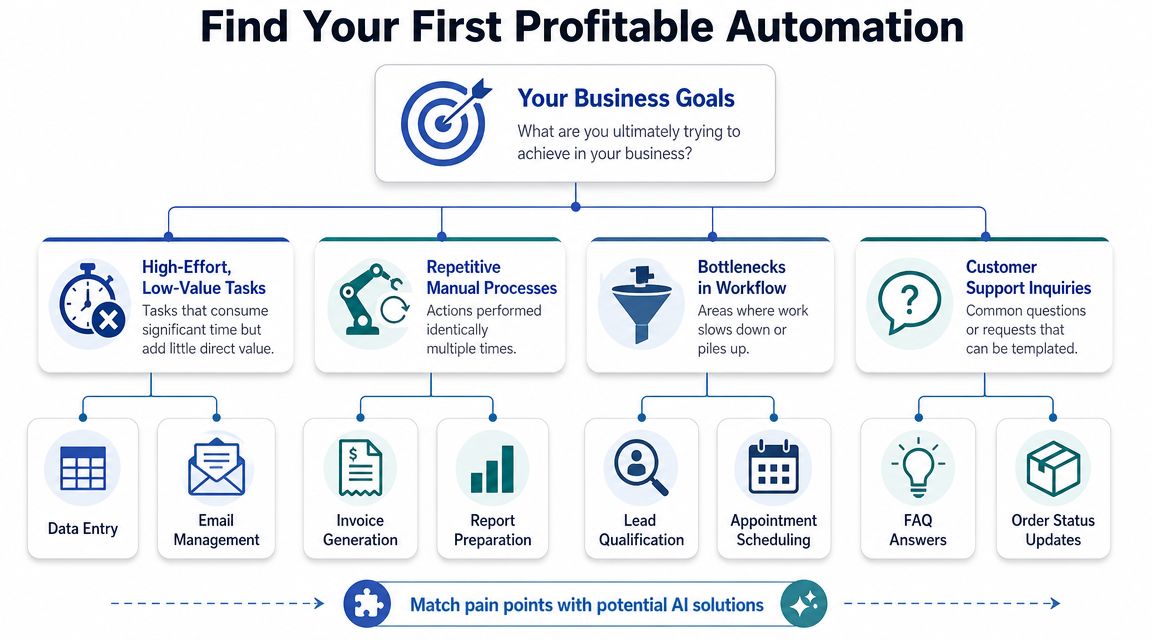
Use the Time Tedium Value test
Here's how I'd think through it.
| Task type | Time | Tedium | Value | Good first automation |
|---|---|---|---|---|
| Replying to common inquiries | High | High | Medium to high | Yes |
| Updating a spreadsheet after every job | High | High | Medium | Yes |
| Writing a one-off strategic proposal | Low | Low | High | No |
| Monthly bookkeeping review | Low | Medium | High | Usually no |
| Qualifying inbound leads | High | Medium | High | Yes |
The sweet spot is obvious. You want the task you do often, hate doing, and know matters.
A lot of owner-operators pick the flashiest workflow instead. Bad move. Don't automate a rare task just because it looks impressive in a demo. Automate the thing that subtly strains your business every day.
Strong first targets
These usually make sense first:
Lead qualification
If inbound leads sit untouched, revenue leaks. An agent can triage, score, and draft replies.Inbox triage
If the same questions hit your inbox repeatedly, an agent can classify them and prepare responses.Quote or estimate prep
If you keep rebuilding similar documents, an agent can assemble a first draft from a template.Customer status updates
If customers ask where things stand, an agent can draft updates using your live data.
The reason I like these use cases is simple. They sit close to money or customer experience.
According to We Are Tenet's AI agent statistics roundup, companies using AI agents report 55% higher efficiency and 35% lower costs. For a lean operation, that's not just operational improvement. It's breathing room, speed, and margin protection.
Stop asking, “What can AI do?”
Ask, “What task do I repeat so often that automating it changes my week?”
A simple selection rule
Pick your first automation only if it passes all three tests:
- It happens often
- It follows recognizable rules
- A better response time or lower admin load helps the business
If you want examples to spark ideas, I've put together a practical set of AI agent use cases built around business outcomes instead of hype.
One more rule. Keep your first build boring. Boring scales. Fancy breaks.
Design Your First Agent Workflow and Prompt
An agent is not magic. It's a workflow.
You give it a trigger, the right context, a narrow decision process, and a defined action. That's it. When people get poor results, it's usually because they asked the agent to “handle leads” or “manage support” instead of designing the actual steps.
Start with one workflow. I'll use lead qualification because it's useful in almost any business.
Here's the visual model I want you thinking in.
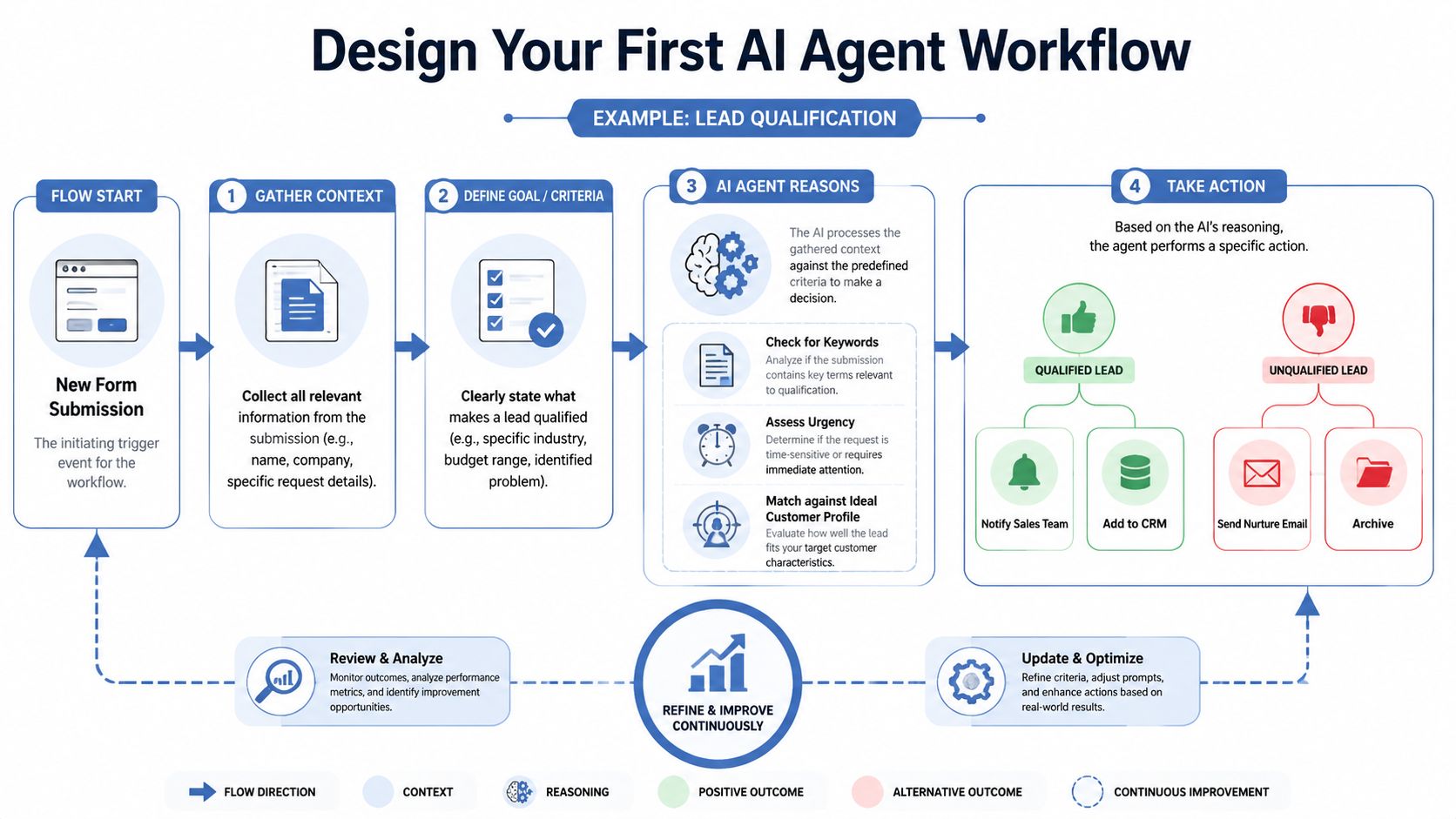
The workflow structure
Break it into four parts.
Trigger
A new website form arrives. Or a message lands in a shared inbox.Context
The agent gets the form content, customer notes, service areas, minimum budget, and disqualifiers.Reasoning
The agent checks whether the lead is real, relevant, qualified, urgent, and worth a fast follow-up.Action
It drafts a response, tags the lead, logs the result, and alerts you if the score is high.
That decomposition matters because AIMultiple's guidance on AI agent performance makes the core issue clear: agent performance degrades as tasks get more complex. The practical fix is to break processes into smaller checkpoints, use specialized agents for sub-tasks, and keep a human in the loop for exceptions.
A lead qualification example
Let's say you run a small service business. A lead submits a form asking for help.
You should not tell the agent: “Figure out if this is a good lead and do the right thing.”
You should tell it exactly how to think.
Here's a prompt structure I'd use:
Role
You are a lead qualification assistant for our business.Goal
Review inbound leads and decide whether they are a strong fit, a possible fit, or not a fit.Business rules
- We only serve these customer types: [insert]
- We do not serve these requests: [insert]
- Our minimum engagement criteria are: [insert]
- High-priority indicators include: [insert]
Input data
- Lead name
- Company
- Request details
- Budget or stated scope
- Timeline
- Source
Process
- Check whether the message appears legitimate or spam.
- Identify the main problem the lead wants solved.
- Compare the request to our service fit criteria.
- Check for urgency signals.
- Score the lead as High, Medium, or Low fit.
- Explain the reason in plain English.
- Draft a reply for review.
Output format
- Fit score
- Reason
- Recommended next step
- Draft email
That's a usable prompt because it encodes business judgment into steps. It doesn't depend on the model guessing what matters to you.
If you want to sharpen how you write instructions, this guide on optimizing your AI conversations is a good companion read. Clear prompts are not a cute skill anymore. They are operating logic.
Keep the human in the loop
For your first version, the agent should draft, not send.
Have it prepare the email, store the summary, and flag the next action. You review it in one click. That gives you speed without handing over your reputation.
A useful mental model is this:
- Agent decides low-risk structure
- You approve high-impact communication
- System logs what happened
Later, once the workflow is stable, you can let the agent auto-send specific responses in narrow situations. Not before.
Here's a deeper walkthrough I recommend if you want to get the architecture right: agentic context engineering. Context quality usually matters more than model cleverness.
After you've mapped the workflow on paper, this video is worth watching to think more clearly about implementation details.
The mistake that kills early builds
People try to build one giant agent.
Don't.
Build small, specialized pieces instead. One agent classifies. Another drafts. A simple automation routes the result. That design is easier to debug, easier to trust, and cheaper to maintain.
Your Lean and Mean AI Agent Starter Stack
You do not need an engineering team to start. You need a practical stack that is cheap, understandable, and good enough to run one valuable workflow.
That's what I recommend to owner-operators. Good enough to produce business value. Simple enough to maintain without turning yourself into a part-time IT department.
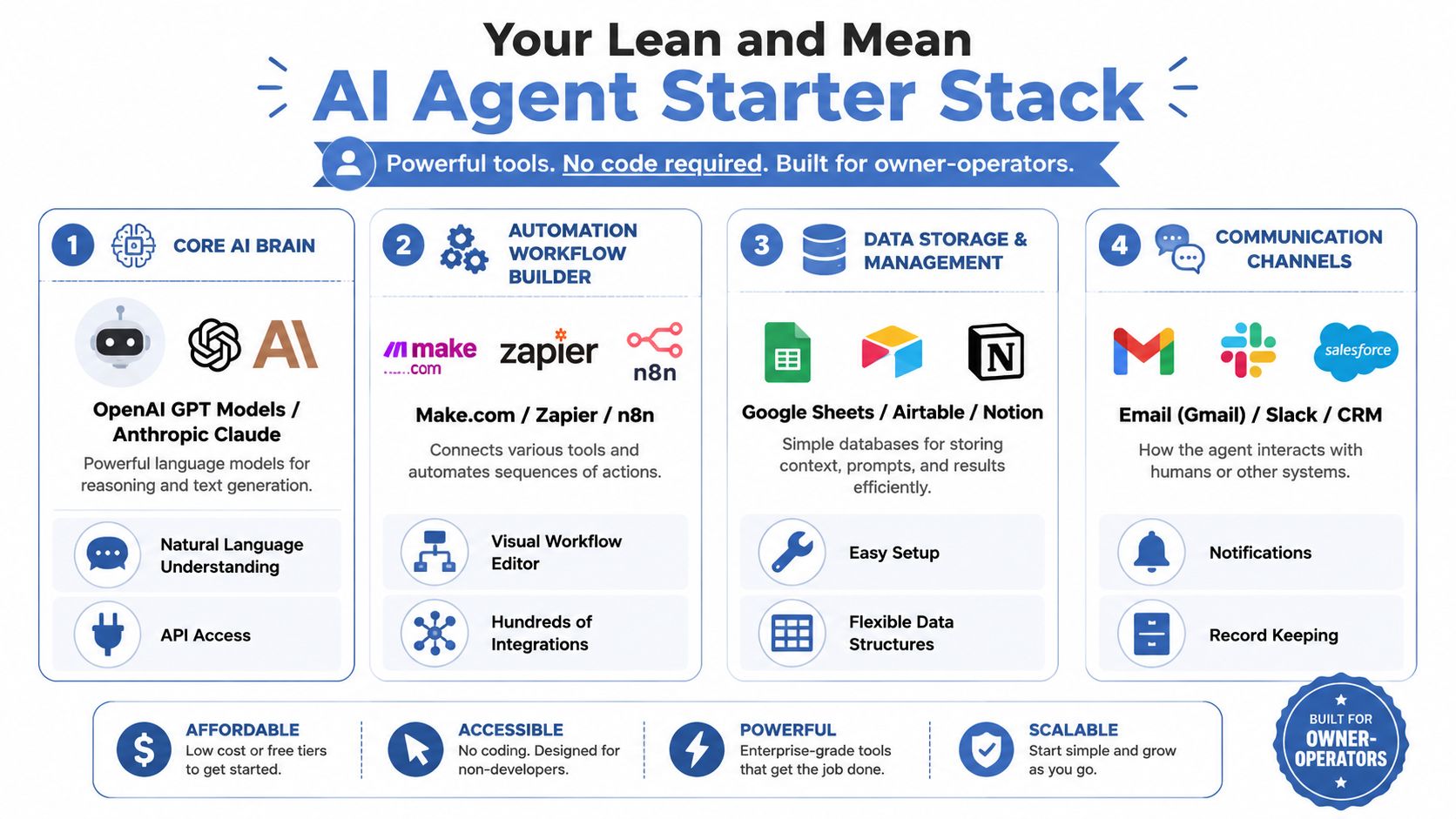
The three-layer stack
| Layer | Start here | Why it works | Trade-off |
|---|---|---|---|
| AI model | OpenAI GPT models or Anthropic Claude | Strong general reasoning and writing | You still need good prompts and guardrails |
| Workflow builder | Zapier, Make, or n8n | Connects forms, email, sheets, and AI steps | More power means more setup complexity |
| Data source | Google Sheets, Airtable, or Notion | Easy place to store rules, logs, and customer context | Not ideal forever, but excellent to start |
My recommendation by category
Core model
If you're early, use OpenAI GPT models or Anthropic Claude through the API. Both are flexible enough for drafting, classification, summarization, and decision support.
Don't overthink model selection on day one. If your workflow is failing, the problem is usually weak instructions, poor context, or sloppy handoffs between steps.
Workflow orchestration
If you want speed, start with Zapier. It's approachable and fast for basic builds.
If you want more control, use Make. It gives you more visual flexibility and better handling for multi-step logic. n8n is also a strong option if you want more technical control and don't mind a steeper setup.
Practical rule: choose the tool you'll still be willing to touch after a long workday. The perfect platform is useless if you avoid it.
Data and memory
Use Google Sheets if you want zero friction. Use Airtable if you want cleaner structure. Use Notion if your team already lives there and the workflow is mostly knowledge-driven.
Your data store can hold:
- Qualification rules: service fit, exclusions, urgency triggers
- Prompt versions: what instruction set produced the result
- Run logs: what happened, what failed, what needed edits
- Customer context: notes, templates, standard replies
For owners who want help designing the process itself, not just picking tools, AI workflow automation tools is a useful breakdown of the options and where each fits.
Keep the budget low by keeping scope tight
The fastest way to overspend is to automate too much too soon.
A sub-$100 monthly setup is realistic when the workflow is narrow, the data source is simple, and the agent is doing one job repeatedly. The moment you start layering unnecessary tools, premium add-ons, and five experimental workflows, your economics get ugly.
That's why I tell clients to build one production-worthy automation before they buy anything else. One workflow that saves time, improves response speed, or reduces manual handling. Then earn the right to expand.
Deploy Safely and Monitor Like a Hawk
A bad first automation can poison the whole effort.
Not because the tech is weak. Because trust disappears fast when an agent makes a visible mistake. If it sends the wrong message, mishandles a sensitive request, or acts too confidently in the wrong situation, you'll stop using it.
PwC found that user trust in AI agents drops to 20% for financial transactions and 22% for autonomous employee interactions in its AI agent survey. That's the warning sign. Start with low-risk workflows and keep a human in the loop.
Your first deployment mode
For the first few weeks, your agent should operate in draft mode.
That means:
- Draft emails instead of sending them
- Recommend tags instead of changing records automatically
- Prepare summaries instead of making final decisions
- Escalate unclear cases to you
You want the speed benefit without the downside risk.
Let the system earn autonomy. Don't grant it upfront.
This is especially important if your workflow touches money, scheduling, compliance, contracts, or customer communication. In those areas, “mostly right” is not good enough.
What to monitor every run
Most owner-operators skip this because they think it's too technical. It isn't. A simple Google Sheet is enough.
Track a few fields every time the agent runs:
| Field | What you record |
|---|---|
| Date | When the workflow ran |
| Task type | Lead qualification, inbox reply, quote draft |
| Result | Success, partial success, failed |
| Human edits needed | None, light, heavy |
| Escalated | Yes or no |
| Notes | Why it worked or why it broke |
That log gives you the truth. Not your memory of the truth.
The metrics that actually matter
I care about three things early on:
Resolution quality
Did the agent produce something usable?Override frequency
How often did you need to step in?Time to escalation
When the agent got stuck, did it hand off cleanly and fast?
Those metrics tell you whether the system is helping or creating hidden cleanup work.
You should also watch for pattern failures. Maybe the agent handles simple requests well but struggles when customers write vague messages. Maybe it drafts good replies but classifies urgency poorly. Good. Now you know what to tighten.
Where not to start
Don't start with:
- Financial approvals
- Billing changes
- Automated pricing decisions
- Sensitive HR-style interactions
- Anything that can damage trust with one wrong move
Build confidence on safer ground first. Internal routing, first-pass support, recurring admin, and qualification workflows are better entry points. You want repetition, not drama.
Measure Real ROI and Scale Your Advantage
If your automation doesn't improve the business, it doesn't matter how clever it is.
A common pitfall causes many AI projects to lose steam. People celebrate time saved without connecting it to cash, throughput, response speed, or fewer expensive mistakes. Time matters, but only when it changes an outcome you care about.

For small trucking fleets, the standard is brutally practical. As TruckSmarter notes in its look at AI in trucking, the ROI of new tech must be clear and immediate for fleets with fewer than 20 trucks, and automation is only margin-positive if it directly lowers empty miles, admin time, or breakdown risk enough to offset subscription and integration costs. That logic applies far beyond trucking.
What to measure instead of vanity wins
Use metrics that tie to profit or protection:
- Response speed: are leads or customers getting answers faster?
- Manual workload: are you touching fewer repetitive tasks?
- Error avoidance: are there fewer dropped balls, missed follow-ups, or bad handoffs?
- Revenue movement: are more qualified opportunities making it through your pipeline?
If your lead agent reduces reply lag and helps you follow up while the prospect still cares, that matters. If your admin agent frees you to spend more time selling, that matters. If your dispatch or service workflow cuts avoidable friction, that matters.
A simple ROI test
Ask four questions:
- What painful task did this replace or reduce?
- What business metric moved because of it?
- What does that metric mean financially?
- Is the gain bigger than the software and setup cost?
If you can't answer those clearly, don't scale yet.
Automate for margin, response speed, and capacity. Not for the screenshot.
Where the real advantage comes from
Once one workflow is stable, you can stack adjacent wins.
A lead qualification agent can feed an estimate-drafting agent. That can feed a follow-up system. That can feed a reporting view. Small automations turn into an operating edge when they connect.
That's the bigger opportunity with ai agents for owner operators. Not replacing you. Expanding your reach without expanding payroll at the same rate.
The owners who win won't be the ones who “use AI” in a vague sense. They'll be the ones who build a few reliable systems around revenue, operations, and responsiveness, then refine them until competitors feel slow.
If you want help designing that kind of system for your business, Samuel Woods offers practical guidance on agent workflows, prompt design, context engineering, and AI automation tied to growth and operations.