
Most founders are getting bad advice about AI. They're told to automate faster, automate more, and automate everything that isn't nailed down. That sounds efficient until you realize you've just given a machine the job of scaling a weak offer, a sloppy process, or a decision you never pressure-tested in the first place.
I'm Samuel Woods, and I've been working with ML since 2016 and Generative AI since 2019. The pattern I've seen in dozens of businesses is simple. The winners use AI workflows for entrepreneurs as a decision-auditing system first, and a production system second. That's how you protect revenue, tighten execution, and keep competitors from outrunning you with bad automation that only looks impressive on the surface.
Table of Contents
- Why Most AI Workflow Advice Fails Entrepreneurs
- Building Your Four-Part AI Workflow Stack
- The Validation-First Pilot Loop
- Staging Your Rollout Over Six To Twelve Months
- Governance and Reliability Controls That Create Competitive Advantage
- Measuring ROI and Building Continuous Improvement Loops
Why Most AI Workflow Advice Fails Entrepreneurs
The loudest advice in the market treats AI like a sweatshop upgrade. Feed it prompts, connect a few apps, and watch the work disappear. That framing misses the core business risk. If the underlying decision is bad, automation just helps you make the same mistake with more confidence and less friction.
I've watched founders spend months wiring together content, inbox, and reporting automations before they could answer a basic question, which offer deserves scale. That's the wrong order. The highest-impact AI workflows for entrepreneurs are the ones that challenge assumptions, flag weak logic, and separate reversible decisions from expensive ones before anyone starts building around them.
Decision quality beats tool quantity
Most content around AI workflows pushes you toward tool stacks. ChatGPT here, Zapier there, a CRM in the middle, and suddenly you've got a machine that can produce a lot of output. Production is easy to admire. Decision quality is what protects margin.
A better lens is to ask what the workflow is really doing. Is it drafting faster, or is it helping you decide whether the draft belongs in market at all? Is it summarizing leads, or is it surfacing the fact that your lead source quality is deteriorating? That difference matters because AI can accelerate a strong strategy, but it can also scale a weak one with brutal efficiency.
A practical rule: if a workflow affects revenue, position it as a review layer before you position it as an automation layer.
That's why I treat AI like a reasoning partner in the early stages. It should argue against your favorite idea, identify what you still need to know, and pressure-test the offer before you automate the surrounding operations. The entrepreneurs who use AI this way move faster in the market because they waste less time on the wrong work.
The common failure modes
The first failure mode is automating before validating. Teams build a beautiful workflow around a broken process and then call the rollout a success because the task got faster. Faster failure is still failure.
The second failure mode is optimizing the wrong metric. If you measure only speed, you can miss accuracy loss, poor handoffs, or a hidden increase in rework. The third is treating AI like a production line instead of a thinking layer. That mindset is how founders end up with systems that look busy but don't improve decisions.
There's a stronger way to think about using AI effectively. Use AI to find the blind spots in your strategy, then use automation to remove repetitive work only after the process has earned trust. That sequence is what keeps you from scaling chaos.
Building Your Four-Part AI Workflow Stack
A workable AI stack for a founder starts with four layers that do different jobs cleanly. You need a language model for drafting and reasoning, an automation orchestrator like Make or Zapier, a CRM or data store, and a delivery channel such as email or Slack.
The point of the stack is separation of concerns. The model thinks, the orchestrator moves data, the CRM remembers, and the delivery channel gets the result to the person who needs it. When those roles blur, workflows become brittle. When they stay distinct, you can debug faster and scale with less drama.
Track repeated work before you automate
Spend one week tracking repeated work before you build anything. Don't guess. Record what shows up again and again, where the delays happen, and which tasks have the highest volume with the lowest risk.
Then pick one workflow first. Not three. Not a department-wide transformation. Choose the single highest-volume, lowest-risk process and define its trigger and output in one sentence each. For example, a marketing workflow might trigger when a form submission lands and output a qualified lead summary in Slack. A sales workflow might trigger on a new prospect and output a drafted outreach note in the CRM. An operations workflow might trigger when an invoice arrives and output a categorized record for review.
Use this filter: weekly or daily work, clearly defined output, low downside if the first version needs human review.
That filter keeps you away from overengineering. It also makes the first automation measurable from day one, because you already know what repeated effort it replaces.
Build from the smallest useful unit
The smartest founders start with a process that repeats often, follows rules, and can be reviewed safely, and leave their most strategic process for later. Slack's guidance to begin with 1 to 2 time-consuming or error-prone processes is right because it forces focus, and focus is what keeps AI work from becoming a toy project Slack's workflow guidance.
If you want a practical implementation map, I also keep a working reference library in this AI agent tech stack guide. It helps founders think through where the model ends and where workflow control begins.
The Validation-First Pilot Loop
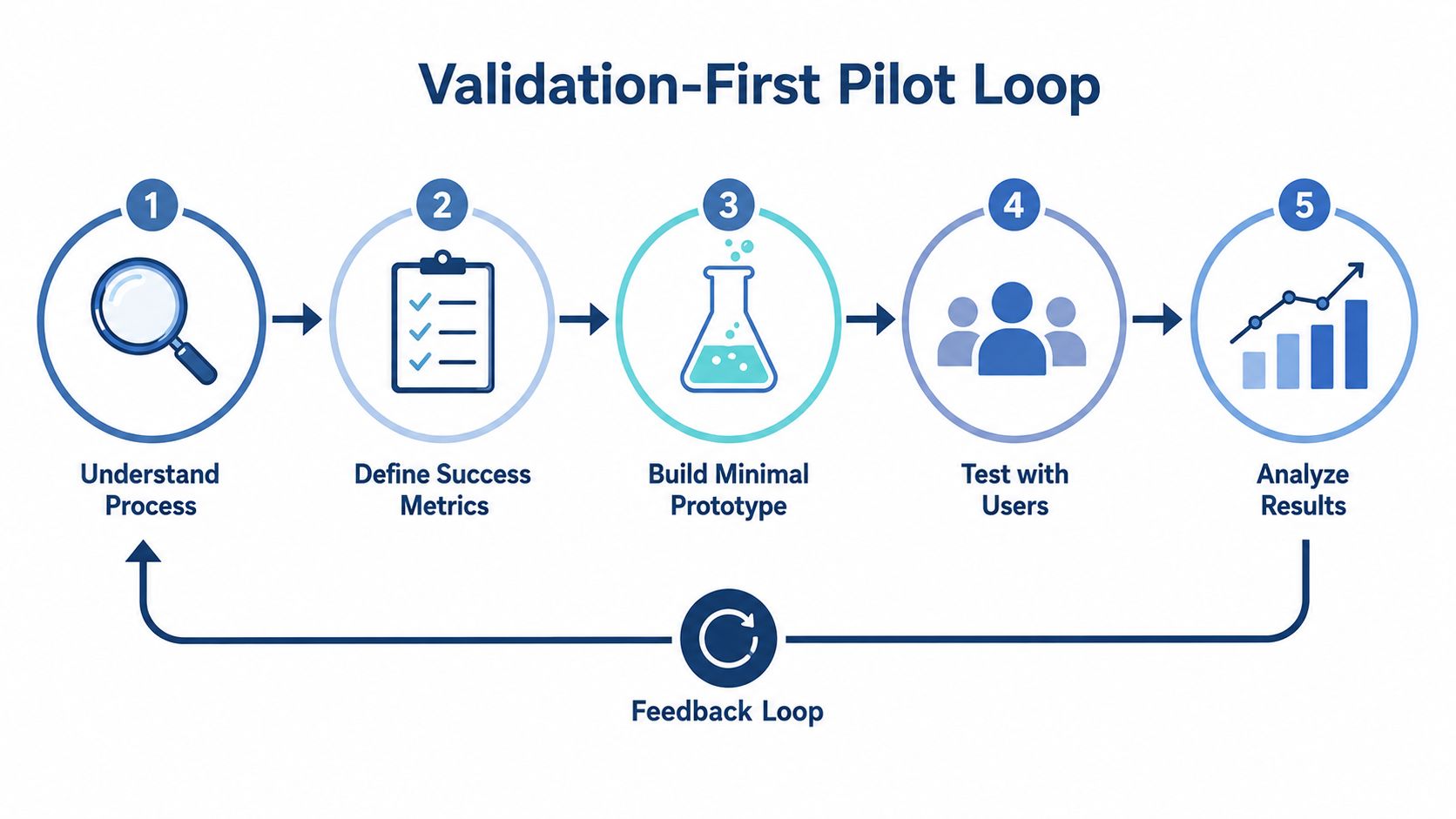
The fastest way to waste time on AI is to automate a workflow you don't fully understand. That's why I start with a validation loop, not a launch plan. The goal is to prove that the process is real, the output is useful, and the economics make sense before the automation takes over.
One useful rule from implementation guidance is to run the manual version three times before you automate it, then measure the work over a one-week baseline so ROI comes from actual effort rather than guesses validation-first guidance. It's how you avoid spending money to accelerate a process you don't understand.
What to measure and why
The right success criteria are boring in the best way. You want processing-time reduction, accuracy, and cost savings. If the workflow supports a decision, I also want a decision-quality check, meaning did the output help the business choose better as well as faster.
Start with the highest-pain workflow, not the easiest one. High pain gives you clearer user feedback and a stronger reason to change the process. Then build a minimal prototype, test it with real inputs, and ask the people who do the work whether it saves time or just changes where the pain lives.
A common mistake is chasing edge cases too early. Founders see one odd input and start redesigning the system for every exception under the sun. That's a trap. Solve the main path first, then handle exceptions only after the workflow has shown it can survive production.
A practical rule: if the pilot can't survive real inputs from your team, it's not ready to scale.
Why manual repetition comes first
Running the task manually three times sounds slow until you compare it with the time lost to bad assumptions. The manual pass tells you what happens, not what the founder remembers happening. It also reveals where judgment lives and where processing lives.
That distinction matters. Brainchild360's workflow advice is clear about separating judgment steps from processing steps before building prompt templates and automation layers workflow mapping guidance. Judgment stays with the human. Repetitive processing gets automated.
For entrepreneurs who like structure, I think of this as a validation-first pilot loop. Understand the process. Define success metrics. Build the smallest prototype. Test it with users. Analyze results. Then decide whether to scale or redesign.
Staging Your Rollout Over Six To Twelve Months
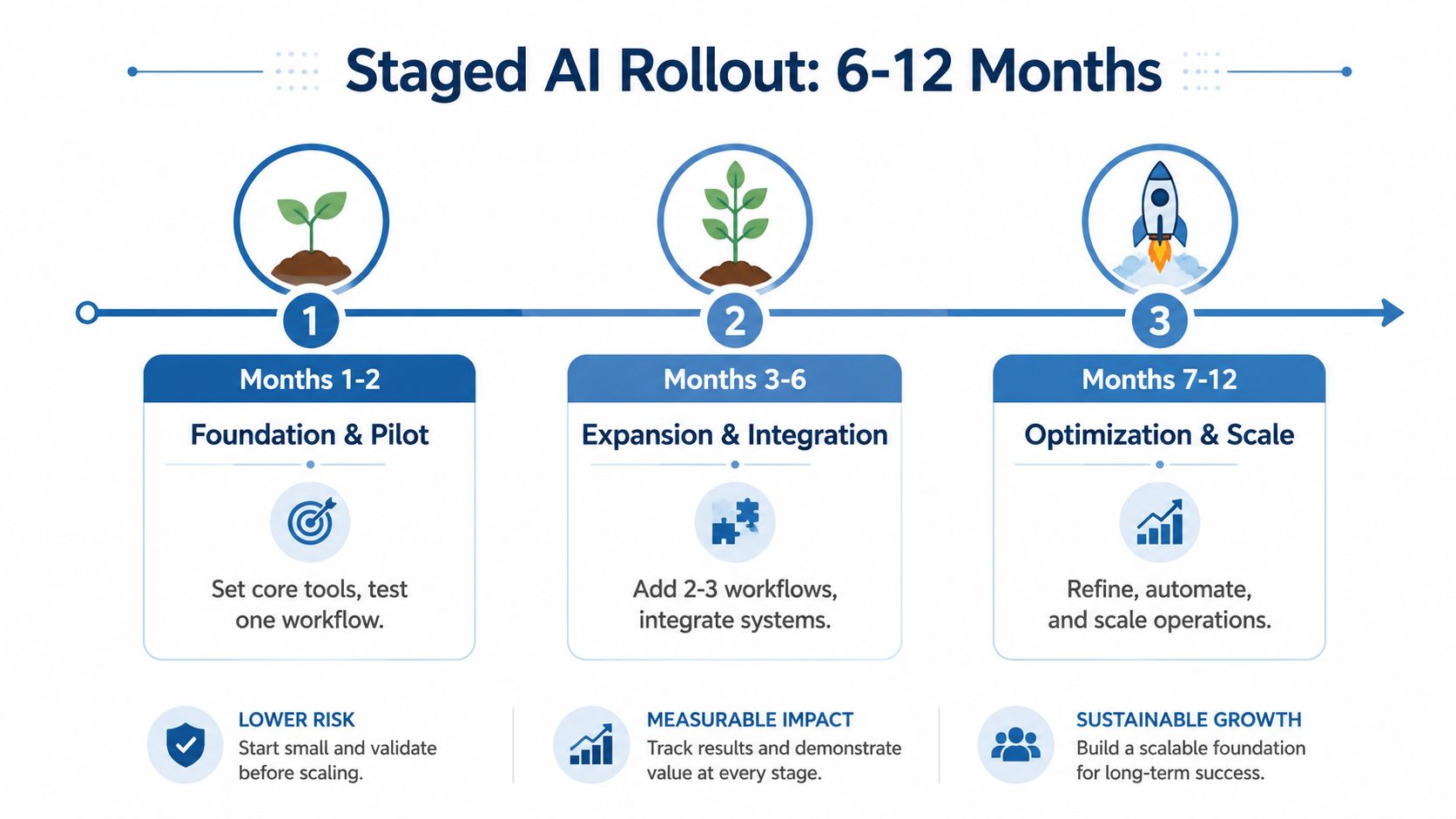
Trying to deploy every AI workflow at once creates operational debt quickly. Teams lose track of what changed, who owns what, and which output is safe to trust. A staged rollout keeps momentum without turning the business into a debugging lab.
I prefer a four-phase approach. In weeks 1 to 4, focus on meeting intelligence and inbox triage. In weeks 5 to 12, move into sales and content workflows. In months 3 to 6, add onboarding and support. In months 6 to 12, take on financial reporting and strategic decision support four-phase rollout guidance.
Roll out in the order of operational confidence
The sequence matters because each stage depends on trust earned in the one before it. Meeting notes and inbox triage are relatively contained. Sales and content workflows touch revenue, but they still allow human review before action. Onboarding and support require consistency across handoffs. Financial reporting and strategic decisions demand the strongest controls of all.
That is why I do not recommend launching every workflow at once. Deploying all 12 workflows together blurs accountability and makes it hard to know which automation improved the business and which one created noise rollout warning. Too much at once also hides weak assumptions until they show up in customer-facing work or internal reporting.
Build confidence first, then expand scope.
That mindset keeps the team bought in. People trust what they can inspect. They resist what arrives all at once and touches every part of their day.
Match the workflow to the business risk
A meeting summary can tolerate light human review. A financial report cannot. A customer support draft needs tone control, while a strategic recommendation needs source grounding and explicit assumptions. If you skip those distinctions, the rollout will feel fast for a week and messy for a quarter.
Founders should also resist the urge to overbuild. A simple workflow that the team uses beats a system that nobody trusts. If you need a broader operating model, I cover that in my AI agent ROI framework, where the focus is business value instead of novelty.
The market is already moving in this direction. The U.S. Chamber reports that 58% of small businesses were using generative AI in 2025, up from 40% in 2024 U.S. Chamber technology report. Competitors will adopt AI. The open question is whether they will do it with discipline or with chaos.
Governance and Reliability Controls That Create Competitive Advantage
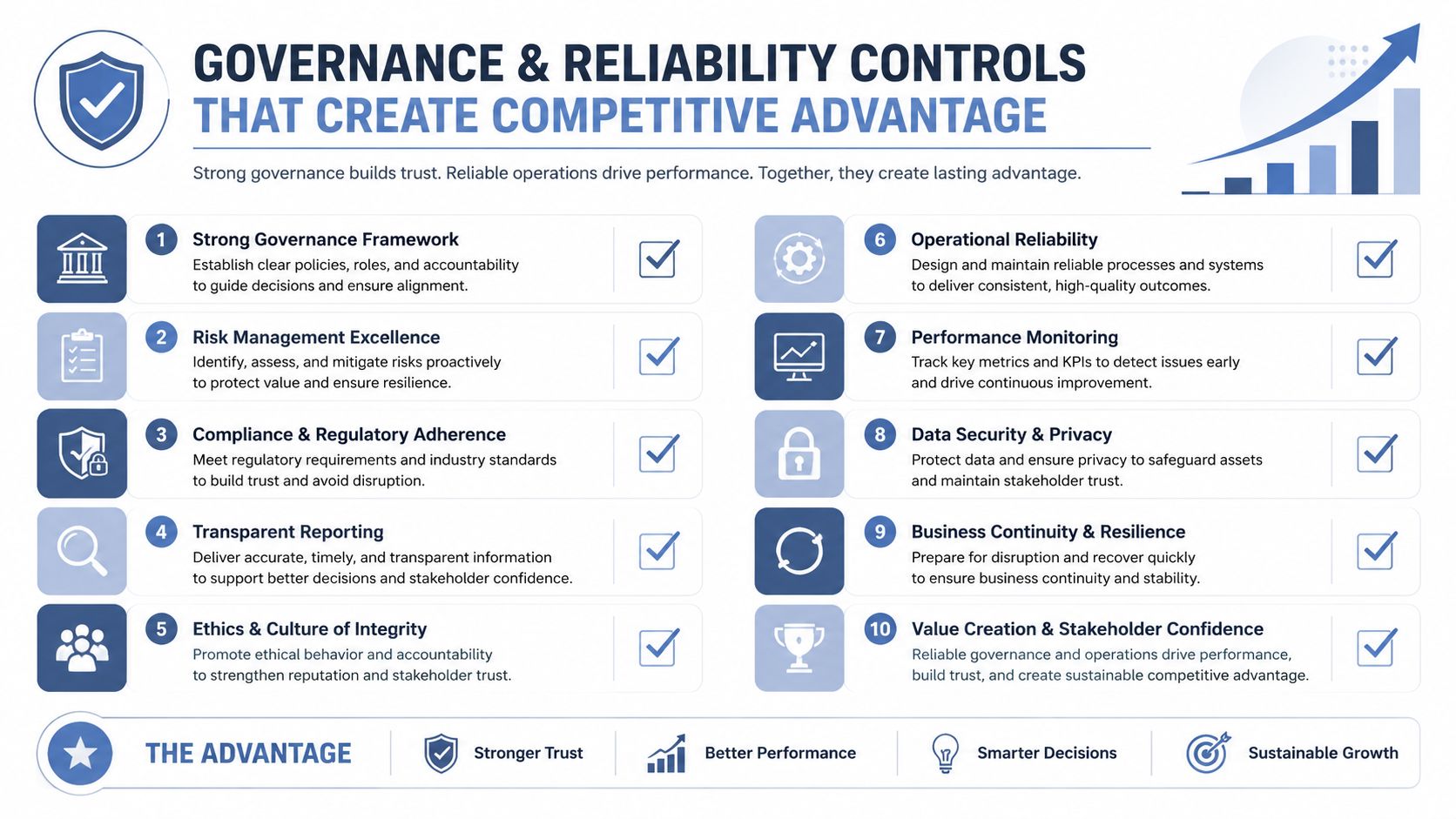
Most founders postpone governance until something breaks. By then, the damage is already visible in customer communication, reporting, or revenue decisions. Governance is how you make your AI workflows trustworthy enough to scale.
The best framing I've seen is simple. Agents bring reasoning, workflows bring consistency, and the two need each other when the work touches real business outcomes Microsoft Copilot Studio overview. That logic maps directly to entrepreneurs. Let the model handle ambiguity where it helps, and lock the repeatable steps inside a tested process.
Controls that actually matter
Source validation is essential when the output informs revenue. So is a human review point for anything that affects pricing, outbound claims, customer commitments, or financial direction. Confidence notes help too, because they tell your team where the model is certain and where it's guessing.
I also like debate passes and red-team passes for high-value workflows. One model drafts, another checks for weak logic, missing assumptions, or unsupported claims. That doesn't slow the team down nearly as much as a bad recommendation does. It also makes the workflow auditable, which matters when multiple people need to trust the same system.
A practical governance pattern looks like this.
- For prospect research, use AI to summarize the account, then require the output to cite the fields or sources it used before anyone sends outreach.
- For growth reports, let AI assemble the narrative, but keep the underlying numbers locked to the CRM or analytics store.
- For revenue-gap analysis, ask the model to identify assumptions, then force a second pass that challenges the logic before you act on the result.
Entrepreneurs often discover that governance creates competitive advantage. Your team can move faster because fewer people are second-guessing the workflow. Your output becomes easier to trust, easier to audit, and easier to defend when a client or partner asks why the system recommended a specific action.
If you're exploring how the model layer fits into a broader architecture, Model Context Protocol is worth understanding because it clarifies how tools, sources, and reasoning can be connected without turning the workflow into a pile of fragile shortcuts.
Measuring ROI and Building Continuous Improvement Loops
If you cannot measure the effect, you cannot justify expanding the workflow. That holds whether you are a solo founder or leading a ten-person team. The numbers do not need to look impressive. They need to reflect actual business movement.
Workflow automation research suggests a practical baseline of 10 to 15 hours per employee per week recovered from repetitive manual work, and small-business surveys also point to average annual savings of $7,500 per business from AI workflow automation, with some adopters saving more than $20,000 per year automation productivity baseline. At team scale, that gives you a simple way to sanity-check whether a workflow is worth expanding without pretending every saved hour turns into cash.
A simple ROI table
| Team Size | Weekly Hours Recovered | Monthly FTE Equivalent | Annual Cost Savings |
|---|---|---|---|
| Small team | qualitative | qualitative | qualitative |
| 10-person company | 100 to 150 hours | qualitative | qualitative |
The exact conversion to monthly FTE depends on how your business prices labor and how much of the saved time gets redirected into revenue work. That is why I do not dress up the math. The point is to measure enough to know whether the workflow is paying for itself and whether it should stay in the stack.
What to track after launch
Track processing-time reduction first, because it is the clearest sign that something changed. Then track accuracy and cost savings. For decision workflows, add a quality metric that asks whether the output improved the choice along with the speed of the choice.
Feedback loops matter because AI workflows drift. Prompts age. Source data changes. Users change how they feed inputs into the process. If the output starts getting sloppy, adjust prompts first when the issue is wording or framing, and redesign the workflow when the issue is structural. That is the difference between automation that compounds and automation that degrades decision quality.
Measurement connects directly to revenue. A workflow that improves lead handling, reporting, or offer analysis can help boost your funnel conversion, because the business learns faster where the bottleneck lives. The metric to watch is “we made a better decision sooner.”
For founders who want a concrete ROI lens, the AI agent ROI framework is built around that question. What changed in the business, and can you prove it without hand-waving?
AI workflows for entrepreneurs work when they reduce guesswork, preserve judgment, and make the company faster without making it sloppier. Start with one workflow, validate it manually, stage the rollout, and measure the result like a business owner who expects the system to earn its keep.
If you are choosing your first automation this week, pick the highest-frequency task that already has a clear output, a clear owner, and a clear business consequence. Build that one carefully, measure it accurately, and only then expand into the next workflow.
