
AI agents for startups work best on one repeated, text-heavy task with clear rules, such as support triage, lead qualification or a weekly report. I give each agent a specific trigger, a narrow set of tools, an approval step for anything customer-facing and a log of every decision. Then I watch the exception rate before adding autonomy.
You've built a demo that reads a form submission, drafts a reply, and updates a spreadsheet. Then a real customer sends an unclear question, the form contains missing data, and the agent writes the wrong answer into your workflow. Now you're reviewing every action manually, which defeats the reason you built it.
That's the practical problem with AI agents for startups. The opportunity is real, but a working demo isn't a working system. I'm Samuel Woods, and I care about the point where an agent handles live work, produces a useful result, and leaves you with a clear record of what happened when it fails.
Table of Contents
- What AI Agents Actually Do Inside a Small Startup
- When to Use an Agent and When to Skip It
- How Startup Agents Are Built to Work Reliably
- Three Complete Agent Workflows You Can Build This Week
- Running Agents in Production Without Breaking Trust
- What to Build Next and What to Leave Alone
What AI Agents Actually Do Inside a Small Startup
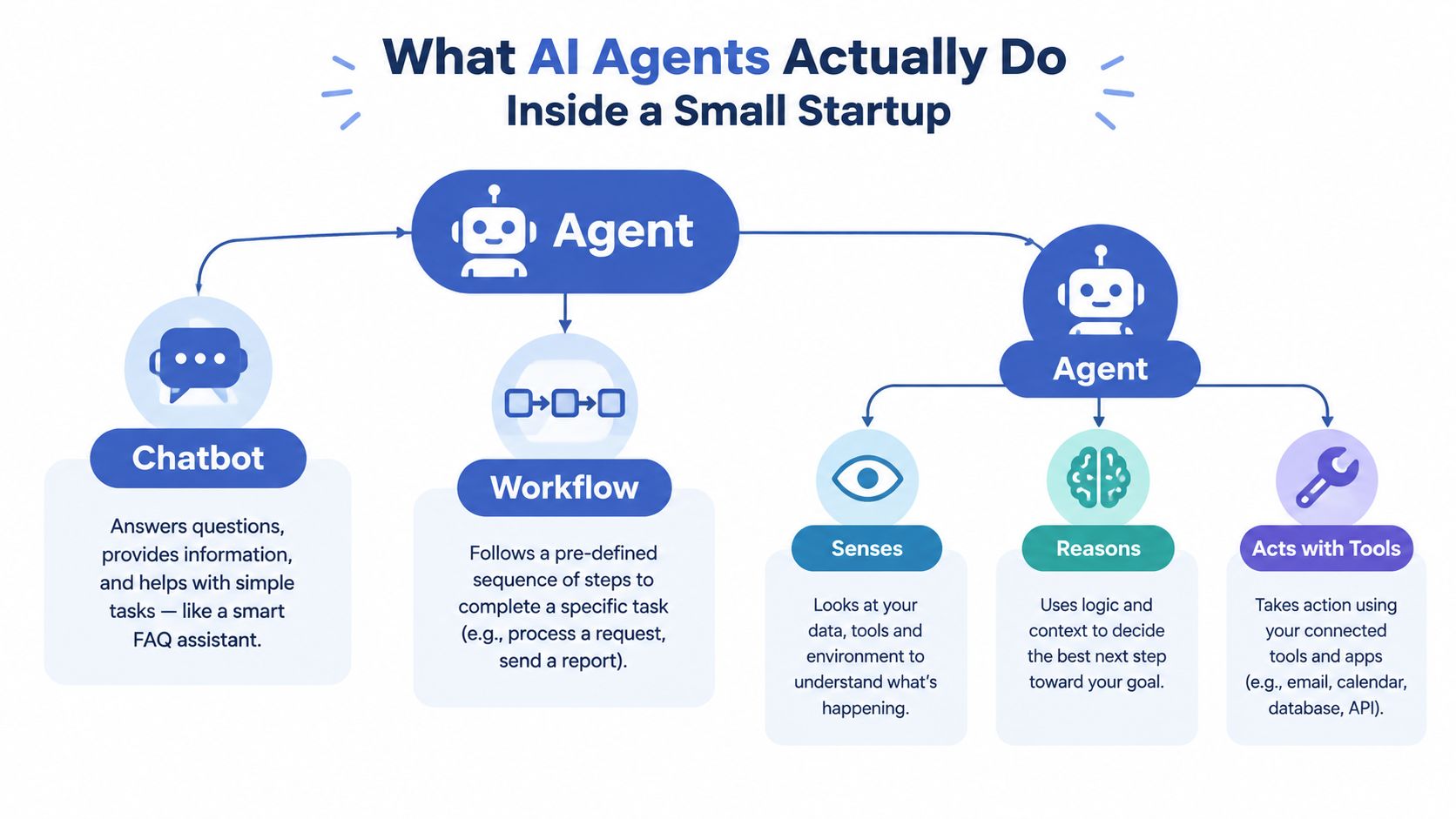
A chatbot answers when you ask. A workflow follows a fixed sequence. An agent can inspect a situation, decide what information it needs, use approved tools, and take an action.
That distinction matters when you're running an online business with no spare person waiting to correct mistakes. A chatbot might draft a support response. A workflow might send every new ticket to a spreadsheet. An agent can classify the ticket, look up the customer record, retrieve the relevant policy, draft a response, and send the case to you when the situation falls outside its rules.
The word “agent” has become useful because the software layer has moved beyond chat interfaces. AI agent startups raised $3.8 billion in 2024, nearly triple the 2023 total, and by March 2025, CB Insights reported that every major big-tech player was developing agents or tools for building them, as summarized in this historical overview of AI agent startup statistics. For a small startup, that timing creates a practical opening. Tools, APIs, and models are now available for founders who want to automate a defined business process rather than build an entire research project.
The opportunity is a task, not a job title
I start with one repeated task that creates a visible delay. Support triage, weekly reporting, content extraction, and lead qualification are easier starting points than “automate operations.”
The opportunity exists now because a solo operator can connect a reasoning model to ordinary tools without building every component from scratch. You can use an LLM, Zapier or Make, Google Sheets, Gmail, a form tool, and a small database. The system won't be perfect, but it can take the first pass on work that previously interrupted your day.
A useful build has six answers:
- What event starts it?
- What information does it read?
- What decision does it make?
- Which tools can it use?
- What requires your approval?
- What record proves what it did?
If you can't answer those questions, you have an idea for an assistant, not a reliable agent.
What I got wrong at the start
I initially gave agents too much freedom because the demo looked better when the model could choose its own path. Live work exposed the weakness. The model made reasonable decisions from incomplete context, which still produced incorrect business actions.
I now prefer narrow permissions and explicit handoffs.
Practical rule: If an error would force you to apologize to a customer, require approval before the agent sends, edits, refunds, publishes, or deletes anything.
When to Use an Agent and When to Skip It
The common advice is to automate whatever consumes the most time. That's incomplete. High time consumption can signal that a task is poorly defined, full of exceptions, or too sensitive to hand over.
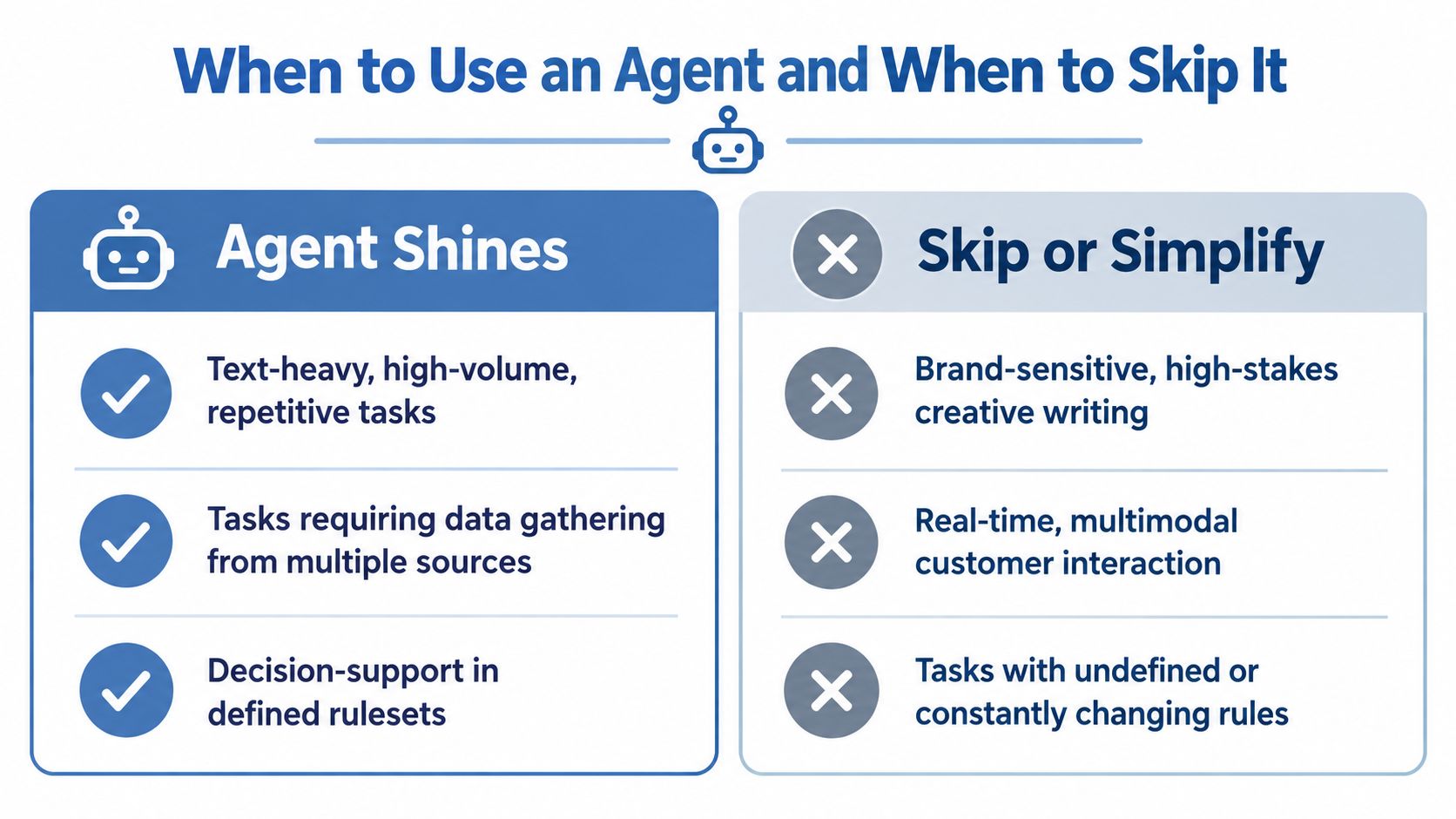
I use a simple filter. An agent is a candidate when the work is text-heavy, repetitive, and bounded by rules. It can also help when it must gather information from several places before making a recommendation. It's a poor candidate when the output depends on subtle brand judgment, visual quality, or a rule you haven't written down.
A field experiment on human-AI teamwork found that human-AI teams achieved 73% greater productivity per worker, with team-level output comparable to human-human teams while using about half as many workers. The result changed by task type, though. Text ads received higher quality ratings, while image quality was lower, which supports starting with text-heavy work and reviewing multimodal outputs carefully in this human-AI teamwork experiment.
Make the yes, no, or assist-only decision
Use “yes” when the agent can complete the task from a stable source of truth, the acceptable output is clear, and mistakes are reversible.
Use “assist only” when the agent can gather information or draft a result, but you need to approve the action. Customer replies, refunds, publishing, and sensitive lead decisions belong here until the system has earned trust.
Use “no” when the rules are undefined, the cost of a wrong result is high, or the task depends on real-time images, audio, or nuanced creative judgment. Simplifying the workflow may help, but adding an agent won't solve a missing process.
Independent benchmark work found that agents completed induced workflows 88.3% to 96.6% faster and at 90.4% to 96.2% lower cost than average human workers. The same work found that augmenting humans sped up work by 24.3%, while full AI automation slowed humans down by 17.7%, as reported in the agentic systems benchmark. The lesson is uncomfortable but useful. Removing the human too early can make the process slower.
Test the task before building
Take ten recent examples and label the decisions a person made. If you can describe the decision rules in plain language, identify the required inputs, and separate normal cases from exceptions, build a small assistant.
If every example requires a different interpretation, start with information gathering. The agent can collect the facts and present them in a consistent format while you make the final call.
I'd still test the workflow with your own inputs before choosing a platform. Your decision should follow the process you can measure, not the most impressive demo.
For a practical return calculation, use the AI agent ROI worksheet and record the time you spend reviewing exceptions. Many owners count the minutes an agent saves and ignore the minutes it creates.
How Startup Agents Are Built to Work Reliably
A reliable agent is a chain of controlled decisions. I build it in layers so I can identify the part that failed instead of blaming “the AI.”
Start with the trigger and context
The trigger is a specific event, such as a new Typeform submission, an email label, a calendar time, or a new row in Google Sheets. Avoid vague triggers like “check for opportunities.” The system needs a clear start condition.
Next, provide context. Store your policies, product details, customer fields, previous messages, and examples in places the agent can retrieve. Keep temporary task information separate from long-term reference material. A support agent may need the current conversation and refund policy, but it doesn't need every internal note ever written.
The prompt should define the job and the boundaries:
Task: Classify the request, retrieve the matching policy, draft a response, and return an approval flag.
Rules: Use only the supplied sources. If required information is missing, ask for it. Never promise a refund or change an account without approval.
Give the model a narrow set of actions
The reasoning model decides what to do with the information. The tools perform the action. Connect only the tools required for the task, and give each one the smallest permission possible.
For example, a lead qualification agent may read a form, search a company page, assign a score, and write a draft note to a CRM. It shouldn't delete records, send messages, or change pricing. Add those actions only after you've reviewed enough real outputs to understand the failure modes.
Then add a human checkpoint. The agent should return structured fields such as category, confidence, evidence, draft, and needs_approval. A simple approval step in Gmail, Slack, or a spreadsheet is enough for an early system.
Log every decision
The log should capture the trigger, input references, tool calls, output, approval status, and final action. Without that record, you can't tell whether the problem came from missing context, a bad rule, a tool error, or an incorrect model decision.
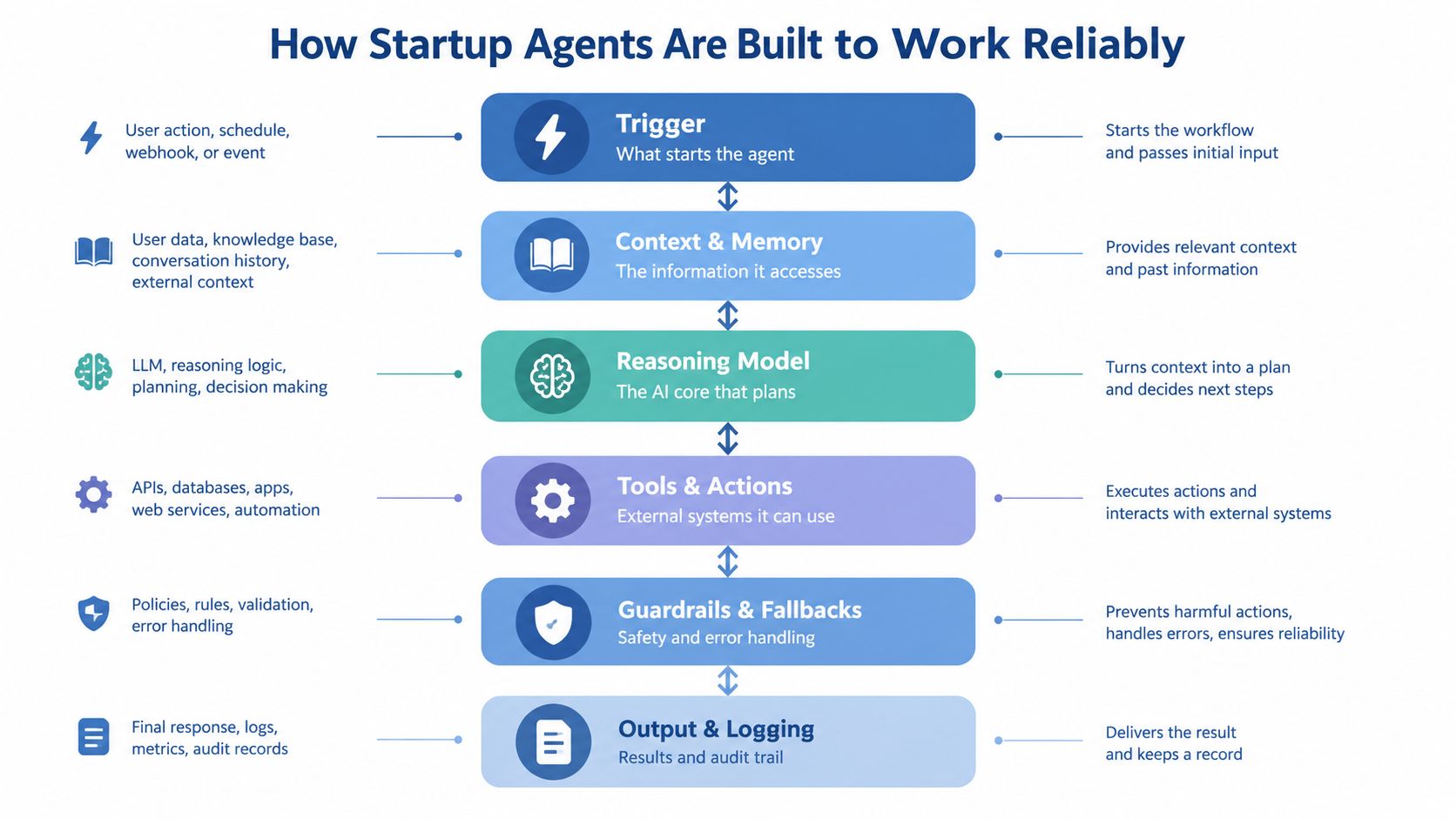
I keep the first version small. One trigger, one model call, a few approved tools, one review gate, and one log. You can add memory and branching after you've seen what the workflow needs.
The AI agent tech stack guide is useful for mapping those components to tools. Don't buy a large platform before you know which part of your process is causing the delay.
Before expanding beyond one function, run the agent against old examples. Check whether it selects the right source, follows the stated rule, produces a usable output, and stops when information is missing. A sound design makes failure visible. A fragile one creates confident-looking work that reaches customers before you notice.
Three Complete Agent Workflows You Can Build This Week
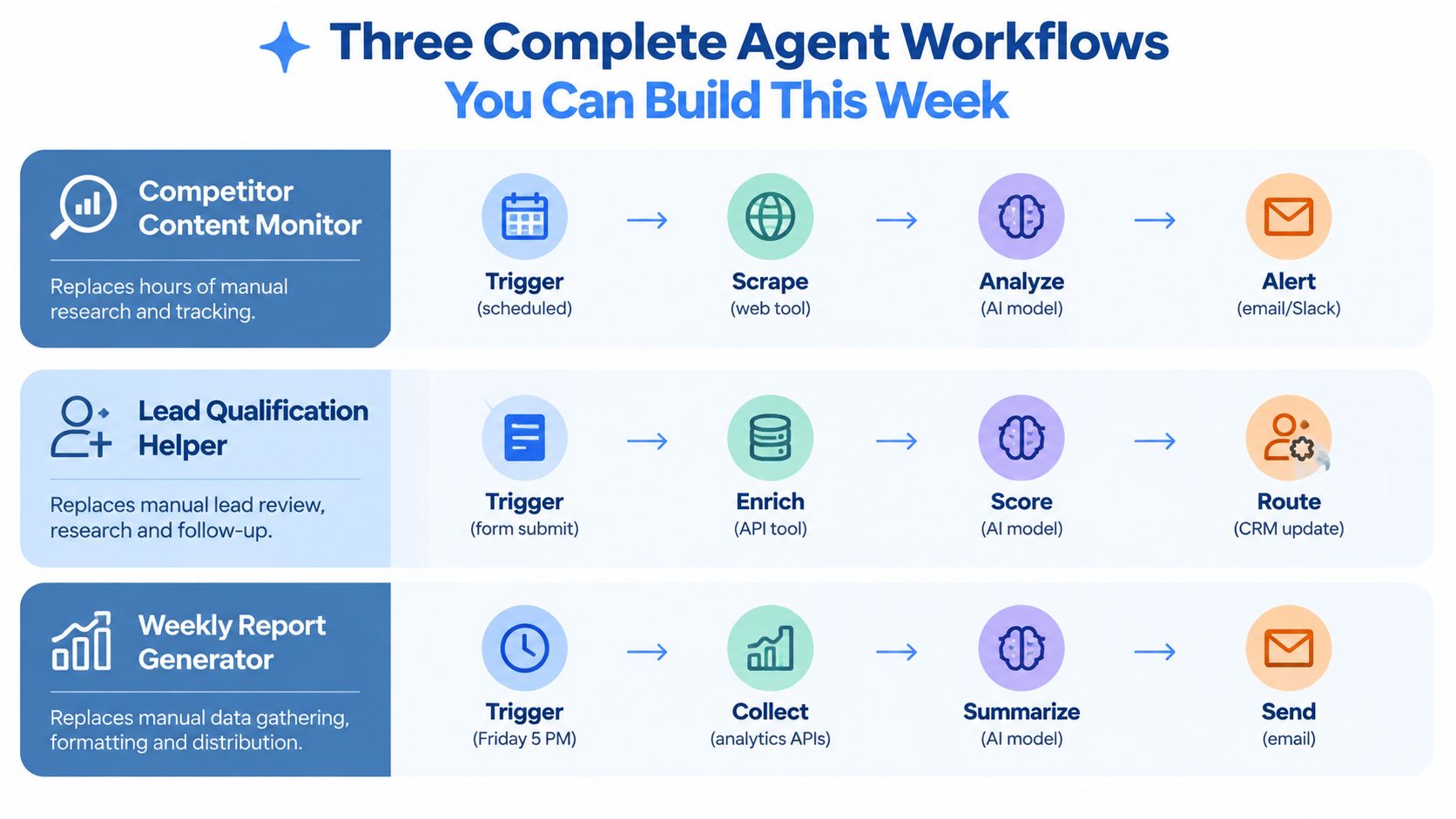
I'd start with one workflow, but these three show the pattern across common owner-operator work. Each can run with a form or schedule, an LLM such as Claude or ChatGPT, Make or Zapier, Google Sheets, Gmail, and a small set of approved actions.
Support triage
Opportunity: New support messages create interruptions and inconsistent first replies. This works now because email, helpdesk records, and searchable product documents can feed a model in one automated path.
Workflow:
- Gmail or your helpdesk detects a new conversation.
- Make sends the message and customer identifier to the model.
- The agent searches your support document or FAQ.
- It classifies the issue as billing, product use, bug, cancellation, or unclear.
- It drafts a reply using the retrieved policy.
- It writes the category, source, draft, and approval flag to Google Sheets.
- You review and send the response.
Use this prompt:
Classify the message using the allowed categories. Retrieve the matching policy. Draft a concise reply using only that policy. If the customer requests an exception, mark
needs_approval: true. Return category, evidence, draft, and missing_information.
What it replaces: Opening each message, finding the relevant policy, writing the first reply, and deciding which cases need your attention.
Data required: Recent customer messages, product documentation, refund rules, account fields, and examples of acceptable replies.
Number to watch: Track the exception rate, the share of tickets that require correction or escalation. A lower rate is useful only if customer satisfaction and resolution quality stay acceptable.
Where it breaks: My first version treated a missing customer ID as a minor inconvenience. The agent guessed from the email address and attached the wrong account context. The fix was simple. If the identifier is absent, stop the workflow and ask for it.
I wrote the fuller version of this support pattern in Bionic Business, where I continue documenting agent builds that survive contact with live work.
Lead qualification and follow-up
Opportunity: A form submission can sit untouched while you're building the product. A small agent can gather public context, classify fit, and prepare a follow-up without sending anything automatically.
Workflow:
- A Tally or Typeform submission triggers Make.
- The automation stores the form response in Airtable.
- An enrichment tool retrieves the submitted company or website context.
- The model compares the information with your written fit criteria.
- It returns a fit label, evidence, missing fields, and suggested next question.
- Airtable records the result.
- You approve a personalized email in Gmail.
Prompt:
Review the form response and supplied company context against these fit rules. Do not infer budget, authority, or urgency. Return
fit,evidence,missing_fields, and a follow-up question. Draft an email only after the evidence is complete.
What it replaces: Copying form details, researching the prospect, drafting the first message, and remembering who needs a reply.
Data required: Your fit rules, form fields, product description, disqualifiers, and an approved email style.
Number to watch: Track qualified leads that receive a human-reviewed follow-up. This measures throughput without pretending that an AI label equals revenue.
Where it breaks: Enrichment data can be stale or incomplete. The first version I'd build would therefore show the evidence beside the score and block the draft when the model has no reliable basis.
Weekly report generation
Opportunity: A weekly report turns scattered analytics into a decision you can act on. Scheduled data collection and a fixed reporting template make this a good first automation.
Workflow:
- A Friday schedule triggers Make.
- The automation retrieves selected metrics from your analytics, email, and sales tools.
- It stores the raw values in Google Sheets.
- The model compares current results with your own baseline and notes missing data.
- It writes a short report with changes, possible causes, and recommended checks.
- You review the claims against the raw sheet.
- Gmail sends the approved report to you or your small team.
Prompt:
Summarize only the supplied data. Separate observed changes from possible explanations. Flag missing or conflicting values. Recommend one check for each material change. Never invent a cause, benchmark, or comparison.
What it replaces: Exporting data, joining spreadsheets, writing the update, and searching for the next action.
Data required: Consistent metric names, date labels, source links, campaign notes, and a report template.
Number to watch: Track review time per report. If the agent produces a longer verification task than the report used to require, simplify the prompt or reduce the data sources.
The workflow fails when the model receives numbers without definitions. “Revenue” might mean recognized revenue, collected cash, or an analytics estimate. Store the definition next to every field.
Running Agents in Production Without Breaking Trust
Production starts when the agent touches real work, not when the prototype produces a convincing answer. A small team needs operational discipline without building an enterprise department.
Give the agent a separate identity where possible, restrict its tools, and make approval mandatory for customer-facing or irreversible actions. Store logs in a place you can inspect quickly. Google Sheets works for an early workflow, provided every run receives a timestamp, status, source references, and final outcome.
The adoption gap is visible in current survey data. Deloitte's 2026 survey found that 42% of leaders said their organizations had tested or deployed AI agents, while 15% had scaled orchestrated, cross-functional multi-agent adoption and only 5% said their business processes were highly prepared, according to this summary of Deloitte's 2026 agent adoption data. For a small startup, the implication is direct. A pilot is easy to announce. A repeatable workflow needs preparation, review, and ownership.
McKinsey's 2025 survey found 23% of organizations were scaling an agentic AI system, while 39% were still experimenting. Among organizations scaling, most were doing so in only one or two functions, and no single function had more than 10% of respondents scaling agents, as reported in this analysis of the McKinsey survey. Start with one function because that's where the evidence points, not because a broad rollout sounds ambitious.
Use a simple operating scorecard
| Signal | What to Measure | Healthy Target |
|---|---|---|
| Throughput | Completed tasks per week | More completed work without extra review burden |
| Cost per task | Model, automation, and tool cost for each completed task | Below the value of the manual task |
| Exception rate | Runs requiring correction, escalation, or missing data | Falling over successive review cycles |
| Review time | Minutes you spend checking each result | Shorter than the manual process |
| Business result | Revenue, margin, retention, or acquisition cost connected to the workflow | A measurable movement or a clear leading indicator |
Don't let a fast agent hide poor output. The benchmark evidence cited earlier found that full automation can slow human work when the workflow is badly designed. Keep a sample of completed runs for manual review, and test the system again whenever you change the prompt, source documents, or permissions.
I've documented the practical deployment sequence in this guide to deploying AI agents in a small team. The key operating habit is to review failures by category. Fix missing data, unclear rules, tool permissions, and prompt instructions separately.
Research summarized in this report on barriers to scaling AI agents identifies inaccessible data, governance difficulty, and costly integrations as major obstacles. You can avoid much of that pain by cleaning the source data and limiting integrations before you add autonomy.
What to Build Next and What to Leave Alone
On Monday, choose one function where work arrives repeatedly, the inputs already exist, and mistakes can be reviewed before they reach a customer. Support triage and weekly reporting are usually better starting points than a fully autonomous sales or publishing system.
Write the rules before you write the prompt. Put the source documents in one place, remove outdated examples, and list the fields the agent must refuse to guess. Then build one trigger, one useful output, one approval gate, and one log.
Leave high-stakes creative work, unclear decisions, and irreversible actions alone until you can describe the acceptance standard. An agent can draft a sensitive message, but you should keep the final send under your control while the workflow is new.
Once the first system produces consistent work, add a second workflow that uses the same source data or approval habit. Don't build a network of agents because the tools make it possible. Build the next system only when the first one has a clear owner, a review cadence, and a business measure attached to it.
The change I'd make this week is small: replace one recurring manual handoff with an agent that gathers context and prepares the next action. Keep the final decision visible. Track the time you save, the corrections you make, and the result the workflow affects. That record will tell you what deserves more automation and what should remain yours.
If you're choosing your first build, pick one live task today and write down its trigger, inputs, allowed actions, approval point, and success measure. Then build the smallest version in Make, Zapier, Google Sheets, or the tools you already use, review every run for the first week, and document the result in Bionic Business at bionicbusiness.com.
Frequently Asked Questions
What is the difference between an AI agent, a chatbot and a workflow?
A chatbot answers when you ask, and a workflow follows a fixed sequence. An agent can inspect a situation, decide what information it needs, use approved tools and take an action. On a support ticket, that means it can classify the message, look up the customer record, pull the matching policy, draft a reply and hand the case to you when it falls outside its rules.
Which tasks should a startup give an AI agent first?
Start with one repeated task that creates a visible delay and is text-heavy, repetitive and bounded by rules. Support triage, weekly reporting, content extraction and lead qualification are easier starting points than automating operations in general. Skip tasks that depend on subtle brand judgment, visual quality, real-time images or audio, or a rule you haven’t written down yet.
What tools do I need to build an AI agent for a small startup?
You can connect a reasoning model such as Claude or ChatGPT to ordinary tools. Make or Zapier runs the automation, Google Sheets or Airtable holds the records and the log, Gmail handles approvals and sending, and a form tool like Typeform or Tally starts the run. Map these components to your process before you pay for a large platform.
Should a startup AI agent act without human approval?
Not for anything customer-facing or irreversible while the workflow is new. If an error would force you to apologize to a customer, require approval before the agent sends, edits, refunds, publishes or deletes anything. Benchmark research cited in the article found that augmenting humans sped work up by 24.3%, while full automation slowed humans down by 17.7%.
How do I know if my AI agent is working?
Keep a small scorecard: completed tasks per week, cost per task, exception rate, minutes of review per result, and the revenue, margin, retention or acquisition cost the workflow affects. The exception rate should fall over successive review cycles, and review time should stay shorter than doing the task by hand. A fast agent that produces poor output is not working.
Why do AI agents break once they touch real work?
Most failures trace back to missing context, unclear rules, tool permissions that are too broad, or a model deciding on incomplete data. Numbers without definitions and missing customer identifiers are common triggers. Log the trigger, inputs, tool calls, output, approval status and final action for every run, so you can tell which of those parts failed.
