
The AI agents for customer support that work are narrow. Each one reads live account data, takes only permitted actions, keeps the conversation history, and hands off to a human with full context when it reaches a limit. I start with three ticket types, one live data source and one human fallback, and I measure verified resolutions before adding autonomy.
The popular advice is to buy an AI support tool, connect your helpdesk, and let it answer tickets. That works in a demo because the demo controls the question, the data, and the happy path. Real customers change topics, ask for account-specific actions, reply in another channel, and expect a human to recover the conversation when the agent gets stuck.
I'm Samuel Woods, and I've built and broken three support agent workflows this year. The pattern was consistent. The language model was rarely the problem. The missing connections were.
AI creates opportunities. Agents and workflows make them yours. For a small online business, that means building a narrow system that can read the right context, take a permitted action, preserve the conversation, and hand off cleanly when it reaches a limit.
Table of Contents
- Why Most AI Support Deployments Stall After the Demo
- The Real Numbers Behind AI Support Productivity
- The Architecture That Actually Resolves Tickets
- A Complete Ticket Resolution Workflow You Can Build
- Choosing Between Vendors and Open Source
- Measuring Whether Your Agent Earns Its Keep
- What to Change on Monday and Where It Will Break
Why Most AI Support Deployments Stall After the Demo
The most common assumption is wrong: purchasing an AI tool doesn't give you an AI support system. It gives you a model interface, a set of connectors, and a starting point. The system only becomes useful when it can move a ticket through your actual business rules.
A demo usually proves that an agent can answer a known question from a clean knowledge base. Production support asks harder questions. What order did this customer place? Was the refund already issued? Which plan is active? Has another agent promised an exception? Can the system update the ticket, trigger the refund workflow, and record what happened?
If the answer to those questions lives in separate tools, the agent needs access to each one. If it can't get that access, it guesses, asks the customer to repeat information, or sends the ticket to you.
Practical rule: Treat every AI support project as an integration project with a language model inside it.
Containment hides the real failure
A ticket can disappear from your queue without being resolved. The customer might abandon the conversation, accept a poor answer, or contact you through another channel. A high deflection figure can therefore conceal unresolved demand.
The more useful question is simple: did the customer's problem reach a verified outcome? That requires a status change, a successful action, a customer confirmation, or a human review with the full conversation attached.
Independent reporting says 85% of organizations still lack orchestration connecting AI agents, human teams, data, and workflows across systems. The same coverage says only 35% retain customer context between systems, while 5% can quantify AI's business impact. Those figures come from coverage of the customer experience orchestration gap, and they explain why polished pilots often stall once real operational dependencies appear.
The missing layer is context
A support agent needs more than a document search. It needs current account data, previous messages, policy boundaries, tool permissions, and a reliable record of what it already attempted.
I learned this while working on training an AI agent on company data. The knowledge base answered policy questions well, but it couldn't tell the agent whether a particular customer qualified for an exception. The result sounded confident and still required manual correction.
Your first audit should trace one ticket from arrival to closure. List every system touched by a human. Helpdesk, billing, order management, customer database, shipping, and internal notes all count. If the proposed agent can't read or update a system on that list, it isn't ready to resolve the ticket end to end.
The Real Numbers Behind AI Support Productivity
The evidence supports a narrower claim than most sales pages make. AI assistance can improve support productivity, especially when it helps people work faster and reduces documentation overhead. That doesn't prove that a fully autonomous agent should handle every conversation.
A frequently cited National Bureau of Economic Research study found a 14% average productivity lift, with gains reaching 34% for newer agents, as summarized with the market context in AI customer service statistics. The result points toward agent assist, where the system retrieves information, drafts a reply, summarizes the interaction, or recommends the next action.
A separate NBER paper, also cited by Stanford HAI, reports a 13.8% to 14% productivity increase when support agents receive generative AI assistance. The mechanism matters. Agents can move issues forward faster, handle conversations simultaneously, and resolve more cases per hour. That makes AI especially useful for reducing the gap between new and experienced support staff, rather than removing workflow controls.
What moved the metrics
The strongest operational gains often come after the customer stops talking. Independent contact-center research reports that generative AI can reduce average handle time by about 9%, increase issue resolution by 14% per hour, and reduce manager-escalation requests by 25%. The same source estimates that auto-summarization can reduce after-call work by 30% to 60%. Those figures are reported in contact-center AI benchmarks.
That changes how I'd build the first version. Start with summarization, classification, suggested replies, and routine case updates. Those tasks have clear inputs and outputs. They also let you inspect the agent's work before allowing it to take a customer-facing action.
| Metric | Measured impact | Source context |
|---|---|---|
| Support-agent productivity | 14% average, up to 34% for newer agents | NBER findings summarized by Coworker |
| Generative AI productivity | 13.8% to 14% | NBER working paper |
| Average handle time | About 9% lower | Contact-center research |
| Issue resolution per hour | 14% higher | Contact-center research |
| Manager escalations | 25% lower | Contact-center research |
| After-call work | 30% to 60% lower | Auto-summarization benchmarks |
The adoption picture also matters. One 2026 industry summary reports that 66% of customer service organizations use AI agents, up from 39% in 2025, according to AI customer support adoption data. A market summary projects the global AI chatbot market will reach $18.27 billion in 2028, up from $9.08 billion in 2025, as reported by Zoom's chatbot statistics overview.
Adoption doesn't remove the trust constraint. A consumer survey found 79% of Americans strongly prefer a human, 89% believe companies should always offer a human option, and 84% think human agents are more accurate than AI, according to SurveyMonkey's customer service statistics. I use those figures as a design constraint. Human fallback belongs in version one.
For a practical ROI model, I track resolved tickets, handling time, escalations, and cost per resolution. I explain the calculation in my guide to AI agent ROI, but the principle is straightforward: measure completed customer outcomes, not conversations that merely stopped.
The Architecture That Actually Resolves Tickets
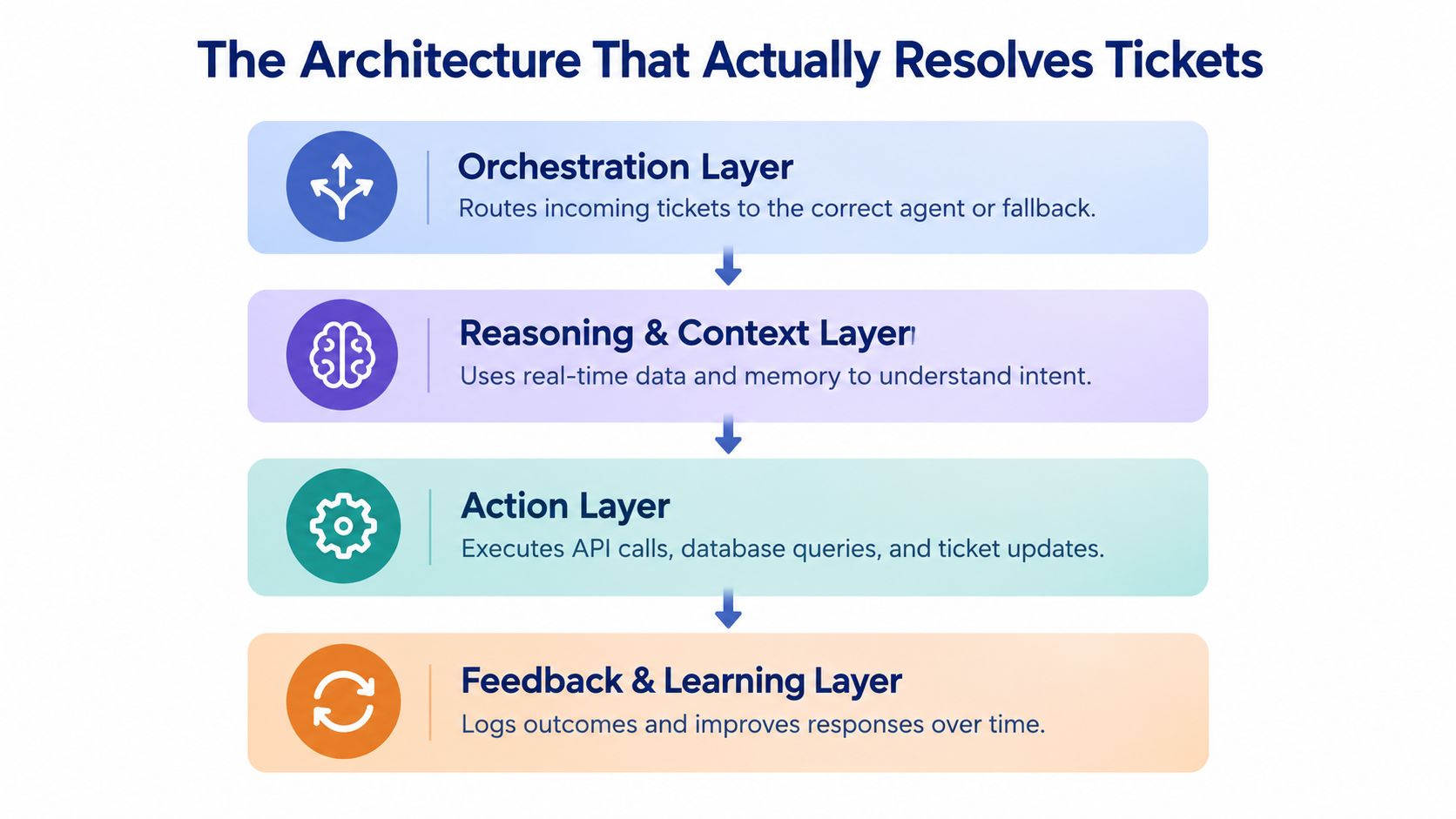
A support agent needs four connected layers. I treat them as a stack, even when a managed platform hides the implementation.
Start with intake and context
The ingestion layer receives email, chat, or form submissions from your helpdesk. Intercom, Zendesk, Help Scout, and a custom inbox can all provide the starting event. The event should include the ticket ID, customer ID, channel, message history, attachments, and current status.
The context layer then retrieves information the model can't safely infer. That might include an order record from Shopify, subscription state from Stripe, account notes from your CRM, or a previous ticket from the helpdesk. Use retrieval for changing data and a knowledge base for stable policy documents. Don't put live billing facts into a static prompt.
Most lightweight builds fail. The agent can explain your refund policy, but it can't check whether the refund has already happened. It then gives a generic answer that sounds useful and creates more work.
Give the model bounded reasoning
The reasoning layer classifies the request, checks whether the required data is available, chooses a permitted action, and decides whether to answer or escalate. I keep the prompt narrow:
You handle order-status questions only. If the ticket requires a refund, account change, legal interpretation, or missing customer data, stop and escalate. Never state that an action occurred unless the action tool returns success.
That final sentence prevents a common failure. Models can describe an intended action as if it already happened unless you define the difference between planning and completion.
The execution layer exposes tools through APIs or controlled automations. A tool might fetch an order, create a return request, add an internal note, update a ticket, or route the conversation. Each tool should accept structured inputs and return a clear success or failure state.
The same audit applies to a small support stack. Ask what the agent can read, what it can change, and how every action is logged.
Preserve the handoff
When the agent escalates, it should pass the original message, extracted intent, retrieved records, attempted tools, tool results, and the reason for escalation. A human shouldn't have to ask the customer for the same order number again.
I've written more about this in AI agent orchestration. The practical test is a failed ticket. If you can open it and understand the agent's decision without reading raw logs, your architecture is probably usable.
A Complete Ticket Resolution Workflow You Can Build
The opportunity exists now because modern models can classify language, retrieve records, and call functions within one workflow. You don't need a large platform to test the idea. You need one helpdesk, one reasoning model, a few read actions, and a human fallback.
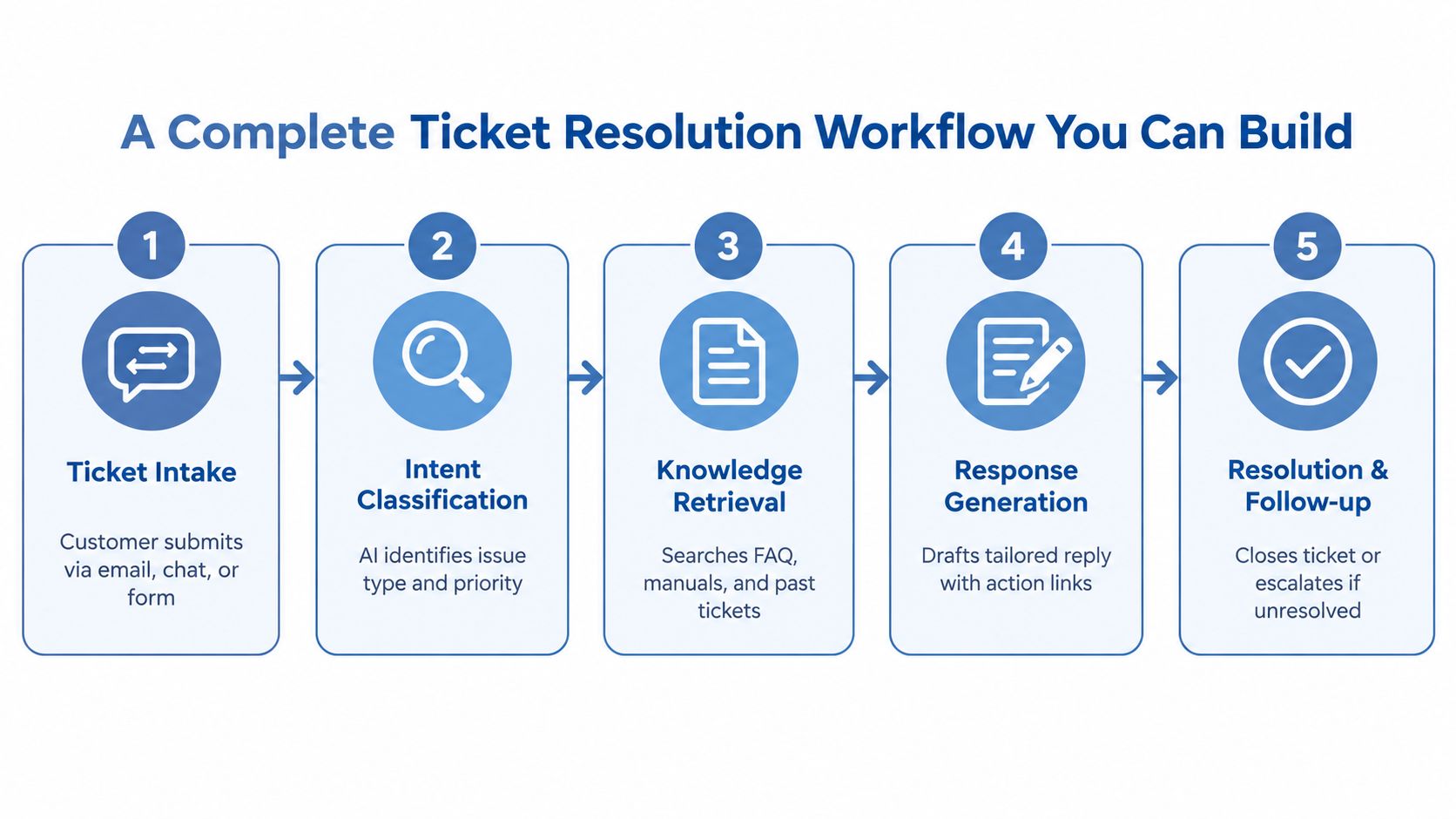
Here's the version I'd build for three repetitive ticket categories.
1. Receive the ticket
Use a Help Scout, Zendesk, or Intercom webhook to send the new ticket to a small middleware service. Store the ticket ID and customer ID before calling the model.
Prompt:
Read the customer message and return JSON with
intent,priority,customer_id, andmissing_data. Allowed intents areorder_status,subscription_question, andreturn_policy. If the intent is outside those values, setintenttoescalate.
This replaces manual sorting. The data required is the incoming message, channel, customer identifier, and any existing thread.
2. Classify before answering
Run a deterministic check for obvious exclusions, then ask the model to classify the remaining message. Don't let the same open-ended agent decide both the route and the answer. A classification mistake at the start can send every later tool call in the wrong direction.
Watch true resolution rate, defined as tickets closed after a verified answer or completed action. Don't count a ticket as resolved because the agent sent a message.
3. Retrieve live records
For order_status, call your commerce API with the customer or order identifier. For subscription_question, call the billing API. For return_policy, retrieve the current policy document from your knowledge base.
Prompt:
Use only the returned order or subscription fields. If a required field is missing, ask for it or escalate. Do not infer delivery status, refund status, eligibility, or account state from the customer's wording.
This replaces the manual search across tabs. It needs current records, not a screenshot or copied spreadsheet.
4. Draft a constrained response
Pass the classified intent, tool results, relevant policy text, and conversation history to the response model.
Prompt:
Write a concise reply using the verified fields below. State what you know, state what you don't know, and provide the next action. Never promise a result that the tool did not confirm. If the customer needs an unsupported action, return
handoff_required: true.
I usually send the first version to a human for approval. Autonomy comes after the workflow has survived real edge cases.
5. Update and follow up
Write the response to the helpdesk, add an internal summary, apply the intent tag, and set the next status. If the tool call fails, keep the ticket open and route it with the error attached.
The workflow replaces repetitive sorting, record lookup, drafting, and note-taking. It doesn't replace judgment in disputes, exceptions, sensitive account changes, or cases where the data is incomplete.
I first got this wrong when a customer moved from email to chat. The second channel created a new thread, so the agent lost the earlier order context and asked questions the customer had already answered. I fixed it by storing a shared customer conversation key and passing the prior ticket summary into every new channel event.
The video below shows another way to think about the workflow in operation.
Choosing Between Vendors and Open Source
Small operators usually have three viable paths. A managed vendor reduces build work, an open-source framework gives you control, and a hybrid setup lets you keep the parts that affect your customer experience.
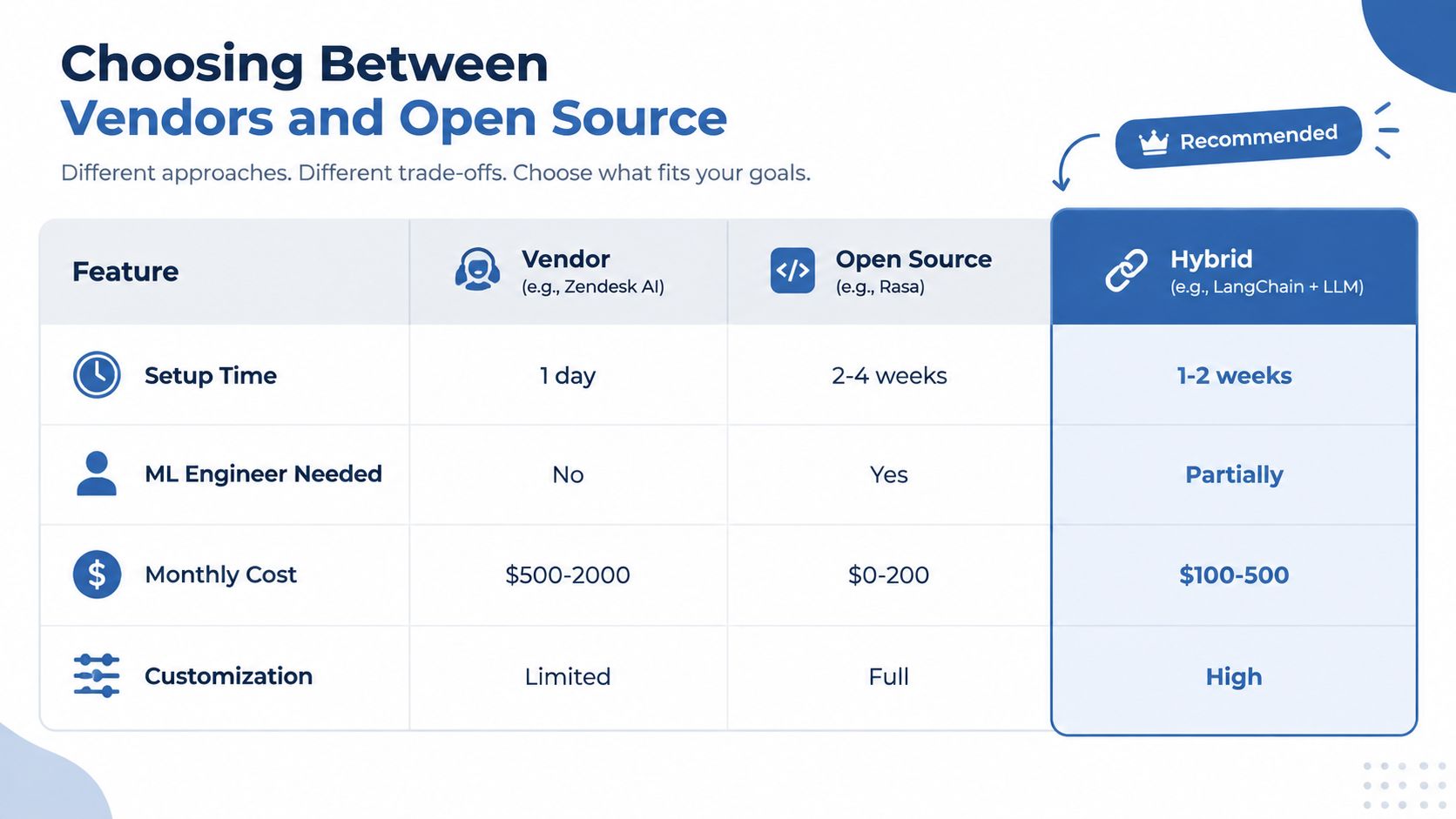
A vendor such as Zendesk AI is sensible when you need to test quickly and your workflows already live inside that platform. You'll give up some control over routing, model choice, data handling, or pricing. That trade-off can be fine if the alternative is spending weeks maintaining plumbing instead of learning which tickets are suitable for automation.
Open-source tools such as Rasa or an orchestration framework give you more control over prompts, storage, routing, and deployment. They also leave you responsible for authentication, monitoring, retries, evaluation, and every integration. Open source isn't free if your own hours become the maintenance budget.
The hybrid route uses a hosted model or vendor reasoning service while you own the context and execution layers. That's the path I chose recently. I accepted model-provider dependency in exchange for keeping customer records, action permissions, escalation logic, and ticket history under my control.
Make the decision against your week
| Path | Setup question | Ongoing trade-off | Choose it when |
|---|---|---|---|
| Managed vendor | Can you connect the helpdesk today? | Faster setup, less control | You need a narrow pilot quickly |
| Open source | Can you maintain integrations and monitoring? | More control, more technical work | You can maintain the system yourself |
| Hybrid | Which layers must remain yours? | Some dependency, strong workflow control | You want speed without surrendering execution logic |
Don't choose a vendor because its demo answers a question elegantly. Ask it to show the ticket record after a failed tool call, the escalation payload, the conversation merge behavior, and the audit trail.
Product labels matter less than whether the system can preserve context and complete your actual actions.
On Monday, export a small sample of resolved and unresolved tickets. Mark which systems a human touched. If most cases need only one knowledge lookup and a reply, a managed pilot may be enough. If closure requires several account actions, own the orchestration even if you rent the model.
Measuring Whether Your Agent Earns Its Keep
Deflection is a poor headline metric. A ticket that disappears without a verified outcome may signal confusion, a second contact, or a lost sale.
I use a dashboard built around five operating measures. Each ticket receives an outcome label, while every automated action creates an inspectable record. That combination connects business results to the workflow failures causing them.
Measure completed work
True resolution rate is the share of tickets closed after a confirmed answer or successful action. Average handle time shows whether the workflow reduces time spent reading, searching, writing, and documenting. Escalation rate shows how often the agent reaches its boundary.
Read those measures together. A lower escalation rate can mean the agent handles more work, or that it is hiding uncertainty. Review a sample of escalated and closed tickets manually before treating the change as progress.
Customer satisfaction delta compares feedback from the automated path with feedback from a comparable human path. Read the comments alongside the score. A polite answer that leaves the issue unresolved may receive temporary approval and still create another contact.
Cost per resolved ticket includes model usage, software, automation runs, and maintenance time. If the agent saves support hours but requires constant debugging, the initial cost calculation misses the integration burden.
Add failure metrics beside the business measures
Track hallucination incidents, context-loss incidents, failed tool calls, and escalation accuracy. During the first week, I would accept more escalations rather than let the agent invent account details.
Set alerts for changes in outcome quality, not just technical uptime. An API can return success while the workflow sends an outdated policy or attaches the wrong customer record. Those orchestration failures belong in the same review as latency and availability.
Customer experience sets another boundary. 43% of consumers cite failure to resolve issues as their biggest chatbot or voicebot frustration, and 82% would abandon a brand because of unresolved support issues, according to Zoom and Morning Consult research summarized by Forrester. The practical lesson is simple: a clean handoff protects more value than an ambitious automation rate.
What to Change on Monday and Where It Will Break
Start by reviewing your ticket history and marking the categories that are repetitive, low-risk, and resolvable with the data you have. Pick three. Don't begin with refunds, disputes, or account changes that need judgment.
Next, connect your helpdesk webhook to a reasoning model and give it a narrow prompt. Let it classify those three categories, retrieve the required record, draft a response, and prepare the ticket update. Keep a human approval step until you can inspect the evidence behind every answer.
Then build the fallback. Send the complete thread, retrieved context, tool results, and failure reason to a human queue. If you can't preserve that context, stop the build and fix the handoff before expanding the agent.
The first week will probably expose over-resolution. The agent will produce a plausible answer for an edge case outside its scope. Add an explicit out-of-scope list, require a successful tool result before making account-specific claims, and route missing data to a person.
I documented the post-deployment tuning process in Bionic Business, where I continue testing the small workflow changes that affect support quality after launch. The useful version of this project is measurable and narrow. Build it Monday, review the closed tickets by Friday, and expand only after the failure log tells you what the next category needs.
If you're building AI agents for customer support this week, start with three ticket types, one live data source, and one human fallback. Measure verified resolution rate before you add autonomy, then document the first failure in Bionic Business at bionicbusiness.com.
Frequently Asked Questions
What data does an AI customer support agent need to resolve tickets?
It needs current account data, previous messages, policy boundaries, tool permissions and a record of what it already attempted. Use retrieval for changing data, such as an order in Shopify, subscription state in Stripe or notes in your CRM, and a knowledge base for stable policy documents. If the agent can’t read or update a system a human touches on that ticket, it can’t resolve the ticket end to end.
Which support tickets should I automate first with an AI agent?
Pick three categories from your ticket history that are repetitive, low-risk and resolvable with the data you already have, such as order status, subscription questions and return policy. Leave refunds, disputes and account changes that need judgment for later. Keep a human approval step on every reply until you can inspect the evidence behind each answer, then widen the scope based on the failure log.
Should I use a support vendor, open source, or a hybrid setup?
A managed vendor such as Zendesk AI suits a quick, narrow pilot when your workflows already live in that platform, at the cost of control. Open source tools such as Rasa give you control but leave you responsible for authentication, monitoring, retries and every integration. A hybrid setup rents the model and keeps context, action permissions, escalation logic and ticket history under your control.
How do you measure whether an AI support agent is working?
Track true resolution rate, meaning tickets closed after a confirmed answer or successful action, plus average handle time, escalation rate, customer satisfaction compared with a human path, and cost per resolved ticket. Add failure metrics beside them: hallucination incidents, context-loss incidents, failed tool calls and escalation accuracy. Deflection is a poor headline number, because a ticket can leave the queue without the problem being solved.
When should an AI support agent hand a ticket to a human?
Escalate whenever a ticket needs a refund, an account change, a legal interpretation, or customer data the agent can’t retrieve. The handoff should carry the original message, the extracted intent, retrieved records, attempted tools and their results, and the reason for escalating. A human should never have to ask the customer for the same order number twice. Most customers still expect a human option.
How much does AI actually improve customer support productivity?
The evidence supports assistance more than full autonomy. An NBER study found a 14% average productivity lift, reaching 34% for newer agents. Contact-center research reports about 9% lower average handle time, 14% more issues resolved per hour and 25% fewer manager escalations, while auto-summarization can cut after-call work by 30% to 60%. Summaries, classification and drafted replies are the safest place to start.
