
Your ops team is probably still buried in dashboards, approvals, triage queues, and repetitive coordination work. Meanwhile, a competitor is wiring agents into those same workflows so work gets done while their people sleep.
That gap compounds fast. The company with faster internal response times ships sooner, follows up sooner, catches issues sooner, and learns sooner. In operations, speed becomes margin. Then margin becomes market share.
I'm Samuel Woods. I've worked with ML since 2016 and generative AI since 2019. My view is simple. Autonomous AI agents for operations are worth pursuing, but only if you treat them like profit infrastructure, not a lab experiment. Many still get this wrong. They chase shiny demos, overbuild architecture, and underinvest in governance.
The teams that win do the opposite. They pick one painful workflow, define the commercial outcome, design tight boundaries, and scale only after the system proves it can perform under real pressure.
Your Competitors Are Building Bionic Operations Teams
The market has already moved past curiosity. In AWS's 2025 analysis of autonomous agents in the enterprise, over 50% of organizations identified agentic AI as a priority area, and the market is projected to reach $52.6 billion by 2030. That matters because it tells you where serious operators are placing bets.
This isn't about replacing your whole operations function with a magic robot. It's about building a bionic operations layer that can handle bounded, repeatable, high-volume work with more consistency than a tired team on a Friday afternoon.
Most businesses don't need full autonomy. They need selective autonomy in places where delay is expensive. Think intake, routing, summarization, follow-up, monitoring, and exception handling. The workflows nobody brags about, but the ones that nonetheless determine whether the business runs well or leaks money every day.
What leaders get wrong
The biggest mistake I see is treating agents like a feature. They're not. They're a new operating model.
If you think in terms of “let's test an AI chatbot,” you'll get a demo. If you think in terms of “let's compress cycle time in a workflow that slows revenue or service delivery,” you'll build something worth scaling.
Practical rule: Don't ask whether AI can do a task. Ask whether faster execution of that task creates a competitive advantage you can feel in revenue, cost, or customer experience.
Where the edge actually comes from
Your advantage isn't that you deployed an agent. Your advantage is that your company can now:
- Respond faster to internal and external requests
- Operate after hours without adding headcount
- Standardize decisions in repetitive workflows
- Free skilled people for judgment-heavy work
- Scale execution without scaling management overhead
That's the core shift. You stop paying humans to move information from one system to another and start using them where judgment, relationships, and accountability matter most.
Find the Money First Select High-ROI Use Cases
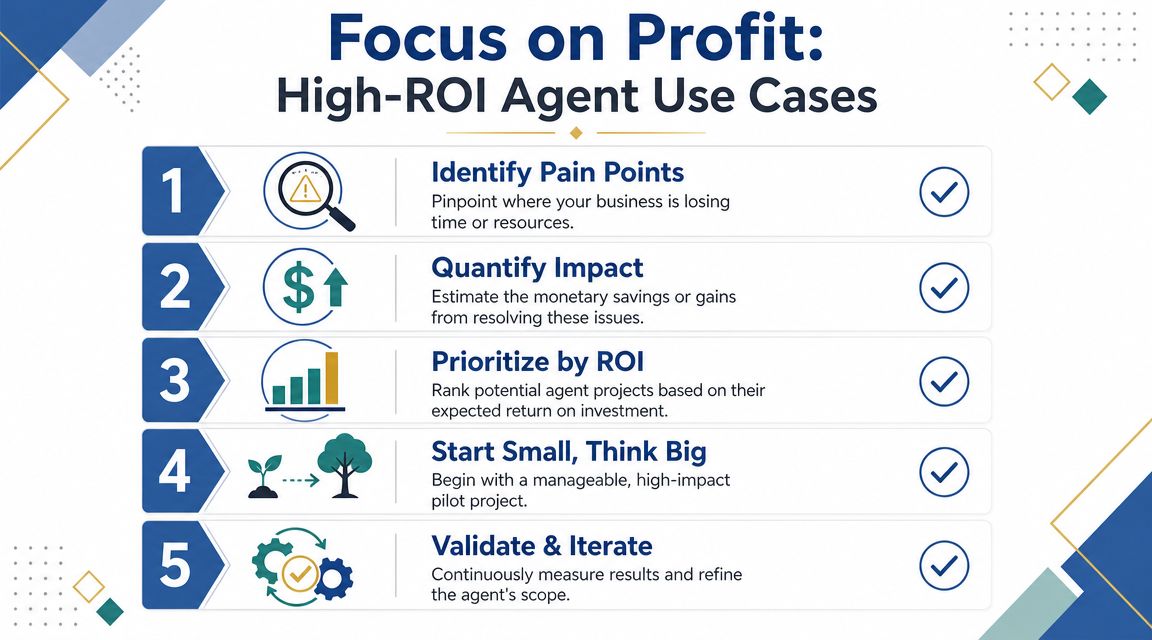
If you start with technology, you'll waste time. Start with financial pain.
The first agent you deploy should solve a problem your CFO can understand in one sentence. Not “we built a helpful assistant.” More like “we reduced cycle time in a workflow that slows customer response” or “we automated a reporting process that eats senior team hours every week.”
Here's the framing I use with clients. Look for workflows with four traits:
- Repetition. The task happens often.
- Information handling. People spend time reading, sorting, summarizing, checking, or routing.
- Clear stakes. Delays or errors cost money, slow service, or create bottlenecks.
- Contained scope. The workflow has boundaries, known inputs, and acceptable outputs.
A lot of operational gold sits in that zone.
For a visual way to assess opportunities, use this checklist:
Start where adoption already works
The pattern in production is clear. In this roundup of AI agent adoption statistics, the most common production uses are research and summarization at 58%, personal productivity and workflow automation at 53.5%, and customer service triage and issue resolution at 45.8%. The same source says companies using agents this way report 55% higher efficiency and 35% lower costs.
That lines up with what I see in the field. The early wins are boring on purpose. They sit in the workflows where humans are reading the same kinds of inputs, making the same kinds of calls, and pushing work through the same systems over and over.
If a process depends on people repeatedly gathering information, applying rules, and moving the work to the next stage, it's a strong candidate.
Good first use cases versus bad first use cases
A good first use case usually looks like this:
- Inbound lead qualification where the agent reads submissions, enriches context, scores fit against your criteria, and routes to sales or nurture
- Support triage where the agent classifies issues, drafts responses, and sends edge cases to a human
- Daily market or ops summaries where the agent pulls data, synthesizes changes, and flags anomalies
- Internal request routing for finance, HR, procurement, or RevOps tickets
A bad first use case usually looks like this:
- A broad “executive assistant” with no boundaries
- A customer-facing agent with brand and compliance exposure before you've proven reliability internally
- An end-to-end workflow with too many dependencies, policy exceptions, or hidden human judgment calls
If you want a broader menu of profitable starting points, I'd review these AI agent use cases for business workflows. The point isn't to copy a list. The point is to spot patterns you can monetize.
Later in your rollout, video walkthroughs can help your team align on what an agentic workflow should look like in practice:
My ROI filter
Before I greenlight any pilot, I ask five questions:
| Question | Why it matters |
|---|---|
| Does this task happen frequently? | Frequency creates leverage |
| Is most of the work information processing? | Agents are strong here |
| Can we define a successful output clearly? | Ambiguity kills deployment |
| Can we limit permissions safely? | Governance determines scale |
| Will a faster cycle create real business value? | Otherwise it's just automation theater |
If a use case fails two or three of those, I move on.
Design Your Agent Workforce
Don't build one giant agent and hope for the best. That's the amateur move.
You wouldn't hire one employee to do research, planning, execution, QA, reporting, and compliance signoff. You'd build a team with roles. Autonomous AI agents for operations work the same way. Specialization improves reliability.
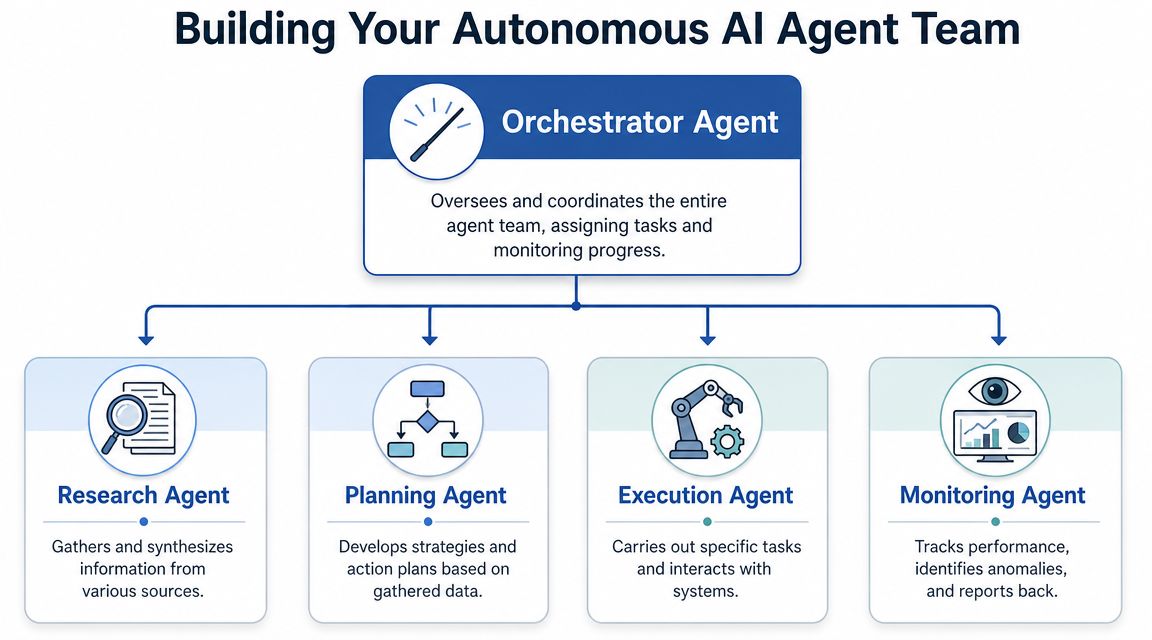
Here's the structure I prefer for most operational systems:
The core team pattern
I usually start with four roles.
Orchestrator
This agent receives the objective, decomposes the work, assigns tasks, and manages state. It is not the smartest specialist. It is the traffic controller.
Research or intake agent
This one gathers the raw material. API data, CRM records, submitted forms, support messages, internal documents, ticket context.
Execution agent
This agent performs bounded actions. Update a record. Draft a message. trigger a workflow. Prepare a report. Call a tool.
Verifier or monitoring agent
This role checks outputs, validates rules, compares actions against expected patterns, and escalates when confidence drops.
That setup beats a “god agent” because each role has a tighter mandate. Tighter mandate means fewer weird behaviors, cleaner prompts, clearer testing, and easier debugging.
Boundaries come before capability
The architecture matters less than the boundaries. This guardrails framework for autonomous operations makes the right point: full autonomy should only be granted in safe/trained operational areas, with immediate human interruption and emergency-stop capability everywhere else.
That's exactly right. I don't care how impressive the model is. If the workflow isn't safe and well understood, don't give it full control.
Give agents freedom only where failure is cheap, reversible, and observable.
A practical design standard
When I map agent roles, I define five things for each one:
- Objective. What result is this agent responsible for?
- Inputs. What data or triggers can it use?
- Tools. What systems can it touch?
- Limits. What is it explicitly not allowed to do?
- Escalation path. When does it stop and ask a human?
That sounds obvious, but this step is frequently overlooked. This often leads to wondering why the system acts unpredictably.
For teams outsourcing parts of implementation, operations leaders can borrow from Blocsys Technologies' IT outsourcing recommendations by getting explicit about ownership, delivery scope, and support boundaries before vendors touch core systems. That discipline matters even more with agents because vague responsibility creates operational risk fast.
Choose Your Agent's Brain and Toolbox
Teams often overcomplicate things. They debate model brands for weeks and ignore the fact that the model is only one part of the system.
Your agent's “brain” should match the task. Your “toolbox” should match the workflow. If you mismatch either one, costs rise and reliability drops.
Match the model to the job
For simple routing, classification, extraction, and templated outputs, use a smaller, faster, cheaper model. You don't need premium reasoning for every task. You need throughput.
For planning, synthesis, trade-off analysis, and multi-step coordination, use a stronger reasoning model. That's where higher-end capability pays for itself.
Here's the practical comparison I use with clients:
| Need | Better fit |
|---|---|
| High-volume triage | Fast low-cost model |
| Detailed reasoning | Frontier model |
| Regulated internal workflow | Model with strong instruction adherence |
| Real-time user interaction | Low-latency model |
| Drafting with brand nuance | Strong language model plus prompt constraints |
Product names matter less than fit. GPT, Claude, Gemini, and open-source models can all be useful. The right choice depends on latency tolerance, accuracy requirements, cost sensitivity, privacy posture, and how much orchestration you're doing around the model.
Tools matter more than prompt cleverness
A lot of agent failures get blamed on the model when the underlying problem is weak tooling. An agent without tools is a clever intern with no system access.
For operations, agents typically need some combination of:
- CRM access through Salesforce, HubSpot, or a similar platform
- Ticketing access through Zendesk, Jira, or ServiceNow
- Database or warehouse access for approved queries
- Execution tools to create records, send messages, update statuses, or trigger automations
- Knowledge access through document stores, file systems, or retrieval layers
Context engineering becomes more valuable than prompt engineering alone. The model needs the right instructions, yes. But it also needs clean state, structured tool schemas, useful memory, and relevant retrieval. I go deeper on that in this guide to agentic context engineering for business systems.
Open-source versus proprietary
This isn't a religion. It's a trade-off.
Proprietary models often get you faster deployment, strong reasoning, and easier managed infrastructure. That's useful when speed matters more than deep customization.
Open-source models can make sense when you need tighter control, custom deployment patterns, or a stronger preference for self-managed environments. But they usually require more operational maturity from your team.
The wrong move is choosing open-source because it sounds strategic, then discovering your team can't support the stack. The other wrong move is choosing a premium model for every micro-task and letting cost sprawl unchecked.
Buy reasoning where it creates leverage. Buy speed where the task is repetitive. Don't pay frontier-model prices for glorified sorting.
My default stack pattern
I like a simple stack first.
One orchestration layer. One or two models matched to task type. Clean tool interfaces. Controlled memory. Strong logging. Human approvals where risk justifies it.
If you need an implementation partner or advisory layer to design those workflows, Samuel Woods offers C-suite advisory around agentic workflows and multi-agent systems through Samuel Woods. That's one option among many. The important part is that whoever helps you build this understands both operations and governance, not just demos.
Build the Safety Net Orchestration and Governance
A lot of leaders still treat governance like legal overhead. That mindset will slow you down.
Governance is what lets you scale. Without it, every new agent becomes a trust problem. With it, you can give agents more responsibility because you know where they can act, what they can access, and how you'll catch bad behavior before it becomes an incident.
Use a process like this:

Treat every agent like a real system identity
One of the most important operational truths is also the one teams ignore. This CDW coverage on autonomous agents and insider-risk style governance argues that the main failure mode is governance, not model quality. It recommends treating each agent as a managed identity with its own logs, baselines, anomaly detection, and human oversight for high-risk decisions.
I agree completely. If an agent can call APIs, move files, update records, or act under valid credentials, then you should manage it like any other privileged actor in your environment.
That means:
- Named ownership so a human is accountable for the agent
- Least-privilege access so it gets only the permissions it needs
- Action logging so every important step is traceable
- Baseline behavior so anomalies can be spotted
- Escalation rules for actions that carry financial, legal, or reputational risk
Human-in-the-loop is a force multiplier
Some people hear “human-in-the-loop” and think it defeats the purpose. Wrong. Human checkpoints are what let you automate confidently.
I want agents handling the repetitive middle of the workflow. I want humans stepping in for threshold approvals, policy exceptions, unusual edge cases, and irreversible actions.
A clean approval model often looks like this:
| Workflow type | Approval model |
|---|---|
| Low-risk internal summaries | Fully automated |
| Standard routing and drafting | Automated with spot review |
| Customer-facing or financial actions | Human approval required |
| Destructive or irreversible actions | Restricted or prohibited |
That's how you move fast without creating a mess your team has to clean up later.
The goal isn't maximum autonomy. The goal is maximum trustworthy throughput.
Orchestration is where systems become operational
A good orchestration layer coordinates tasks, state, retries, timeouts, and escalation. It doesn't just pass prompts around.
I want the orchestrator to know who does what, what dependencies exist, what constitutes failure, and when to route work to a person. I also want every material action logged. Not because logging is exciting, but because auditability is what separates an operational system from a risky toy.
If you can't explain why the agent took an action, who approved it, what data it used, and whether that behavior is normal, you're not ready to scale.
From Lab to Live Deployment and KPIs
An agent that works in a workshop and fails in production is worthless. Deployment needs discipline.
The right rollout pattern is not big bang. It's controlled expansion. Teradata's guidance on autonomous agent deployment recommends a phased path: pilot a contained use case, expand to adjacent workflows, then industrialize with shared services. It also points to monitoring against workflow success rates, time-to-resolution, and drift from expected patterns. That's the correct scoreboard.
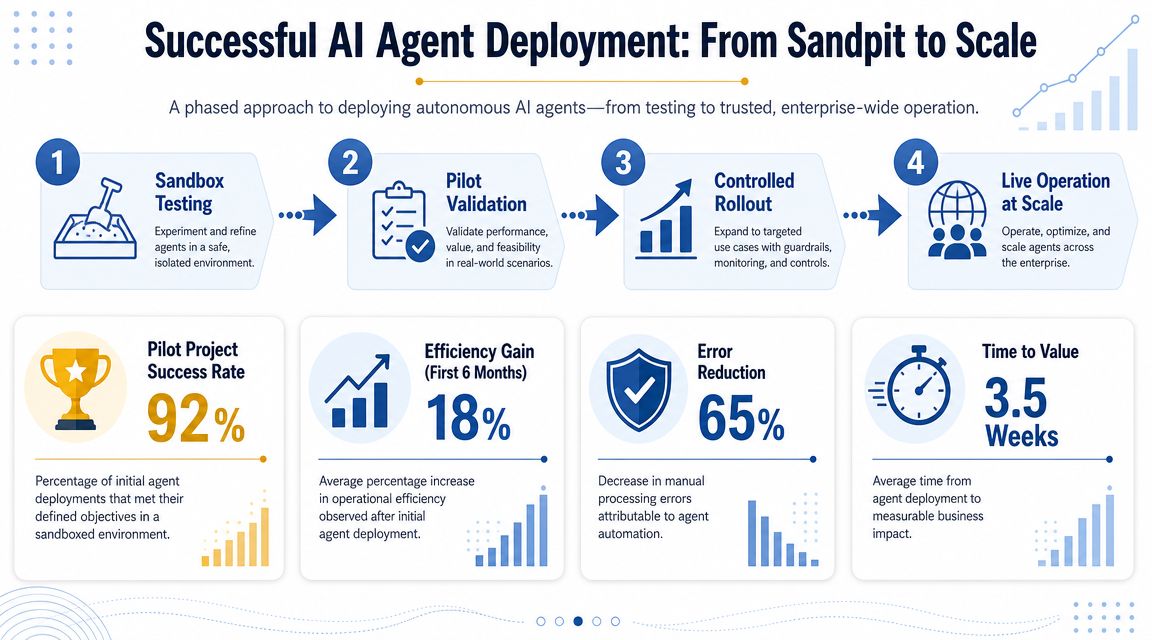
This is the deployment path I recommend most often:
Phase the rollout
Phase one is sandboxed parallel run
Let the agent work alongside your human process. It produces outputs, recommendations, drafts, or decisions, but a human still owns execution. This allows for exposing bad assumptions without business damage.
Phase two is bounded production access
Now the agent can act inside a narrow scope. Limited permissions. Tight monitoring. Clear rollback path.
Phase three is adjacent workflow expansion
Once one workflow is stable, extend into neighboring tasks. Keep the same operating standards. Don't loosen controls because the first pilot went well.
Phase four is industrialization
Industrialization involves standardizing shared services like observability, policy controls, tool catalogs, and evaluation routines so you can scale across teams without rebuilding governance every time.
Track board-level KPIs, not vanity metrics
Most agent dashboards are full of nonsense. Prompt count. Session volume. Token charts. Interesting for engineers, useless for executives.
I care about business impact and operational reliability:
- Workflow success rate so you know whether the process completes correctly
- Time-to-resolution so you know whether the business is moving faster
- Exception rate so you know where the workflow still breaks
- Drift signals so you know when data, policies, or tools have changed enough to degrade performance
- Human intervention patterns so you know where judgment is still needed
If you want a broader foundation for building and evaluating agent systems, review these practical frameworks for AI agents in business. Use them to standardize how your team defines success before the rollout begins.
What production readiness actually means
Production readiness doesn't mean the demo looked smooth. It means the agent can handle ordinary inputs, edge cases, bad inputs, system failures, and policy constraints without creating operational chaos.
I want scenario testing. I want adversarial testing. I want pre-execution checks and post-action verification. And I want drift detection because workflows change subtly. New data structures. New business rules. New software behavior. If you aren't watching for that, performance degrades long before anyone notices.
The companies that scale agents successfully treat deployment like operations. Because that's what it is.
Stop Managing Tasks Start Orchestrating Outcomes
The leadership shift is the real story. You're not just assigning work anymore. You're designing systems that produce outcomes with humans and agents working together.
That changes your role. You become the architect of throughput, quality, and control. The winners won't be the companies with the flashiest AI announcements. They'll be the companies that steadily build faster, tighter, more resilient operating systems than everyone else.
If you want a grounded companion read for smaller teams and founder-led businesses, I recommend your practical AI agents guide from Wayfinder Agents. It's useful when you need to translate the idea of agents into practical business moves without overengineering.
Move now. Pick one workflow. Define the economic outcome. Build the boundary. Deploy the agent. Then scale what proves itself.
If you want help designing autonomous AI agents for operations that improve speed, margin, and control, I work with leadership teams on strategy, architecture, and rollout.