
You're juggling campaign data, CRM records, email segments, product analytics, support tickets, and pricing changes. Your team is still clicking through dashboards and exporting CSVs while competitors are letting AI query their stack, reason across the mess, and act faster. That gap compounds fast.
I'm Samuel Woods. I've been working with ML since 2016 and Generative AI since 2019, and I can tell you most companies don't have an AI model problem. They have a context problem. The model can't drive outcomes if it can't reach the systems where your business operates.
That's why MCP matters. Anthropic launched the standardized Model Context Protocol in November 2024, and it gave businesses a cleaner way to connect AI assistants to tools, data sources, and workflows with governance and permission controls. In practice, that means your AI can stop being a chatbot and start behaving like an operator inside your business.
The timing is right. In marketing operations alone, 56% of marketers report lacking sufficient time to analyze their data properly. That's the bottleneck. MCP removes a lot of that manual analysis work by letting AI assistants query and act on live data from systems like Google Analytics, HubSpot, Salesforce, Mixpanel, Mailchimp, and Zendesk.
If you're evaluating MCP use cases for business, don't start broad. Start where latency, manual work, and missed context are already hurting revenue. The eight scenarios below are the ones I'd prioritize first.
Table of Contents
- 1. AI-Powered Market Intelligence Networks
- 2. Autonomous Email Campaign Orchestration
- 3. Dynamic Landing Page Optimization and Variant Generation
- 4. Customer Feedback Analysis and Product Insight Extraction
- 5. AI-Driven Content Production and Distribution Pipeline
- 6. Personalized Customer Segmentation and Lifecycle Marketing
- 7. Competitive Pricing Intelligence and Dynamic Pricing Strategy
- 8. Automated Prospect Research and Sales Readiness Intelligence
- MCP Use Cases for Business, 8-Point Comparison
- Next Steps: Embed MCP Into Your Growth Engine
1. AI-Powered Market Intelligence Networks
Your competitor cuts pricing on Tuesday, updates positioning on Wednesday, and arms sales with new objection handling by Thursday. If your team spots the pattern two weeks later in a dashboard review, you already lost margin, pipeline, or both.
This is one of the best MCP use cases for business because it ties signal collection to action. Instead of another reporting layer, you are building an operating system for market awareness that watches competitor moves, customer language, pipeline friction, and demand shifts in one place, then surfaces what deserves a response.
MCP fits this scenario because it gives your AI agent structured access to the systems where those signals already live. Used well, it lets your marketing, sales, and product decisions come from the same market view instead of arguing over screenshots, gut feel, and stale reports. My recommendation is simple. Start here if your business competes in a crowded category, sells against active alternatives, or changes messaging and pricing often.
What this looks like in practice
A real market intelligence network pulls from competitor pricing pages, review platforms, CRM notes, win loss interviews, search visibility tools, support conversations, and product usage trends. The agent compares changes across sources, ranks them by business impact, and routes the output to the team that can act on it.
That changes the job.
Instead of asking an analyst to monitor ten tools and summarize noise, you give your team a short list of decisions. Should you adjust pricing. Should sales update talk tracks. Should marketing change positioning. Should product investigate a recurring complaint tied to churn or lost deals.
A practical rule: start with five trusted sources and a narrow alerting logic. Signal quality matters more than source count.
If you want a stronger source mix before you build, use this guide to marketing intelligence tools that create real decision advantage.
Behind the scenes requirements
To make this work, wire your stack around four questions:
- What changed in the market? Pull from competitor pricing pages, product pages, changelogs, review sites
- What are customers repeating? Pull from support tickets, call transcripts, review text, churn reasons
- What is happening in the pipeline? Pull from CRM opportunities, lost deal reasons, sales notes, win loss interviews
- Where is demand shifting? Pull from Google Analytics, Mixpanel, search data, campaign performance
That is the minimum viable setup. Skip any source your team does not trust, cannot permission cleanly, or cannot map to a business decision. Bad inputs produce busywork, not insight.
What high-performing teams track
The best setup does not stop at summaries. It scores findings against concrete business outcomes:
- Message changes tied to win rate swings
- Competitor price moves tied to discount pressure
- Review themes tied to churn risk or feature demand
- Search trend changes tied to content or landing page gaps
- Sales objections tied to positioning weakness
That is where ROI shows up. You improve response time, tighten positioning, reduce wasted analysis hours, and give sales and marketing the same playbook. If you cannot name the action each alert should trigger, do not automate it yet.
2. Autonomous Email Campaign Orchestration
Your team launches a nurture sequence on Monday. By Wednesday, a prospect who already booked a demo gets the same “still interested?” email as a dormant lead, a customer with an open support issue gets an upsell push, and nobody catches it until reply rates drop. That highlights the core email problem. Coordination fails before copy does.
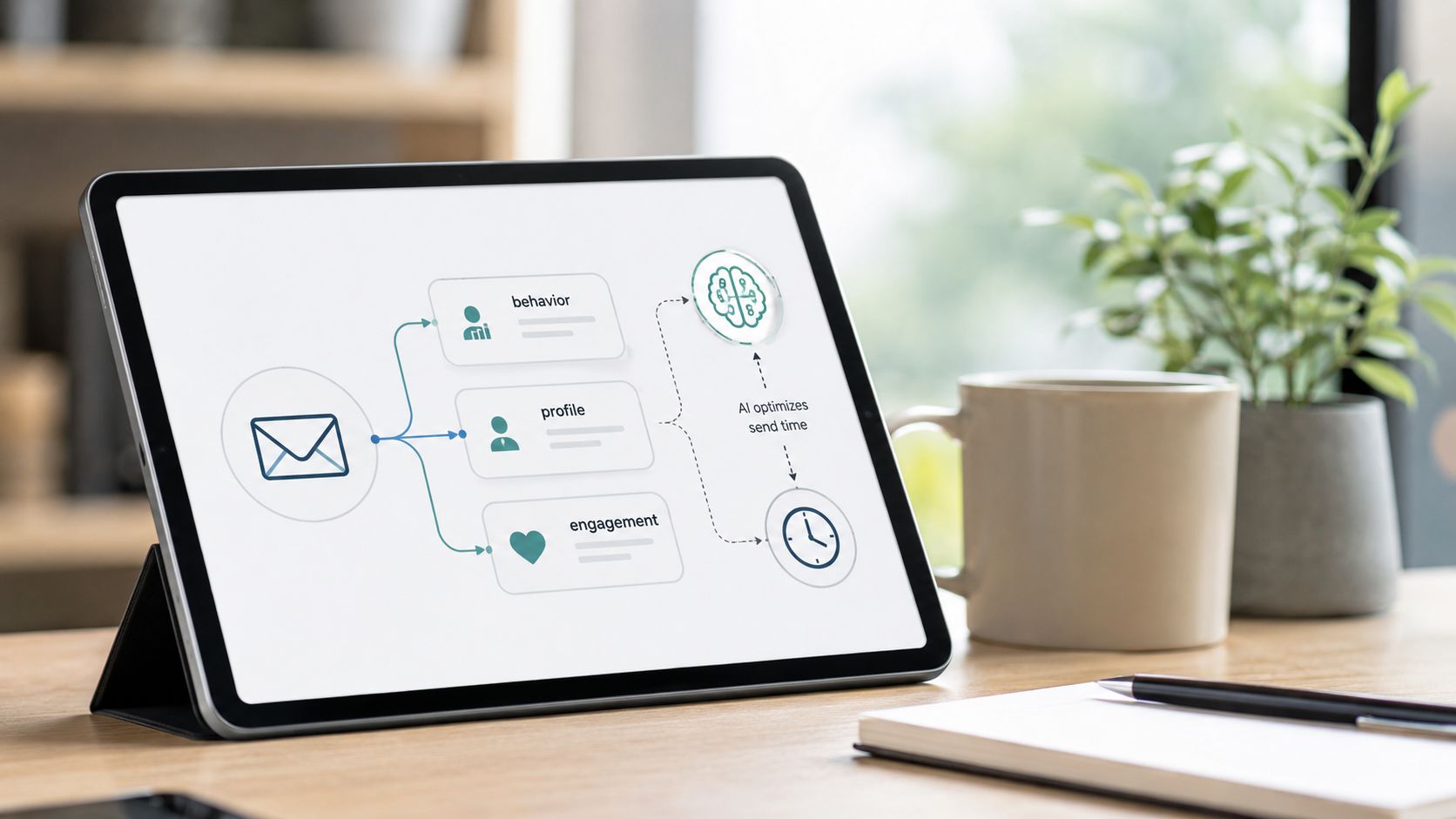
MCP fixes the operating model. It lets an AI agent use your ESP, CRM, product analytics, and support data in one workflow, so send decisions reflect current customer state instead of stale list logic. The payoff is practical: fewer mistimed sends, tighter lifecycle targeting, better conversion from the traffic and leads you already paid for.
Where MCP earns its keep
The strongest use case is triggered lifecycle orchestration. The agent checks recent behavior, account status, and channel history, then chooses the next message, delay, and branch. You stop relying on fixed drip schedules that ignore what happened yesterday.
Say you run SaaS onboarding. A user invited two teammates, viewed the integrations page, and hit an activation milestone. That user should get expansion-focused education or a sales assist sequence. Another user opened three onboarding emails, never completed setup, and created a support ticket. That user needs friction-removal content, not another feature pitch.
This also works in renewal rescue, post-purchase education, win-back campaigns, and lead recycling.
Keep the model inside clear rules. Let it optimize timing, sequence selection, and approved personalization. Do not let it write policy, override exclusions, or invent offers.
Behind-the-scenes checklist
If you want ROI, wire the workflow to the systems that control send quality:
- Your ESP, for audience, templates, send history, and deliverability signals
- Your CRM, for lifecycle stage, owner, opportunity status, renewal dates, and account tier
- Product analytics, for activation events, usage thresholds, feature engagement, and inactivity
- Support systems, for open tickets, escalation tags, CSAT risk, and refund requests
- A suppression layer covering unsubscribes, complaints, legal exclusions, and internal blocklists
- An approved content library of vetted templates, offer rules, and brand-safe copy blocks
Skip any source the model cannot interpret reliably or your team cannot govern. If the agent can trigger sends but cannot see complaint risk, account status, or support friction, it will create avoidable damage fast.
What to measure before you expand
Do not judge this workflow by opens alone. Track the business outputs tied to each automated decision:
- Conversion to activation, demo booked, or repeat purchase by sequence branch
- Time from qualifying behavior to send
- Unsubscribe and complaint patterns by lifecycle stage
- Revenue per recipient for expansion, renewal, or win-back flows
- Assist rate from email to pipeline movement or retained account
- Manual hours removed from campaign setup, QA, and audience pulls
Those metrics tell you whether the orchestration is producing revenue or just increasing send volume.
Required guardrails
Start with one high-volume flow where logic is clear and downside is limited, usually onboarding, trial conversion, or post-purchase education. Then add guardrails before you scale:
- Frequency controls that cap sends by audience, message type, and account status
- Eligibility rules that set no-send conditions for refunds, escalations, legal holds, or active sales conversations
- Template governance through approved copy blocks, personalization fields, and fallback content
- Human review points that require approval for new branches, sensitive segments, and offer changes
- A monitoring cadence of weekly checks for edge cases, suppression failures, and deliverability drift
My recommendation is simple. Use MCP to improve decision quality, not to maximize email output. If a workflow cannot explain why this person should get this message now, do not automate it yet.
3. Dynamic Landing Page Optimization and Variant Generation
You pay for traffic before you earn from it. That makes your landing page one of the most strategic places to use MCP.
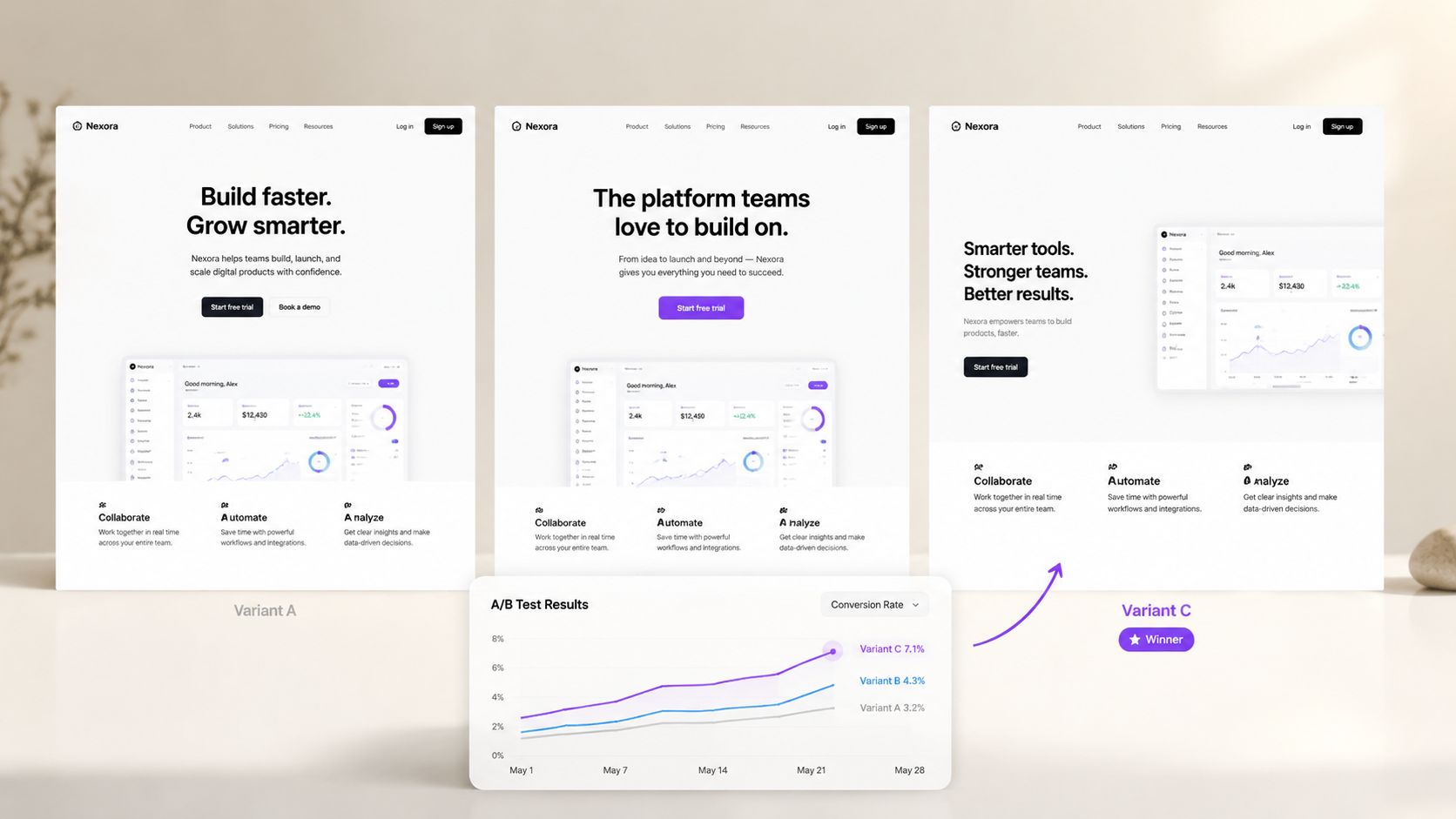
The goal is more profit per visit, and extra tests only count when they raise it. MCP helps when it can pull in the signals your team usually reviews in separate tools, then turn them into testable page changes tied to revenue, lead quality, and sales feedback.
How the workflow runs
A useful workflow starts with diagnosis, not copy generation. The agent reviews entry source, scroll depth, bounce paths, form abandonment, on-page behavior, sales-call objections, and downstream CRM outcomes. Then it recommends variants with a clear hypothesis, such as reducing friction for mobile visitors, matching ad intent more closely, or answering the objection that keeps showing up in demo calls.
That is the difference between testing and guessing.
Done right, MCP can also catch problems you miss during a normal review cycle. It can query funnel analysis tools, segment behavior by device, traffic source, and returning versus new visitors, then connect those patterns to broken form events, slow page loads, JavaScript errors, or API failures. That gives you a tighter feedback loop between conversion work and technical fixes, which is where a lot of lost revenue hides.
What to connect before you launch
If you want useful recommendations, connect the systems that show intent, friction, and commercial outcome. Anything less produces pretty variants with weak business impact.
- Behavior data from Google Analytics, Mixpanel, Hotjar, or equivalent tools for session trends, click behavior, and form drop-off
- Commercial outcomes such as CRM stage movement, qualified pipeline, closed-won status, and revenue by source page
- Technical diagnostics such as error tracking, broken submissions, page-speed monitoring, and API failure logs
- Voice-of-customer inputs such as sales transcripts, support objections, chat logs, and win-loss notes
- Competitive context, meaning the pages buyers compare you against before they convert or leave
When you want a quick walkthrough on the mechanics of AI-assisted testing, this explainer is worth watching.
What to measure if you want real ROI
Track business outcomes, beyond lift on a single page metric.
- Conversion rate by traffic source and device
- Qualified lead rate, beyond raw form fills
- Revenue per session or pipeline created per variant
- Form completion time and abandonment point
- Page error rate tied to conversion loss
- Test cycle time from insight to publish
My recommendation is simple. Start with one high-intent page that already gets enough traffic and has a working CRM feedback loop. Pricing pages, demo pages, and high-volume campaign destinations are usually the best candidates.
Do not use MCP here if traffic is thin, attribution is messy, or sales outcome data is missing. In those cases, the model will optimize for surface-level engagement and give you false confidence.
4. Customer Feedback Analysis and Product Insight Extraction
Most companies have the data needed to improve retention and product-market fit. They just can't process it fast enough. Support tickets pile up. Reviews spread across marketplaces. Survey responses sit untouched in a dashboard nobody opens.
This is where MCP pays off. Instead of relying on someone to manually tag themes, the model can ingest support data, reviews, survey text, CRM notes, and community conversations, then turn that into a prioritized decision layer.

From raw feedback to decisions
“Customers are unhappy” tells you nothing. The useful output is “these complaints are concentrated in high-value accounts, they map to one workflow, and they appear just before cancellation.” That's something you can act on.
For marketing teams, this matters even more because the analysis bottleneck is already severe. As noted earlier, a majority of marketers report they don't have enough time to analyze data properly. Feedback data is one of the first places that time shortage causes strategic mistakes.
The best insight pipeline ranks issues by business consequence, not by mention volume alone.
What to wire up first
Your first-pass stack should pull from support platforms, NPS or survey tools, review sites, product analytics, and churn notes. If possible, enrich each feedback item with account value, customer age, product plan, and status.
Here's what I'd prioritize:
- Support systems such as Zendesk, Intercom, or your help desk of record.
- Customer sentiment sources such as review platforms, post-purchase surveys, and in-app feedback.
- Product context from event data tied to the workflow the customer mentioned.
- Revenue context from CRM or billing data so the model can distinguish noise from costly friction.
Don't hand roadmap ownership to the model. Use it to surface patterns, cluster them, and attach commercial context. Then you decide what gets built.
5. AI-Driven Content Production and Distribution Pipeline
Monday starts with a familiar problem. You need a blog post, three LinkedIn posts, an email, and sales collateral by Friday. Ideas are rarely the bottleneck. The bottleneck is turning approved messaging, search demand, product context, and channel-specific formatting into publish-ready assets without burning your team out.
MCP fixes the handoff problem. Your AI can pull from your content calendar, keyword set, brand rules, internal docs, CRM notes, and publishing tools in one workflow. That changes content from a series of disconnected tasks into an operating system you can measure.
What actually improves ROI
The best use case here is throughput with control. You cut research time, reduce rewriting, and repurpose strong ideas faster across channels. You also stop publishing content that sounds polished but says nothing.
That only works if you treat content production like a pipeline with checkpoints.
Topic selection should connect to revenue goals. Drafting should reference approved claims and subject-matter input. Distribution should follow channel rules, not generic copy-paste. Measurement should feed the next cycle. If you need to build that process from scratch, start with this guide on how to automate content creation without wrecking quality.
A smart team also uses external datasets where they add strategic value. If you publish founder-led content in AI, a Database of Generative AI investors can support investor trend pieces, partnership maps, or ecosystem commentary that is harder to fake and easier to differentiate.
The stack I would set up first
You do not need a bloated toolchain. You need the right inputs connected in the right order.
- Planning inputs such as search terms, content briefs, customer questions, sales call notes, and product launch priorities.
- Creation controls such as your style guide, brand vocabulary, compliance rules, approved examples, and SME source material.
- Publishing systems such as your CMS, email platform, social scheduler, asset library, and approval workflow.
- Performance feedback such as rankings, assisted conversions, pipeline influence, on-page engagement, and reuse rate by asset type.
The hidden win is editorial consistency. When the model can access the same rules, examples, and source material every time, output quality stops swinging wildly from one prompt to the next.
Behind-the-scenes checklist
If you want this to produce business results, configure these before you scale volume:
- Define 3 to 5 content goals tied to pipeline, retention, or expansion.
- Create source folders for claims, examples, customer proof, and product notes.
- Set channel-specific formatting rules for blog, email, LinkedIn, and sales enablement.
- Add human review at the points where factual errors or brand risk are expensive.
- Track production time, publication rate, assisted revenue, and content refresh intervals.
Judge the system on business output, not word count. If content volume rises but assisted pipeline, qualified traffic, and sales reuse stay flat, the workflow is generating clutter.
One more rule. Do not automate publishing by default. Automate research assembly, first drafts, repurposing, metadata, and scheduling prep first. Keep editorial judgment with a real operator until your QA process is tight enough to trust.
6. Personalized Customer Segmentation and Lifecycle Marketing
Your team sends an upgrade campaign on Monday, a save campaign on Wednesday, and a support follow-up on Friday to the same account. That is what happens when segmentation lives in static lists instead of live customer context.
MCP gives you a better system. It lets an AI agent evaluate each customer against current CRM records, product usage, support history, billing status, and campaign engagement, then assign the next best lifecycle action based on business value.
Why static segmentation costs you money
Lifecycle marketing breaks when teams force one customer into one label. Real accounts do not behave that cleanly. A customer can show expansion intent, declining usage, and rising support burden in the same week.
MCP handles that overlap better because the model can weigh competing signals instead of waiting for someone to rebuild a segment manually. It can flag users nearing plan limits, identify customers who only convert after repeated email engagement, and surface accounts that fit a churn pattern based on lower usage plus heavier support demand.
Priority is the primary advantage here.
A good lifecycle system goes past sorting people into buckets. It decides which message should win, which channel should carry it, and when your team should hold back because another motion, like support recovery or sales outreach, matters more.
Core integrations to prioritize
This use case lives or dies on identity resolution. If product events, email activity, CRM contacts, and billing records do not map to the same customer, the model will make bad decisions fast.
Start with four inputs:
- A customer system of record such as Salesforce, HubSpot, or your primary CRM
- A behavior layer of product analytics, website analytics, and email engagement data
- A commercial layer covering subscription status, plan limits, renewal dates, upgrades, downgrades, and refunds
- An experience layer covering support tickets, chat transcripts, NPS, CSAT, and onboarding status
Do not start with fancy segment logic if your IDs are broken. Fix account matching first.
Behind-the-scenes checklist
If you want this to improve retention or expansion, set up the operating rules before you automate journeys:
- Define the lifecycle states that matter to revenue, such as activation, adoption, expansion, renewal risk, and reactivation
- Set priority rules for conflicts, so the system knows whether churn prevention should outrank upsell or whether onboarding should suppress promotional offers
- Map the exact triggers for each state, including usage thresholds, support volume, billing changes, and engagement patterns
- Set channel rules by scenario, such as email for nurture, in-app prompts for feature adoption, and human outreach for high-value risk accounts
- Review false positives every week during rollout, especially for churn flags and expansion recommendations
- Track activation rate, time to first value, expansion conversion, renewal rate, reactivation rate, and suppression accuracy
One recommendation. Start with two or three high-value lifecycle moments, not the full customer journey. Activation, expansion, and churn prevention usually give you the fastest return because the signals are easier to define and the revenue impact is easier to measure.
Judge this system by lift, not by segment count. If you create more audiences but renewal, expansion, and activation stay flat, your setup is adding complexity without improving outcomes.
7. Competitive Pricing Intelligence and Dynamic Pricing Strategy
You notice a competitor changed packaging on Tuesday. A prospect mentions price pressure on Wednesday. You review discounting two weeks later. By then, the window to respond has narrowed, and your team is arguing from fragments instead of evidence.
MCP fixes that by pulling pricing inputs into one operating loop. It connects your costs, competitor pages, win-loss notes, usage data, discount approvals, and support complaints so your team can make pricing decisions with current context instead of stale opinions.
What MCP adds to pricing work
The win is better pricing judgment, with you still making the call.
An MCP-connected agent can monitor competitor pricing pages, detect packaging edits, flag new plan limits, summarize repeated buyer objections, and compare those signals against your own margin and usage data. That gives you a practical answer to the question that matters. Should you change price, change packaging, tighten discounting, or do nothing?
This approach also works well in e-commerce and marketplace businesses. If your catalog, PIM, channel listings, and margin data are connected, an agent can spot where pricing drift, promo conflicts, or outdated product-page positioning are hurting conversion or profit. The same principle applies in SaaS. Pricing gets better when the AI has access to actual commercial systems, not screenshots in Slack and a spreadsheet someone forgot to update.
Good pricing intelligence tells you which competitor moves affect revenue and which ones you should ignore.
If you sell through a sales-assisted motion, connect pricing signals to qualification. Teams that align deal context, objections, and pricing pressure usually make better discount decisions. I break that workflow down in this guide to an AI agent for lead qualification.
Minimum viable pricing stack
Start with inputs that directly affect revenue and margin:
- Internal economics such as cost structure, gross margin by product or plan, discount patterns, refund trends, and exception approvals
- Market signals such as competitor pricing pages, packaging updates, promotional offers, free-trial changes, and contract terms when available
- Buyer feedback such as sales call transcripts, objection tags, lost-deal notes, procurement pushback, and renewal negotiation themes
- Usage and value signals such as feature adoption, seat expansion, overage behavior, plan-limit friction, and support volume by tier
Behind-the-scenes checklist
If you want pricing recommendations you can trust, set the rules before you automate anything:
- Define which pricing decisions the system can support, such as packaging changes, discount guardrails, promo timing, or list-price reviews
- Set alert thresholds so minor competitor edits do not trigger unnecessary reactions
- Map margin floors by product, segment, and channel
- Tag common pricing objections in sales and support data so the agent can separate real price issues from weak positioning
- Review recommendations against win rate, average selling price, gross margin, and refund or churn patterns
- Audit changes every week during rollout to catch bad comparisons, missing competitor data, or false urgency
One recommendation. Start with one pricing problem.
For SaaS, that is usually discount control or packaging clarity. For e-commerce, it is often margin protection during competitive promo periods. Both are easier to measure than fully dynamic pricing, and both give you a faster read on whether the system is improving revenue quality.
Use caution with individualized pricing. If your model, legal posture, or brand does not support it, keep MCP focused on strategic pricing and packaging decisions. That is where you get the clearest ROI without creating trust problems or operational mess.
8. Automated Prospect Research and Sales Readiness Intelligence
Your rep has a discovery call in 20 minutes. Right now, they are bouncing between the CRM, LinkedIn, the company site, recent news, and old call notes, trying to piece together a point of view. That is wasted selling time.
MCP fixes that by turning scattered sales context into one usable brief. Your agent can pull account history, firmographic data, buying signals, stakeholder context, recent company activity, and recommended outreach angles into a single workflow. The rep starts the call prepared, and your pipeline review gets cleaner because the reasoning is documented.
The primary ROI is speed plus consistency. You cut prep time, but you also stop relying on each rep to do research with the same level of discipline. That matters as soon as more than one person takes sales calls, accounts change hands, or you work a mixed book of inbound and outbound opportunities.
Where the readiness advantage comes from
The win here is research tied directly to action.
An MCP setup can connect your agent to Apollo, your CRM, enrichment tools, public web sources, call transcripts, and sequencing platforms in one chain. The agent finds the account, checks for buying signals, reviews prior touches, drafts a brief, suggests the next step, and writes the output back to the systems your team already uses. That removes the gap between "I found something useful" and "the rep actually used it."
Done well, the brief should answer five questions fast:
- Why this account now
- Who likely matters in the buying group
- What changed recently
- What pain or opportunity is most plausible
- What the rep should do next
If you want the qualification side of this process mapped out in more detail, read my guide to building an AI agent for lead qualification.
What your sales agent needs access to
Keep the first version practical. If you connect too many tools before you define the output, you will create noise instead of readiness.
Start with these inputs and actions:
- An account and contact source such as Apollo, LinkedIn Sales Navigator exports, or your owned target account list
- A system of record covering CRM accounts, contacts, open opportunities, activity history, and owner fields
- Context sources such as the company site, hiring pages, recent news, product pages, job posts, and public tech stack signals
- Conversation memory from call recordings, transcripts, email threads, prior objections, and meeting notes
- An action layer for sequence enrollment, task creation, account updates, meeting prep notes, and CRM write-back
Do not launch without CRM write-back. If the agent produces a great brief that lives in a side panel nobody checks again, you saved a few minutes and changed nothing.
Behind-the-scenes checklist
Treat this as a sales operations workflow, not a prompt experiment.
- Define the exact brief format reps will get before you connect new data sources
- Set rules for which signals count as meaningful, such as hiring, funding, leadership changes, expansion activity, or inbound engagement
- Map which fields the agent can write to in the CRM and which ones require human approval
- Create separate logic for SMB, mid-market, and enterprise accounts so the same template does not flatten different buying motions
- Require source citations inside the brief so reps can verify key claims fast
- Review a sample of outputs every week for bad enrichment, stale signals, weak recommendations, and duplicate records
One recommendation. Start with pre-call briefs for inbound demos or high-value outbound accounts.
That gives you a clear before-and-after test. Measure rep prep time, speed to first touch, meeting quality, CRM completeness, and progression from first meeting to qualified opportunity. If those improve, expand into automated tasking and sequence enrollment. If they do not, your issue is usually bad source access or a vague brief template, not the concept itself.
Do not let the system send unsupervised outreach to strategic accounts on day one. Review the first batch of briefs and message suggestions yourself, or have your strongest rep do it, then tighten the rules. The goal is better sales judgment at scale, not more automated noise.
MCP Use Cases for Business, 8-Point Comparison
| Solution | Implementation complexity | Resource requirements | Expected outcomes | Ideal use cases | Key advantages |
|---|---|---|---|---|---|
| AI-Powered Market Intelligence Networks | High, data ingestion, MCP servers, reasoning models | Engineering for connectors, clean data pipelines, model & infra costs | Faster competitive insights; decision cycles cut ~50%; 15–25% win-rate lift | Competitive monitoring, pricing/market shifts, strategic planning | Real-time synthesis across sources; surfaces non-obvious opportunities |
| Autonomous Email Campaign Orchestration | Medium, platform integration and guardrail design | Clean customer tracking, CRM/email platform integration, prompt engineering | Improve opens/clicks 8–15%; frees 12–18 hrs/week of ops work | Welcome flows, cart recovery, reactivation, high-volume email programs | Behavioral personalization and conditional send logic at scale |
| Dynamic Landing Page Optimization & Variant Generation | Medium–High, analytics + test orchestration | Integration with analytics/A/B tools, sufficient traffic, design/dev support | Run 4–5x more experiments; conversion lifts 20–50% in months | Conversion rate optimization, high-traffic landing pages, product launches | Rapid variant generation and statistical detection of winners |
| Customer Feedback Analysis & Product Insight Extraction | Medium, connectors and thematic reasoning | Integrations with support/review platforms, deduplication, validation loop | Identify high-impact roadmap items; retention +5–15% | Churn root-cause analysis, roadmap prioritization, UX improvements | Multi-source thematic clustering and impact correlation to metrics |
| AI-Driven Content Production & Distribution Pipeline | Medium, content workflows and SEO tooling | CMS/SEO tool integration, brand voice docs, human editors | 3–5x content output; organic traffic +20–40% within months | Blog scaling, creator content, demand-gen content programs | End‑to‑end ideation, draft generation, SEO and distribution automation |
| Personalized Customer Segmentation & Lifecycle Marketing | High, unified data and real-time evaluation | Clean unified customer data, CRM/engagement integrations, modeling | Marketing ROI +30–50%; LTV +15–25%; churn −12–18% in top segments | Retention campaigns, expansion plays, lifecycle orchestration | Dynamic, predictive segments with real-time journey orchestration |
| Competitive Pricing Intelligence & Dynamic Pricing Strategy | Medium, pricing models and cohort analysis | Pricing/cost data, competitor monitoring, margin analytics | Revenue per customer +12–25%; faster price decisions (weeks) | Tiering decisions, bundling, price tests for SaaS/ecommerce | Market-informed pricing recommendations and test orchestration |
| Automated Prospect Research & Sales Readiness Intelligence | Medium, data enrichment and brief generation | CRM integration, company data APIs, news/tech-stack sources | Prep time per prospect ↓, sales velocity +20–30%, faster outreach | ABM, SDR outreach, enterprise prospecting | Fast, contextual one-page briefs and decision-maker identification |
Next Steps: Embed MCP Into Your Growth Engine
You've now seen the MCP use cases for business that matter most when the goal is growth, speed, and leaner operations. Actual business execution, with no theoretical AI transformation.
The wrong move is trying to wire your whole business into MCP at once. That creates integration drag, governance issues, and a pile of low-trust outputs your team won't use. Start where the pain is already expensive. Usually that means one of four places: market intelligence, email orchestration, landing page optimization, or sales research.
Pick one scenario and define three things before you touch the tooling. First, what decision or workflow is too slow today. Second, which systems hold the context needed to improve it. Third, what guardrails the AI must stay inside. If you can't answer those clearly, you're not ready to automate the process.
Then clean the data path. This is the unsexy part, but it decides whether MCP helps or hurts. You need stable integrations, permission controls, source prioritization, and a clear owner for the workflow. If the CRM is full of junk, if analytics naming is inconsistent, or if nobody trusts the support taxonomy, fix that before you expect clean AI output.
A practical rollout looks like this:
- Choose one high-value workflow, something frequent, measurable, and painful.
- Connect only the required systems. Don't overbuild the first version.
- Set approval rules that decide what the model can recommend, draft, or execute.
- Review outputs weekly to catch failure modes early, especially categorization errors and overconfident recommendations.
- Measure business impact through time saved, response speed, conversion movement, retention effect, or revenue influence.
Your competitors will still have the same raw tools. The difference is that your AI can operate inside your business context instead of only generating text about it.
That's the shift. MCP turns isolated models into connected operators. It closes the gap between question and action. It removes the wait between signal and decision. And once you embed it into the workflows that drive revenue, you stop using AI as a novelty and start using it as infrastructure.
