
AI is the part of a system that interprets messy input, like deciding what a customer message means. Automation carries out defined actions when a trigger and rule are met. AI automation connects them, with a model interpreting the input and automation moving the result through the business. I keep a human on decisions with real risk.
You've probably opened an AI tool to solve a workflow problem, then discovered you still had to copy the output into a spreadsheet, check it, rewrite it, and send it yourself. The tool had “AI automation” on the pricing page. Your afternoon still disappeared.
I'm Samuel Woods. I build practical systems for small online businesses, and the useful question isn't whether a tool uses AI. It's which part of your work requires interpretation, which part follows a rule, and where a human should remain responsible.
This distinction gives you a buildable answer to the ai and automation meaning question. You can use it this week, with the tools you already have, without turning your business into a software project.
Table of Contents
- Why AI and Automation Get Mixed Up and Why It Costs You
- What AI and Automation Actually Mean in Plain English
- How AI and Automation Overlap and Where They Differ
- Real Marketing and Growth Workflows That Show the Difference
- How to Build a Bionic System Without a Big Team or Budget
- How to Measure ROI and Catch What Breaks Early
- Your Quick Start Checklist for AI and Automation This Week
Why AI and Automation Get Mixed Up and Why It Costs You
A founder sees a new lead arrive through a form. They want a system that reads the message, decides whether the person is a fit, adds context from the website, drafts a reply, and sends it. They search for automation, find a workflow builder, connect a few apps, and expect the whole process to run.
Then the edge cases arrive.
A lead writes an incomplete message. A company name appears differently in two systems. The email contains a buying question the original rule never anticipated. The workflow moves the record, but nobody decides what the message means. The founder ends up reviewing every result manually, while also paying for several connected tools.
That's the opportunity cost of confusing execution with interpretation. You spend time wiring actions when the bottleneck is judgment, or you ask an AI model to make a decision that should have been a simple condition.
The practical business test is narrower:
Before choosing a tool, ask: “Does this task need a rule, an inference, or both?”
A rule can say, “If a form includes a company email, create a CRM record.” An inference can say, “Read this message and decide whether the person is asking for pricing, support, or a partnership.” A combined workflow can classify the message, then execute a fixed series of actions based on that classification.
The mistake I see most often
People start with the tool. I start with the repeated job.
Write down the task exactly as you perform it today. Include the trigger, the information you inspect, the decision you make, the action that follows, and the point where you check the result. If the task has a stable trigger and predictable actions, traditional automation may be enough. If the input is messy and the decision depends on meaning, AI may have a role. If the final action carries reputational or financial risk, keep an approval step.
That filter prevents wasted pilots because it tells you what capability you're buying. You're no longer asking whether AI sounds impressive. You're deciding whether the work needs thinking, doing, or a controlled loop between the two.
What AI and Automation Actually Mean in Plain English
Think of a small business as having two kinds of digital labor. One part examines information and reaches an interpretation. Another part carries out an instruction.
AI is the interpretation layer. The OECD defines an AI system as a machine-based system that infers from inputs how to produce outputs such as predictions, content, recommendations, or decisions that can affect a physical or virtual environment. The system can vary in autonomy and adaptiveness after deployment. The OECD's updated AI system definition gives the technical foundation for that distinction.
Automation is the execution layer. It uses technology to perform tasks with limited human intervention. A trigger starts the process, conditions determine what happens, and connected tools carry out the actions. Traditional automation usually works best when the input is structured and the rules are clear.
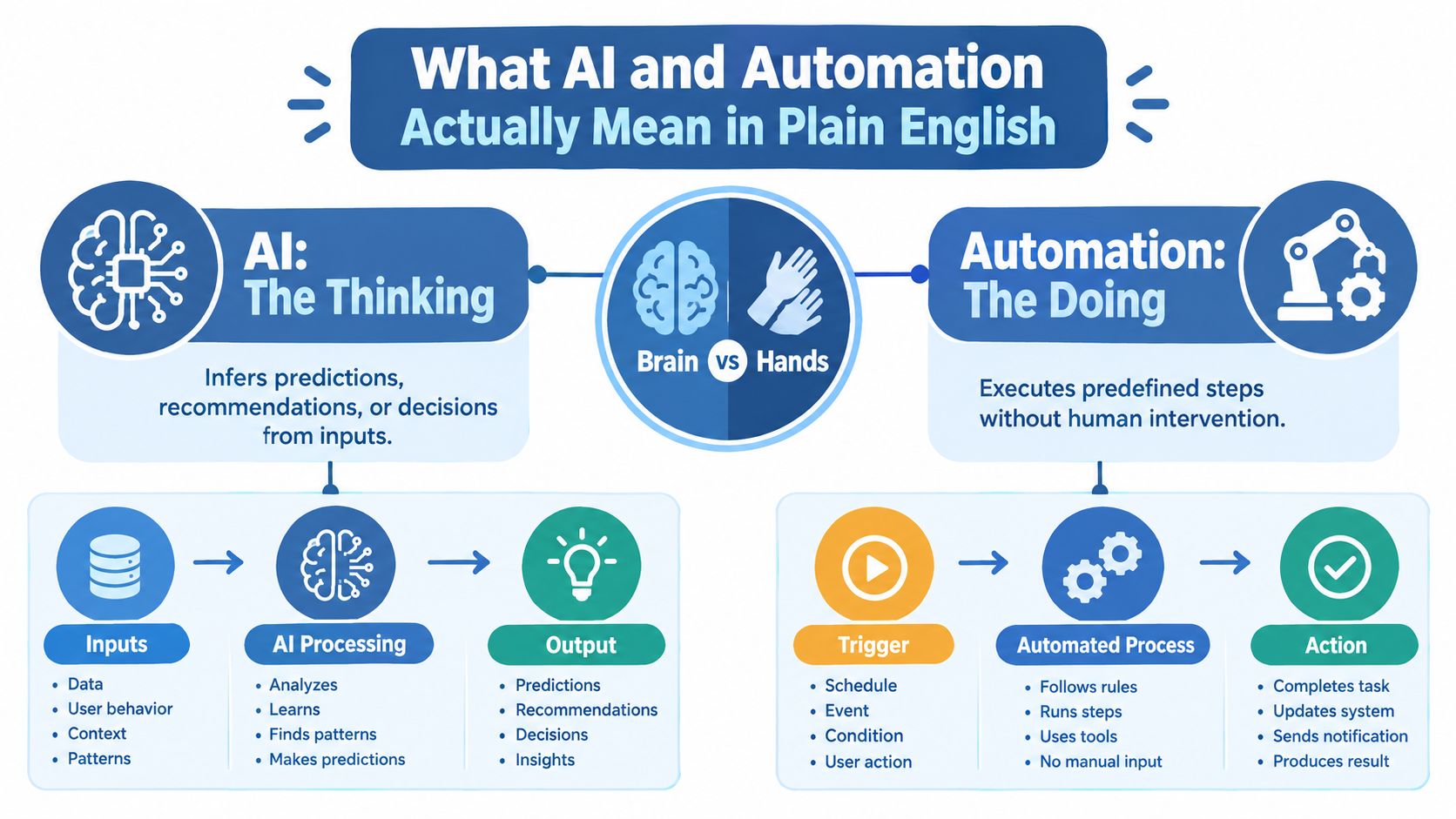
Here's a simple example. A spreadsheet row contains a customer's name, email address, plan, and renewal date. Automation can copy that row into a CRM, create a reminder, and send a predefined message. AI can read the customer's free-text note, infer whether they're confused, unhappy, or ready to upgrade, and recommend the next action.
Why the distinction changed
The idea of AI is usually traced to the 1956 Dartmouth workshop, while the convergence between AI and automation accelerated in the early 2010s, when machine learning, natural language processing, and computer vision became capable of handling unstructured data, documents, and conversations at scale. The OECD's analysis of artificial intelligence and jobs describes this movement from narrow, rule-based handling toward systems that can interpret context.
That change matters for your workflow. A rule-based system needs you to anticipate the variations. An AI system can examine a document, message, image, or transcript and map it to an output even when the input doesn't match a tidy template.
The combination is often called AI automation. A model interprets the input, then automation moves the result through the business.
A test you can use on Monday
Take one recurring task and write two sentences:
- “The system must understand…”
- “The system must do…”
The first sentence identifies the AI requirement. The second identifies the automation requirement.
For example:
- The system must understand whether an inbound message shows purchase intent.
- The system must add a label, create a follow-up task, and draft an email.
If you need a human to handle legal or highly sensitive material, you might still automate collection and sorting while leaving the decision with a person.
You can explain the ai and automation meaning to a teammate this way: AI decides what an input means or recommends what should happen. Automation carries out defined actions. AI automation connects those two layers.
How AI and Automation Overlap and Where They Differ
AI and automation overlap because AI itself can automate decision-like tasks. The OECD explicitly classifies AI as an automation technology, alongside technologies such as industrial robots and software that perform work previously done by people. The OECD workplace classification makes the relationship direct.
That still doesn't make the terms interchangeable. Automation can run entirely on fixed rules. AI can produce a recommendation without taking any action. A useful system places each capability where it adds value.
| Task Type | Best Fit | Human Role |
|---|---|---|
| Copy a form submission into a CRM | Rule-based automation | Check the field mapping during setup |
| Label a message using known keywords | Rule-based automation | Review exceptions |
| Classify a messy customer message | AI inference | Review low-confidence or sensitive cases |
| Draft a response from approved context | AI inference inside automation | Approve before sending when tone or risk matters |
| Research, decide, and take several connected actions | Combined system or agent | Set boundaries, approve high-impact actions, inspect logs |
Rules, inference, and agents
Rule-based automation is predictable. Given the same trigger and conditions, it follows the same path. Use it for moving records, scheduling reminders, applying known thresholds, and enforcing a sequence that must remain stable.
AI inference is probabilistic. It reads context and produces a likely interpretation, classification, summary, or recommendation. That makes it useful for language and semi-structured information, but it also means you should constrain the output and inspect important decisions.
An agent sits further toward autonomy. It can pursue a goal, choose steps, use tools, and adjust its path based on what it finds. I only use that pattern when the task doesn't require physical presence, emotional intelligence, complex interpersonal judgment, or high ambiguity, and when the necessary data is available to the system. Those boundaries align with BCG's discussion of agentic work.
Two workplace uses that sound similar
The ILO separates workplace AI into two broad uses. One automates tasks workers perform. The other automates managerial functions through analytics and algorithms, which it calls algorithmic management. The ILO's artificial intelligence topic page is useful because it keeps the worker's task and the manager's decision process distinct.
For a small business, the distinction changes what you monitor. An AI tool that drafts a customer reply needs checks for accuracy and tone. A system that scores workers, controls schedules, or determines access to opportunities needs a different level of scrutiny because it affects people's working conditions.
My practical test is simple. Use rules for repeatability, AI for interpretation, and a hybrid loop when interpretation must lead to controlled action. Don't buy an agent when a filter and a button will do.
Real Marketing and Growth Workflows That Show the Difference
The fastest way to understand the difference is to build a small workflow with a clear output. I use six questions every time: what opportunity exists, what steps run, what manual work disappears, what data the system needs, which number tells me it worked, and where it can fail.
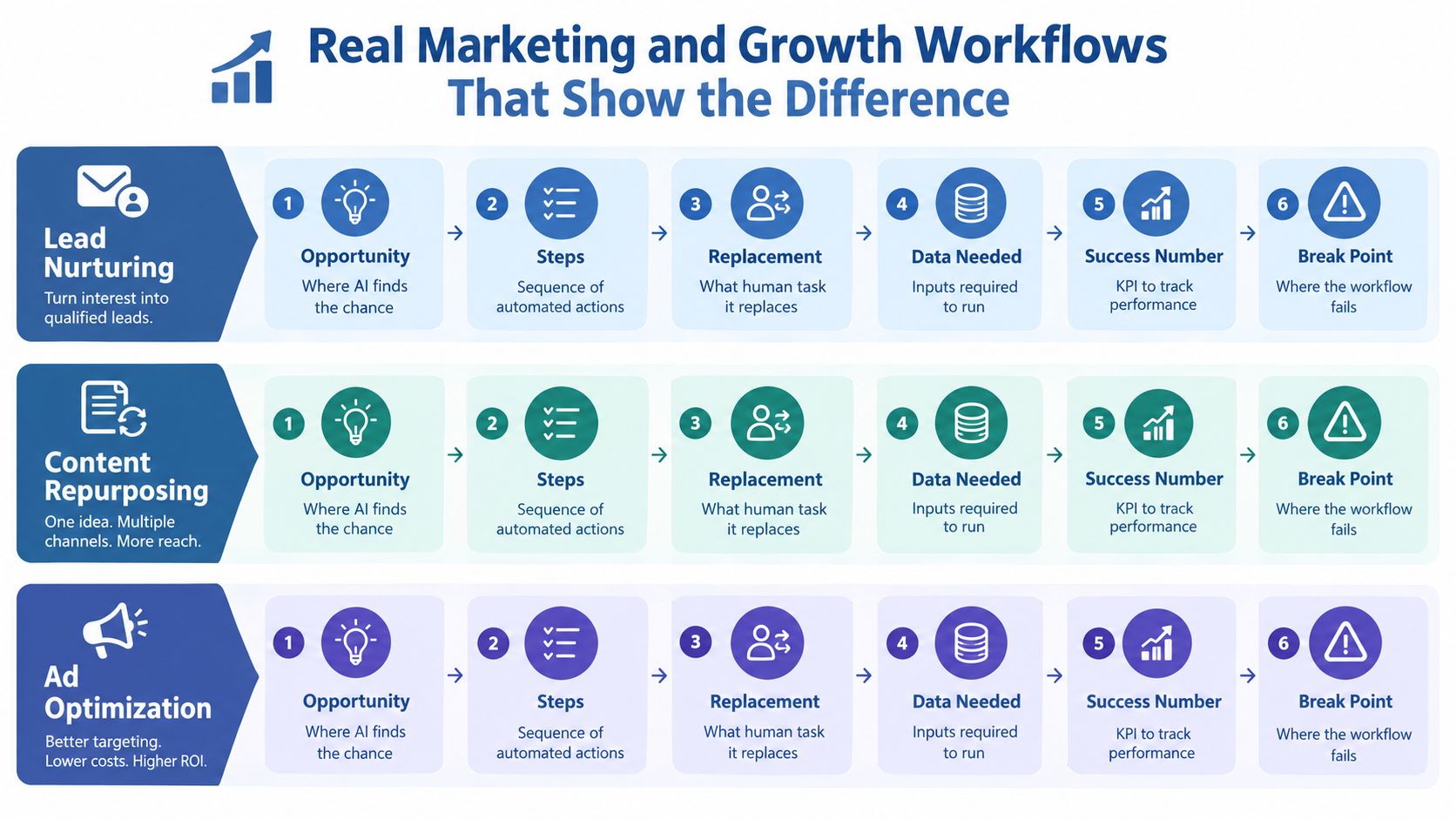
Lead message triage
Opportunity. A solopreneur can respond faster to real buying signals without reading every message first. Modern language models can interpret free-text inquiries that fixed keyword rules miss.
Workflow. A form or email trigger sends the message to ChatGPT or Claude with this prompt:
Classify this message as sales, support, partnership, spam, or unclear. Extract the problem, urgency, product mentioned, and requested next step. Return valid JSON with those fields. If evidence is missing, use “unknown.”
Zapier or Make then writes the classification to Airtable or HubSpot, creates a task for sales messages, and drafts a reply from approved FAQs. I keep the send action behind a manual approval.
Replacement. This removes inbox sorting and first-draft preparation. It doesn't remove judgment about whether a prospect is suitable.
Data needed. The model needs the original message, your product descriptions, exclusion rules, and approved response language. Without that context, it produces plausible generic replies.
Success number. Watch qualified response time, measured from message arrival to an approved reply.
Break point. The first version failed when short messages contained sarcasm or vague requests. I had treated every classification as certain. The fix was an “unclear” category and a required human review.
Content repurposing
A long-form article, podcast transcript, or recorded workshop can become several useful drafts. The opportunity exists because AI can interpret the source and rewrite it for different formats, while automation can move each draft into a review queue.
I'd place the transcript in Google Drive, trigger a Make scenario, send the text to Claude, and use a prompt that specifies the audience, point of view, prohibited claims, and output fields. The workflow creates a newsletter draft, social post drafts, and a list of quotes for review in Notion.
It replaces repeated copying and formatting. It still needs source context, a style guide, and a human who knows whether the ideas are accurate. The number to watch is hours returned to the founder per published source asset.
I wrote up the full version of a similar marketing automation workflow example for the weekly work that sits around content production.
Campaign performance triage
An agent can inspect campaign data, compare current results with your chosen thresholds, identify a likely issue, and recommend an action. I'd schedule a daily pull from the advertising platform into Google Sheets, give the agent access to the current campaign table and a written decision policy, then require it to return a finding, evidence, recommended action, and confidence note.
Automation posts the result to Slack or email. I don't let the agent change budgets or pause campaigns until the recommendation has passed a human check.
This replaces the first pass through dashboards. It requires clean naming, stable metrics, enough historical context to avoid overreacting, and explicit thresholds. Measure cost per qualified customer, not the number of alerts generated.
Don't use this workflow when a single campaign decision could materially damage cash flow and you have no review habit. An agent that acts quickly on bad or incomplete data makes the wrong decision faster.
How to Build a Bionic System Without a Big Team or Budget
A bionic system gives software the repetitive work and gives you the decisions that depend on taste, trust, or responsibility. I build these systems in a strict order because tool stacking creates maintenance work before it creates value.
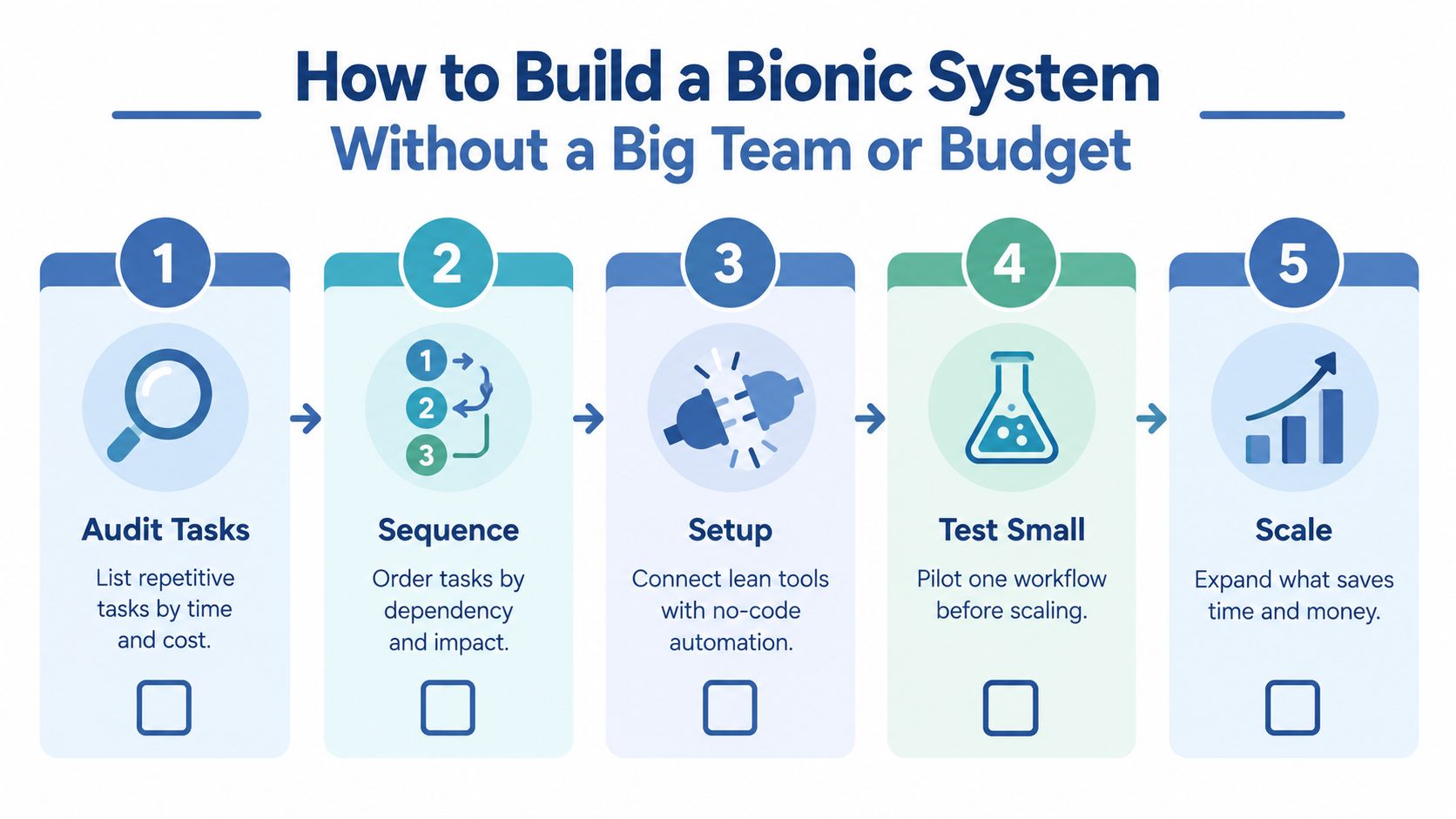
Start with a task audit
Open a document and list the work you repeat. Write the trigger, input, decision, action, frequency, and failure cost for each task. Don't begin with “Where can I use AI?” Begin with “Which job keeps returning even though the steps are familiar?”
Mark each task as structured, messy, or high judgment. Structured tasks are candidates for normal automation. Messy tasks may need AI. High-judgment work usually needs assistance rather than delegation.
Pick one recurring job
Choose a task that happens often, has a clear finish line, and creates a measurable result. A content brief, inbound message classification, or weekly campaign summary is easier to test than an entire customer journey.
Write the desired output before you choose the model. For example: “A row with message type, urgency, evidence, recommended action, and review status.” That output becomes the contract between AI and the rest of the workflow.
Connect the smallest useful stack
Use the tools already holding the data. A form, Gmail, Google Sheets, Airtable, Notion, Zapier, Make, ChatGPT, or Claude can be enough for a first version. Connect the trigger, model call, structured output, destination, and approval step.
Keep the prompt in one place. Include examples of good and bad results, the context the model may use, and the instruction to mark missing information instead of guessing.
Add a narrow autonomous loop
An agent should have a bounded goal and a short list of permitted actions. It can inspect a lead, retrieve approved context, classify the lead, and create a draft task. It shouldn't have unrestricted access to your inbox, payment system, or customer records.
A narrow loop is easier to debug because you can see which action failed. If the workflow needs physical presence, emotional judgment, complex interpersonal judgment, or data you can't reliably provide, keep a person in control.
Test before expanding
Run the workflow on real examples that include ordinary cases and awkward ones. Save the input, output, your correction, and the reason for the correction. Then test whether the system makes the same kind of mistake repeatedly.
I've described this setup in AI automation for small business, including the practical boundary between a useful assistant and an expensive autonomous mess.
The conventional advice is to automate the biggest process first. I disagree. Start with the smallest process that teaches you something important. A short workflow with a clear metric gives you evidence about data quality, prompt design, approvals, and failure handling before you attach the system to revenue-critical work.
How to Measure ROI and Catch What Breaks Early
A workflow worked only when it improves the business and remains safe to run. Hours saved matter, but they're a weak result if the system creates poor leads, weak replies, refund requests, or extra correction work.
Track the number that matches the job. For a lead workflow, watch qualified response time and cost per qualified customer. For content, track hours returned to the founder and the revenue or qualified inquiries connected to the published asset. For retention work, track customers who stay, while recording whether the workflow produced useful warnings.
The wider business measures still matter: revenue, margin, acquisition cost, retention, and hours saved. I use the marketing effectiveness measurement guide to keep workflow metrics connected to commercial outcomes rather than treating activity as success.
Add a health check beside the KPI
Every automated process needs a second dashboard line for failure. Count missing fields, rejected outputs, manual overrides, duplicate records, and messages sent for approval. A workflow that saves time while increasing corrections may have negative value.
Use a simple status:
- Green: the output passes the required checks and reaches the next step.
- Amber: a human corrected it or the data was incomplete.
- Red: the workflow took an unauthorised action, fabricated information, or stopped without creating a clear exception.
The OECD's labor research also helps put automation claims in proportion. One estimate placed 14% of jobs in OECD countries at high risk and 47% at significant risk of task change, while later work found the highest-risk jobs still typically had only 18% to 27% of required skills and abilities highly automatable. The OECD automation research supports a task-reshaping view rather than treating every role as an all-or-nothing replacement.
Keep some work human
The WEF reports that fewer than 5% of occupations could be fully automated, while about 60% could have at least 30% of tasks automated with current technology, based on its analysis of 46 countries. The World Economic Forum's workplace analysis points toward task decomposition.
That's why I keep final approval for sensitive customer communication, unusual refunds, brand-defining claims, and decisions where the input is incomplete. The best automation target is repetitive work with a clear answer. The worst target is ambiguous work where your reputation absorbs the cost of a confident mistake.
Your Quick Start Checklist for AI and Automation This Week
On Monday, choose one repeated task and write down:
- The trigger that starts it.
- The exact input it needs.
- The decision that currently consumes your attention.
- The action that follows.
- The human approval point.
- The single metric that defines success.
Then build the smallest loop. Connect the source to a spreadsheet or database, send the relevant context to ChatGPT or Claude, require a structured response, route the result through Zapier or Make, and save every correction. Don't connect more tools until the first path works consistently.
Use this decision filter:
- A fixed condition needs automation.
- A messy message or document needs AI inference.
- A multi-step goal can use an agent only when its data, permissions, and actions are tightly bounded.
- A sensitive decision stays with you.
Watch one number for the first test, such as qualified response time, hours returned, or cost per qualified customer. Add a failure count beside it.
The newsletter is where I continue testing these small loops each week, and Bionic Business is where I document what survives contact with real work.
Start with the task you'll repeat before Friday. Build the trigger, inference, action, and approval path today, then review every output yourself before you let the system run unattended.
Frequently Asked Questions
What is the difference between AI and automation?
AI interprets. It infers from inputs how to produce outputs such as predictions, content, recommendations or decisions. Automation executes. A trigger starts a process, conditions decide what happens, and connected tools carry out the actions. Automation can run entirely on fixed rules with no AI, and AI can produce a recommendation without taking any action at all.
What does AI automation mean?
AI automation is the combination of the two layers. A model reads an input that does not fit a tidy template, such as a free-text inquiry, and classifies or summarizes it. Automation then moves that result through the business by writing it to a CRM, creating a task or drafting a reply. High-risk actions still pass through a human approval step.
Is AI a type of automation?
The OECD classifies AI as an automation technology, alongside industrial robots and software that performs work people used to do, because AI can automate decision-like tasks. The terms still are not interchangeable. Rule-based automation is predictable and follows the same path every time, while AI inference is probabilistic and produces a likely interpretation that you should constrain and check.
When should you use rule-based automation instead of AI?
Use rules when the input is structured, the trigger is stable and the actions are predictable, such as copying a form submission into a CRM, scheduling reminders or applying known thresholds. Bring in AI when the input is messy and the decision depends on meaning. If the final action carries reputational or financial risk, keep an approval step either way.
How is an AI agent different from AI automation?
An agent sits further toward autonomy. It can pursue a goal, choose its own steps, use tools and adjust its path based on what it finds. That makes it useful for multi-step work, but only when its data, permissions and actions are tightly bounded. Keep people in control when a task needs physical presence, emotional judgment or data you cannot reliably provide.
How do you measure whether an AI automation is working?
Track the number that matches the job, such as qualified response time for leads, hours returned per published asset for content, or cost per qualified customer for campaigns. Add a health check beside it that counts missing fields, rejected outputs, manual overrides and duplicate records. A workflow that saves time while increasing corrections may have negative value.
