
You bought the tools, maybe even installed the chatbot, and the business still feels one bad week away from slipping. Leads still go cold. The team still answers the same questions over and over. That's where most AI automation for small business efforts fail. The model is rarely the weak part; the workflow was never tied to money, ownership, or a clean handoff.
I've spent years building AI systems into real businesses, first with ML work in 2016, then with generative AI from 2019 onward. The pattern is consistent. The winners don't start with “What can AI do?” They start with “What revenue leakage are we stopping first?” Small firms are no longer dabbling. A U.S. QuickBooks survey of 2,200 small businesses found 68% now use AI regularly, up from 48% in mid-2024, and the U.S. Chamber estimated almost 60% of small businesses were using AI for business operations in August 2025 (colorwhistle summary of SMB AI adoption). That shift matters because the competitive edge now comes from execution, and experimenting alone no longer sets you apart.
Table of Contents
- Why Most Small Business AI Projects Stall
- The Readiness Audit Most Founders Skip
- Which Workflows to Automate First
- Designing One Workflow That Holds Up
- Choosing Tools Without Locking Yourself In
- What a Real Rollout Looks Like
- Measuring ROI and Leading the Change
Why Most Small Business AI Projects Stall
The founder I keep seeing has three AI tools, one half-built chatbot, and a vague sense that competitors are moving faster. The problem is that the business bought software before defining the workflow, the trigger, and the metric that matters.

The real failure isn't the model
A lot of small-business AI ends up as productivity theater. The team drafts posts faster, but leads still fall through the cracks. The inbox gets triaged, but nobody owns what happens after a quote is sent. That's where the money leaks.
The U.S. Small Business Administration frames AI as useful for repeat tasks, business decision-making, customer service, and content creation, including chatbots, email sorting, meeting summaries, social posts, and product descriptions (SBA AI for small business guidance). Microsoft's small-business guidance points in the same direction, start with repetitive, data-driven, or pattern-recognition tasks, then scale gradually (SBA AI for small business guidance). That's the practical clue. If the workflow doesn't repeat, doesn't touch revenue, or can't be measured, it's usually a weak first move.
As a practical rule, if the automation doesn't protect revenue, reduce response lag, or remove a recurring bottleneck, it's probably a convenience project, not a growth project.
Competitors win by automating the boring revenue moments
While one founder is polishing prompts, another is wiring missed-call text-back, estimate follow-up, and review requests into a system that runs without hand-holding. That's the edge. It's not flashy, but it keeps leads alive long enough for a human to close them.
The market is also making this easier to afford. One industry estimate places a functional AI stack for a small business at about $200–$500 per month, with AI writing tools often at $20–$60 per month and analytics tools at $100–$500 per month (SBA AI for small business guidance). At that price, the usual barrier is clarity more than budget.
The fastest way to self-diagnose your current effort is simple. If you can't name the workflow, the trigger, the human checkpoint, and the metric in one sentence, you're still experimenting.
The Readiness Audit Most Founders Skip
Before you buy anything else, check whether the business is ready to automate. That sounds basic, but it's where most failed rollouts begin. AI performs badly when the process lives in someone's head, the data is fragmented, or the team doesn't know who owns the workflow when it breaks.
Check repeatability first
A workflow should happen the same way often enough that you can describe it without improvising. If every quote request depends on one veteran employee “just knowing” what to do, the process is too tribal for automation.
A clean example is lead intake. If every inbound inquiry follows a familiar path, form submitted, qualification question asked, next step assigned, that's repeatable. A messier example is bespoke proposal work for a high-touch client where the relationship itself is the product. In that case, automate the admin around the relationship, not the relationship.
Check the data next
Automation needs accessible information. If the source data is trapped in paper folders, scattered spreadsheets, or an unreadable CRM, the software will only move the mess faster. That's why the readiness question matters more than tool selection.
Look for these warning signs. A staff member has to “go ask Sarah” before anything can move forward. The same customer details get typed into multiple places. File names are inconsistent. Those are all signs that the workflow isn't ready, even if the team is enthusiastic.
Check ownership before anything goes live
Someone needs to own the workflow, especially when the AI fails on a weird edge case. If no one is accountable, the automation becomes everyone's problem and nobody's job. That's when trust collapses.
If one person can't explain where the workflow starts, where it ends, and who fixes it when it breaks, don't automate it yet.
A simple readiness lens beats another software demo. Is the task repeatable. Is the data accessible and documented. Is there a single owner. If you can't answer yes to all three, fix the process first, then automate it.
For a deeper deployment lens on smaller teams, I've laid out a practical path in how to deploy AI agents in a small team.
Which Workflows to Automate First
Most guides list a dozen use cases and leave you to guess what pays back first. That's the wrong order. I rank automations by revenue protection, then by speed of implementation, then by convenience. If money is leaking now, fix that before you automate internal admin.

Start with the workflows that catch lost leads
A missed call is often a lost lead. A missed-call text-back gives the prospect a fast next step while the lead is still warm. The trigger is simple, a call goes unanswered. The protected metric is lead capture. This is the first automation I look at in service businesses because it closes a leak before the sales process even starts.
A form auto-response comes next. The trigger is a website inquiry or quote request. The protected metric is response time and lead continuity. It won't close a deal by itself, but it keeps the conversation alive long enough for a human to follow up.
Then protect the quote and follow-up stage
Estimate follow-up is where a lot of service revenue dies. The trigger is a sent quote that hasn't been answered. The protected metric is booked work. AI automation for small business usually starts to show up in cash flow here, because the system keeps nudging the buyer without making your team chase every thread manually.
Review requests matter too. The trigger is a completed job or purchase. The protected metric is future demand. Public proof compounds, and competitor businesses that neglect this often end up paying more for every next lead.
Customer reactivation belongs on the list because past buyers are cheaper to revive than strangers are to acquire. The trigger is inactivity over a defined period. The protected metric is repeat revenue.
Use this filter. Automate anything that prevents lead leakage, speeds up response, or recovers demand. Defer anything that mainly makes your internal life feel tidier.
Leave chatbots and content generation for later
Chatbots and content tools are useful, but they're not always the fastest path to revenue. If your call handling, quoting, or follow-up is sloppy, a chatbot won't save the month. It can even create friction if customers want a human and get trapped in a script.
The line I use with founders is blunt. If a workflow touches the cash register, automate it early. If it mostly saves internal time, automate it after the revenue leaks are sealed.
A useful perspective on what freelancers automate first is in renn's automation tips for freelancers. The lesson is consistent with small business work, automate the repetitive handoff points before you automate polish.
For task selection, the most defensible candidates are the ones that are frequent, predictable, and easy to verify, like data entry, appointment scheduling, follow-up sequences, expense tracking, inventory management, and standard customer support replies (Capsule CRM on AI automation for small business).
Designing One Workflow That Holds Up
A good automation is boring in the best way. It starts when the trigger appears, does one job, hands off cleanly, and gets measured against a single outcome. If any of those pieces are missing, the workflow is fragile.
Build the workflow around one clear trigger
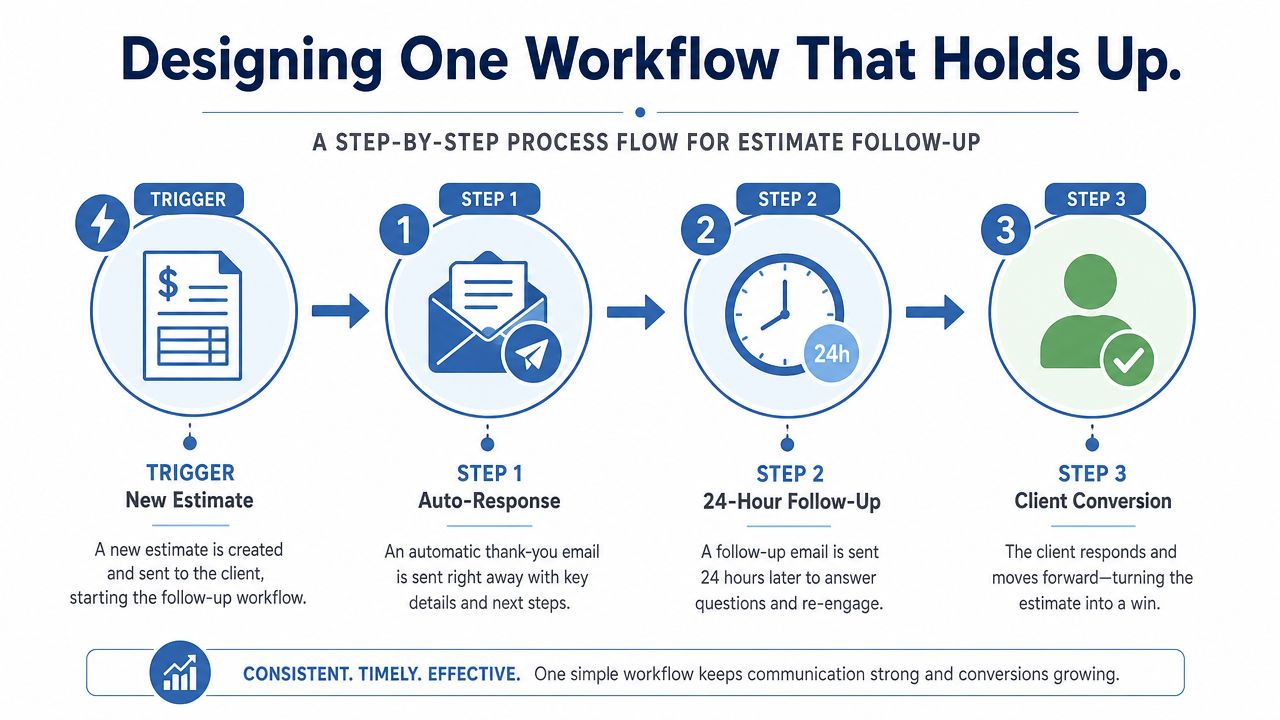
Take estimate follow-up for a service business. The trigger is a new estimate being sent. The desired outcome is a booked job or a clean no-response signal that lets the team move on. That's the shape.
The first step should be a short auto-response that confirms receipt and sets expectations. The second step can be a follow-up after 24 hours if there's no reply. The third step is a human handoff for active prospects that need judgment, tone, or negotiation.
Keep a human checkpoint in the first pass
The bad version of this workflow blasts a message the second an estimate goes out, with no tone review and no exception handling. That's how you end up annoying a high-value prospect or sending the wrong attachment. I've seen malformed files break parsers and field mapping errors send the wrong data downstream.
The better version runs in parallel with the manual process for 10 to 20 iterations before it goes live. That approach is echoed in practical rollout guidance from small-business automation operators who recommend testing edge cases before promoting a workflow (AI automation getting started guide). A first-run human approver catches the ugly stuff before customers do.
Track one metric, not five
Choose one primary metric for the workflow. For estimate follow-up, that might be conversion from sent estimate to booked job. For missed-call text-back, it might be recovered leads. Don't drown the workflow in dashboards. You need one number that tells you whether the automation is helping or just creating motion.
I also use a simple rule on tone. If the customer-facing message sounds like it was written by a machine trying to prove it's clever, rewrite it. Utility beats flair.
A more detailed operating pattern for workflow design is in AI agent for operations and workflow. The underlying principle stays the same, define the trigger, constrain the action, and make the output measurable.
Choosing Tools Without Locking Yourself In
Tool choice matters, but process clarity matters more. Once the workflow is defined, the main question is how much control you need over maintenance, handoffs, and future changes. The wrong stack can protect a weak process for a while, then turn into a repair job later.
No-code is the fastest path for many small teams. Platforms like Zapier and Make are useful when you need a working workflow quickly and the task is straightforward. They are a good fit for early wins, especially when the team wants something live without waiting on a full build cycle. The trade-off is ownership. If every new use case becomes another disconnected zap or scenario, the system gets hard to understand and harder to clean up.
That is why I use no-code for contained workflows, not for architecture that keeps growing in every direction. You can move fast, but someone still needs to document what each automation does, who owns it, and what happens when it breaks. Without that, the stack becomes invisible infrastructure.
API-first stacks give you more control and a higher ceiling. If you are building around ChatGPT, Claude, or Gemini in a more deliberate way, you can add custom logic, tighter routing, and better control over exceptions. The trade-off is coordination. Setup usually takes more planning, and you need someone who understands system behavior as well as prompts.
This route makes sense when the workflow includes judgment, such as classification, drafting, or triage. It also works better when the same behavior has to hold across several steps and you do not want to depend on a template marketplace for every piece. If the business depends on repeatable decisions, API-first gives you that structure.
Open-source makes sense when you have a developer or contractor who can maintain it. The upside is control over the stack and fewer limits on how the workflow is built. The downside is ownership risk. If the person who built it disappears and nobody else understands the system, the automation can become a liability instead of an asset.
As noted earlier, a functional SMB stack is a real operating line you can plan for. The point here is to avoid a tool choice that creates hidden dependency costs later, whether that dependency is a fragile no-code chain, a custom API layer, or an open-source install that only one person can support. For a practical comparison outside your own stack, see renn's automation tips for freelancers.
The better question is which option lets you keep control while still moving quickly. A good stack is one another owner could understand in a week, because continuity protects revenue when the person who built the workflow is not in the room.
What a Real Rollout Looks Like
A twelve-person services company came in with the same problem I see everywhere. Leads were entering through multiple channels, follow-up was inconsistent, and no one trusted the current handoff process. I automated lead intake, qualification, and follow-up over six weeks.
The first week looked clean
The team got the intake flow working, and at first it looked like a win. Leads were being captured faster, and the owners liked the idea that the system could respond while they were busy on jobs. That early momentum matters, because small businesses often need to see something working before they'll trust the rest of it.
Then a malformed attachment broke the parser. The workflow didn't fail loudly, it failed awkwardly, which is worse. A bad file format caused the intake logic to choke, and the team stopped trusting the automation almost immediately.
The recovery move was manual, not magical
The fix was a human checkpoint and a clearer exception rule, with no extra layer of AI. I let the automation keep running in parallel with the manual process, and the team only promoted it after the edge cases had been handled enough times to be boring. That's the part founders skip when they're impatient.
The company also used a staged test window of 10 to 20 iterations before turning the workflow loose, which is exactly the kind of discipline that prevents a few weird inputs from poisoning the entire rollout (AI automation getting started guide). That parallel run rebuilt trust because people could compare outcomes instead of guessing.
The result was operational confidence
The business saved time, and it also got a cleaner handoff, fewer dropped leads, and a team that stopped treating automation like a toy. In practice, that's what successful rollout looks like. The headline is that managers can trust the process.
If you're evaluating how to use an AI agent across operations, the deployment logic in AI agent ROI gives you a useful lens for separating vanity workflows from useful ones.
Measuring ROI and Leading the Change
Most founders say they want ROI, then they measure nothing consistently. That's why automation projects drift. A workflow can feel useful and still fail financially if nobody ties it to a baseline, a target, and a weekly review.

Use one weekly cadence for every automation
Every Friday, review each running automation against one primary metric. Check whether the baseline is being beaten or missed. If the metric is flat, decide whether the problem is the workflow, the data, or the human handoff.
That weekly rhythm keeps the project honest. Without it, the team stops noticing when the automation slows down, breaks on edge cases, or starts producing outputs that no one trusts.
Train people before you ask for adoption
A neutral small-business guide reports that 90% of small-business teams use some form of AI, only 52% properly train employees, and 57% of organizations say their data is not AI-ready (SME Advantage on AI automation in small business America). Those numbers line up with what I see in the field. Tool adoption is outrunning readiness.
Training doesn't need to be ceremonial. It does need to be specific. Show the team what the automation does, what it won't do, when it escalates, and who owns the exception path. If someone feels replaced, don't brush past it. Explain which repetitive tasks are being removed and where human judgment still matters.
Document the workflow like you expect it to fail
At minimum, keep a short record of the trigger, the desired outcome, the owner, the escalation rule, and the customer-facing language. If something goes wrong, you want enough documentation to reconstruct what happened without asking three people to remember the same event differently. That matters for customer trust and for internal continuity.
A major challenge in 2026 is handling customer data carefully and making sure the team knows when an AI is replying on the business's behalf. You don't need an elaborate governance program to start, but you do need basic disclosure, access discipline, and a written process for exceptions.
Every Friday, review one metric, inspect one failed edge case, confirm one owner, and update one process note.
Scale from one workflow to five only after the first one is stable. If the first automation still needs constant rescue, adding more will just multiply the confusion. When the system is ready, the next workflow should feel familiar, not heroic.
The bigger competitive point is simple. Businesses that measure, train, and document will move faster than competitors who treat AI as a side project. That's the difference between a tool stack and an operating advantage.
If you want to turn this into real revenue protection, start with one workflow this week, missed-call text-back if the phone is your leak, estimate follow-up if quotes are going cold, or form auto-response if speed-to-lead is slipping. Pick one owner, one metric, and one manual fallback, then run it for two weeks before you touch anything else.
