
An AI agent for operations and workflow takes one narrow, repeatable process and moves it forward: it reads the input, makes a bounded decision, calls the tools it is allowed to use, and pauses for your approval before anything risky. It works when the process has clear inputs, written rules and a completion point you can verify.
You've probably already automated the easy part. A form creates a spreadsheet row, an email sends a notification, and a calendar event appears on its own. The work still stalls between those steps because someone has to read the submission, decide what matters, check the details, update another system, and write the next message.
That's where AI agents for workflow automation can help a small business. The opportunity isn't handing your company to an autonomous bot. It's giving a narrow, repeatable process enough context, tools, and review points to move without constant manual handoffs.
Table of Contents
- Why AI Agents for Workflow Automation Matter Now for Small Teams
- Agent Types and Roles That Actually Map to Work
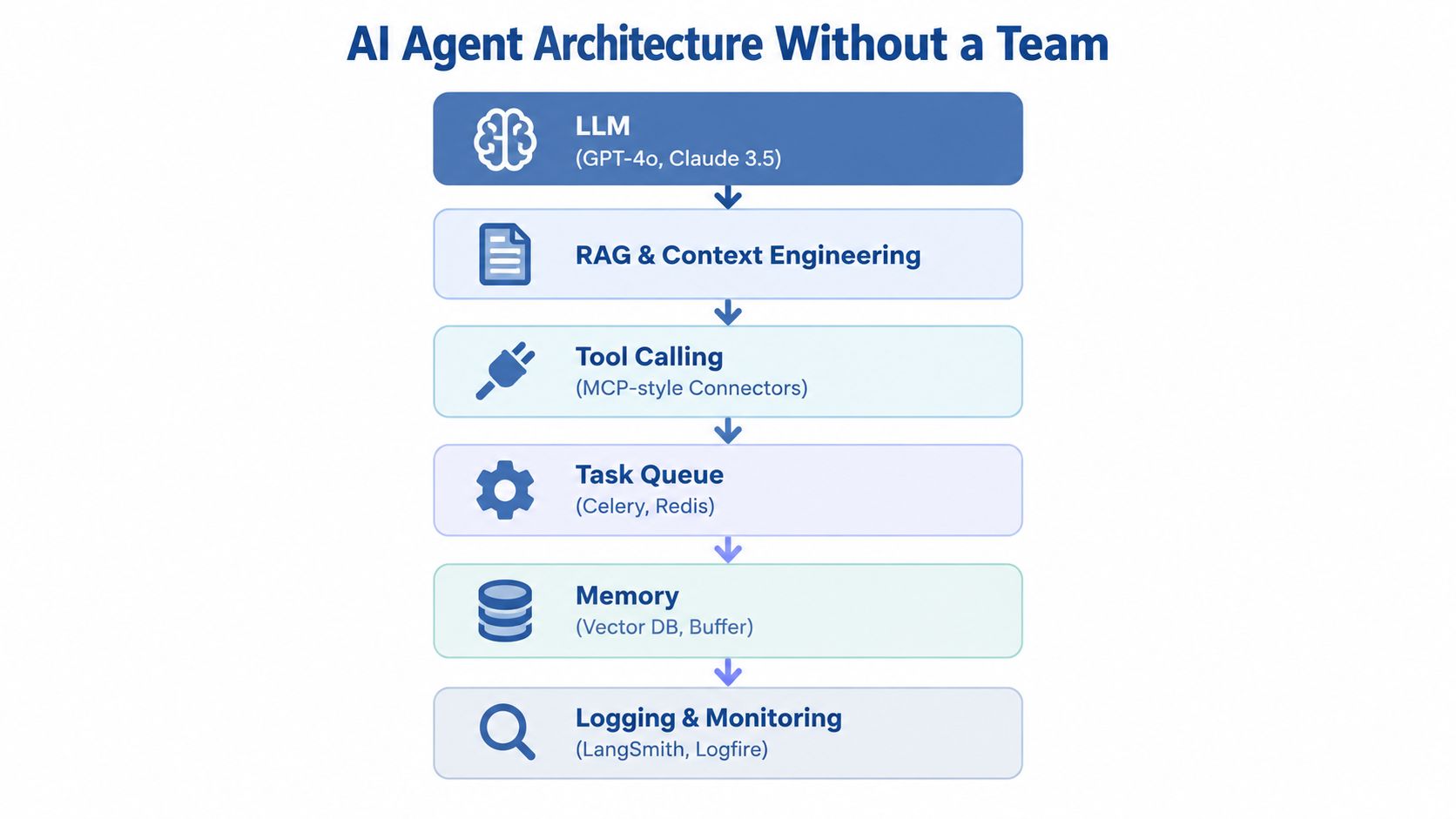
- Architecture and Orchestration You Can Build Without a Team
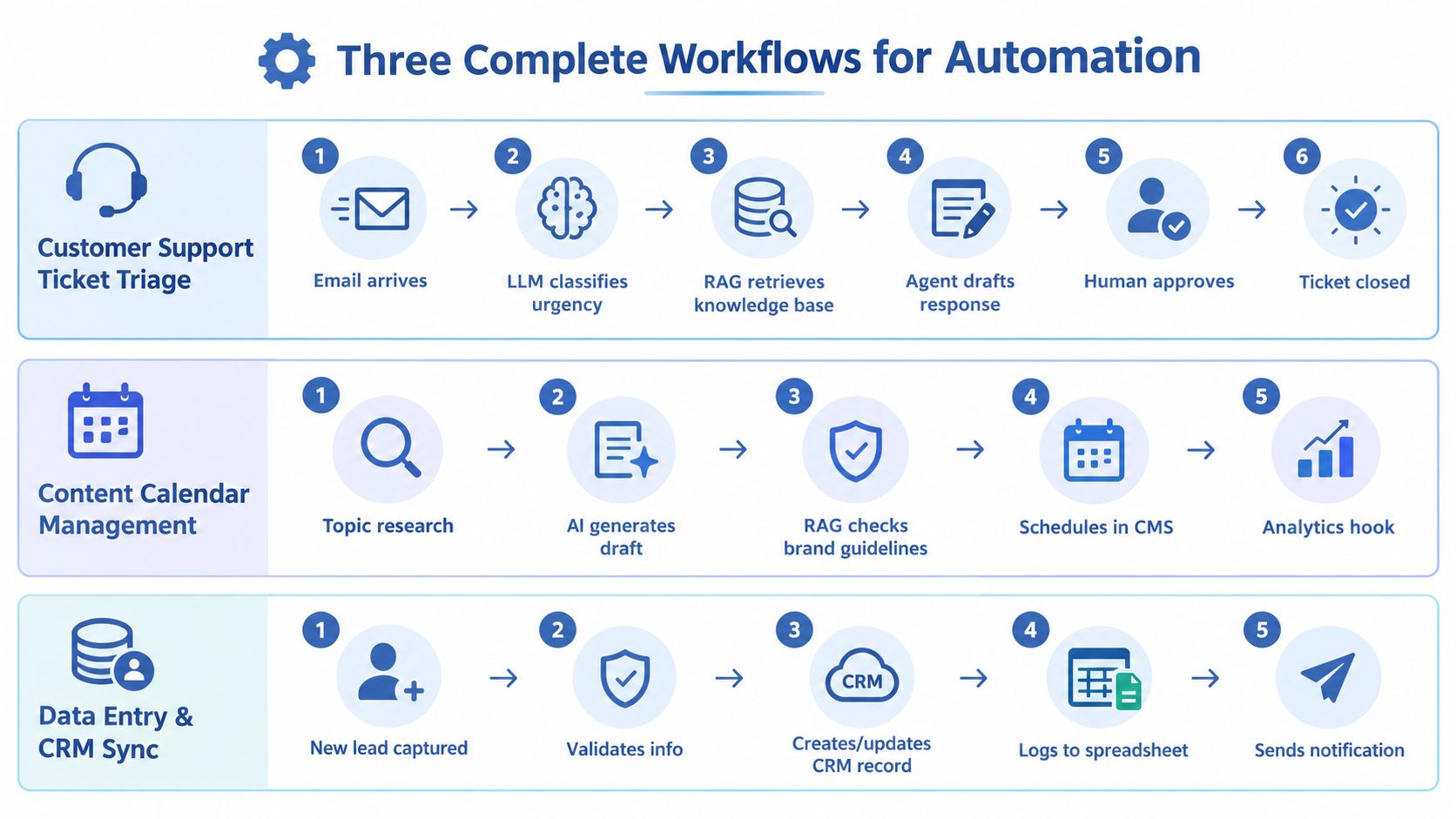
- Three Complete Workflows With Tools Prompts and Handoffs
- Testing Monitoring KPIs and Cost Controls That Keep Agents Honest
- What to Ship on Monday With Templates and Guardrails
Why AI Agents for Workflow Automation Matter Now for Small Teams
Two years ago, most of the agent demos I saw stopped at a chat window. The model answered a question, perhaps called one tool, and handed the rest back to a person. The useful shift now is that agents can sit inside a workflow, read business context, make a bounded decision, call several tools, and pause when a human needs to approve the result.
The adoption signal is real. 79% of companies say AI agents are already being adopted, and 66% of those adopters report measurable productivity gains, according to PwC's AI agent survey. PwC also reports that 35% are using agents broadly across the business, while 17% say agents are fully adopted in almost all workflows and functions. The same survey finds that 68% of companies say half or fewer employees interact with agents in everyday work, so adoption is ahead of full workforce penetration.

For a solo operator, that gap matters. You don't need to automate the whole business. You need to find the one process that repeats often, consumes judgment-lite attention, and ends with an action you can verify.
A useful candidate looks like this:
- The input is predictable: A support email, lead form, document, or research request arrives in a known place.
- The decision has rules: The agent can classify, extract, compare, or route using written criteria.
- The output is inspectable: A draft, CRM update, ticket label, or spreadsheet row can be checked before it creates damage.
- The next action is clear: The workflow either continues, pauses for approval, or sends the item to a manual queue.
A bad candidate is a process built around taste, negotiation, or irreversible financial and legal decisions. If every case needs a different answer and the cost of a wrong action is high, an agent will add review work instead of removing it.
The number I watch first is completed workflow tasks per hour of human attention. Hours saved sounds attractive, but a workflow that produces faster mistakes is a liability. I track how many items reach the intended endpoint, how many require correction, and how much time I spend reviewing each one.
Operational reliability matters after launch too. I keep that operating burden visible before I build anything. My broader view of AI for solopreneurs follows the same rule: automation should create room for revenue-producing work, not create a new technical job.
Agent Types and Roles That Actually Map to Work
The word “agent” hides several different designs. A classifier that labels incoming requests doesn't need the same permissions or memory as an orchestrator that updates a CRM, drafts an email, and schedules a follow-up.
I choose the smallest pattern that can finish the job.
| Workflow Goal | Agent Pattern | Autonomy Level | Human Review Gate |
|---|---|---|---|
| Label incoming messages or documents | Single-task agent | Low | Review uncertain classifications |
| Extract fields from a form or PDF | Single-task agent | Low | Check missing or conflicting fields |
| Research a topic and prepare a brief | Multi-step orchestrator | Medium | Approve sources and factual claims |
| Move data across a form, spreadsheet, and CRM | Multi-step orchestrator | Medium | Approve writes during the first runs |
| Draft support replies from approved knowledge | Human-on-the-loop agent | Medium | Approve every external reply |
| Update a knowledge base from resolved tickets | Human-on-the-loop agent | Medium | Approve the proposed article change |
| Execute an irreversible transaction | Human-on-the-loop agent | Low | Mandatory approval before action |
Single-task agents
Start by giving the model one job, one input schema, and one output schema. For example: “Read this support request and return category, urgency, customer_id, and missing_information.”
It replaces sorting and copying, usually the least valuable part of the work. It needs examples of valid labels, the rules for ambiguous cases, and access only to the input it must read.
Multi-step orchestrators
An orchestrator plans or follows a sequence. It may retrieve a document, call a search tool, write a draft, validate required fields, and place the result in a review queue.
This pattern can remove repeated handoffs, but it also creates more failure points. A trajectory-aware tool-use benchmark evaluates the sequence of tool choice, parameters, and ordering because an agent can make a wrong turn before its final answer looks obviously wrong. I don't allow a multi-step agent to write to every system on its first run.
Human-on-the-loop agents
A reviewer doesn't need to inspect every internal thought. The reviewer needs a clean record of the input, proposed action, evidence, and buttons for approve, reject, or edit.
Production research reports that 67% of deployments include mandatory human review gates, while timelines average 3–4 months for a single agent and 6–9 months for multi-agent systems, according to Halkwinds' 2026 AI agent adoption report. For a small business, that's a warning against building a sprawling multi-agent system for a workflow you haven't measured manually.
Practical rule: Give an agent permission to prepare more actions than it has permission to execute.
Architecture and Orchestration You Can Build Without a Team
I build the system in layers. Each layer answers a different question, and skipping one usually creates a confusing failure later.
Start with the model and the context
The LLM handles classification, extraction, drafting, and decisions that depend on language. I don't ask it to remember the business from a vague system prompt. I provide a short instruction, a structured input, relevant reference material, and a required output format.
For company-specific answers, I use retrieval-augmented generation, or RAG. The workflow searches a controlled knowledge base, passes the relevant passages to the model, and requires the draft to identify when the material doesn't contain an answer. Context engineering matters more than adding a larger prompt. Remove stale documents, label source dates, and separate policy from examples.
Connect tools after the decision is bounded
The agent should call tools only after I define what each tool can do. A connector might read a CRM record, create a draft email, append a row to Google Sheets, or open a support ticket. MCP-Bench connects models to 28 live Model Context Protocol servers spanning 250 tools across finance, travel, scientific computing, and academic search, showing why cross-tool coordination needs careful permission design (MCP-Bench details).
MCPVerse expands that problem to more than 550 executable tools, an action space exceeding 140k tokens, and outcome-based evaluation using live ground truth (MCPVerse benchmark). I don't expose an agent to a huge toolbox. I expose only the tools required for the current workflow.
Add the execution layer
A simple build can use n8n or Zapier for triggers and app actions, a small Python service for validation, Redis or Celery for queued work, and a database or spreadsheet for state. The exact stack matters less than the separation between a request, a run, an action, and a result.
I assign every run an ID. I log the input reference, prompt version, retrieved documents, tool calls, returned values, reviewer decision, and final status. I keep the agent in a sandbox or test workspace until the workflow completes representative scenarios without touching live records.
Choose the right orchestration pattern
Use a sequential flow when every step depends on the previous result. Research, draft, review, and publish belongs here.
Use a parallel flow when independent checks can run at the same time. A lead record might receive separate validation, enrichment, and duplicate checks before a final decision combines their results.
Use a conditional flow when different inputs require different routes. A support ticket can go to a billing queue, a technical queue, or a human escalation path based on category and urgency.
Memory should be narrow. Store durable facts that the workflow will need again, not every conversation. A short buffer can preserve the current run, while a vector database can hold approved documents. Logs are for traceability. Memory is for useful context. Mixing them makes both harder to debug.
The practical orchestration sequence is:
- Receive the trigger.
- Create a run ID.
- Validate the input.
- Retrieve only relevant context.
- Ask the model for a structured decision.
- Check the decision against rules.
- Call the permitted tool.
- Record the result.
- Continue, retry safely, or send the item to review.
I also keep rollback and shutdown controls close to the action layer. AI agent orchestration works best when every handoff has an owner and a recoverable state.
Three Complete Workflows With Tools Prompts and Handoffs
The workflows below use ordinary small-business systems. You can build the first version with Gmail, Google Sheets, a CRM, a help desk, an LLM API, and an automation platform such as n8n or Zapier.
Content research to reviewed draft
Opportunity. A content workflow can turn a topic idea into a source-backed draft while you spend your time choosing the angle and correcting the argument. It exists now because models can search, extract, structure, and rewrite across several steps, provided you keep source selection and publication under control.
Build it.
- Add a topic, audience, desired action, and excluded claims to a Google Sheet.
- Trigger n8n when a new row appears.
- Ask the research agent to collect relevant pages and return source URLs, claims, and supporting passages.
- Store the research packet in a document.
- Pass that packet to a drafting agent with your style guide.
- Run a separate checker against required claims, unsupported numbers, and missing links.
- Send the draft and checker report to an approval queue.
- After approval, create a draft in WordPress. Don't publish automatically at first.
Prompt for research:
You're a research assistant. Use only the supplied sources. Return a table with claim, exact supporting passage, source URL, and confidence. If a claim isn't supported, mark it unsupported. Don't invent statistics, examples, or quotes.
Prompt for drafting:
Write for a solo online operator. Use the approved research packet and style rules. Keep every quantitative claim tied to its source. Where evidence is missing, use qualitative language. Return the article, suggested title, meta description, and image alt text.
What it replaces. Topic searching, copying notes, building an outline, creating a first draft, and checking whether each factual statement has support.
Data required. Your editorial rules, approved sources, audience description, internal links, excluded topics, and a record of previous published pieces.
Number to watch. Track the percentage of drafts that pass your first review without a structural rewrite. If that number stays low, improve the brief and retrieval set before adding another agent.
Where it breaks. My first mistake was allowing the writer to browse independently after research. It introduced claims that weren't in the approved packet. The fix was simple: research first, freeze the packet, draft second, check third.
Lead intake to CRM and follow-up
I’ve written up the full version of this one separately: my AI lead qualification workflow, with the scoring, the five routes and one consultant’s real numbers.
Opportunity. A lead form can become a qualified, correctly routed record without you copying details between email, Sheets, and a CRM. The value comes from removing delay and duplicate entry, while keeping judgment around fit and promises with you.
Build it.
- Capture the form submission in a webhook.
- Validate the email, company field, request, and consent field.
- Search the CRM for an existing matching record.
- Ask the agent to classify the request using your written categories.
- Create or update the CRM record.
- Write the raw submission and decision to a private Google Sheet.
- Draft a follow-up email using only the submitted facts.
- Send the draft to you for approval.
- After approval, send the email and schedule the next task.
Prompt:
Read this lead submission. Return JSON with
intent,fit_reason,missing_fields,crm_action, andfollow_up_draft. Never infer budget, authority, urgency, or business size. If the request is ambiguous, route it to human review.
What it replaces. Inbox inspection, duplicate checking, CRM entry, notification writing, and the first follow-up draft.
Data required. CRM field definitions, duplicate rules, qualification criteria, approved claims about your offer, and the exact email fields the agent may use.
Number to watch. Track the share of submissions that reach a complete CRM record without correction. Don't count a record as complete if a human had to repair a wrong field.
Where it breaks. The dangerous failure is confident inference. A polished email can imply a need the lead never stated. I removed open-ended qualification and made missing information an explicit output.
Support triage to knowledge-base update
Opportunity. Repeated support questions can become a controlled loop. The agent labels the request, retrieves approved help content, drafts a reply, and proposes an update when the existing article fails to answer the question.
Build it.
- Trigger on a new support email or ticket.
- Strip signatures and irrelevant quoted text.
- Classify product area, urgency, sentiment, and request type.
- Retrieve matching knowledge-base passages.
- Draft a reply with citations to the internal article.
- Route billing, access, security, and unclear cases to human review.
- Save the approved response to the ticket.
- Detect whether the knowledge base lacked an answer.
- Create a proposed article change with the original question, approved answer, and source ticket.
Prompt:
Classify this ticket using the supplied categories. Retrieve only approved knowledge-base content. Draft a concise reply that answers the question or says what information is missing. Don't invent policy, refunds, timelines, or technical steps. Escalate billing, access, security, and uncertainty to a human.
What it replaces. Initial sorting, article searching, repetitive drafting, and the first pass at documenting knowledge gaps.
Data required. Current help articles, escalation rules, product terminology, customer account context, and a clear list of actions the agent cannot take.
Number to watch. Track the percentage of replies approved without factual edits, separately from the percentage approved without style edits. Combining those numbers hides dangerous errors.
Where it breaks. A retrieved article can be technically related but still wrong for the customer's plan or account state. I added account-specific checks and made the agent show the exact article passages used.
For a visual walkthrough of the handoffs, this video gives you another way to inspect the workflow mechanics:
Testing Monitoring KPIs and Cost Controls That Keep Agents Honest
Two longer guides go with this section: how to turn an SOP into an AI agent covers testing a build on past cases and in shadow before launch, and how to tell if your AI agent is working covers the weekly routine and the numbers to track after.
A chat test is a poor test for a workflow. The final answer may look good while the agent selected the wrong record, used the wrong parameter, skipped a required check, or exposed information it shouldn't have seen.
ITBench used 94 real-world scenarios across SRE, compliance and security operations, and FinOps. Its systems resolved 13.8% of SRE scenarios, 25.2% of CISO scenarios, and 0% of FinOps scenarios, according to IBM's ITBench evaluation. The lesson for a small operator is direct: test the actual domain and the actual completion condition.
AutomationBench evaluates 657 tasks across six business domains and 47 real tools, including noisy records, layered rules, and guardrail constraints (AutomationBench evaluation). I reproduce that principle at a smaller scale with a fixed scenario set: normal inputs, missing fields, duplicates, conflicting records, misleading text, and requests that must escalate.
Track the path, not only the result
For every run, I store:
- Task completion: Did the workflow reach the intended endpoint?
- Intermediate validity: Did each classification, retrieval, and tool parameter pass its check?
- Human correction: What did I edit or reject?
- Safety outcome: Did the agent access or change anything outside its permission?
- Cost per run: What did the model and connected services consume?
- Review time: How long did approval take?
Enterprise coverage reports 58% success on single-turn tasks and 35% on multi-turn tasks, with confidentiality awareness close to zero in the cited tests (Oliver Wyman's workflow integration coverage). I treat multi-step execution and data protection as separate test categories. A good answer doesn't compensate for a bad permission boundary.

Put controls inside the workflow
I require human approval before external messages, record deletion, financial actions, account changes, and knowledge-base publication. I use read-only credentials during testing, separate sandbox data from live data, and add a stop switch that prevents new runs without deleting the run history.
Governance guidance recommends IDs and logs for traceability, rollback or shutdown for damage control, sandboxing and access controls for containment, and clear liability alignment (AI agent governance field guide). Those controls fit a solo workflow. They're cheaper than reconstructing what happened after an agent changes the wrong record.
I also set a daily spend alert, cap retries, and stop a run when a required field is absent. The cost target isn't the lowest possible token bill. It's a workflow where the value of completed work exceeds model fees, review time, and maintenance.
What to Ship on Monday With Templates and Guardrails
Pick one queue on Monday. Export the last set of completed items, label the correct outcome yourself, and write the rules in plain language. Then build a read-only agent that classifies and drafts without sending, publishing, or updating a live system.
Use this compact template:
- Trigger: What starts the run?
- Input: Which fields can the agent read?
- Decision: What categories or conditions can it return?
- Context: Which approved documents or records can it retrieve?
- Action: Which tool call is allowed?
- Review: What must a human approve?
- Success metric: Which completion or correction number will you track?
- Failure route: Where does uncertainty go?
- Audit record: What gets logged for every run?
The conventional advice is to automate the highest-volume task first. That's wrong when the task has messy inputs and expensive errors. Start with the workflow that has clear rules, visible outputs, and a tolerable failure mode, even if it happens less often.
Don't use autonomy for refunds, account access, sensitive customer data, legal commitments, or anything where a wrong action is difficult to reverse. Use an agent to gather evidence and prepare the action, then approve it yourself.
I keep prompt patterns and practical workflow examples in my AI prompts for marketing collection, and I've written the longer weekly build notes in Bionic Business when a workflow deserves more testing detail. For code-heavy builds, review concrete AI coding security guardrails before an agent can modify files or run actions in a live environment.
On Monday, choose one inbox, one output, and one number. Build the draft-only version, run it against real historical inputs, inspect every failure, and keep it manual until the agent earns permission to take the next action.
Build the draft-only version of one workflow this week, record the completion and correction numbers for every run, and make your next permission decision from that evidence.
Frequently Asked Questions
What is an AI agent in workflow automation?
It is a model placed inside a workflow that can read business context, make a bounded decision, call several tools and stop when a human needs to approve the result. Regular automation moves data between steps. The agent handles the reading, classifying, drafting and routing that used to stall the work between those steps.
Which operations tasks are good candidates for an AI agent?
Pick a process where the input arrives in a known place, the decision follows written rules, the output can be checked before it causes damage and the next action is clear. Support emails, lead forms and research requests fit. Processes built on taste, negotiation or irreversible financial and legal decisions do not, because the agent adds review work instead of removing it.
Should I automate my highest-volume task first?
Not when that task has messy inputs and expensive errors. Start with the workflow that has clear rules, visible outputs and a failure mode you can tolerate, even if it happens less often. Build a draft-only version first, run it against real historical inputs, inspect every failure and keep it manual until the agent earns permission to take the next action.
How do you test an AI agent before it touches live systems?
A chat test is not enough, because the final answer can look right while the agent picked the wrong record or skipped a check. Build a fixed scenario set with normal inputs, missing fields, duplicates, conflicting records, misleading text and requests that must escalate. Use read-only credentials and sandbox data, and log every run with an ID.
What should an AI agent never do without human approval?
Keep approval in front of external messages, record deletion, financial actions, account changes and knowledge-base publication. Do not give an agent autonomy over refunds, account access, sensitive customer data, legal commitments or anything that is hard to reverse. Let it gather evidence and prepare the action, then approve it yourself. It can prepare more actions than it is allowed to execute.
What metrics show an AI workflow agent is working?
Track completed workflow tasks per hour of human attention rather than hours saved, because a workflow that produces faster mistakes is a liability. For each run, record task completion, whether each intermediate step passed its check, what you corrected, any permission breach, cost per run and review time. Keep factual corrections separate from style edits.
