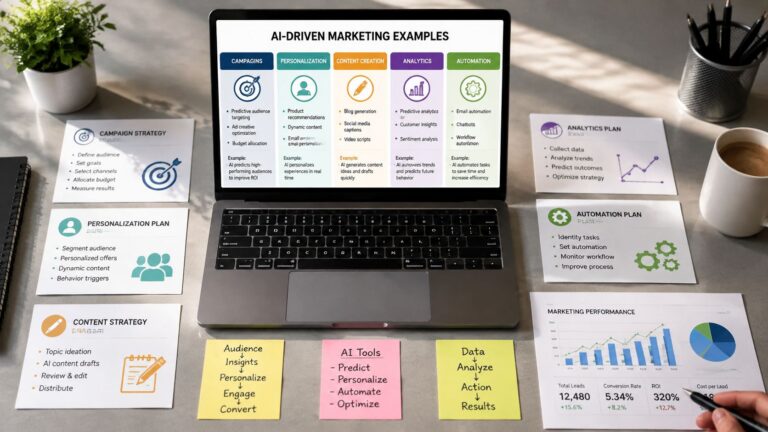
Here are ten AI in marketing examples you can build this week: personalized email campaigns, lead-qualification chatbots, social post creation, ad creative testing, predictive segmentation, content outlines, SEO content optimization, landing page personalization, social listening and upsell recommendations. Each works when it has a clear input, one repeatable action, a number you watch, and a human reviewing the output first.
Polished AI demos make marketing look easy. A solo operator still has to segment a list, answer leads, write posts, test ads, update pages, and decide which number matters. The popular advice is to “use AI for content,” but that usually produces more drafts, not a working marketing system.
I'm Samuel Woods, and I build around a narrower idea. The useful AI in marketing examples have a clear input, one repeatable action, and a number you can watch. I'll show the tools, prompts, workflow, manual work removed, required context, trade-offs, and the failure that can make each system unreliable. The examples are small enough to build this week without a department or a large software budget.
The shift is already practical. SurveyMonkey reports that 51% of marketers use AI to optimize content, 50% to create content, 45% to brainstorm ideas, 43% to automate repetitive processes, and 41% to analyze data. The same roundup says 73% report that AI helps create personalized customer experiences. SurveyMonkey's 2025 marketing AI roundup supports the opportunity, but the build still has to fit your data and your week.
Table of Contents
- 1. AI-Driven Personalized Email Campaigns
- 2. Chatbots for Lead Qualification
- 3. Automated Social Media Post Creation
- 4. AI-Powered Ad Creative and A/B Testing
- 5. Predictive Customer Segmentation
- 6. Content Ideation and Outline Generation
- 7. Automated SEO Content Optimization
- 8. Dynamic Landing Page Personalization
- 9. Social Listening for Trend Spotting
- 10. AI Recommendation Engines for Upsell
- 10 AI Marketing Use Cases Comparison
- Your Monday Build Starts With One Number
1. AI-Driven Personalized Email Campaigns
A generic list hides the reason each person joined. I once watched open rates stall at 18%, then changed the workflow so behavior, rather than age or industry, determined the message. The first useful segment was the people already engaging with my emails, not the entire database.
The workflow I'd build
Export recent sends, clicks, purchases, and the last meaningful page visit into a spreadsheet. In Claude or ChatGPT, use a prompt such as:
“Group these contacts by recent behavior. Create three segments based on clicked topic, purchase status, and recency. For each segment, write five subject lines and one email. Keep the promise specific, avoid invented customer details, and return the reason each segment should receive the message.”
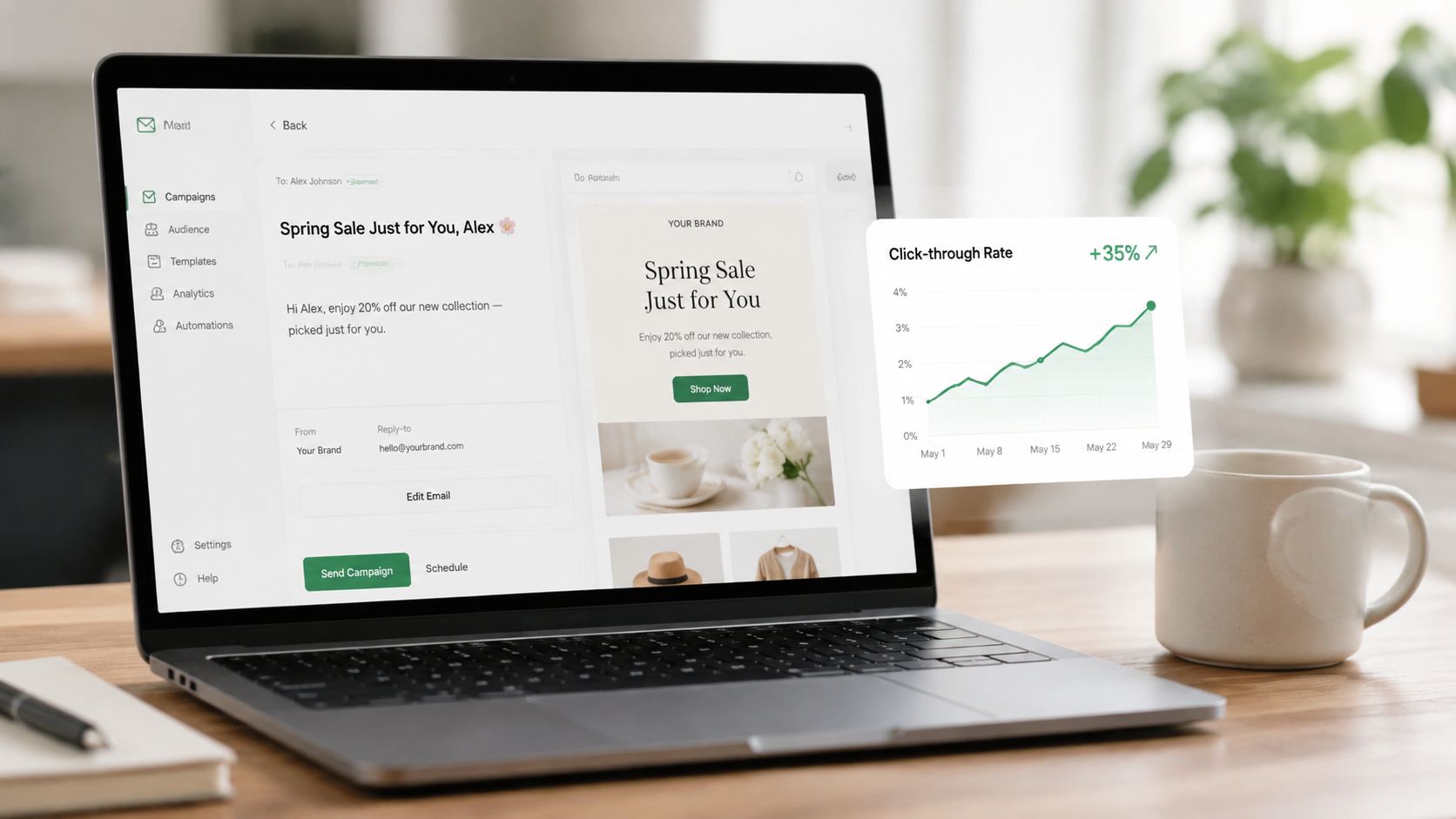
Feed the resulting copy into your email platform. Use the platform's send-time feature only after you've collected enough engagement history to make the timing signal useful. Start with your best-engaged 20%, then compare click-through rate against a control message.
I sent 1,200 targeted emails and recorded 324 clicks within 24 hours. My click-through rate moved from 18% to 27%, while campaign writing fell from three hours to 30 minutes. Those are my operating results, not a general benchmark.
The system replaces list sorting, first-draft writing, and manual send-time decisions. It still needs clean consent status, event data, product details, exclusions, and a record of previous offers. My first mistake was asking the model to infer intent from job titles. Behavior gave me a better signal.
Practical rule: Use AI to choose and adapt the message. Keep the final send decision manual until the segment logic has survived a controlled comparison.
Watch click-through rate first. If clicks rise while unsubscribes or complaints rise too, the personalization is probably too aggressive. My email marketing automation strategies explain the surrounding workflow.
2. Chatbots for Lead Qualification
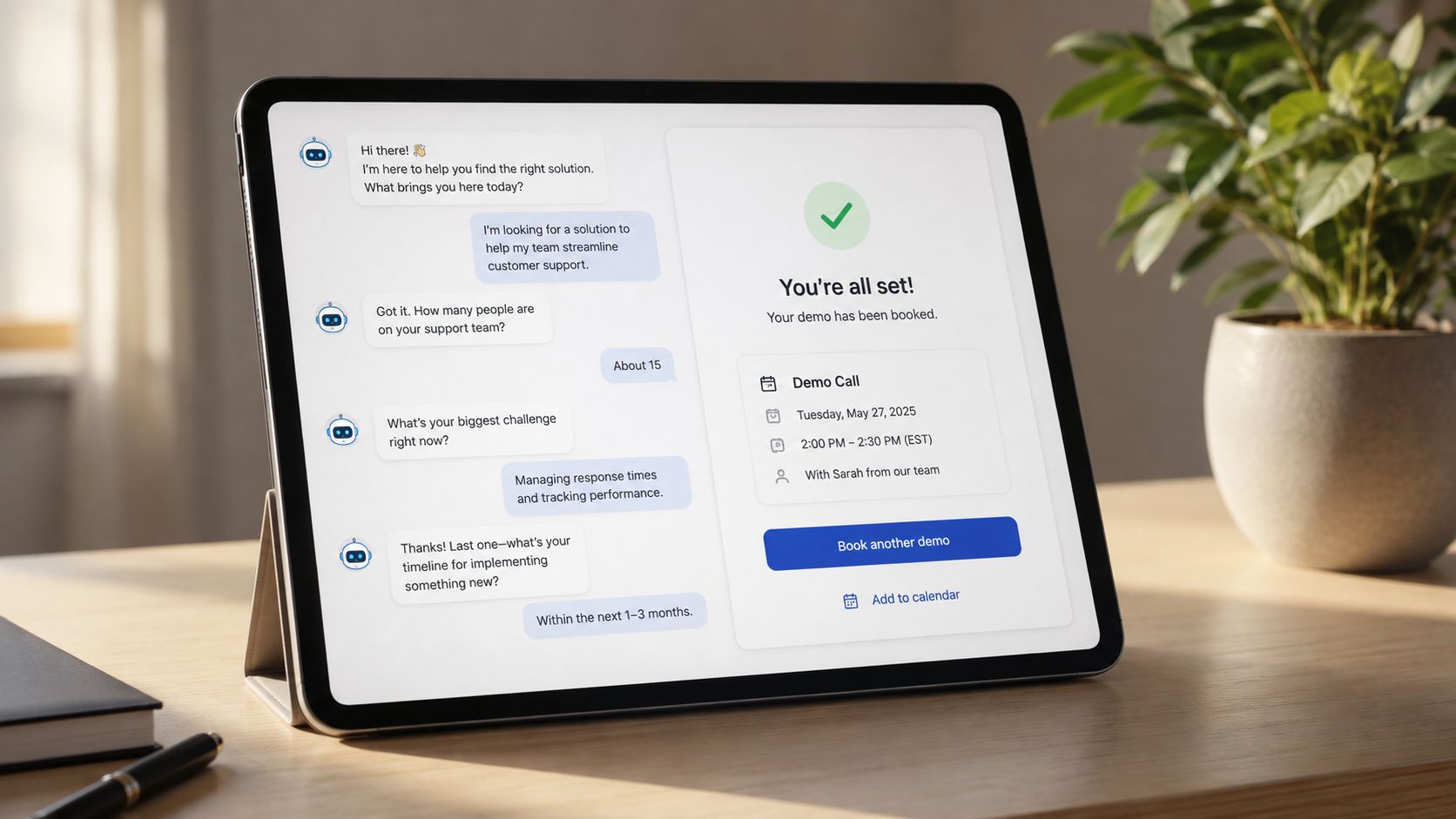
A static form asks a visitor to do all the work before you've earned their attention. A conversational flow can ask a few useful questions, explain the next step, and place a qualified call on your calendar while you're doing something else.
Build the five-question path
I'd connect a site chat widget to a simple automation tool, a calendar, and a spreadsheet. The prompt needs strict boundaries:
“You qualify visitors for [offer]. Ask no more than five questions: problem, current approach, urgency, budget fit, and preferred next step. Use casual language. Never promise an outcome. If the visitor is a fit, offer the calendar link. If not, recommend the most relevant free resource.”
The bot should store the answers, score the lead against rules I wrote myself, and send only qualified conversations to the calendar. On day one, my version handled 85 leads, passed 23 qualified calls to my calendar, and saved eight hours of screening.
That replaces repetitive form review and the first qualification exchange. It needs a defined customer profile, disqualifying conditions, calendar availability, approved answers, and an escalation route. It doesn't need to answer every question. In fact, broad open-ended chat is where the build starts to fail.
A solopreneur I coached saw qualified demos rise 18% in one month. That result belongs to that business and workflow, not to chatbots in general. The number I'd watch is qualified-booking rate, with show rate as a guardrail.
The first version I built asked too much. Visitors abandoned the conversation before the useful question arrived. Keep the language close to how customers speak, and make the bot easy to exit.
Read my guide to AI agents versus chatbots before adding actions that go beyond answering and routing.
3. Automated Social Media Post Creation
Posting every day feels impossible when you're also the writer, editor, operator, and customer support desk. AI helps when it turns one source idea into a controlled batch of posts. It fails when it fills your feed with interchangeable captions.
Turn one idea into a week
I'd start with a source folder containing customer questions, product notes, transcripts, and past posts. Ask ChatGPT or Claude:
“Extract five distinct lessons from these notes. Create one text post, one carousel outline, and one short-video script for each lesson. Use plain language, preserve the source meaning, state one claim per post, and mark any claim that needs verification.”
I review the claims, create or select images, and schedule the approved posts. I rotate text, carousel, and video rather than publishing the same format repeatedly. An AI workflow now saves me five hours each week, and one week-old Instagram series produced 200 saves instead of my typical 80.
The manual work removed is topic sorting, first-draft caption writing, and scheduling preparation. The inputs need a real source library, a clear audience, visual assets, banned claims, and platform limits. A prompt alone can't supply those.
The number to watch is saves per impression for educational posts, not raw likes. I also tag each hook so I can see which opening earns attention.
My first mistake was letting the model invent examples to make posts sound vivid. That created plausible content with no connection to the business. I corrected it by requiring a source note beside every draft.
For a fuller publishing workflow, see AI social media automation. Don't automate replies until you've reviewed the tone and the risk of answering a customer incorrectly.
4. AI-Powered Ad Creative and A/B Testing
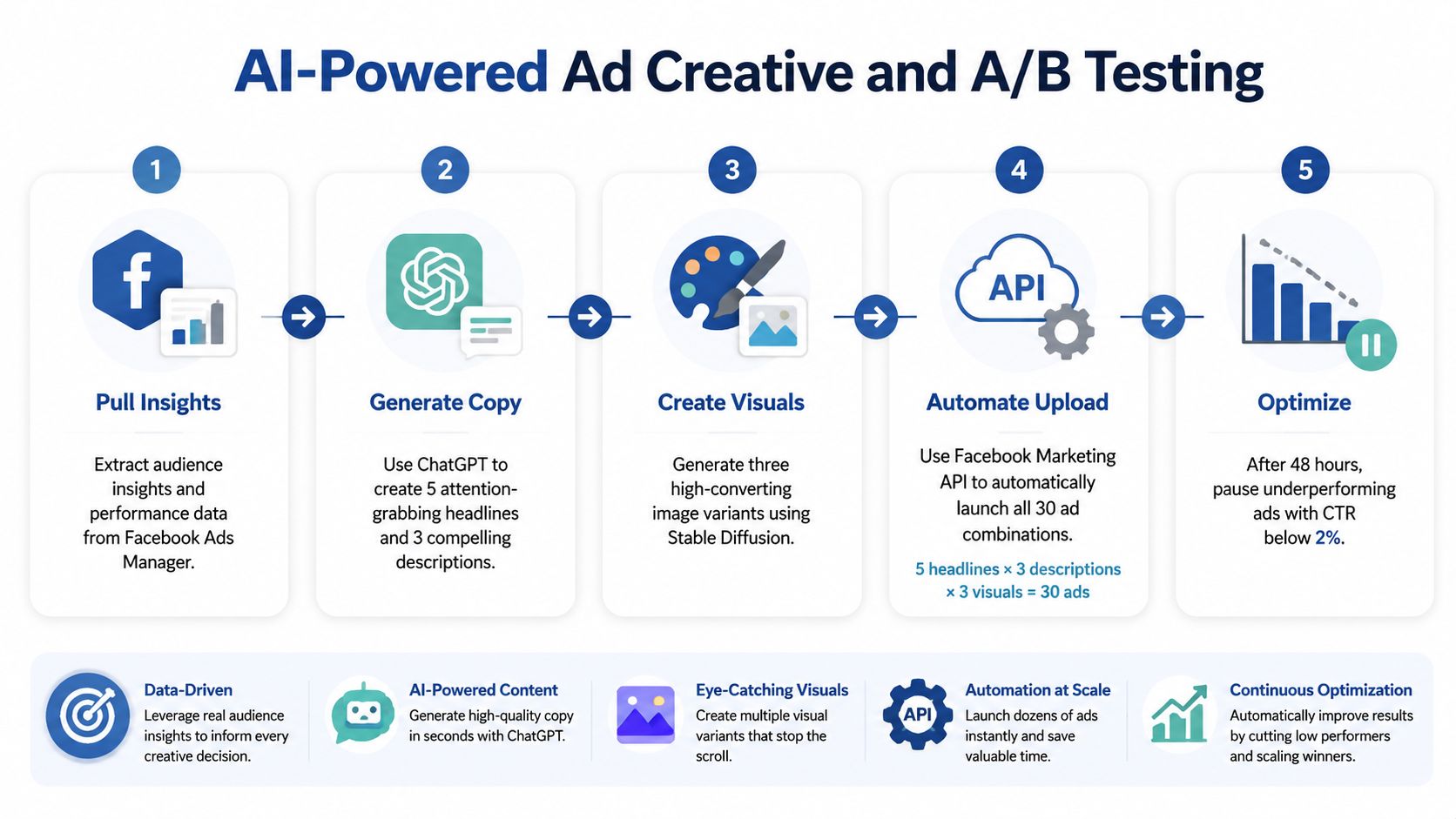
Ad testing usually slows down because the operator changes too many things at once or waits too long before learning anything. I built a small creative workflow that tests five headlines, three descriptions, and two images in parallel. The test cycle fell from two weeks to two days, and my ad return improved 18%.
Keep the experiment legible
I'd place the variants in a spreadsheet, then ask an image-capable model and a writing model to produce them:
“Write five headlines for [audience] using this offer and landing page. Keep each promise accurate. Create three descriptions with different objections. Suggest two image concepts. Label every variant by the single element being tested.”
I'd upload the approved assets to the ad platform, cap each variant at 20% of the budget, and rotate one element at a time. The process replaces repetitive copy production and the delay caused by building each variation manually.
One campaign moved cost per click from $1.25 to $1.02 in three days. Those figures describe that campaign only. I'd watch cost per qualified conversion, not CPC alone, because cheap clicks can still produce poor leads.
A tool such as ShortGenius AI may speed up creative production, but no generator knows whether a claim is supportable for your offer. The required context includes the approved landing-page promise, audience objections, excluded claims, conversion event, and budget rules.
The failure was attribution. With five headlines, three descriptions and two images in one test, I couldn't tell whether the image, headline, or description caused the lift. The attractive demo was a large asset batch. The useful system was a small, readable experiment.
5. Predictive Customer Segmentation
Treating every customer as one list makes your offers blunt. A practical segmentation model can group contacts by predicted lifetime value and churn risk, then help you choose a different message for each group.
Use three segments first
I'd export purchase history, order frequency, refunds, last activity, email engagement, and support events. Then I'd ask:
“Using these fields, assign each contact to one of three segments: high-value active, promising but inactive, and at-risk. Explain the evidence for each assignment. Do not infer sensitive attributes. Return the recommended offer, exclusion rule, and confidence level.”
I'd review the assignments manually, send custom offers to a small sample, and retrain the rules every 30 days. Start with three segments, not ten. More labels create the appearance of precision before the data supports it.
I once focused offers on my top 30% and saw revenue from that segment rise 42% over two months. An ecommerce client reduced churn 15% after using segment-specific promotions. These are individual results, not universal expectations.
The system replaces spreadsheet filtering and repeated campaign selection. It needs stable customer IDs, transaction history, engagement events, product margins, and a clear definition of churn. It breaks when the list is too small, events are missing, or the model mistakes a seasonal pause for a customer leaving.
The number I'd watch is revenue per segment, with margin and unsubscribe rate beside it. Revenue alone can reward discounts that weaken the business.
6. Content Ideation and Outline Generation
A blank document can consume the part of the day when you should be making decisions. I now separate planning from writing. AI creates the first structure, while I decide whether the topic deserves a place on the site.
Feed the model enough context
I'd give Claude or ChatGPT the customer questions, existing articles, desired word counts, and two competitor URLs for context. My prompt is:
“Create an outline for a practical article about [topic]. Use the supplied customer questions and the two reference pages. Include section headers, the job each section must do, suggested word counts, internal-link opportunities, and claims that need primary sources. Do not copy wording.”
The workflow removes blank-page planning and the first round of structural decisions. It needs a defined reader, search intent, source material, editorial point of view, and a realistic publishing capacity. Competitor pages provide context, not permission to imitate.
I cut planning time by 80%, doubled my publishing cadence, and produced 12 long-form posts in one month instead of six. Those are my own workflow results. I'd watch published posts that reach the intended conversion action, not the number of outlines generated.
The first failure was accepting a complete-looking outline with no original argument. AI is good at arranging familiar points. It won't decide what you've learned from your own work unless you give it evidence.
Deloitte's CMO Survey found that content personalization and content creation were among the top AI marketing applications, at 53% and 49% respectively. The cited summary of Deloitte's data supports using AI in production, but production is only the beginning. Your outline still needs a reason to exist.
7. Automated SEO Content Optimization
A page that ranks near the top can need a small correction rather than a complete rewrite. I built a workflow that compares a page with relevant top-ranking results, finds missing subtopics, and proposes limited on-page edits.
Edit evidence, not keywords
I'd pull the article text, title, headings, search query, and a manually reviewed set of competing pages into a script or spreadsheet. Then I'd use this prompt:
“Compare this article with the supplied reference pages. Identify missing questions, unclear definitions, unsupported claims, and sections that fail the search intent. Suggest edits that improve usefulness and readability. Do not force keywords, remove accurate detail, or copy phrasing.”
I review every suggestion, publish one update, and wait before making another. My article moved from position 8 to 3 in three days after one update, and a landing-page guide moved from page two to page one in four days. Those outcomes aren't a promise for every page.
The system replaces manual comparison and first-pass editing. It needs reliable query data, the actual page, relevant competitors, internal links, and source references. I'd limit updates to three per month per article so I can identify which change mattered.
The metric is the page's target-query position, paired with organic clicks and the page's conversion action. A ranking lift with no qualified traffic isn't enough.
The conventional advice that “more keywords means better SEO” is wrong here. My first version inserted phrases until the copy sounded unnatural. Readability fell, and the page became less useful. AI should find gaps. I decide what belongs.
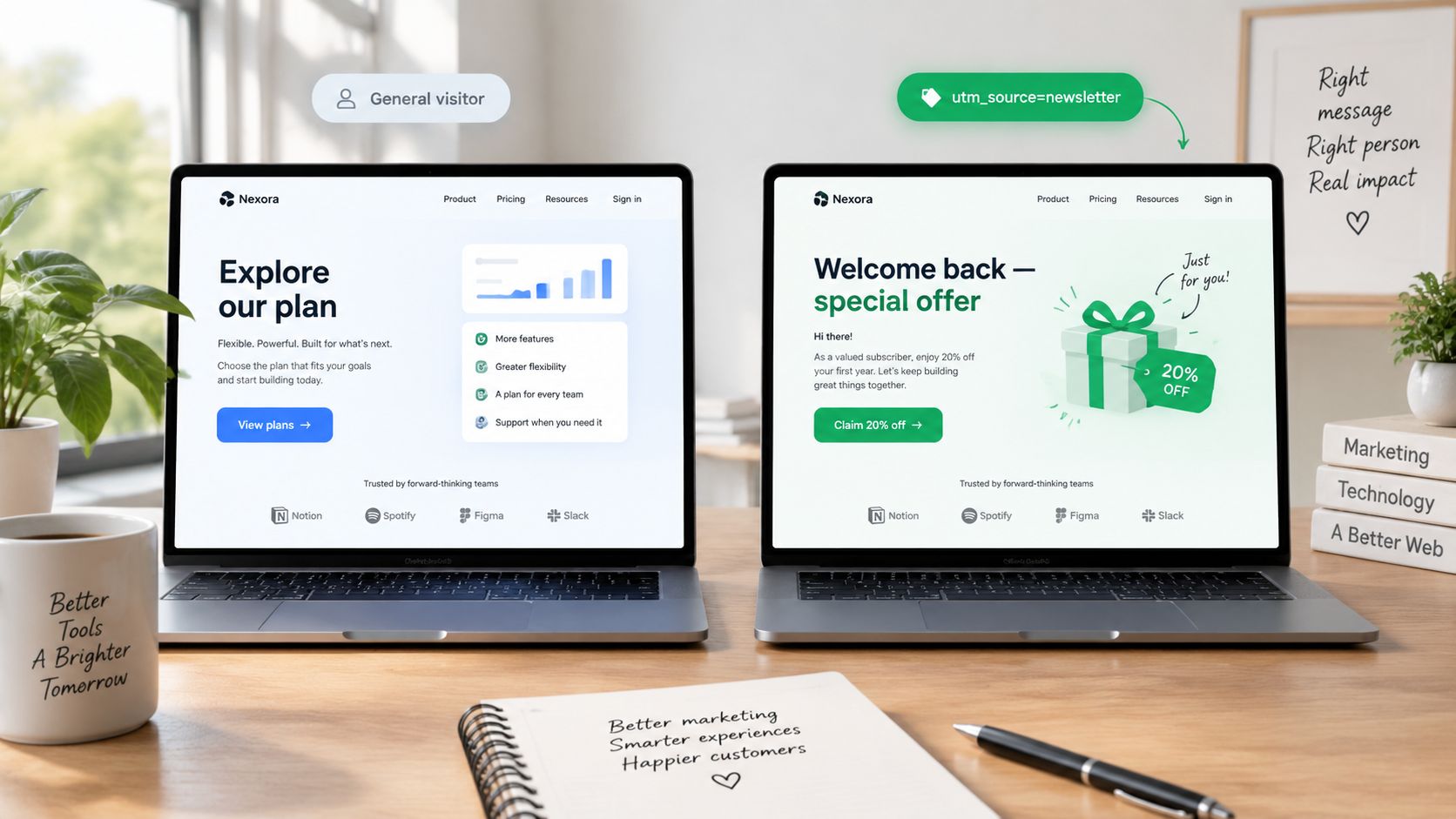
8. Dynamic Landing Page Personalization
A personalized page can help a visitor see the most relevant promise sooner. It can also create a slow, confusing page with claims that don't match the ad or search result. For a small business, the default experience matters more than the clever variation.
Keep the default version safe
I'd define a few intent signals, such as campaign source, visited topic, and returning status. A lightweight script can select approved headline, image, and call-to-action combinations. The model's job is to draft the variants:
“Write three headline options and three CTA options for visitors interested in [topic]. Preserve the approved offer, avoid new claims, and label each version by intent. Write a default version that works for every visitor.”
I'd test one element at a time and keep a default version available. My conversion rate rose from 2.1% to 3.8%, and I removed 120 development hours from the process. A SaaS page saw demo requests rise 35%. Those are specific project results, not a baseline.
The workflow replaces repeated page-copy edits and some developer handoffs. It needs approved copy, intent signals, page-speed monitoring, analytics, and a fallback. I'd watch conversion rate for the chosen action, then check bounce rate and load performance.
The system breaks when signals are noisy or traffic is too thin to compare versions. It also breaks when every visitor sees a different page and you can't explain what changed. My first mistake was personalizing headline, image, and CTA together. I couldn't isolate the cause.
9. Social Listening for Trend Spotting
You can't react to a customer complaint you never see. I set up an agent to scan Twitter, Reddit, and relevant forums for rising terms, sentiment changes, and competitor mentions. The agent doesn't publish anything. It brings me a short list of signals worth checking.
Make the agent prove relevance
I'd start with three core keywords, product names, common complaints, and competitor names. The prompt would be:
“Review these public posts for mentions of [keywords]. Group repeated complaints, separate questions from opinions, flag changes in sentiment, and cite the original post. Return only themes with evidence from multiple posts. Recommend one product, content, or support action for each theme.”
The agent replaces manual searching and scattered note-taking. It needs monitored sources, keyword variants, exclusion terms, sentiment examples, and a review schedule. I'd tune the sentiment threshold after the first week because sarcasm and niche language can distort the output.
My agent surfaces two actionable trends each week. One product adjustment lifted sign-ups 10%, and an onboarding change following a complaint theme produced a 12% drop in support tickets. These results came from my own observations and tests.
The metric is the number of verified signals that become useful actions, not the volume of mentions collected. I'd also track the support or conversion measure attached to the change.
The failure is noise. A viral post can look like a market trend, while a small but serious recurring complaint can look insignificant. I don't let the agent turn sentiment into a decision without opening the source posts myself.
10. AI Recommendation Engines for Upsell
An upsell widget works when the recommendation answers a real next need. It fails when it displays random products, unavailable stock, or an expensive offer before the customer has confidence in the first purchase.
Start with complementary products
I'd export product relationships, purchase history, inventory status, category, price, and returns. For a simple first version, I'd ask:
“For each product, recommend up to three complementary items using co-purchase history and category fit. Exclude out-of-stock products, duplicate items, and products that conflict with the customer's current selection. Return a reason for each recommendation.”
The widget should cache responses for repeat visitors and refresh stock status in real time. I'd run it against a control page, keeping the recommendation placement fixed. The manual work removed is product pairing and repeated merchandising edits.
My average order value moved from $45 to $57, and repeat purchase rate rose 8% in an A/B test. A Shopify store generated $12 in additional revenue per order on average. Those figures belong to the tested stores and should not be treated as a forecast.
The main metric is average order value, with gross margin and refund rate beside it. If the widget raises order value by pushing low-margin items, it may make the store look healthier while leaving less money behind.
A Bionic Business issue documents the recommendation agent in more detail, including the point where I stopped trusting the model and moved stock exclusions into a deterministic rule. That separation matters. AI can suggest. Inventory logic should have a hard boundary.
10 AI Marketing Use Cases Comparison
| Solution | Implementation complexity | Resource requirements | Expected outcomes | Ideal use cases | Key advantages |
|---|---|---|---|---|---|
| AI-Driven Personalized Email Campaigns | Medium, LLM copy + send-time prediction integration | Clean engagement data, ESP, LLM/model, analytics; reliable above ~300–500 subscribers | Higher CTR (example 18%→27%), large time savings per campaign | Behavioral email lists, nurture and re-engagement campaigns | Better opens/clicks; significant writing time saved |
| Chatbots for Lead Qualification | Low–Medium, embeddable bot + calendar/API hookups | Chatbot platform, calendar integration, prompts, weekly tuning | Automated screening (example: 85 leads → 23 qualified day one), saves screening hours | High inbound traffic sites needing 24/7 qualification | 24/7 lead capture; frees up calendar time |
| Automated Social Media Post Creation | Low–Medium, prompt workflows + design API automation | Brand assets, engagement history, scheduling tool, Canva/API access | Saves about 5 hours/week; engagement lift (about 30% reported) | Small teams/solopreneurs needing consistent posting | Rapid content generation; consistent publishing cadence |
| AI-Powered Ad Creative and A/B Testing | High, API automation, creative generation, test orchestration | Ad platform APIs, image models, scripting skills, ad budget | Faster test cycles (days vs weeks), improved ROI (example +18%) | Paid acquisition programs that run frequent experiments | Rapid iteration; better ROI per ad dollar |
| Predictive Customer Segmentation | Medium–High, AutoML/model training + CRM tagging | Order history, engagement data, AutoML tools, CRM integration | Focused offers yield revenue uplifts (example top 30% revenue +42%) | Ecommerce/subscription businesses with purchase data | More efficient ad spend; higher ROI on offers |
| Content Ideation and Outline Generation | Low, LLM prompting and reuse of prompts | Target keywords, competitor URLs, LLM access | Planning time cut (~80%), publishing cadence doubled in example | Content teams needing volume and faster ideation | Faster planning; improved SEO topic coverage |
| Automated SEO Content Optimization | Medium, SERP API + AI-driven rewrites | SERP API (e.g., SerpAPI), article text, LLM, monitoring tools | Rapid rank gains (example position 8→3 in days) | SEO teams optimizing existing posts for quick wins | Fast on-page improvements; fills topical gaps |
| Dynamic Landing Page Personalization | Medium, front-end snippet + tag manager rules | UTM/behavior signals, small model, tag manager, logging | Conversion lift (example 2.1%→3.8%), reduces dev hours | High-traffic landing pages, targeted campaigns | No-code personalization; higher conversion rates |
| Social Listening for Trend Spotting | Medium, multi-source agent + sentiment filtering | API keys (Twitter/Reddit), agent framework, sentiment model | Regular actionable trends (example sign-ups +10% from tweak) | Product/marketing teams monitoring brand and trends | Early detection of topics; faster reaction to signals |
| AI Recommendation Engines for Upsell | Medium, recommendation model + front-end integration | Order history, collaborative filtering (Pinecone), caching, UI snippet | AOV increase (example $45→$57), repeat purchases +8% | Ecommerce product pages focused on AOV uplift | Data-driven product pairing; higher basket value |
Your Monday Build Starts With One Number
Pick the example whose required data already exists. If you have clean click and purchase events, email personalization or segmentation may be ready. If your strongest asset is a library of customer questions, content planning or social production is a better first build. If you have product relationships and inventory data, recommendations can produce a clean comparison.
Write down one supplied success metric before you open a model. That might be click-through rate for email, qualified-booking rate for a chatbot, saves per impression for social posts, cost per qualified conversion for ads, revenue per segment, conversion rate for a page, or average order value for recommendations. The number is the point of the workflow. Without it, you're collecting impressive outputs.
On Monday, export one small dataset. Create one prompt that names the input fields, the approved context, the exclusions, and the required output format. Run the workflow manually, review every result, and compare it with the existing process. Leave the final customer-facing action manual on the first pass.
That last part runs against the popular advice. You don't need to automate the whole chain to learn whether AI helps. A human review step protects email reputation, ad claims, customer trust, page accuracy, and product recommendations while you learn where the model is useful.
Stop or simplify the system when the data volume is too small to support a comparison. Stop when social listening produces more noise than verified themes. Stop when personalization slows the page, when repeated email variants tire the audience, or when model drift changes segment assignments without a business reason. A workflow that runs constantly but produces unreliable decisions is worse than a manual process you understand.
The 2025 Gartner survey found that 27% of CMOs reported limited or no generative AI adoption for marketing campaigns, while 77% of organizations that had adopted it used generative AI for creative development and 48% used it for strategy development. Nearly half, 47%, saw a large benefit in evaluation and reporting. The reported Gartner survey findings point to a gap: many businesses can produce AI-assisted work, but fewer have repeatable operating habits around it.
I'd keep a simple log with the prompt version, input date, output used, human edits, and result. I'd review that log weekly and remove steps that don't change the number. Bionic Business continues this kind of workflow documentation, especially where an attractive AI demo breaks under real operating conditions.
Choose one build, one dataset, and one number on Monday. Run the smallest comparison you can finish before the week ends, keep the judgment manual, and only automate the part that proves reliable.
Frequently Asked Questions
What is a good first AI marketing project for a small business?
Pick the example whose data you already have. Clean click and purchase events make email personalization or segmentation a good start. A library of customer questions suits content planning or social posts. Product relationships and inventory data suit upsell recommendations. Write down one success metric before you open a model, run the workflow manually on one small dataset, and compare it with your current process.
How do you use AI to personalize email campaigns?
Export recent sends, clicks, purchases and the last meaningful page visit, then ask Claude or ChatGPT to group contacts into three segments by clicked topic, purchase status and recency, with subject lines and an email for each. Start with your best-engaged 20% and compare click-through rate against a control message. If unsubscribes or complaints rise with clicks, the personalization is too aggressive.
Can an AI chatbot qualify leads for a small business?
Yes, if you keep it narrow. Limit the bot to five questions covering the problem, current approach, urgency, budget fit and preferred next step, score answers against rules you write yourself, and offer the calendar link only to qualified visitors. Broad open-ended chat is where these builds fail. Watch qualified-booking rate, with show rate as a guardrail, and make the bot easy to exit.
How do you test AI-generated ad creative without muddying the results?
Label every variant by the single element it tests, cap each variant at 20% of the budget, and rotate one element at a time. Testing headlines, descriptions and images together makes it impossible to tell what caused a change. Judge the test on cost per qualified conversion, because cheap clicks can still bring poor leads, and keep excluded claims out of every prompt.
Which metric should you track for each AI marketing workflow?
Use one number per build. Track click-through rate for email, qualified-booking rate for a chatbot, saves per impression for social posts, cost per qualified conversion for ads, revenue per segment for segmentation, conversion rate for a personalized page, and average order value for recommendations. Put a guardrail beside each one, such as unsubscribes, margin or refund rate, so a rising number can’t hide damage elsewhere.
When should you stop or simplify an AI marketing workflow?
Stop or simplify when your data volume is too small to support a comparison, when social listening produces more noise than verified themes, when personalization slows the page, when repeated email variants tire the audience, or when model drift changes segment assignments without a business reason. A workflow that runs constantly but produces unreliable decisions is worse than a manual process you understand.