
Most advice on how to implement marketing automation is backwards. People start with a demo, compare feature grids, and end up buying software before they've built the operating system that software is supposed to run.
I've been working with ML since 2016 and Generative AI since 2019, and I've seen this pattern repeat in startups, SaaS teams, ecommerce brands, and agencies. The companies that win don't treat automation like a tool purchase. They treat it like a revenue system with data rules, workflow logic, and human oversight built in from day one.
That matters because automation can absolutely pay off fast when you implement it correctly. Successful implementations generate $5.44 for every dollar spent over three years, and 44% of organizations realize a positive return within six months, according to Nucleus Research and the verified benchmark set provided for this topic. But speed to ROI only happens when your data, stack, and governance are designed before your workflows go live.
Table of Contents
- Stop Buying Automation Tools and Start Building Systems
- The Pre-Flight Check for Your Data and Strategy
- Architecting Your Marketing Automation Stack
- Your First Automation Workflow: A Proof of Concept
- Scaling with AI Agents and Human Oversight
- Measuring Success and Proving ROI
Stop Buying Automation Tools and Start Building Systems
Buying software first is the fastest way to build expensive confusion.
Teams get stuck because they start with vendor demos instead of operating design. WebFX cites reported industry data showing that 73% of marketers find automation challenging to deploy. That outcome makes sense. Sending an email or assigning a lead is easy. The hard part is deciding who owns each workflow, which data source triggers it, where approvals happen, and how each step connects to revenue.
Treat implementation like systems design.
Marketing automation sits inside marketing operations, and weak operations create weak automation. If ownership is blurry, lifecycle stages are inconsistent, or reporting is disconnected from sales outcomes, your platform becomes a polished way to send the wrong message faster. If you need a clearer operating model, my guide to marketing operations explains how these systems should work inside a business.
I build automation in five layers:
| Layer | What it does | Why it matters |
|---|---|---|
| Strategy | Defines offers, audiences, goals | Keeps automation tied to pipeline and retention |
| Data | Supplies triggers, fields, and segmentation | Prevents bad records from firing bad campaigns |
| Workflows | Runs follow-up, routing, and handoffs | Increases speed without creating chaos |
| Governance | Sets approvals, permissions, and QA rules | Reduces compliance risk and brand drift |
| Reporting | Measures influence on revenue and efficiency | Shows whether the system is worth keeping |
That fourth layer gets ignored too often. It should not.
AI agents make automation more productive, but they also make mistakes at scale if you skip governance. Build Data Pre-Flight and Human-in-the-Loop controls into the implementation plan from day one. Review prompt templates, approval rules, escalation paths, and source-of-truth fields before you activate AI-generated outreach, lead qualification, or content decisions. If you bolt those controls on later, you inherit data debt and inconsistent messaging across every campaign.
Your competitive advantage comes from workflow discipline, not logo selection.
A competitor using a cheaper platform with cleaner routing logic, better field governance, and tighter approval rules will outperform a team running enterprise software with messy processes. That is why I tell founders and small-team owners to study campaign logic before touching platform settings. This guide to email marketing automation strategies is useful because it focuses on sequence structure, timing, and segmentation instead of vendor positioning.
Delay automation if the foundation is weak.
Hold off if any of these are true:
- Your CRM is unreliable. Duplicate contacts, missing lifecycle fields, and broken ownership rules will contaminate every workflow.
- No one owns the system. If marketing, sales, and ops each assume someone else is responsible, failures will sit in production unnoticed.
- Success is undefined. “Save time” is not a business case. Set targets tied to pipeline velocity, conversion rate, retention, or cost per acquisition.
- AI has no guardrails. If nobody has defined approved data sources, review checkpoints, and brand rules, your system will produce inconsistent output at scale.
Automation multiplies what already exists. Strong processes become faster. Broken processes become harder to control and more expensive to fix.
The Pre-Flight Check for Your Data and Strategy
Your automation platform is only as smart as the data you feed it. This often becomes apparent after launch, when the wrong leads get routed, the wrong emails fire, and AI starts generating polished nonsense from broken records.
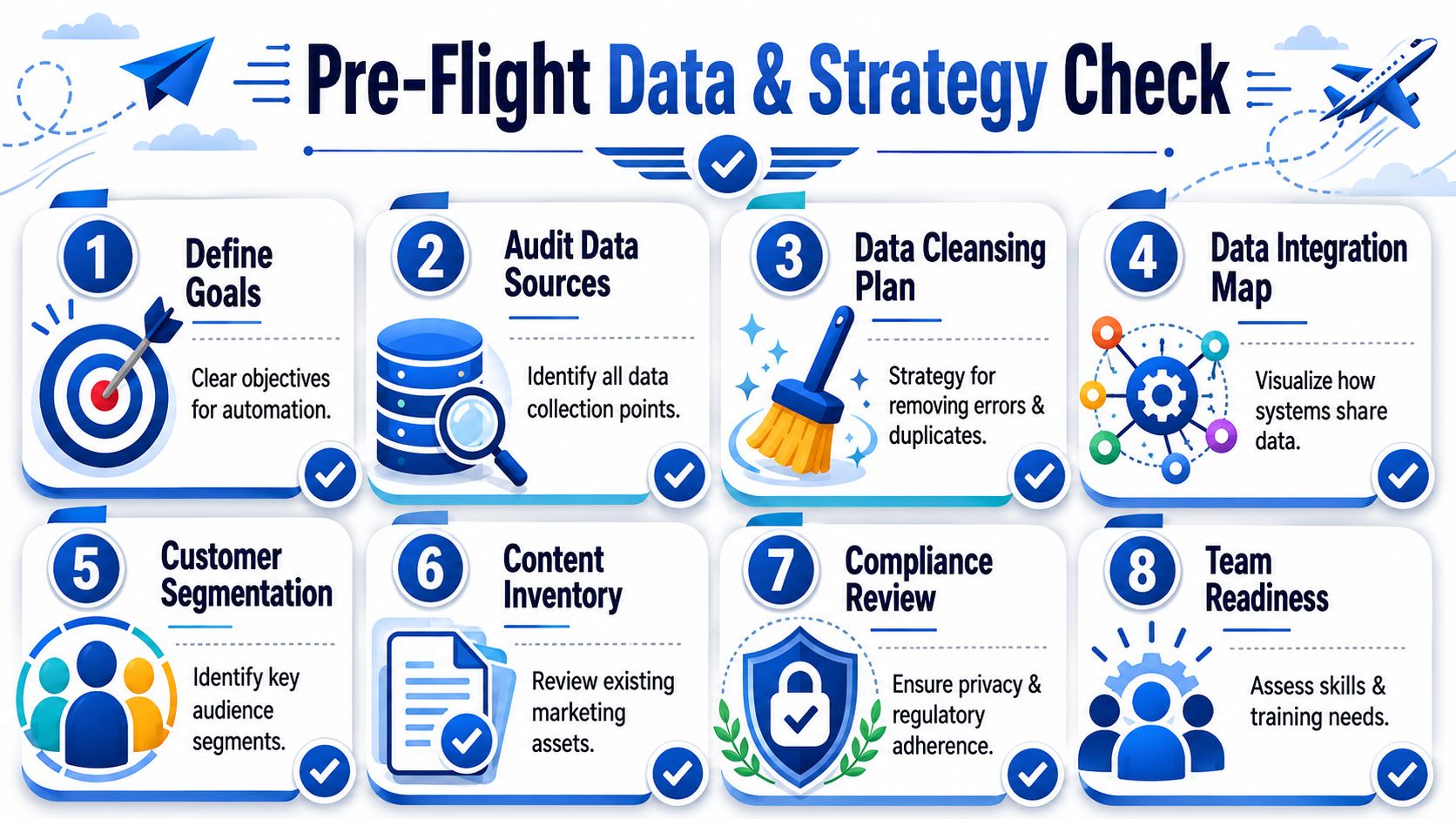
That's why I insist on a Data Pre-Flight phase before implementation. Not after procurement. Before.
Start with data debt, not campaign ideas
You might want to build welcome sequences, lead scoring, cart recovery, reactivation, or AI-personalized outreach. None of that matters if your customer records are fragmented.
The benchmark is blunt. Organizations investing in pre-implementation data hygiene see a 3.5x increase in ROI within 12 months and a 40% improvement in lead conversion rates, according to the verified neutral industry analysis provided for this topic. That gap is the difference between a profitable system and a noisy one.
If you're sorting out messy pipelines, warehouse syncs, and source-of-truth problems, this guide to marketing data integration will help you frame the technical side correctly.
My Data Pre-Flight checklist
I use a simple audit before any serious automation rollout.
Define one commercial objective first. Pick a business target. Faster lead follow-up. Better reactivation. Higher sales efficiency. Lower overhead. Not all four at once.
List every source feeding customer data. CRM, ecommerce platform, forms, chat, webinar tools, support desk, billing platform, ad lead forms. If data enters the business anywhere, it belongs on the map.
Find duplicate identities. One customer often exists as three records with slightly different names, emails, or company fields. That breaks segmentation and confuses AI systems.
Standardize key fields. Country names, phone formats, lifecycle stages, acquisition source labels, owner fields. If your team uses five versions of the same field value, your automation logic will splinter.
Clean data is revenue protection, even when it feels like admin work.
The three non-negotiable sanitation steps
This is the minimum standard I'd accept before connecting a live automation engine.
- De-duplicate first. Merge fragmented records so one person equals one profile. If a lead appears in multiple systems, unify it before workflow logic starts firing.
- Standardize next. Normalize formats and labels so triggers behave consistently. “SQL,” “Sales Qualified,” and “sales-qualified” cannot live as separate realities.
- Then validate lifecycle stages. Map records to actual journey stages. Awareness, consideration, decision, customer, expansion, churn risk. Your automation has to know where a person is before it decides what to do.
Strategy checks most teams skip
Data quality is half the job. Strategy quality is the other half.
Use this quick screen:
| Question | Good answer | Bad answer |
|---|---|---|
| Who is this workflow for? | A defined segment with clear intent | “Everyone in the database” |
| What event triggers action? | A specific behavior or stage change | “Whenever marketing wants” |
| What business action follows? | Route, message, update, alert, suppress | “Send some emails” |
| Who approves AI output? | Named human owner | “The tool handles it” |
Most failed rollouts don't collapse because the UI is confusing. They collapse because nobody agreed on segment definitions, handoff rules, or approval thresholds before launch.
Fix that upstream. Your stack gets easier immediately.
Architecting Your Marketing Automation Stack
Teams waste months arguing about vendors when the core problem is architecture. The stack decides whether your automation produces revenue or just produces activity.
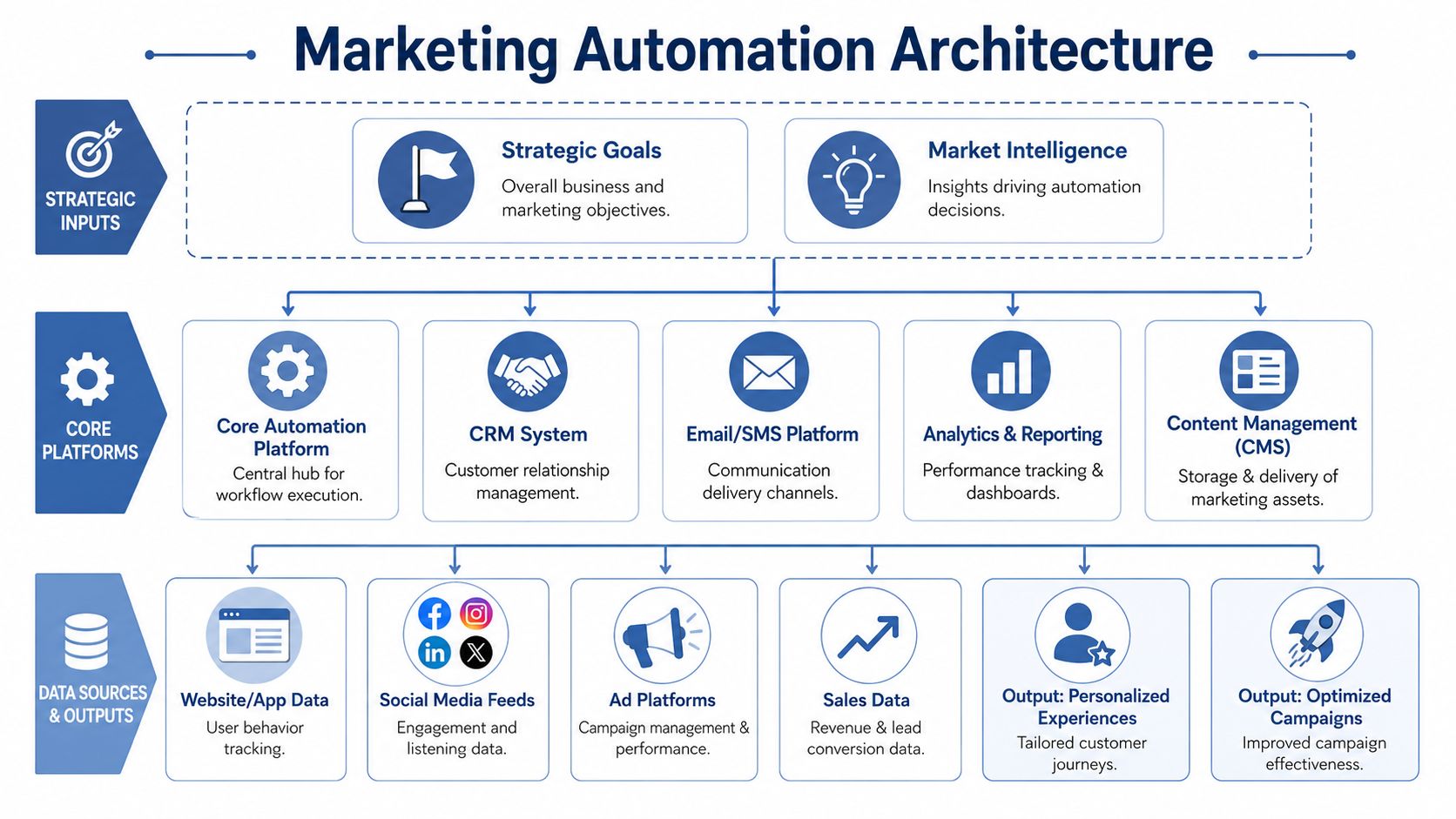
A stack that works has one job. Move customer signals into reliable decisions, then turn those decisions into actions your team can trust.
The stack I recommend most often
Build around three operating layers, then add governance on top.
Your CRM holds customer truth. It owns identity, account relationships, lifecycle stage, pipeline status, ownership, and the fields sales and marketing both depend on.
Your automation engine handles orchestration. It triggers workflows, updates records, sends messages, routes leads, suppresses contacts, and logs what happened.
Your AI reasoning layer makes judgment calls inside defined boundaries. It can classify intent, draft copy, summarize calls, score urgency, recommend next-best actions, and prepare content variants. It should not invent customer truth or rewrite brand standards on the fly.
That last point matters. AI belongs inside the architecture, not bolted on after launch. If you add agents without Data Pre-Flight rules, field governance, and human approval paths, you get data debt faster and brand drift at scale.
If you're comparing categories and implementation patterns, I've written about AI marketing automation tools in a way that separates platform role from vendor hype.
The architecture rule that prevents chaos
Assign one owner to each job.
- The CRM owns identity, lifecycle, pipeline, ownership, and account history.
- The automation platform owns triggers, journeys, channel sends, list logic, and operational updates.
- The CMS or product layer owns website and in-product experiences.
- The analytics layer owns attribution, workflow reporting, and revenue measurement.
- The AI layer owns classification, drafting, summarization, recommendations, and decision support.
- The governance layer owns consent rules, approval thresholds, audit logs, prompt controls, and write-back permissions.
If two systems own the same field, one system will corrupt it.
I see the same implementation mistake over and over. A team lets the CRM score leads, the automation platform applies its own lifecycle labels, and an AI agent creates a third version of intent in a hidden workspace. Reporting breaks, routing gets noisy, and nobody can explain why sales is chasing the wrong accounts.
Fix ownership early.
The first build step
After your data pre-check is done, connect systems in the order decisions happen. Start with CRM and automation platform sync. Then connect your email platform or sending layer. Then add product, web, ad, and support signals. Add AI agents only after the write paths, approvals, and logging rules are explicit.
For email execution details, this email automation guide is a useful companion because it focuses on workflow mechanics and deliverability choices that affect actual performance.
Do not let an AI agent write directly into high-risk fields such as lifecycle stage, lead status, consent, account ownership, or opportunity value without a Human-in-the-Loop checkpoint. Let agents recommend, classify, and draft first. Let approved workflows commit changes back to core systems.
Here's a visual walkthrough that helps map the architecture thinking into something concrete:
What good implementation looks like in practice
A practical example makes this clear.
Suppose an AI agent reviews form submissions, pricing-page visits, and recent email replies to identify high-intent leads. Good architecture writes that judgment back into approved CRM or automation fields, logs why the score changed, and triggers the right follow-up sequence or sales alert. Bad architecture leaves the reasoning inside a prompt log, a spreadsheet, or a separate AI app that nobody can report on.
The difference is operational control.
I'll also mention one option in this category: my own work. The systems I build for clients are designed around AI agents, workflow orchestration, and market-intelligence processing, but they still follow the same principle: one source of truth, one orchestration layer, one reporting loop, and clear Human-in-the-Loop controls where brand or revenue risk is high. If you want one built for your business, you can work with me.
Your First Automation Workflow: A Proof of Concept
Your first workflow should not be customer-facing. That's where teams get reckless.
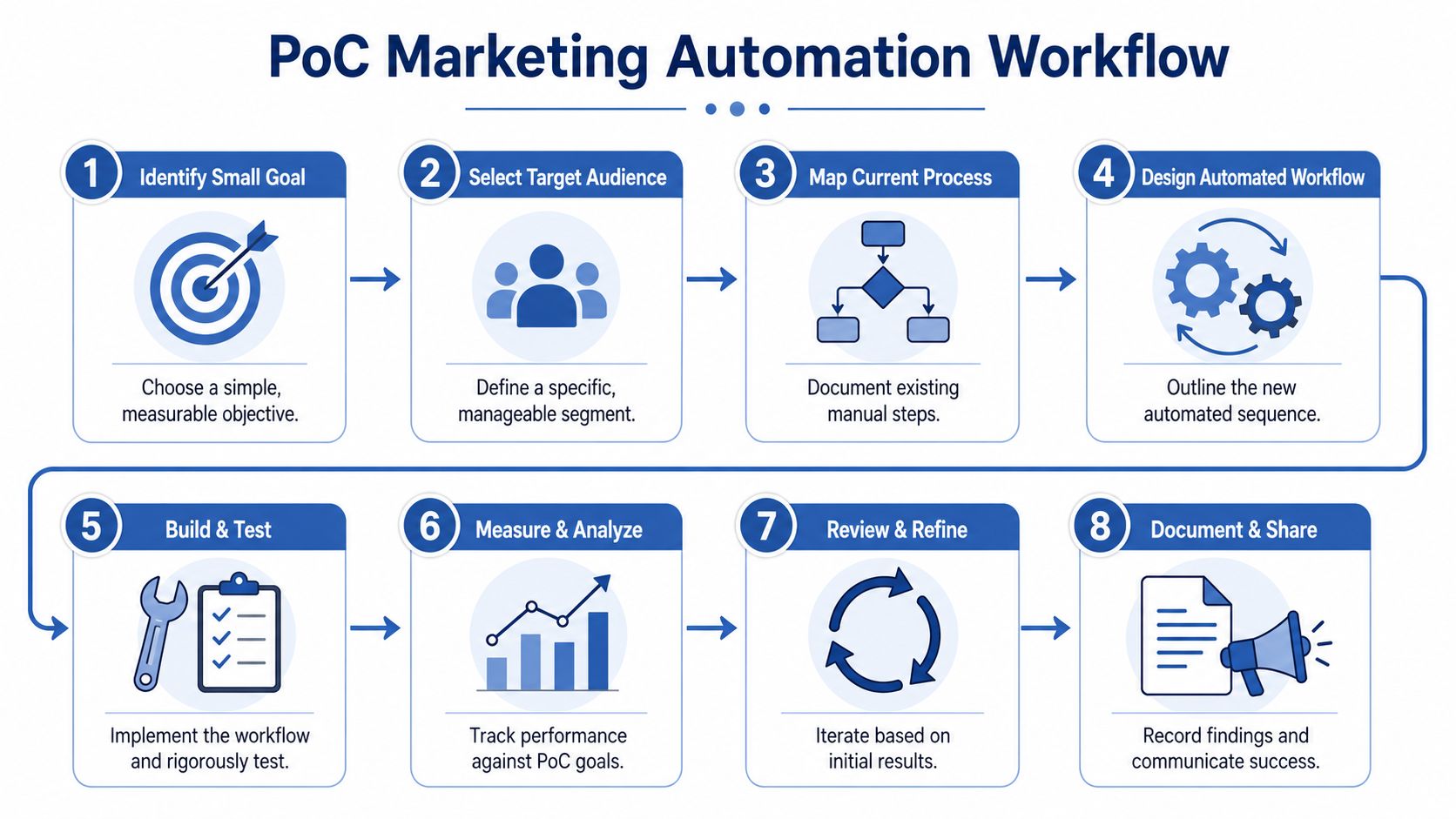
I want your first implementation to be small, internal, measurable, and boring. Boring is good. Boring means controlled. Controlled means you learn fast without damaging brand trust or customer experience.
The workflow I like first
A classic first Proof of Concept is simple: when a lead crosses a qualification threshold, notify sales, update the CRM, and log the event for review.
That's it. No multi-branch nurture path. No dynamic offer logic. No AI-written welcome series. Just one rule-based internal automation that proves your data, handoff, and reporting work together.
The payoff for disciplined rollout is huge. Teams adhering to a start small, internal-first Proof-of-Concept protocol achieve a 92% success rate in subsequent full-scale deployments, whereas those launching big-bang external campaigns face a 45% early abandonment rate, according to the verified independent implementation studies provided for this topic.
What the PoC needs to include
Your first workflow needs three technical components.
Validated trigger logic. Define exactly what event starts the workflow. Maybe a lead score threshold, a demo request from a target account, or repeated pricing-page activity from a known contact.
Clean handoff into the CRM. The automation shouldn't just send a notification. It should update status, assign ownership if needed, and leave an audit trail.
Closed-loop feedback. Sales needs a way to confirm whether the lead was valid, contacted, and progressed. Otherwise marketing never learns whether the trigger is useful.
Start with an internal alert. If that fails quietly, customers never see it.
A practical PoC sequence
Use this pattern for your first launch:
| Step | Action | What you learn |
|---|---|---|
| 1 | Pick one trigger | Whether your data is usable |
| 2 | Route to one internal destination | Whether handoff logic works |
| 3 | Log every event | Whether reporting is trustworthy |
| 4 | Review with sales weekly | Whether the rule creates value |
| 5 | Tune thresholds | Whether quality improves over time |
This workflow should run long enough for your team to inspect edge cases. Contacts with missing owners. Duplicate alerts. Misclassified leads. Delayed updates. Treat those as implementation signals.
What not to do first
Don't start with a public-facing nurture journey driven by untested AI content. Don't build a twelve-step onboarding flow because the template library looked polished. Don't launch across email, SMS, paid retargeting, and sales outreach at the same time.
That's how teams create expensive ambiguity.
A founder running a small team doesn't need fifty workflows on day one. You need one workflow that proves your system can recognize a signal, trigger the right action, and produce a business outcome with minimal risk. Once that works, expansion gets much easier because your team trusts the machine.
Scaling with AI Agents and Human Oversight
Rule-based automation gets you efficiency. AI agents get you adaptability.
That's where the competitive edge starts to widen. An agent can classify inbound leads, draft campaign variants, summarize support conversations, identify churn signals, and tailor messaging in ways static if-then logic can't. But if you plug AI into a weak governance model, it will scale inconsistency faster than a human team ever could.

Brand drift is the real risk
Whether AI can write good enough copy is a common concern among marketing professionals. That's the wrong concern.
The bigger concern is governance. Data from Stanford's 2025 AI Index reveals that 64% of companies using autonomous agents for content creation experienced brand drift within three months, yet only 12% had formalized human-in-the-loop validation triggers, according to the verified Stanford benchmark provided for this topic.
That tracks with what I see in the field. Teams let AI generate emails, landing-page variants, ad copy, chat responses, and nurture paths with no intervention rules. Then they act surprised when tone shifts, claims become too aggressive, or compliance language disappears.
Build human-in-the-loop triggers, not vague review policies
You don't need humans reviewing every AI output forever. That defeats the point.
You do need defined interruption points where the system stops and hands control to a person. I recommend using trigger-based review like this:
- High-risk messaging needs approval before launch. That covers new offers, regulated claims, pricing language, and competitor comparisons.
- Low-confidence outputs go to a person. If the model can't classify intent clearly or the source data is sparse, route the draft for review.
- Brand-sensitive moments stay supervised at the start. Welcome flows, win-back campaigns, important customer communications, and apologies should not run fully autonomous.
- Unusual cases get escalated. If an agent detects unusual sentiment or contradictory account data, it sends the case to a human owner instead of improvising.
AI should accelerate judgment, not replace it where brand risk is highest.
A good parallel exists in support operations. If you want a practical look at where automation should hand off to humans in service workflows, this piece on how to automate customer support is useful because the same escalation logic applies to marketing and customer communications.
Where AI agents actually help
Used properly, agents can improve execution in a few high-value ways:
| Use case | Agent role | Human role |
|---|---|---|
| Lead triage | Classify and enrich inbound demand | Approve routing logic and exceptions |
| Email personalization | Draft variants by segment or intent | Set voice rules and approve risky messages |
| Content operations | Repurpose assets across channels | Review strategic framing |
| Journey optimization | Suggest next action or suppression | Set constraints and business priorities |
The mistake is treating AI like a plugin. It's closer to a junior operator with speed and scale, but uneven judgment. You wouldn't hand a junior operator unrestricted access to your outbound engine without review standards. Don't do it with agents either.
You leapfrog slower competitors by building a system where AI handles volume and humans protect quality. Automating everything blindly gets you the opposite.
Measuring Success and Proving ROI
If your dashboard leads with opens, clicks, or emails sent, you're reporting activity, not performance.
What you care about is output. Did sales move faster? Did costs drop? Did the system generate more qualified demand? Did the business get paid back quickly enough to justify the investment?
The scoreboard that matters
There are strong benchmarks for what good implementation looks like.
Successful marketing automation implementations produce $5.44 in return for every dollar spent over three years, and 44% of organizations realize a positive return within six months, according to the verified Nucleus Research benchmark.
Oracle-cited benchmarks in the verified data also show a 14.5% increase in sales productivity and a 12.2% reduction in marketing overhead when automation is implemented effectively through centralized, unified workflows, as reflected in the verified dataset for this article.
What I'd put on the dashboard
Keep the owner's view simple.
- Revenue impact covers pipeline influenced, pipeline created, closed revenue tied to automated journeys, and reactivation revenue.
- Efficiency impact covers time to follow-up, sales handoff speed, campaign build time, and manual task reduction.
- Cost impact covers marketing overhead, agency dependence, and duplicated tool usage.
- Quality impact covers lead acceptance by sales, suppression accuracy, content approval exceptions, and workflow error rates.
Skip the martech language. Show whether the system is producing money, reducing wasted labor, or improving throughput.
A clean reporting model
I like a three-layer reporting setup:
| Layer | Audience | Core question |
|---|---|---|
| Executive | CEO, founder, board | Did this create financial return? |
| Operational | CMO, RevOps, marketing ops | Which workflows are performing or failing? |
| Diagnostic | Specialists and builders | What exactly broke or improved? |
A single dashboard cannot serve all three distinct functions. Executives need proof of business impact. Operators need visibility into bottlenecks. Builders need event-level detail.
What to expect in the first six months
You should expect evidence quickly, but not magic.
In a healthy rollout, early wins usually show up as faster response times, cleaner handoffs, fewer manual campaign steps, and better consistency in follow-up. Financial impact follows when those operational gains translate into more productive sales time and lower wasted effort.
If you can't explain the return in plain English, your implementation isn't done. A strong automation system should let you say, with evidence, that it improved sales productivity, reduced overhead, and paid back the investment on a credible timeline.
That's the standard. Prettier workflow diagrams, more triggers and a larger tech stack don't meet it.
What meets it is a system that keeps adding revenue month after month, with numbers you can check.
