
AI for small business marketing works best when you build it around one repeatable task and connect the output to your CRM, email platform, ad account and reporting. Start with a one-week work log of your marketing tasks, pick a frequent, low-risk one, record a baseline number, and keep a human approval step before anything reaches a customer.
Most advice about AI for small business marketing starts with prompts. Write a better prompt, generate more content, publish faster. That advice misses the expensive part: an output has no commercial value until it reaches the right person, enters your CRM, gets measured, and changes what you do next.
I've built enough AI marketing workflows to know where they fail. The model usually isn't the problem. The failure happens when a draft sits in a chat window, a lead loses its context between a form and an inbox, or a weekly report describes performance without triggering an action.
The opportunity is real. In a 2023 Constant Contact survey, 26% of small and medium-sized businesses were already using AI for marketing, while 44% of non-users hoped to begin within the next year. Adoption was concentrated in social media, content creation, and email campaigns, according to Search Engine Land's coverage of the survey. The practical lesson is simple: AI entered small-business marketing through repetitive work first.
This playbook treats AI as an operating layer around the tools you already use. I'll cover the audit, model selection, three bionic workflows, the connections between your CRM, email, ads, and reporting, and a phased rollout you can run yourself. If you want the deeper agent builds and the failures that follow them, I continue documenting them each week in Bionic Business.
The question is: which workflow should you build first, and how will you know it worked?
Table of Contents
- Why Most AI Marketing Advice Fails Small Teams
- Auditing Your Marketing to Find the First AI Workflow
- Choosing Models and Tools Without Overbuying
- Three Bionic Workflows You Can Build This Week
- Connecting AI to Your CRM, Ads, and Reporting
- A 90-Day Rollout Plan With Real KPIs
Why Most AI Marketing Advice Fails Small Teams
Small businesses rarely need another content generator. They need fewer unfinished handoffs between marketing tools.
A chat model can produce ten social captions before breakfast. Unless those captions connect to a campaign, audience segment, offer, publishing schedule, and conversion event, they create review work rather than new demand. Faster drafting does not fix a broken path from attention to revenue.
Tool lists have the same limitation. A guide to platforms for small business growth can clarify channel choices, but it cannot decide which event triggers an email, which CRM field the model should read, or where the resulting revenue is recorded. Those operating decisions matter more than small differences between writing interfaces.
The useful unit of AI marketing isn't the prompt. It's the handoff.
A handoff has four parts: the input, the model's job, the destination for its output, and the person who approves the next action. Leave out any one of them and the workflow usually stalls.
For a solo operator, a customer interview might enter a document, become a content brief, move into an editorial board, and wait for approval before publication. For a small ecommerce business, a form response might enter the CRM, shape a follow-up email, and add a tag when the lead replies. The failure points are concrete. Missing fields produce generic messages, weak integrations strand drafts, and unclear approval rules let errors reach customers.
Research from Supermetrics shows the gap between adopting AI and putting it into daily operations. In a 2026 survey of 435 marketing leaders across five countries, 80% felt pressure to adopt AI within 12 months, while only 6% said AI was fully embedded in their workflows. Analysts also found that 40% of SMB teams identified poor integration between analytics and activation tools as their biggest blocker between insight and action. The findings appear in Supermetrics' analysis of the AI readiness gap.
Start with the systems already holding customer and performance data: your CRM, email platform, ad account, and reporting sheet. Map how a lead, message, click, and sale move between them before buying another tool. My guide to autonomous marketing workflows for small teams examines that operating pattern and the points where autonomous workflows break.
The useful question is: which workflow should you build first, and what evidence will show that it earned its place?
Auditing Your Marketing to Find the First AI Workflow
Start with a work log, not a model.
For one week, record every recurring marketing task. Write down the task, the time it took, the tool used, the input required, the output produced, and the business event it affected. Add the monthly software cost where a tool is involved. “Content” is too broad. “Drafting the weekly customer email” is usable.
Then score each task on three dimensions:
- Frequency. Does it happen daily, weekly, or only during occasional campaigns?
- Repetition. Can you describe the task with a repeatable set of rules?
- Revenue impact. Does the task influence leads, replies, purchases, retention, or reporting decisions?
A high score on frequency and repetition makes a task easier to automate. A high score on revenue impact makes it worth improving. Risk decides the order. A draft email is easier to review than a customer-facing claim about a regulated product.
Use a simple first-build matrix
| Task | Hours per Week | Frequency | Revenue Impact | First Build Score |
|---|---|---|---|---|
| Content creation | 5 | Weekly | Medium | High |
| Email follow-up | 3 | Daily | High | Very high |
| Ad iteration | 2 | Weekly | High | High |
| Social posting | 3 | Several times weekly | Low to medium | Medium |
| Reporting | 2 | Weekly | Medium | Medium |
The figures in this example are a planning template, not a benchmark. Replace them with your own log. Your first workflow should usually be a frequent, repetitive task where an imperfect result costs little to correct.
Conventional advice often says to automate the most valuable task first. I disagree when you're starting alone. A high-value task can carry high brand or customer risk. Begin with a task that has enough repetition to teach you something and enough commercial connection to measure.
Set the baseline before the model
Choose one number before you change the process. For email follow-up, track reply rate. For paid ads, track cost per lead and the result of each creative variant. For content, track qualified inquiries or assisted revenue rather than word count.
Keep the old process for one representative cycle if you can. Record how long it takes, how many revisions it needs, and where the final output is used. Then run the AI-assisted version against the same operational definition.
A solo operator might discover that blog drafting takes five hours each week. The first bionic workflow can reduce drafting time, but the success metric shouldn't be “more articles.” Track qualified inquiries attributed to the content, alongside hours saved. If hours fall while inquiries remain stable or improve, the workflow has earned another test.
Choosing Models and Tools Without Overbuying
You don't need five AI subscriptions to begin. You need a model that handles the task, a place to store context, and an automation layer that moves the result.
A general-purpose chat model is the sensible starting point for drafting emails, social posts, outlines, and repurposed content. It's fast and flexible, but it will produce generic copy when you give it generic context. A reasoning model is more useful for segmentation rules, campaign diagnosis, and decisions that require several conditions. It usually costs more or responds more slowly, so I wouldn't use it for every caption.
An image model helps with ad concepts, product mockups, and social graphics. It also introduces brand and accuracy risk. Products can gain incorrect details, text inside images can fail, and visual consistency can drift. A lightweight automation tool connects the pieces. Without that layer, you'll copy and paste the model's work between applications.
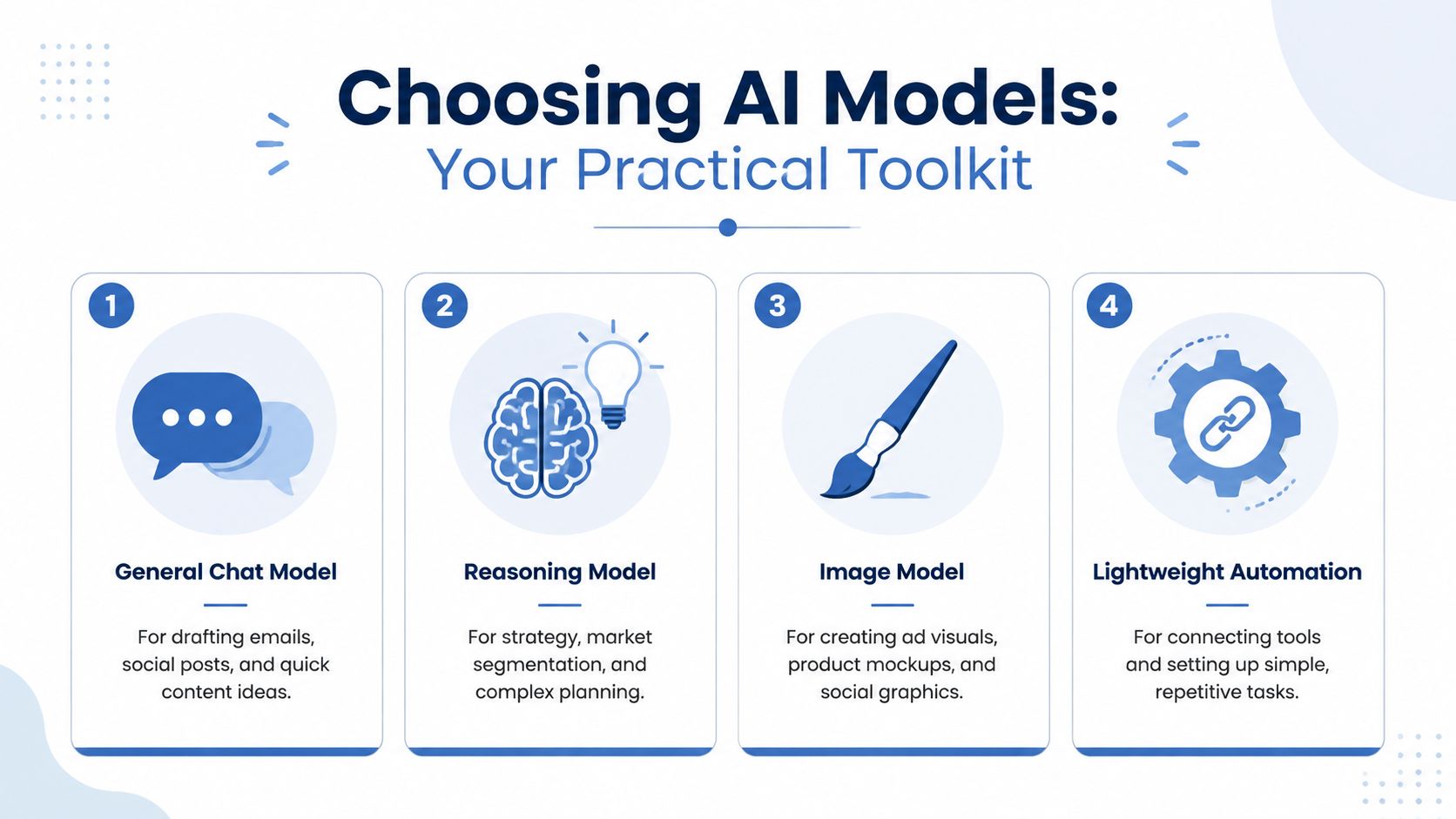
Choose by task, context, and risk
Use a free interface while you're testing whether a workflow deserves to exist. Pay for an API or higher-capacity plan when volume, repeatability, or integration becomes the constraint. Cost isn't the only trade-off. Latency matters when a lead is waiting for a response, and context limits matter when your brand documents, product rules, and customer history need to fit into one process.
Brand voice is another hidden cost. A model can imitate a tone from examples, but it won't know which claims you refuse to make unless you provide those rules. Build a short reference document with approved positioning, banned claims, customer language, product facts, and examples of acceptable writing.
The advice I give to small operators is to keep the stack narrow:
- One direct chat model for drafts and transformation.
- One reasoning-capable model if segmentation or analysis requires it.
- One image tool only when visual production is a real constraint.
- One automation layer for triggers, routing, and updates.
- Your existing CRM and email platform as the record of customer activity.
Ignore agent marketplaces, duplicate copywriting tools, complex dashboards, and automated publishing until the first workflow has a baseline. A tool that saves clicks but makes review harder isn't saving you time.
I'd also keep a written record of why each tool exists. If you can't name its trigger, output, and success metric, pause the purchase.
My AI model selection guide for business covers the same decision from the task backward rather than from the model brand forward.
Three Bionic Workflows You Can Build This Week
A bionic workflow keeps the model inside a process you control. It doesn't publish blindly. It gives the model structured material, sends the result to a predictable destination, and leaves a clear approval point.
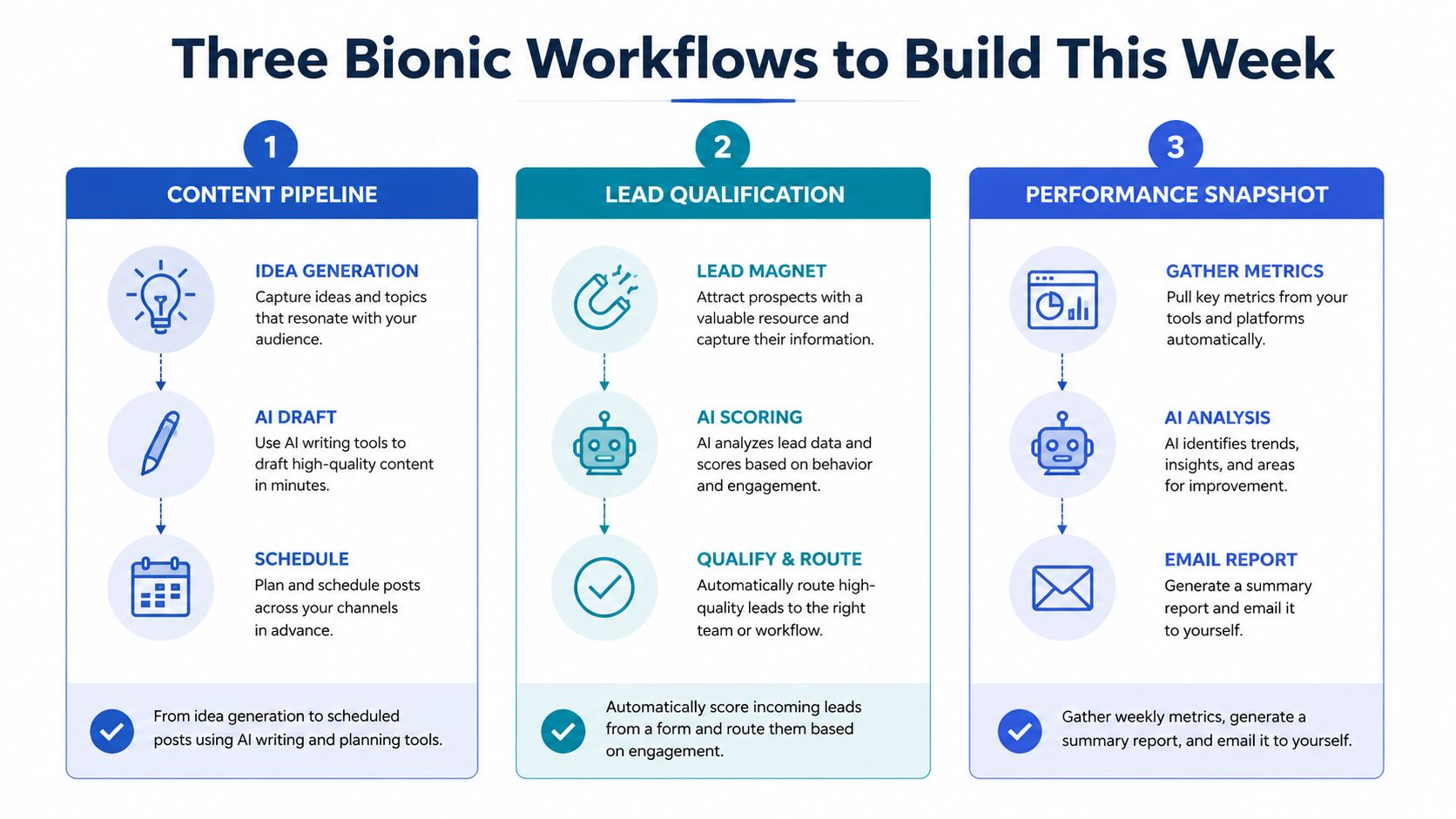
One interview into a month of content
Opportunity. Your customer conversations contain language that is more useful than abstract content ideas. A recording, transcript, or structured interview can now become a source for several channel-specific assets in one pass. The opportunity exists because current chat models can transform long source material while retaining instructions about audience, offer, and format.
Workflow.
- Record a customer call or answer your own interview questions.
- Transcribe it with your meeting tool or transcription service.
- Store the transcript in a document with the customer's industry, problem, desired outcome, and product context.
- Ask a chat model to extract recurring questions, objections, phrases, and proof points.
- Ask a reasoning model to group those themes into a monthly editorial plan.
- Ask the chat model to draft one long article, email, and set of social posts from the approved plan.
- Review every factual claim, customer reference, price, and promise.
- Move approved drafts into your editorial calendar and email platform.
- Tag the source interview in your reporting sheet so you can connect content to later inquiries.
Use this prompt:
Read the transcript below. Extract only statements supported by the transcript. Separate customer language, objections, product facts, and ideas that require verification. Create a content brief for one article and one email. Mark every unsupported claim as VERIFY. Do not invent statistics, outcomes, customer names, or quotes.
What it replaces. This removes the blank-page phase and repeated repurposing work. It doesn't remove editorial judgment. I still decide which idea is worth publishing and whether the draft sounds like something I'd send.
Data needed. You need the transcript, audience description, product facts, approved claims, and a list of topics you won't discuss. A model with no source context will fill gaps with plausible nonsense.
Number to watch. Track qualified inquiries attributed to the content, with drafting hours as the operating measure.
Where it breaks. The first time I ran this, the model turned a customer's casual comment into a polished testimonial. The sentence sounded convincing and was completely unusable. The fix was to ban quotation marks unless the exact words appeared in the transcript, then make human approval mandatory before scheduling.
Segment email follow-up by customer intent
Opportunity. A new lead often gives you a useful signal through the form they complete, page they viewed, or question they ask. AI can classify that context and draft a relevant follow-up while your CRM remains the source of truth.
Workflow.
- Trigger the automation when a new form submission enters the CRM.
- Pass the model only the permitted fields, such as problem, business type, requested service, and source.
- Classify the lead into a small set of practical cohorts, such as researching, comparing, or ready to discuss.
- Pull the approved email template for that cohort.
- Ask the model to personalize the opening and select one relevant resource.
- Send the draft to yourself or an approval inbox.
- Review claims, tone, links, and the proposed next step.
- Send the email through your existing platform.
- Log the cohort, send time, reply, and eventual revenue outcome in the CRM.
Prompt:
Classify this lead using only the fields provided. Return one cohort, the evidence for that cohort, and one recommended next action. Then rewrite the approved email template for this lead. Keep the offer, product facts, and call to action unchanged. If the data is insufficient, return NEEDS REVIEW.
What it replaces. It removes manual sorting and the repetitive first draft. It doesn't replace your judgment about whether a lead should receive a sales message.
Data needed. You need consistent form fields, source tags, consent status, approved templates, and a way to record replies. Don't send private or unnecessary customer information to a model.
Number to watch. Track email reply rate by cohort. A single overall reply rate can hide a poor classification rule.
Where it breaks. My first version assigned leads based on one vague free-text answer. The model sounded confident even when the answer contained no buying signal. I added an explicit “insufficient data” outcome and stopped the automation whenever that result appeared.
Generate and score paid ad variants
Opportunity. Paid campaigns need fresh creative and clear learning loops. AI can produce structured variants around a known offer, then score them against your rules before you spend time preparing them for launch.
Workflow.
- Export recent ad copy, spend, clicks, leads, and conversion outcomes.
- Remove personal information and label each creative by angle, audience, offer, and format.
- Give the model your approved claims and banned language.
- Ask it to produce variants that change one meaningful element at a time.
- Ask a reasoning model to score each variant for audience fit, clarity, proof, and compliance with your own rules.
- Review the top candidates manually.
- Create the visual assets in your image tool or design platform.
- Launch a controlled test in the ad account.
- Record cost per lead, lead quality, and downstream revenue by creative ID.
Prompt:
Using the approved offer and audience notes below, create six ad variants. Change only the angle or opening hook in each variant. Do not add claims, statistics, guarantees, or customer results that aren't in the source material. Return a table with variant ID, angle, headline, body, call to action, and VERIFY flags.
What it replaces. This speeds ideation and first-pass scoring. It doesn't decide which ad deserves budget. The platform data and lead quality still decide that.
Data needed. You need clean creative IDs, spend, conversion events, audience notes, approved claims, and a definition of a qualified lead. If revenue isn't connected to the ad platform or CRM, you'll optimize for cheap inquiries that may never buy.
Number to watch. Track cost per qualified lead by creative ID, then compare it with revenue influenced once enough data exists.
Where it breaks. I initially asked the model to generate “high-converting” ads without giving it winning angles or exclusions. It returned polished variations of the same generic promise. The fix was to feed it actual historical creative labels and force a one-variable change.
Connecting AI to Your CRM, Ads, and Reporting
A prompt becomes useful when its output changes a record.
Start with the minimum data plumbing. Your CRM needs clean contact fields, consistent source and campaign tags, and a clear status for the next action. Your links need disciplined UTM naming. Your reporting sheet or dashboard needs one agreed revenue field, even if you update it manually.
The model should read a narrow context packet rather than your entire business. Include the lead's permitted form data, source, relevant page or offer, previous contact status, and the approved response template. Then return structured fields that your automation can write back to the CRM.
A practical lead handoff
A simple trigger can run like this:
- A new lead enters the CRM.
- The automation checks consent and required fields.
- The model classifies intent and drafts a follow-up.
- The draft goes to an approval queue.
- You approve, edit, or reject it.
- The email platform sends the message.
- The CRM records the cohort, timestamp, and message ID.
- A weekly report compares replies, qualified leads, and revenue.
That structure keeps the model away from irreversible actions until you trust the outputs. It also makes errors visible. If an email contains a claim that isn't in your approved fact sheet, the reviewer can stop it before delivery.
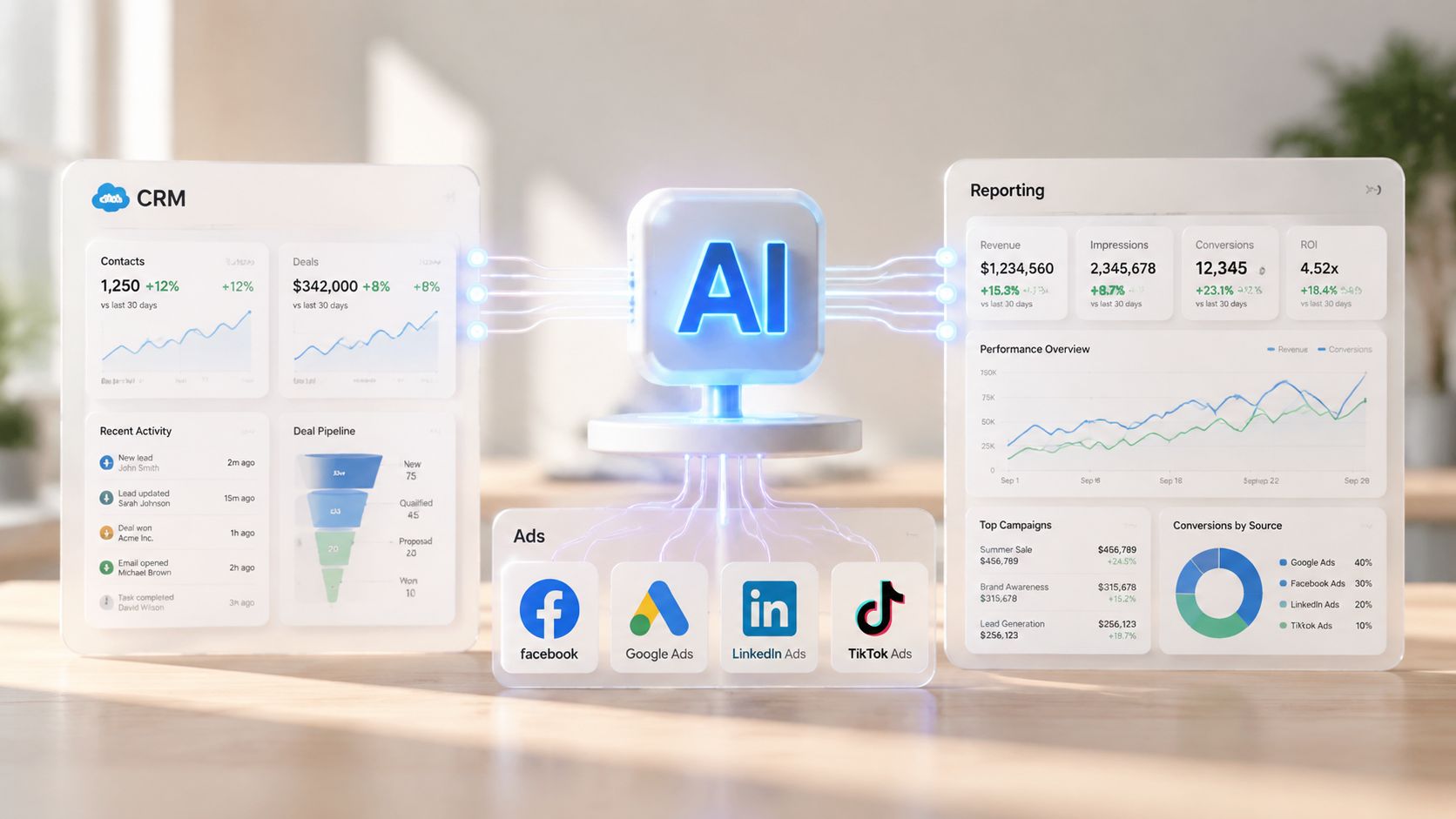
Human review belongs at the point of customer risk, not at every keystroke.
I once shipped a broken handoff where the CRM stored the lead's source as a campaign name, while the reporting sheet expected a UTM value. The email sent correctly, but the revenue report couldn't connect the lead to the ad. I fixed it by using one campaign ID across the form, CRM record, email event, ad creative, and report.
I'd also keep a short change log for every field and automation rule. My AI customer data platform guide covers the broader data flow, but you can begin with a spreadsheet and a single weekly export.
The integration is working when the report changes an action. Watch hours saved, reply rate, cost per qualified lead, and revenue connected to a source. If the report only describes what happened, you've built a dashboard, not a workflow.
A 90-Day Rollout Plan With Real KPIs
Don't automate the whole marketing stack at once. For days 1 to 30, choose one low-risk workflow, record the manual baseline, build the prompt and approval checklist, and run the process alongside your existing method.
For days 31 to 60, connect the workflow to the CRM and reporting process. Add source tags, campaign IDs, and the one customer field the model needs most. Review every failure and adjust the input before adding another action.
For days 61 to 90, test a second workflow, such as email segmentation or ad iteration. Keep the first workflow stable while you expand. Adoption research supports this stepwise approach, while also warning that weak data hygiene and fragmented workflows limit productivity gains.
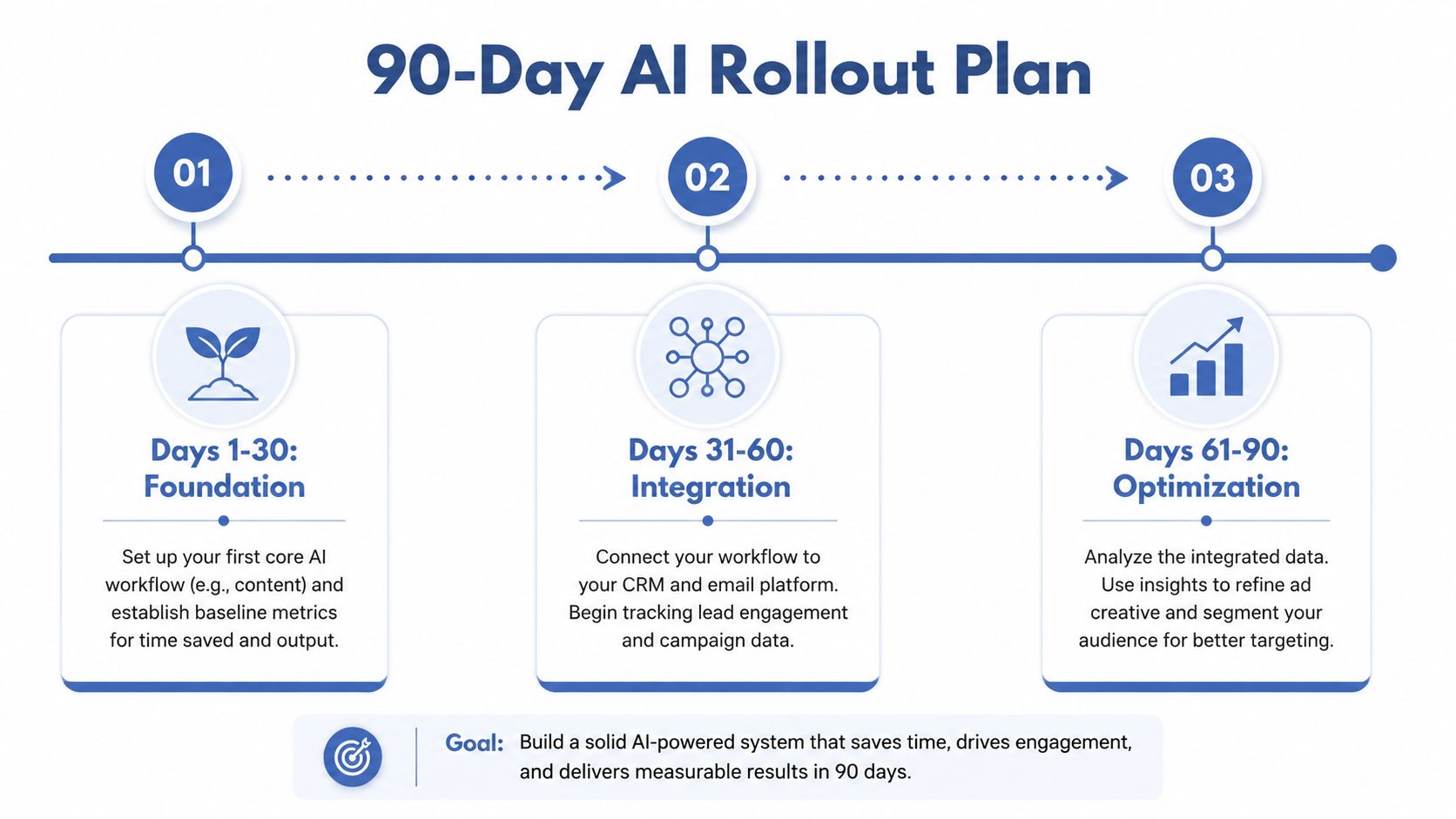
Track five KPIs:
- Hours saved per week, measured against your original work log.
- Cost per lead, split by source and creative.
- Email reply rate, split by cohort.
- Ad creative win rate, using the rule you define before testing.
- Revenue influenced, tied to a campaign or source ID.
Conventional advice says to scale the moment a workflow saves time. I'd wait until the output quality is predictable and the handoff data is clean. Saving time while losing attribution or customer trust is a bad trade.
On Monday, choose one recurring task, write down its current hours and outcome metric, collect the source material, and build an approval-only version. Don't buy another tool. Run one cycle, inspect every handoff, and decide whether the number you chose moved.
If you run a small business, build the first workflow this week and document what breaks. Then send the result, including the metric and the failure, to Bionic Business at bionicbusiness.com. The useful AI marketing system is the one that survives contact with your CRM, your customers, and your calendar.
Frequently Asked Questions
How should a small business start using AI for marketing?
Keep a work log for one week and record every recurring marketing task, the time it takes, the tool, the input, the output and the business event it affects. Score each task on frequency, repetition and revenue impact, then let risk set the order. Your first workflow should usually be a frequent, repetitive task where an imperfect result costs little to correct.
Which marketing task should a small business automate with AI first?
Email follow-up often scores well because it happens daily and affects revenue directly, but the answer should come from your own log. Conventional advice says to automate the most valuable task first. When you work alone, a high-value task can carry high brand or customer risk, so begin with one that repeats often and can still be measured commercially.
How many AI tools does a small business need for marketing?
You don’t need five AI subscriptions to begin. You need one chat model for drafts, a reasoning model only if segmentation or analysis requires it, an image tool only when visual production is a real constraint, one automation layer for triggers and routing, and your existing CRM and email platform. If you can’t name a tool’s trigger, output and success metric, pause the purchase.
How do you measure whether AI marketing is working?
Choose one number before you change the process and record the manual baseline. For email follow-up, track reply rate by cohort. For paid ads, track cost per qualified lead by creative ID. For content, track qualified inquiries instead of word count. Across the rollout, watch hours saved, cost per lead, reply rate, ad creative win rate and revenue tied to a campaign or source ID.
What does a 90-day AI marketing rollout look like?
In days 1 to 30, pick one low-risk workflow, record the baseline, build the prompt and approval checklist, and run it alongside your current method. In days 31 to 60, connect it to your CRM and reporting with source tags and campaign IDs. In days 61 to 90, test a second workflow such as email segmentation or ad iteration while keeping the first one stable.
Where do AI marketing workflows usually break?
The model is usually not the problem. Failures happen at the handoffs: a draft sits in a chat window, a lead loses its context between a form and an inbox, or a weekly report describes performance without triggering an action. Missing fields produce generic messages and unclear approval rules let errors reach customers. One campaign ID across form, CRM, email, ad and report prevents attribution gaps.
