AI is changing marketing by moving from a tool you open for drafts into a working layer inside the process itself. It now classifies customer language, adapts messages, suggests send times, routes replies and summarizes results. The gains show up only when you feed it clean context and keep the risky decisions manual.
You open your laptop on Monday and find that AI has already touched your marketing. Your email platform chose a send time, your ad account adjusted delivery, your analytics dashboard grouped customers, and a writing tool helped shape last week's post. You may never have opened an AI chat window.
That creates a useful tension. AI can give a solo operator more capacity, but a faster way to produce weak campaigns is still a weak marketing system. The opportunity sits in the workflow around the tool: what you feed it, what decision it makes, what you review, and which number tells you whether it helped.
I'm Samuel Woods. I've shipped AI marketing workflows for small teams, and the first version usually breaks in an unglamorous place. The CRM has duplicate contacts. The prompt assumes context that isn't there. The automation sends a polished message to the wrong segment. The fix is usually a better process, not another subscription.
This guide uses six questions for every system: What opportunity exists? Why now? What are the steps? What manual work does it replace? What data does it need? How will you measure success, and where can it fail? By the end, you'll have a practical way to choose a use case, build a content and personalization loop, decide when AI should stay out of the process, and make a change you can test this week.
Table of Contents
- Why Your Marketing Already Runs on AI Whether You Planned It or Not
- How AI Actually Changes Marketing Work Right Now
- Where AI Moves the Needle Across Strategy Creative and Growth
- A Complete Workflow You Can Build This Week to Capture the Opportunity
- How to Tell If AI Is Actually Working and When to Skip It
- The Readiness Gap and Trust Gap Most Teams Miss
- What to Change on Monday to Make AI Pay
Why Your Marketing Already Runs on AI Whether You Planned It or Not
You publish a post, send an email, or launch an ad, then assume the work ends at publish. The platforms keep working. They rank delivery, predict engagement, sort audiences, flag anomalies, and summarize patterns through machine-assisted systems. Even a one-person business now operates inside an algorithmic marketing workflow.
Adoption reflects that shift. A 2025 global survey reported that 88% of organizations used AI in at least one business function, up from 78% the year before, with marketing and sales among the common adoption areas. In marketing, 75% of marketing organizations reported using at least one form of AI, 66% of marketers worldwide said they used AI in their own role, and 91% of marketing leaders said their teams use AI, as compiled in this marketing AI statistics analysis.
For a team with fewer than ten people, the practical change is access. A tool can turn a product description into email variations, classify customer replies, summarize a spreadsheet, or produce a first-pass research brief without a technical project. The constraint has moved from finding capability to placing each AI action inside a process you can inspect.
The Monday problem
A typical week repeats the same work. You search customer questions, copy them into notes, draft content, adapt it for email, create social versions, review performance, and try to remember what changed. AI can cut that manual load. It can also spread inconsistency when every task starts with a blank chat window.
I do not begin with, “Which AI tool should I buy?” I begin with the repeated decision. Does it have a clear opportunity, defined steps, work that can be replaced, usable data, and feedback? The workflow also needs a success metric and a known failure mode. That six-part test separates a useful system from a faster way to produce disconnected drafts.
A good first use case has a clear input, a bounded output, and a number you already track. For strategy, that might mean turning customer questions into a research brief. For creative work, it might mean adapting an approved message. Personalization, automation, and analytics each need the same scrutiny: identify the data, the human review, and the point where an incorrect output causes harm.
Practical rule: If you cannot name the input, success metric, and failure mode, you are discussing a tool, not designing a system.
Solo operators gain capacity when AI removes repeatable production while leaving judgment visible. They lose control when the workflow hides its assumptions, uses unreliable data, or has no review point. The sensible choice is sometimes to keep the task manual.
How AI Actually Changes Marketing Work Right Now
A solo operator can now turn one approved campaign idea into several usable outputs before the first coffee gets cold. ChatGPT can adapt the message for email, ads, and social posts. A spreadsheet can be reviewed in time to shape the next campaign, rather than explain the last one. An automation can route a customer question, prepare a response, and leave the final decision with the operator.
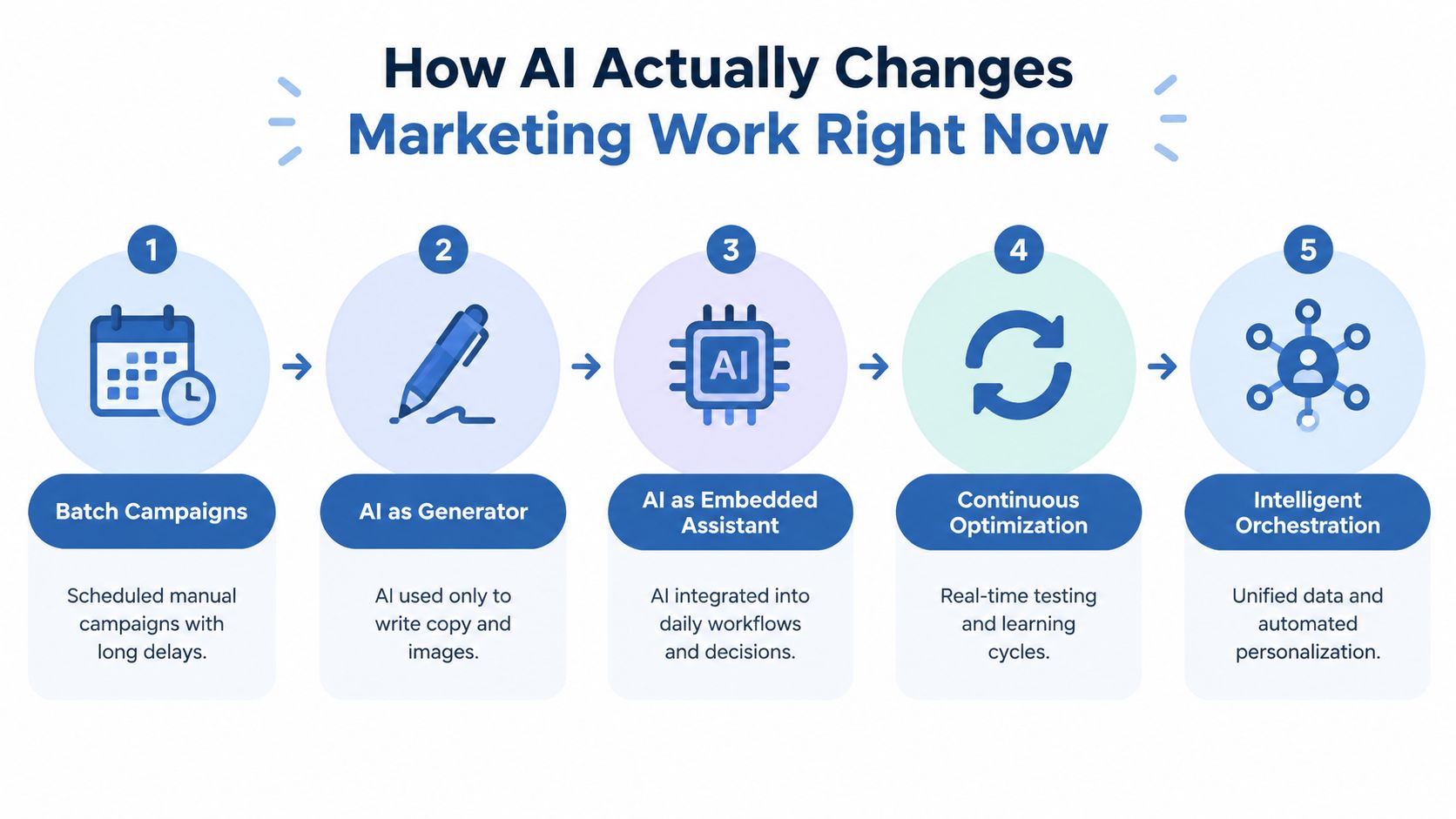
That speed changes the work itself. Traditional marketing often runs in batches: research, create, schedule, wait, then review. AI shortens the distance between those steps, but it also makes weak inputs travel faster. A vague brief can produce a full set of polished drafts that all miss the customer's actual problem.
From generator to working layer
The first practical use was generation. You asked for a headline, product description, image prompt, or outline. That remains useful for a small team, especially when one person handles strategy and production. The larger shift comes from placing AI inside the workflow, where it supports planning, personalization, analytics, and repetitive tasks.
Content creation is already a common use. Industry surveys show 52% of marketers using AI for content creation and 43% using it to brainstorm content ideas. The figures matter less as a benchmark than as a sign that AI is becoming part of routine production instead of a tool opened only when a deadline is close.
The solo-operator test is practical. What opportunity does the workflow address? What steps will AI handle? Which task can it replace? What data does it need? What metric defines success, and what failure mode requires human review? Those questions keep a faster process connected to a real marketing decision.
A connected workflow might collect customer language, draft a message, classify audiences, suggest send timing, route replies, and summarize performance. A disconnected set of prompts produces more drafts. A connected system gives the operator a repeatable way to decide what to make, who should receive it, and what to change next.
AI also changes marketing's social consequences. Personalization can help a customer reach a relevant answer, while incorrect context can make automated persuasion feel intrusive or careless.
Where AI Moves the Needle Across Strategy Creative and Growth
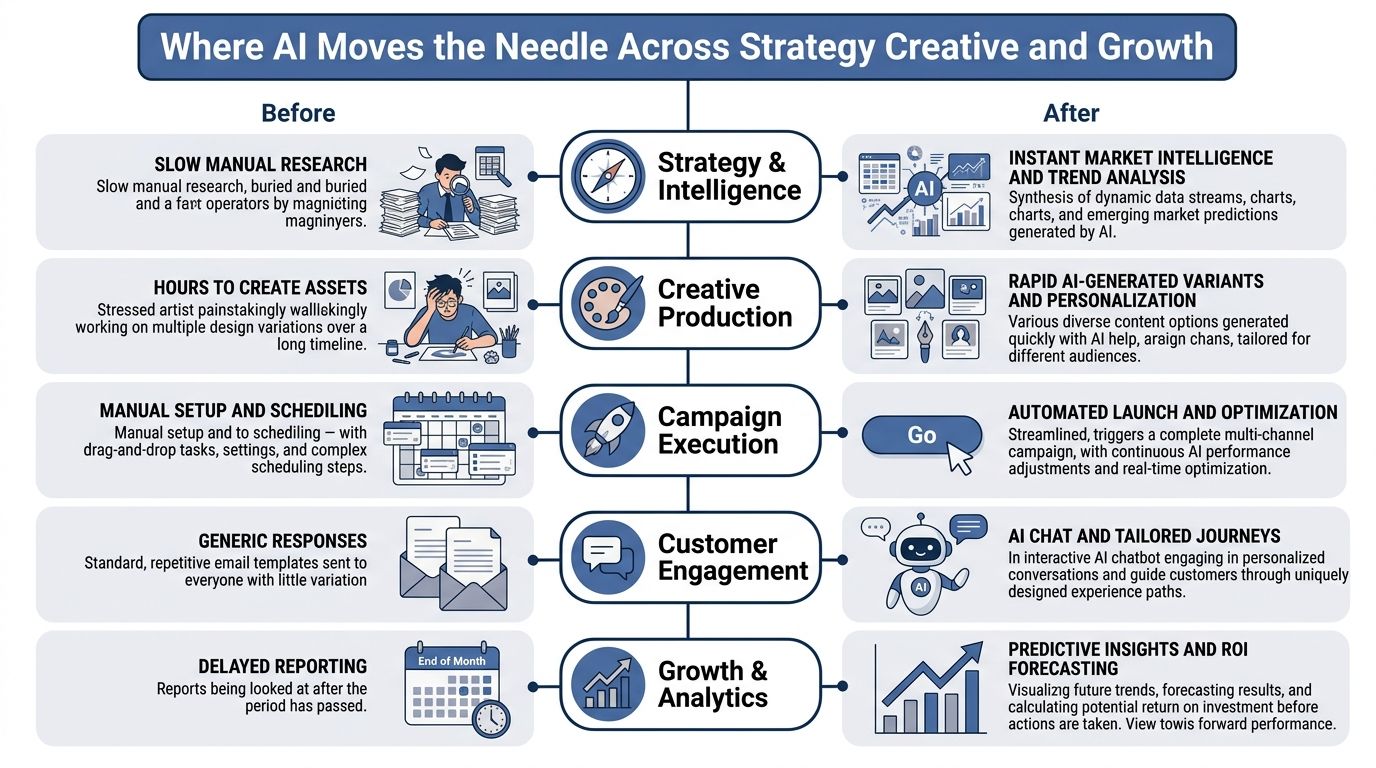
AI affects marketing in five practical places. The right starting point depends on the bottleneck in your business, not on which tool is currently getting attention.
Strategy and intelligence
AI can turn scattered reviews, support messages, search queries, and competitor pages into a working research brief. The opportunity exists because language models can classify and summarize large amounts of text quickly, while a solo operator can still check the original evidence.
The workflow is simple: collect a defined set of customer language, remove sensitive details, ask ChatGPT or Claude to group recurring problems and buying objections, then verify each pattern against the source material. This replaces repeated manual note-taking and gives you a faster route to a message you can test.
It needs clean source text and a specific question. If you ask for “market insights,” you'll get generalities. Watch the number of qualified conversations, sales calls, or purchases attributed to the revised message.
Creative production
Generative AI can produce variations in tone, format, imagery, and length. McKinsey describes this as creating bespoke messages and experiences at high volume and speed through personalized marketing workflows.
I use it for first drafts, alternative hooks, image concepts, and repurposing. It replaces blank-page time and some production work, but it doesn't replace the decision about what the offer should mean to a buyer. It needs a style reference, product facts, exclusions, and examples of language you use. The number to watch is completed assets that reach publication without creating correction work.
Personalization
AI can match a message to behavior, purchase history, stated preference, or stage in a journey. Research on AI-driven hyper-personalization reported conversion rates up to 55%, marketing ROI of 35% to 40%, and customer retention of 25% to 30% in the study cited by this academic paper on AI-driven personalization.
The workflow replaces broad campaigns with conditional messages. It needs reliable customer attributes and a clear reason for each variation. If your data is thin, personalization becomes guesswork with a more confident tone. Measure conversion by segment, not only the blended campaign result.
Automation and engagement
Use AI when the task repeats and the acceptable output is clear. Examples include tagging inbound questions, drafting a reply for review, creating campaign briefs from a form, or moving a contact into the next email sequence.
This can remove routine copying and routing. It needs a trigger, an action, and a stop condition. I wouldn't automate a sensitive complaint, a refund decision, or a message where a wrong assumption could damage a customer relationship.
Growth and analytics
AI can turn a report into a list of questions and next actions. McKinsey estimates generative AI could raise marketing productivity by 5% to 15% of total marketing spend, with an estimated value of $463 billion annually, as described in its analysis of generative AI and consumer marketing.
The useful workflow is to give the model a defined dataset, a metric glossary, and a comparison period, then make it identify anomalies and propose tests. It replaces slow reporting preparation. It breaks when tracking is inconsistent, attribution is overstated, or the model treats correlation as a decision.
The underlying lesson is the same: give the system clear source material and judge it by business results, not output volume.
A Complete Workflow You Can Build This Week to Capture the Opportunity
The opportunity is a content-to-personalization loop. You already have customer questions, product knowledge, campaign data, and an email list. AI can connect those materials into a repeatable publishing and learning process now because low-cost tools can handle drafting, classification, and analysis without a dedicated production team.
The workflow below has nine steps. I'd build it with ChatGPT or Claude, Google Sheets, your email platform, and Zapier or Make. Keep the first version narrow. One audience, one offer, one channel.

1. Spot the opportunity
Choose a repeated task that affects revenue or frees meaningful production time. A useful example is turning customer questions into an email and content queue, then adapting the message for existing subscribers.
Write down why now: you have enough recurring questions to see a pattern, and the current manual process delays publishing.
2. Map the workflow
Document the current path in plain language. For example: collect questions, remove duplicates, group by problem, choose one problem, draft an article, create an email, send it, record clicks and sales.
Mark the points where judgment matters. I keep the offer, factual claims, and final send decision manual. I allow AI to classify, draft, format, and suggest variations.
3. Connect the data
Create a Google Sheet with columns for question, source, audience, product relevance, status, and outcome. Export only the customer context needed for the task. Don't paste private customer details into a general-purpose model without checking the tool's data settings and your own obligations.
The workflow needs consistent labels. “Interested,” “warm,” and “high intent” shouldn't mean three different things depending on the week.
4. Choose lean tools
Use one model for analysis and drafting, one spreadsheet for the source of truth, one email platform for delivery, and Zapier or Make for connections. You don't need a separate AI application for every stage.
The tool replaces copying between documents and reduces setup friction. It won't repair unclear ownership. You still decide which model output can move automatically and which requires review.
5. Build the prompt system
I use a prompt like this:
You are helping a solo operator turn verified customer language into useful marketing. Read the source rows below. Group them by problem, preserve the customer's wording where useful, flag claims that need verification, and recommend one topic for an audience that already knows the product. Return a table with problem, evidence, audience, proposed angle, and missing context.
Then I use a second prompt:
Using only the approved facts and customer language below, draft one email and one article outline. The email should state one problem, one consequence, and one next action. Do not invent proof, numbers, testimonials, or product capabilities. Mark every unsupported claim as [CHECK].
The prompt is a reusable operating instruction, not a magic spell. Store it beside the sheet and revise it when the output fails.
6. Automate execution
Use a form or inbox label as the trigger. Send new entries to the sheet, ask the model to classify them, and create a draft row for review. After approval, pass the selected copy to your email platform.
This replaces routine data entry and draft assembly. I wouldn't let the automation publish directly during the first cycle. Add a human approval field and a stop condition for missing facts, sensitive complaints, or low-confidence classification.
7. Test and personalize
Create a small set of message variants based on a real distinction, such as problem severity or previous product interest. Keep the offer consistent so the test answers one question.
AI can draft the variants, but you should check whether each one sounds like a real message rather than a label pasted onto the same copy. Measure clicks and conversions by segment.
8. Measure impact
Record hours spent before the workflow, hours spent after it, completed assets, email clicks, conversions, revenue, and acquisition cost where you can calculate it. Don't count generated drafts as output. Count approved work that reaches customers and produces a useful response.
A field study in online retail found GenAI adoption increased sales by 0% to 16.3%, depending on how much the underlying process improved, with the largest gains in customer service and search applications, according to WARC's summary of the research. The lesson for a solo operator is direct: improve the process around the model.
9. Scale and iterate
After one cycle, remove steps that add review without reducing risk. Keep a failure log. Add successful prompts to a shared document, even if the “team” is only you today.
I've written a longer practical guide to AI workflows for entrepreneurs for this kind of build. The workflow replaces repetitive research, formatting, and first-draft assembly, but it still needs your offer, customer context, approval standards, and measurement discipline.
For a visual walkthrough of the process, use this video as a companion to the written steps.
How to Tell If AI Is Actually Working and When to Skip It
AI working faster doesn't prove that AI worked. The proof appears in the economics of the task: more useful output per hour, lower acquisition cost, better margin, stronger retention, or more revenue from the same audience.
The AMA reported that 85% of marketers using AI believed it had slightly or significantly increased their productivity, and about half said it saved time while improving both the quality and quantity of creative content, according to its report on generative AI adoption. That's encouraging, but your own baseline matters more than a broad sentiment measure.
Pick the right operating mode
| Task Type | Automate with AI | Augment with AI | Skip AI For Now |
|---|---|---|---|
| Repetitive classification | Tag routine questions with a review rule | Ask AI to suggest tags for ambiguous cases | Keep rare, high-risk cases manual |
| First-draft content | Create structured drafts from approved facts | Generate angles, outlines, and variants | Write sensitive founder or apology messages yourself |
| Customer replies | Route simple questions with clear answers | Draft replies for your approval | Avoid autonomous replies where context or emotion matters |
| Reporting | Produce a recurring metrics summary | Ask for anomalies and test ideas | Keep final financial interpretation manual |
| Personalization | Adapt low-risk content using reliable fields | Suggest segments and message differences | Skip it when customer data is incomplete |
| Campaign decisions | Trigger routine follow-up actions | Use AI to compare options | Keep budget, offer, and brand decisions manual |
The conventional advice is to automate the largest possible task first. I disagree. Start with the task where mistakes are cheap, feedback arrives quickly, and the input is already organized. That gives you a safer measurement loop.
Watch hours saved, approved output, conversion, revenue, margin, acquisition cost, and retention. Ignore the number of prompts, generated words, and draft variations unless they lead to customer action. I keep a simple before-and-after sheet and review it weekly. My guide to measuring marketing effectiveness covers the wider measurement problem.
A practical readiness check should include ownership, data quality, clear triggers, review points, and a metric.
Skip AI when the task happens rarely, requires deep personal judgment, depends on missing data, or creates serious downside when wrong. A handwritten note to a disappointed customer may take longer, and still be the better marketing decision.
The Readiness Gap and Trust Gap Most Teams Miss
More software doesn't automatically create a better marketing operation. One 2026 industry analysis says CMOs allocate 15.3% of marketing budgets to AI, while only about 30% of marketing organizations are mature enough to scale those capabilities. Another report says only 6% have fully embedded AI into workflows despite broad experimentation, as summarized in this analysis of the 2026 AI marketing readiness gap.
For a small business, the equivalent failure is buying a tool before cleaning the inputs. I've made that mistake. I connected an automation to a contact list with inconsistent lifecycle labels, so the workflow treated curious readers like active customers. The writing was fine. The routing was wrong.
I fixed it by defining the fields first, deleting labels I couldn't explain, and adding a manual approval state. I didn't add another model. The process became easier to inspect, and the prompts became shorter because the data carried more of the context.

The audience may not share your enthusiasm
The trust problem is separate from the readiness problem. A 2026 IAB study found 82% of advertising executives believed Gen Z and millennials felt positive about AI-generated ads, while only 45% of consumers felt that way. The resulting 37-point perception gap widened from 32 points in 2024, according to the IAB's analysis of the AI gap.
That gap changes how I use generative creative. I'll use AI to explore concepts and create variations, but I check whether the image, claim, and tone feel specific to the brand. A polished generic ad can reduce trust faster than an imperfect human-made one.
The customer doesn't care that your workflow is efficient. The customer cares whether the message understands the problem without pretending to know more than it does.
The practical fix is modest. Keep a human approval step for public creative, disclose AI use where it matters to the audience, and test response rather than assuming relevance. The operating model described in my guide to a digital workforce depends on clear boundaries between automated production and human judgment.
What to Change on Monday to Make AI Pay
On Monday, choose one repeated task that takes time and has a visible business metric. Put its current steps in a document, define the input and stop conditions, then use ChatGPT or Claude to create a draft prompt that works only from approved facts.
On Tuesday, create a small source sheet with customer questions, audience labels, offer details, and the outcome you'll track. On Wednesday, connect the sheet to your email or task system with a review step. Don't publish automatically until you've checked the first outputs against the original context.
By the end of the week, compare hours spent, approved assets, clicks, conversions, revenue, and acquisition cost against your starting baseline. I continue documenting these builds, including the failures, in Bionic Business, where the full agent and workflow experiments continue each week.
You don't need more AI software to begin. Pick one workflow, give it clean context, keep the risky decision manual, and measure whether the finished work helps a customer take the next step.
Frequently Asked Questions
How is AI changing marketing work for small businesses?
The biggest change is access. A solo operator can now turn a product description into email variations, classify customer replies, summarize a spreadsheet or produce a first-pass research brief without a technical project. The constraint has moved from finding the capability to placing each AI action inside a process you can inspect, with a clear input, a review point and a number you already track.
Which marketing tasks should I automate with AI first?
Start with a repeated task where mistakes are cheap, feedback arrives quickly and the input is already organized. Tagging routine customer questions or turning approved facts into structured drafts are good candidates. The usual advice is to automate the largest task first, and I disagree with it, because a smaller task gives you a safer measurement loop before you trust the system with more.
When should you not use AI in marketing?
Skip AI when the task happens rarely, needs deep personal judgment, depends on missing data or causes serious harm when it goes wrong. Sensitive complaints, refund decisions, budget and offer choices, and apology messages belong with you. A handwritten note to a disappointed customer may take longer and still be the better marketing decision.
How do you know if AI is actually improving your marketing?
Look at the economics of the task. Compare hours spent, approved assets, clicks, conversions, revenue and acquisition cost against a baseline you recorded before the change. Ignore the number of prompts, generated words and draft variations unless they lead to customer action. Only approved work that reaches customers and produces a response counts as output.
Does AI personalization work if my customer data is thin?
Usually it does not. Personalization needs reliable customer attributes and a clear reason for each message variation. When the data is incomplete, it turns into guesswork delivered in a more confident tone, and incorrect context can make automated messages feel intrusive or careless. Clean your fields first, base variants on a real distinction such as previous product interest, and measure conversion by segment.
Do customers trust AI-generated ads?
Less than marketers assume. A 2026 IAB study found 82% of advertising executives believed Gen Z and millennials felt positive about AI-generated ads, while only 45% of consumers did. A polished generic ad can reduce trust faster than an imperfect human-made one, so keep a human approval step for public creative and test the response.
